
QML学习笔记(八)— QML实现列表侧滑覆盖按钮
QML实现列表右边滑动删除按钮,并覆盖原有的操作按钮,点击可实现删除当前项
本文链接:QML实现列表侧滑覆盖按钮
作者:狐狸家的鱼
GitHub:八至
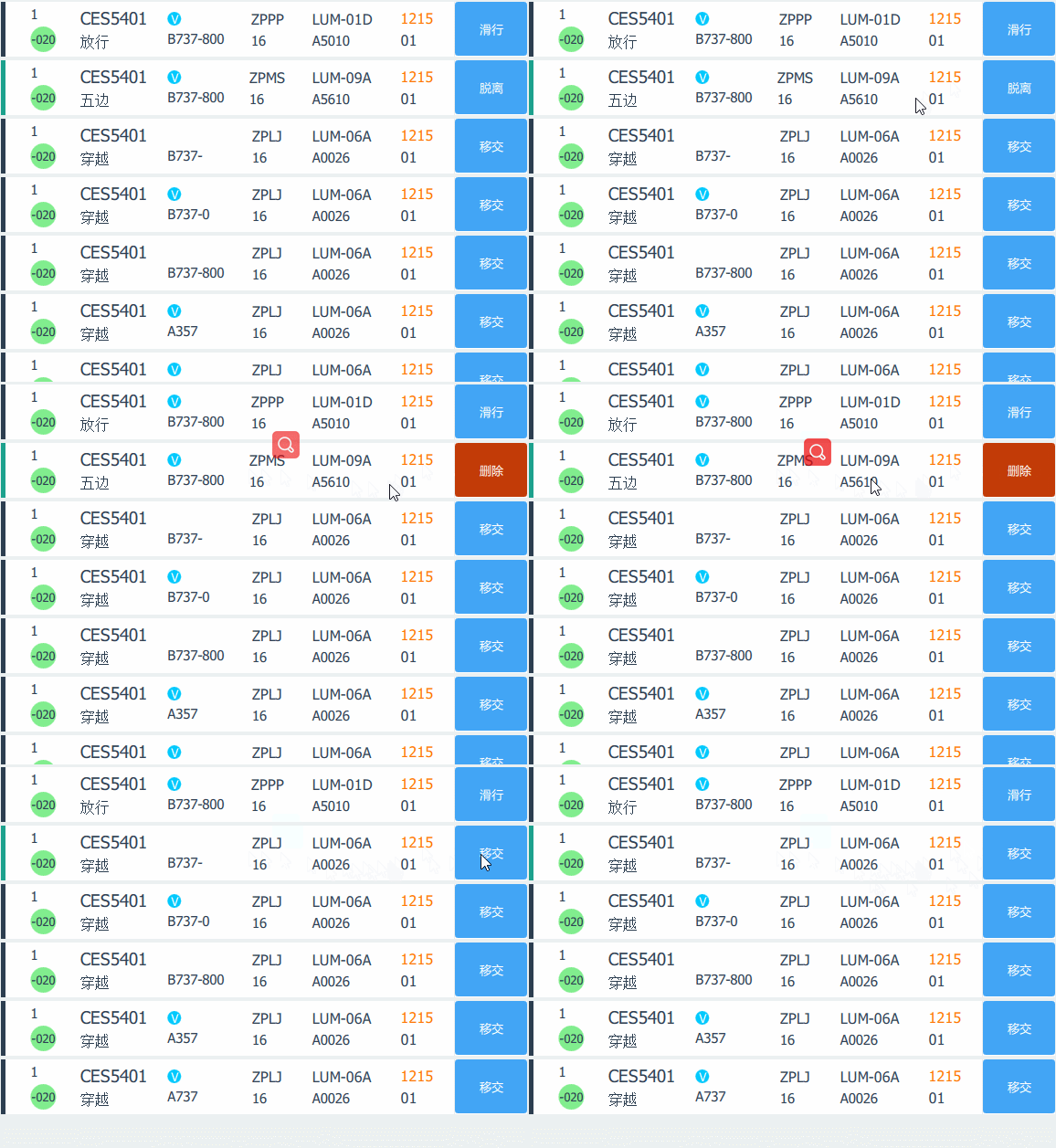
列表实现在另一篇博客已经提及,列表可选中、拖拽、编辑,现在优化一下,实现滑动删除效果,并覆盖原有的操作按钮。
主要就是对操作按钮与删除按钮之间做一个动态切换效果。
管制按钮一开始就是默认显示的,代码如下:
                   //管制按钮

                                Rectangle{

                                    id: controlBtn

                                    anchors.verticalCenter: parent.verticalCenter

                                    height: controlRect.height - 1

                                    width: controlRect.width - 1

                                    radius: 3

                                    color:"#42A5F5"

                                    Text {

                                        id:btnTex

                                        font.family: "microsoft yahei"

                                        font.pointSize: 10

                                        anchors.centerIn: parent

                                        text: ctrBtn

                                        color: Global.GlobalVar.whiteColor

                                    }

                                    MouseArea{

                                        anchors.fill: parent

                                    }

                                }
删除按钮一开始是不显示的,宽度设置为0,这样在动态切换的时候对宽度进行设置即可
                    //删除按钮

                                Rectangle{

                                    id:delBtn

                                    anchors.verticalCenter: parent.verticalCenter

                                    height: controlRect.height-1

                                    width: 0

                                    radius: 3

                                    color: Global.GlobalVar.remindColor

                                    Text {

                                        id:delTex

                                        font.family: "microsoft yahei"

                                        font.pointSize: 10

                                        anchors.centerIn: parent

                                        color: Global.GlobalVar.whiteColor

                                    }

                                    MouseArea{

                                        anchors.fill: parent

                                        onClicked: {

                                            sstpModel.remove(sstpView.currentIndex)

                                        }

                                    }

                                }
因为要滑动覆盖按钮,所有这里存在四个动画,第一是删除按钮需要滑动设置宽度大于0,显示出来,第二是管制按钮的宽度设置为0,被删除按钮覆盖隐藏掉,第三是点击当前项的其他地方,将已经显示的删除按钮隐藏,宽度设为0,第四是管制按钮再次显示,宽度设为大于0:
                   //滑动显示删除按钮,覆盖管制按钮

                                PropertyAnimation{

                                    id: delBtnShow

                                    target: delBtn

                                    property: "width"

                                    duration: 150

                                    from: 0

                                    to: controlRect.width - 1

                                }

                                PropertyAnimation{

                                    id: delBtnHide

                                    target: delBtn

                                    property: "width"

                                    duration: 150

                                    from: controlRect.width - 1

                                    to: 0

                                }

                                //点击隐藏删除按钮,显示管制按钮

                                PropertyAnimation{

                                    id: ctrBtnShow

                                    target: controlBtn

                                    property: "width"

                                    duration: 150

                                    from: 0

                                    to: controlRect.width - 1

                                }

                                PropertyAnimation{

                                    id: ctrBtnHide

                                    target: controlBtn

                                    property: "width"

                                    duration: 150

                                    from: controlRect.width - 1

                                    to: 0

                                }
动态效果如何触发呢,滑动是鼠标按压->拖动->鼠标释放实现的,逻辑处理如下:
在代理的当前项鼠标可操作区域MouseArea{}声明点击的坐标点
property point clickPos: "0,0"
然后在鼠标按压事件里获取当前坐标点:
onPressed: {

    ...

     clickPos  = Qt.point(mouse.x,mouse.y)

}
鼠标释放完成滑动覆盖:
               onReleased: {

                            var delta = Qt.point(mouse.x-clickPos.x, mouse.y-clickPos.y)

                            console.debug("delta.x: " + delta.x);

                            if (

                                    (delta.x < 0) &&

                                    (delBtnShow.running === false && ctrBtnHide.running === false) &&

                                    (delBtn.width == 0)

                                    ){

                                delBtnShow.start();

                                delTex.text = "删除"

                                ctrBtnHide.start();

                            }else if (

                                      (delBtnHide.running === false && ctrBtnShow.running === false) &&

                                      (delBtn.width > 0)

                                      ){

                                delBtnHide.start();

                                delTex.text = ""

                                ctrBtnShow.start();

                            }

                        }
这样就实现效果啦。
完整代码如下,作为参考:
import QtQuick 2.7
import QtQuick.Window 2.3
import QtQuick.Layouts 1.3
import QtQuick.Controls 2.2
import Qt.an.qobjectSingleton 1.0 as Global
import "../../Component"
Window{
id:sstpWind
width: 580
height: 420
minimumWidth: 520
minimumHeight: 420
title: "Sttp SetUp Window"
color: Global.GlobalVar.windowBg
visible: true
ListView{
id:sstpView
property bool isClicked: false //初始化没有点击事件
anchors.fill: parent
clip:true
interactive: !isClicked
focus: true
flickableDirection: Flickable.VerticalFlick
boundsBehavior: Flickable.StopAtBounds
ScrollBar.vertical: ScrollBar {id:scrollBar;active: true;}
Keys.onUpPressed: scrollBar.decrease()
Keys.onDownPressed: scrollBar.increase()
move:Transition {
NumberAnimation{
properties: "x,y";
duration: 300
}
}
anchors {
left: parent.left; top: parent.top; right: parent.right;
margins: 2
}
spacing: 4
cacheBuffer: 50 //model: anAirModel
model: ListModel{
id:sstpModel;
ListElement{
num_1:1
num_2:'-020'
ssr:'A5010'//应答机编码
air_iden:"CES5401"//呼号 航班号
vip:true//是否为vip
type:"B737-800"//机型
status:"放行"//状态
el:"16"//机场标高 ALT-高度
ctrBtn:"滑行"// 管制按钮 HANDOVER-移交 CLR-放行 TAI-滑行 OFF-起飞 DESCENT-降落 DISENGAGE-脱离
time:"1215"//时间
airport:"ZPPP"//机场
runway:"01"// 跑道
procedure:"LUM-01D"//进离场程序
}
ListElement{
num_1:1
num_2:'-020'
ssr:'A5610'//应答机编码
air_iden:"CES5401"//呼号 航班号
vip:true//是否为vip
type:"B737-800"//机型
status:"五边"//状态
el:"16"//机场标高 ALT-高度
ctrBtn:"脱离"// 管制按钮 HANDOVER-移交 CLR-放行 TAI-滑行 OFF-起飞 DESCENT-降落 DISENGAGE-脱离
time:"1215"//时间
airport:"ZPMS"//机场
runway:"01"// 跑道
procedure:"LUM-09A"//进离场程序
}
ListElement{
num_1:1
num_2:'-020'
ssr:'A0026'//应答机编码
air_iden:"CES5401"//呼号 航班号
vip:false//是否为vip
type:"B737-"//机型
status:"穿越"//状态
el:"16"//机场标高 ALT-高度
ctrBtn:"移交"// 管制按钮 HANDOVER-移交 CLR-放行 TAI-滑行 OFF-起飞 DESCENT-降落 DISENGAGE-脱离
time:"1215"//时间
airport:"ZPLJ"//机场
runway:"01"// 跑道
procedure:"LUM-06A"//进离场程序
}
ListElement{
num_1:1
num_2:'-020'
ssr:'A0026'//应答机编码
air_iden:"CES5401"//呼号 航班号
vip:true//是否为vip
type:"B737-0"//机型
status:"穿越"//状态
el:"16"//机场标高 ALT-高度
ctrBtn:"移交"// 管制按钮 HANDOVER-移交 CLR-放行 TAI-滑行 OFF-起飞 DESCENT-降落 DISENGAGE-脱离
time:"1215"//时间
airport:"ZPLJ"//机场
runway:"01"// 跑道
procedure:"LUM-06A"//进离场程序
}
ListElement{
num_1:1
num_2:'-020'
ssr:'A0026'//应答机编码
air_iden:"CES5401"//呼号 航班号
vip:false//是否为vip
type:"B737-800"//机型
status:"穿越"//状态
el:"16"//机场标高 ALT-高度
ctrBtn:"移交"// 管制按钮 HANDOVER-移交 CLR-放行 TAI-滑行 OFF-起飞 DESCENT-降落 DISENGAGE-脱离
time:"1215"//时间
airport:"ZPLJ"//机场
runway:"01"// 跑道
procedure:"LUM-06A"//进离场程序
}
ListElement{
num_1:1
num_2:'-020'
ssr:'A0026'//应答机编码
air_iden:"CES5401"//呼号 航班号
vip:true//是否为vip
type:"A357"//机型
status:"穿越"//状态
el:"16"//机场标高 ALT-高度
ctrBtn:"移交"// 管制按钮 HANDOVER-移交 CLR-放行 TAI-滑行 OFF-起飞 DESCENT-降落 DISENGAGE-脱离
time:"1215"//时间
airport:"ZPLJ"//机场
runway:"01"// 跑道
procedure:"LUM-06A"//进离场程序
}
ListElement{
num_1:1
num_2:'-020'
ssr:'A0026'//应答机编码
air_iden:"CES5401"//呼号 航班号
vip:true//是否为vip
type:"A737"//机型
status:"穿越"//状态
el:"16"//机场标高 ALT-高度
ctrBtn:"移交"// 管制按钮 HANDOVER-移交 CLR-放行 TAI-滑行 OFF-起飞 DESCENT-降落 DISENGAGE-脱离
time:"1215"//时间
airport:"ZPLJ"//机场
runway:"01"// 跑道
procedure:"LUM-06A"//进离场程序
}
} delegate:Rectangle{
id:sstpDelegate
property int fromIndex:0
property int toIndex:0
property var controlColor:["#00C9FD", "#DB0058", "#FF7400", "#81EE8E"]
width: parent.width
height: 60
MouseArea {
id:mousearea
property point clickPos: "0,0"
anchors.fill: parent
onClicked: {
sstpView.currentIndex = index
}
onPressed: {
sstpView.currentIndex = index
sstpDelegate.fromIndex = index
sstpView.isClicked = true //每项按钮点击就true clickPos = Qt.point(mouse.x,mouse.y) }
onReleased: {
sstpView.isClicked = false //每项按钮点击就false
console.log("fromIndex:",sstpDelegate.fromIndex,"toIndex:",sstpDelegate.toIndex) var delta = Qt.point(mouse.x-clickPos.x, mouse.y-clickPos.y)
console.debug("delta.x: " + delta.x);
if (
(delta.x < 0) &&
(delBtnShow.running === false && ctrBtnHide.running === false) &&
(delBtn.width == 0)
){
delBtnShow.start();
delTex.text = "删除"
ctrBtnHide.start(); }else if (
(delBtnHide.running === false && ctrBtnShow.running === false) &&
(delBtn.width > 0)
){
delBtnHide.start();
delTex.text = ""
ctrBtnShow.start();
}
}
onPositionChanged: {
var lastIndex = sstpView.indexAt(mousearea.mouseX + sstpDelegate.x,mousearea.mouseY + sstpDelegate.y);
if ((lastIndex < 0) || (lastIndex > sstpModel.rowCount()))
return;
if (index !== lastIndex){
sstpModel.move(index, lastIndex, 1);
}
sstpDelegate.toIndex = lastIndex;
}
}
Row{
Rectangle{//选中当前 颜色高亮
id:curRect
width: 5
height: sstpDelegate.height
color: index===sstpView.currentIndex ? Global.GlobalVar.sstpCurIndex : Global.GlobalVar.mainFontColor//选中颜色设置
}
//进程单信息
Rectangle{
id:infoRect
width: sstpDelegate.width - controlRect.width - 5
height: sstpDelegate.height
Row{
Rectangle{
width: infoRect.width/6
height: infoRect.height
ColumnLayout{
anchors.verticalCenter: parent.verticalCenter
anchors.horizontalCenter: parent.horizontalCenter
MyText{//num_1
text: num_1
fontColor: b1;
fontSize: m;
}
Rectangle{
implicitWidth: 28
implicitHeight: 28
radius: 28;
color: controlColor[3]
MyText{//num_2
anchors.centerIn: parent
text:num_2
fontColor:b1
}
}
}
}
Rectangle{
width: infoRect.width/6
height: infoRect.height
//第二列
ColumnLayout{
anchors.verticalCenter: parent.verticalCenter
MyText{//航班呼号
text: air_iden
fontColor: b1
fontSize: xl
}
MyText{//状态
text:status;
fontColor: b1
fontSize: l
}
}
}
Rectangle{
width: infoRect.width/6
height: infoRect.height
//第三列
ColumnLayout{
anchors.verticalCenter: parent.verticalCenter
anchors.left: parent.left
anchors.leftMargin: parent.width/6
//anchors.horizontalCenter: parent.horizontalCenter
Rectangle{
width: 15
height: 15
radius: 15
color: vip ? controlColor[0]: "transparent"
MyText{//vip
anchors.centerIn: parent
text: vip ? "V" :''//判断布尔值
color: "#FFF"
fontColor:color
fontSize: s
}
}
MyText{
text: type;
fontColor: b1
fontSize: m
}
}
}
Rectangle{
width: infoRect.width/6
height: infoRect.height
//第四列
ColumnLayout{
anchors.verticalCenter: parent.verticalCenter
anchors.horizontalCenter: parent.horizontalCenter
TextInput{//机场
text: airport;
color: Global.GlobalVar.mainFontColor
font.pointSize: 12
onEditingFinished: { }
}
MyText{//标高
text: el;
fontColor: b1
fontSize: m
}
}
}
Rectangle{
width: infoRect.width/6
height: infoRect.height
//第五列
ColumnLayout{
anchors.verticalCenter: parent.verticalCenter
anchors.horizontalCenter: parent.horizontalCenter
TextInput{//进离场程序
text: procedure;
color: Global.GlobalVar.mainFontColor
font.pointSize: 12
}
MyText{//应答机编码
text: ssr;
fontColor: b1
fontSize: m
} }
} Rectangle{
width: infoRect.width/6
height: infoRect.height
//第六列
ColumnLayout{
anchors.verticalCenter: parent.verticalCenter
anchors.horizontalCenter: parent.horizontalCenter
TextInput{//时间
text: time;
color: controlColor[2];
font.pointSize: 12
onEditingFinished: { }
}
TextInput{//降落跑道
text: runway;
color: Global.GlobalVar.mainFontColor
font.pointSize: 12
onEditingFinished: { }
}
}
}
}
}
RecLine{id:recLine;direction:false}
Rectangle{
id:controlRect
width: 80
height: sstpDelegate.height
Row{
//管制按钮
Rectangle{
id: controlBtn
anchors.verticalCenter: parent.verticalCenter
height: controlRect.height - 1
width: controlRect.width - 1
radius: 3
//color: Global.GlobalVar.btnBorderColor
color:"#42A5F5"
//color: ctrBtn == "滑行" ? controlColor[0] : (ctrBtn == "脱离" ? controlColor[1] : (ctrBtn == "移交" ? controlColor[2] : Global.GlobalVar.mainColor))
Text {
id:btnTex
font.family: "microsoft yahei"
font.pointSize: 10
anchors.centerIn: parent
text: ctrBtn
color: Global.GlobalVar.whiteColor
}
MouseArea{
anchors.fill: parent
}
}
//删除按钮
Rectangle{
id:delBtn
anchors.verticalCenter: parent.verticalCenter
height: controlRect.height-1
width: 0
radius: 3
color: Global.GlobalVar.remindColor
//color: ctrBtn == "滑行" ? controlColor[0] : (ctrBtn == "脱离" ? controlColor[1] : (ctrBtn == "移交" ? controlColor[2] : Global.GlobalVar.mainColor))
Text {
id:delTex
font.family: "microsoft yahei"
font.pointSize: 10
anchors.centerIn: parent
color: Global.GlobalVar.whiteColor
}
MouseArea{
anchors.fill: parent
onClicked: {
sstpModel.remove(sstpView.currentIndex)
}
}
}
//滑动显示删除按钮,覆盖管制按钮
PropertyAnimation{
id: delBtnShow
target: delBtn
property: "width"
duration: 150
from: 0
to: controlRect.width - 1
}
PropertyAnimation{
id: delBtnHide
target: delBtn
property: "width"
duration: 150
from: controlRect.width - 1
to: 0
}
//点击隐藏删除按钮,显示管制按钮
PropertyAnimation{
id: ctrBtnShow
target: controlBtn
property: "width"
duration: 150
from: 0
to: controlRect.width - 1
}
PropertyAnimation{
id: ctrBtnHide
target: controlBtn
property: "width"
duration: 150
from: controlRect.width - 1
to: 0
}
}
}
}
}
}
QML学习笔记(八)— QML实现列表侧滑覆盖按钮的更多相关文章
- QML学习笔记(五)— 做一个简单的待做事项列表
做一个简单的QML待做事项列表,能够动态添加和删除和编辑数据 GitHub:八至 作者:狐狸家的鱼 本文链接:QML学习笔记(五)— 做一个待做事项列表 主要用到QML:ListView 效果 全部代 ...
- QML学习笔记(六)- 简单计时器和定时器
做一个简单的qml计时器和定时器,左键触发计时,右键触发定时 GitHub:八至 作者:狐狸家的鱼 本文链接:QML学习笔记(六)- 简单计时器和定时器 左键点击按钮,触发计时器,中键可以暂停计时,同 ...
- qml学习笔记(二):可视化元素基类Item详解(上半场anchors等等)
原博主博客地址:http://blog.csdn.net/qq21497936本文章博客地址:http://blog.csdn.net/qq21497936/article/details/78516 ...
- Learning ROS forRobotics Programming Second Edition学习笔记(八)indigo rviz gazebo
中文译著已经出版,详情请参考:http://blog.csdn.net/ZhangRelay/article/category/6506865 Learning ROS forRobotics Pro ...
- python3.4学习笔记(八) Python第三方库安装与使用,包管理工具解惑
python3.4学习笔记(八) Python第三方库安装与使用,包管理工具解惑 许多人在安装Python第三方库的时候, 经常会为一个问题困扰:到底应该下载什么格式的文件?当我们点开下载页时, 一般 ...
- Go语言学习笔记八: 数组
Go语言学习笔记八: 数组 数组地球人都知道.所以只说说Go语言的特殊(奇葩)写法. 我一直在想一个人参与了两种语言的设计,但是最后两种语言的语法差异这么大.这是自己否定自己么,为什么不与之前统一一下 ...
- 【opencv学习笔记八】创建TrackBar轨迹条
createTrackbar这个函数我们以后会经常用到,它创建一个可以调整数值的轨迹条,并将轨迹条附加到指定的窗口上,使用起来很方便.首先大家要记住,它往往会和一个回调函数配合起来使用.先看下他的函数 ...
- Flutter学习笔记(12)--列表组件
如需转载,请注明出处:Flutter学习笔记(12)--列表组件 在日常的产品项目需求中,经常会有列表展示类的需求,在Android中常用的做法是收集数据源,然后创建列表适配器Adapter,将数据源 ...
- Python学习笔记(二)——列表
Python学习笔记(二)--列表 Python中的列表可以存放任何数据类型 >>> list1 = ['Hello','this','is','GUN',123,['I','Lov ...
随机推荐
- abstractmethod
a class with an abstract method cannot be instantiated (that is, we cannot create an instance by cal ...
- TortoiseGit操作之提交代码到远程库
1.在本地代码库的文件夹中,"右键" 2.GIT提交要求必须填写Commit message,请认真填写描述信息. 建议填写的变更项编号,如上图. 代码提交到本地的配置库中,然后p ...
- 用Redis进行实时数据排名
1先生成一个Redis对象 2实例化一个对象.zscore有序集合中进行排序 3 Redis Zscore命令返回有序集合中,成员的分数值.如果成员元素不是有序集合 key的成员,则key不存在,返回 ...
- VM安装OSX进度条一半时卡住不动,【附】OSX10.10 ISO镜像文件
安装OSX10.10真是一波多折,先是下载了一个5G多的原版dmg文件,转成ISO后在虚拟机上无法识别,后按网上的说的方法在提取出来的BaseSystem.dmg文件,再转成ISO文件,可以 ...
- Jmeter下载文件和保存文件
Jmeter下载文件: 任意在网上搜索一张图片,地址为https://timgsa.baidu.com/timg?image&quality=80&size=b9999_10000&a ...
- python 中的__str__ 和__repr__方法
看下面的例子就明白了 class Test(object): def __init__(self, value='hello, world!'): self.data = value >> ...
- shallow update not allowed
! [remote rejected] master -> master (shallow update not allowed) https://stackoverflow.com/quest ...
- php使用curl抓取网页自动跳转问题处理
问题分析: 请求抓取http://go.com数据: function curlGet($url) { $ch = curl_init(); curl_setopt($ch, CURLOPT_URL, ...
- Leaflet-Leafletv0.7使用leaflet-bing-layer
digidem/leaflet-bing-layer: Bing Maps Layer for Leaflet v1.0.0:从标题就可以看出要Leaflet v1.0.0才能用.其实leaflet ...
- Linux随笔 - Linux统计某文件夹下文件、文件夹的个数
统计某文件夹下文件的个数 ls -l |grep "^-"|wc -l 统计某文件夹下目录的个数 ls -l |grep "^d"|wc -l 统计文件夹下文件 ...