
#20175201张驰 实验三 敏捷开发与XP实践
实验步骤
(一)敏捷开发与XP
一.敏捷开发与XP实践-1
①实验要求:
敏捷开发与XP实践 http://www.cnblogs.com/rocedu/p/4795776.html, Eclipse的内容替换成IDEA
参考 http://www.cnblogs.com/rocedu/p/6371315.html#SECCODESTANDARD 安装alibaba 插件,解决代码中的规范问题。
在IDEA中使用工具(Code->Reformate Code)把下面代码重新格式化,再研究一下Code菜单,找出一项让自己感觉最好用的功能。提交截图,加上自己学号水印。
②实验代码:
public class CodeStandard {
public static void main(String [] args){
StringBuffer buffer = new StringBuffer();
buffer.append('S');
buffer.append("tringBuffer");
System.out.println(buffer.charAt(1));
System.out.println(buffer.capacity());
System.out.println(buffer.indexOf("tring"));
System.out.println("buffer = " + buffer.toString());
if(buffer.capacity()<20)
buffer.append("1234567");
for(int i=0; i<buffer.length();i++)
System.out.println(buffer.charAt(i));
}
}
产品代码:
public class CodeStandard {
public static void main(String[] args) {
StringBuffer buffer = new StringBuffer();
buffer.append('S');
buffer.append("tringBuffer");
System.out.println(buffer.charAt(1));
System.out.println(buffer.capacity());
System.out.println(buffer.indexOf("tring"));
System.out.println("buffer = " + buffer.toString());
if (buffer.capacity() < 20)
buffer.append("1234567");
for (int i = 0; i < buffer.length(); i++)
System.out.println(buffer.charAt(i));
}
}
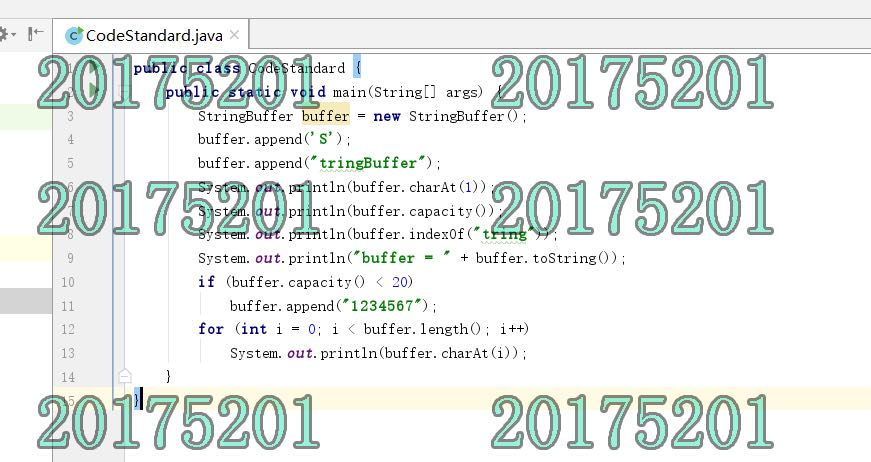
(二)
二.敏捷开发与XP实践-2
①实验要求:
在码云上把自己的学习搭档加入自己的项目中,确认搭档的项目加入自己后,下载搭档实验二的Complex代码,加入不少于三个JUnit单元测试用例,测试成功后git add .; git commit -m "自己学号 添加内容";git push;
提交搭档项目git log的截图,包含上面git commit的信息,并加上自己的学号水印信息。
②实验代码:
1.搭档码云链接:https://gitee.com/pyc-1751/chapter_1_of_java.git
2.产品代码:
public class Complex {
// 定义属性并生成getter,setter
double RealPart;
double ImagePart;
// 定义构造函数
public Complex(){
}
public Complex(double R,double I){
RealPart=R;
ImagePart=I;
}
//Override Object
public boolean equals(Complex m){
if(m.RealPart==this.RealPart&&m.ImagePart==this.ImagePart){
return true;
}
else{
return false;
}
}
public String toString(){
if (this.RealPart != 0 && this.ImagePart > 0) {
return this.RealPart + " + " + this.ImagePart + "i";
} else if (this.RealPart != 0 && this.ImagePart == 0) {
return String.valueOf(this.RealPart);
} else if (this.RealPart != 0 && this.ImagePart < 0) {
return this.RealPart + " - " + -this.ImagePart + "i";
} else if (this.RealPart == 0 && this.ImagePart != 0) {
return this.ImagePart + "i";
} else {
return "0";
}
}
// 定义公有方法:加减乘除
Complex ComplexAdd(Complex a){
return new Complex(this.RealPart + a.RealPart, this.ImagePart + a.ImagePart);
}
Complex ComplexSub(Complex a){
return new Complex(this.RealPart - a.RealPart, this.ImagePart - a.ImagePart);
}
Complex ComplexMulti(Complex a){
return new Complex(this.RealPart * a.RealPart - this.ImagePart * a.ImagePart,
this.ImagePart * a.RealPart + this.RealPart * a.ImagePart);
}
Complex ComplexDiv(Complex a){
return new Complex((this.ImagePart * a.ImagePart + this.RealPart * a.RealPart) / (a.ImagePart * a.ImagePart + a.RealPart * a.RealPart),
(this.RealPart * a.ImagePart - this.ImagePart * a.RealPart) / (a.ImagePart * a.ImagePart + a.RealPart * a.RealPart));
}
}
测试代码:
import junit.framework.TestCase;
public class ComplexTest extends TestCase {
Complex a = new Complex(1, 5);
Complex b = new Complex(2, -3);
public void testEquals() {
assertEquals(true, a.equals(a));
assertEquals(false, b.equals(a));
}
public void testToString() {
assertEquals("1.0 + 5.0i", a.toString());
assertEquals("2.0 - 3.0i", b.toString());
}
public void testComplexAdd() {
assertEquals("3.0 + 2.0i",a.ComplexAdd(b).toString());
assertEquals("4.0 - 6.0i",b.ComplexAdd(b).toString());
}
public void testComplexSub() {
assertEquals("-1.0 + 8.0i",a.ComplexSub(b).toString());
assertEquals("0",b.ComplexSub(b).toString());
}
public void testComplexMulti() {
assertEquals("-24.0 + 10.0i",a.ComplexMulti(a).toString());
assertEquals("17.0 + 7.0i",a.ComplexMulti(b).toString());
}
public void testComplexDiv() {
assertEquals("1.0",a.ComplexDiv(a).toString());
}
}
3.运行截图:


3-4重构

#20175201张驰 实验三 敏捷开发与XP实践的更多相关文章
- 20165215 实验三 敏捷开发与XP实践
20165215 实验三 敏捷开发与XP实践 一.实验报告封面 课程:Java程序设计 班级:1652班 姓名:张家佳 学号:20165215 指导教师:娄嘉鹏 实验日期:2018年4月28日 实验时 ...
- 20162307 实验三 敏捷开发与XP实践
实验三 <敏捷开发与XP实践> 北京电子科技学院(BESTI) 实 验 报 告 课程:程序设计与数据结构 班级:1623 姓名:张韵琪 学号:20162307 指导教师:娄佳鹏老师.王志强 ...
- 20145213《Java程序设计》实验三敏捷开发与XP实践
20145213<Java程序设计>实验三敏捷开发与XP实践 实验要求 1.XP基础 2.XP核心实践 3.相关工具 实验内容 1.敏捷开发与XP 软件工程是把系统的.有序的.可量化的方法 ...
- 20145308刘昊阳 《Java程序设计》实验三 敏捷开发与XP实践 实验报告
20145308刘昊阳 <Java程序设计>实验三 敏捷开发与XP实践 实验报告 实验名称 敏捷开发与XP实践 实验内容 XP基础 XP核心实践 相关工具 统计的PSP(Personal ...
- JAVA课程实验报告 实验三 敏捷开发与XP实践
北京电子科技学院(BESTI) 实 验 报 告 课程:Java程序设计 班级:1353 姓名:韩玉琪 学号:20135317 成绩: 指导教师:娄嘉 ...
- 20145225《Java程序设计》 实验三 "敏捷开发与XP实践"
20145225<Java程序设计> 实验三 "敏捷开发与XP实践" 实验报告 实验内容 使用 git 上传代码 使用 git 相互更改代码 实现代码的重载 git 上 ...
- 20145215实验三 敏捷开发与XP实践
20145215实验三 敏捷开发与XP实践 实验内容 XP基础 XP核心实践 相关工具 实验步骤 (一)敏捷开发与XP 软件工程是把系统的.有序的.可量化的方法应用到软件的开发.运营和维护上的过程.软 ...
- 20145325张梓靖 实验三 "敏捷开发与XP实践"
20145325张梓靖 实验三 "敏捷开发与XP实践" 程序设计过程 实验内容 使用 git 上传代码 git上传中遇到的问题 使用 git 相互更改代码 实现代码的重构 git ...
- 20162311 实验三 敏捷开发与XP实践 实验报告
20162311 实验三 敏捷开发与XP实践 实验报告 实验内容 一.研究学习IDEA中的Code菜单 使用Code ->Reformate Code功能将以下代码格式化 public clas ...
随机推荐
- [Jupyter Notebook] 01 这么多快捷键,我可顶不住!先记个八成吧
0. 一些说明 为了入门 Python3 安装了 Anaconda,它集成了 Jupyter Notebook 1. 调出快捷键表 打开 Jupyter Notebook,新建一个 Python3(我 ...
- Python3 AES加解密(AES/ECB/PKCS5Padding)
class AesEncry(object): key = "wwwwwwwwwwwwwwww" # aes秘钥 def encrypt(self, data): data = j ...
- object in javascript
枚举对象属性 for....in 列举obj的可枚举属性,包括自身和原型链上的 object.keys() 只列举对象本身的可枚举属性 创建对象的几种方式 对象字面量 const pre='test' ...
- 第三方模块:gulp模块
一.Gulp的使用 1. 使用npm install gulp 下载gulp库文件 2. 在项目根目录下简历gulpfile.js文件 3. 重构项目的文件夹架构src目录放置源代码文件,dist ...
- 使用pdfjs插件在线预览PDF文件
前言 本文介绍在html中使用 pdfjs插件在线预览PDF文件的方法. 实现步骤 下载 pdfjs 并引入项目中 到PDFJS官网 http://mozilla.github.io/pdf.js/g ...
- Mysql数据库在建表时指定engine等于InnoDB 或MyISAM的意义
一.ISAM和InnoDB的定义 1. ISAM ISAM是一个定义明确且历经时间考验的数据表格管理方法,它在设计之时就考虑到数据库被查询的次数要远大于更新的次数.因此,ISAM执行读取操作的速度很快 ...
- 关于prepareStatement(String sql,int autoGeneratedKeys)的记录
PreparedStatement prepareStatement(String sql,int autoGeneratedKeys) throws SQLException autoGenerat ...
- Qt项目界面文件(.ui)及其作用(超详细)
http://c.biancheng.net/view/1820.html Qt 项目中,后缀为“.ui”的文件是可视化设计的窗体的定义文件,如 widget.ui.双击项目文件目录树中的文件 wid ...
- Jmeter--逻辑控制之if控制器(转)
一.背景 在实际工作中,当使用Jmeter做性能脚本或者接口脚本时,有可能会遇到需要对不同的条件做不同的操作,基于这种诉求,在Jmeter中可使用if控制器来实现 二.实际操作 逻辑控制器位置: 在线 ...
- MySQL安装+更换yum源+mysql密码忘记(2019更新)
安装mysql步骤:1.yum install mysql-server -y2.service mysqld start3.mysql4.切换数据库 use mysql 查看表 show table ...