
[IOS UICollectionView模版]
创建CollectionCell模版:
1、新建类CollectionCell继承自UICollectionViewCell
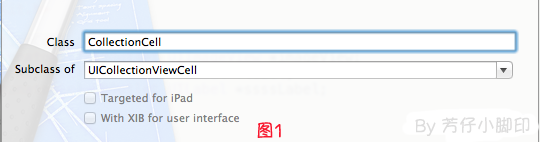
2、新建Xib,命名为CollectionCell.xib
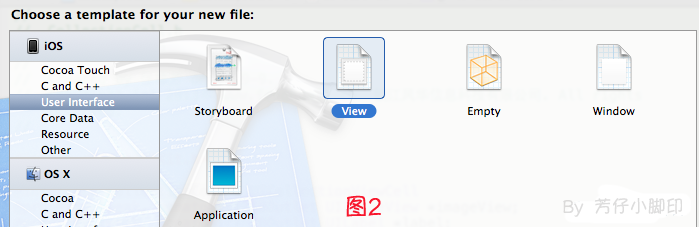
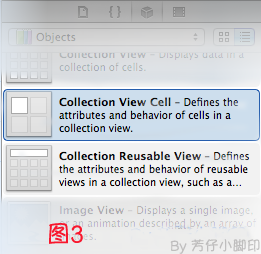
a.选中CollectionCell.xib删掉默认的View,从控件中拖一个Collection View Cell(图3)到画布中,设置大小为95*116;
b.选中刚刚添加的Cell,更改类名为CollectionCell,如图4

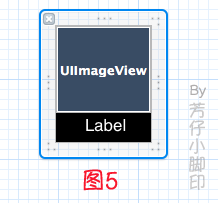
c.在CollectionCell.xib的CollectionCell中添加一个ImageView和一个Label(图5)
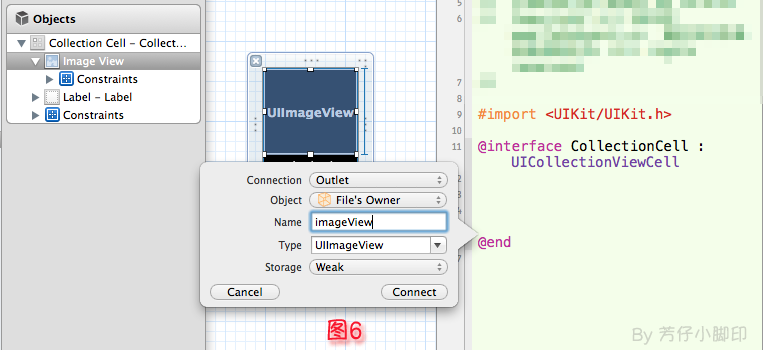
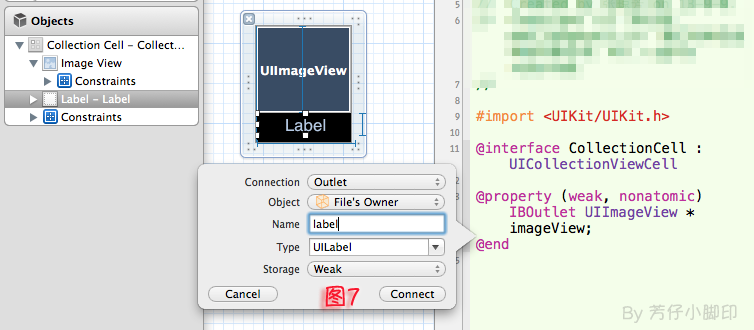
d.创建映射, 图6,图7
e.选中CollectionCell.m , 重写init方法
- (id)initWithFrame:(CGRect)frame

{

    self = [super initWithFrame:frame];

    if (self)

    {

        // 初始化时加载collectionCell.xib文件

        NSArray *arrayOfViews = [[NSBundle mainBundle] loadNibNamed:@"CollectionCell" owner:self options:nil];

        // 如果路径不存在,return nil

        if (arrayOfViews.count < )

        {

            return nil;

        }

        // 如果xib中view不属于UICollectionViewCell类,return nil

        if (![[arrayOfViews objectAtIndex:] isKindOfClass:[UICollectionViewCell class]])

        {

            return nil;

        }

        // 加载nib

        self = [arrayOfViews objectAtIndex:];

    }

    return self;

}
f.选中CollectionCell.xib 修改其identifier为CollectionCell。
======================================================
indexviewcontroller.h
#import <UIKit/UIKit.h>

#import "CollectionCell.h"

@interface indexviewcontroller : UIViewController <UICollectionViewDataSource,UICollectionViewDelegate,UICollectionViewDelegateFlowLayout>

@end
indexviewcontroller.m
#import "indexviewcontroller.h"

@interface indexviewcontroller ()

@end

@implementation indexviewcontroller

UICollectionView *cv;

- (void)viewDidLoad

{

    [super viewDidLoad];

    [self loadcollectionview];

}

-(void)loadcollectionview{

    UICollectionViewFlowLayout *flowLayout = [[UICollectionViewFlowLayout alloc]init];

    [flowLayout setItemSize:CGSizeMake(, )];//设置cell的尺寸

    [flowLayout setScrollDirection:UICollectionViewScrollDirectionHorizontal];//设置其布局方向

    cv=[[UICollectionView alloc]initWithFrame:CGRectMake(,,,) collectionViewLayout:flowLayout];

    [cv registerClass:[CollectionCell class] forCellWithReuseIdentifier:@"CollectionCell"];

    [cv setBackgroundColor:[UIColor colorWithRed:255.0f/255.0f green:255.0f/255.0f blue:255.0f/255.0f alpha:0.75]];

    cv.delegate=self;

    cv.dataSource=self;

    [self.view addSubview:cv];

}

#pragma mark -- UICollectionViewDataSource

//定义展示的UICollectionViewCell的个数

-(NSInteger)collectionView:(UICollectionView *)collectionView numberOfItemsInSection:(NSInteger)section

{

    return ;

}

//定义展示的Section的个数

-(NSInteger)numberOfSectionsInCollectionView:(UICollectionView *)collectionView

{

    return ;

}

//每个UICollectionView展示的内容

-(UICollectionViewCell *)collectionView:(UICollectionView *)collectionView cellForItemAtIndexPath:(NSIndexPath *)indexPath

{

    static NSString * CellIdentifier = @"CollectionCell";

    UICollectionViewCell * cell = [collectionView dequeueReusableCellWithReuseIdentifier:CellIdentifier forIndexPath:indexPath];

    cell.backgroundColor=[UIColor grayColor];

    return cell;

}

#pragma mark --UICollectionViewDelegateFlowLayout

//定义每个UICollectionView 的大小

- (CGSize)collectionView:(UICollectionView *)collectionView layout:(UICollectionViewLayout*)collectionViewLayout sizeForItemAtIndexPath:(NSIndexPath *)indexPath

{

    return CGSizeMake(, );

}

//定义每个UICollectionView 的 margin

-(UIEdgeInsets)collectionView:(UICollectionView *)collectionView layout:(UICollectionViewLayout *)collectionViewLayout insetForSectionAtIndex:(NSInteger)section

{

    return UIEdgeInsetsMake(, , , );

}

#pragma mark --UICollectionViewDelegate

//UICollectionView被选中时调用的方法

-(void)collectionView:(UICollectionView *)collectionView didSelectItemAtIndexPath:(NSIndexPath *)indexPath

{

    UICollectionViewCell * cell = (UICollectionViewCell *)[collectionView cellForItemAtIndexPath:indexPath];

    cell.backgroundColor = [UIColor whiteColor];

}

//返回这个UICollectionView是否可以被选择

-(BOOL)collectionView:(UICollectionView *)collectionView shouldSelectItemAtIndexPath:(NSIndexPath *)indexPath

{

    return YES;

}

- (void)didReceiveMemoryWarning

{

    [super didReceiveMemoryWarning];

    // Dispose of any resources that can be recreated.

}

@end
[IOS UICollectionView模版]的更多相关文章
- iOS UICollectionView的实现
ios的UICollectionView并不能在iOS6之前的版本中使用,为了兼容之前的版本需要自定义UICollectionView.写完之后发现人家已经有开源了,下过来看了看发现我是用UIScro ...
- iOS UICollectionView 长按移动cell
ref:http://www.jianshu.com/p/31d07bf32d62 iOS 9之后: 示例如下 效果 前言: 看完你可以学到哪些呢? 就是文章标题那么多, 只有那么多. . 手残效果图 ...
- iOS UICollectionView高级用法(长按自由移动cell)-新
[reference]http://www.jianshu.com/p/31d07bf32d62 iOS 9之后: 示例如下 效果 前言: 看完你可以学到哪些呢? 就是文章标题那么多, 只有那么多. ...
- iOS UICollectionView(转三)
上篇博客的实例是自带的UICollectionViewDelegateFlowLayout布局基础上来做的Demo, 详情请看<iOS开发之窥探UICollectionViewControlle ...
- iOS UICollectionView(转一) XIB+纯代码创建:cell,头脚视图 cell间距
之前用CollectionViewController只是皮毛,一些iOS从入门到精通的书上也是泛泛而谈.这几天好好的搞了搞苹果的开发文档上CollectionViewController的内容,亲身 ...
- [iOS] UICollectionView初始化滚动到中间的bug
转载请保留地址wossoneri.com 问题 首先看一下我之前写的demo:link demo是封装了一个控件,直接在MainViewController的viewWillAppear里初始化,并且 ...
- iOS UICollectionView高级用法(长按自由移动cell)
iOS 9之后: 示例如下 效果 前言: 看完你可以学到哪些呢? 就是文章标题那么多, 只有那么多. . 手残效果图没弄好. @property (nonatomic, strong) UIColle ...
- 【Swift】iOS UICollectionView 计算 Cell 大小的陷阱
前言 API 不熟悉导致的问题,想当然的去理解果然会出问题,这里记录一下 UICollectionView 使用问题. 声明 欢迎转载,但请保留文章原始出处:) 博客园:http://www.cn ...
- IOS UICollectionView基础+UICollectionViewFlowLayout基础
UICollectionView在众多控件中也算是比较常用的了,像淘宝在浏览宝贝时采用的就是UICollectionView,对于UICollectionView->UICollectionVi ...
随机推荐
- JAVA NIO概述(一):I/O模型
NIO是jdk1.4加入的新功能,我们一般成为非阻塞IO,在1.4之前,JAVA中的都是BIO(堵塞IO),BIO有以下几个缺点: 没有数据缓冲区,I/O性能存在问题 没有C/C++中channel( ...
- 验证码生成的c语言库
http://www.open-open.com/lib/view/open1324534929968.html
- sqlserver数据库附加报错5120
sqlserver数据库的数据文件分离.附加是很方便的功能. 有时候在附加文件时报错,是因为数据库文件权限不够,给Authenticated Users用户增加完全控制权限即可.
- jquery中$("#afui").get(0)为什么要加get(0)呢?
jquery中$("#afui").get(0)为什么要加get(0)呢? 2015-04-13 17:46SYYZZ3 | 浏览 509 次 Jquery $("#a ...
- poj 1050 To the Max
To the Max Time Limit: 1000MS Memory Limit: 10000K Total Submissions: 45906 Accepted: 24276 Desc ...
- poj 1163 The Triangle
The Triangle Time Limit: 1000MS Memory Limit: 10000K Total Submissions: 43809 Accepted: 26430 De ...
- CardboardCamera Prefab 中文笔记
在Cardboard的预制体(Prefab)中, CardboardCamera是最简单的一个,仅有两个子物体,一个PostRender, 一个PreRender,以及分别带的Camera组件. Ca ...
- 思科简单教程CCNA
这是CCNA的内容,从PC配置交换机(或者路由器),这里呢我们使用的软件叫pack 这是ciso开发的一款工具,能生动形象的模拟现实生活中组网技术的过程,下面我大概讲一下流程,想更多的了解我会录制一些 ...
- Oracle数据库,数字强制显示2位小数(转)
Oracle数据库,数字强制显示2位小数 在银行.财务等对数字要求敏感的系统中,数字的显示一般有着严格的要求.今遇到一个需求,如题,要求将数字以两位小数的格式显示,如果没有小数,则强制显示为0.例如: ...
- Convert和Parse对null值处理的区别
类型的转换在日常的变成中是经常被用到的,我们最常用的类型转换的方法就是Convert和Parse, 下面来说一下这两者null值处理的区别. int i1 = Convert.ToInt32(null ...