
ExtJs4.2中Tab选项卡的右击关闭其它和关闭当前功能不准确的解决方法
一、ExtJs4.2中Tab选项卡的右击关闭其它和关闭当前功能不准确的解决方法
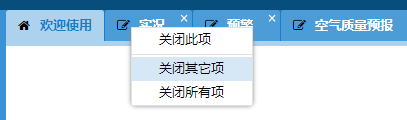
二、找到ux目录下的TabCloseMenu.js文件,将内容替换成下面代码。
三、代码:
/**

 * Plugin for adding a close context menu to tabs. Note that the menu respects

 * the closable configuration on the tab. As such, commands like remove others

 * and remove all will not remove items that are not closable.

 */

Ext.define('Ext.ux.TabCloseMenu', {

    alias: 'plugin.tabclosemenu',

    mixins: {

        observable: 'Ext.util.Observable'

    },

    /**

     * @cfg {String} closeTabText

     * The text for closing the current tab.

     */

    closeTabText: 'Close Tab',

    showCloseOthers: true,

    closeOthersTabsText: 'Close Other Tabs',

    /**

     * @cfg {Boolean} showCloseAll

     * Indicates whether to show the 'Close All' option.

     */

    showCloseAll: true,

    closeAllTabsText: 'Close All Tabs',

    /**

     * @cfg {Array} extraItemsHead

     * An array of additional context menu items to add to the front of the context menu.

     */

    extraItemsHead: null,

    /**

     * @cfg {Array} extraItemsTail

     * An array of additional context menu items to add to the end of the context menu.

     */

    extraItemsTail: null,

    //public

    constructor: function (config) {

        this.addEvents(

            'aftermenu',

            'beforemenu');

        this.mixins.observable.constructor.call(this, config);

    },

    init: function (tabpanel) {

        this.tabPanel = tabpanel;

        this.tabBar = tabpanel.down("tabbar");

        this.mon(this.tabPanel, {

            scope: this,

            afterlayout: this.onAfterLayout,

            single: true

        });

    },

    onAfterLayout: function () {

        this.mon(this.tabBar.el, {

            scope: this,

            contextmenu: this.onContextMenu,

            delegate: '.x-tab'

        });

    },

    onBeforeDestroy: function () {

        Ext.destroy(this.menu);

        this.callParent(arguments);

    },

    // private

    onContextMenu: function (event, target) {

        var me = this,

            menu = me.createMenu(),

            disableAll = true,

            disableOthers = true,

            tab = me.tabBar.getChildByElement(target),

            index = me.tabBar.items.indexOf(tab);

        this.item = me.tabPanel.getComponent(index);

        me.selectedTab = me.tabPanel.getComponent(index);

        menu.child('*[text="' + me.closeTabText + '"]').setDisabled(!me.item.closable);

        if (me.showCloseAll || me.showCloseOthers) {

            me.tabPanel.items.each(function (item) {

                if (item.closable) {

                    disableAll = false;

                    if (item != me.item) {

                        disableOthers = false;

                        return false;

                    }

                }

                return true;

            });

            if (me.showCloseAll) {

                menu.child('*[text="' + me.closeAllTabsText + '"]').setDisabled(disableAll);

            }

            if (me.showCloseOthers) {

                menu.child('*[text="' + me.closeOthersTabsText + '"]').setDisabled(disableOthers);

            }

        }

        event.preventDefault();

        me.fireEvent('beforemenu', menu, me.item, me);

        menu.showAt(event.getXY());

    },

    createMenu: function () {

        var me = this;

        if (!me.menu) {

            var items = [{

                text: me.closeTabText,

                scope: me,

                handler: me.onClose

            }];

            if (me.showCloseAll || me.showCloseOthers) {

                items.push('-');

            }

            if (me.showCloseOthers) {

                items.push({

                    text: me.closeOthersTabsText,

                    scope: me,

                    handler: me.onCloseOthers

                });

            }

            if (me.showCloseAll) {

                items.push({

                    text: me.closeAllTabsText,

                    scope: me,

                    handler: me.onCloseAll

                });

            }

            if (me.extraItemsHead) {

                items = me.extraItemsHead.concat(items);

            }

            if (me.extraItemsTail) {

                items = items.concat(me.extraItemsTail);

            }

            me.menu = Ext.create('Ext.menu.Menu', {

                items: items,

                listeners: {

                    hide: me.onHideMenu,

                    scope: me

                }

            });

        }

        return me.menu;

    },

    onHideMenu: function () {

        var me = this;

        me.item = null;

        me.fireEvent('aftermenu', me.menu, me);

    },

    onClose: function () {

        this.tabPanel.remove(this.selectedTab);

    },

    onCloseOthers: function () {

        this.doClose(true);

    },

    onCloseAll: function () {

        this.doClose(false);

    },

    doClose: function (excludeActive) {

        var items = [];

        this.tabPanel.items.each(function (item) {

            if (item.closable) {

                if (!excludeActive || item != this.selectedTab) {

                    items.push(item);

                }

            }

        }, this);

        Ext.each(items, function (item) {

            this.tabPanel.remove(item);

        }, this);

    }

});
ExtJs4.2中Tab选项卡的右击关闭其它和关闭当前功能不准确的解决方法的更多相关文章
- WPF:指定的命名连接在配置中找不到、非计划用于 EntityClient 提供程序或者无效的解决方法
文/嶽永鹏 WPF 数据绑定中绑定到ENTITY,如果把数据文件做成一个类库,在UI文件中去应用它,可能遇到下面这种情况. 指定的命名连接在配置中找不到.非计划用于 EntityClient 提供程序 ...
- zend studio中ctrl+鼠标左键无法转到类或函数定义文件的解决方法
转载自:http://blog.csdn.net/wide288/article/details/21622183 zend studio中ctrl+鼠标左键无法转到类或函数定义文件的解决方法: ze ...
- Bootstrap Modal 关闭时右侧滚动条消失,页面左移的解决方法
问题描述:页面在打开Modal之前右侧有滚动条,Modal关闭之后,body中的class="modal-open"和style="padding-right: 17px ...
- python中引入包的时候报错AttributeError: module 'sys' has no attribute 'setdefaultencoding'解决方法?
python中引入包的时候报错:import unittestimport smtplibimport timeimport osimport sysimp.reload(sys)sys.setdef ...
- 网页中"IE限制网页访问脚本或ActiveX控件"的提示问题的解决方法
以前从来没有注意过"IE限制网页访问脚本或ActiveX控件"的提示问题,对于这个小细节问题,虽然感觉很别扭,但一直没考虑解决方法,今天才发现该问题可以轻松解决,以下做个小小记录. ...
- iframe中使用模态框提交表单后,iframe加载父页面的解决方法
在iframe中使用模态框提交表单后,会出现iframe加载整个父页面的问题,如下图: 解决方法: 在form表单中添加target属性 _parent 这个属性会使目标文档载入父窗口或者包含来超链接 ...
- Android开发中怎样用多进程、用多进程的好处、多进程的缺陷、解决方法(转)
转自:http://blog.csdn.net/spencer_hale/article/details/54968092 1.怎样用多进程 Android多进程概念:一般情况下,一个应用程序就是一个 ...
- Centos7.5中Nginx报错:nginx: [error] invalid PID number "" in "/run/nginx.pid" 解决方法
服务器重启之后,执行 nginx -t 是OK的,然而在执行 nginx -s reload 的时候报错 nginx: [error] invalid PID number "" ...
- NS2中couldn‘t read file “../tcl/mobility/scene/cbr-3-test“: no such file or directory解决方法
运行wireless.tcl 文件时报错:couldn't read file "../../uAMPS/ns-leach.tcl": no such file or direct ...
随机推荐
- Swift:playground
在介绍Playground之前,我先罗列一些本人认为有点重要然而零碎的知识点. 1. Swift语法.每句话之后不用加分号.但也能够加分号.但假设写在一行的话.必须加分号. 2. Swift严格要求变 ...
- 架构:The Onion Architecture : part 3(洋葱架构:第三篇)(转载)
In my previous installments, I described what has become my approach to defining the architecture fo ...
- java.util.ConcurrentModificationException解决详解
异常产生 当我们迭代一个ArrayList或者HashMap时,如果尝试对集合做一些修改操作(例如删除元素),可能会抛出java.util.ConcurrentModificationExceptio ...
- HTML5文件上传qq、百度、taobao等比较(改进支持三种状态提示)
拖拽过程详解: 1:文件未拖出文件选择框的时候提示:将要上传的文件或文件夹拖拽至此区域 2:文件拖出文件选择框但未拖入上传的文件框提示:请继续拖拽文件或文件夹至此区域 3:文件拖出文件选择框且已拖入上 ...
- SharePoint PowerShell 修改计时器任务
前言 最近碰到需要修改计时器任务的需求,然后搜了搜,发现有powershell命令可以搞定,记录一下. $timerJob = Get-SPTimerJob -Identity "DocID ...
- Lua游戏开发参考资料收集
table {border-collapse:collapse;} List of game engines that use lua: 2D Agen (Lua; Windows) Blitwiza ...
- [A类会议] 国内论文检索
https://www.cn-ki.net/ http://www.koovin.com
- Orchard之创建列表
一:首先需要确保 List Module 的开始 即: Enable 之后,左边的列表中,多了一个 List 功能菜单. 二:为 Content type 选定 Cotainable 不再赘述. 三: ...
- [转]12种JavaScript MVC框架之比较
From : http://www.infoq.com/cn/news/2012/05/js-mvc-framework/ Gordon L. Hempton是西雅图的一位黑客和设计师,他花费了几个月 ...
- QT TCP网络编程
首先介绍一下TCP:(Transmission Control Protocol 传输控制协议)是一种面向连接的.可靠的.基于字节流的传输层通信协议.相比而言UDP,就是开放式.无连接.不可靠的传输层 ...