
Python爬虫爬取豆瓣读书
一,准备工作。
工具:win10+Python3.6
爬取目标:爬取图中红色方框的内容。
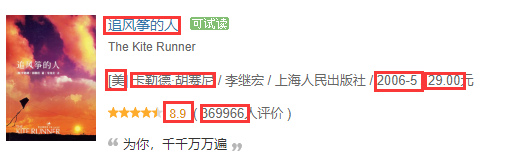
原则:能在源码中看到的信息都能爬取出来。
信息表现方式:CSV转Excel。
二,具体步骤。
先给出具体代码吧:
 import requests

 import re

 from bs4 import BeautifulSoup

 import pandas as pd

 def gethtml(url):

     try:

         r = requests.get(url,timeout = 30)

         r.raise_for_status()

         r.encoding = r.apparent_encoding

         return r.text

     except:

         return "It is failed to get html!"

 def getcontent(url):

     html = gethtml(url)

     soup = BeautifulSoup(html,"html.parser")

     # print(soup.prettify())

     div = soup.find("div",class_="indent")

     tables = div.find_all("table")

     price = []

     date = []

     nationality = []

     nation = []  #standard

     bookname=[]

     link = []

     score = []

     comment = []

     people = []

     peo = []  #standard

     author = []

     for table in tables:

         bookname.append(table.find_all("a")[1]['title'])   #bookname

         link.append(table.find_all("a")[1]['href'])    #link

         score.append(table.find("span",class_="rating_nums").string)   #score

         comment.append(table.find_all("span")[-1].string)   #comment in a word

         people_info = table.find_all("span")[-2].text

         people.append(re.findall(r'\d+', people_info))  #How many people comment on this book? Note:But there are sublist in the list.

         navistr = (table.find("p").string)   #nationality,author,translator,press,date,price

         infos = str(navistr.split("/"))   #Note this info:The string has been interrupted.

         infostr = str(navistr)            #Note this info:The string has not been interrupted.

         s = infostr.split("/")

         if re.findall(r'\[', s[0]):  # If the first character is "[",match the author.

             w = re.findall(r'\s\D+', s[0])

             author.append(w[0])

         else:

             author.append(s[0])

         #Find all infomations from infos.Just like price,nationality,author,translator,press,date

         price_info = re.findall(r'\d+\.\d+', infos)

         price.append((price_info[0]))   #We can get price.

         date.append(s[-2])  #We can get date.

         nationality_info = re.findall(r'[[](\D)[]]', infos)

         nationality.append(nationality_info)   #We can get nationality.Note:But there are sublist in the list.

     for i in nationality:

         if len(i) == 1:

             nation.append(i[0])

         else:

             nation.append("中")

     for i in people:

         if len(i) == 1:

             peo.append(i[0])

     print(bookname)

     print(author)

     print(nation)

     print(score)

     print(peo)

     print(date)

     print(price)

     print(link)

     # 字典中的key值即为csv中列名

     dataframe = pd.DataFrame({'书名': bookname, '作者': author,'国籍': nation,'评分': score,'评分人数': peo,'出版时间': date,'价格': price,'链接': link,})

     # 将DataFrame存储为csv,index表示是否显示行名,default=True

     dataframe.to_csv("C:/Users/zhengyong/Desktop/test.csv", index=False, encoding='utf-8-sig',sep=',')

 if __name__ == '__main__':

     url = "https://book.douban.com/top250?start=0"   #If you want to add next pages,you have to alter the code.

     getcontent(url)
1,爬取大致信息。
选用如下轮子:
 import requests

 import re

 from bs4 import BeautifulSoup

 def gethtml(url):

     try:

         r = requests.get(url,timeout = 30)

         r.raise_for_status()

         r.encoding = r.apparent_encoding

         return r.text

     except:

         return "It is failed to get html!"

 def getcontent(url):

     html = gethtml(url)

     bsObj = BeautifulSoup(html,"html.parser")

 if __name__ == '__main__':

     url = "https://book.douban.com/top250?icn=index-book250-all"

     getcontent(url)
这样就能从bsObj获取我们想要的信息。
2,信息具体提取。
所有信息都在一个div中,这个div下有25个table,其中每个table都是独立的信息单元,我们只用造出提取一个table的轮子(前提是确保这个轮子的兼容性)。我们发现:一个div父节点下有25个table子节点,用如下方式提取:
    div = soup.find("div",class_="indent")

    tables = div.find_all("table")
书名可以直接在节点中的title中提取(原始代码确实这么丑,但不影响):
<a href="https://book.douban.com/subject/1770782/" onclick=""moreurl(this,{i:'0'})"" title="追风筝的人">
追风筝的人
</a>
据如下代码提取:
bookname.append(table.find_all("a")[1]['title']) #bookname
相似的不赘述。
评价人数打算用正则表达式提取:
people.append(re.findall(r'\d+', people_info)) #How many people comment on this book? Note:But there are sublist in the list.
people_info = 13456人评价。
在看其余信息:
<p class="pl">[美] 卡勒德·胡赛尼 / 李继宏 / 上海人民出版社 / 2006-5 / 29.00元</p>
其中国籍有个“【】”符号,如何去掉?第一行给出回答。
nationality_info = re.findall(r'[[](\D)[]]', infos)

        nationality.append(nationality_info)   #We can get nationality.Note:But there are sublist in the list.

    for i in nationality:

        if len(i) == 1:

            nation.append(i[0])

        else:

            nation.append("中")
其中有国籍的都写出了,但是没写出的我们发现都是中国,所以我们把国籍为空白的改写为“中”:
    for i in nationality:

        if len(i) == 1:

            nation.append(i[0])

        else:

            nation.append("中")
还有list中存在list的问题也很好解决:
    for i in people:

        if len(i) == 1:

            peo.append(i[0])
长度为1证明不是空序列,就加上序号填写处具体值,使变为一个没有子序列的序列。
打印结果如下图:
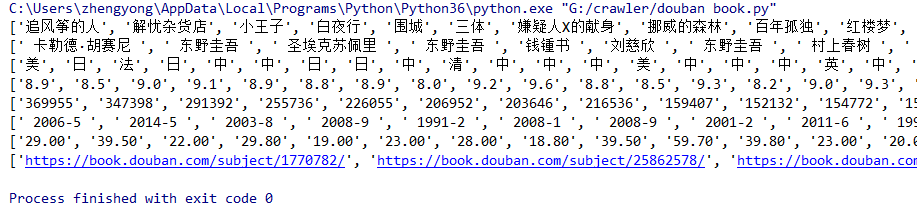
基本是我们想要的了。
然后写入csv:
    dataframe = pd.DataFrame({'书名': bookname, '作者': author,'国籍': nation,'评分': score,'评分人数': peo,'出版时间': date,'价格': price,'链接': link,})

    # 将DataFrame存储为csv,index表示是否显示行名,default=True

    dataframe.to_csv("C:/Users/zhengyong/Desktop/test.csv", index=False, encoding='utf-8-sig',sep=',')
注意:如果没有加上encoding='utf-8-sig'会存在乱码问题,所以这里必须得加,当然你用其他方法也可。
最后一个翻页的问题,这里由于我没做好兼容性问题,所以后面的页码中提取信息老是出问题,但是这里还是写一下方法:
    for i in range(10):

        url = "https://book.douban.com/top250?start=" + str(i*25)

        getcontent(url)
注意要加上str。
效果图:
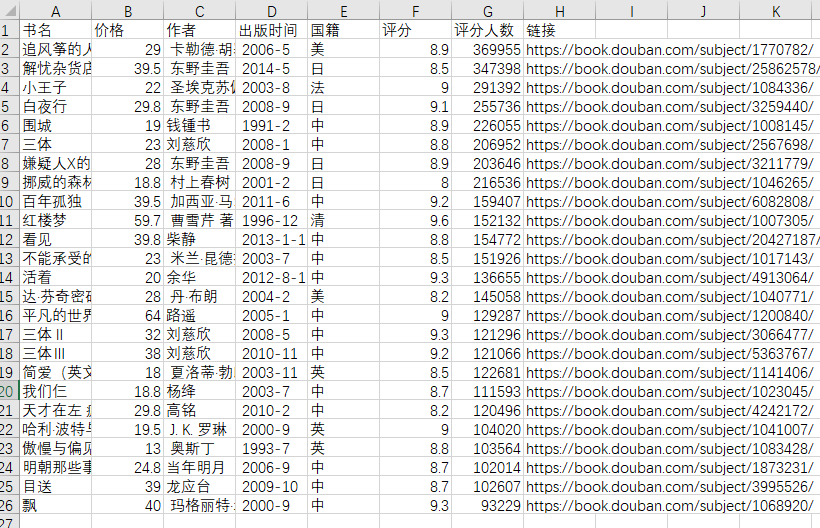
其实这里的效果图与我写入csv的传人顺序不一致,后期我会看看原因。
三,总结。
大胆细心,这里一定要细心,很多细节不好好深究后面会有很多东西修改。
Python爬虫爬取豆瓣读书的更多相关文章
- Python爬虫爬取豆瓣电影之数据提取值xpath和lxml模块
工具:Python 3.6.5.PyCharm开发工具.Windows 10 操作系统.谷歌浏览器 目的:爬取豆瓣电影排行榜中电影的title.链接地址.图片.评价人数.评分等 网址:https:// ...
- python 爬虫&爬取豆瓣电影top250
爬取豆瓣电影top250from urllib.request import * #导入所有的request,urllib相当于一个文件夹,用到它里面的方法requestfrom lxml impor ...
- Python爬虫-爬取豆瓣图书Top250
豆瓣网站很人性化,对于新手爬虫比较友好,没有如果调低爬取频率,不用担心会被封 IP.但也不要太频繁爬取. 涉及知识点:requests.html.xpath.csv 一.准备工作 需要安装reques ...
- 2019-02-01 Python爬虫爬取豆瓣Top250
这几天学了一点爬虫后写了个爬取电影top250的代码,分别用requests库和urllib库,想看看自己能不能搞出个啥东西,虽然很简单但还是小开心. import requests import r ...
- python爬虫-爬取豆瓣电影数据
#!/usr/bin/python# coding=utf-8# 作者 :Y0010026# 创建时间 :2018/12/16 16:27# 文件 :spider_05.py# IDE :PyChar ...
- Python爬虫爬取豆瓣电影名称和链接,分别存入txt,excel和数据库
前提条件是python操作excel和数据库的环境配置是完整的,这个需要在python中安装导入相关依赖包: 实现的具体代码如下: #!/usr/bin/python# -*- coding: utf ...
- Python爬虫-爬取豆瓣电影Top250
#!usr/bin/env python3 # -*- coding:utf-8-*- import requests from bs4 import BeautifulSoup import re ...
- python爬虫:利用正则表达式爬取豆瓣读书首页的book
1.问题描述: 爬取豆瓣读书首页的图书的名称.链接.作者.出版日期,并将爬取的数据存储到Excel表格Douban_I.xlsx中 2.思路分析: 发送请求--获取数据--解析数据--存储数据 1.目 ...
- python定时器爬取豆瓣音乐Top榜歌名
python定时器爬取豆瓣音乐Top榜歌名 作者:vpoet mail:vpoet_sir@163.com 注:这些小demo都是前段时间为了学python写的,现在贴出来纯粹是为了和大家分享一下 # ...
随机推荐
- 安卓ADB学习笔记
ADB(Android Debug Bridge)可以远程调试安卓设备,包括模拟器,可以进入终端模式(安卓本身相当于一个linux) 1.配置adb环境变量 以夜神模拟器为例,将模拟器安装路径里的bi ...
- Vue + Element 配置报错
{ test: /\.(eot|svg|ttf|woff|woff2)$/, loader: 'file-loader'}
- Bootstrap使用-1
目录 结构: 1. 视图函数 2. 模板 3. 登陆 4. 怎样发生的 添加模板 基础模板提供的block 定制基础模板 结构: $ tree -I "__pycache*|*.pyc|*. ...
- Flask-Login用户登陆
Flask-Login Flask-Login 提供用户会话管理,处理常见的登录.退出和注册的任务. Flask-Login 没有绑定数据库,可以从数据库回调用户对象. 安装flask-login p ...
- linux --xampp 配置多个网站
我们想要在本地安装两个测试域名,www.abc.tld, www.xyz.tld, 分别指向到 htdoc 目录下的 abc.tld 和 xyz.tld 文件夹下.tld 是顶级域名 the top ...
- css 实现加载中3个点跳动
<style type="text/css">.loading:after { overflow: hidden; display: inline-block; ver ...
- LeetCode第二十题-有效的括号
Valid Parentheses 问题简介: 给定一个只包含字符 ‘(’ , ‘)’ , ‘{’ , ‘}’ , ‘[’ , ‘]’ 的字符串,确定输入字符串是否有效 有效的条件: 必须使用相同类型 ...
- 泛型约束new()的使用
下面泛型约束代码,where字句后面有new()约束,T类型必须有公有的无参的构造函数. private T InternalCreate<T>() where T : IObjectWi ...
- Groovy Closure简介
什么是闭包(Closure) 在Groovy中,闭包是一段匿名的代码段,它可以有参数,返回值,并且能够赋值给一个变量.闭包中使用的变量可以是在闭包外部定义的,也可以是在闭包内部定义的.
- 十五丶IO model
事件驱动模型 上节的问题: 协程:遇到IO操作就切换. 但什么时候切回去呢?怎么确定IO操作完了? 很多程序员可能会考虑使用“线程池”或“连接池”.“线程池”旨在减少创建和销毁线程的频率,其维持一定合 ...