
Python爬虫-爬取豆瓣图书Top250
豆瓣网站很人性化,对于新手爬虫比较友好,没有如果调低爬取频率,不用担心会被封 IP。但也不要太频繁爬取。
涉及知识点:requests、html、xpath、csv
一、准备工作
需要安装requests、lxml、csv库
爬取目标:https://book.douban.com/top250
二、分析页面源码
打开网址,按下F12,然后查找书名,右键弹出菜单栏 Copy==> Copy Xpath
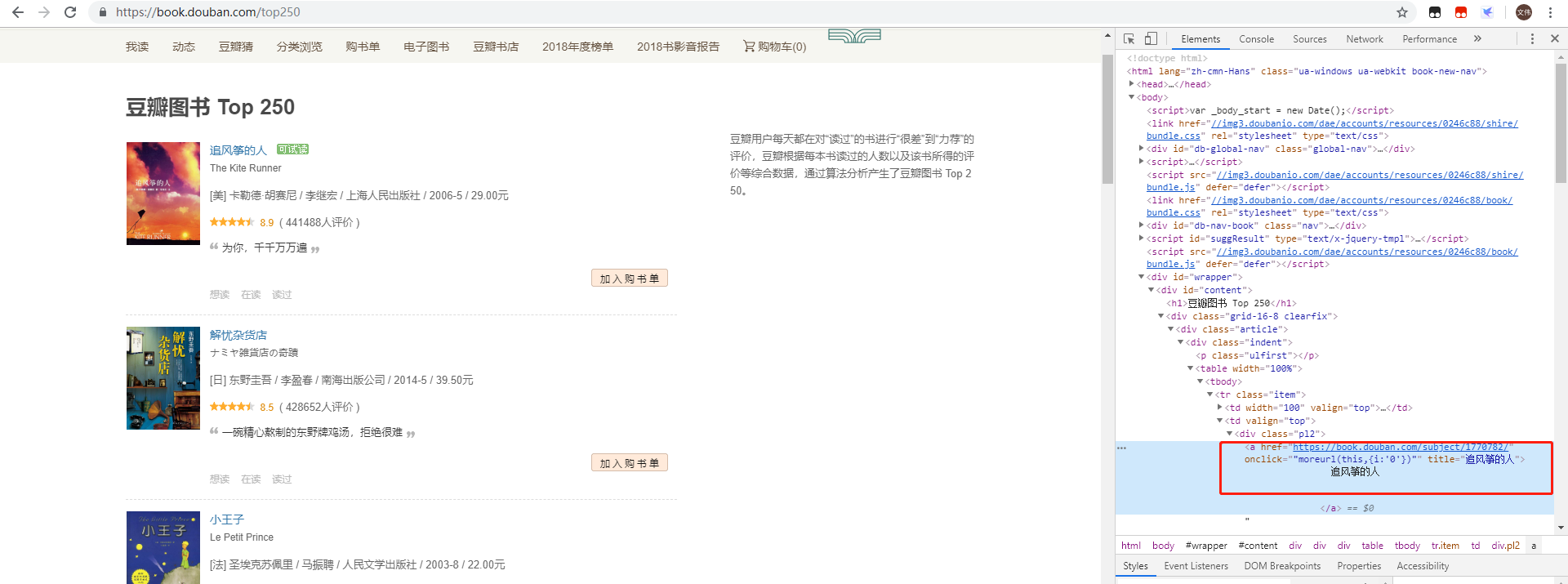
以书名“追风筝的人” 获取书名的xpath是://*[@id="content"]/div/div[1]/div/table[1]/tbody/tr/td[2]/div[1]/a
这里需要注意一下,浏览器复制的xpath只能作参考,因为浏览器经常会在自己里面增加多余的tbody标签,我们需要手动把这个标签删除,整理成//*[@id="content"]/div/div[1]/div/table[1]/tr/td[2]/div[1]/a
同样获取图书的评分、评论人数、简介,结果如下:
//*[@id="content"]/div/div[1]/div/table[1]/tr/td[2]/div[2]/span[2]
//*[@id="content"]/div/div[1]/div/table[1]/tr/td[2]/div[2]/span[3]
//*[@id="content"]/div/div[1]/div/table[1]/tr/td[2]/p[1]
初步代码
import requests

from lxml import etree

html = requests.get('https://book.douban.com/top250').text

res = etree.HTML(html)

#因为要获取标题文本,所以xpath表达式要追加/text(),res.xpath返回的是一个列表,且列表中只有一个元素所以追加一个[0]

name = res.xpath('//*[@id="content"]/div/div[1]/div/table[1]/tr/td[2]/div[1]/a/text()')[0].strip()

score = res.xpath('//*[@id="content"]/div/div[1]/div/table[1]/tr/td[2]/div[2]/span[2]/text()')[0].strip()

comment = res.xpath('//*[@id="content"]/div/div[1]/div/table[1]/tr/td[2]/div[2]/span[3]/text()')[0].strip()

info = res.xpath('//*[@id="content"]/div/div[1]/div/table[1]/tr/td[2]/p[1]/text()')[0].strip()

print(name,score,comment,info)
执行显示:

这里只是获取第一条图书的信息,获取第二、第三看看
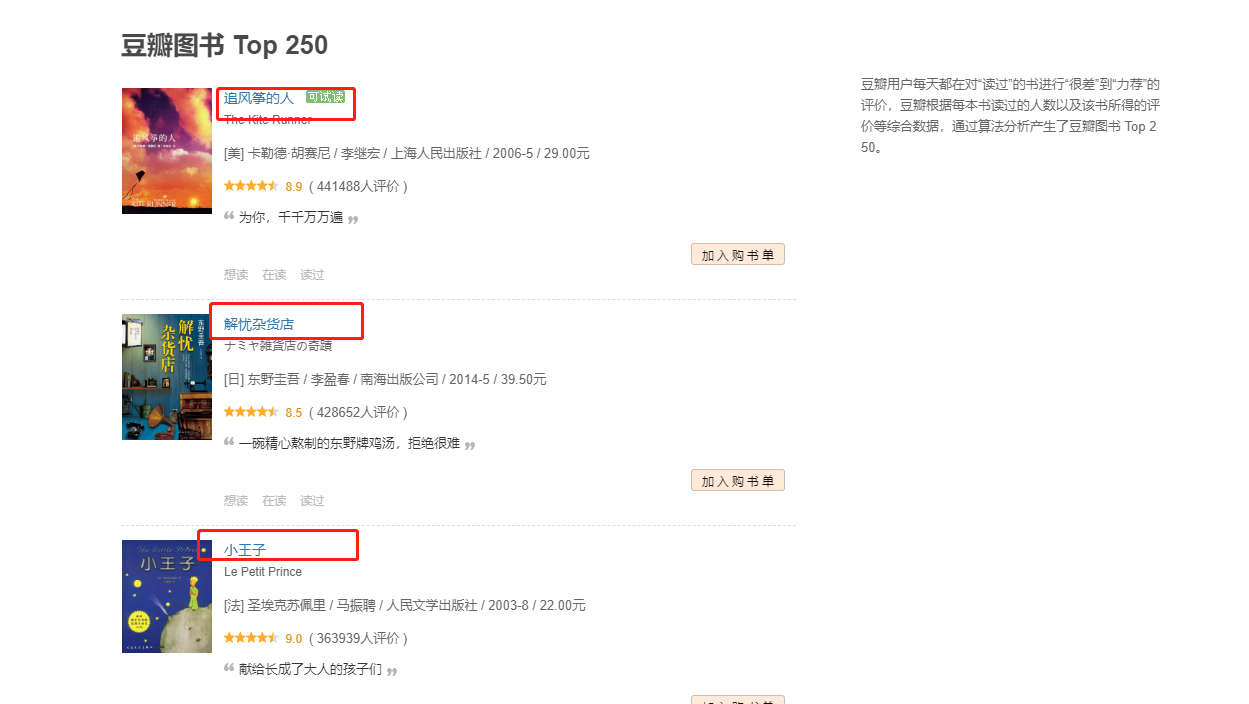
得到xpath:
import requests

from lxml import etree

html = requests.get('https://book.douban.com/top250').text

res = etree.HTML(html)

name1 = res.xpath('//*[@id="content"]/div/div[1]/div/table[1]/tr/td[2]/div[1]/a/text()')[0].strip()

name2 = res.xpath('//*[@id="content"]/div/div[1]/div/table[2]/tr/td[2]/div[1]/a/text()')[0].strip()

name3 = res.xpath('//*[@id="content"]/div/div[1]/div/table[3]/tr/td[2]/div[1]/a/text()')[0].strip()

print(name1,name2,name3)
执行显示:

对比他们的xpath,发现只有table序号不一样,我们可以就去掉序号,得到全部关于书名的xpath信息:
import requests

from lxml import etree

html = requests.get('https://book.douban.com/top250').text

res = etree.HTML(html)

names = res.xpath('//*[@id="content"]/div/div[1]/div/table/tr/td[2]/div[1]/a/text()')

for name in names:

    print(name.strip())
执行结果:太多,这里只展示一部分
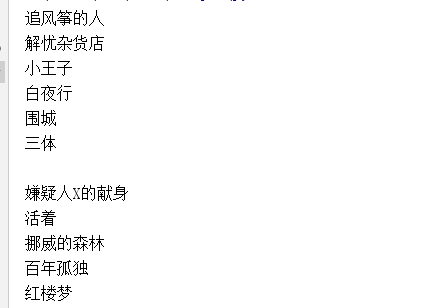
对于其他评分、评论人数、简介也同样使用此方法来获取。
到此,根据分析到的信息进行规律对比,写出获取第一页图书信息的代码:
import requests

from lxml import etree

html = requests.get('https://book.douban.com/top250').text

res = etree.HTML(html)

trs = res.xpath('//*[@id="content"]/div/div[1]/div/table/tr')

for tr in trs:

    name = tr.xpath('./td[2]/div[1]/a/text()')[0].strip()

    score = tr.xpath('./td[2]/div[2]/span[2]/text()')[0].strip()

    comment = tr.xpath('./td[2]/div[2]/span[3]/text()')[0].strip()

    info = tr.xpath('./td[2]/p[1]/text()')[0].strip()

    print(name,score,comment,info)
执行结果展示(内容较多,只展示前部分)
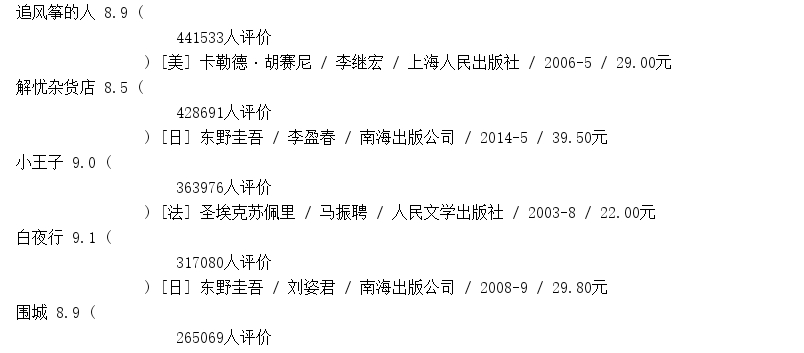
以上只是获取第一页的数据,接下来,我们获取到全部页数的链接,然后进行循环即可
三、获取全部链接地址
查看分析页数对应网页源码:
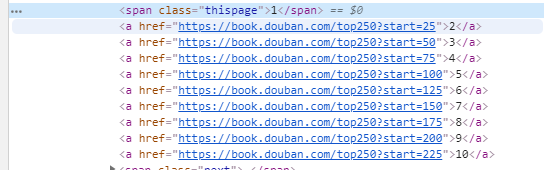
以代码实现
for i in range(10):

    url = 'https://book.douban.com/top250?start={}'.format(i * 25)

    print(url)
执行结果:正是正确的结果
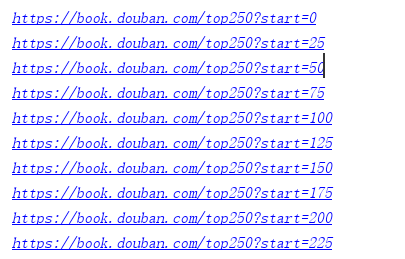
经过分析,已经获取到全部的页面链接和每一页的数据提取,最后把整体代码进行整理和优化。
完整代码
#-*- coding:utf-8 -*-

"""

-------------------------------------------------

   File Name:     DoubanBookTop250

   Author :        zww

   Date:          2019/5/13

   Change Activity:2019/5/13

-------------------------------------------------

"""

import requests

from lxml import etree

#获取每页地址

def getUrl():

    for i in range(10):

        url = 'https://book.douban.com/top250?start={}'.format(i*25)

        urlData(url)

#获取每页数据

def urlData(url):

    html = requests.get(url).text

    res = etree.HTML(html)

    trs = res.xpath('//*[@id="content"]/div/div[1]/div/table/tr')

    for tr in trs:

        name = tr.xpath('./td[2]/div/a/text()')[0].strip()

        score = tr.xpath('./td[2]/div/span[2]/text()')[0].strip()

        comment = tr.xpath('./td[2]/div/span[3]/text()')[0].replace('(','').replace(')','').strip()

        info = tr.xpath('./td[2]/p[1]/text()')[0].strip()

        print("《{}》--{}分--{}--{}".format(name,score,comment,info))

if __name__ == '__main__':

    getUrl()
执行结果:总共250条图书信息,一条不少,由于数据太多,只展示前部分
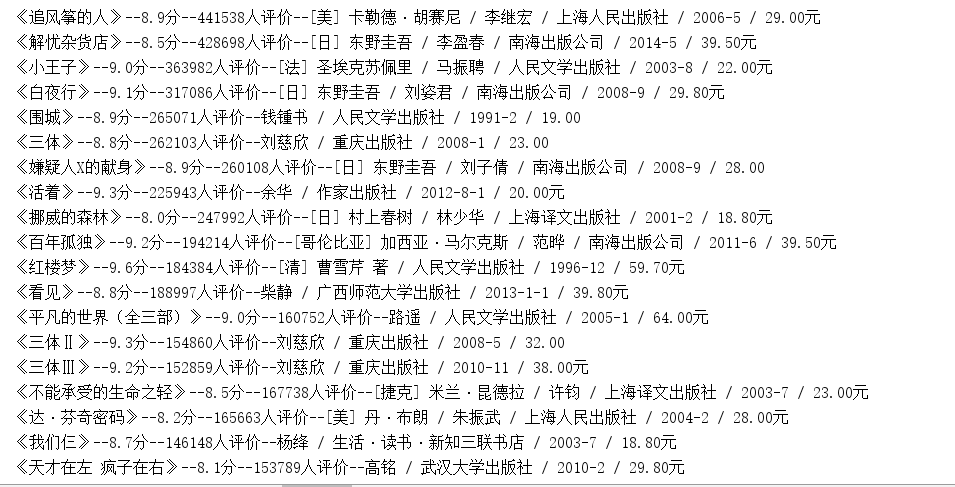
把爬取到的数据存储到csv文件中
def write_to_file(content):

    #‘a’追加模式,‘utf_8_sig’格式到处csv不乱码

    with open('DoubanBookTop250.csv','a',encoding='utf_8_sig',newline='') as f:

        fieldnames = ['name','score','comment','info']

        #利用csv包的DictWriter函数将字典格式数据存储到csv文件中

        w = csv.DictWriter(f,fieldnames=fieldnames)

        w.writerow(content)
完整代码
#-*- coding:utf-8 -*-

"""

-------------------------------------------------

   File Name:     DoubanBookTop250

   Author :        zww

   Date:          2019/5/13

   Change Activity:2019/5/13

-------------------------------------------------

"""

import csv

import requests

from lxml import etree

#获取每页地址

def getUrl():

    for i in range(10):

        url = 'https://book.douban.com/top250?start={}'.format(i*25)

        for item in urlData(url):

            write_to_file(item)

        print('成功保存豆瓣图书Top250第{}页的数据!'.format(i+1))

#数据存储到csv

def write_to_file(content):

    #‘a’追加模式,‘utf_8_sig’格式到处csv不乱码

    with open('DoubanBookTop250.csv','a',encoding='utf_8_sig',newline='') as f:

        fieldnames = ['name','score','comment','info']

        #利用csv包的DictWriter函数将字典格式数据存储到csv文件中

        w = csv.DictWriter(f,fieldnames=fieldnames)

        w.writerow(content)

#获取每页数据

def urlData(url):

    html = requests.get(url).text

    res = etree.HTML(html)

    trs = res.xpath('//*[@id="content"]/div/div[1]/div/table/tr')

    for tr in trs:

        yield {

        'name':tr.xpath('./td[2]/div/a/text()')[0].strip(),

        'score':tr.xpath('./td[2]/div/span[2]/text()')[0].strip(),

        'comment':tr.xpath('./td[2]/div/span[3]/text()')[0].replace('(','').replace(')','').strip(),

        'info':tr.xpath('./td[2]/p[1]/text()')[0].strip()

        }

        #print("《{}》--{}分--{}--{}".format(name,score,comment,info))

if __name__ == '__main__':

    getUrl()
内容过多,只展示前部分

Python爬虫-爬取豆瓣图书Top250的更多相关文章
- python 爬虫&爬取豆瓣电影top250
爬取豆瓣电影top250from urllib.request import * #导入所有的request,urllib相当于一个文件夹,用到它里面的方法requestfrom lxml impor ...
- Python爬虫-爬取豆瓣电影Top250
#!usr/bin/env python3 # -*- coding:utf-8-*- import requests from bs4 import BeautifulSoup import re ...
- Python 2.7_利用xpath语法爬取豆瓣图书top250信息_20170129
大年初二,忙完家里一些事,顺带有人交流爬取豆瓣图书top250 1.构造urls列表 urls=['https://book.douban.com/top250?start={}'.format(st ...
- python爬虫 Scrapy2-- 爬取豆瓣电影TOP250
sklearn实战-乳腺癌细胞数据挖掘(博主亲自录制视频) https://study.163.com/course/introduction.htm?courseId=1005269003& ...
- Python爬虫----抓取豆瓣电影Top250
有了上次利用python爬虫抓取糗事百科的经验,这次自己动手写了个爬虫抓取豆瓣电影Top250的简要信息. 1.观察url 首先观察一下网址的结构 http://movie.douban.com/to ...
- Python爬虫爬取豆瓣电影之数据提取值xpath和lxml模块
工具:Python 3.6.5.PyCharm开发工具.Windows 10 操作系统.谷歌浏览器 目的:爬取豆瓣电影排行榜中电影的title.链接地址.图片.评价人数.评分等 网址:https:// ...
- Python项目之我的第一个爬虫----爬取豆瓣图书网,统计图书数量
今天,花了一个晚上的时间边学边做,搞出了我的第一个爬虫.学习Python有两个月了,期间断断续续,但是始终放弃,今天搞了一个小项目,有种丰收的喜悦.废话不说了,直接附上我的全部代码. # -*- co ...
- 2019-02-01 Python爬虫爬取豆瓣Top250
这几天学了一点爬虫后写了个爬取电影top250的代码,分别用requests库和urllib库,想看看自己能不能搞出个啥东西,虽然很简单但还是小开心. import requests import r ...
- python3 爬虫---爬取豆瓣电影TOP250
第一次爬取的网站就是豆瓣电影 Top 250,网址是:https://movie.douban.com/top250?start=0&filter= 分析网址'?'符号后的参数,第一个参数's ...
随机推荐
- CF19D Points 平衡树
题意:支持插入/删除点 $(x,y)$,查询一个点右上方横坐标与之最接近的点坐标. 我们可以对于每一个操作过的横坐标都开一个 $set$,然后再开一个平衡树,维护每个横坐标上最大的纵坐标. 然后查询点 ...
- 常用命令备忘 lsof
lsof命令 可以列出被进程所打开的文件的信息.被打开的文件可以是 1.普通的文件, 2.目录 3.网络文件系统的文件, 4.字符设备文件 5.(函数)共享库 6.管道,命名管道 7.符号链接 8.底 ...
- MATLAB曲线拟合函数
一.多项式拟合 ployfit(x,y,n) :找到次数为 n 的多项式系数,对于数据集合 {(x_i,y_i)},满足差的平方和最小 [P,E] = ployfit(x,y,n) :返回同上的多项式 ...
- Android中相对布局的两个控件
<Button android:id="@+id/button3" android:layout_width="wrap_content" android ...
- js 中数组对象的定义赋值 以及方法
1.定义数组 var m=new Array(); var n=[]; 2.数组的赋值(两种) A. var m=new Array(2); 一个值表示数组length var m=new Array ...
- angr工具的安装
一.安装 python2 或 python3: pip install angr 目前官方不再维护python2版本,所以python2装的版本偏低,且很可能没有后续更新. 如果你选择python2版 ...
- ubuntu之路——day1(一点十五分 MMP终于把显卡装好了)
因为要上手深度学习的原因,购置了一台RTX2080TI+ubuntu18.04的机器 例行两条命令 sudo apt-get update sudo apt-get upgrade 开启巨坑第一天,以 ...
- 信息论 | information theory | 信息度量 | information measures | R代码(一)
这个时代已经是多学科相互渗透的时代,纯粹的传统学科在没落,新兴的交叉学科在不断兴起. life science neurosciences statistics computer science in ...
- centos sqlite3安装及简单命令
安装:方法一:wget http://www.sqlite.org/sqlite-autoconf-3070500.tar.gztar xvzf sqlite-autoconf-3070500.tar ...
- winddows rabbitmq安装与配置
RabbitMQ是一个在AMQP协议标准基础上完整的,可复用的企业消息系统.它遵循Mozilla Public License开源协议,采用 Erlang 实现的工业级的消息队列(MQ)服务器,Rab ...