
Unity3D AssetBundle的打包与加载
在Unity项目开发过程中,当要做热更新时常常使用一个叫做AssetBundle的东西,这里做一点个人的学习记录
步骤1: 设置打包标签:具体步骤----进入Unity,选择某一资源然后看右下角,在那个地方做这个事情
步骤2: 打对应平台的Bundle包, 这里或多或少要用到一点编辑器扩展的内容,很简单,这里就不介绍编辑器扩展的内容了。
using System.Collections;
using System.Collections.Generic;
using UnityEngine;
using UnityEditor;
using System.IO;
public class AssetBundleBuild {
[MenuItem("Assets/BuildAssetBundle/Android")] // 这个打的时安卓包,
static void BuildAssetBundle(){
Debug.Log ("打包");
string assetBundleDirectory = "AssetsBundles";
if (!Directory.Exists (assetBundleDirectory)) {
Directory.CreateDirectory (assetBundleDirectory);
}
string[] file = Directory.GetFiles (assetBundleDirectory);
for (int i = 0; i < file.Length; i++) {
Debug.Log (file [i]);
}
BuildPipeline.BuildAssetBundles (assetBundleDirectory, BuildAssetBundleOptions.None, BuildTarget.Android);
AssetDatabase.Refresh ();
}
[MenuItem("Assets/BuildAssetBundle/Windows")]
static void BuildAssetBundleWin(){ // 这个方法执行后资源bundle就会出现在项目汇总AssetsBundles/window 这个目录中
string path = Application.dataPath + "/AssetsBundles/window";
if(Directory.Exists(path)){
}else{
// 创建路径
Directory.CreateDirectory(path);
}
BuildPipeline.BuildAssetBundles(path, BuildAssetBundleOptions.None, BuildTarget.对应平台);
AssetDatabase.Refresh();
Debug.Log("win-finish");
}
}
注: BuildAssetBundleOptions 这个东西叫做资源包编译选项
这里推荐一个地址需要的可以在这里进行学习:https://blog.csdn.net/AnYuanLzh/article/details/81485762
打出来打bundle(以及对应的Manifest文件如图:)
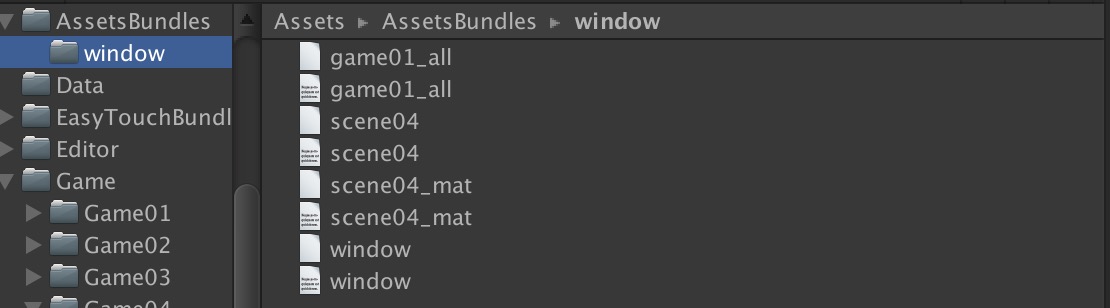
这里提一句:我们所有包的依赖信息都在window里,这里记住一个东西叫依赖
依赖:加入我们有一张图Pic1,在ab1这个bundle里,我们的一个prefab在ab2中,且这个prefab引用了Pic1这个图,
那么,这时就称ab2对ab1有依赖如上图对scene04依赖了sceneo4_mat这个一个assetbundle包那么在其scene04.manifest文件中就会有这么一句:
看图:
知道了这么一个概念我们介绍如何加载资源(我的scene04里面有个Cube,我们这时就要加载这个东西,且,我们Cube引用了scene04_mat的一个材质也就是上图中dependencies存在的原因)
步骤3: 加载资源包
using UnityEngine;
using System.Collections;
public class startLoadbundle : MonoBehaviour
{
public string manifestAssetBundleName = "Window";//还记得这个window吗? 我们有个window的bundle包,
// 每一个包的依赖信息就是从这里来的
public string assetbundleName = "scene04";//想要加载的AssetBundle的名称
private void Awake()
{
StartCoroutine(starting());
}
IEnumerator starting()
{
print(">> startLoadbundle >> Line 9" + assetbundleName); // 这里的asserbundleName是什么都没有的
string assetbundlePath = "http://localhost/TAssetBundle/window/";/* 要加载的AssetBundle所在的地址(我的在本机的服务器上,其实这个地址不重要,能访问到就行)*/
string manifestAssetBundlePath = assetbundlePath + "window"; /*因为资源的引用信息都在这个包里,所以我们要先加载这个bundle,这个包的中其实没有资源(这句话是我的个人理解)但是它有我们的bundle,及其依赖的所有信息,只有这个总的bundle里有这些信息,其他地方都没有,我也不知道为啥*/
WWW wwwmanifestAssetBundle = WWW.LoadFromCacheOrDownload(manifestAssetBundlePath, 0);//下载
yield return wwwmanifestAssetBundle;//等待下载完成
if(wwwmanifestAssetBundle.error != null) {
print(wwwmanifestAssetBundle.error); // 打印出错信息
}
AssetBundle manifestAssetBundle = wwwmanifestAssetBundle.assetBundle;//加载包含依赖关系的AssetBundle
AssetBundleManifest manifest = (AssetBundleManifest)manifestAssetBundle.LoadAsset("AssetBundleManifest");/*从这个bundle中提取出.manifest文件,这样就可以获得所有bundle的依赖信息了,文末贴图 而且其他bundle中*/
manifestAssetBundle.Unload(false);
//获取依赖关系列表
string[] dependAssetBundles = manifest.GetAllDependencies("scene04"); /*获取“scene04”这个bundle 的依赖并返回string[]数组*/
if(dependAssetBundles.Length != 0){
for (int i = 0; i < dependAssetBundles.Length; i++)
{
print(dependAssetBundles[i]);
}
}else{
print("null");
}
AssetBundle[] abs = new AssetBundle[dependAssetBundles.Length];
for(int i=0;i<dependAssetBundles.Length;i++)
{
// 根据刚才的数组加载左右的依赖bundle
WWW www = WWW.LoadFromCacheOrDownload(assetbundlePath+dependAssetBundles[i],0);
yield return www;
abs[i] = www.assetBundle;
if(www.assetBundle == null){
print("依赖为空");
}
}
/*注意:以上我们只是加载到了scene04的所有依赖,并没有加载scene04, 依赖加载结束,在这里加载目标bundle*/
WWW www2 = WWW.LoadFromCacheOrDownload(assetbundlePath + "scene04", 0);
yield return www2;
AssetBundle test = www2.assetBundle;
if(test == null){
print("Bundle 是空的");
}
if(test.LoadAsset("Cube") == null){
print("Cube" + "是空的");
}
object obj = test.LoadAsset("Cube"); /*加载并实例化Cube*/
GameObject prefabs = (GameObject)obj;
GameObject cube = GameObject.Instantiate(prefabs);
test.Unload(false);
}
}
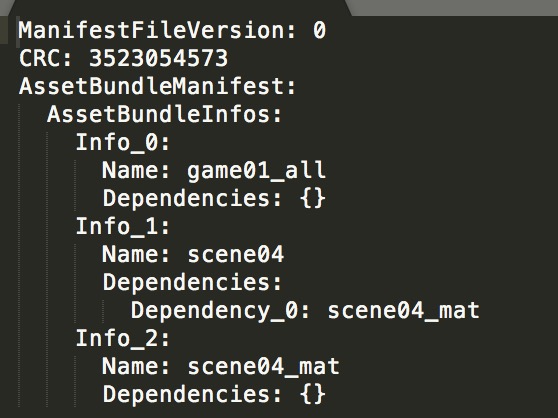
window.manifest 中的信息,我们能看到这个scene04以及其Dependencies:scene04_mat
Unity3D AssetBundle的打包与加载的更多相关文章
- AssetBundle资源打包与加载
AssetBundle资源打包 1.AssetLabels资源标签 文件名:资源打包成AssetBundle后的文件名,类似于压缩包的名字 后缀:自定义 文件名和后缀名都是小写格式(大写会自动转为小 ...
- KEngine:Unity3D资源的打包、加载、调试监控
资源模块做什么? 资源模块——ResourceModule,是KEngine中最核心的模块,其他模块基本或多或少的对它有依赖,它主要的功能是:资源打包.路径定义.资源管理.资源调试. 资源模块对Uni ...
- [Unity] unity5.3 assetbundle打包及加载
Unity5.3更新了assetbundle的打包和加载api,下面简单介绍使用方法及示例代码. 在Unity中选中一个prefab查看Inspector窗口,有两个位置可以进行assetbundle ...
- Unity3d Web3d资源的动态加载
Unity3d Web3d资源的动态加载 @灰太龙 参考了宣雨松的博客,原文出处http://www.xuanyusong.com/archives/2405,如果涉及到侵权,请通知我! Unity3 ...
- 【Unity3D】Unity3D之 Resources.Load 动态加载资源
[Unity3D]Unity3D之 Resources.Load 动态加载资源 1.Resources.Load:使用这种方式加载资源,首先需要下Asset目录下创建一个名为Resources的文件夹 ...
- Unity3d 5.x AssetBundle打包与加载
1.AssetBundle打包 unity 5.x版本AssetBundle打包,只需要设置好AssetBundle的名称后,unity会自动将其打包,无需处理其他,唯独需要做的是设置好个AssetB ...
- Unity5 AssetBundle 打包以及加载
using UnityEngine; using System.Collections; using System.Collections.Generic; using UnityEditor; us ...
- 【Unity3d】3d网页游戏场景打包与加载
http://www.cnblogs.com/dosomething/archive/2012/04/07/2436353.html 3d游戏中 一个场景往往比较大 如果游戏的进行需要下载一个10 ...
- Unity3D在移动平台下加载AssetBundle导致Shader效果不正确的问题
这个问题,主要还是在移动平台下开发导致的. 在编辑器里调试加载AB时会导致Shader效果不正确的原因,主要还是编辑器下加载以IOS或是ANDROID平台打包的AB它所使用的shader已经编译成对应 ...
随机推荐
- _spellmod_base
技能基础修改(进去可能会改动) 可以配合数据库的spell_dbc在线制作无补丁技能. 具体效果查询DBC表 `spellid` int(11) NOT NULL DEFAULT '0', `Effe ...
- react项目中页面跳转、刷新及获取网络状态
// 页面跳转 window.location.href = 'http://speedtest.wangxiaotong.com/' // 页面刷新 window.location.reload() ...
- Python自学:第三章 根据值删除元素
motorcycles = ["honda", "yamaha", "suzuki", "ducati"] print( ...
- CHM文件命令转换成html
在Windows下chm转换为html的超简单方法(反编译CHM文件的方法) 通过调用Windows命令,将chm 文件转换为html 文件. 方法: 命令行(cmd),输入hh -decompile ...
- HTL里面使用sling model的时候传参问题
Question: Can we pass in parameters? <div data-sly-use.myClass=”${ ‘mysite.myproject.HeaderCompon ...
- git 的详解
https://blog.csdn.net/youzhouliu/article/details/78952453
- 关于footer 小于一屏还要在底部显示的思考
首先想到了页面是动态的 就是js 计算 但是有一个简单的方法就是 运用定位 1 footer 的祖先元素没有定位属性 absoulite (这样他就会相对于文档定位) left:0 bottom : ...
- 【转】Asp.Net Core2.0获取客户IP地址,及解决发布到Ubuntu服务器获取不到正确IP解决办法
1.获取客户端IP地址实现方法(扩展类) using Microsoft.AspNetCore.Http; using Microsoft.AspNetCore.Mvc.ModelBinding; u ...
- There are multiple modules with names that only differ in casing. 黄色warning
There are multiple modules with names that only differ in casing.有多个模块同名仅大小写不同This can lead to unexp ...
- 微信公众号手机无法直接下载APK文件是怎么回事
现在微信分享的功能很多,从分享的链接下载apk安卓包是很正常的,但是微信不让下载apk包,只能通过浏览器来下载,但是这要给用户一个提示吧,不然用户不知道 下面我们来实现,引导用户通过浏览器来下载apk ...