
VS2015+Win10 调试DirectX 报错
安装完Win10调试程序突然在这个地方报错:
#if (defined(DEBUG) || defined(_DEBUG))

deviceFlags |= D3D11_CREATE_DEVICE_DEBUG;

#endif /* (defined(DEBUG) || defined(_DEBUG)) */
错误信息如下:
D3D11CreateDevice: Flags (0x2) were specified which require the D3D11 SDK Layers for Windows 10, but they are not present on the system. These flags must be removed, or the Windows 10 SDK must be installed. Flags include: D3D11_CREATE_DEVICE_DEBUG
问题分析:
以前在win7 和Win8 下安装完DirectX 的SDK就不错了,在Win10 下则装了DirectX也报错(Win8 的SDK 和Win10 的SDK都装了)
后来在MSDN的博客中发现:
Windows 10 optional feature: Graphics Tools
There are several scenarios where you need only minimal graphics tools on the target system. For example:
- Install the D3D SDK Layers so that your application can create a D3D Debug device
- Use DXCAP command line tool to capture and playback D3D graphics log file
- Scripting of API traces or doing regression testing on a lab machine
In these cases, all you need to install is the Windows 10 optional feature of “Graphics Tools”.
To install the Graphics Tools optional feature, go to the Settings panel, under System, Apps & features, Manage optional Features, Add a feature, and then look for “Graphics Tools”
解决方案:
方法1
Settings panel -> System -> Apps & features -> Manage optional Features -> Add a feature -> Select "Graphics Tools"
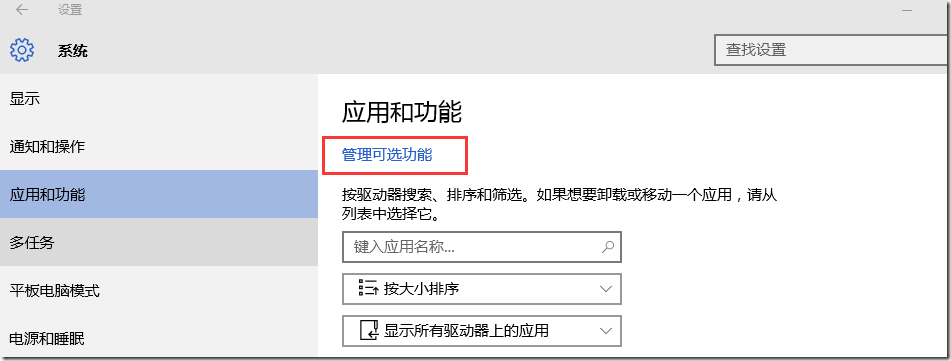
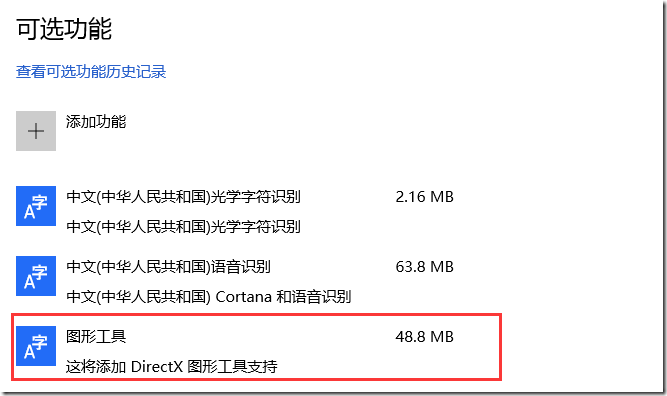
方法2
用管理员身份打开命令行工具(cmd),执行如下命令:
Dism /online /add-capability /capabilityname:Tools.Graphics.DirectX~~~~0.0.1.0
参考
Visual Studio 2015 and Graphics Tools for Windows 10
Use D3D11 debug layer with VS2013 on Windows 10
VS2015+Win10 调试DirectX 报错的更多相关文章
- 【Datastage】Datastage在win10上安装报错:This Application requires one of the following versions of the .NET Framework:v1.1.4322 Do you want to install this .NET Framework version now?
Datastage在win10上安装报错如下: 这个错误的意思是:.netFramWork的版本不符合要求,于是,我在网上下载了一个版本一致的 下载地址为:http://pan.baidu.com/s ...
- 获取win10 Insider Preview报错0x80080300
获取win10 Insider Preview报错0x80080300 1.msconfig2.隐藏Microsoft 服务3.disable 剩下的服务4.win + i, Update&s ...
- Ubuntu-1404 GDB 调试C++报错
问题 Ubuntu1404下,当用GDB调试C++程序时,报错ImportError: No module named 'libstdcxx' 解决办法 vim ~/.gdbinit #~/.gdbi ...
- win10安装wmi报错问题
在win10上,安装wmi,首先下载https://pypi.python.org/pypi/WMI/#downloads,将wmi下载下来 安装过程中,会报错,No Python installat ...
- 本地调试 谷歌浏览器报错:跨域问题处理 Access-Control-Allow-Origin
前端在本地,调试,就经常的就是会遇到 调用接口,提示跨域了. 如你要访问 http://****/api/user chrome 浏览器 报错: XMLHttpRequest cannot load ...
- ionic真机调试Android报错 - could not read ok from ADB Server * failed to start daemon * error: cannot connect to daemon
在使用真机调试Android程序时,报错如下: could not read ok from ADB Server * failed to start daemon error: cannot con ...
- 安卓小程序的一次bug调试,报错:java.lang.NullPointerException,logcat学习
做实验的时候,调试了很久后模拟器执行后,app还是会崩溃并停止运行,错误如下. 因为初学,所以也不知道怎么使用调试工具,也不懂看日志,经过学习后尝试这查看了LogCat日志上面有这样的提示: 其中引起 ...
- Delphi2007 在Win10 下运行报错 Assertion failure
Delphi2007 原来安装在Win7 下 运行正常, 自从升级到Win10 ,新建工程运行然后关闭报错, 报错信息如下: ---------------------------bds.exe - ...
- vscode与MinGW64调试c++报错
这个问题在刚配好环境测试的时候往往不会被发现,因为单纯的c++编译调试是没问题的.但一旦调试使用stl库的代码就会报错,而编译又没问题且可以正常运行,但在vscode的集成终端里运行不会显示任何本该显 ...
随机推荐
- 解析大型.NET ERP系统 高质量.NET代码设计模式
1 缓存 Cache 系统中大量的用到缓存设计模式,对系统登入之后不变的数据进行缓存,不从数据库中直接读取.耗费一些内存,相比从SQL Server中再次读取数据要划算得多.缓存的基本设计模式参考下面 ...
- 【Win 10应用开发】自定义浮动层——Flyout
最近几天总是下雨,真是“何处秋窗无雨声”,也“不知风雨几时休”. 好,进入正题. 弹出层有三种. 第一种是ContentDialog,即内容对话框,它其实类似于模态对话框,弹出后会覆盖整个窗口区域,并 ...
- 锋利的jQuery--编写jQuery插件(读书笔记五)[完结篇]
1.表单验证插件Validation 2.表单插件Form 3.动态事件绑定插件livequery 可以为后来的元素绑定事件 类似于jQuery中的live()方法 4.jQuer ...
- ElasticSearch 5学习(1)——安装Elasticsearch、Kibana和X-Pack
安装准备: 安装Elasticsearch唯一的要求是安装官方新版的Java,包括对应的Jdk. 安装Elasticsearch 首先到官网下载最新版本的Elasticsearch压缩包. 可以使用命 ...
- 设计模式(九): 从醋溜土豆丝和清炒苦瓜中来学习"模板方法模式"(Template Method Pattern)
今天是五.四青年节,祝大家节日快乐.看着今天这标题就有食欲,夏天到了,醋溜土豆丝和清炒苦瓜适合夏天吃,好吃不上火.这两道菜大部分人都应该吃过,特别是醋溜土豆丝,作为“鲁菜”的代表作之一更是为大众所熟知 ...
- window.name实现的跨域数据传输
这篇文章是对 JavaScript跨域总结与解决办法 的补充. 有三个页面: a.com/app.html:应用页面. a.com/proxy.html:代理文件,一般是一个没有任何内容的html文件 ...
- Python笔记之不可不练
如果您已经有了一定的Python编程基础,那么本文就是为您的编程能力锦上添花,如果您刚刚开始对Python有一点点兴趣,不怕,Python的重点基础知识已经总结在博文<Python笔记之不可不知 ...
- android使用ImageLoader实现图片缓存(安卓开发必备)
相信大家在学习以及实际开发中基本都会与网络数据打交道,而这其中一个非常影响用户体验的就是图片的缓存了,若是没有弄好图片缓存,用户体验会大大下降,总会出现卡顿情况,而这个问题尤其容易出现在ListVie ...
- [spring]03_装配Bean
3.1 JavaBean 3.1.1 JavaBean 是什么 JavaBean 是一种JAVA语言写成的可重用组件. 为写成JavaBean,类必须是具体的和公共的,并且具有无参数的构造器. Jav ...
- 关于Quartz.NET作业调度框架的一点小小的封装,实现伪AOP写LOG功能
Quartz.NET是一个非常强大的作业调度框架,适用于各种定时执行的业务处理等,类似于WINDOWS自带的任务计划程序,其中运用Cron表达式来实现各种定时触发条件是我认为最为惊喜的地方. Quar ...