
Ibatis自动生成dao sqlmapper文件和domain文件过程
generator自动生成mybatis的xml配置、model、map等信息:
1、下载mybatis-generator-core-1.3.2.jar包。
网址:http://code.google.com/p/mybatis/downloads/list?can=3&q=Product%3DGenerator,下载mybatis-generator-core-1.3.2-bundle.zip,解压
找到lib下的需要jar包。
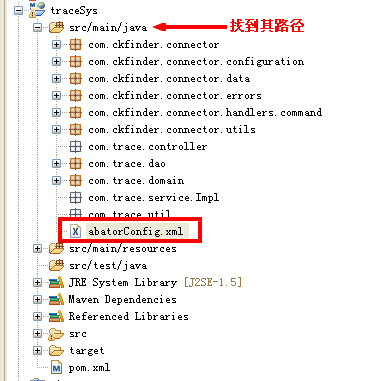
3、编写genertor的xml文件,名下:generator.xml
<?xml version="1.0" encoding="UTF-8" ?><!DOCTYPE generatorConfiguration PUBLIC "-//mybatis.org//DTD MyBatis Generator Configuration 1.0//EN" "http://mybatis.org/dtd/mybatis-generator-config_1_0.dtd" ><generatorConfiguration><classPathEntry location="D:\apache-tomcat-7.0.52\webapps\traceSys\WEB-INF\lib\mysql-connector-java-5.1.29.jar" /><context id="context1"><jdbcConnection driverClass="com.mysql.jdbc.Driver" connectionURL="jdbc:mysql://localhost:3306/trace_sys" userId="root" password="" /><javaModelGenerator targetPackage="com.trace.domain"targetProject="D:\cpn-work\traceSys\src\main\java" /><sqlMapGenerator targetPackage="com.trace.dao" targetProject="D:\cpn-work\traceSys\src\main\java"></sqlMapGenerator><javaClientGenerator targetPackage="com.trace.dao"targetProject="D:\cpn-work\traceSys\src\main\java" type="XMLMAPPER" /><table tableName="company" enableCountByExample="false" enableUpdateByExample="false" enableDeleteByExample="false" enableSelectByExample="false" selectByExampleQueryId="false" /><table tableName="goods" enableCountByExample="false" enableUpdateByExample="false" enableDeleteByExample="false" enableSelectByExample="false" selectByExampleQueryId="false" /><table tableName="goods_discuss" enableCountByExample="false" enableUpdateByExample="false" enableDeleteByExample="false" enableSelectByExample="false" selectByExampleQueryId="false" /><table tableName="goods_production" enableCountByExample="false" enableUpdateByExample="false" enableDeleteByExample="false" enableSelectByExample="false" selectByExampleQueryId="false" /><table tableName="goods_profile" enableCountByExample="false" enableUpdateByExample="false" enableDeleteByExample="false" enableSelectByExample="false" selectByExampleQueryId="false" /><table tableName="goods_record" enableCountByExample="false" enableUpdateByExample="false" enableDeleteByExample="false" enableSelectByExample="false" selectByExampleQueryId="false" /><table tableName="type" enableCountByExample="false" enableUpdateByExample="false" enableDeleteByExample="false" enableSelectByExample="false" selectByExampleQueryId="false" /><table tableName="user" enableCountByExample="false" enableUpdateByExample="false" enableDeleteByExample="false" enableSelectByExample="false" selectByExampleQueryId="false" /></context></generatorConfiguration>
enableCountByExample="false"
enableUpdateByExample="false"
enableDeleteByExample="false"
enableSelectByExample="false"
selectByExampleQueryId="false"
schema即为数据库名, tableName为对应的数据库表, domainObjectName是要生成的实体类,
如果想要mapper配置文件加入sql的where条件查询, 可以将enableCountByExample等设为true,
这样就会生成一个对应domainObjectName的Example类, enableCountByExample等设为false时,
就不会生成对应的Example类了.
java -jar E:\Websoft\mybaits\mybatis-generator-core-1.3.2\lib\mybatis-generator-core-1.3.2.jar -configfile E:\WebWorkSpace\workspace_js\downAttachdemo\src\com\mochasoft\down\generator.xml -overwrite
Ibatis自动生成dao sqlmapper文件和domain文件过程的更多相关文章
- iBatis——自动生成DAO层接口提供操作函数(详解)
iBatis——自动生成DAO层接口提供操作函数(详解) 在使用iBatis进行持久层管理时,发现在使用DAO层的updateByPrimaryKey.updateByPrimaryKeySelect ...
- 【Java MyBatis Generator】使用generator自动生成Dao,Mapping和实体文件
具体请参照: http://blog.csdn.net/fengshizty/article/details/43086833 按照上面博客地址,下载Generator的依赖包: 如下是我的配置文件: ...
- Mybatis-Generator插件自动生成Dao、Model、Mapping相关文件
最近做项目,mapping 有点多而且容易写错,于是试着用了Mybatis-Generator 插件自动生成 dao, domain mapping 文件.感觉还挺好用.把相关配置分享,一边以后做项 ...
- 使用Mybatis-Generator自动生成Dao、Model、Mapping相关文件(转)-----https://www.cnblogs.com/smileberry/p/4145872.html
https://www.cnblogs.com/smileberry/p/4145872.html 使用Mybatis-Generator自动生成Dao.Model.Mapping相关文件(转)
- Mybatis-Generator 自动生成Dao、Model、Mapping相关文档
最近在学习mybatis,结果在写Mapping的映射文件时insert语句一直报错,于是想看看标准的映射文件是什么样.百度到Mybatis-Generator 自动生成Dao.Model.Mappi ...
- T4 模板自动生成带注释的实体类文件
T4 模板自动生成带注释的实体类文件 - 只需要一个 SqlSugar.dll 生成实体就是这么简单,只要建一个T4文件和 文件夹里面放一个DLL. 使用T4模板教程 步骤1 创建T4模板 如果你没有 ...
- IDEA利用mybatis-generator自动生成dao和mapper
pom.xml配置 <properties> <java.version>1.8</java.version> <mybatis-generator-core ...
- ibatis 自动生成map,bean,dao
1.下载 AbatorForEclipse1.1.0 地址:http://download.csdn.net/detail/fym548/9426877 点击Archive按钮选择下载的,然后重启My ...
- 使用mybatis generator插件,自动生成dao、dto、mapper等文件
mybatis generator 介绍 mybatis generator中文文档http://mbg.cndocs.tk/ MyBatis Generator (MBG) 是一个Mybatis的代 ...
随机推荐
- Puppent 介绍原理及安装
Puppet原理: Puppet是一个或者多个master,众多client,所有的客户端都定期(默认为30分钟)使用facter工具把 客户端的基本信息,通过https的xmlrpc协议发送给服务器 ...
- 滚动视图UIScrollView
int i; @interface ViewController () @end @implementation ViewController - (void)viewDidLoad { [super ...
- ibatis resultMap 结果集映射
1.结果集映射 就是将返回的记录,逐个字段映射到java对象上:如果数据库字段与java对象的成员变量名对应的话,则使用resultClas即可 2.实现 结合 ibatis初探这篇文章中提到的pro ...
- drupal错误: Maximum execution time of 240 seconds exceeded
drupal7.5安装完成,导入汉化包时,出现错误: Fatal error: Maximum execution time of 240 seconds exceeded in D:\phpweb\ ...
- 判断Android应用是否安装、运行
本文介绍3个方法,判断手机上是否安装了某应用.该应用是否正在运行.获取手机某个APK文件的安装Intent.启动该Intent就可以直接安装该APK. /** * 判断应用是否已安装 * * @par ...
- over-float清除浮动++隐藏溢出
overflow:hidden这个CSS样式是大家常用到的CSS样式,但是大多数人对这个样式的理解仅仅局限于隐藏溢出,而对于清除浮动这个含义不是很了解.一提到清除浮动,我们就会想到另外一个CSS样式: ...
- java面向对象_接口
java接口 interface,是一个抽象类型,是抽象方法的集合,接口通常以interface来声明.一个类通过继承接口的方式,从而来继承接口的抽象方法. 接口并不是类,编写接口的方式和类很相似,但 ...
- java.lang.IllegalArgumentException: Can't convert argument: null
出现这样的异常:: 这是由于eclipse在修改项目名的时候,eclipse自动更新部署了web.xml文件 并且重新生成了xml文件的头部声明. 新增了java的命名把这个javaee去掉就可以了. ...
- Ubuntu下安装Reids
安装 官网 http://redis.io/ 下载安装包 redis-3.0.5.tar.gz 解压 tar -zxvf redis-3.0.5.tar.gz cd redis-3.0.5 安 ...
- ubuntu 解压 windows 生成的 zip 文件乱码问题
在windows上压缩的文件,是以系统默认编码中文来压缩文件.由于zip文件中没有声明其编码,所以linux上的unzip一般以默认编码解压,中文文件名会出现乱码. 有两种方式解决问题:(建议采用方法 ...