
So easy Webservice 7.CXF 发布WebService
(一)使用ServerFactoryBean 方式实现发布WS服务
1.新建项目,添加cxf jar包到项目中
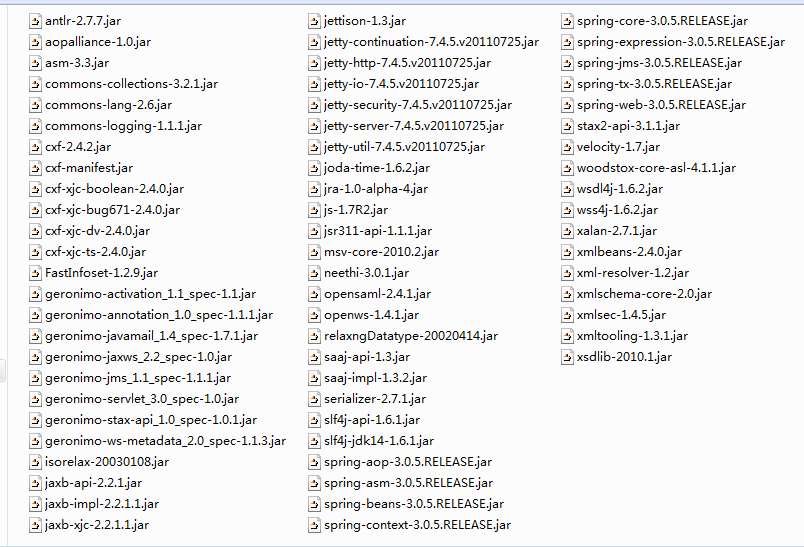
2.编写服务实现类
/**

 * CXF WebService

 * 不用注解

 * @author mlxs

 *

 */

public class CXFWebService {

    public String sayHello(String name){

        return "hello," + name;

    }

}
3.编写服务发布类
/**

 * CXF 使用ServerFactoryBean发布WS服务,采用编码方式

 * 这种方式不好:不支持注解,不能修改WSDL文件

 *         如设置服务名称无效:

 *         @WebService(

 *            serviceName="cxfHelloService"

 *        )

 * @author mlxs

 *

 */

public class CXFPublishWS {

    public static void main(String[] args) {

        String address = "http://127.0.0.1:2345/cxfHello";

        ServerFactoryBean factoryBean = new ServerFactoryBean();

        //设置服务地址

        factoryBean.setAddress(address);

        //设置服务实现类

        factoryBean.setServiceBean(new CXFWebService());

        //发布WS

        factoryBean.create();

        System.out.println(address + "?WSDL");

    }

}
4.访问WSDL地址:http://127.0.0.1:2345/cxfHello?WSDL
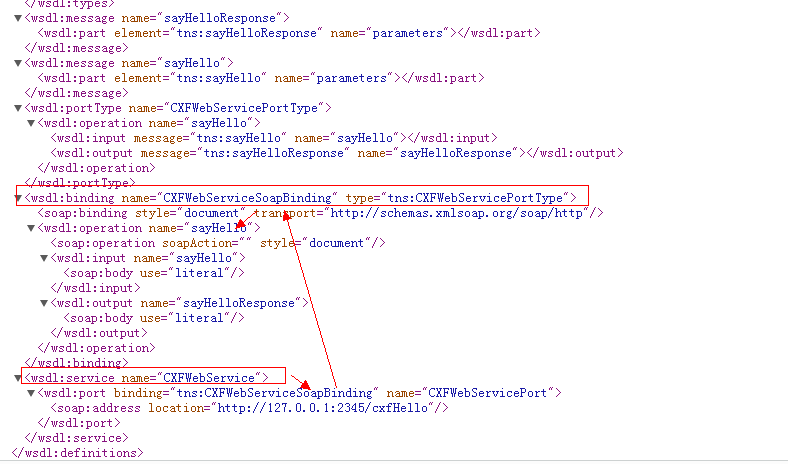
5.总结:
这种方式不好:不支持注解,不能修改WSDL文件
* 如设置服务名称无效:
* @WebService(
* serviceName="cxfHelloService"
* )
(二)下面使用支持注解,支持日志的发布方式:
1.创建CXF WS实现类 可以支持注解:自定义服务名
/**

 * CXF WebService

 * @author mlxs

 *

 */

@WebService(

        serviceName="CXFWs1"

)

public class CXFWebService {

    public String sayHello(String name){

        return "hello," + name;

    }

}
2.创建发布类
/**

 * CXF 使用JaxWsServerFactoryBean发布WS服务,采用编码方式

 * 这种方式:

 * 1.支持注解

 * 2.可以打印日志

 * @author mlxs

 *

 */

public class CXFPublishWS {

    public static void main(String[] args) {

        String address = "http://127.0.0.1:2345/cxfJaxWsHello";

        JaxWsServerFactoryBean factoryBean = new JaxWsServerFactoryBean();

        //设置服务地址

        factoryBean.setAddress(address);

        //设置服务实现类

        factoryBean.setServiceBean(new CXFWebService());

        //支持日志:在有请求进来、和返回给客户端的时候打印日志

        factoryBean.getInInterceptors().add(new LoggingInInterceptor());

        factoryBean.getInInterceptors().add(new LoggingOutInterceptor());

        //发布WS

        factoryBean.create();

        System.out.println(address + "?WSDL");

    }

}
运行后:
2016-1-27 23:13:37 org.apache.cxf.service.factory.ReflectionServiceFactoryBean buildServiceFromClass

信息: Creating Service {http://jaxws.cxfws.ws.mlxs.com/}CXFWs1 from class com.mlxs.ws.cxfws.jaxws.CXFWebService

2016-1-27 23:13:37 org.apache.cxf.endpoint.ServerImpl initDestination

信息: Setting the server's publish address to be http://127.0.0.1:2345/cxfJaxWsHello

2016-1-27 23:13:37 org.eclipse.jetty.util.log.Slf4jLog info

信息: jetty-7.4.5.v20110725

2016-1-27 23:13:37 org.eclipse.jetty.util.log.Slf4jLog info

信息: Started SelectChannelConnector@127.0.0.1:2345 STARTING

2016-1-27 23:13:37 org.eclipse.jetty.util.log.Slf4jLog info

信息: started o.e.j.s.h.ContextHandler{,null}

http://127.0.0.1:2345/cxfJaxWsHello?WSDL
3.访问WSDL地址(Get请求):

控制台日志:
2016-1-27 23:16:30 org.apache.cxf.interceptor.AbstractLoggingInterceptor log

信息: Inbound Message

----------------------------

ID: 1

Address: http://127.0.0.1:2345/cxfJaxWsHello?WSDL

Http-Method: GET

Content-Type:

Headers: {Accept=[text/html,application/xhtml+xml,application/xml;q=0.9,image/webp,*/*;q=0.8], accept-encoding=[gzip, deflate, sdch], Accept-Language=[zh-CN,zh;q=0.8], Cache-Control=[max-age=0], connection=[keep-alive], Content-Type=[null], Host=[127.0.0.1:2345], Upgrade-Insecure-Requests=[1], User-Agent=[Mozilla/5.0 (Windows NT 6.1; WOW64) AppleWebKit/537.36 (KHTML, like Gecko) Chrome/45.0.2454.101 Safari/537.36]}

--------------------------------------
4.使用wsimport下载源码,放到client工程中,执行访问WS接口:
public static void main(String[] args) {

        CXFWs1 ws = new CXFWs1();

        CXFWebService port = ws.getCXFWebServicePort();

        System.out.println(port.sayHello("administrator"));

    }
客户端输出:

hello,administrator
服务端日志:

2016-1-27 23:21:41 org.apache.cxf.interceptor.AbstractLoggingInterceptor log

信息: Inbound Message

----------------------------

ID: 4

Address: http://127.0.0.1:2345/cxfJaxWsHello

Encoding: UTF-8

Http-Method: POST

Content-Type: text/xml; charset=UTF-8

Headers: {Accept=[text/xml, multipart/related, text/html, image/gif, image/jpeg, *; q=.2, */*; q=.2], connection=[keep-alive], Content-Length=[215], content-type=[text/xml; charset=UTF-8], Host=[127.0.0.1:2345], SOAPAction=[""], User-Agent=[Java/1.6.0_13]}

Payload: <?xml version="1.0" ?><S:Envelope xmlns:S="http://schemas.xmlsoap.org/soap/envelope/"><S:Body><ns2:sayHello xmlns:ns2="http://jaxws.cxfws.ws.mlxs.com/"><arg0>administrator</arg0></ns2:sayHello></S:Body></S:Envelope>

--------------------------------------
(三)WebService总结
1.ws访问流程: 在调用方法的时候先发送一条get请求去访问远程的wsdl文件(此文件中有相应的公共接口和可以调用的方法),此流程称为"握手"
2.然后在客户端发送 post请求传输 soap数据交给服务器,最后服务器返回soap格式给客户端
3.前面所讲的ws服务都是硬编码的服务, Service应该是单例模式, 如果有Spring,CXF应该需要交给Spring管理
So easy Webservice 7.CXF 发布WebService的更多相关文章
- Spring集成CXF发布WebService并在客户端调用
Spring集成CXF发布WebService 1.导入jar包 因为官方下载的包里面有其他版本的sprring包,全导入会产生版本冲突,所以去掉spring的部分,然后在项目根目录下新建了一个CXF ...
- 使用CXF发布WebService
这里普及一下WebService和cxf的知识.关于webservice和cxf: WebService.各种提供服务的组件 .企业总线.通讯总线(ESB)CXF:是一个SOA框架,Axi ...
- CXF发布webService服务以及客户端调用
这篇随笔内容是CXF发布webService服务以及客户端调用的方法 CXF是什么? 开发工作之前需要下载CXF和安装 下载地址:http://cxf.apache.org 安装过程: <1&g ...
- SpringBoot整合cxf发布webService
1. 看看项目结构图 2. cxf的pom依赖 1 <dependency>2 <groupId>org.apache.cxf</groupId>3 <art ...
- SpringMVC4整合CXF发布WebService
SpringMVC4整合CXF发布WebService版本:SpringMVC 4.1.6,CXF 3.1.0项目管理:apache-maven-3.3.3 pom.xml <project x ...
- 使用CXF发布WebService服务简单实例
一.说明: 前面介绍了使用axis2来发布Webservice服务,现在介绍一种更popular,更高效的Webservice服务发布技术:CXF Apache CXF = Celtix + XFir ...
- CXF发布webservice入门
1.设置CXF的bin目录进环境变量 2.CXF导入相关的jar包. 3.建立接口 @WebService public interface HelloWorld { public void say( ...
- [置顶] 利用CXF发布webService的小demo
其实webService的发布不仅仅只有xfire,今天,给大家介绍一下用CXF发布一个webService的小demo,CXF也是我做webService用的第一个框架... 先将相关的jar引进来 ...
- Spring+CXF整合来管理webservice(服务器启动发布webservice)
Spring+CXF整合来管理webservice 实现步骤: 1. 添加cxf.jar 包(集成了Spring.jar.servlet.jar ),spring.jar包 ,serv ...
随机推荐
- 【python cookbook】【数据结构与算法】8.与字典有关的计算问题
问题:在字典上对数据执行各式各样的计算(比如求最小值.最大值.排序). 解决方案:利用zip()将字典的键-值对“反转”为值-键对序列. 例如:如下字典存放的股票名称和对应的价格: >>& ...
- ansible
3.1 配置 #vim /etc/ansible/hosts //定义主机,支持IP和域名,支持分组 [local] 127.0.0.1 [nginx] 192.168.0.10 ...
- Android 常用工具类之SPUtil,可以修改默认sp文件的路径
参考: 1. 利用Java反射机制改变SharedPreferences存储路径 Singleton1900 2. Android快速开发系列 10个常用工具类 Hongyang import ...
- 分析Linux内核创建一个新进程的过程【转】
转自:http://www.cnblogs.com/MarkWoo/p/4420588.html 前言说明 本篇为网易云课堂Linux内核分析课程的第六周作业,本次作业我们将具体来分析fork系统调用 ...
- org.apache.commons.httpclient
org.apache.commons.httpclient /** * post 方法 * @param url * @param params * @return */ public static ...
- xib托线出来的为什么是weak而不是strong
因为控件他爹( view.superview )已经揪着它的小辫了( strong reference ),你( viewController )眼瞅着( weak reference )就好了. 当 ...
- hdwiki中模板的使用说明
HDwiki所有模版文件都在根目录view下的default文件里,以admin_开头的是后台的模版文件,其它不是以admin_开头的,就是所有的前台文件.具体列表如下:首页模版文件: index. ...
- poj1988 Cube Stacking
并查集的高效之处在于路径压缩和延迟更新. 在本题中需要额外维护子树的规模以及当前子树节点到跟的距离两个数组. 由于一个新的数必然是两棵树拼接而成,对于子树规模的更新直接相加即可, 对于节点到跟的距离: ...
- JavaScript 中的Object的使用详解笔记(一)
昨天的学习笔记,今天更新上.第三遍看oop,还是理解的比较到位了. 1.JavaScript的组成:ECMAScript(最新6) + DOM + BOM 2.数组与对象的应用: object的基 ...
- ACM-ICPC国际大学生程序设计竞赛北京赛区(2016)网络赛 A Simple Job
描述 Institute of Computational Linguistics (ICL), Peking University is an interdisciplinary institute ...