
SpringBoot整合cxf发布webService
1. 看看项目结构图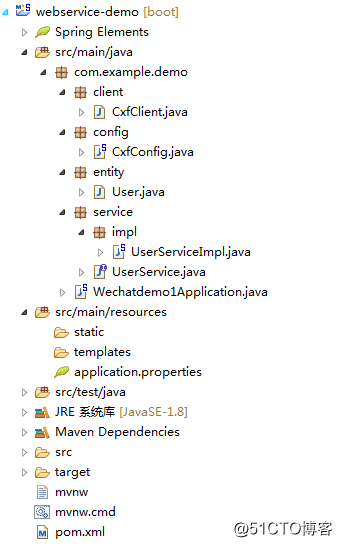
2. cxf的pom依赖
1 <dependency>
2 <groupId>org.apache.cxf</groupId>
3 <artifactId>cxf-spring-boot-starter-jaxws</artifactId>
4 <version>3.2.4</version>
5 </dependency>
3. 开始编写webService服务端
3.1 实体类entity
1 package com.example.demo.entity;
2
3 import java.io.Serializable;
4 /
5 @ClassName:User
6 @Description:测试实体
7 @author Jerry
8 @date:2018年4月10日下午3:57:38
9 */
10 public class User implements Serializable{
11
12 private static final long serialVersionUID = -3628469724795296287L;
13
14 private String userId;
15 private String userName;
16 private String email;
17 public String getUserId() {
18 return userId;
19 }
20 public void setUserId(String userId) {
21 this.userId = userId;
22 }
23 public String getUserName() {
24 return userName;
25 }
26 public void setUserName(String userName) {
27 this.userName = userName;
28 }
29 public String getEmail() {
30 return email;
31 }
32 public void setEmail(String email) {
33 this.email = email;
34 }
35 @Override
36 public String toString() {
37 return "User [userId=" + userId + ", userName=" + userName + ", email=" + email + "]";
38 }
39
40 }**
3.2 服务接口
package com.example.demo.service;
import javax.jws.WebMethod;
import javax.jws.WebParam;
import javax.jws.WebResult;
import javax.jws.WebService;import com.example.demo.entity.User;
/
- @ClassName:UserService
- @Description:测试服务接口类
- include:两个测试方法
- @author Jerry
@date:2018年4月10日下午3:58:10br/>*/
//@WebService(targetNamespace="http://service.demo.example.com")如果不添加的话,动态调用invoke的时候,会报找不到接口内的方法,具体原因未知.
@WebService(targetNamespace="http://service.demo.example.com")
public interface UserService {@WebMethod//标注该方法为webservice暴露的方法,用于向外公布,它修饰的方法是webservice方法,去掉也没影响的,类似一个注释信息。
public User getUser(@WebParam(name = "userId") String userId);}**
3.3 服务接口的实现类
package com.example.demo.service.impl;
import java.util.HashMap;
import java.util.Map;
import java.util.UUID;import javax.jws.WebService;
import org.springframework.stereotype.Component;
import com.example.demo.entity.User;
import com.example.demo.service.UserService;
/
- @ClassName:UserServiceImpl
- @Description:测试服务接口实现类
- @author Jerry
@date:2018年4月10日下午3:58:58br/>*/
@WebService(serviceName="UserService",//对外发布的服务名
targetNamespace="http://service.demo.example.com",//指定你想要的名称空间,通常使用使用包名反转
endpointInterface="com.example.demo.service.UserService")//服务接口全路径, 指定做SEI(Service EndPoint Interface)服务端点接口br/>@Component
public class UserServiceImpl implements UserService{private Map<String, User> userMap = new HashMap<String, User>();
public UserServiceImpl() {
System.out.println("向实体类插入数据");
User user = new User();
user.setUserId(UUID.randomUUID().toString().replace("-", ""));user.setEmail("Jerry@163.xom");<br "="" rel="nofollow">br/>user.setUserName("test1");
user.setEmail("Jerry@163.xom");
userMap.put(user.getUserId(), user);user = new User();
user.setUserId(UUID.randomUUID().toString().replace("-", ""));
user.setUserName("test2");
user.setEmail("Jerryfix@163.xom");
userMap.put(user.getUserId(), user); user = new User();
user.setUserId(UUID.randomUUID().toString().replace("-", ""));
user.setUserName("test3");
user.setEmail("Jerryfix@163.xom");
userMap.put(user.getUserId(), user);}br/>@Override
public String getUserName(String userId) {
return "userId为:" + userId;br/>}
@Override
public User getUser(String userId) {
System.out.println("userMap是:"+userMap);
return userMap.get(userId);
}}****
3.4 发布webService的配置
package com.example.demo.config;
import javax.xml.ws.Endpoint;
import org.apache.cxf.Bus;
import org.apache.cxf.jaxws.EndpointImpl;
import org.apache.cxf.transport.servlet.CXFServlet;
import org.springframework.beans.factory.annotation.Autowired;
import org.springframework.boot.web.servlet.ServletRegistrationBean;
import org.springframework.context.annotation.Bean;
import org.springframework.context.annotation.Configuration;import com.example.demo.service.UserService;
/**
- @ClassName:CxfConfig
- @Description:cxf发布webservice配置
- @author Jerry
@date:2018年4月10日下午4:12:24br/>*/
@Configuration
public class CxfConfig {br/>@Autowired
private Bus bus;@Autowired
UserService userService;/**
- 此方法作用是改变项目中服务名的前缀名,此处127.0.0.1或者localhost不能访问时,请使用ipconfig查看本机ip来访问
- 此方法被注释后:wsdl访问地址为http://127.0.0.1:8080/services/user?wsdl
- 去掉注释后:wsdl访问地址为:http://127.0.0.1:8080/soap/user?wsdl
- @returnbr/>*/
@SuppressWarnings("all")
@Bean
public ServletRegistrationBean dispatcherServlet() {
return new ServletRegistrationBean(new CXFServlet(), "/soap/*");
}/** JAX-WS
- 站点服务
}
4. 项目启动后的wsdl信息
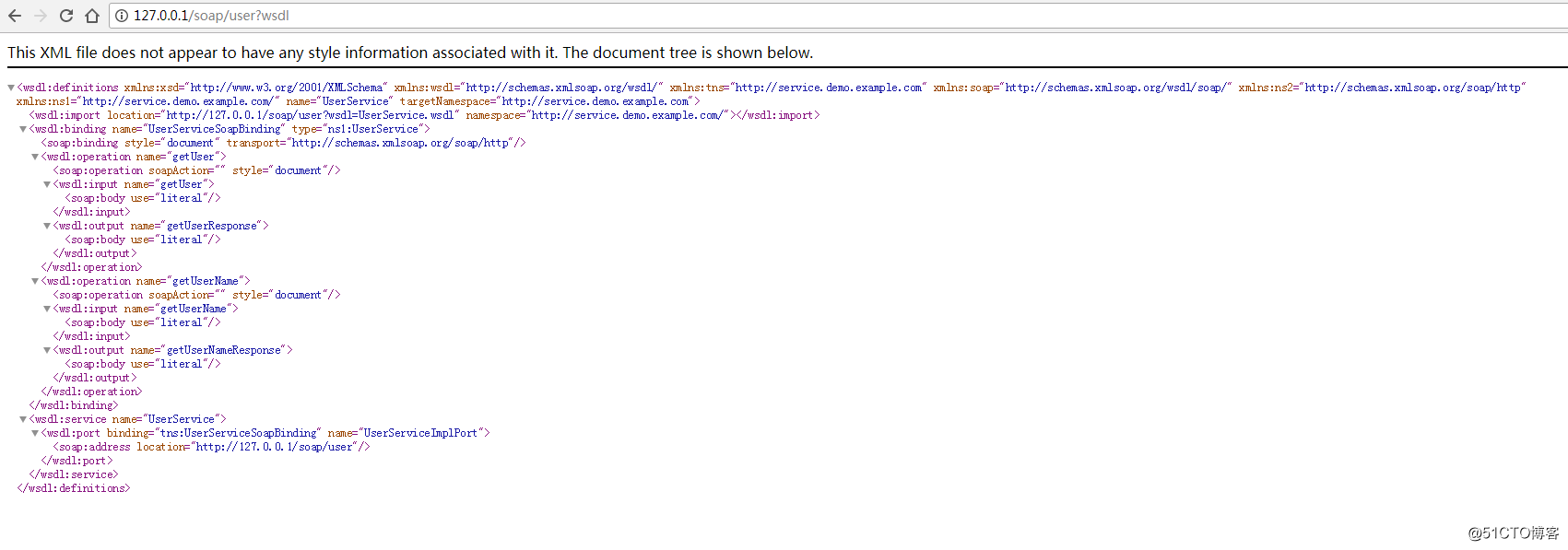
由于图省事,我将项目的服务端口改为了80,这样就省去了IP后面写端口号的麻烦。
5. 两种调用方式
package com.example.demo.client;
import org.apache.cxf.endpoint.Client;
import org.apache.cxf.jaxws.JaxWsProxyFactoryBean;
import org.apache.cxf.jaxws.endpoint.dynamic.JaxWsDynamicClientFactory;import com.example.demo.service.UserService;
/**
- @ClassName:CxfClient
- @Description:webservice客户端:
- 该类提供两种不同的方式来调用webservice服务
- 1:代理工厂方式
- 2:动态调用webservice
- @author Jerry
@date:2018年4月10日下午4:14:07
*/
public class CxfClient {public static void main(String[] args) {
CxfClient.main1();
CxfClient.main2();
}/**
- 1.代理类工厂的方式,需要拿到对方的接口地址
*/
public static void main1() {
try {
// 接口地址
String address = "http://127.0.0.1/soap/user?wsdl";
// 代理工厂
JaxWsProxyFactoryBean jaxWsProxyFactoryBean = new JaxWsProxyFactoryBean();
// 设置代理地址
jaxWsProxyFactoryBean.setAddress(address);
// 设置接口类型
jaxWsProxyFactoryBean.setServiceClass(UserService.class);
// 创建一个代理接口实现
UserService us = (UserService) jaxWsProxyFactoryBean.create();
// 数据准备
String userId = "maple";
// 调用代理接口的方法调用并返回结果
String result = us.getUserName(userId);
System.out.println("返回结果:" + result);
} catch (Exception e) {
e.printStackTrace();
}
}/**
- 2:动态调用
*/
public static void main2() {
// 创建动态客户端
JaxWsDynamicClientFactory dcf = JaxWsDynamicClientFactory.newInstance();
Client client = dcf.createClient("http://127.0.0.1/soap/user?wsdl");
// 需要密码的情况需要加上用户名和密码
// client.getOutInterceptors().add(new ClientLoginInterceptor(USER_NAME, PASS_WORD));
Object[] objects = new Object[0];
try {
// invoke("方法名",参数1,参数2,参数3....);
objects = client.invoke("getUserName", "maple");
System.out.println("返回数据:" + objects[0]);
} catch (java.lang.Exception e) {
e.printStackTrace();
}
}
}
6. 注意点.
诚如之前所说,如果接口的注解上不加targetNamespace的话,动态调用的时候,会报如下的错误。

SpringBoot整合cxf发布webService的更多相关文章
- SpringMVC4整合CXF发布WebService
SpringMVC4整合CXF发布WebService版本:SpringMVC 4.1.6,CXF 3.1.0项目管理:apache-maven-3.3.3 pom.xml <project x ...
- spring-boot整合Cxf的webservice案例
1.运行环境 开发工具:intellij idea JDK版本:1.8 项目管理工具:Maven 4.0.0 2.Maven Plugin管理 <?xml version="1.0&q ...
- SpringBoot2.1.6 整合CXF 实现Webservice
SpringBoot2.1.6 整合CXF 实现Webservice 前言 最近LZ产品需要对接公司内部通讯工具,采用的是Webservice接口.产品框架用的SpringBoot2.1.6,于是采用 ...
- CXF发布webService服务以及客户端调用
这篇随笔内容是CXF发布webService服务以及客户端调用的方法 CXF是什么? 开发工作之前需要下载CXF和安装 下载地址:http://cxf.apache.org 安装过程: <1&g ...
- CXF2.7整合spring发布webservice,返回值类型是Map和List<Map>类型
在昨天研究了发布CXF发布webservice之后想着将以前的项目发布webservice接口,可是怎么也发布不起来,服务启动失败,原来是自己的接口有返回值类型是Map. 研究了一番之后,发现: we ...
- Spring集成CXF发布WebService并在客户端调用
Spring集成CXF发布WebService 1.导入jar包 因为官方下载的包里面有其他版本的sprring包,全导入会产生版本冲突,所以去掉spring的部分,然后在项目根目录下新建了一个CXF ...
- CXF整合Spring发布WebService实例
一.说明: 上一篇简单介绍了CXF以及如何使用CXF来发布一个简单的WebService服务,并且介绍了客户端的调用. 这一篇介绍如何使用CXF与spring在Web项目中来发布WebService服 ...
- Spring整合CXF发布及调用WebService
这几天终于把webService搞定,下面给大家分享一下发布webService和调用webService的方法 添加jar包 (官方下载地址:http://cxf.apache.org/downlo ...
- spring mvc + mybaties + mysql 完美整合cxf 实现webservice接口 (服务端、客户端)
spring-3.1.2.cxf-3.1.3.mybaties.mysql 整合实现webservice需要的完整jar文件 地址:http://download.csdn.net/detail/xu ...
随机推荐
- php多进程编程相关资料(以备参考)
进程与线程的区别 要了解二者的区别与联系,首先得对进程与线程有一个宏观上的了解. 进程,是并发执行的程序在执行过程中分配和管理资源的基本单位,是一个动态概念,竟争计算机系统资源的基本单位.每一个进程都 ...
- ActiveMQ实战篇之ActiveMQ实现request/reply模型(二)
ActiveMQ实战篇之ActiveMQ实现request/reply模型(二)
- gdb 内存查看
(gdb) x /4xw 0xc20000000xc2000000: 0x00001111 0x22223333 0x00001111 0x22223333(gdb) x /8 ...
- Kafka内核中的分布式机制实现
Kafka内核中的分布式机制实现 一个Topic中的所有数据分布式的存储在kafka集群的所有机器(broker)上,以分区(partition)的的形式进行数据存储:每个分区允许存在备份数据/备份分 ...
- JFinal的使用
JFinal 中的Controller Controller是JFinal核心类之一,该类作为MVC模式中的控制器.基于JFinal的Web应用的控制器需要继承该类.Controller是定义Acti ...
- html传值及接收传值
传值:url?para1=value1¶2=value2 接收传值: <script type="text/javascript"> function ...
- 高通 fastboot 显示
需要在fastboot里面添加功能用于保存,记录一下fastboot显示的过程. android O新添加了选项,如下 platform/msm_shared/rules.mk ifeq ($(ENA ...
- linux下压缩与打包工具——gzip, bzip2 和 tar;
以下内容来自:阿铭http://www.apelearn.com/study_v2/chapter11.html, 把常用的写出来了:感觉可以了: 只管压缩与解压缩的工具: gzip 工具: 用的时候 ...
- 第三百九十节,Django+Xadmin打造上线标准的在线教育平台—Django+cropper插件头像裁剪上传
第三百九十节,Django+Xadmin打造上线标准的在线教育平台—Django+cropper插件头像裁剪上传 实现原理 前台用cropper插件,将用户上传头像时裁剪图片的坐标和图片,传到逻辑处理 ...
- logbook日志系统
python中替代logging的日志系统. 不过比之前的logging难理解. 先上打印到屏幕上的代码和存到日志文件中的代码: #!/usr/bin/env python3 # -*- coding ...