
Android——学习:线性布局权重分配
LinearLayout在Android中被广泛使用,LinearLayout有一个比较重要的属性——android:layout_weight。按照字面理解就是该控件的权重,这个值默认是 零(0)。
举个例子:
在下图中,整个界面是一个Linearlayout,包含了5个子控件Linerarlayout,分别是空的、用户名的、密码的、确认和取消按钮的、保存用户的layout。
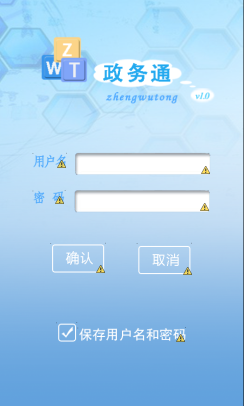
在这里,先给整个界面设置20个权重,再给子控件layout分别设置:10、1、2、3、1个权重,最后的效果就是上图。
Xml文件代码:
<?xml version="1.0" encoding="utf-8"?>

<LinearLayout

    xmlns:android="http://schemas.android.com/apk/res/android"

    android:layout_width="fill_parent"

    android:layout_height="fill_parent"

    android:id="@+id/mailLayout"

    android:orientation="vertical"

    android:background="@drawable/login_background"

    android:weightSum="20"

    >

    <!-- 空白部分 -->

    <LinearLayout

        android:id="@+id/loginSpace"

        android:layout_width="fill_parent"

        android:layout_height="wrap_content"

        android:layout_weight="10"

        >

    </LinearLayout>

    <!-- 登陆用户名 -->

    <LinearLayout

        android:id="@+id/loginNameLayout"

        android:layout_weight="1"

        android:layout_width="fill_parent"

        android:layout_height="wrap_content"

        android:gravity="center_horizontal"

        android:orientation="horizontal"

        >

        <ImageView

            android:id="@+id/loginTextName"

            android:layout_width="wrap_content"

            android:layout_height="wrap_content"

            android:src="@drawable/login_text_name"

            />

        <EditText

            android:id="@+id/userName"

            android:layout_width="wrap_content"

            android:layout_height="wrap_content"

            android:padding="2dp"

            android:layout_marginLeft="10dip"

            android:background="@drawable/login_name_input"

            />

    </LinearLayout>

    <!-- 登陆密码 -->

    <LinearLayout

        android:id="@+id/loginPasswordLayout"

        android:layout_weight="2"

        android:layout_width="fill_parent"

        android:layout_height="wrap_content"

        android:gravity="center_horizontal"

        android:orientation="horizontal"

        >

        <ImageView

            android:id="@+id/loginTextPassword"

            android:layout_width="wrap_content"

            android:layout_height="wrap_content"

            android:src="@drawable/login_text_pwd"

            />

        <EditText

            android:id="@+id/passWord"

            android:layout_width="wrap_content"

            android:layout_height="wrap_content"

            android:padding="2dp"

            android:password="true"

            android:layout_marginLeft="11dip"

            android:background="@drawable/login_pwd_input"

            />

    </LinearLayout>

    <!-- 确认登陆按钮和取消按钮 -->

     <LinearLayout

        android:id="@+id/loginButtonLayout"

        android:layout_weight="3"

        android:layout_width="fill_parent"

        android:layout_height="wrap_content"

        android:orientation="horizontal"

        android:gravity="center_horizontal"

        >

        <ImageButton

            android:id="@+id/loginButton"

            android:layout_width="wrap_content"

            android:layout_height="wrap_content"

            android:src="@drawable/login_confirm_button"

            android:background="@null"

            />

        <ImageButton

            android:id="@+id/cancelButton"

             android:layout_width="wrap_content"

            android:layout_height="wrap_content"

            android:layout_marginLeft="40dip"

            android:src="@drawable/login_text_cancel"

            android:background="@null" />

     </LinearLayout>

    <!-- 保存用户名和密码 -->

     <LinearLayout

        android:id="@+id/loginSaveUserLayout"

        android:layout_weight="1"

        android:layout_width="fill_parent"

        android:layout_height="wrap_content"

        android:gravity="center_horizontal"

        android:orientation="horizontal"

         >

         <CheckBox

             android:id="@+id/saveUserInfoCheckBox"

             android:layout_width="wrap_content"

             android:layout_height="wrap_content"

             android:button="@drawable/login_checkbox"

            android:checked="true" />

         <TextView

         android:id="@+id/loginTextSaveUser"

         android:layout_width="wrap_content"

         android:layout_height="wrap_content"

         android:background="@drawable/login_saveuser" />

    </LinearLayout>

</LinearLayout>
Android——学习:线性布局权重分配的更多相关文章
- Android学习----五大布局
1.LinearLayout 线性布局 android:orientation="horizontal" 制定线性布局的排列方式 水平 horizontal 垂直 vertical ...
- Android LinearLayout线性布局
LinearLayout是线性布局控件:要么横向排布,要么竖向排布 决定性属性:必须有的! android:orientation:vertical (垂直方向) .horizontal(水平方向) ...
- android 学习Layout布局的使用
android 常用布局 LinearLayout(线性布局) 线性的 垂直的 水平的RelativeLaytout(相对布局) 最灵活的TableLayout(表格布局) 使用GridView代替A ...
- android 学习 之 布局(上)
学习安卓布局前,先了解三个属性值: 1.fill_parent: 设置一个构件的布局为fill_parent将强制性地使构件扩展,以填充布局单元内尽可能多的空间 2.match_parent: And ...
- Android LinearLayout线性布局详解
为了更好地管理Android应用的用户界面里的各组件,Android提供了布局管理器.通过使用布局管理器,Android应用图形用户界面具有良好的平台无关性.推荐使用布局管理器来管理组件的分布.大小, ...
- Android学习5—布局简介
Android界面的布局主要有四种,分别为RelativeLayout.LinearLayout.TableLayout.FrameLayout,接下来分别介绍这些布局如何使用(为了简单起见,接下来的 ...
- Android学习——LinearLayout布局实现居中、左对齐、右对齐
android:orientation="vertical"表示该布局下的元素垂直排列: 在整体垂直排列的基础上想要实现内部水平排列,则在整体LinearLayout布局下再创建一 ...
- Android 使用线性布局LinearLayout和Button实现一个点红块游戏
这个游戏的功能类似打地鼠. 项目地址:https://github.com/moonlightpoet/RedBlock 程序下载试玩地址:https://github.com/moonlightpo ...
- android 学习 之 布局(下)LinearLayout,RelativeLayout,TableLayout,FrameLayout
<LinearLayout xmlns:android="http://schemas.android.com/apk/res/android" xmlns:tools=&q ...
随机推荐
- struts2 笔记02 文件上传、文件下载、类型转换器、国际化的支持
Struts2的上传 1. Struts2默认采用了apache commons-fileupload 2. Struts2支持三种类型的上传组件 3. 需要引入commons-fileupload ...
- LoadRunner并发用户和集合点的深入讨论
看到51上三个高手Zee, 大漠飞鹰,xingcyx的一场非常精彩的关于并发用户数和集合点的讨论,很有意义.如果对这两个概念不清楚的朋友,一定要仔细领悟了. 故事开始于xingcyx的一番话: 声明: ...
- IEnumerator:概念详解
IEnumerable接口是非常的简单,只包含一个抽象的方法GetEnumerator(),它返回一个可用于循环访问集合的IEnumerator对象.IEnumerator对象有什么呢?它是一个真正的 ...
- Linux内存管理原理【转】
转自:http://www.cnblogs.com/zhaoyl/p/3695517.html 本文以32位机器为准,串讲一些内存管理的知识点. 1. 虚拟地址.物理地址.逻辑地址.线性地址 虚拟地址 ...
- mongo VUE 操作
一 修改字段名称 db.rc_配置_付款限额_消费.update({ "生效标识" : 1, "$atomic" : "true" },{ ...
- c#线程创建
using System; using System.Collections.Generic; using System.ComponentModel; using System.Data; usin ...
- hdu4935 Prime Tree(2014多校联合第七场)
首先这是一道dp题,对题意的把握和对状态的处理是解题关键. 题目给出的范围是n在1到1e11之间,由于在裂变过称中左儿子总是父亲节点的一个非平凡约数,容易看出裂变过程只与 素数幂有关,并且显然有素数不 ...
- A Mathematical Curiosity 分类: HDU 2015-06-25 21:27 11人阅读 评论(0) 收藏
A Mathematical Curiosity Time Limit: 2000/1000 MS (Java/Others) Memory Limit: 65536/32768 K (Java/Ot ...
- TCP/IP通信实现
网络层的IP协议提供不可靠通信服务.TCP协议则解决了分组的重传和排序问题. TCP通信特征 : 1)全双工,同时发送和接收数据 2)只支持两个端口之间的通信 3)基于字节流.对端无法知道报文的边界. ...
- phpcms 03
继续上次对header.html文件的分析 logo<a href="{siteurl($siteid)}/"><img src="{IMG_PATH} ...