
Linux 配置YUM
标签:MYSQL/linux
概述
文章主要介绍配置163,mysql,epel这三个yum源。
目录
步骤
安装163源
注意:我这里的163的源是32位CPU的,如果是64位的要下载x86_64
我当前的服务器版本的redhat6,所以下载的安装包也应该是对应linux6的安装包,这里配置的是163的yum源。
wget http://mirrors.163.com/centos/6/os/i386/Packages/yum-3.2.29-69.el6.centos.noarch.rpm

wget http://mirrors.163.com/centos/6/os/i386/Packages/yum-plugin-fastestmirror-1.1.30-30.el6.noarch.rpm

wget http://mirrors.163.com/centos/6/os/i386/Packages/yum-metadata-parser-1.1.2-16.el6.i686.rpm

wget http://mirrors.163.com/centos/6/os/i386/Packages/python-iniparse-0.3.1-2.1.el6.noarch.rpm
卸载自带的yum
rpm -aq|grep yum|xargs rpm -e --nodeps
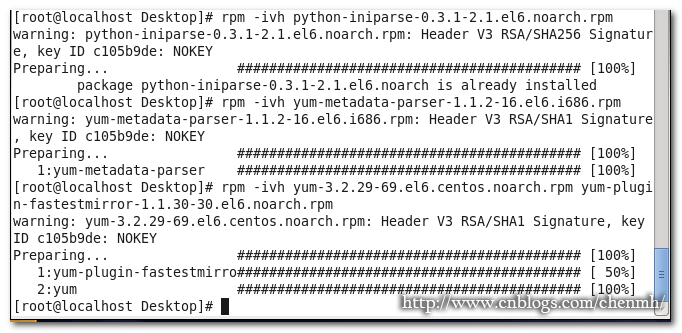
安装yum包
注意顺序
rpm -ivh python-iniparse-0.3.-2.1.el6.noarch.rpm

rpm -ivh yum-metadata-parser-1.1.-.el6.i686.rpm

--注意后面两个是一起安装

rpm -ivh yum-3.2.-.el6.centos.noarch.rpm yum-plugin-fastestmirror-1.1.-.el6.noarch.rpm
添加yum
切换路径
cd /etc/yum.repos.d/
下载文件
wget http://mirrors.163.com/.help/CentOS6-Base-163.repo
编辑文件
vim CentOS6-Base-.repo
内容如下
# CentOS-Base.repo

#

# The mirror system uses the connecting IP address of the client and the

# update status of each mirror to pick mirrors that are updated to and

# geographically close to the client.  You should use this for CentOS updates

# unless you are manually picking other mirrors.

#

# If the mirrorlist= does not work for you, as a fall back you can try the

# remarked out baseurl= line instead.

#

#

[base]

name=CentOS- - Base - .com

baseurl=http://mirrors.163.com/centos/6/os/i386/

#mirrorlist=http://mirrorlist.centos.org/?release=$releasever&arch=$basearch&repo=os

gpgcheck=

gpgkey=http://mirror.centos.org/centos/RPM-GPG-KEY-CentOS-6

#released updates

[updates]

name=CentOS- - Updates - .com

baseurl=http://mirrors.163.com/centos/6/updates/i386/

#mirrorlist=http://mirrorlist.centos.org/?release=$releasever&arch=$basearch&repo=updates

gpgcheck=

gpgkey=http://mirror.centos.org/centos/RPM-GPG-KEY-CentOS-6

#additional packages that may be useful

[extras]

name=CentOS- - Extras - .com

baseurl=http://mirrors.163.com/centos/6/extras/i386/

#mirrorlist=http://mirrorlist.centos.org/?release=$releasever&arch=$basearch&repo=extras

gpgcheck=

gpgkey=http://mirror.centos.org/centos/RPM-GPG-KEY-CentOS-6

#additional packages that extend functionality of existing packages

[centosplus]

name=CentOS- - Plus - .com

baseurl=http://mirrors.163.com/centos/6/centosplus/i386/

#mirrorlist=http://mirrorlist.centos.org/?release=$releasever&arch=$basearch&repo=centosplus

gpgcheck=

enabled=

gpgkey=http://mirror.centos.org/centos/RPM-GPG-KEY-CentOS-6

#contrib - packages by Centos Users

[contrib]

name=CentOS- - Contrib - .com

baseurl=http://mirrors.163.com/centos/6/contrib/i386/

#mirrorlist=http://mirrorlist.centos.org/?release=$releasever&arch=$basearch&repo=contrib

gpgcheck=

enabled=

gpgkey=http://mirror.centos.org/centos/RPM-GPG-KEY-CentOS-6
rpm --import http://mirrors.163.com/centos/RPM-GPG-KEY-CentOS-6
yum clean all
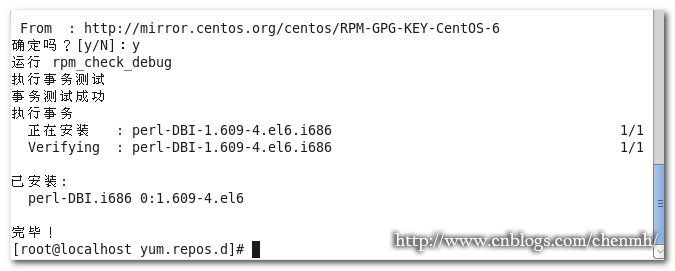
测试是否安装成功
yum install perl-DBI
64位
wget http://mirrors.163.com/centos/6/os/x86_64/Packages/yum-3.2.29-69.el6.centos.noarch.rpm

wget http://mirrors.163.com/centos/6/os/x86_64/Packages/yum-plugin-fastestmirror-1.1.30-30.el6.noarch.rpm

wget  http://mirrors.163.com/centos/6/os/x86_64/Packages/python-iniparse-0.3.1-2.1.el6.noarch.rpm

wget http://mirrors.163.com/centos/6/os/x86_64/Packages/yum-metadata-parser-1.1.2-16.el6.x86_64.rpm
# CentOS-Base.repo

#

# The mirror system uses the connecting IP address of the client and the

# update status of each mirror to pick mirrors that are updated to and

# geographically close to the client.  You should use this for CentOS updates

# unless you are manually picking other mirrors.

#

# If the mirrorlist= does not work for you, as a fall back you can try the

# remarked out baseurl= line instead.

#

#

[base]

name=CentOS- - Base - .com

baseurl=http://mirrors.163.com/centos/6/os/x86_64/

#mirrorlist=http://mirrorlist.centos.org/?release=$releasever&arch=$basearch&repo=os

gpgcheck=

gpgkey=http://mirror.centos.org/centos/RPM-GPG-KEY-CentOS-6

#released updates

[updates]

name=CentOS- - Updates - .com

baseurl=http://mirrors.163.com/centos/6/updates/x86_64/

#mirrorlist=http://mirrorlist.centos.org/?release=$releasever&arch=$basearch&repo=updates

gpgcheck=

gpgkey=http://mirror.centos.org/centos/RPM-GPG-KEY-CentOS-6

#additional packages that may be useful

[extras]

name=CentOS- - Extras - .com

baseurl=http://mirrors.163.com/centos/6/extras/x86_64/

#mirrorlist=http://mirrorlist.centos.org/?release=$releasever&arch=$basearch&repo=extras

gpgcheck=

gpgkey=http://mirror.centos.org/centos/RPM-GPG-KEY-CentOS-6

#additional packages that extend functionality of existing packages

[centosplus]

name=CentOS- - Plus - .com

baseurl=http://mirrors.163.com/centos/6/centosplus/x86_64/

#mirrorlist=http://mirrorlist.centos.org/?release=$releasever&arch=$basearch&repo=centosplus

gpgcheck=

enabled=

gpgkey=http://mirror.centos.org/centos/RPM-GPG-KEY-CentOS-6

#contrib - packages by Centos Users

[contrib]

name=CentOS- - Contrib - .com

baseurl=http://mirrors.163.com/centos/6/contrib/x86_64/

#mirrorlist=http://mirrorlist.centos.org/?release=$releasever&arch=$basearch&repo=contrib

gpgcheck=

enabled=

gpgkey=http://mirror.centos.org/centos/RPM-GPG-KEY-CentOS-6
添加mysqlYUM
下载yum包
wget http://dev.mysql.com/get/mysql-community-release-el6-5.noarch.rpm
安装yum包
rpm -ivh mysql-community-release-el6-5.noarch.rpm
查看yum源文件
cd /etc/yum.repos.d/
安装epel源
下载epel安装文件
wget http://mirrors.ustc.edu.cn/fedora/epel/6/x86_64/epel-release-6-8.noarch.rpm
32位:http://mirrors.ustc.edu.cn/fedora/epel/6/i386/epel-release-6-6.noarch.rpm
64位:http://mirrors.ustc.edu.cn/fedora/epel/6/x86_64/epel-release-6-8.noarch.rpm
安装
rpm -ivh epel-release-6-8.noarch.rpm
查看是否安装成功
rpm -q epel-release
导入KEY
rpm --import /etc/pki/rpm-gpg/RPM-GPG-KEY-EPEL-6
安装yum-priorities
查询是否安装了
rpm -q yum-plugin-priorities
安装
yum istall yum-priorities
yum源优先级的一个文件。
是yum-plugin-priroites这个插件的一个文件。
用来给yum源分优先级的。
比如你在centos下有centos,epel,rpmfusion三个yum源。
三个yum源中可能含有相同的软件,补丁之类的东西。
yum管理器为了分辨更新系统或者安装软件的时候用那个yum源的软件所以才有这么个东西。
如果说,设置centos官方的yum源优先级最高,epelyum源第二,rpmfusion第三。(用1到99来表示,1最高)
那在安装程序的时候,先寻找centos的yum源,如果源里面有要的程序,那就停止寻找,直接安装找到的,如果没有找到,就依次寻找epel和rpmfusion的源。
如果说三个yum源都含有同一个软件,那就安装优先级最高的yum源的。
总结
epel源里面的软件是最全的,所以我一般将epel源设为优先源。
文章如果对大家有帮助,请帮忙推荐,谢谢!!!
|
备注: 作者:pursuer.chen 博客:http://www.cnblogs.com/chenmh 本站点所有随笔都是原创,欢迎大家转载;但转载时必须注明文章来源,且在文章开头明显处给明链接,否则保留追究责任的权利。 《欢迎交流讨论》 |
---恢复内容结束---
Linux 配置YUM的更多相关文章
- Linux 配置yum源.
Linux 配置yum源. 环境:虚拟机中安装了RedHat ,在进行安装mariadb的时候,出现如下错误.是因为yum源的问题,需要进行配置yum源.本教程是配置本地yum源. [root@loc ...
- Linux 配置yum源(互联网)
Linux 配置yum源(互联网) 环境:操作系统Redhat 7.5 1.卸载现有的yum源 rpm -qa|grep yum|xargs rpm -e --nodeps #移除与原yum有 ...
- RedHat linux配置yum本地资源
今天安装个linux平台的oracle数据库,在oracle检测的时候发现有些系统补丁包没有安装,手动rpm安装报有些关联包也没有安装,想想如果一个一个rpm的话累死人了要,所以想起用yum来进行安装 ...
- linux配置yum源
yum(全称为 Yellow dog Updater, Modified)是一个在Fedora和RedHat以及SUSE中的Shell前端软件包管理器.基於RPM包管理,能够从指定的服务器自动下载RP ...
- Linux配置yum源(离线和在线)
配置yum源有2种方法,一种是离线yum源,另外一种是在线yum源. 一.离线yum源,基于安装光盘提供的安装仓库. 建立一个属于仓库文件夹 mkdir /media/zidong cd /media ...
- linux配置yum源、mount及yum命令
配置yum源: 在/mnt目录下新建一个空的目录,名为rhel. [root@localhost mnt]# mkdir rhel 然后 [root@localhost Packages]# cd ...
- Linux 配置yum本地安装源
cat /etc/system-release Red Hat Enterprise Linux Server release 7.0 (Maipo) 1 使用本地源得先挂载ISO光盘文件 # 可以创 ...
- linux配置 yum 源
使用 yum 命令安装软件包需要一个yum仓库(即yum源),yum通过客户端(yum命令本身即是yum客户端)去连接yum源服务器,CentOS默认yum源为官方的 http://mirrorlis ...
- Linux配置yum源(本地源和网络源)
目录 一:配置本地yum源 二:配置网络yum源 更新源可以获取最新的软件信息,以更新您的系统 Redhat7配置源 YUM(Yellow dog Updater Modified): yum是Re ...
随机推荐
- [Spring] Spring配置文件中特殊字符的规定
今天查找一个错误,发现在xml里面不能包含特殊字符:&,特来总结一下: XML中共有5个特殊的字符,分别是:&<>“’.如果配置文件中的注入值包括这些特殊字符,就需要进行特 ...
- 解决 U 盘写保护的问题
插了一个 U 盘,想格式化或者创建文件,但是提示我 U 盘是写保护的. 解决方法如下: Open a command prompt type DISKPART press type LIST VOLU ...
- SpringMVC(二) SpringMVC Hello World
准备条件: STS(集成了Spring相关工具的Eclipse) Spring软件包 spring-framework-4.3.3.RELEASE-dist.zip. 步骤: 加入jar包. Ecli ...
- trigger() --工作中问题nav样式
自动执行某元素的某个事件 $("#div").trigger("click"); //让系统自动执行单击事件 适用于nav样式中,下面横线绝对定位于nav.o ...
- [NHibernate]利用LINQPad查看NHibernate生成SQL语句
上篇文章中我们提到可以通过重写NHibernate的 EmptyInterceptor 拦截器来监控NHibernate发送给数据库的SQL脚本,今天看到有朋友用LINQPad工具来进行NHibern ...
- JavaScript中严格模式"use strict";需注意的几个雷区:
1.with语句会抛错误 2.未声明的变量被赋值会报错 3.arguments在严格模式下变为静态,传入的参数与arguments无关系 4.delete会报错 5.对象的重复属性名会报错 6.禁止八 ...
- 时代杂志发文:2017 AR/MR将变得比VR更加重要
每到年末都有很多企业或高管分析科技产业明年趋势.近日,时代杂志网页版刊登了2017年科技行业的五大趋势和热点话题的预测.该本作者TimBajarin,是硅谷市场研究公司CreativeStrategi ...
- Mybatis总结
jdbc.properties driver=com.mysql.jdbc.Driver url=jdbc:mysql://127.0.0.1:3306/testdb username=root pa ...
- Python 键盘记录
之前写的键盘记录最后一直在纠结弹框与不弹框的问题,代码找不到了,今天重新来一遍 #!/usr/bin/env python# -*-coding:utf-8 -*-from ctypes import ...
- 使用Jmeter录制web脚本
1:启动Jmeter: 2:选择测试计划,右键->添加->Threads(users)>线程组 3:选择这个线程组,右键->添加->配置元件->HTTP请求默认值, ...