
Jenkins+Gitlab+Ansible自动化部署(四)
接Jenkins+Gitlab+Ansible自动化部署(三)https://www.cnblogs.com/zd520pyx1314/p/10235394.html
Jenkins应用
Jenkins Linux Shell集成
登录Jenkins web管理页,点击新建任务
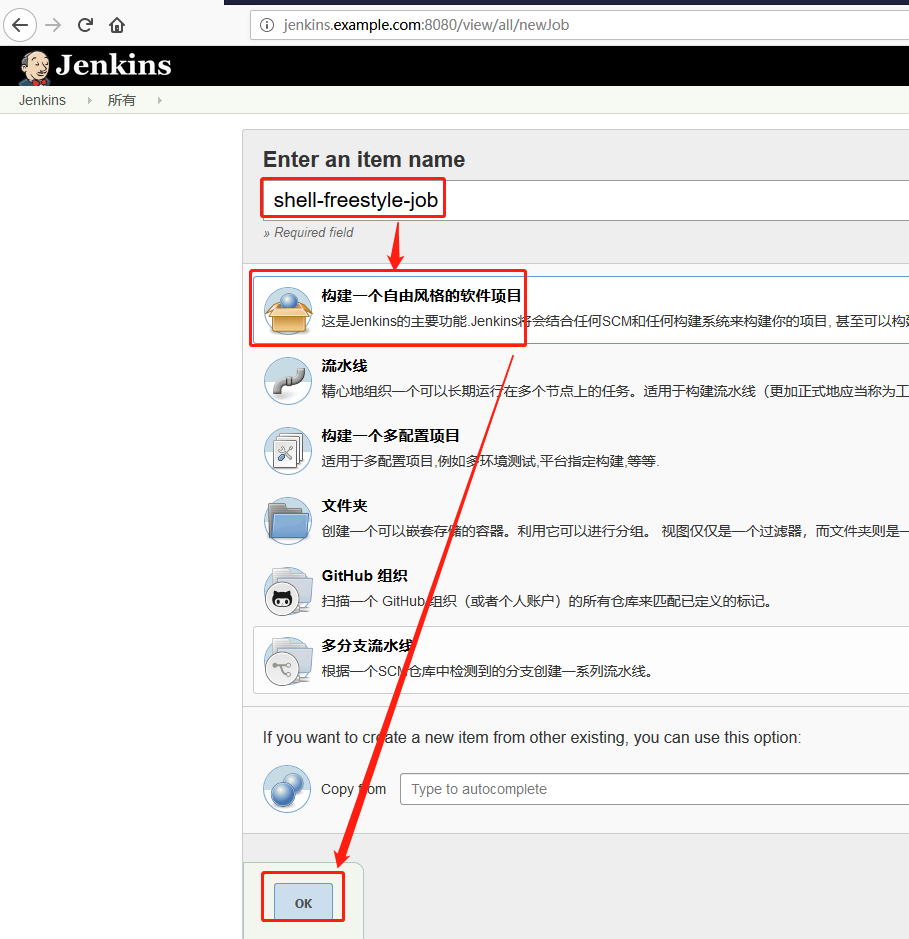
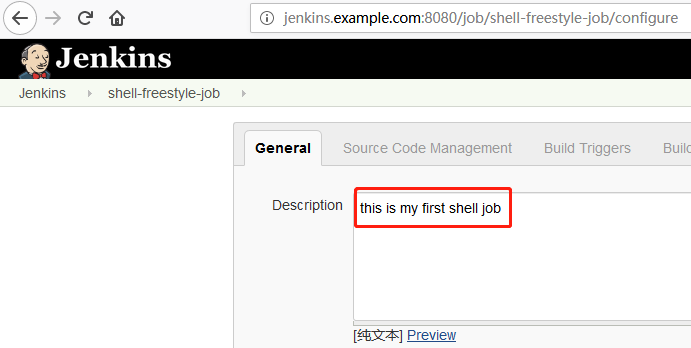
添加描述信息
添加构建执行shell

在执行shell输入框内输入
#!/bin/sh

user=`whoami`

if [ $user == 'deploy' ]

then

    echo "Hello, my name is $user"

else

    echo "Sorry, I am not $user"

fi

ip addr

cat /etc/system-release

free -m

df -h

py_cmd=`which python`

$py_cmd --version
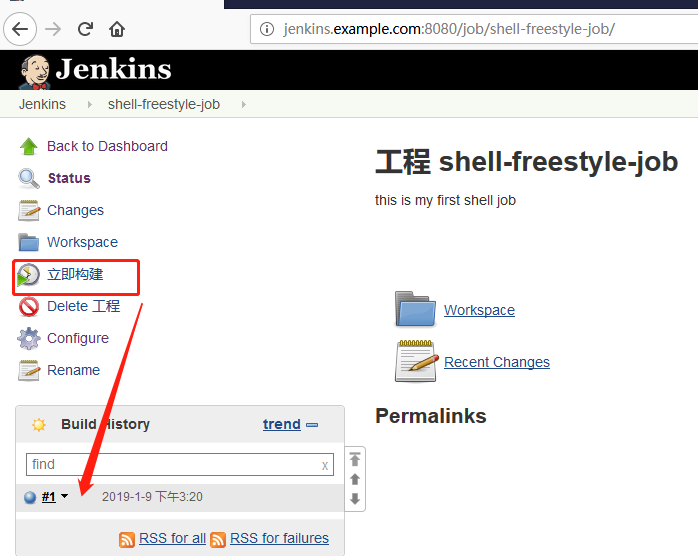
点击查看输出信息
Started by user admin

Building in workspace /var/lib/jenkins/workspace/shell-freestyle-job

[shell-freestyle-job] $ /bin/sh /tmp/jenkins3318863497197478868.sh

Hello, my name is deploy

: lo: <LOOPBACK,UP,LOWER_UP> mtu  qdisc noqueue state UNKNOWN group default qlen

    link/loopback ::::: brd :::::

    inet 127.0.0.1/ scope host lo

       valid_lft forever preferred_lft forever

    inet6 ::/ scope host

       valid_lft forever preferred_lft forever

: ens33: <BROADCAST,MULTICAST,UP,LOWER_UP> mtu  qdisc pfifo_fast state UP group default qlen

    link/ether :0c::::a4 brd ff:ff:ff:ff:ff:ff

    inet 192.168.244.131/ brd 192.168.244.255 scope global noprefixroute ens33

       valid_lft forever preferred_lft forever

    inet6 fe80::6c1f:4afc:8c42:2ef7/ scope link noprefixroute

       valid_lft forever preferred_lft forever

: ens34: <BROADCAST,MULTICAST,UP,LOWER_UP> mtu  qdisc pfifo_fast state UP group default qlen

    link/ether :0c::::ae brd ff:ff:ff:ff:ff:ff

: virbr0: <NO-CARRIER,BROADCAST,MULTICAST,UP> mtu  qdisc noqueue state DOWN group default qlen

    link/ether :::d5:9c:dd brd ff:ff:ff:ff:ff:ff

    inet 192.168.122.1/ brd 192.168.122.255 scope global virbr0

       valid_lft forever preferred_lft forever

: virbr0-nic: <BROADCAST,MULTICAST> mtu  qdisc pfifo_fast master virbr0 state DOWN group default qlen

    link/ether :::d5:9c:dd brd ff:ff:ff:ff:ff:ff

CentOS Linux release 7.5. (Core)

              total        used        free      shared  buff/cache   available

Mem:

Swap:

Filesystem               Size  Used Avail Use% Mounted on

/dev/mapper/centos-root   18G  .6G   13G  % /

devtmpfs                 975M       975M   % /dev

tmpfs                    992M       992M   % /dev/shm

tmpfs                    992M   11M  982M   % /run

tmpfs                    992M       992M   % /sys/fs/cgroup

/dev/sr0                 .8G  .8G      % /media/cdrom

/dev/sda1                497M  150M  347M  % /boot

tmpfs                    199M   12K  199M   % /run/user/

tmpfs                    199M       199M   % /run/user/

Python 2.7.

Finished: SUCCESS
Jenkins 参数集成
仍然登录到Jenkins web管理页,点击新建任务。
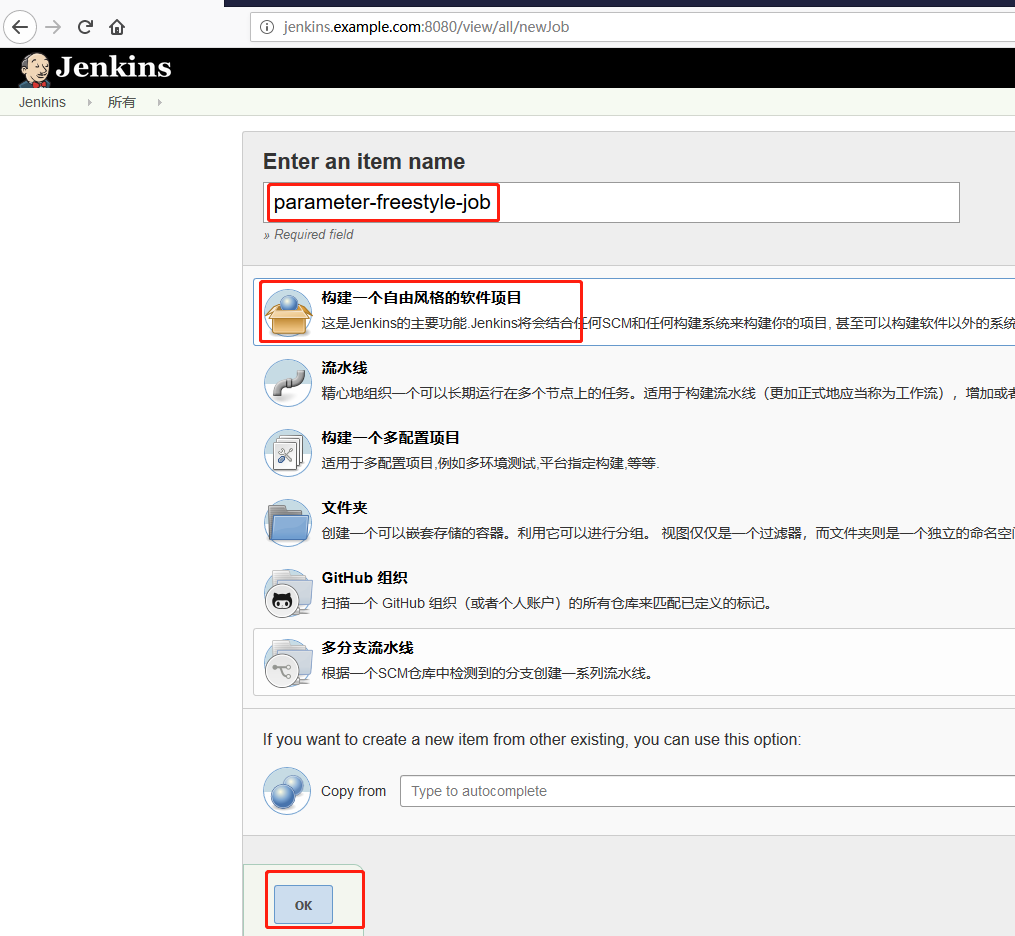
添加描述信息

点击“参数化构建过程”
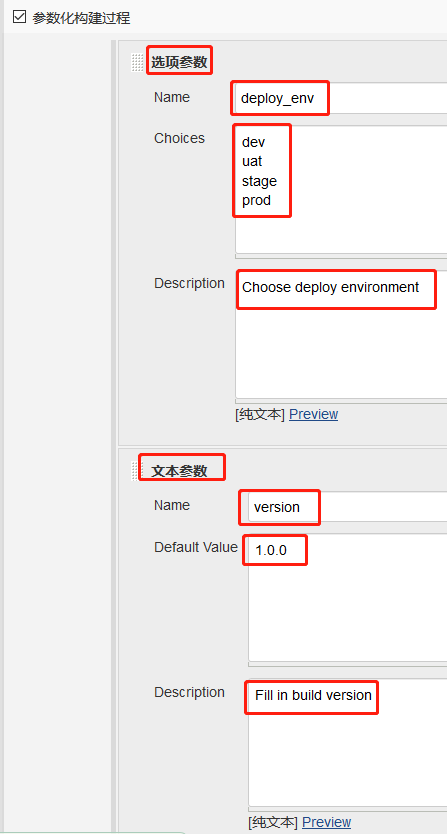
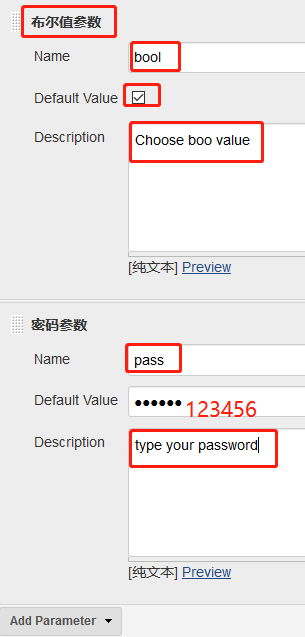
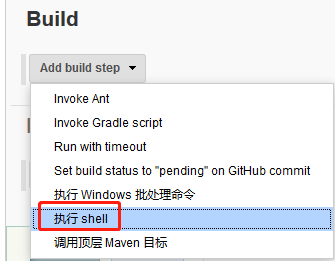
#!/bin/sh

echo "Current deploy environment is $deploy_env"

echo "The build is $version"

echo "The paasword is $pass"

if $bool

then

    echo "Request is approved"

else

    echo "Request is rejected"

fi
点击“Build with Parameters”后如下图所示
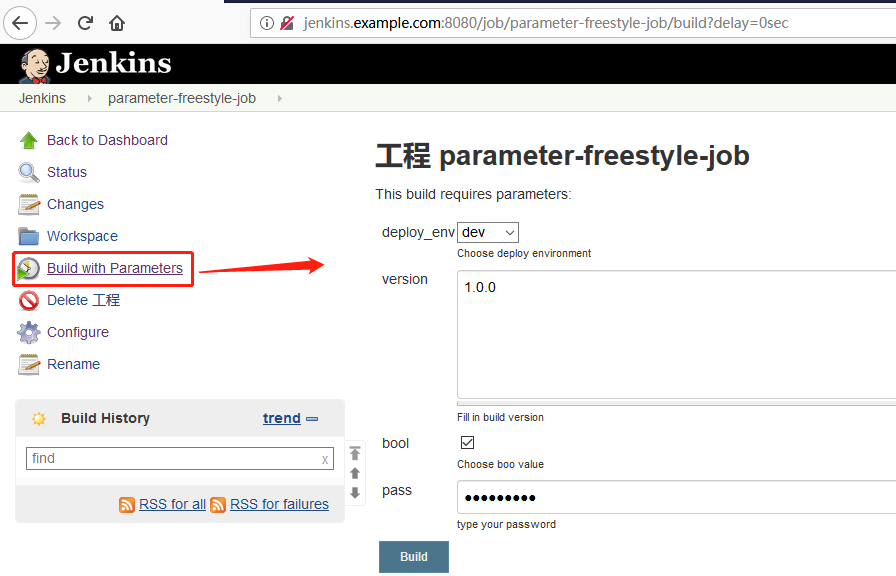
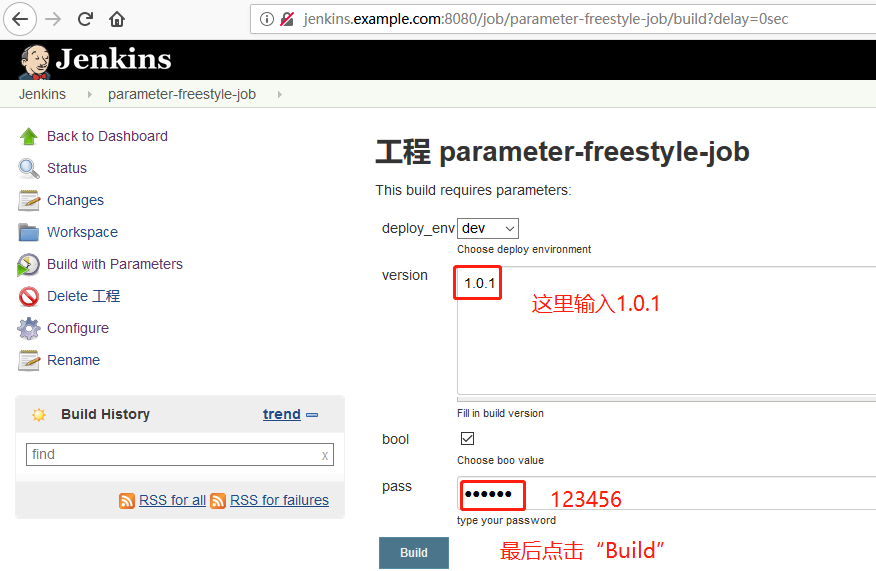
查看输出信息
Started by user admin

Building in workspace /var/lib/jenkins/workspace/parameter-freestyle-job

[parameter-freestyle-job] $ /bin/sh /tmp/jenkins459467524349987986.sh

Current deploy environment is dev

The build is 1.0.

The paasword is

Request is approved

Finished: SUCCESS
Jenkins Git集成
首先还是登录Jenkins web管理页,点击“New 任务”
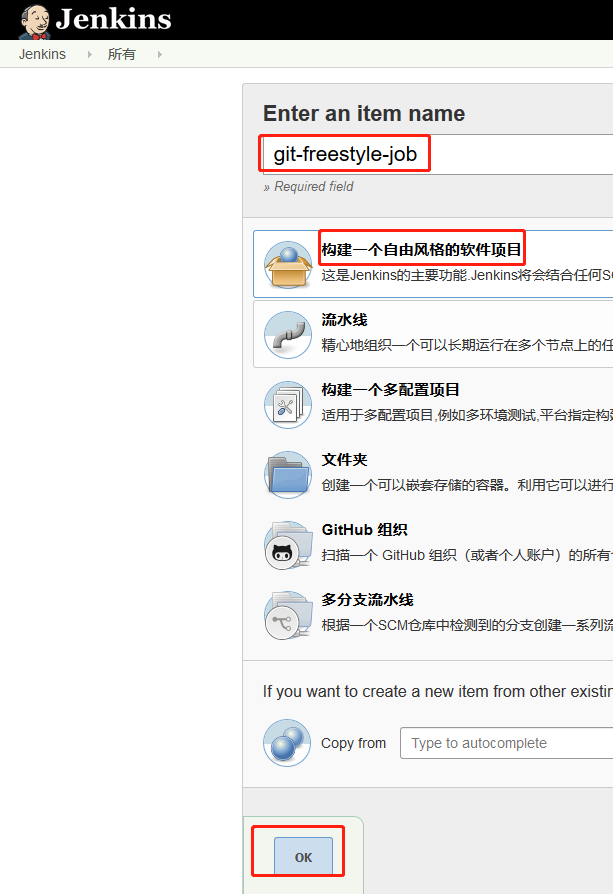
添加描述信息

返回到gitlab新建一个ansible-playbook.repo工程(新建过程略),只有一个ansible-playbook.txt空文件
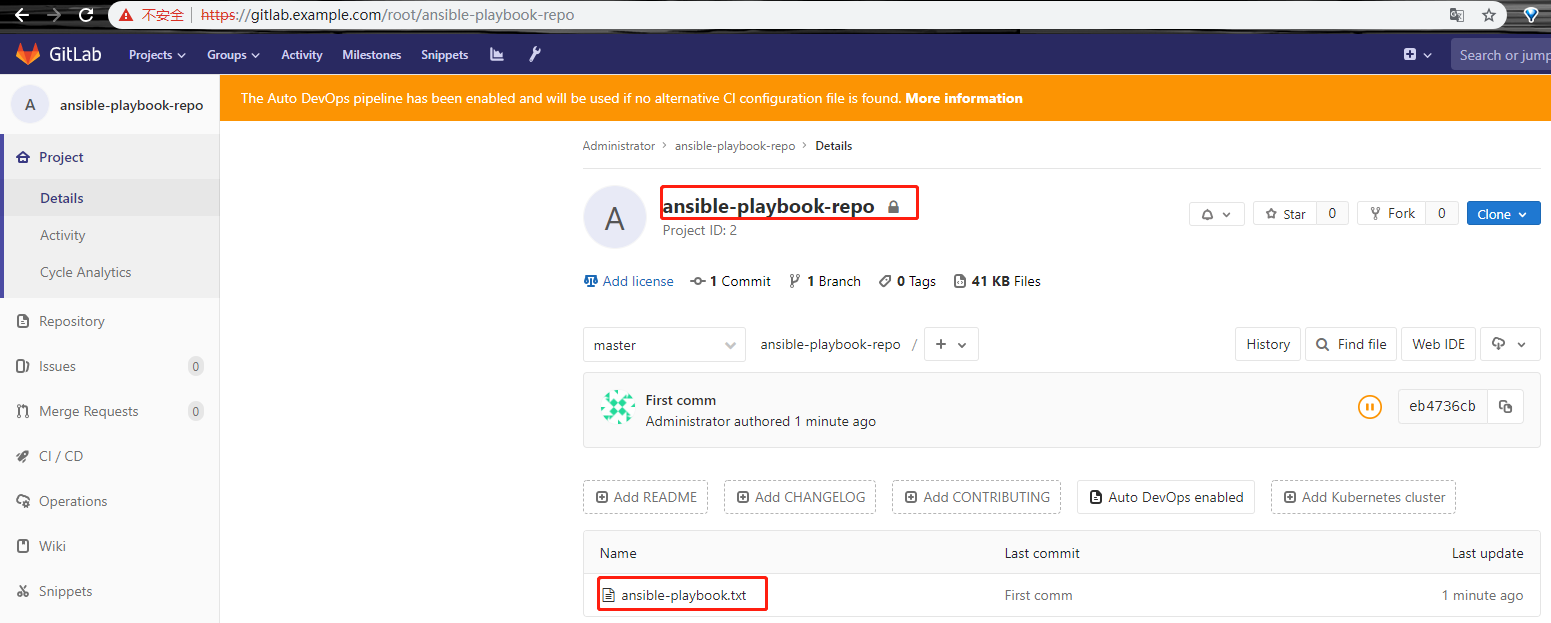
复制ansible-playbook.repo仓库地址,粘贴至下图
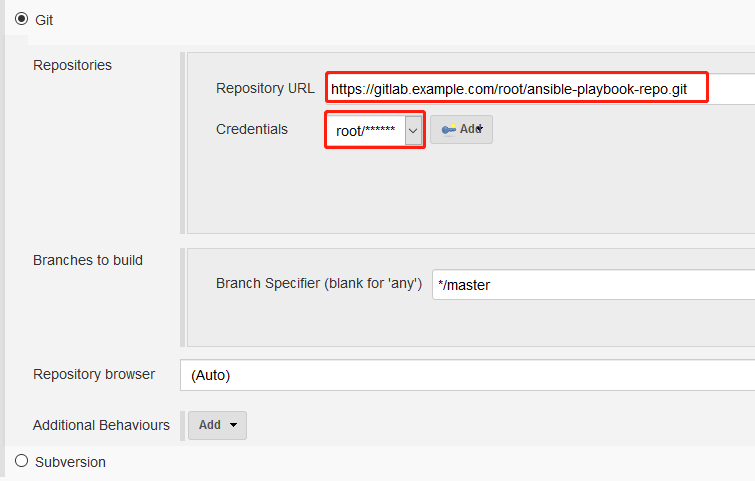
点击“立即构建”
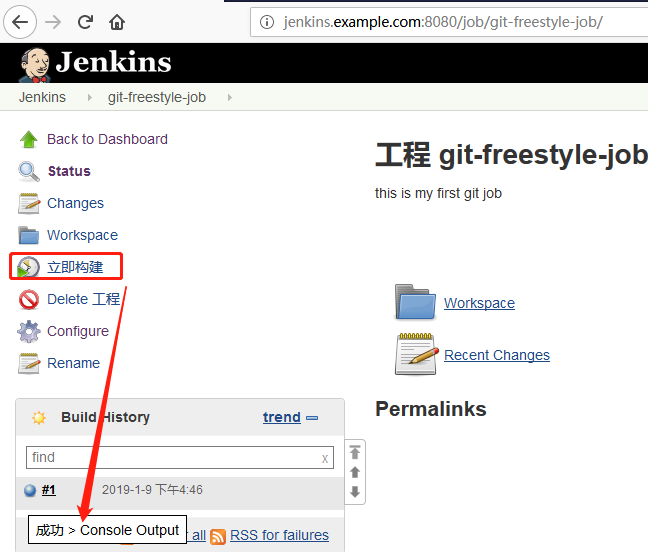
查看输出信息
Started by user admin

Building in workspace /var/lib/jenkins/workspace/git-freestyle-job

Cloning the remote Git repository

Cloning repository https://gitlab.example.com/root/ansible-playbook-repo.git

 > git init /var/lib/jenkins/workspace/git-freestyle-job # timeout=

Fetching upstream changes from https://gitlab.example.com/root/ansible-playbook-repo.git

 > git --version # timeout=

using GIT_ASKPASS to set credentials

 > git fetch --tags --progress https://gitlab.example.com/root/ansible-playbook-repo.git +refs/heads/*:refs/remotes/origin/*

 > git config remote.origin.url https://gitlab.example.com/root/ansible-playbook-repo.git # timeout=10

 > git config --add remote.origin.fetch +refs/heads/*:refs/remotes/origin/* # timeout=10

 > git config remote.origin.url https://gitlab.example.com/root/ansible-playbook-repo.git # timeout=10

Fetching upstream changes from https://gitlab.example.com/root/ansible-playbook-repo.git

using GIT_ASKPASS to set credentials

 > git fetch --tags --progress https://gitlab.example.com/root/ansible-playbook-repo.git +refs/heads/*:refs/remotes/origin/*

 > git rev-parse refs/remotes/origin/master^{commit} # timeout=10

 > git rev-parse refs/remotes/origin/origin/master^{commit} # timeout=10

Checking out Revision eb4736cb66dd954b1f45b1d38f789c84aaedb078 (refs/remotes/origin/master)

 > git config core.sparsecheckout # timeout=10

 > git checkout -f eb4736cb66dd954b1f45b1d38f789c84aaedb078

Commit message: "First comm"

First time build. Skipping changelog.

Finished: SUCCESS
Jenkins maven集成
打开maven官网:https://maven.apache.org/download.cgi
复制最新maven的软件包链接
http://mirrors.shu.edu.cn/apache/maven/maven-3/3.6.0/binaries/apache-maven-3.6.0-bin.tar.gz
安装maven
[root@jenkins ~]# wget http://mirrors.shu.edu.cn/apache/maven/maven-3/3.6.0/binaries/apache-maven-3.6.0-bin.tar.gz

[root@jenkins ~]# tar -xf apache-maven-3.6.-bin.tar.gz -C /opt/

[root@jenkins ~]# ls /opt/

apache-maven-3.6.  rh

[root@jenkins ~]# cd /opt/apache-maven-3.6./bin/

[root@jenkins bin]# ./mvn --version

Apache Maven 3.6. (97c98ec64a1fdfee7767ce5ffb20918da4f719f3; --25T02::+:)

Maven home: /opt/apache-maven-3.6.

Java version: 1.8.0_191, vendor: Oracle Corporation, runtime: /usr/lib/jvm/java-1.8.-openjdk-1.8.0.191.b12-.el7_6.x86_64/jre

Default locale: en_US, platform encoding: UTF-

OS name: "linux", version: "3.10.0-862.el7.x86_64", arch: "amd64", family: "unix"
回到Jenkins web管理页,点击“New 任务”

添加描述信息

回到gitlab主页
新建一个空的Java-war-dev工程,复制其仓库地址;
然后切到windows git bash命令行,上传本地代码到刚才新建的Java-war-dev仓库中:
xueji@xueji MINGW64 ~/Desktop/repo

$ pwd

/c/Users/xueji/Desktop/repo

xueji@xueji MINGW64 ~/Desktop/repo

$ ls

Java-war-dev/

xueji@xueji MINGW64 ~/Desktop/repo

$ git config --global user.name "root"

xueji@xueji MINGW64 ~/Desktop/repo

$ git config --global user.email "root@example.com"

xueji@xueji MINGW64 ~/Desktop/repo

$ git init

Initialized empty Git repository in C:/Users/xueji/Desktop/repo/.git/

xueji@xueji MINGW64 ~/Desktop/repo (master)

$ git remote add origin https://gitlab.example.com/root/java-war-dev.git

xueji@xueji MINGW64 ~/Desktop/repo (master)

$ git add .

warning: LF will be replaced by CRLF in Java-war-dev/pom.xml.

The file will have its original line endings in your working directory

warning: LF will be replaced by CRLF in Java-war-dev/src/main/webapp/WEB-INF/web.xml.

The file will have its original line endings in your working directory

warning: LF will be replaced by CRLF in Java-war-dev/src/main/webapp/index.jsp.

The file will have its original line endings in your working directory

xueji@xueji MINGW64 ~/Desktop/repo (master)

$ git commit -m"first commit"

[master (root-commit) aa3c70c] first commit

  files changed,  insertions(+)

 create mode  Java-war-dev/.DS_Store

 create mode  Java-war-dev/pom.xml

 create mode  Java-war-dev/src/.DS_Store

 create mode  Java-war-dev/src/main/.DS_Store

 create mode  Java-war-dev/src/main/webapp/.DS_Store

 create mode  Java-war-dev/src/main/webapp/WEB-INF/web.xml

 create mode  Java-war-dev/src/main/webapp/index.jsp

xueji@xueji MINGW64 ~/Desktop/repo (master)

$ git -c http.sslVerify=false push origin master

Enumerating objects: , done.

Counting objects: % (/), done.

Delta compression using up to  threads

Compressing objects: % (/), done.

Writing objects: % (/), 2.13 KiB | 726.00 KiB/s, done.

Total  (delta ), reused  (delta )

To https://gitlab.example.com/root/java-war-dev.git

 * [new branch]      master -> master
查看gitlab上已经上传成功,复制Java-war-dev仓库地址;
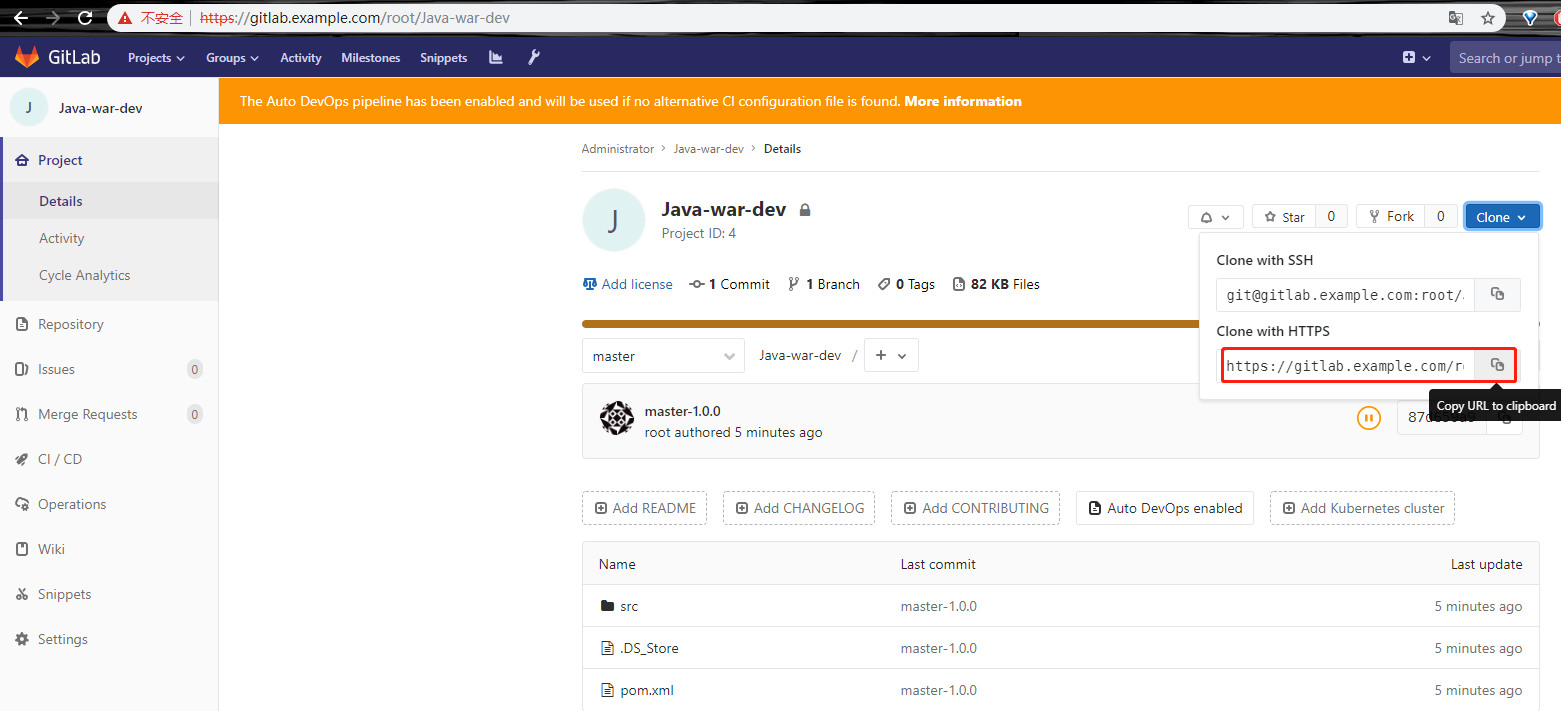
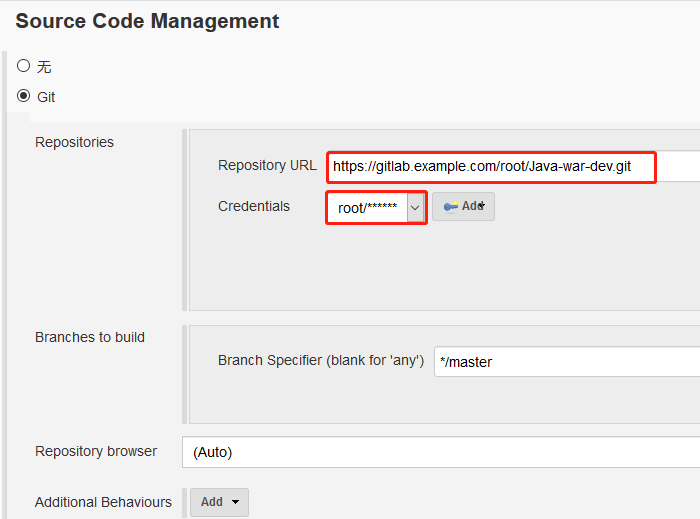
再次回到Jenkins刚才创建的maven-freestyle-job中,将复制的仓库地址粘贴过来;
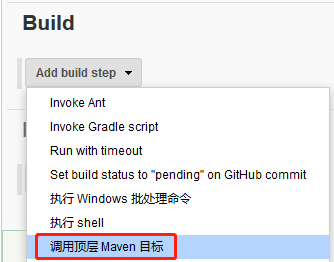
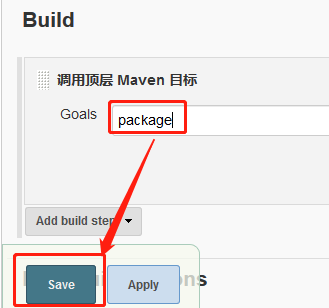
接着添加构建步骤
返回到Jenkins系统管理设置jdk和maven路径


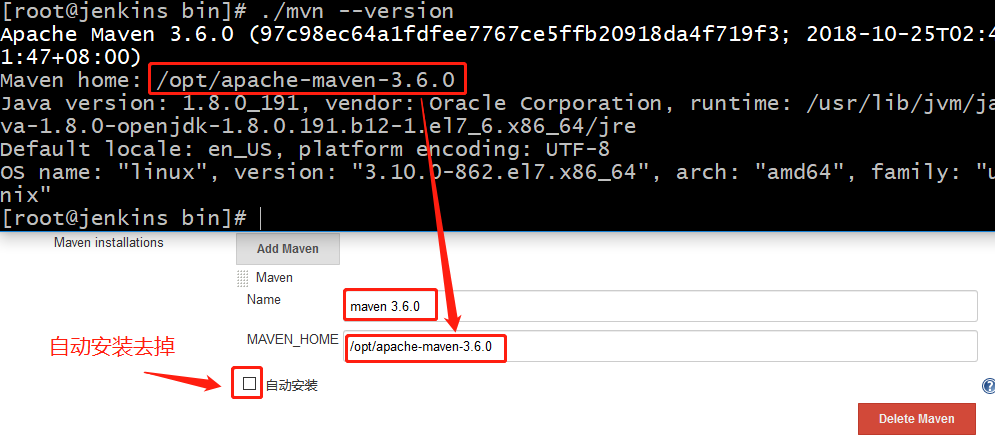
点击“Apply”,最后点击“Save”
回到Jenkins mavent-freestyle-job配置页;
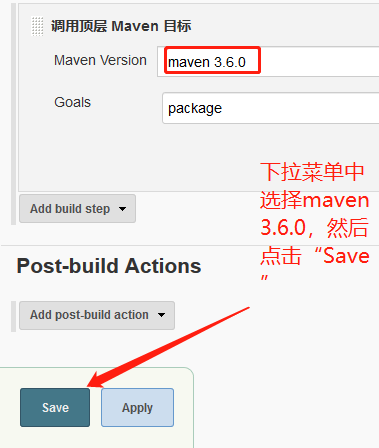

试了好多次,中间错误过程及错误信息在本文结尾列出,针对我的环境,我猜测的是路径错误导致的,因为重新设置了路径之后,第16次构建,也就是上述构建成功的截图就是我重新建了一个Java-war-dev工程,直接在工程下面就是src目录,之前的错误因为我的目录结构是Java-war-dev工程下还有一个Java-war-dev文件夹,导致一直报错,在晚上转了一大圈,也没解决,最后我尝试新建了一个工程,重新配置了一下,构建成功!
查看输出信息
Started by user admin

Building in workspace /var/lib/jenkins/workspace/maven-freestyle-job

 > git rev-parse --is-inside-work-tree # timeout=

Fetching changes from the remote Git repository

 > git config remote.origin.url https://gitlab.example.com/root/Java-war-dev.git # timeout=10

Fetching upstream changes from https://gitlab.example.com/root/Java-war-dev.git

 > git --version # timeout=

using GIT_ASKPASS to set credentials

 > git fetch --tags --progress https://gitlab.example.com/root/Java-war-dev.git +refs/heads/*:refs/remotes/origin/*

 > git rev-parse refs/remotes/origin/master^{commit} # timeout=

 > git rev-parse refs/remotes/origin/origin/master^{commit} # timeout=

Checking out Revision 87d659a9d8706b67e70a89fe7c9d5359d8fd72f5 (refs/remotes/origin/master)

 > git config core.sparsecheckout # timeout=

 > git checkout -f 87d659a9d8706b67e70a89fe7c9d5359d8fd72f5

Commit message: "master-1.0.0"

First time build. Skipping changelog.

[maven-freestyle-job] $ /opt/apache-maven-3.6./bin/mvn package

[INFO] Scanning for projects...

[INFO]

[INFO] -------------------< com.jenkins.demo:Java-war-dev >--------------------

[INFO] Building Java-war-dev Maven Webapp 1.0.-SNAPSHOT

[INFO] --------------------------------[ war ]---------------------------------

[INFO]

[INFO] --- maven-resources-plugin:2.6:resources (default-resources) @ Java-war-dev ---

[WARNING] Using platform encoding (UTF- actually) to copy filtered resources, i.e. build is platform dependent!

[INFO] skip non existing resourceDirectory /var/lib/jenkins/workspace/maven-freestyle-job/src/main/resources

[INFO]

[INFO] --- maven-compiler-plugin:3.1:compile (default-compile) @ Java-war-dev ---

[INFO] No sources to compile

[INFO]

[INFO] --- maven-resources-plugin:2.6:testResources (default-testResources) @ Java-war-dev ---

[WARNING] Using platform encoding (UTF- actually) to copy filtered resources, i.e. build is platform dependent!

[INFO] skip non existing resourceDirectory /var/lib/jenkins/workspace/maven-freestyle-job/src/test/resources

[INFO]

[INFO] --- maven-compiler-plugin:3.1:testCompile (default-testCompile) @ Java-war-dev ---

[INFO] No sources to compile

[INFO]

[INFO] --- maven-surefire-plugin:2.12.:test (default-test) @ Java-war-dev ---

[INFO] No tests to run.

[INFO]

[INFO] --- maven-war-plugin:2.2:war (default-war) @ Java-war-dev ---

[INFO] Packaging webapp

[INFO] Assembling webapp [Java-war-dev] in [/var/lib/jenkins/workspace/maven-freestyle-job/target/Java-war-dev]

[INFO] Processing war project

[INFO] Copying webapp resources [/var/lib/jenkins/workspace/maven-freestyle-job/src/main/webapp]

[INFO] Webapp assembled in [ msecs]

[INFO] Building war: /var/lib/jenkins/workspace/maven-freestyle-job/target/Java-war-dev.war

[INFO] WEB-INF/web.xml already added, skipping

[INFO] ------------------------------------------------------------------------

[INFO] BUILD SUCCESS

[INFO] ------------------------------------------------------------------------

[INFO] Total time:  1.341 s

[INFO] Finished at: --09T19::+:

[INFO] ------------------------------------------------------------------------

Finished: SUCCESS
Jenkins Ansible集成演示
需要同anible主机上的配置ansible2.5+python 3.6虚拟环境一致,
配置Ansible2.5+python3.6
[root@jenkins Python-3.6.]# yum install -y openssl* gcc zlib*

[root@jenkins ~]# wget https://www.python.org/ftp/python/3.6.8/Python-3.6.8.tar.xz

[root@jenkins ~]# tar -xf Python-3.6..tar.xz -C /usr/local/src/

[root@jenkins ~]# cd /usr/local/src/Python-3.6./

[root@jenkins Python-3.6.]# ./configure --prefix=/usr/local/ --with-ensurepip=install --enable-shared LDFLAGS="-Wl,-rpath /usr/local/lib"

[root@jenkins Python-3.6.]# make && echo $? && sleep  && make altinstall && echo $?

[root@jenkins Python-3.6.]# whereis pip3.

pip3: /usr/local/bin/pip3.

[root@jenkins Python-3.6.]# whereis pip

pip: /usr/local/bin/pip3.

[root@jenkins Python-3.6.]# ln -s /usr/local/bin/pip3. /usr/local/bin/pip

[root@jenkins ~]# pip install virtualenv

[root@jenkins ~]# su - deploy

[deploy@jenkins ~]$ virtualenv -p /usr/local/bin/python3. .py3-a2.-env

Already using interpreter /usr/local/bin/python3.

Using base prefix '/usr/local'

New python executable in /home/deploy/.py3-a2.-env/bin/python3.

Also creating executable in /home/deploy/.py3-a2.-env/bin/python

Installing setuptools, pip, wheel...

done.

[deploy@jenkins ~]$ cd /home/deploy/.py3-a2.-env/

[deploy@jenkins .py3-a2.-env]$ source /home/deploy/.py3-a2.-env/bin/activate

(.py3-a2.-env) [deploy@jenkins .py3-a2.-env]$ pip install paramiko PyYAML jinja2

 (.py3-a2.-env) [deploy@jenkins .py3-a2.-env]$git clone https://github.com/ansible/ansible.git

(.py3-a2.-env) [deploy@jenkins .py3-a2.-env]$ cd ansible/

(.py3-a2.-env) [deploy@jenkins ansible]$ pwd

/home/deploy/.py3-a2.-env/ansible

(.py3-a2.-env) [deploy@jenkins ansible]$ git checkout stable-2.5

Branch stable-2.5 set up to track remote branch stable-2.5 from origin.

Switched to a new branch 'stable-2.5'

(.py3-a2.-env) [deploy@jenkins ansible]$ source /home/deploy/.py3-a2.-env/ansible/hacking/env-setup -q

(.py3-a2.-env) [deploy@jenkins ansible]$ ansible --version

ansible 2.5. (stable-2.5 c748512c4c) last updated // :: (GMT +)

  config file = None

  configured module search path = ['/home/deploy/.ansible/plugins/modules', '/usr/share/ansible/plugins/modules']

  ansible python module location = /home/deploy/.py3-a2.-env/ansible/lib/ansible

  executable location = /home/deploy/.py3-a2.-env/ansible/bin/ansible

  python version = 3.6. (default, Jan   , ::) [GCC 4.8.  (Red Hat 4.8.-)]
配置jenkins.example.com主机到test.example.com主机的ssh免秘钥认证
(.py3-a2.-env) [deploy@jenkins ~]$ ssh-keygen

Generating public/private rsa key pair.

Enter file in which to save the key (/home/deploy/.ssh/id_rsa):

Enter passphrase (empty for no passphrase):

Enter same passphrase again:

Your identification has been saved in /home/deploy/.ssh/id_rsa.

Your public key has been saved in /home/deploy/.ssh/id_rsa.pub.

The key fingerprint is:

SHA256:cXo/fOrw7FhywXZvsRmHUBkMPvuY2C3wdMIFTgeaZ1Q deploy@jenkins.example.com

The key's randomart image is:

+---[RSA ]----+

|            *=Eo |

|           B +o  |

|        . + B .  |

|         + = = . |

|        S o O +o.|

|         . X X .*|

|          + % +oo|

|           O = . |

|          .o*    |

+----[SHA256]-----+

(.py3-a2.-env) [deploy@jenkins ~]$ ssh-copy-id root@test.example.com

/bin/ssh-copy-id: INFO: Source of key(s) to be installed: "/home/deploy/.ssh/id_rsa.pub"

/bin/ssh-copy-id: INFO: attempting to log in with the new key(s), to filter out any that are already installed

/bin/ssh-copy-id: INFO:  key(s) remain to be installed -- if you are prompted now it is to install the new keys

root@test.example.com's password:

Number of key(s) added:

Now try logging into the machine, with:   "ssh 'root@test.example.com'"

and check to make sure that only the key(s) you wanted were added.

(.py3-a2.-env) [deploy@jenkins ~]$ ssh root@test.example.com

Last login: Wed Jan   ::  from 192.168.244.131

[root@test ~]# hostname

test.example.com
配置ansible
[deploy@jenkins ~]$ pwd

/home/deploy

[deploy@jenkins ~]$ cat testservers

[testserver]

test.example.com  ansible_user=root
登录到jenkins web管理页,点击“New 任务”
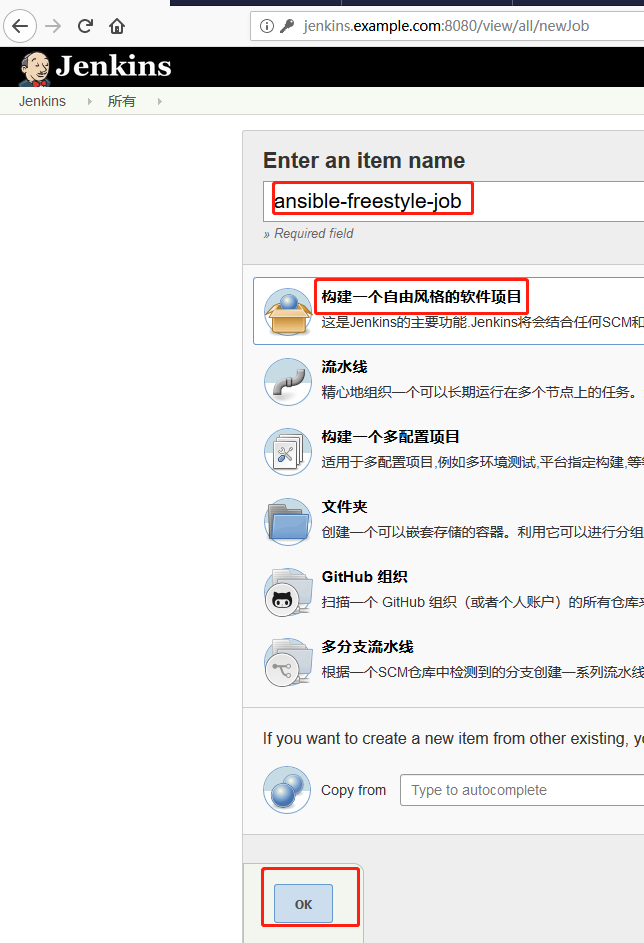
添加描述信息

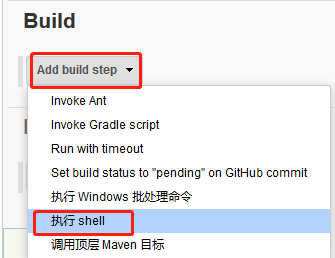
#!/bin/sh

set +x

source /home/deploy/.py3-a2.-env/bin/activate

source /home/deploy/.py3-a2.-env/ansible/hacking/env-setup -q

cd /home/deploy

ansible --version

ansible-playbook --version

cat testservers

ansible -i testservers testserver -m command -a "ip addr"

set -x

查看输出信息
Started by user admin

Building in workspace /var/lib/jenkins/workspace/ansible-freestyle-job

[ansible-freestyle-job] $ /bin/sh /tmp/jenkins7988516678097340995.sh

ansible 2.5. (stable-2.5 c748512c4c) last updated // :: (GMT +)

  config file = None

  configured module search path = ['/home/deploy/.ansible/plugins/modules', '/usr/share/ansible/plugins/modules']

  ansible python module location = /home/deploy/.py3-a2.-env/ansible/lib/ansible

  executable location = /home/deploy/.py3-a2.-env/ansible/bin/ansible

  python version = 3.6. (default, Jan   , ::) [GCC 4.8.  (Red Hat 4.8.-)]

ansible-playbook 2.5. (stable-2.5 c748512c4c) last updated // :: (GMT +)

  config file = None

  configured module search path = ['/home/deploy/.ansible/plugins/modules', '/usr/share/ansible/plugins/modules']

  ansible python module location = /home/deploy/.py3-a2.-env/ansible/lib/ansible

  executable location = /home/deploy/.py3-a2.-env/ansible/bin/ansible-playbook

  python version = 3.6. (default, Jan   , ::) [GCC 4.8.  (Red Hat 4.8.-)]

[testserver]

test.example.com  ansible_user=root

test.example.com | SUCCESS | rc= >>

: lo: <LOOPBACK,UP,LOWER_UP> mtu  qdisc noqueue state UNKNOWN group default qlen

    link/loopback ::::: brd :::::

    inet 127.0.0.1/ scope host lo

       valid_lft forever preferred_lft forever

    inet6 ::/ scope host

       valid_lft forever preferred_lft forever

: ens33: <BROADCAST,MULTICAST,UP,LOWER_UP> mtu  qdisc pfifo_fast state UP group default qlen

    link/ether :0c:::aa: brd ff:ff:ff:ff:ff:ff

    inet 192.168.244.133/ brd 192.168.244.255 scope global noprefixroute ens33

       valid_lft forever preferred_lft forever

    inet6 fe80:::7e45:e2e6:ec36/ scope link noprefixroute

       valid_lft forever preferred_lft forever

: ens34: <BROADCAST,MULTICAST,UP,LOWER_UP> mtu  qdisc pfifo_fast state UP group default qlen

    link/ether :0c:::aa:7d brd ff:ff:ff:ff:ff:ff

    inet 192.168.182.134/ brd 192.168.182.255 scope global noprefixroute dynamic ens34

       valid_lft 1477sec preferred_lft 1477sec

    inet6 fe80:::adf0:e929:d612/ scope link noprefixroute

       valid_lft forever preferred_lft forever

Finished: SUCCESS
下面错误信息就是上述构建jenkins maven集成时报错信息(可以随便看看):
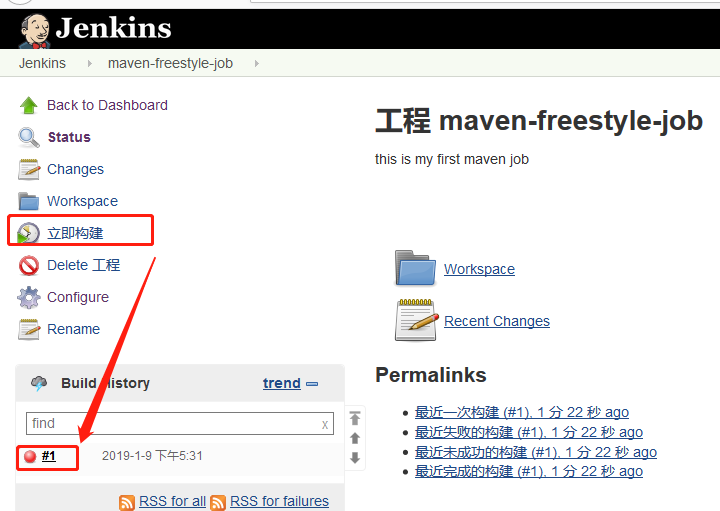
构建失败,查看错误输出信息
Started by user admin

Building in workspace /var/lib/jenkins/workspace/maven-freestyle-job

Cloning the remote Git repository

Cloning repository https://gitlab.example.com/root/java-war-dev.git

 > git init /var/lib/jenkins/workspace/maven-freestyle-job # timeout=

Fetching upstream changes from https://gitlab.example.com/root/java-war-dev.git

 > git --version # timeout=

using GIT_ASKPASS to set credentials

 > git fetch --tags --progress https://gitlab.example.com/root/java-war-dev.git +refs/heads/*:refs/remotes/origin/*

 > git config remote.origin.url https://gitlab.example.com/root/java-war-dev.git # timeout=10

 > git config --add remote.origin.fetch +refs/heads/*:refs/remotes/origin/* # timeout=10

 > git config remote.origin.url https://gitlab.example.com/root/java-war-dev.git # timeout=10

Fetching upstream changes from https://gitlab.example.com/root/java-war-dev.git

using GIT_ASKPASS to set credentials

 > git fetch --tags --progress https://gitlab.example.com/root/java-war-dev.git +refs/heads/*:refs/remotes/origin/*

 > git rev-parse refs/remotes/origin/master^{commit} # timeout=10

 > git rev-parse refs/remotes/origin/origin/master^{commit} # timeout=10

Checking out Revision aa3c70c49a68bfc91b4fe65c38be0b4b15461a63 (refs/remotes/origin/master)

 > git config core.sparsecheckout # timeout=10

 > git checkout -f aa3c70c49a68bfc91b4fe65c38be0b4b15461a63

Commit message: "first commit"

First time build. Skipping changelog.

[maven-freestyle-job] $ /opt/apache-maven-3.6.0/bin/mvn package

The JAVA_HOME environment variable is not defined correctly

This environment variable is needed to run this program

NB: JAVA_HOME should point to a JDK not a JRE

Build step 'Invoke top-level Maven targets' marked build as failure

Finished: FAILURE
由报错信息可以看出,jdk环境设置有问题
以下报错信息目前没有解决掉,如果有热心同学知道解决办法的欢迎评论区指教^_^ ~,针对以上问题,我是删掉重新构建了一遍,包括全局凭据也是删掉重新创建了一个一样的,然后再次执行的时候就没有报错。
但是经反复确认,jdk路径没有错,接着有重新构建,提示以下内容
Started by user admin

Building in workspace /var/lib/jenkins/workspace/maven-freestyle-job

 > git rev-parse --is-inside-work-tree # timeout=

Fetching changes from the remote Git repository

 > git config remote.origin.url https://gitlab.example.com/root/java-war-dev.git # timeout=10

Fetching upstream changes from https://gitlab.example.com/root/java-war-dev.git

 > git --version # timeout=

using GIT_ASKPASS to set credentials

 > git fetch --tags --progress https://gitlab.example.com/root/java-war-dev.git +refs/heads/*:refs/remotes/origin/*

 > git rev-parse refs/remotes/origin/master^{commit} # timeout=

 > git rev-parse refs/remotes/origin/origin/master^{commit} # timeout=

Checking out Revision aa3c70c49a68bfc91b4fe65c38be0b4b15461a63 (refs/remotes/origin/master)

 > git config core.sparsecheckout # timeout=

 > git checkout -f aa3c70c49a68bfc91b4fe65c38be0b4b15461a63

Commit message: "first commit"

 > git rev-list --no-walk aa3c70c49a68bfc91b4fe65c38be0b4b15461a63 # timeout=

[maven-freestyle-job] $ /opt/apache-maven-3.6./bin/mvn package

[INFO] Scanning for projects...

[INFO] ------------------------------------------------------------------------

[INFO] BUILD FAILURE

[INFO] ------------------------------------------------------------------------

[INFO] Total time:  0.112 s

[INFO] Finished at: --09T17::+:

[INFO] ------------------------------------------------------------------------

[ERROR] The goal you specified requires a project to execute but there is no POM in this directory (/var/lib/jenkins/workspace/maven-freestyle-job). Please verify you invoked Maven from the correct directory. -> [Help ]

[ERROR]

[ERROR] To see the full stack trace of the errors, re-run Maven with the -e switch.

[ERROR] Re-run Maven using the -X switch to enable full debug logging.

[ERROR]

[ERROR] For more information about the errors and possible solutions, please read the following articles:

[ERROR] [Help ] http://cwiki.apache.org/confluence/display/MAVEN/MissingProjectException

Build step 'Invoke top-level Maven targets' marked build as failure

Finished: FAILURE
然后进行如下操作
[root@jenkins ~]# cd /var/lib/jenkins/workspace/maven-freestyle-job

[root@jenkins maven-freestyle-job]# ls

Java-war-dev

[root@jenkins maven-freestyle-job]# ls Java-war-dev/

pom.xml  src

[root@jenkins maven-freestyle-job]# mv Java-war-dev/pom.xml .

[root@jenkins maven-freestyle-job]# ls

Java-war-dev  pom.xml
再次执行构建操作,还是报错
........

[INFO] Building war: /var/lib/jenkins/workspace/maven-freestyle-job/target/Java-war-dev.war

[INFO] ------------------------------------------------------------------------

[INFO] BUILD FAILURE

[INFO] ------------------------------------------------------------------------

[INFO] Total time:  : min

[INFO] Finished at: --09T18::+:

[INFO] ------------------------------------------------------------------------

[ERROR] Failed to execute goal

org.apache.maven.plugins:maven-war-plugin:2.2:war (default-war) on project Java-war-dev: Error assembling WAR: webxml attribute is required (or pre-existing WEB-INF/web.xml if executing in update mode) -> [Help ]

[ERROR]

[ERROR] To see the full stack trace of the errors, re-run Maven with the -e switch.

[ERROR] Re-run Maven using the -X switch to enable full debug logging.

[ERROR]

[ERROR] For more information about the errors and possible solutions, please read the following articles:

[ERROR] [Help ] http://cwiki.apache.org/confluence/display/MAVEN/MojoExecutionException

Build step 'Invoke top-level Maven targets' marked build as failure

Finished: FAILURE
改了pom.xml文件之后
            <artifactId>maven-release-plugin</artifactId>

            <version>3.6</version>

            <configuration>

                <webXml>WebRoot\WEB-INF\web.xml</webXml>

                <warSourceDirectory>WebRoot</warSourceDirectory>

                <!--autoVersionSubmodules>true</autoVersionSubmodules-->

            </configuration>
仍然报错
[INFO] Building war: /var/lib/jenkins/workspace/maven-freestyle-job/target/Java-war-dev.war

[INFO] ------------------------------------------------------------------------

[INFO] BUILD FAILURE

[INFO] ------------------------------------------------------------------------

[INFO] Total time:  0.995 s

[INFO] Finished at: --09T18::+:

[INFO] ------------------------------------------------------------------------

[ERROR] Failed to execute goal org.apache.maven.plugins:maven-war-plugin:2.2:war (default-war) on project Java-war-dev: Error assembling WAR: webxml attribute is required (or pre-existing WEB-INF/web.xml if executing in update mode) -> [Help ]

[ERROR]

[ERROR] To see the full stack trace of the errors, re-run Maven with the -e switch.

[ERROR] Re-run Maven using the -X switch to enable full debug logging.

[ERROR]

[ERROR] For more information about the errors and possible solutions, please read the following articles:

[ERROR] [Help ] http://cwiki.apache.org/confluence/display/MAVEN/MojoExecutionException

Build step 'Invoke top-level Maven targets' marked build as failure

Finished: FAILURE
再次更改pom.xml
 <version>3.6</version>

            <configuration>

                <webResources>

                    <resource>

                        <directory>web</directory>

                    </resource>

                </webResources>

                <!--webXml>WebRoot\WEB-INF\web.xml</webXml>

                <warSourceDirectory>WebRoot</warSourceDirectory-->

                <!--autoVersionSubmodules>true</autoVersionSubmodules-->

            </configuration>
仍然报错
[INFO] Building war: /var/lib/jenkins/workspace/maven-freestyle-job/target/Java-war-dev.war

[INFO] ------------------------------------------------------------------------

[INFO] BUILD FAILURE

[INFO] ------------------------------------------------------------------------

[INFO] Total time:  0.982 s

[INFO] Finished at: --09T18::+:

[INFO] ------------------------------------------------------------------------

[ERROR] Failed to execute goal org.apache.maven.plugins:maven-war-plugin:2.2:war (default-war) on project Java-war-dev: Error assembling WAR: webxml attribute is required (or pre-existing WEB-INF/web.xml if executing in update mode) -> [Help ]

[ERROR]

[ERROR] To see the full stack trace of the errors, re-run Maven with the -e switch.

[ERROR] Re-run Maven using the -X switch to enable full debug logging.

[ERROR]

[ERROR] For more information about the errors and possible solutions, please read the following articles:

[ERROR] [Help ] http://cwiki.apache.org/confluence/display/MAVEN/MojoExecutionException

Build step 'Invoke top-level Maven targets' marked build as failure

Finished: FAILURE
然而网友说的这些并不能解决问题。
Jenkins+Gitlab+Ansible自动化部署(四)的更多相关文章
- Jenkins+Gitlab+Ansible自动化部署(五)
Freestyle Job实现静态网站部署交付(接Jenkins+Gitlab+Ansible自动化部署(四)https://www.cnblogs.com/zd520pyx1314/p/102445 ...
- Jenkins+Gitlab+Ansible自动化部署(六)
Pipeline Job实现Nginix+MySQL+PHP+Wordpress实现自动化部署交付(Jenkins+Gitlab+Ansible自动化部署(五)https://www.cnblogs. ...
- Jenkins+Gitlab+Ansible自动化部署(三)
接Jenkins+Gitlab+Ansible自动化部署(一)https://www.cnblogs.com/zd520pyx1314/p/10210727.html 和(二)https://www. ...
- Jenkins+Gitlab+Ansible自动化部署(一)
首先准备实验环境 虚拟机 主机名 IP地址 服务 系统版本 内核版本 Vmware Workstation 14 gitlab.example.com 192.168.244.130 gitlab ...
- Jenkins+Gitlab+Ansible自动化部署(二)
接Jenkins+Gitlab+Ansbile自动化部署(一):https://www.cnblogs.com/zd520pyx1314/p/10210727.html Ansible的配置与部署 工 ...
- 【开发工具】Jenkins+Gitlab实现自动化部署
我在尝试在容器中安装Jenkins时,初衷是希望使用docker in docker 的模式来实现Jenkins slave容器按需创建.在实现的时候需要在Jenkins 中安装Kubernetes插 ...
- 基于Jenkins+Gitlab的自动化部署实战
故事背景 一个中小型企业,是典型的互联网公司,当初期的时候可能运维只能标配到2~3人,此时随着公司的发展,项目会逐渐增多.前期部署项目可能都是手动的, 俗称“人肉部署”,这简直是无比的痛苦,不能忍受的 ...
- jenkins +gitlab +docker 自动化部署tomcat 项目
实验环境 实验设备 三台服务器 centos 7.X 以上 内存 2-3G左右 192.168.1.195 (jenkins最新+ git 2.8+maven 3.5 +tomcat 8+java1. ...
- Linux(四)—— 项目部署与ansible自动化部署
目录 项目部署与ansible自动化部署 一.项目部署 二.ansible自动化部署(python自动化运维) 1.安装ansible 2.ansible例子 3.ansible自动化部署nginx ...
随机推荐
- str_2.判断两个字符串是否互为旋转词
1. 字符串str的前面任意部分挪到后面形成的字符串叫做字符串str的旋转词 $str1 = "2ab1"; $str2 = "ab12"; $ret = is ...
- node.js Web应用框架Express入门指南
node.js Web应用框架Express入门指南 作者: 字体:[增加 减小] 类型:转载 时间:2014-05-28 我要评论 这篇文章主要介绍了node.js Web应用框架Express入门 ...
- CRC16算法之一:CRC16-CCITT-FALSE算法的java实现
CRC16算法系列文章: CRC16算法之一:CRC16-CCITT-FALSE算法的java实现 CRC16算法之二:CRC16-CCITT-XMODEM算法的java实现 CRC16算法之三:CR ...
- bzoj 3680(洛谷1337) 吊打XXX——模拟退火
题目:https://www.lydsy.com/JudgeOnline/problem.php?id=3680 https://www.luogu.org/problemnew/show/P1337 ...
- BZOJ3196:二逼平衡树
浅谈树状数组与线段树:https://www.cnblogs.com/AKMer/p/9946944.html 浅谈\(Splay\):https://www.cnblogs.com/AKMer/p/ ...
- TCP/IP详解卷1 - wireshark抓包分析
TCP/IP详解卷1 - 系列文 TCP/IP详解卷1 - 思维导图(1) TCP/IP详解卷1 - wireshark抓包分析 引言 在初学TCP/IP协议时,会觉得协议是一种很抽象的东西,通过wi ...
- ReSIProcate源码目录下功能说明
1.basicCall,basicMessage,basicRegister,resip_test测试用的 2.db_static Sleepy Cat开发的Berkeley DB 3.dum为Dia ...
- H.264有四种画质级别
H264相关知识-poseidonqiu-ChinaUnix博客 H.264有四种画质级别分别是BP.EP.MP.HP: 1.BP-Baseline Profile:基本画质.支持I/P 帧,只支持无 ...
- js取得数组重复元素
function duplicates(arr) { var result=[]; arr.sort();//进行排序,重复的都相邻了 ;i<arr.length;i++){ ]&&am ...
- Android如何解析json数组对象
import org.json.JSONArray; import org.json.JSONObject; //jsonData的数据格式:[{ "id": "27Jp ...