
【开发工具】Jenkins+Gitlab实现自动化部署
最全的Java后端知识体系 https://www.pdai.tech, 每天更新中...。

我在尝试在容器中安装Jenkins时,初衷是希望使用docker in docker 的模式来实现Jenkins slave容器按需创建。在实现的时候需要在Jenkins 中安装Kubernetes插件。
kubernetes的插件目前来看存在一个Bug,这个bug很小但是会导致我们无法设置和kubernetes mastert认证的机制。Bug是由于配置代理时候是用的IP地址,但是jenkins必须加入http协议,可惜的是加入http协议后更新的代理又不能使用了,进入这种死循环了。所以这种方案暂时搁置。
我在写这篇文章的时候,Jenkins X 还没有出来。。。目前Jenkins 是拥抱了K8S; 我认为CI CD环境容器化编排是大趋势。
一些实践
搭建过基于K8S的完整的平台,写了系列的文章总结。有些小的团队或者独立开发者,单独一个Jenkins和Gitlab就足够做编译自动化了。
So,这里我会写常用的实现自动化部署的方案之Jenkins+Gitlab这种模式,在小型的开发时候完全够用了,从来没有一致的最佳方案,只有适不适合咱们的团队方案。
Jenkins的安装 - 官网
RedHat Linux RPM packages for Jenkins - https://pkg.jenkins.io/redhat-stable/
To use this repository, run the following command:
sudo wget -O /etc/yum.repos.d/jenkins.repo https://pkg.jenkins.io/redhat-stable/jenkins.repo

sudo rpm --import https://pkg.jenkins.io/redhat-stable/jenkins.io.key
If you've previously imported the key from Jenkins, the "rpm --import" will fail because you already have a key. Please ignore that and move on.
You will need to explicitly install a Java runtime environment, because Oracle's Java RPMs are incorrect and fail to register as providing a java dependency. Thus, adding an explicit dependency requirement on Java would force installation of the OpenJDK JVM.
2.54 (2017-04) and newer: Java 8
1.612 (2015-05) and newer: Java 7
With that set up, the Jenkins package can be installed with:
yum install jenkins
See Wiki for more information, including how Jenkins is run and where the configuration is stored, etc.
Gitlab的安装
自己网上找吧,但是安装8.0+的版本,因为后面webhooks是有版本的要求的。
自动化部署配置
创建普通编译Job
Jenkins创建一个Job,并配置git信息
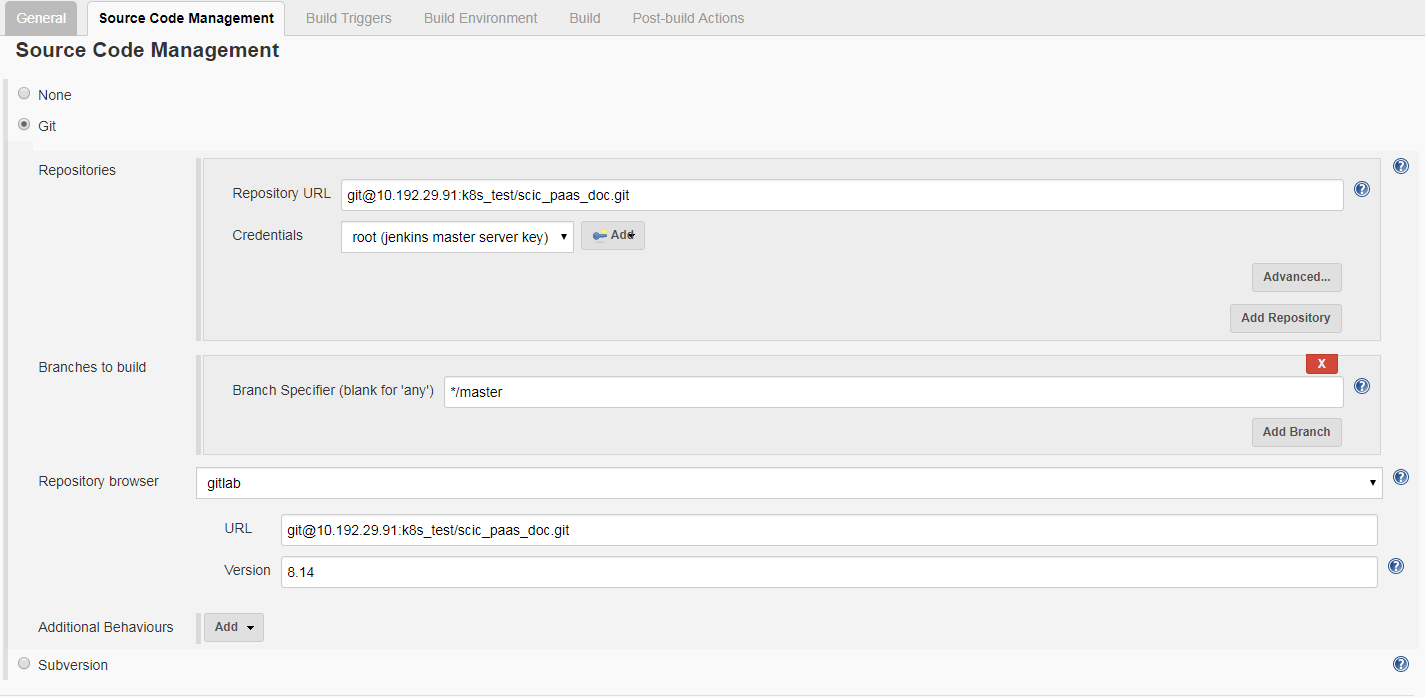
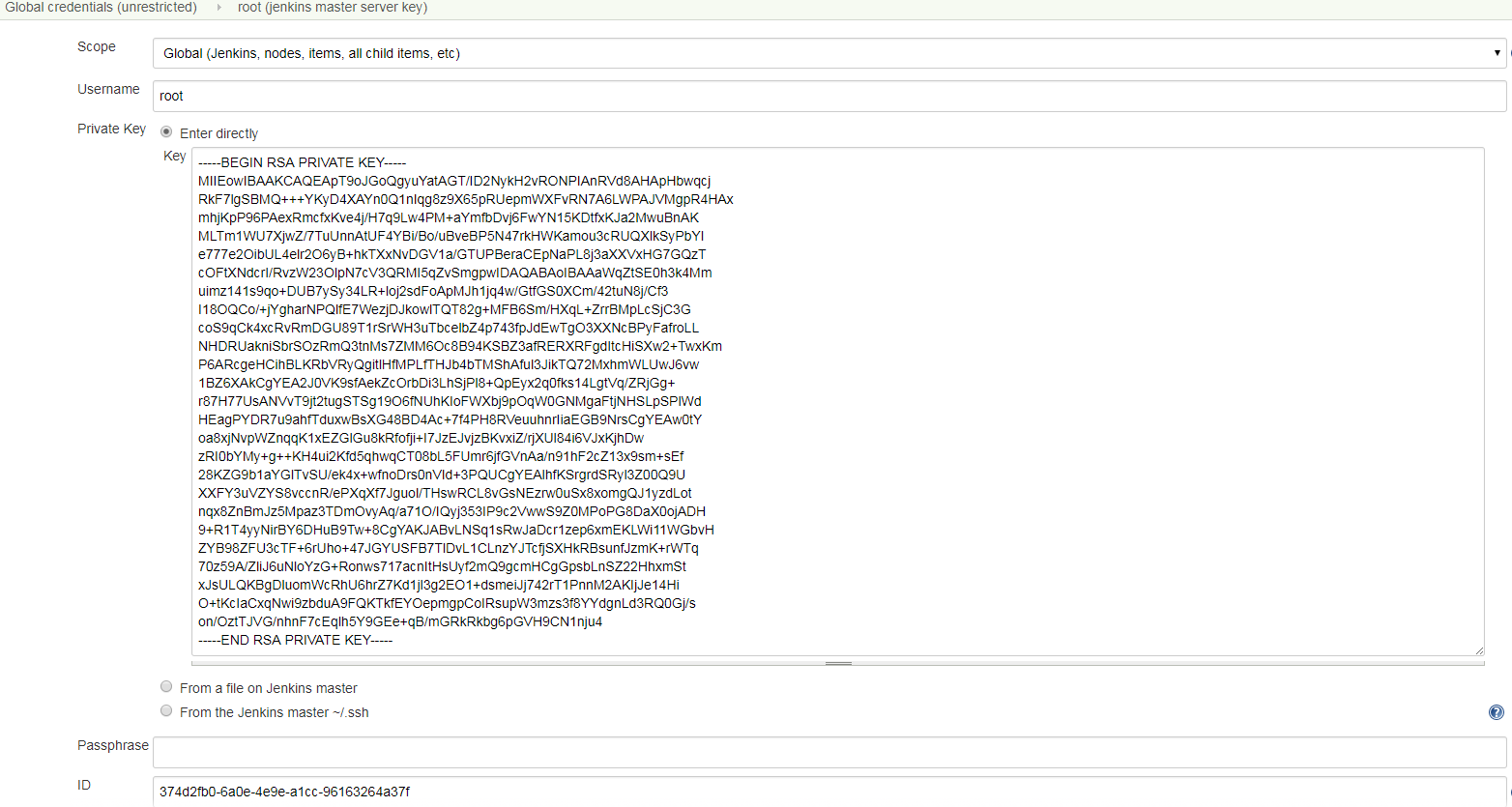
注意,这里连接Gitlab需要配置认证
同时,保证jenkins机器安装了Java, maven。
Maven 中需要配置成我们自己的仓库,配置settings.xm即可。
[root@jenkins ~]# find / -name settings.xml

/etc/maven/settings.xml

/var/lib/jenkins/.m2/settings.xml

/usr/share/maven/conf/settings.xml

[root@jenkins ~]# cat /usr/share/maven/conf/settings.xml
更改成公司artificatory配置
   <mirror>

      <id>mirrorId_2</id>

      <mirrorOf>*</mirrorOf>

      <name>Human Readable Name for this Mirror.</name>

      <url>http://maven.aliyun.com/nexus/content/groups/public/</url>

    </mirror>-->

   <mirror>

      <id>mirrorId_1</id>

      <mirrorOf>*</mirrorOf>

      <name>Human Readable Name for this Mirror.</name>

      <url>http://your_ip:your_port/artifactory/list/maven2/</url>

    </mirror>
加入CI Trigger功能
Jenkins Trigger配置
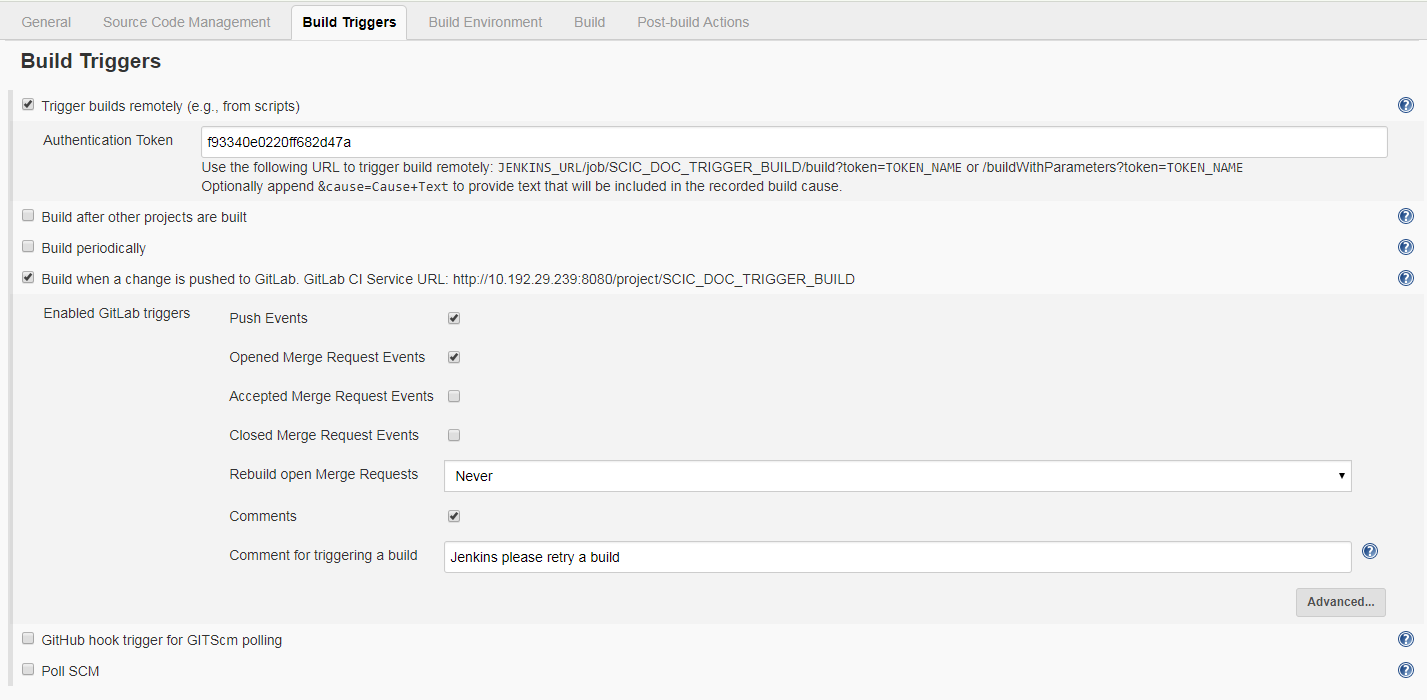
Gitlab配置webhook
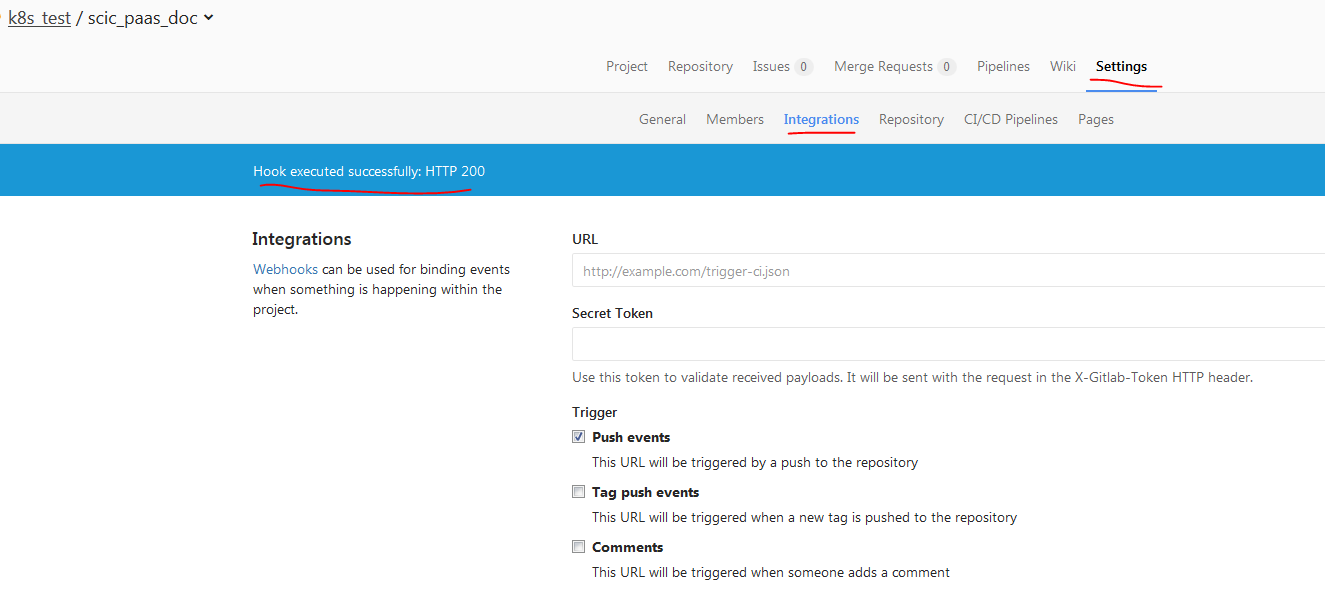
测试webhook:

加入CD功能
自动化运行脚本编写
[root@jenkins ~]# cat run.sh

#!/bin/bash

echo 'Checking scic document system status...'

SCIC_APP_PID=$(ps -ef | grep scic_paas_doc | grep -v grep | awk '{ print $2 }')

if [ -z "$SCIC_APP_PID" ]

  then

      echo Starting scic document...

      nohup java -jar scic_paas_doc-0.0.1-RELEASE.jar > doc.log 2>&1 &

      echo Started successfully.

else

    echo killing old service -  $SCIC_APP_PID ...

    kill $SCIC_APP_PID

    echo Restarting scic document...

    nohup java -jar scic_paas_doc-0.0.1-RELEASE.jar > doc.log 2>&1 &

    echo Restarted successfully.

fi
Global配置SSH Server
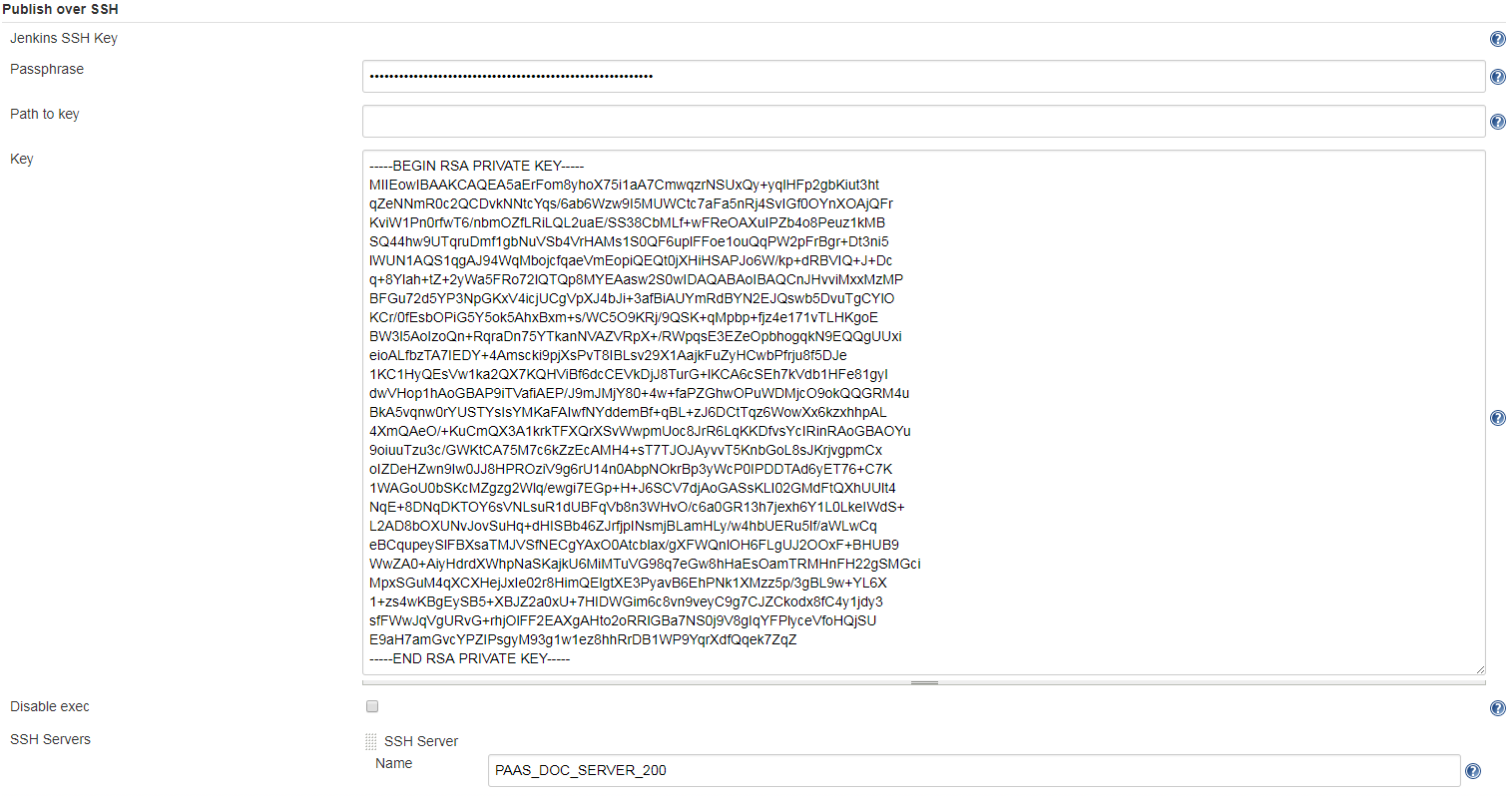
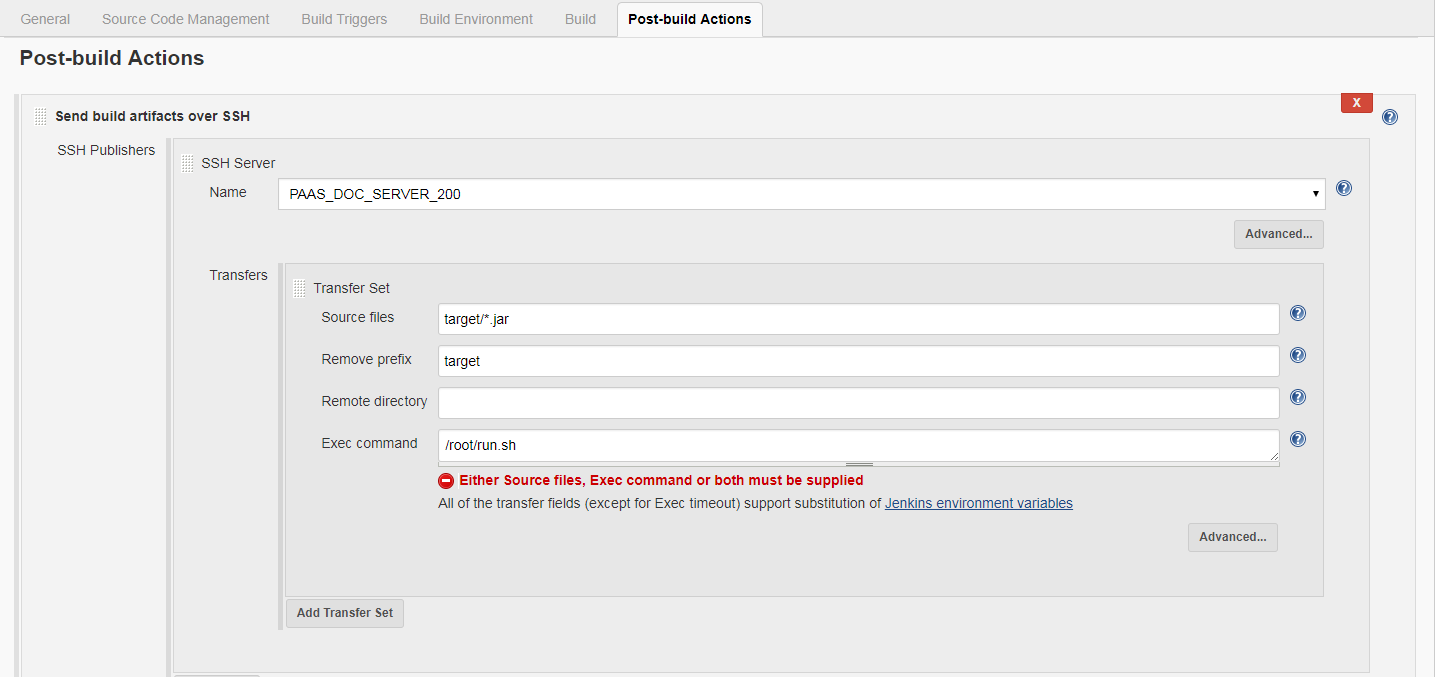
Build Job中配置PostBuild,Over SSH
通过SSH上传jar,并使用脚本运行
更新并提交代码
Z003MRZB@AAECNSHA02921L MINGW64 /d/git/k8s/scic_paas_doc (master)

$ git add .

warning: LF will be replaced by CRLF in src/main/resources/static/_sidebar.md.

The file will have its original line endings in your working directory.

Z003MRZB@AAECNSHA02921L MINGW64 /d/git/k8s/scic_paas_doc (master)

$ git commit

warning: LF will be replaced by CRLF in src/main/resources/static/_sidebar.md.

The file will have its original line endings in your working directory.

[master warning: LF will be replaced by CRLF in src/main/resources/static/_sidebar.md.

The file will have its original line endings in your working directory.

50c1cc4] test trigger

warning: LF will be replaced by CRLF in src/main/resources/static/_sidebar.md.

The file will have its original line endings in your working directory.

 1 file changed, 1 insertion(+), 1 deletion(-)

Z003MRZB@AAECNSHA02921L MINGW64 /d/git/k8s/scic_paas_doc (master)

$ git push

Counting objects: 7, done.

Delta compression using up to 4 threads.

Compressing objects: 100% (6/6), done.

Writing objects: 100% (7/7), 499 bytes | 0 bytes/s, done.

Total 7 (delta 5), reused 0 (delta 0)

To git@10.192.29.91:k8s_test/scic_paas_doc.git

   63b8ff4..50c1cc4  master -> master
触发编译和自动化部署
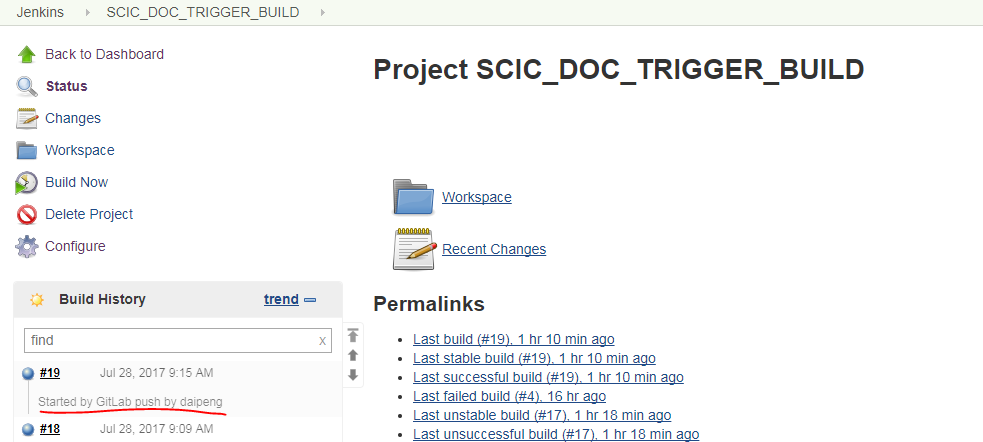
Tigger Build Logs
Started by GitLab push by daipeng

Building in workspace /var/lib/jenkins/workspace/SCIC_DOC_TRIGGER_BUILD

 > git rev-parse --is-inside-work-tree # timeout=10

Fetching changes from the remote Git repository

 > git config remote.origin.url git@10.192.29.91:k8s_test/scic_paas_doc.git # timeout=10

Fetching upstream changes from git@10.192.29.91:k8s_test/scic_paas_doc.git

 > git --version # timeout=10

using GIT_SSH to set credentials jenkins master server key

 > git fetch --tags --progress git@10.192.29.91:k8s_test/scic_paas_doc.git +refs/heads/*:refs/remotes/origin/*

 > git rev-parse remotes/origin/master^{commit} # timeout=10

 > git branch -a -v --no-abbrev --contains 50c1cc4499394d70919a470db5961cec00e65457 # timeout=10

Checking out Revision 50c1cc4499394d70919a470db5961cec00e65457 (origin/master)

Commit message: "test trigger"

 > git config core.sparsecheckout # timeout=10

 > git checkout -f 50c1cc4499394d70919a470db5961cec00e65457

 > git rev-list 99d919b08d5a2010fe750d4d920a10024401bc92 # timeout=10

[SCIC_DOC_TRIGGER_BUILD] $ /bin/sh -xe /tmp/jenkins3779972667920467885.sh

+ mvn package

[INFO] Scanning for projects...

[INFO]

[INFO] ------------------------------------------------------------------------

[INFO] Building pass_doc 0.0.1-RELEASE

[INFO] ------------------------------------------------------------------------

[INFO]

[INFO] --- maven-resources-plugin:2.6:resources (default-resources) @ scic_paas_doc ---

[INFO] Using 'UTF-8' encoding to copy filtered resources.

[INFO] Copying 1 resource

[INFO] Copying 71 resources

[INFO]

[INFO] --- maven-compiler-plugin:3.1:compile (default-compile) @ scic_paas_doc ---

[INFO] Nothing to compile - all classes are up to date

[INFO]

[INFO] --- maven-resources-plugin:2.6:testResources (default-testResources) @ scic_paas_doc ---

[INFO] Using 'UTF-8' encoding to copy filtered resources.

[INFO] skip non existing resourceDirectory /var/lib/jenkins/workspace/SCIC_DOC_TRIGGER_BUILD/src/test/resources

[INFO]

[INFO] --- maven-compiler-plugin:3.1:testCompile (default-testCompile) @ scic_paas_doc ---

[INFO] No sources to compile

[INFO]

[INFO] --- maven-surefire-plugin:2.18.1:test (default-test) @ scic_paas_doc ---

[INFO] No tests to run.

[INFO]

[INFO] --- maven-jar-plugin:2.6:jar (default-jar) @ scic_paas_doc ---

[INFO] Building jar: /var/lib/jenkins/workspace/SCIC_DOC_TRIGGER_BUILD/target/scic_paas_doc-0.0.1-RELEASE.jar

[INFO]

[INFO] --- spring-boot-maven-plugin:1.4.1.RELEASE:repackage (default) @ scic_paas_doc ---

[INFO] ------------------------------------------------------------------------

[INFO] BUILD SUCCESS

[INFO] ------------------------------------------------------------------------

[INFO] Total time: 3.695s

[INFO] Finished at: Fri Jul 28 09:15:43 CST 2017

[INFO] Final Memory: 16M/237M

[INFO] ------------------------------------------------------------------------

SSH: Connecting from host [jenkins]

SSH: Connecting with configuration [PAAS_DOC_SERVER_200] ...

SSH: EXEC: STDOUT/STDERR from command [/root/run.sh] ...

Checking scic document system status...

killing old service - 19970 ...

Restarting scic document...

Restarted successfully.

SSH: EXEC: completed after 200 ms

SSH: Disconnecting configuration [PAAS_DOC_SERVER_200] ...

SSH: Transferred 1 file(s)

Finished: SUCCESS
查看网站更新
发现确实已经更新 啦。
参考文档
https://jenkins.io/doc/pipeline/tour/hello-world/
https://jenkins.io/user-handbook.pdf
http://www.cnblogs.com/kevingrace/p/5651447.html
http://www.cnblogs.com/ceshi2016/p/6529557.html
http://linuxsogood.org/1539.html
http://www.mamicode.com/info-detail-1264849.html
http://blog.didispace.com/spring-boot-run-backend/
【开发工具】Jenkins+Gitlab实现自动化部署的更多相关文章
- Jenkins+Gitlab+Ansible自动化部署(二)
接Jenkins+Gitlab+Ansbile自动化部署(一):https://www.cnblogs.com/zd520pyx1314/p/10210727.html Ansible的配置与部署 工 ...
- Jenkins+Gitlab+Ansible自动化部署(三)
接Jenkins+Gitlab+Ansible自动化部署(一)https://www.cnblogs.com/zd520pyx1314/p/10210727.html 和(二)https://www. ...
- Jenkins+Gitlab+Ansible自动化部署(一)
首先准备实验环境 虚拟机 主机名 IP地址 服务 系统版本 内核版本 Vmware Workstation 14 gitlab.example.com 192.168.244.130 gitlab ...
- Jenkins+Gitlab+Ansible自动化部署(五)
Freestyle Job实现静态网站部署交付(接Jenkins+Gitlab+Ansible自动化部署(四)https://www.cnblogs.com/zd520pyx1314/p/102445 ...
- Jenkins+Gitlab+Ansible自动化部署(六)
Pipeline Job实现Nginix+MySQL+PHP+Wordpress实现自动化部署交付(Jenkins+Gitlab+Ansible自动化部署(五)https://www.cnblogs. ...
- Jenkins+Gitlab+Ansible自动化部署(四)
接Jenkins+Gitlab+Ansible自动化部署(三)https://www.cnblogs.com/zd520pyx1314/p/10235394.html Jenkins应用 Jenkin ...
- 基于Jenkins+Gitlab的自动化部署实战
故事背景 一个中小型企业,是典型的互联网公司,当初期的时候可能运维只能标配到2~3人,此时随着公司的发展,项目会逐渐增多.前期部署项目可能都是手动的, 俗称“人肉部署”,这简直是无比的痛苦,不能忍受的 ...
- jenkins +gitlab +docker 自动化部署tomcat 项目
实验环境 实验设备 三台服务器 centos 7.X 以上 内存 2-3G左右 192.168.1.195 (jenkins最新+ git 2.8+maven 3.5 +tomcat 8+java1. ...
- Linux-GitLab+Jenkins持续集成+自动化部署
GitLab+Jenkins持续集成+自动化部署 什么是持续集成? (1)Continuous integration (CI) 持续集成是一种软件开发实践,即团队开发成员经常集成他们的工作,通常每个 ...
随机推荐
- 【解题报告】Codeforces Round #301 (Div. 2) 之ABCD
A. Combination Lock 拨密码..最少次数..密码最多有1000位. 用字符串存起来,然后每位大的减小的和小的+10减大的,再取较小值加起来就可以了... #include<st ...
- springmvc+mybatis+redis实现查询插入操作
最近在学习redis,虽然现在还不是很熟练.不过可以进行简单的框架整合开发. IDE:我使用的是IDEA.springmvc+spring+mybatis的整合这个我就不多说了,下面我们先进行这块的整 ...
- LOJ2613 NOIP2013 华容道 【最短路】*
LOJ2613 NOIP2013 华容道 LINK 这是个好题,具体题意比较麻烦可以直接看LINK中的链接 然后考虑我们可能的移动方式 首先我们需要把白块移动到需要移动块S的附近(附近四格) 然后我们 ...
- 获取web.config 内的值
获取 System.Configuration.ConfigurationManager.AppSettings[DrugPackageRegistrationName]//获取web.config ...
- Lua table
获取数组长度 在Lua中可以使用“#”和table.maxn两种方法来获取数组的长度 arr = {,,,} arr[] = 7 都仅统计数字key的长度: #是从1递增到nil的长度: table. ...
- jQuery AJAX 跨域请求
跨域请求 只要 dataType : 'jsonp', jsonp:"jsoncallback", 然后返回一个json格式的就可以了 <!doctype html> ...
- 用fiddler设置手机代理
做App测试的朋友可能因为环境的需要,要切换不同的测试环境,这时就需要在自己的电脑上配置好环境,然后在手机上设置代理,用WiFi连自己的电脑,这样一来,手机网络走的就是自己的电脑网络,也就是说,手机的 ...
- 隐藏控件HiddenField使用
HiddenField控件顾名思义就是隐藏输入框的服务器控件,它能让你保存那些不需要显示在页面上的且对安全性要求不高的数据. 增加HiddenField,其实是为了让整个状态管理机制的应用程度更加全面 ...
- 动态添加 items to PopupMenu
引用自http://stackoverflow.com/questions/10175140/adding-items-to-popupmenu DevExpress.XtraBars.BarMana ...
- Kalman Filter
本质是一种最优估计法. 核心是"预测"+"测量反馈". 一个视频: http://blog.sina.com.cn/s/blog_461db08c0102uw ...