
[Tensorflow] 使用 tf.train.Checkpoint() 保存 / 加载 keras subclassed model
在 subclassed_model.py 中,通过对 tf.keras.Model 进行子类化,设计了两个自定义模型。
 import tensorflow as tf

 tf.enable_eager_execution()

 # parameters

 UNITS = 8

 class Encoder(tf.keras.Model):

     def __init__(self):

         super(Encoder, self).__init__()

         self.fc1 = tf.keras.layers.Dense(units=UNITS * 2, activation='relu')

         self.fc2 = tf.keras.layers.Dense(units=UNITS, activation='relu')

     def call(self, inputs):

         r = self.fc1(inputs)

         return self.fc2(r)

 class Decoder(tf.keras.Model):

     def __init__(self):

         super(Decoder, self).__init__()

         self.fc = tf.keras.layers.Dense(units=1)

     def call(self, inputs):

         return self.fc(inputs)
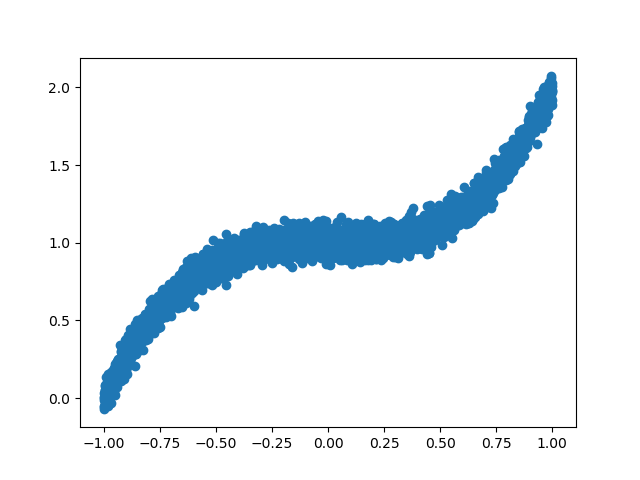
在 save_subclassed_model.py 中,创建了 5000 组训练数据集,实例化 Encoder()、Decoder() 模型,优化器采用 tf.train.AdamOptimizer(),以均方误差作为 Loss 函数。训练过程中,每 5 个 epoch 保存一次模型。
 from subclassed_model import *

 import numpy as np

 import matplotlib.pyplot as plt

 import os

 import tensorflow as tf

 tf.enable_eager_execution()

 # create training data

 X = np.linspace(-1, 1, 5000)

 np.random.shuffle(X)

 y = X ** 3 + 1 + np.random.normal(0, 0.05, (5000,))

 # plot data

 plt.scatter(X, y)

 plt.show()

 # training dataset

 BATCH_SIZE = 16

 BUFFER_SIZE = 128

 training_dataset = tf.data.Dataset.from_tensor_slices((X, y)).batch(BATCH_SIZE).shuffle(BUFFER_SIZE)

 # initialize subclassed models

 encoder = Encoder()

 decoder = Decoder()

 optimizer = tf.train.AdamOptimizer()

 # loss function

 def loss_function(real, pred):

     return tf.losses.mean_squared_error(labels=real, predictions=pred)

 # training

 EPOCHS = 15

 # checkpoint

 checkpoint_dir = './training_checkpoints'

 checkpoint_prefix = os.path.join(checkpoint_dir, 'ckpt')

 checkpoint = tf.train.Checkpoint(optimizer=optimizer,

                                  encoder=encoder,

                                  decoder=decoder)

 if not os.path.exists(checkpoint_dir):

     os.makedirs(checkpoint_dir)

 for epoch in range(EPOCHS):

     epoch_loss = 0

     for (batch, (x, y)) in enumerate(training_dataset):

         x = tf.cast(x, tf.float32)

         y = tf.cast(y, tf.float32)

         x = tf.expand_dims(x, axis=1)   # tf.Tensor([...], shape=(16, 1), dtype=float32)

         y = tf.expand_dims(y, axis=1)   # tf.Tensor([...], shape=(16, 1), dtype=float32)

         with tf.GradientTape() as tape:

             y_ = encoder(x)

             prediction = decoder(y_)

             batch_loss = loss_function(real=y, pred=prediction)

         grads = tape.gradient(batch_loss, encoder.variables + decoder.variables)

         optimizer.apply_gradients(zip(grads, encoder.variables + decoder.variables),

                                   global_step=tf.train.get_or_create_global_step())

         epoch_loss += batch_loss

         if (batch + 1) % 100 == 0:

             print('Epoch {} Batch {} Loss {:.4f}'.format(epoch + 1,

                                                          batch + 1,

                                                          batch_loss.numpy()))

     print('Epoch {} Loss {:.4f}'.format(epoch + 1, epoch_loss / len(X)))

     if (epoch + 1) % 5 == 0:

         checkpoint.save(file_prefix=checkpoint_prefix)
运行 save_subclassed_model.py。
2019-06-27 12:57:14.253635: I tensorflow/core/platform/cpu_feature_guard.cc:141] Your CPU supports instructions that this TensorFlow binary was not compiled to use: AVX2

2019-06-27 12:57:15.660142: I tensorflow/core/common_runtime/gpu/gpu_device.cc:1432] Found device 0 with properties:

name: GeForce GTX 1060 major: 6 minor: 1 memoryClockRate(GHz): 1.6705

pciBusID: 0000:01:00.0

totalMemory: 6.00GiB freeMemory: 4.97GiB

2019-06-27 12:57:15.660397: I tensorflow/core/common_runtime/gpu/gpu_device.cc:1511] Adding visible gpu devices: 0

2019-06-27 12:57:16.488227: I tensorflow/core/common_runtime/gpu/gpu_device.cc:982] Device interconnect StreamExecutor with strength 1 edge matrix:

2019-06-27 12:57:16.488385: I tensorflow/core/common_runtime/gpu/gpu_device.cc:988]      0

2019-06-27 12:57:16.488476: I tensorflow/core/common_runtime/gpu/gpu_device.cc:1001] 0:   N

2019-06-27 12:57:16.488772: I tensorflow/core/common_runtime/gpu/gpu_device.cc:1115] Created TensorFlow device (/job:localhost/replica:0/task:0/device:GPU:0 with 4722 MB memory) -> physical GPU (device: 0, name: GeForce GTX 1060, pci bus id: 0000:01:00.0, compute capability: 6.1)

Epoch 1 Batch 100 Loss 0.1120

Epoch 1 Batch 200 Loss 0.0179

Epoch 1 Batch 300 Loss 0.0347

Epoch 1 Loss 0.0111

Epoch 2 Batch 100 Loss 0.0144

Epoch 2 Batch 200 Loss 0.0097

Epoch 2 Batch 300 Loss 0.0141

Epoch 2 Loss 0.0012

Epoch 3 Batch 100 Loss 0.0060

Epoch 3 Batch 200 Loss 0.0037

Epoch 3 Batch 300 Loss 0.0054

Epoch 3 Loss 0.0007

Epoch 4 Batch 100 Loss 0.0088

Epoch 4 Batch 200 Loss 0.0038

Epoch 4 Batch 300 Loss 0.0093

Epoch 4 Loss 0.0004

Epoch 5 Batch 100 Loss 0.0039

Epoch 5 Batch 200 Loss 0.0044

Epoch 5 Batch 300 Loss 0.0031

Epoch 5 Loss 0.0003

Epoch 6 Batch 100 Loss 0.0025

Epoch 6 Batch 200 Loss 0.0038

Epoch 6 Batch 300 Loss 0.0027

Epoch 6 Loss 0.0002

Epoch 7 Batch 100 Loss 0.0026

Epoch 7 Batch 200 Loss 0.0032

Epoch 7 Batch 300 Loss 0.0041

Epoch 7 Loss 0.0002

Epoch 8 Batch 100 Loss 0.0022

Epoch 8 Batch 200 Loss 0.0031

Epoch 8 Batch 300 Loss 0.0026

Epoch 8 Loss 0.0002

Epoch 9 Batch 100 Loss 0.0040

Epoch 9 Batch 200 Loss 0.0014

Epoch 9 Batch 300 Loss 0.0040

Epoch 9 Loss 0.0002

Epoch 10 Batch 100 Loss 0.0023

Epoch 10 Batch 200 Loss 0.0030

Epoch 10 Batch 300 Loss 0.0038

Epoch 10 Loss 0.0002

Epoch 11 Batch 100 Loss 0.0028

Epoch 11 Batch 200 Loss 0.0020

Epoch 11 Batch 300 Loss 0.0025

Epoch 11 Loss 0.0002

Epoch 12 Batch 100 Loss 0.0027

Epoch 12 Batch 200 Loss 0.0045

Epoch 12 Batch 300 Loss 0.0021

Epoch 12 Loss 0.0002

Epoch 13 Batch 100 Loss 0.0016

Epoch 13 Batch 200 Loss 0.0033

Epoch 13 Batch 300 Loss 0.0024

Epoch 13 Loss 0.0002

Epoch 14 Batch 100 Loss 0.0034

Epoch 14 Batch 200 Loss 0.0028

Epoch 14 Batch 300 Loss 0.0033

Epoch 14 Loss 0.0002

Epoch 15 Batch 100 Loss 0.0019

Epoch 15 Batch 200 Loss 0.0030

Epoch 15 Batch 300 Loss 0.0037

Epoch 15 Loss 0.0002

Process finished with exit code 0
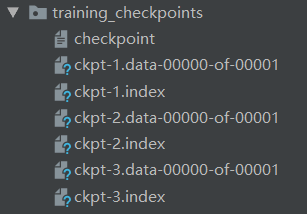
查看 checkpoint_dir 目录下的文件。
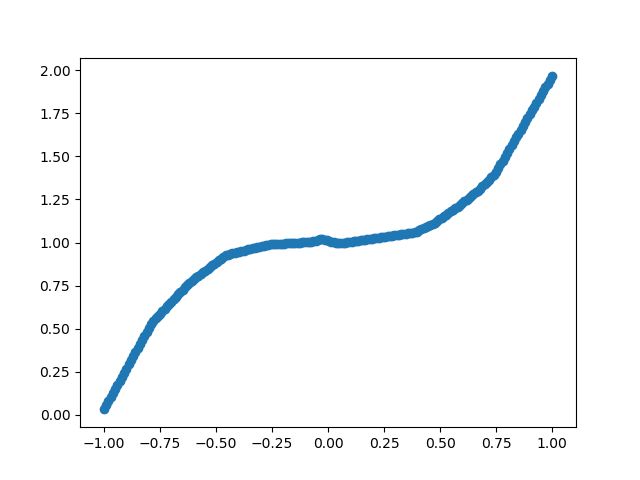
在 load_subclassed_model.py 中,创建了 200 组测试数据,加载了 the latest checkpoint 中保存的模型参数,对模型进行了测试。
 from subclassed_model import *

 import numpy as np

 import matplotlib.pyplot as plt

 import tensorflow as tf

 tf.enable_eager_execution()

 # load model

 encoder = Encoder()

 decoder = Decoder()

 optimizer = tf.train.AdamOptimizer()

 checkpoint_dir = './training_checkpoints'

 checkpoint = tf.train.Checkpoint(optimizer=optimizer,

                                  encoder=encoder,

                                  decoder=decoder)

 checkpoint.restore(tf.train.latest_checkpoint(checkpoint_dir))

 # build model

 BATCH_SIZE = 16

 encoder.build(input_shape=tf.TensorShape((BATCH_SIZE, 1)))

 decoder.build(input_shape=tf.TensorShape((BATCH_SIZE, UNITS)))

 encoder.summary()

 decoder.summary()

 # create validation data

 X_test = np.linspace(-1, 1, 200)

 # validation dataset

 val_dataset = tf.data.Dataset.from_tensor_slices(X_test).batch(1)

 # predict and plot

 results = []

 for (batch, x) in enumerate(val_dataset):

     x = tf.cast(x, tf.float32)

     x = tf.expand_dims(x, axis=1)

     y_ = encoder(x)

     prediction = decoder(y_)

     # print(prediction.numpy()[0][0])

     results.append(prediction.numpy()[0][0])

 # plot results

 plt.scatter(X_test, results)

 plt.show()
运行 load_subclassed_model.py。
2019-06-27 13:27:40.712260: I tensorflow/core/platform/cpu_feature_guard.cc:141] Your CPU supports instructions that this TensorFlow binary was not compiled to use: AVX2

2019-06-27 13:27:42.105938: I tensorflow/core/common_runtime/gpu/gpu_device.cc:1432] Found device 0 with properties:

name: GeForce GTX 1060 major: 6 minor: 1 memoryClockRate(GHz): 1.6705

pciBusID: 0000:01:00.0

totalMemory: 6.00GiB freeMemory: 4.97GiB

2019-06-27 13:27:42.106200: I tensorflow/core/common_runtime/gpu/gpu_device.cc:1511] Adding visible gpu devices: 0

2019-06-27 13:27:42.921364: I tensorflow/core/common_runtime/gpu/gpu_device.cc:982] Device interconnect StreamExecutor with strength 1 edge matrix:

2019-06-27 13:27:42.921510: I tensorflow/core/common_runtime/gpu/gpu_device.cc:988]      0

2019-06-27 13:27:42.921594: I tensorflow/core/common_runtime/gpu/gpu_device.cc:1001] 0:   N

2019-06-27 13:27:42.921777: I tensorflow/core/common_runtime/gpu/gpu_device.cc:1115] Created TensorFlow device (/job:localhost/replica:0/task:0/device:GPU:0 with 4722 MB memory) -> physical GPU (device: 0, name: GeForce GTX 1060, pci bus id: 0000:01:00.0, compute capability: 6.1)

_________________________________________________________________

Layer (type)                 Output Shape              Param #

=================================================================

dense (Dense)                multiple                  32

_________________________________________________________________

dense_1 (Dense)              multiple                  136

=================================================================

Total params: 168

Trainable params: 168

Non-trainable params: 0

_________________________________________________________________

_________________________________________________________________

Layer (type)                 Output Shape              Param #

=================================================================

dense_2 (Dense)              multiple                  9

=================================================================

Total params: 9

Trainable params: 9

Non-trainable params: 0

_________________________________________________________________

Process finished with exit code 0
版权声明:本文为博主原创文章,欢迎转载,转载请注明作者及原文出处!
[Tensorflow] 使用 tf.train.Checkpoint() 保存 / 加载 keras subclassed model的更多相关文章
- [Tensorflow] 使用 model.save_weights() 保存 / 加载 Keras Subclassed Model
在 parameters.py 中,定义了各类参数. # training data directory TRAINING_DATA_DIR = './data/' # checkpoint dire ...
- docker 保存 加载(导入 导出镜像
tensorflow 的docker镜像很大,pull一次由于墙经常失败.其实docker 可以将镜像导出再导入. 保存加载(tensorflow)镜像 1) 查看镜像 docker images 如 ...
- 优化tableView加载cell与model的过程
优化tableView加载cell与model的过程 效果图 说明 1. 用多态的特性来优化tableView加载cell与model的过程 2. swift写起来果然要比Objective-C简洁了 ...
- TensorFlow:tf.train.Saver()模型保存与恢复
1.保存 将训练好的模型参数保存起来,以便以后进行验证或测试.tf里面提供模型保存的是tf.train.Saver()模块. 模型保存,先要创建一个Saver对象:如 saver=tf.train.S ...
- tensorflow的tf.train.Saver()模型保存与恢复
将训练好的模型参数保存起来,以便以后进行验证或测试.tf里面提供模型保存的是tf.train.Saver()模块. 模型保存,先要创建一个Saver对象:如 saver=tf.train.Saver( ...
- tensorflow中 tf.train.slice_input_producer 和 tf.train.batch 函数(转)
tensorflow数据读取机制 tensorflow中为了充分利用GPU,减少GPU等待数据的空闲时间,使用了两个线程分别执行数据读入和数据计算. 具体来说就是使用一个线程源源不断的将硬盘中的图片数 ...
- tensorflow中 tf.train.slice_input_producer 和 tf.train.batch 函数
tensorflow数据读取机制 tensorflow中为了充分利用GPU,减少GPU等待数据的空闲时间,使用了两个线程分别执行数据读入和数据计算. 具体来说就是使用一个线程源源不断的将硬盘中的图片数 ...
- 【转载】 tensorflow中 tf.train.slice_input_producer 和 tf.train.batch 函数
原文地址: https://blog.csdn.net/dcrmg/article/details/79776876 ----------------------------------------- ...
- tensorflow之tf.train.exponential_decay()指数衰减法
exponential_decay(learning_rate, global_steps, decay_steps, decay_rate, staircase=False, name=None) ...
随机推荐
- Spring-Spring配置-依赖注入
5.Spring配置 5.1.别名 <!--别名,如果添加了别名,我们也可以使用别名获取到这个对象--> <alias name="user" alias=&qu ...
- ASP.NET MVC Liu_Cabbage 个人博客
RightControl_Blog 介绍 前台使用燕十三博客前端模板,后台基于RightControl .NET通用角色权限管理系统搭建,已完成.项目地址:http://www.baocaige.to ...
- [2019HDU多校第三场][HDU 6603][A. Azshara's deep sea]
题目链接:http://acm.hdu.edu.cn/showproblem.php?pid=6603 题目大意:给出一个凸包,凸包内有若干个圆,要求画尽可能多的对角线使得他们两两不在凸包内相交且不与 ...
- js 弹层下面的body禁止滚动
弹窗是一种常见的交互方式,而蒙层是弹窗必不可少的元素,用于隔断页面与弹窗区块,暂时阻断页面的交互.但是,在蒙层元素中滑动的时候,滑到内容的尽头时,再继续滑动,蒙层底部的页面会开始滚动,显然这不是我们想 ...
- 【线性代数】5-3:克莱姆法则,逆和体积(Cramer's Rule,Inverses,and Volumes)
title: [线性代数]5-3:克莱姆法则,逆和体积(Cramer's Rule,Inverses,and Volumes) categories: Mathematic Linear Algebr ...
- ftp、sftp、vsftp、vsftpd、lftp以及一些网络客户端工具命令
ftp 是File Transfer Protocol的缩写,文件传输协议,用于在网络上进行文件传输的一套标准协议,使用客户/服务器模式.它属于网络传输协议的应用层.了解更多ftp lftp :是一个 ...
- 重读APUE(5)-文件权限
文件,目录,权限 1. 用名称打开任一个类型的文件时,对该名字中包含的每一个目录,包括它可能隐含的当前工作目录都应该具有执行权限:这就是目录执行权限通常被称为搜索位的原因: 例如:为了打开文件/usr ...
- vue devtools无法使用
vue devtools无法使用 一.总结 一句话总结: 没显示vue devtools调试工具的原因是用了生产环境的版本或是压缩的vue版本,或是没有勾选:允许访问文件网址 二.vue调试工具Dev ...
- P1944 最长括号匹配_NOI导刊2009提高(1)
P1944 最长括号匹配_NOI导刊2009提高 题解 宁愿相信世上有鬼,也不能随便相信某谷题目标签 我想了半天然后看了眼题解,发现用栈来模拟就好了 栈来模拟,还要用到一个bool数组,标记是否已经匹 ...
- [转]Html 页面常用单词
Html 页面常用单词 本文来自:https://gitee.com/opencc/SchoolAppDemo 第2批: JavaScript ready 准备 function 函数 disappe ...