
把vim当做golang的IDE
开始决定丢弃鼠标,所以准备用vim了。
那么在vim里面如何搭建golang环境呢?
git盛行之下,搭建vim环境是如此简单。
而且vim搭建好了之后,基本上跟IDE没有差别。
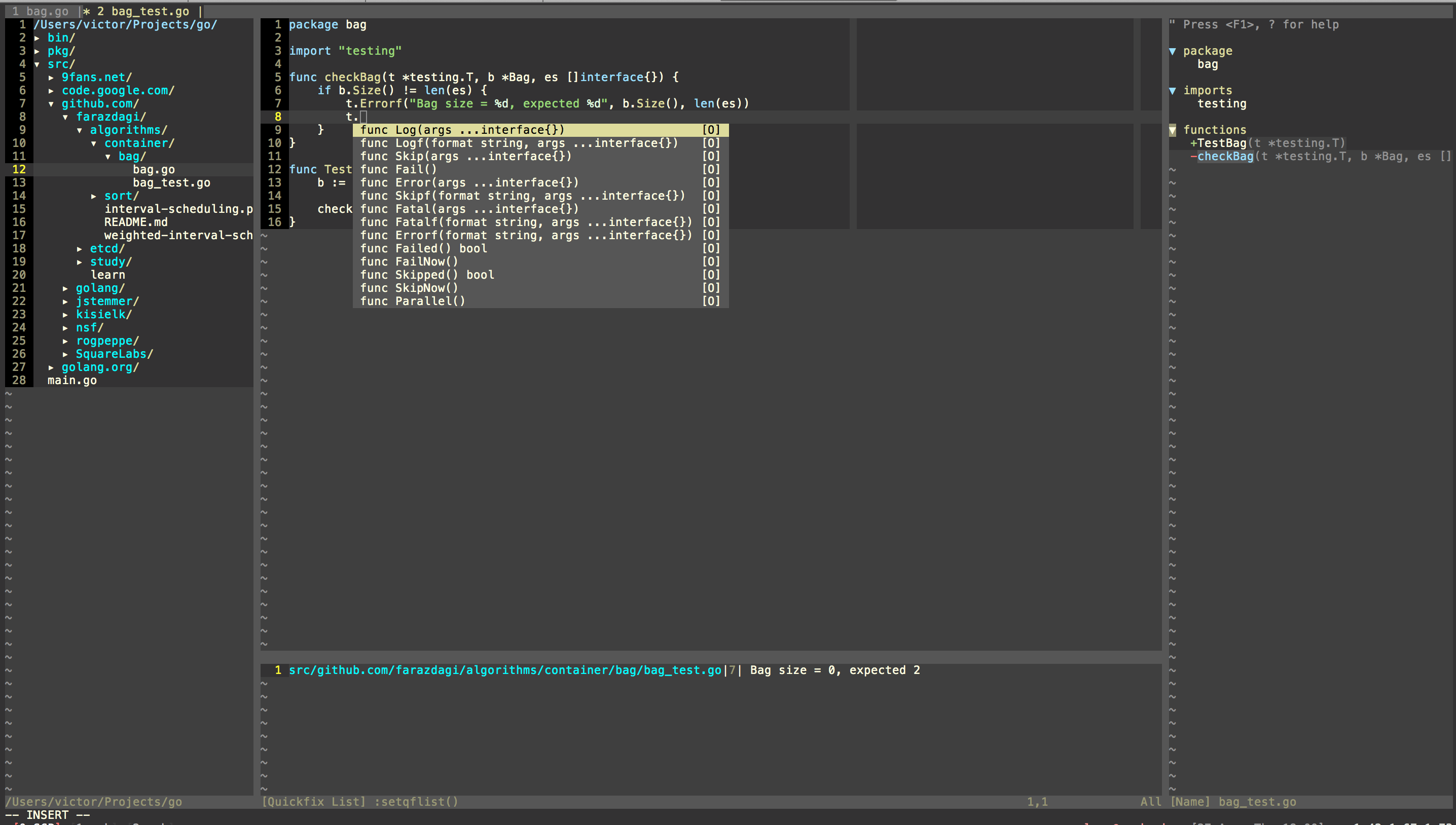
高亮、自动补全、自动格式化、查看定义跳转、语法检测等等等等, 简直是不要不要的:
- Improved Syntax highlighting with items such as Functions, Operators, Methods.
- Auto completion support via
gocode - Better
gofmton save, which keeps cursor position and doesn't break your undo history - Go to symbol/declaration with
:GoDef - Look up documentation with
:GoDocinside Vim or open it in browser - Automatically import packages via
:GoImportor plug it into autosave - Compile your package with
:GoBuild, install it with:GoInstallor test them with:GoTest(also supports running single tests via:GoTestFunc) - Quickly execute your current file/files with
:GoRun - Automatic
GOPATHdetection based on the directory structure (i.e.gbprojects,godepvendored projects) - Change or display
GOPATHwith:GoPath - Create a coverage profile and display annotated source code in browser to see which functions are covered with
:GoCoverage - Call
gometalinterwith:GoMetaLinter, which invokes all possible linters (golint, vet, errcheck, deadcode, etc..) and shows the warnings/errors - Lint your code with
:GoLint - Run your code through
:GoVetto catch static errors - Advanced source analysis tools utilizing oracle, such as
:GoImplements,:GoCallees, and:GoReferrers - Precise type-safe renaming of identifiers with
:GoRename - List all source files and dependencies
- Unchecked error checking with
:GoErrCheck - Integrated and improved snippets, supporting
ultisnipsorneosnippet - Share your current code to play.golang.org with
:GoPlay - On-the-fly type information about the word under the cursor. Plug it into your custom vim function.
- Go asm formatting on save
- Tagbar support to show tags of the source code in a sidebar with
gotags - Custom vim text objects such as
a functionorinner functionlist. - A async launcher for the go command is implemented for Neovim, fully async building and testing (beta).
- Integrated with the Neovim terminal, launch
:GoRunand other go commands in their own new terminal. (beta) - Alternate between implementation and test code with
:GoAlternate
安装起来也非常方便,只要一下三行代码:
#下载安装
git clone git@github.com:farazdagi/vim-go-ide.git ~/.vim_go_runtime

sh ~/.vim_go_runtime/bin/install

#运行

vim -u ~/.vimrc.go
PS:
a)这里要求vim 要开启lua :
brew install vim --with-lua --override-system-vim
b)如果需要类解析,需要转ctag
--------------------
2016-10-20补充
如果把go升级到go1.7,这里的函数 auto-complete 会显示PANIC不能显示任何的系统库对应的函数和自定义的函数
这里需要做一件事情,可以恢复
ps aux | grep gocode

#存在就干掉

killall gocode

#重启

gocode
或者采用以下方式
gocode close && go get -u github.com/nsf/gocode
参考这里:https://github.com/fatih/vim-go/issues/1015
---------------------
原文:http://farazdagi.com/blog/2015/vim-as-golang-ide/
效果如下:
把vim当做golang的IDE的更多相关文章
- golang笔记——IDE
可选方案有 Lite IDE\GoSublime\Visual Studio Code\Goclipse\Vim 1.Lite IDE 这是国人开发的开源且跨平台的 golang 专属IDE,也算是目 ...
- 【转】手把手教你把Vim改装成一个IDE编程环境(图文)
手把手教你把Vim改装成一个IDE编程环境(图文) By: 吴垠 Date: 2007-09-07 Version: 0.5 Email: lazy.fox.wu#gmail.com Homepage ...
- Ubuntu下将vim配置为Python IDE(转)
工欲善其事,必先利其器. 配置好了Django的环境,该把vim好好配置一下当做python的IDE来用. 在Windows下用惯了各种现成的工具,转到Linux下,一下没了头绪……好歹google出 ...
- Vim配置及说明——IDE编程环境
Vim配置及说明——IDE编程环境 Vim配置及说明——IDE编程环境 1.基本及字体 2.插件管理 3.主题风格 4.窗口设置 5.目录树导航 6.标签导航 7.taglist 8.多文档编辑 9. ...
- golang学习笔记11 golang要用jetbrain的golang这个IDE工具开发才好
golang学习笔记11 golang要用jetbrain的golang这个IDE工具开发才好 jetbrain家的全套ide都很好用,一定要dark背景风格才装B 从File-->s ...
- Use Vim as a Python IDE
Use Vim as a Python IDE I love vim and often use it to write Python code. Here are some useful plugi ...
- Vim改装成一个IDE编程环境
1 写在前面 Linux下编程一直被诟病的一点是: 没有一个好用的IDE, 但是听说Linux牛人, 黑客之类的也都不用IDE. 但是对我等从Windows平台转移过来的Coder来说, 一个 ...
- 04-手把手教你把Vim改装成一个IDE编程环境(图文)
Linux下编程一直被诟病的一点是: 没有一个好用的IDE, 但是听说Linux牛人, 黑客之类的也都不用IDE. 但是对我等从Windows平台转移过来的Coder来说, 一个好用的IDE是何等的重 ...
- Ubuntu16.04 IDE: 用Vim逐步打造一个IDE
目前打造完成的IDE主要有: terminator+Bundle+NERDtree+YCF(youcompleteme)+UltiSnips+新创建文件自动补充注释和作者,版权信息等 1,当任务比较多 ...
随机推荐
- DAO跨事物调用---转账
第一步创建实体类:Entity package com.beiwo.epet.entity; public class Account { private int id; private String ...
- (分享)FreeVideo1.6.1 VIP视频播放器(支持下载)
软件名字:FreeVideo 版 本 号 :v 1.6.1 开发语言:易语言 压缩加壳:VMP 3.0 beta 皮 肤:易简约定制版(白色) 模块使用:乐易.精易.皮肤 主要技术:其实没啥 ...
- Android开发--Socket通信
一.Socket通信简介 Android与服务器的通信方式主要有两种,一是Http通信,一是Socket通信.两者的最大差异在于,http连接使用的是"请求-响应方式",即在请求时 ...
- ODAC ,MYDAC版本问题
已确定D7下,ODAC.v6.80.0.47 和 MyDACv5.80.0.47 可以一起用
- mysql数据引擎的概念介绍
什么是数据库引擎?每种数据库的数据格式,内部实现机制都是不同的,要利用一种开发工具访问一种数据库,就必须通过一种中介程序,这种开发工具与数据库之间的中介程序就叫数据库引擎. 如果你是个赛车手并且按一下 ...
- ASP.NET页面回车键触发Button按钮事件问题
首先了解一下Button.UseSubmitBehavior属性. 获取或设置一个布尔值,该值指示 Button 控件使用客户端浏览器的提交机制还是 ASP.NET 回发机制. 如果该控件使用了客户端 ...
- XidianOJ 1099 A simple problem
题目描述 一个长度为N的数组A, 所有数都是整数 ,0 <= A[i] <= 1000000,1 <= i <= N,1 <= N <= 100000,对于 任意i ...
- hadoop环境搭建
osubtu16.04(单机模式),存储空间25G,内存2G密码那啥(!!) 1:任务清单 参考书籍,(hadoop3权威指南) (环境(系统macos12,java18101 ,hadoop173, ...
- touches, targetTouches, changedTouches 区别
1. touches: A list of information for every finger currently touching the screen2. targetTouches: Li ...
- 简单的androidStudio 添加Jar包
感谢http://blog.csdn.net/ta893115871/article/details/46955791博主的文章, 1新建一个空项目 2在项目下添加一个新的moudle 3在该moud ...