
DQL_MySQL
4.DQL(查询数据){SUPER 重点}
4.1DQL
(Data Query Language : 数据查询语言)
-所有的查询操作; Select
数据库中最核心的语言
create database `school`;--创建数据库school
use `school`;--使用school数据库
drop table if EXISTS `grade`;--删除grade历史表
create table `grade`( --创建表grade
`GradeID` int(11) not null auto_increment comment '年级编号',
`GradeName` varchar(50) not null comment '年级名称',
primary key(`GradeID`)
)engine = innodb auto_increment=6 default CHARSET=utf8;
--插入数据
insert into `grade`(`GradeID`,`GradeName`)values(1,'大一'),(2,'大二'),(3,'大三'),(4,'大四');
--删除result历史表
drop table if exists `result`;
--创建表result
create table `result`(
`StudentNo` int(4) not null comment '学号',
`SubjectNo` int(4) not null comment '课程编号',
`ExamDate` TIMESTAMP not null comment '考试日期',
`StudentResult` int(4) not null comment '考试成绩',
key `SubjectNo`(`SubjectNo`)
)engine = innodb default charset=utf8;
--插入数据
insert into `result`(`StudentNo`,`SubjectNo`,`ExamDate`,`StudentResult`)values(100,101,'2020.1.1',88);
--删除student历史表
drop table if exists `student`;
--建表student
create table `student`(
`StudentNo` int(4) not null comment '学号',
`LoginPwd` varchar(20) DEFAULT null,
`StudnetName` varchar(20) DEFAULT null comment '学生姓名',
`Sex` tinyint(1) default null comment '性别,取值0或1',
`GradeId` int(11) default null comment '年级编号',
`Phone` varchar(40) not null comment '联系电话,允许为空,可选输入',
`Address` varchar(255) not null comment '地址,允许为空',
`BornDate` TIMESTAMP default null comment '出生日期',
`Email` varchar(50) not null comment '邮箱账号',
`IdentityCard` varchar(18) default null comment '身份证号',
PRIMARY key (`StudentNo`),
UNIQUE key `IdentityCard`(`IdentityCard`),
key `Email`(`Email`)
)engine=MYISAM default charset=utf8;
--建表
create table `subject`(
`SubjectNo` int(11) not null auto_increment comment '课程编号',
`SubjectName` varchar(40) default null comment '课程名称',
`ClassHour` int(4) default null comment '学号',
`GradeId` int(4) default null comment '年级编号',
primary key(`SubjectNo`)
)engine=innodb auto_increment=18 default charset=utf8;
4.2指定查询字段
-查询表中所有的数据&指定数据
 --select * from 表名; 查询所有的表数据
 --完整语法 select 去重选项 字段列表 [as 字段别名] from 数据源 [where子句] [group by 子句] [having子句] [order by 子句] [limit子句];
 --select 字段1,... from 表名;
 select * from `student`;
 select `StudentNo`,`Address` from `student`;
-别名设置
 --别名as语句 给结果起一个新名字
 --可以给字段和表起别名
 select `StudentNo` as 学号,`Address`as 地址 from `student`;
-函数
 --函数 Concat(a,b)
 select concat('姓名:',StudentName) as 新名字 from student;
去重 distinct
--去重复值
select distinct `StudentNo` from result;
-- 所有成绩加一分
select `StudentNo`,`StudentResult`+1 as '加分后成绩' from result;
查看当前系统版本
 --查看当前版本 函数
 select version();
用来计算
 -- 用于计算 表达式
 select 100*2-4 as 计算;
4.3where条件子句
作用:检索数据中符合条件的值
搜索的条件为一个或者多个表达式组成,结果为布尔值
逻辑运算符(英文状态下)
| 逻辑运算符 | 语法 | 描述 |
|---|---|---|
| and && | a and b(a && a) | 逻辑与,两个值都为真时,结果为真 |
| or || | a or b(a || b) | 逻辑或,两个值中有一个值为真,结果为真 |
| not ! | not a (!a) | 逻辑非,做取反操作 |
--查询学生中成绩大于等于95小于等于100的学生学号以及分数
select `StudentNo`,`StudentResult` from result
where `StudentResult`>=95 and `StudentResult`<=100;
--between and 用法
select `StudentNo`,`StudentResult` from result
where `StudentResult` between 81 and 100;
--!的用法
select `StudentNo`,`StudentResult` from result
where `StudentNo` != 1001;
4.4模糊查询
模糊查询:比较运算符
| 运算符 | 语法 | 描述 |
|---|---|---|
| is null | a is null | 如果a为空,则结果为真 |
| is not null | a is not null | 如果a不为空,则结果为真 |
| between | a between b and c | 如果a在b和c之间,则结果为真 |
| like | a like b | SQL匹配,如果a匹配b,则结果为真 |
| in | a in(a1,a2,a3...) | 假设a在a1,a2,a3...其中某一个值中,则结果为真 |
-- =======================模糊查询===============
-- =========like==========
select `StudentNo`,`StudentName` from student
where `StudentName` like 'R%';
select `StudentNo`,`StudentName` from student
where `StudentName` like 'R___';
select `StudentNo`,`StudentName` from student
where `StudentName` like '%o%';
-- =======in(具体的一个或者多个值)========
select `StudentNo`,`StudentName` from student
where `StudentNo` in (1001,1002);
select `StudentNo`,`StudentName` from student
where `Address` in ('克利夫兰');
4.5联表查询
JOIN 对比
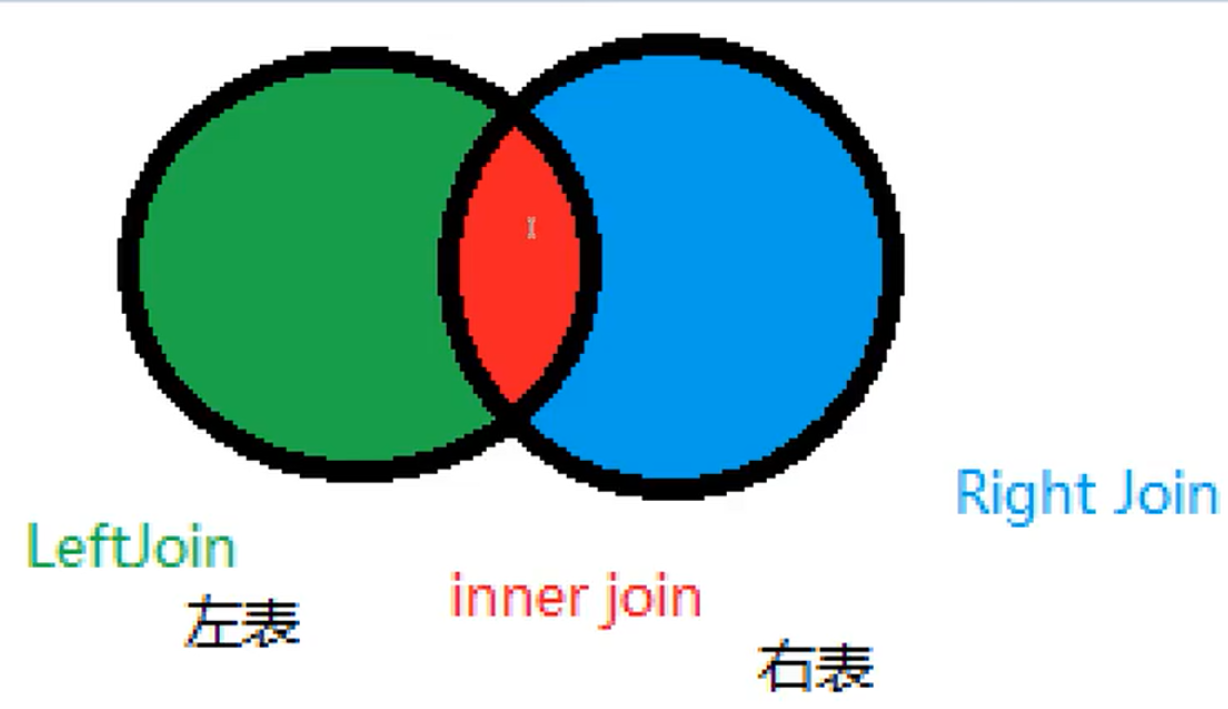
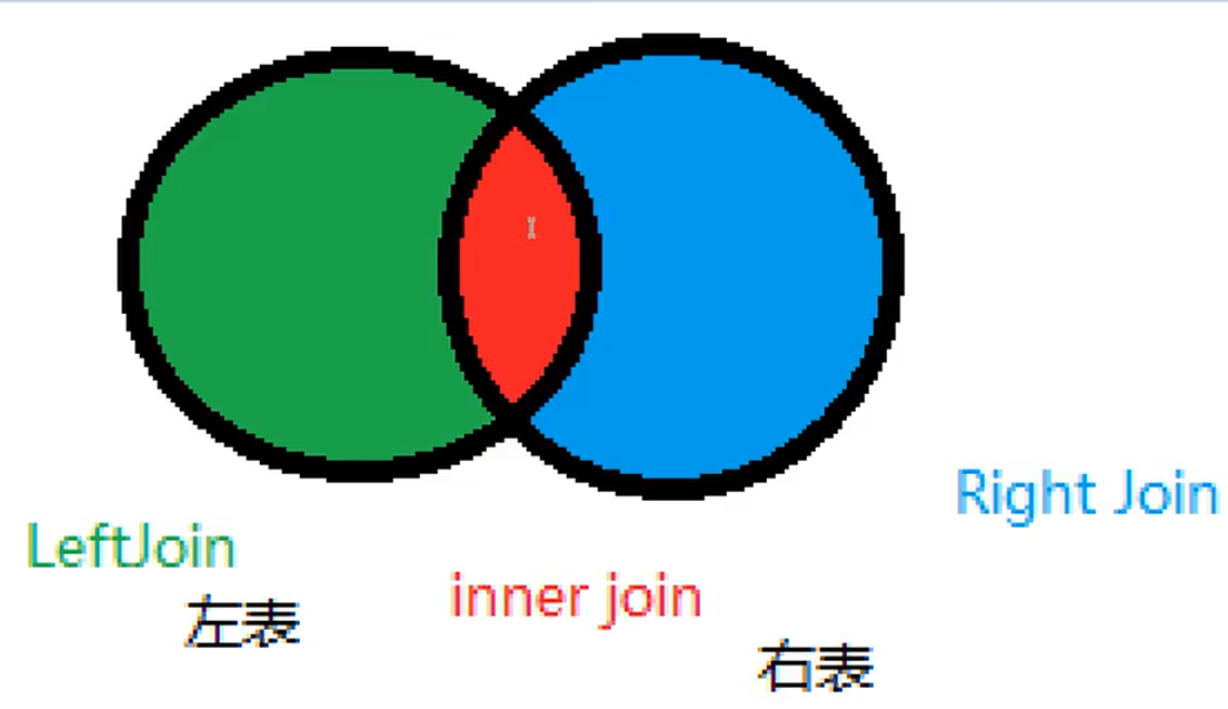
-- =======================联表查询========================
--查询了参加了考试的同学(学号、姓名、科目编号、分数)
/*
思路:
1、分析需求,分析查询的字段来自哪些表(连接查询)
2、确定使用哪些连接查询 7中
3、确定一个交叉数据
4、判断条件:学生表中的 StudentNo = 成绩表中的 StudentNo
*/
-- inner join 求交集
select s.StudentNo,StudentName,SubjectNo,StudentResult
from `student` as s
inner join `result` as r
where s.studentNo=r.studentNo;
-- right join
select s.StudentNo,StudentName,SubjectNo,StudentResult
from `student` as s
right join `result` as r
on s.studentNo = r.studentNo;
-- left join
select s.StudentNo,StudentName,SubjectNo,StudentResult
from `student` as s
left join `result` as r
on s.studentNo = r.studentNo;
/*
参加考试同学信息:学号、学生姓名,科目名、分数
三个表 student subject result
*/
select s.StudentNo,StudentName,SubjectName,StudentResult
from student s
right join result r
on r.StudentNo=s.StudentNo
inner join `subject` sub
on r.SubjectNo=sub.SubjectNo;
| 操作 | 描述 |
|---|---|
| inner join | 如果表中至少有一个匹配,就返回行 |
| left join | 即使右表中没有匹配,也会从左表中返回所有的值 |
| right join | 会从左表中没有匹配,也会从右表中返回所有的值 |
join on(判断的条件) 连接查询
where(连接的表) 等值查询
自连接
自己和自己连接;核心:一张表拆为两张一样的表
父类
| categoryid | categoryName |
|---|---|
| 2 | 信息技术 |
| 3 | 软件开发 |
| 4 | 数据库 |
| 5 | Web开发 |
子类
**
| pid | categoryid | categoryName |
|---|---|---|
| 1 | 2 | 信息技术 |
| 1 | 3 | 软件开发 |
| 3 | 4 | 数据库 |
| 1 | 5 | Web开发 |
create table `category`(
`categoryid` int(10) UNSIGNED not null auto_increment comment '主题id',
`pid` int(5) not null comment '父id',
`categoryName` varchar(40) not null comment '主题名字',
primary key (`categoryid`)
)engine=innodb auto_increment=9 default charset=utf8;
insert into `category`(`categoryid`,`pid`,`categoryName`)
values(2,1,'信息技术'),
(3,1,'软件开发'),
(4,3,'数据库'),
(5,1,'Web开发'),
(6,4,'PS技术');
-- 查询父子信息 --把一张表看成两张一模一样的表
select a.`categoryName`as '父栏目',b.`categoryName` as '子栏目'
from `category` as a ,`category` as b
where a.`categoryid`=b.`pid`;
4.6分页和排序
排序
-- =========分页limit 和 排序order by===========
-- 排序:升序 ASC;降序 DESC
select s.`StudentNo`,`StudentName`,`SubjectName`,`StudentResult`
from student s
inner join `result` r
on s.StudentNo=r.StudentNo
inner join `subject` sub
on r.SubjectNo=sub.SubjectNo
where subjectName = '软件工程'
order by `StudentResult` desc;
分页
-- =========分页limit 和 排序order by===========
-- 排序:升序 ASC;降序 DESC
select s.`StudentNo`,`StudentName`,`SubjectName`,`StudentResult`
from student s
inner join `result` r
on s.StudentNo=r.StudentNo
inner join `subject` sub
on r.SubjectNo=sub.SubjectNo
where subjectName = '软件工程'
order by `StudentResult` desc;
-- 分页;每页显示一条数据
-- 语法:limit 起始位置,页面的大小
-- limit 0,1 1到2的数据
select s.`StudentNo`,`StudentName`,`SubjectName`,`StudentResult`
from student s
inner join `result` r
on s.StudentNo=r.StudentNo
inner join `subject` sub
on r.SubjectNo=sub.SubjectNo
where subjectName = '软件工程'
order by `StudentResult` asc
limit 0,1;
语法:limit(查询起始下标,pageSize)
4.7子查询
本质:在where语句中嵌套一个子查询语句
where (select * from ...)
-- ======子查询=========
-- 由里及外
select `StudentNo`,`SubjectNo`,`StudentResult`
from `result`
where `StudentNo` = (select SubjectNo from `subject`
where SubjectName = '软件工程'
);
select `StudentNo`,`StudentName`
from `student` s
where `StudentNo`=(
select `StudentNo` from `result`
where `StudentResult` > 80
limit 1
);
4.8.分组和过滤
 select SubjectName,AVG(StudentResult) as '平均分'
 from result r
 inner join `subject` sub
 on r.`SubjectNo`=sub.`SubjectNo`
 GROUP BY r.`SubjectNo` -- 分组
 HAVING 平均分 > 80;  -- 过滤(和where一样效果,知识位置不同,在group by后面)
DQL_MySQL的更多相关文章
随机推荐
- 入门大数据---通过Yarn搭建MapReduce和应用实例
上一篇中我们了解了MapReduce和Yarn的基本概念,接下来带领大家搭建下Mapreduce-HA的框架. 结构图如下: 开始搭建: 一.配置环境 注:可以现在一台计算机上进行配置,然后分发给其它 ...
- js基础练习题(3)
8.this 1.举例说说apply方法和call方法的作用和区别 2.读下面代码,写程序结果 function identify () { return this.name.toUpperCase( ...
- 019.Kubernetes二进制集群存储longhorn
一 Longhorn存储部署 1.1 Longhorn概述 Longhorn是用于Kubernetes的开源分布式块存储系统. 提示:更多介绍参考:https://github.com/longhor ...
- JS控制滚动条的位置
转载▼http://blog.sina.com.cn/s/blog_4481a3460100rwwu.html JS控制滚动条的位置:window.scrollTo(x,y); 竖向滚动条置顶 ...
- Fiddler和JMeter测试需要主要的地方
Fiddler里面设置请求头的时候ContentType和Content-Type这两种写法都可以: 这两种写法都可以. 但是在JMeter中必须要用Content-Type才行,如下图所示: (完)
- css中input与button在一行高度不一致的解决方法
在写html表单的时候,发现了一个问题:input和button设置了一样的宽高,但是显示高度确不一致,先看代码: <style> input,button{ width:100px; h ...
- 来看下css边框阴影怎么设置?这些方法掌握后工作更轻松
我们在网页设计中,通常会使用ps工具来达到图片或者边框阴影.立体等效果.但是如果一些基础效果都需要用p图来完成那就显得效率比较低了.其实可以使用CSS来设置边框阴影,下面本篇文章来给大家介绍一下. 在 ...
- 巧用transform: scale()
巧用transform: scale() 移动端font-size小于12px时line-height问题 由于出现的场景是字体小于12px的时候,所以可以将原来包括 font-size 在内的属性放 ...
- 手写一个React-Redux,玩转React的Context API
上一篇文章我们手写了一个Redux,但是单纯的Redux只是一个状态机,是没有UI呈现的,所以一般我们使用的时候都会配合一个UI库,比如在React中使用Redux就会用到React-Redux这个库 ...
- day13 作业
目录 1.编写文件修改功能,调用函数时,传入三个参数(修改的文件路径,要修改的内容,修改后的内容)既可完成文件的修改 2.编写tail工具 3.编写登录功能 4.编写注册功能 选做题:编写ATM程序实 ...