
手把手教你Spring Boot2.x整合Elasticsearch(ES)
文末会附上完整的代码包供大家下载参考,码字不易,如果对你有帮助请给个点赞和关注,谢谢!
如果只是想看java对于Elasticsearch的操作可以直接看第四大点
一、docker部署Elasticsearch(下面简称es)单机版教程
1、部署es
拉取es镜像(这里我使用的版本是7.5.1)
docker pull docker.elastic.co/elasticsearch/elasticsearch:7.5.1
构建容器并启动
docker run -di --restart=always --name=es -p 9200:9200 -p 9300:9300 -e "discovery.type=single-node" -e ES_JAVA_OPTS="-Xms512m -Xmx512m" docker.elastic.co/elasticsearch/elasticsearch:7.5.1
注意:es默认占用2G内存,我这里添加 -e ES_JAVA_OPTS="-Xms512m -Xmx512m" 参数指定占用内存
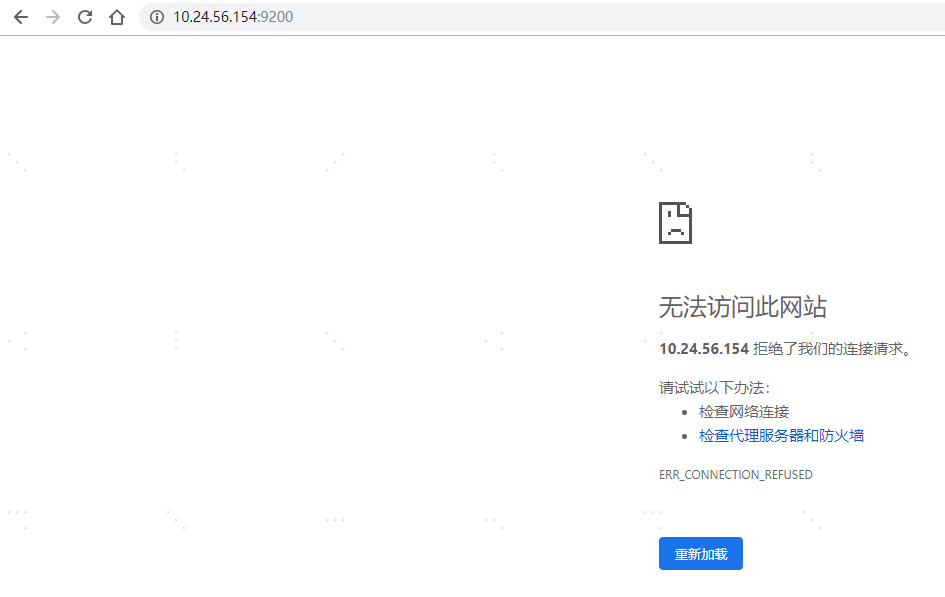
此时如果你访问 服务器ip:9200会出现无法访问的情况,这是因为还需要开启es的跨域访问
2、配置es允许跨域访问
进入es的容器
docker exec -it es /bin/bash
执行命令
vi /usr/share/elasticsearch/config/elasticsearch.yml编辑配置文件,在文件末尾添加下面的配置然后wq保存退出http.cors.enabled: true
http.cors.allow-origin: "*"
执行
exit命令退出容器,然后执行docker restart es命令重启es,然后再访问 服务器ip:9200 ,出现下图就表示单机版es搭建完成并可以远程访问了
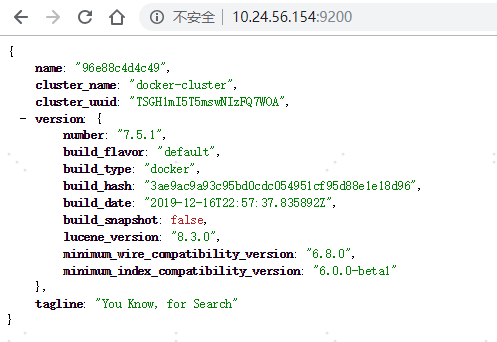
注意:如果此时出现还是无法访问的,稍等几分钟后再刷新页面就好了,因为es重启是需要一些时间的
二、Elasticsearch(下面简称es)安装ik分词器教程
由于es自带没有中文分词器,所以这里添加大家用的比较多的ik分词器(注意ik分词器的版本必须和es版本一致)
首先执行
docker exec -it es bash进入es的容器然后执行
cd /usr/share/elasticsearch/bin/进入bin目录然后执行下面的命令在线安装ik分词器./elasticsearch-plugin install https://github.com/medcl/elasticsearch-analysis-ik/releases/download/v6.5.4/elasticsearch-analysis-ik-7.5.1.zip
执行
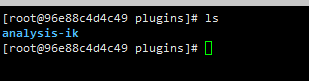
cd ../plugins/进入plugins查看ik分词器是否成功安装
三、Elasticsearch(下面简称es)安装可视化插件head教程
拉取elasticsearch-head镜像
docker pull mobz/elasticsearch-head:5
创建并启动容器
docker run --restart=always --name elasticsearch-head -di -p 9100:9100 docker.io/mobz/elasticsearch-head:5
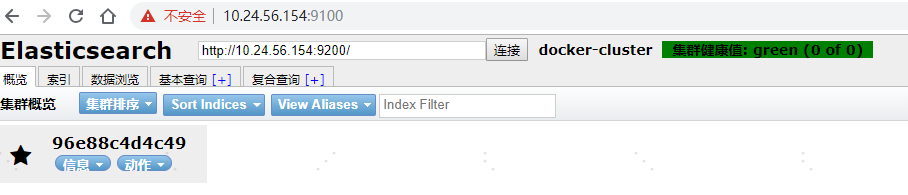
访问服务器ip:9100,然后输入服务器ip:9200,点击“连接”按钮
四、SpringBoot2.x整合Elasticsearch(下面简称es)教程
1、老规矩,先在pom.xml中添加es的依赖
<dependency>

   <groupId>org.springframework.boot</groupId>

   <artifactId>spring-boot-starter-data-elasticsearch</artifactId>

</dependency>
2、在application.yml中添加es的配置
#elasticsearch配置

elasticsearch:

  rest:

    #es节点地址,集群则用逗号隔开

    uris: 10.24.56.154:9200
3、添加es的工具类ElasticSearchUtils.java,工具类中我只添加了常用的一些方法,大家可以根据需要自行完善
package com.example.study.util;

import com.alibaba.fastjson.JSON;

import lombok.extern.slf4j.Slf4j;

import org.apache.commons.lang3.StringUtils;

import org.apache.http.HttpHost;

import org.elasticsearch.action.admin.indices.create.CreateIndexRequest;

import org.elasticsearch.action.admin.indices.create.CreateIndexResponse;

import org.elasticsearch.action.admin.indices.delete.DeleteIndexRequest;

import org.elasticsearch.action.bulk.BulkRequest;

import org.elasticsearch.action.bulk.BulkResponse;

import org.elasticsearch.action.delete.DeleteRequest;

import org.elasticsearch.action.delete.DeleteResponse;

import org.elasticsearch.action.get.GetRequest;

import org.elasticsearch.action.get.GetResponse;

import org.elasticsearch.action.index.IndexRequest;

import org.elasticsearch.action.index.IndexResponse;

import org.elasticsearch.action.search.SearchRequest;

import org.elasticsearch.action.search.SearchResponse;

import org.elasticsearch.action.support.master.AcknowledgedResponse;

import org.elasticsearch.action.update.UpdateRequest;

import org.elasticsearch.action.update.UpdateResponse;

import org.elasticsearch.client.RequestOptions;

import org.elasticsearch.client.RestClient;

import org.elasticsearch.client.RestClientBuilder;

import org.elasticsearch.client.RestHighLevelClient;

import org.elasticsearch.client.indices.GetIndexRequest;

import org.elasticsearch.common.Strings;

import org.elasticsearch.common.text.Text;

import org.elasticsearch.common.unit.TimeValue;

import org.elasticsearch.common.xcontent.XContentType;

import org.elasticsearch.search.SearchHit;

import org.elasticsearch.search.builder.SearchSourceBuilder;

import org.elasticsearch.search.fetch.subphase.FetchSourceContext;

import org.elasticsearch.search.fetch.subphase.highlight.HighlightBuilder;

import org.elasticsearch.search.fetch.subphase.highlight.HighlightField;

import org.springframework.beans.factory.annotation.Value;

import org.springframework.stereotype.Component;

import javax.annotation.PostConstruct;

import java.io.IOException;

import java.util.ArrayList;

import java.util.List;

import java.util.Map;

import java.util.UUID;

/**

 * ElasticSearch工具类

 *

 * @author 154594742@qq.com

 * @date 2021/3/4 19:34

 */

@Slf4j

@Component

public class ElasticSearchUtils {

    @Value("${spring.elasticsearch.rest.uris}")

    private String uris;

    private RestHighLevelClient restHighLevelClient;

    /**

     * 在Servlet容器初始化前执行

     */

    @PostConstruct

    private void init() {

        try {

            if (restHighLevelClient != null) {

                restHighLevelClient.close();

            }

            if (StringUtils.isBlank(uris)) {

                log.error("spring.elasticsearch.rest.uris is blank");

                return;

            }

            //解析yml中的配置转化为HttpHost数组

            String[] uriArr = uris.split(",");

            HttpHost[] httpHostArr = new HttpHost[uriArr.length];

            int i = 0;

            for (String uri : uriArr) {

                if (StringUtils.isEmpty(uris)) {

                    continue;

                }

                try {

                    //拆分出ip和端口号

                    String[] split = uri.split(":");

                    String host = split[0];

                    String port = split[1];

                    HttpHost httpHost = new HttpHost(host, Integer.parseInt(port), "http");

                    httpHostArr[i++] = httpHost;

                } catch (Exception e) {

                    log.error(e.getMessage());

                }

            }

            RestClientBuilder builder = RestClient.builder(httpHostArr);

            restHighLevelClient = new RestHighLevelClient(builder);

        } catch (IOException e) {

            log.error(e.getMessage());

        }

    }

    /**

     * 创建索引

     *

     * @param index

     * @return

     */

    public boolean createIndex(String index) throws IOException {

        if (isIndexExist(index)) {

            log.error("Index is  exits!");

            return false;

        }

        //1.创建索引请求

        CreateIndexRequest request = new CreateIndexRequest(index);

        //2.执行客户端请求

        CreateIndexResponse response = restHighLevelClient.indices()

                .create(request, RequestOptions.DEFAULT);

        return response.isAcknowledged();

    }

    /**

     * 判断索引是否存在

     *

     * @param index

     * @return

     */

    public boolean isIndexExist(String index) throws IOException {

        GetIndexRequest request = new GetIndexRequest(index);

        return restHighLevelClient.indices().exists(request, RequestOptions.DEFAULT);

    }

    /**

     * 删除索引

     *

     * @param index

     * @return

     */

    public boolean deleteIndex(String index) throws IOException {

        if (!isIndexExist(index)) {

            log.error("Index is not exits!");

            return false;

        }

        DeleteIndexRequest request = new DeleteIndexRequest(index);

        AcknowledgedResponse delete = restHighLevelClient.indices()

                .delete(request, RequestOptions.DEFAULT);

        return delete.isAcknowledged();

    }

    /**

     * 新增/更新数据

     *

     * @param object 要新增/更新的数据

     * @param index  索引,类似数据库

     * @param id     数据ID

     * @return

     */

    public String submitData(Object object, String index, String id) throws IOException {

        if (null == id) {

            return addData(object, index);

        }

        if (this.existsById(index, id)) {

            return this.updateDataByIdNoRealTime(object, index, id);

        } else {

            return addData(object, index, id);

        }

    }

    /**

     * 新增数据,自定义id

     *

     * @param object 要增加的数据

     * @param index  索引,类似数据库

     * @param id     数据ID,为null时es随机生成

     * @return

     */

    public String addData(Object object, String index, String id) throws IOException {

        if (null == id) {

            return addData(object, index);

        }

        if (this.existsById(index, id)) {

            return this.updateDataByIdNoRealTime(object, index, id);

        }

        //创建请求

        IndexRequest request = new IndexRequest(index);

        request.id(id);

        request.timeout(TimeValue.timeValueSeconds(1));

        //将数据放入请求 json

        request.source(JSON.toJSONString(object), XContentType.JSON);

        //客户端发送请求

        IndexResponse response = restHighLevelClient.index(request, RequestOptions.DEFAULT);

        log.info("添加数据成功 索引为: {}, response 状态: {}, id为: {}", index, response.status().getStatus(), response.getId());

        return response.getId();

    }

    /**

     * 数据添加 随机id

     *

     * @param object 要增加的数据

     * @param index  索引,类似数据库

     * @return

     */

    public String addData(Object object, String index) throws IOException {

        return addData(object, index, UUID.randomUUID().toString().replaceAll("-", "").toUpperCase());

    }

    /**

     * 通过ID删除数据

     *

     * @param index 索引,类似数据库

     * @param id    数据ID

     * @return

     */

    public String deleteDataById(String index, String id) throws IOException {

        DeleteRequest request = new DeleteRequest(index, id);

        DeleteResponse deleteResponse = restHighLevelClient.delete(request, RequestOptions.DEFAULT);

        return deleteResponse.getId();

    }

    /**

     * 通过ID 更新数据

     *

     * @param object 要更新数据

     * @param index  索引,类似数据库

     * @param id     数据ID

     * @return

     */

    public String updateDataById(Object object, String index, String id) throws IOException {

        UpdateRequest updateRequest = new UpdateRequest(index, id);

        updateRequest.timeout("1s");

        updateRequest.doc(JSON.toJSONString(object), XContentType.JSON);

        UpdateResponse updateResponse = restHighLevelClient.update(updateRequest, RequestOptions.DEFAULT);

        log.info("索引为: {}, id为: {},updateResponseID:{}, 更新数据成功", index, id, updateResponse.getId());

        return updateResponse.getId();

    }

    /**

     * 通过ID 更新数据,保证实时性

     *

     * @param object 要增加的数据

     * @param index  索引,类似数据库

     * @param id     数据ID

     * @return

     */

    public String updateDataByIdNoRealTime(Object object, String index, String id) throws IOException {

        //更新请求

        UpdateRequest updateRequest = new UpdateRequest(index, id);

        //保证数据实时更新

        updateRequest.setRefreshPolicy("wait_for");

        updateRequest.timeout("1s");

        updateRequest.doc(JSON.toJSONString(object), XContentType.JSON);

        //执行更新请求

        UpdateResponse updateResponse = restHighLevelClient.update(updateRequest, RequestOptions.DEFAULT);

        log.info("索引为: {}, id为: {},updateResponseID:{}, 实时更新数据成功", index, id, updateResponse.getId());

        return updateResponse.getId();

    }

    /**

     * 通过ID获取数据

     *

     * @param index  索引,类似数据库

     * @param id     数据ID

     * @param fields 需要显示的字段,逗号分隔(缺省为全部字段)

     * @return

     */

    public Map<String, Object> searchDataById(String index, String id, String fields) throws IOException {

        GetRequest request = new GetRequest(index, id);

        if (StringUtils.isNotEmpty(fields)) {

            //只查询特定字段。如果需要查询所有字段则不设置该项。

            request.fetchSourceContext(new FetchSourceContext(true, fields.split(","), Strings.EMPTY_ARRAY));

        }

        GetResponse response = restHighLevelClient.get(request, RequestOptions.DEFAULT);

        return response.getSource();

    }

    /**

     * 通过ID判断文档是否存在

     *

     * @param index 索引,类似数据库

     * @param id    数据ID

     * @return

     */

    public boolean existsById(String index, String id) throws IOException {

        GetRequest request = new GetRequest(index, id);

        //不获取返回的_source的上下文

        request.fetchSourceContext(new FetchSourceContext(false));

        request.storedFields("_none_");

        return restHighLevelClient.exists(request, RequestOptions.DEFAULT);

    }

    /**

     * 批量插入false成功

     *

     * @param index   索引,类似数据库

     * @param objects 数据

     * @return

     */

    public boolean bulkPost(String index, List<?> objects) {

        BulkRequest bulkRequest = new BulkRequest();

        BulkResponse response = null;

        //最大数量不得超过20万

        for (Object object : objects) {

            IndexRequest request = new IndexRequest(index);

            request.source(JSON.toJSONString(object), XContentType.JSON);

            bulkRequest.add(request);

        }

        try {

            response = restHighLevelClient.bulk(bulkRequest, RequestOptions.DEFAULT);

        } catch (IOException e) {

            e.printStackTrace();

        }

        return null != response && response.hasFailures();

    }

    /**

     * 获取低水平客户端

     *

     * @return

     */

    public RestClient getLowLevelClient() {

        return restHighLevelClient.getLowLevelClient();

    }

    /**

     * 高亮结果集 特殊处理

     * map转对象 JSONObject.parseObject(JSONObject.toJSONString(map), Content.class)

     *

     * @param searchResponse

     * @param highlightField

     */

    private List<Map<String, Object>> setSearchResponse(SearchResponse searchResponse, String highlightField) {

        //解析结果

        ArrayList<Map<String, Object>> list = new ArrayList<>();

        for (SearchHit hit : searchResponse.getHits().getHits()) {

            Map<String, HighlightField> high = hit.getHighlightFields();

            HighlightField title = high.get(highlightField);

            //原来的结果

            Map<String, Object> sourceAsMap = hit.getSourceAsMap();

            //解析高亮字段,将原来的字段换为高亮字段

            if (title != null) {

                Text[] texts = title.fragments();

                StringBuilder nTitle = new StringBuilder();

                for (Text text : texts) {

                    nTitle.append(text);

                }

                //替换

                sourceAsMap.put(highlightField, nTitle.toString());

            }

            list.add(sourceAsMap);

        }

        return list;

    }

    /**

     * 查询并分页

     *

     * @param index          索引名称

     * @param query          查询条件

     * @param highlightField 高亮字段

     * @return

     */

    public List<Map<String, Object>> searchListData(String index,

                                                    SearchSourceBuilder query,

                                                    String highlightField) throws IOException {

        SearchRequest request = new SearchRequest(index);

        //高亮

        HighlightBuilder highlight = new HighlightBuilder();

        highlight.field(highlightField);

        //关闭多个高亮

        highlight.requireFieldMatch(false);

        highlight.preTags("<span style='color:red'>");

        highlight.postTags("</span>");

        query.highlighter(highlight);

        //不返回源数据。只有条数之类的数据。

        //builder.fetchSource(false);

        request.source(query);

        SearchResponse response = restHighLevelClient.search(request, RequestOptions.DEFAULT);

        log.info("totalHits:" + response.getHits().getTotalHits());

        if (response.status().getStatus() == 200) {

            // 解析对象

            return setSearchResponse(response, highlightField);

        }

        return null;

    }

}
4、添加es控制器ElasticSearchController.java作为测试使用
package com.example.study.controller;

import com.example.study.model.entity.UserEntity;

import com.example.study.model.vo.ResponseVo;

import com.example.study.util.BuildResponseUtils;

import com.example.study.util.ElasticSearchUtils;

import io.swagger.annotations.Api;

import io.swagger.annotations.ApiOperation;

import org.apache.commons.lang3.StringUtils;

import org.elasticsearch.common.Strings;

import org.elasticsearch.index.query.BoolQueryBuilder;

import org.elasticsearch.index.query.QueryBuilders;

import org.elasticsearch.search.builder.SearchSourceBuilder;

import org.elasticsearch.search.fetch.subphase.FetchSourceContext;

import org.elasticsearch.search.sort.SortOrder;

import org.springframework.beans.factory.annotation.Autowired;

import org.springframework.web.bind.annotation.*;

import java.io.IOException;

import java.util.Map;

/**

 * ElasticSearch控制器

 *

 * @author 154594742@qq.com

 * @date 2021/3/5 10:02

 */

@Api(tags = "ElasticSearch控制器")

@RestController

@RequestMapping("elasticSearch")

public class ElasticSearchController {

    @Autowired

    private ElasticSearchUtils elasticSearchUtils;

    /**

     * 新增索引

     *

     * @param index 索引

     * @return ResponseVo

     */

    @ApiOperation("新增索引")

    @PostMapping("index")

    public ResponseVo<?> createIndex(String index) throws IOException {

        return BuildResponseUtils.buildResponse(elasticSearchUtils.createIndex(index));

    }

    /**

     * 索引是否存在

     *

     * @param index index

     * @return ResponseVo

     */

    @ApiOperation("索引是否存在")

    @GetMapping("index/{index}")

    public ResponseVo<?> existIndex(@PathVariable String index) throws IOException {

        return BuildResponseUtils.buildResponse(elasticSearchUtils.isIndexExist(index));

    }

    /**

     * 删除索引

     *

     * @param index index

     * @return ResponseVo

     */

    @ApiOperation("删除索引")

    @DeleteMapping("index/{index}")

    public ResponseVo<?> deleteIndex(@PathVariable String index) throws IOException {

        return BuildResponseUtils.buildResponse(elasticSearchUtils.deleteIndex(index));

    }

    /**

     * 新增/更新数据

     *

     * @param entity 数据

     * @param index  索引

     * @param esId   esId

     * @return ResponseVo

     */

    @ApiOperation("新增/更新数据")

    @PostMapping("data")

    public ResponseVo<String> submitData(UserEntity entity, String index, String esId) throws IOException {

        return BuildResponseUtils.buildResponse(elasticSearchUtils.submitData(entity, index, esId));

    }

    /**

     * 通过id删除数据

     *

     * @param index index

     * @param id    id

     * @return ResponseVo

     */

    @ApiOperation("通过id删除数据")

    @DeleteMapping("data/{index}/{id}")

    public ResponseVo<String> deleteDataById(@PathVariable String index, @PathVariable String id) throws IOException {

        return BuildResponseUtils.buildResponse(elasticSearchUtils.deleteDataById(index, id));

    }

    /**

     * 通过id查询数据

     *

     * @param index  index

     * @param id     id

     * @param fields 需要显示的字段,逗号分隔(缺省为全部字段)

     * @return ResponseVo

     */

    @ApiOperation("通过id查询数据")

    @GetMapping("data")

    public ResponseVo<Map<String, Object>> searchDataById(String index, String id, String fields) throws IOException {

        return BuildResponseUtils.buildResponse(elasticSearchUtils.searchDataById(index, id, fields));

    }

    /**

     * 分页查询(这只是一个demo)

     *

     * @param index index

     * @return ResponseVo

     */

    @ApiOperation("分页查询")

    @GetMapping("data/page")

    public ResponseVo<?> selectPage(String index) throws IOException {

        //构建查询条件

        BoolQueryBuilder boolQueryBuilder = new BoolQueryBuilder();

        //精确查询

        //boolQueryBuilder.must(QueryBuilders.wildcardQuery("name", "张三"));

        // 模糊查询

        boolQueryBuilder.filter(QueryBuilders.wildcardQuery("name", "张"));

        // 范围查询 from:相当于闭区间; gt:相当于开区间(>) gte:相当于闭区间 (>=) lt:开区间(<) lte:闭区间 (<=)

        boolQueryBuilder.filter(QueryBuilders.rangeQuery("age").from(18).to(32));

        SearchSourceBuilder query = new SearchSourceBuilder();

        query.query(boolQueryBuilder);

        //需要查询的字段,缺省则查询全部

        String fields = "";

        //需要高亮显示的字段

        String highlightField = "name";

        if (StringUtils.isNotBlank(fields)) {

            //只查询特定字段。如果需要查询所有字段则不设置该项。

            query.fetchSource(new FetchSourceContext(true, fields.split(","), Strings.EMPTY_ARRAY));

        }

        //分页参数,相当于pageNum

        Integer from = 0;

        //分页参数,相当于pageSize

        Integer size = 2;

        //设置分页参数

        query.from(from);

        query.size(size);

        //设置排序字段和排序方式,注意:字段是text类型需要拼接.keyword

        //query.sort("age", SortOrder.DESC);

        query.sort("name" + ".keyword", SortOrder.ASC);

        return BuildResponseUtils.buildResponse(elasticSearchUtils.searchListData(index, query, highlightField));

    }

}
5、运行项目,然后访问 http://localhost:8080/swagger-ui.html 测试一下效果吧
* 这里我就只贴上分页查询的效果(相信这也是大家最需要的),其余的大家自行体验

最后,附上完整代码包供大家学习参考,如果对你有帮助,请给个关注或者点个赞吧! 点击下载完整代码包
手把手教你Spring Boot2.x整合Elasticsearch(ES)的更多相关文章
- 手把手教你Spring Boot2.x整合kafka
首先得自己搭建一个kafka,搭建教程请自行百度,本人是使用docker搭建了一个单机版的zookeeper+kafka作为演示,文末会有完整代码包提供给大家下载参考 废话不多说,教程开始 一.老规矩 ...
- Spring Boot2.0 整合 Kafka
Kafka 概述 Apache Kafka 是一个分布式流处理平台,用于构建实时的数据管道和流式的应用.它可以让你发布和订阅流式的记录,可以储存流式的记录,并且有较好的容错性,可以在流式记录产生时就进 ...
- 手把手教你Spring Boot整合Mybatis Plus和Swagger2
前言:如果你是初学者,请完全按照我的教程以及代码来搭建(文末会附上完整的项目代码包,你可以直接下载我提供的完整项目代码包然后自行体验!),为了照顾初学者所以贴图比较多,请耐心跟着教程来,希望这个项目D ...
- 手把手教你Spring Boot整合Mybatis Plus 代码生成器
一.在pom.xml中添加所需依赖 <!-- MyBatis-Plus代码生成器--> <dependency> <groupId>com.baomidou< ...
- Spring Boot2.X整合消息中间件RabbitMQ原理简浅探析
目录 1.简单概述RabbitMQ重要作用 2.简单概述RabbitMQ重要概念 3.Spring Boot整合RabbitMQ 前言 RabbitMQ是一个消息队列,主要是用来实现应用程序的异步和解 ...
- 基于Redis的消息队列使用:spring boot2.0整合redis
一 . 引入依赖 <?xml version="1.0" encoding="UTF-8"?> <project xmlns="ht ...
- Elasticsearch学习(1) Spring boot整合Elasticsearch
本文的Spring Boot版本为1.5.9,Elasticsearch版本为2.4.4,话不多说,直接上代码. 一.启动Elasticsearch 在官网上下载Elasticsearch后,打开bi ...
- 手把手教你使用IDEA2020创建SpringBoot项目
一.New Project 二.如图选择Spring Initalizr,选择jdk版本,然后点击Next(注意:SpringBoot2开始至少使用JDK1.8) 三.如图根据自己需要修改,然后点击N ...
- 手把手教你整合最优雅SSM框架:SpringMVC + Spring + MyBatis
在写代码之前我们先了解一下这三个框架分别是干什么的? 相信大以前也看过不少这些概念,我这就用大白话来讲,如果之前有了解过可以跳过这一大段,直接看代码! SpringMVC:它用于web层,相当于con ...
随机推荐
- VMware ESXi 开启嵌套虚拟化
VMware ESXi 默认不支持嵌套虚拟化功能,需要修改相关配置文件才能支持. 1.Esxi主机开启ssh,修改 /etc/vmware/config 配置文件,在配置文件后面加入如下配置:vhv. ...
- leetcode16 最接近的三数之和 双指针
三个数循环太复杂 确定一个数,搜索另两个 先排序,之后就确定了搜索的策略 if(tp>target) while (l < r && nums[r] == nums[--r ...
- linux repo init 遇到的问题
问题描述: 利用repo从远程服务器上取代码时候,出现错误 fatal: cannot make .repo directory:Permission denied, 加了sudo 之后,还是不行, ...
- zzuli-2266 number
题目描述 某人刚学习了数位DP,他在某天忽然思考如下问题: 给定n,问有多少数对<x, y>满足: x, y∈[1, n], x < y x, y中出现的[0, 9]的数码种类相同 ...
- Win10 Nodejs搭建http-server注意点
下载安装,并用命令行查看版本:如果提示输入命令找不到等,可能是没有安装成功,或者是环境变量引起的: 如果在提示安装不成功可能是win10权限问题,最好使用管理员模式运行cmd,再用cmd命令打开安装文 ...
- 深入理解gradle中的task
目录 简介 定义task tasks 集合类 Task 之间的依赖 定义task之间的顺序 给task一些描述 task的条件执行 task rule Finalizer tasks 总结 深入理解g ...
- Eclipce怎么恢复误删类
选择误删除文件在eclipse所在包(文件夹) 在包上单击右键. 选择restore from local history... 在弹出的对话框中选择需要恢复的文件
- MDK5生成BIn文件的方法
配置MDK5 生成bin文件的 第一步:方法打开option for Target 第二步:选择 user 第三步:找到After Build/Rebuild 第四步:勾选run,点击文件选择小图标选 ...
- string logo(字符画),website,html5,css3,atom ide
1 <!DOCTYPE html> <!-- Powered by... _ _ ____. ______ ._______. _______ ___ ___ sssssssss \ ...
- Apple 产品反人类的设计 All In One
Apple 产品反人类的设计 All In One 用户体验 shit rank WTF rank iPhone 更换铃声 WTF, 这么简单的一个功能搞得太复杂了 使用要下载 1.6 G的库乐队 A ...