
自定义View(9)使用Renderscript 渲染特效。
1.渲染脚本官网
https://developer.android.com/guide/topics/renderscript/compute
2.高斯模糊 ScriptIntrinsicBlur
2.1 添加api
在module 的 build.gradle 文件中添加选项,注意是 defaultConfig中。
 android {

     compileSdkVersion 28

     defaultConfig {

         applicationId "com.cnblogs.sjjg.gaussianblur"

         minSdkVersion 17

         targetSdkVersion 28

         versionCode 1

         versionName "1.0"

         testInstrumentationRunner "androidx.test.runner.AndroidJUnitRunner"

         renderscriptTargetApi 18

11         renderscriptSupportModeEnabled true

     }

     buildTypes {

         release {

             minifyEnabled false

             proguardFiles getDefaultProguardFile('proguard-android-optimize.txt'), 'proguard-rules.pro'

         }

     }

 }

 dependencies {

     implementation fileTree(dir: 'libs', include: ['*.jar'])

     implementation 'androidx.appcompat:appcompat:1.0.2'

     implementation 'androidx.constraintlayout:constraintlayout:1.1.3'

     testImplementation 'junit:junit:4.12'

     androidTestImplementation 'androidx.test:runner:1.2.0'

     androidTestImplementation 'androidx.test.espresso:espresso-core:3.2.0'

 }
2.2 添加模糊工具类
 package com.cnblogs.sjjg.gaussianblur;

 import android.content.Context;

 import android.graphics.Bitmap;

 import android.renderscript.Allocation;

 import android.renderscript.Element;

 import android.renderscript.RenderScript;

 import android.renderscript.ScriptIntrinsicBlur;

 import androidx.annotation.IntRange;

 import androidx.annotation.NonNull;

 public class RenderScriptGaussianBlur {

     private RenderScript renderScript;

     public RenderScriptGaussianBlur(@NonNull Context context) {

         this.renderScript = RenderScript.create(context);

     }

     public Bitmap gaussianBlur(@IntRange(from = , to = ) int radius, Bitmap original) {

         Allocation input = Allocation.createFromBitmap(renderScript, original);

         Allocation output = Allocation.createTyped(renderScript, input.getType());

         ScriptIntrinsicBlur scriptIntrinsicBlur = ScriptIntrinsicBlur.create(renderScript, Element.U8_4(renderScript));

         scriptIntrinsicBlur.setRadius(radius);

         scriptIntrinsicBlur.setInput(input);

         scriptIntrinsicBlur.forEach(output);

         output.copyTo(original);

         return original;

     }

 }
2.3 使用模糊类
 package com.cnblogs.sjjg.gaussianblur;

 import androidx.appcompat.app.AppCompatActivity;

 import android.graphics.Bitmap;

 import android.graphics.BitmapFactory;

 import android.os.Bundle;

 import android.widget.ImageView;

 import android.widget.SeekBar;

 public class MainActivity extends AppCompatActivity implements SeekBar.OnSeekBarChangeListener {

     private         SeekBar                     blurValue;

     private         ImageView                   image;

     private         RenderScriptGaussianBlur    blur;

     @Override

     public void onProgressChanged(SeekBar seekBar, int progress, boolean fromUser) {

     }

     @Override

     public void onStartTrackingTouch(SeekBar seekBar) {

     }

     @Override

     public void onStopTrackingTouch(SeekBar seekBar) {

         int radius = seekBar.getProgress();

         if (radius < ) {

             radius = ;

         }

         Bitmap bitmap = BitmapFactory.decodeResource(getResources(), R.mipmap.image);

         bitmap = blur.gaussianBlur(radius,bitmap);

         image.setImageBitmap(bitmap);

     }

     @Override

     protected void onCreate(Bundle savedInstanceState) {

         super.onCreate(savedInstanceState);

         setContentView(R.layout.activity_main);

         image = findViewById(R.id.imageView);

         blurValue = findViewById(R.id.blur_value);

         blurValue.setOnSeekBarChangeListener(this);

         blur = new RenderScriptGaussianBlur(getBaseContext());

     }

 }
2.4 效果
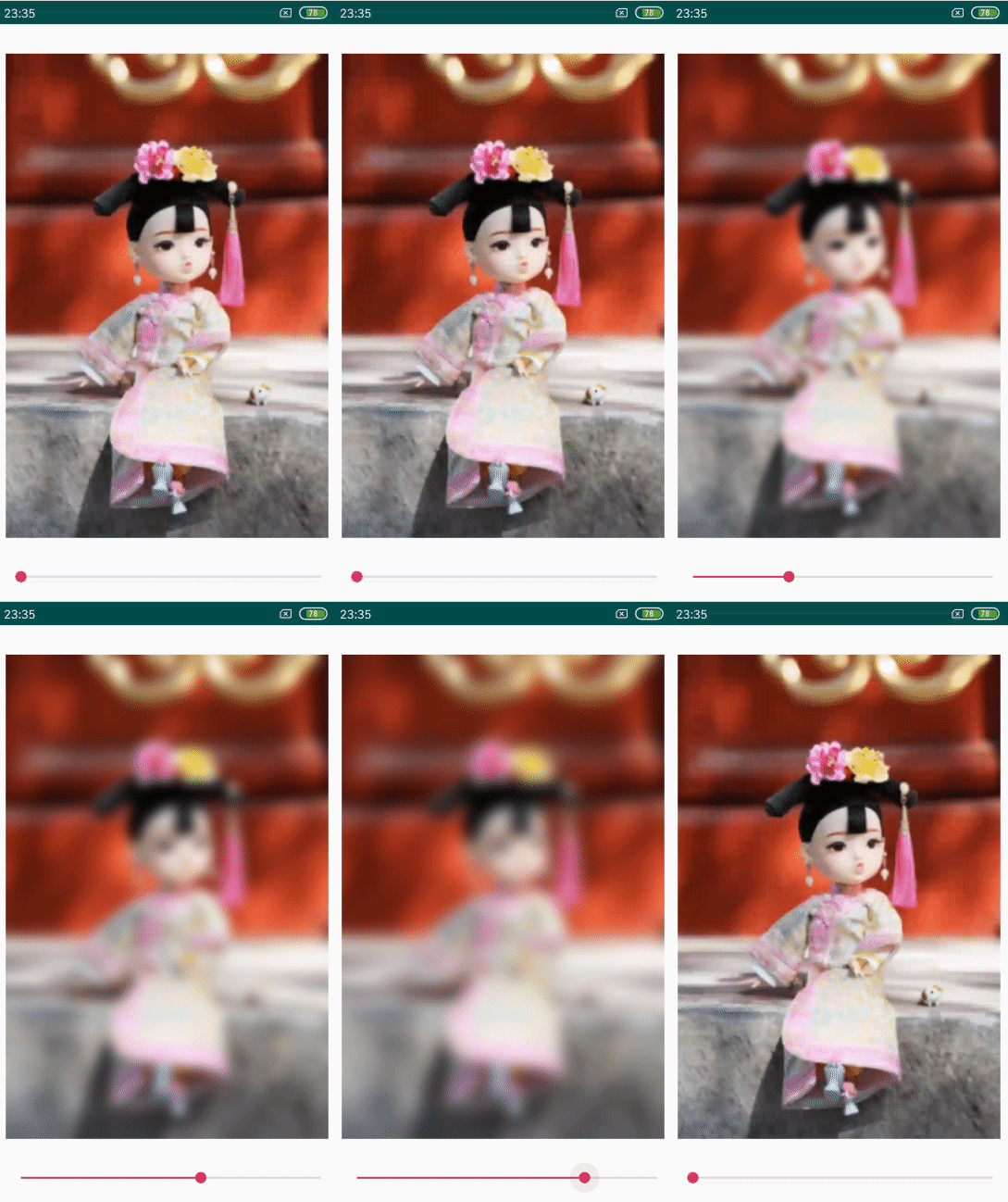
2.5 下载
https://github.com/f9q/gaussianblur
自定义View(9)使用Renderscript 渲染特效。的更多相关文章
- WPF/Silverlight深度解决方案:(六)HLSL自定义渲染特效之完美攻略(上)
原文:WPF/Silverlight深度解决方案:(六)HLSL自定义渲染特效之完美攻略(上) Shader Effect种位图特效及2种渲染特效,而Silverlight中仅有这2种渲染特效: Bl ...
- WPF/Silverlight深度解决方案:(九)HLSL自定义渲染特效之完美攻略(下)
原文:WPF/Silverlight深度解决方案:(九)HLSL自定义渲染特效之完美攻略(下) 本想只用两节来完成关于HLSL自定义渲染相关知识的讲解,鉴于最近非常的多的朋友对此相当感兴趣,想知道最多 ...
- WPF/Silverlight深度解决方案:(七)HLSL自定义渲染特效之完美攻略(中)
原文:WPF/Silverlight深度解决方案:(七)HLSL自定义渲染特效之完美攻略(中) 通过上一节的解说,大家是否已经对HLSL有了较深刻的认识和理解,HLSL的渲染不仅仅局限于静态处理,通过 ...
- 自定义View系列教程04--Draw源码分析及其实践
深入探讨Android异步精髓Handler 站在源码的肩膀上全解Scroller工作机制 Android多分辨率适配框架(1)- 核心基础 Android多分辨率适配框架(2)- 原理剖析 Andr ...
- [转]Android自定义控件三部曲系列完全解析(动画, 绘图, 自定义View)
来源:http://blog.csdn.net/harvic880925/article/details/50995268 一.自定义控件三部曲之动画篇 1.<自定义控件三部曲之动画篇(一)—— ...
- Android 自定义View 三板斧之三——重写View来实现全新控件
通常情况下,Android实现自定义控件无非三种方式. Ⅰ.继承现有控件,对其控件的功能进行拓展. Ⅱ.将现有控件进行组合,实现功能更加强大控件. Ⅲ.重写View实现全新的控件 本文来讨论最难的一种 ...
- Android 自定义View 三板斧之一——继承现有控件
通常情况下,Android实现自定义控件无非三种方式. Ⅰ.继承现有控件,对其控件的功能进行拓展. Ⅱ.将现有控件进行组合,实现功能更加强大控件. Ⅲ.重写View实现全新的控件 本文重点讨论继承现有 ...
- android 自定义view详解
1.自定义View前首先要了解一下View的方法,虽然有些不一定要实现. 分类 方法 描述 创建 Constructors View中有两种类型的构造方法,一种是在代码中构建View,另一种是填充布局 ...
- 零门槛!ZBLibrary仿微信朋友圈自定义View,就是这么简单!
传统方法是继承现有View再重写方法,这种方式缺点很多: 1.往往不能在xml编辑器中预览效果: 2.比较难实现预期效果,比如设置宽度为wrap_content,实际显示为match_parent等: ...
随机推荐
- Python-函数和代码复用
函数的定义与使用 >函数的理解与定义 函数是一段代码的表示 -函数是一段具有特定功能的.可重用的语句组 -函数是一种功能的抽象,一般函数表达特定功能 -两个作用:降低编程难度 和 代码复用 de ...
- pressure coeffcient of a wing/blade
software: CFD POST ANSYS menu bar, select Tools > Macro Calculator. \ correction: Ref pressure is ...
- 解决maven无法加载本地lib/下的jar包问题(程序包XXX不存在)
这次一个项目用到maven编译,我在本地开发的时候jar包都是放在WEB-INF/lib目录下,通过 BuildPath将jar包导入,然后用MyEclipse中的:maven package命令打成 ...
- How to automate PowerPoint using VB
Microsoft has an article that explains how to automate PowerPoint using VB For some odd reason they' ...
- codevs1009 产生数
题目描述 Description 给出一个整数 n(n<10^30) 和 k 个变换规则(k<=15). 规则: 一位数可变换成另一个一位数: 规则的右部不能为零. 例如:n=234.有规 ...
- Maven项目pom.xml报错
1.org.apache.maven.archiver.MavenArchiver.getManifest报错 pom.xml第一行报错,如图: 解决办法: 第一步: help ->Instal ...
- react-浏览后的想法
- MySQL用户及数据安全专题
1 简单介绍 1.1 概要 1.2 权限分类 2 加入用户 2.1 语法例如以下: CREATE USER user_specification [, user_specification] ...
- UNIX网络编程——网络I/O模型
在学习UNIX网络编程的时候.一開始分不清 同步 和 异步,所以还是总结一下,理清下他们的差别比較好. IO分类 IO依据对IO的调度方式可分为堵塞IO.非堵塞IO.IO复用.信号驱动IO.异步IO. ...
- LeetCode 788. Rotated Digits (旋转数字)
X is a good number if after rotating each digit individually by 180 degrees, we get a valid number t ...