
11 MySQL--Navicat与pymysql模块
1、Navicat的安装下载
一、Navicat

    在生产环境中操作MySQL数据库还是推荐使用命令行工具mysql,但在我们自己开发测试时,

    可以使用可视化工具Navicat,以图形界面的形式操作MySQL数据库

    官网下载:https://www.navicat.com/en/products/navicat-for-mysql

    网盘下载:https://pan.baidu.com/s/1bpo5mqj

    链接:https://pan.baidu.com/s/1Hu-x0mPuSW3g9CxNFlnAng 密码:pqe5

 使用网盘的有免费的注册码

      # 打开 双击:

      # D:\navicatformysql\Navicat for MySQL\navicat

    需要掌握的基本操作

    掌握:

        #1. 测试+链接数据库

        #2. 新建库

        #3. 新建表,新增字段+类型+约束

        #4. 设计表:外键

        #5. 新建查询

        #6. 备份库/表

    注意:

        批量加注释:ctrl+?键

        批量去注释:ctrl+shift+?键
新建查询:
ctrl +? 注释代码
ctrl + shift+/ 解除代码注释
备份库:
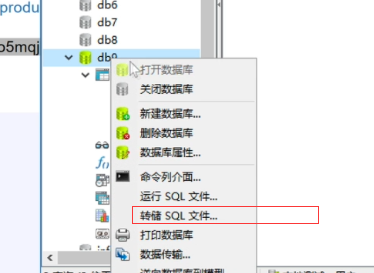
方面自己开发时调试用
二、pymysql模块
介绍:

        在python程序中操作数据库呢?这就用到了pymysql模块,

        该模块本质就是一个套接字客户端软件,使用前需要事先安装

        pip3 install pymysql

    前提:

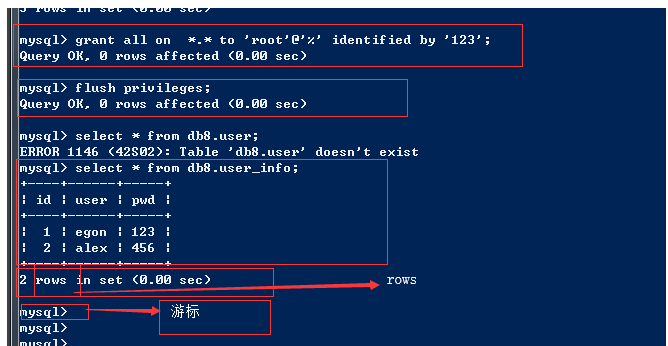
        授权加创建

        grant all on *.* to 'root'@'%' identified by '';

        flush privileges;

        端口:3306

        ip: 192.168.1.102

        mysql -uroot -p123 -h 192.168.1.102
pymysql模块之基本使用:
# pip3 install pymysql

import pymysql

user=input('user>>').strip()

pwd=input('password>>').strip()

# 建立连接

conn=pymysql.connect(

    host=服务端ip

    port=3306,

    user='root',

    password='',

    db='db8',

    charset='utf8'

)

# 拿到游标

cursor=conn.cursor()

# 相当于 >mysql  输入命令

# 执行sql语句

sql = 'select * from user_info where user="%s" and pwd="%s"' %(user,pwd)

rows = cursor.execute(sql)

cursor.close()

conn.close()

if rows:

    print('welcome')

else:

    print('sorry')
pymysql模块之sql注入问题,解决上面程的bug
非法字符的输入可以登录成功
 2.sql注入

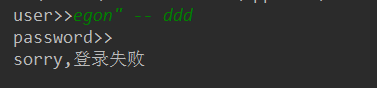
        注意:符号--会注释掉它之后的sql,正确的语法:--后至少有一个任意字符

        1、sql注入之:用户存在,绕过密码

        egon' -- 任意字符

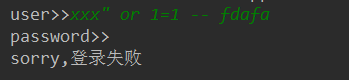
        2、sql注入之:用户不存在,绕过用户与密码

        xxx' or 1=1 -- 任意字符

-- 之后的sql均被注释掉了

or 1=1 永远成立
解决办法:
 解决办法:

            # 原来是我们对sql进行字符串拼接

            # sql="select * from userinfo where name='%s' and password='%s'" %(user,pwd)

            # print(sql)

            # res=cursor.execute(sql)

            #改写为(execute帮我们做字符串拼接,我们无需且一定不能再为%s加引号了)

            sql="select * from userinfo where name=%s and password=%s" #!!!注意%s需要去掉引号,因为pymysql会自动为我们加上

            res=cursor.execute(sql,(user,pwd)) #pymysql模块自动帮我们解决sql注入的问题,只要我们按照pymysql的规矩来。
代码:
# pip3 install pymysql

import pymysql

user=input('user>>').strip()

pwd=input('password>>').strip()

# 建立连接

conn=pymysql.connect(

    host='10.10.40.140',

    port=3306,

    user='root',

    password='',

    db='db8',

    charset='utf8'

)

# 拿到游标

cursor=conn.cursor()

# 相当于 >mysql  输入命令

# 执行sql语句

#sql = 'select * from user_info where user="%s" and pwd="%s"' %(user,pwd)

#print(sql)

sql = 'select * from user_info where user=%s and pwd=%s'

rows = cursor.execute(sql,[user,pwd])

cursor.close()

conn.close()

if rows:

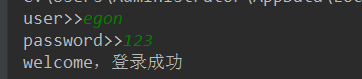
    print('welcome,登录成功')

else:

    print('sorry,登录失败')
3、pymysql模块之增删改查
增:
import pymysql

#链接

conn=pymysql.connect(host='localhost',user='root',password='',database='egon')

#游标

cursor=conn.cursor()

#执行sql语句

#part1

# sql='insert into userinfo(name,password) values("root","123456");'

# res=cursor.execute(sql) #执行sql语句,返回sql影响成功的行数

# print(res)

#part2

# sql='insert into userinfo(name,password) values(%s,%s);'

# res=cursor.execute(sql,("root","123456")) #执行sql语句,返回sql影响成功的行数

# print(res)

#part3

sql='insert into userinfo(name,password) values(%s,%s);'

res=cursor.executemany(sql,[("root",""),("lhf",""),("eee","")]) #执行sql语句,返回sql影响成功的行数

print(res)

conn.commit() #提交后才发现表中插入记录成功

cursor.close()

conn.close()
查:fetchone(每次查询一个),fetchmany(查询多个),fetchall全部
import pymysql

#链接

conn=pymysql.connect(host='localhost',user='root',password='',database='egon')

#游标

cursor=conn.cursor()

#执行sql语句

sql='select * from userinfo;'

rows=cursor.execute(sql) #执行sql语句,返回sql影响成功的行数rows,将结果放入一个集合,等待被查询

# cursor.scroll(3,mode='absolute') # 相对绝对位置移动

# cursor.scroll(3,mode='relative') # 相对当前位置移动

res1=cursor.fetchone()

res2=cursor.fetchone()

res3=cursor.fetchone()

res4=cursor.fetchmany(2)

res5=cursor.fetchall()

print(res1)

print(res2)

print(res3)

print(res4)

print(res5)

print('%s rows in set (0.00 sec)' %rows)

conn.commit() #提交后才发现表中插入记录成功

cursor.close()

conn.close()

'''

(1, 'root', '123456')

(2, 'root', '123456')

(3, 'root', '123456')

((4, 'root', '123456'), (5, 'root', '123456'))

((6, 'root', '123456'), (7, 'lhf', '12356'), (8, 'eee', '156'))

rows in set (0.00 sec)

'''
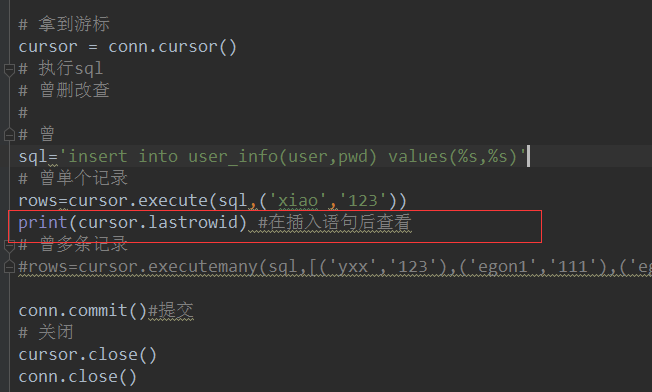
获取插入的最后一条数据的自增ID
print(cursor.lastrowid) #在插入语句后查看

import pymysql

conn=pymysql.connect(host='localhost',user='root',password='',database='egon')

cursor=conn.cursor()

sql='insert into userinfo(name,password) values("xxx","123");'

rows=cursor.execute(sql)

print(cursor.lastrowid) #在插入语句后查看

conn.commit()

cursor.close()

conn.close()
11 MySQL--Navicat与pymysql模块的更多相关文章
- navicat工具 pymysql模块
目录 一 IDE工具介绍(Navicat) 二 pymysql模块 一 IDE工具介绍(Navicat) 生产环境还是推荐使用mysql命令行,但为了方便我们测试,可以使用IDE工具,我们使用Navi ...
- 数据库——可视化工具Navicat、pymysql模块、sql注入问题
数据库--可视化工具Navicat.pymysql模块.sql注入问题 Navicat可视化工具 Navicat是数据库的一个可视化工具,可直接在百度搜索下载安装,它可以通过鼠标"点点点&q ...
- MySQL多表查询,Navicat使用,pymysql模块,sql注入问题
一.多表查询 #建表 create table dep( id int, name varchar(20) ); create table emp( id int primary key auto_i ...
- mysql五:pymysql模块
一.介绍 之前都是通过MySQ自带的命令行客户端工具Mysql来操作数据库,那如何在Python程序中操作数据库呢?这就需要用到pymysql模块了. 这个模块本质就是一个套接字客户端软件,使用前需要 ...
- navicat 使用 pymysql模块
新健库 ,新增字段+类型+约束 设计表:外键(自增) 新建查询 建立表模型 /* 数据导入: Navicat Premium Data Transfer Source Server : localho ...
- 数据库 - Navicat与pymysql模块
一.Nabicat 在生产环境中操作MySQL数据库还是推荐使用命令行工具mysql,但在我们自己开发测试时, 可以使用可视化工具Navicat,以图形界面的形式操作MySQL数据库 官网下载:htt ...
- MySQL学习12 - pymysql模块的使用
一.pymysql的下载和使用 1.pymysql模块的下载 2.pymysql的使用 二.execute()之sql注入 三.增.删.改:conn.commit() 四.查:fetchone.fet ...
- Python连接MySQL数据库之pymysql模块使用
安装PyMySQL pip install pymysql PyMySQL介绍 PyMySQL是在python3.x版本中用于连接MySQL服务器的一个库,2中则使用mysqldb. Django中也 ...
- 操作mysql(import pymysql模块)
pymysql模块 import pymysql #1.连上数据库.账号.密码.ip.端口号.数据库 #2.建立游标 #3.执行sql #4.获取结果 #5.关闭游标 #6.连接关闭 #charest ...
- Python连接MySQL数据库之pymysql模块
pymysql 在python3.x 中用于连接MySQL服务器的一个库:Python2中则使用mysqldb pymysql的模块的基本的使用 # 导入pymysql模块 import pymysq ...
随机推荐
- 331. Verify Preorder Serialization of a Binary Tree -- 判断是否为合法的先序序列
One way to serialize a binary tree is to use pre-order traversal. When we encounter a non-null node, ...
- 改变Vim保存文件路径
1. vim 有个cd命令.用来更改当前文件夹.:cd sth进入sth文件夹.这样新文件保存之后就在当前文件夹.不过如果你打开一个已经保存的文件后然后更改当前文件夹是不会改变保存路径的.你必须为:w ...
- [例1.10]使用setw设置输出宽度的例子
[例1.10]使用setw设置输出宽度的例子: #include <iostream> #include <iomanip> using namespace std; void ...
- <NET CLR via c# 第4版>笔记 第8章 方法
8.1 实例构造器和类(引用类型) 构造引用类型的对象时,在调用类型的实例构造器之前,为对象分配的内存总是先被归零 .没有被构造器显式重写的所有字段都保证获得 0 或 null 值. 构造器不能被继承 ...
- CMD中goto语句会中断for循环特性详解
在这个程序里面由于用到了上篇文章中所说的字符串切割,而用到了Goto强制跳转语句 但是在程序中使用的时候却发现一个错误,当把这个字符切割的代码段如果直接作为非嵌套语句执行正常 但是一旦放到for循环的 ...
- vim 编辑 windows下的文本时出现乱码, 修改配置后 已解决
最近用VIM 查看一个 WINDOWS下的文本,打开以后发现出现乱码,具体如上图. 最后在网上找到了一个解决方法: 原文地址: https://www.zhihu.com/question/22363 ...
- vim没有权限却可以强制保存时所引起的思考 ------ 文件夹权限对所属文件的权限影响
最近在拿着Linux 鸟叔私房菜对着Linux 系统学习一下基本操作,虽然已经使用Linux系统已经好多年不过却一直没有系统的学习一下.在用vim 编辑一个文件的时候出现了一个很神奇的事情,明明该文件 ...
- springboot项目配置拦截器,进行登陆等拦截
新建拦截类: public class LoginInterceptor implements HandlerInterceptor{ private static Log logger = LogF ...
- office 2013母版保存并调用
如果觉得某个ppt的母版不错,想保存下来以后使用的话,那么执行 开始->另存为-> 选择位置和格式,注意格式选择potx. 之后如果想要使用这组母版,怎么办呢? 浏览主题,打开之前保存的 ...
- 使用nomad && consul && fabio 创建简单的微服务系统
具体每个组件的功能就不详细说明了 nomad 一个调度工具,consul 一个服务发现,健康检查多数据中心支持的工具 fabio 一个基于consul的负载均衡&&动态路由工具,对于集 ...