
Elasticsearch5.X IN Windows 10 系列文章(4)
ElasticSearch版本: 5.5.1 (最新稳定版为5.5.2),由于用到IK中文分词插件,最新版本没有5.5.2 ,所以使用5.5.1
日期:2017-08-30
第四章:安装 Search Guard
由于x-pack 的 security 部分是收费的,考虑使用其他插件来替代,倾向于两款插件,一个是今天的主角 Search Guard, 另一个是readonlyrest
Search Guard 与 Elasticsearch 的版本对照表
一、停止运行elasticsearch,定位到es主目录下,执行下面命令:
.\bin\elasticsearch-plugin install -b com.floragunn:search-guard-5:5.4.2-15
执行效果如下图: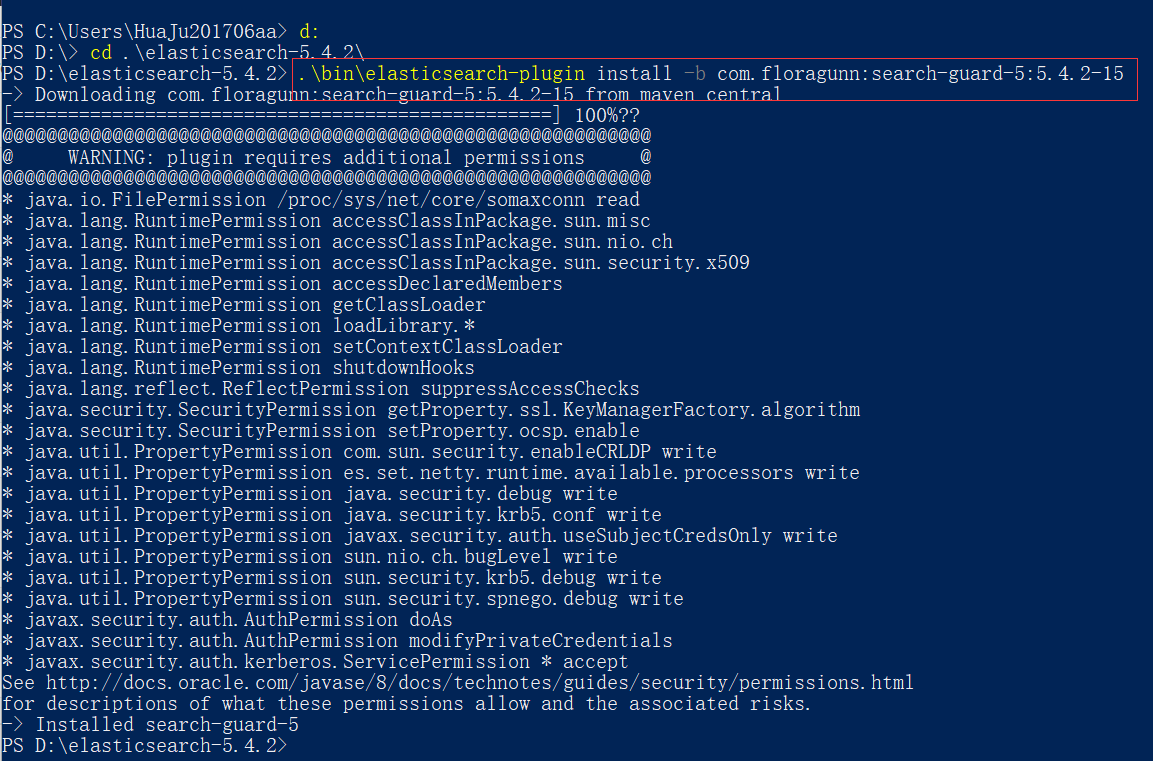
如果在服务器上没有网络,可以使用离线安装方式:
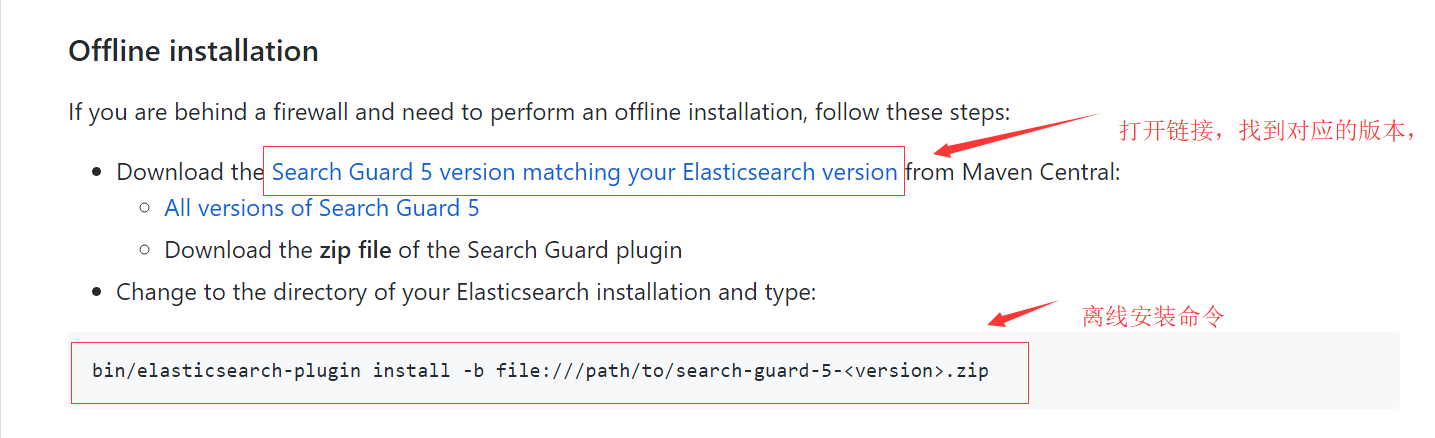
离线安装步骤:
1、下载对应版本的Search Guard,版本对照表
2、Search Guard 5 下载地址
3、search-guard-ssl 下载地址 ,后面要用到这个生成证书。
二、配置Search Guard
1、下载search-guard-ssl
git clone https://github.com/floragunncom/search-guard-ssl.git
2、切换到search guard ssl 源码目录,进入example-pki-scripts文件夹,修改example.sh文件,修改之后如下:
#!/bin/bash

OPENSSL_VER="$(openssl version)"

if [[ $OPENSSL_VER == *"0.9"* ]]; then

	echo "Your OpenSSL version is too old: $OPENSSL_VER"

	echo "Please install version 1.0.1 or later"

	exit -1

else

    echo "Your OpenSSL version is: $OPENSSL_VER"

fi

set -e

./clean.sh

./gen_root_ca.sh capass changeit

./gen_node_cert.sh 1 changeit capass

./gen_client_node_cert.sh spock changeit capass

./gen_client_node_cert.sh kirk changeit capass

./gen_client_node_cert.sh kibana changeit capass

rm -f ./*tmp*
3、生成证书:
sh example.sh
4、将example-pki-scripts文件夹中的node-1-keystore.jks和truststore.jks复制到elasticsearch的配置目录中(%ES_HOME%/config)
5、配置elasticsearch 基于 TLS 加密通讯,在 elasticsearch.yml 中增加以下内容:
searchguard.ssl.transport.keystore_filepath: node-1-keystore.jks

searchguard.ssl.transport.keystore_password: changeit

searchguard.ssl.transport.truststore_filepath: truststore.jks

searchguard.ssl.transport.truststore_password: changeit

searchguard.ssl.transport.enforce_hostname_verification: false
6、重启后访问:http://localhost:9200,发现会报错,提示没有初始化 Search Guard 索引。
7、初始化 Search Guard 索引,配置帐号,首先将example-pki-scripts文件夹中的kirk-keystore.jks和truststore.jks复制到%ES_HOME%\plugins\search-guard-5\sgconfig 文件夹中
8、在 elasticsearch.yml 中增加以下内容:
searchguard.authcz.admin_dn:

  - CN=kirk,OU=client,O=client,L=test, C=de
9、重启elasticsearch,在 \plugins\search-guard-5\ 目录打开终端,执行以下命令:
.\tools\sgadmin.bat -ts .\sgconfig\truststore.jks -tspass changeit -ks .\sgconfig\kirk-keystore.jks -kspass changeit -cd .\sgconfig\ -icl -nhnv -h 0.0.0.0
显示如下图,则执行成功:
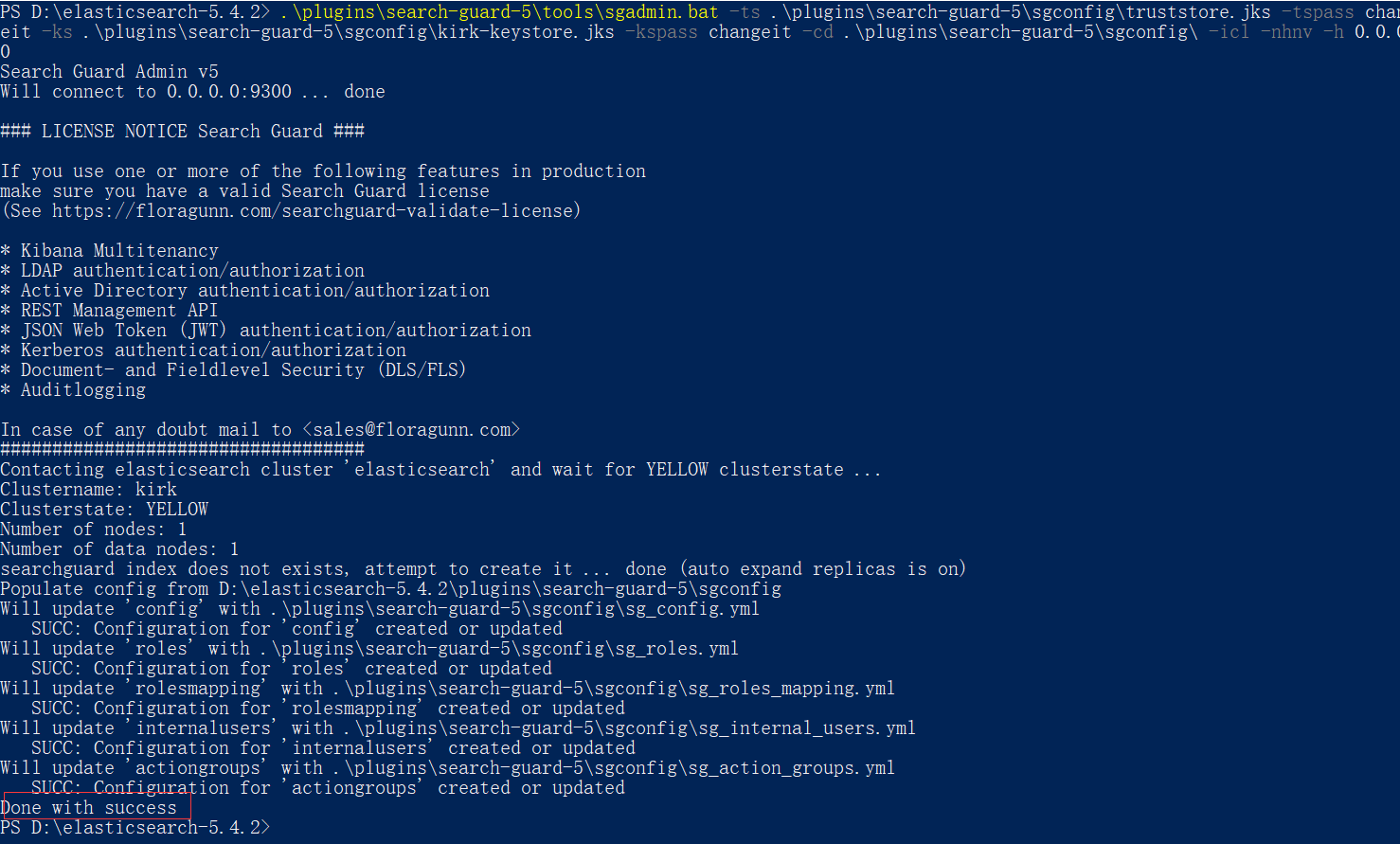
使用浏览器访问:http://localhost:9200 提示输入密码,输入默认用户: admin admin ,可登陆表示正常。
10、配置REST-API 基于https连接,在 elasticsearch.yml 中增加以下内容:
searchguard.ssl.http.enabled: true

searchguard.ssl.http.keystore_filepath: node-1-keystore.jks

searchguard.ssl.http.keystore_password: changeit

searchguard.ssl.http.truststore_filepath: truststore.jks

searchguard.ssl.http.truststore_password: changeit
重启后 ,使用浏览器访问:https://localhost:9200 提示输入密码,输入默认用户: admin admin ,可登陆表示正常
http://localhost:9200 无加密拒绝访问
参考文章:
http://m.blog.csdn.net/envinfo2012/article/details/76685818
http://blog.csdn.net/lulongzhou_llz/article/details/77099418
http://www.cnblogs.com/Orgliny/p/6168986.html
https://hacpai.com/article/1472803335867?p=1&m=0
http://www.cnblogs.com/ywcz060/p/6950404.html
http://www.cnblogs.com/shifu204/p/6376683.html
Elasticsearch5.X IN Windows 10 系列文章(4)的更多相关文章
- Elasticsearch5.X IN Windows 10 系列文章(2)
ElasticSearch版本: 5.5.1 (最新稳定版为5.5.2),由于用到IK中文分词插件,最新版本没有5.5.2 ,所以使用5.5.1 日期:2017-08-29 第二章:安装Kibana ...
- Elasticsearch5.X IN Windows 10 系列文章(1)
系统类型:windows10 64位家庭版 ElasticSearch版本: 5.5.1 (最新稳定版为5.5.2),由于用到IK中文分词插件,最新版本没有5.5.2 ,所以使用5.5.1 日期:2 ...
- Elasticsearch5.X IN Windows 10 系列文章(5)
ElasticSearch版本: 5.5.1 (最新稳定版为5.5.2),由于用到IK中文分词插件,最新版本没有5.5.2 ,所以使用5.5.1 日期:2017-08-31 第五章:Kibana 安装 ...
- Elasticsearch5.X IN Windows 10 系列文章(3)
系统类型:windows10 64位家庭版 ElasticSearch版本: 5.5.1 (最新稳定版为5.5.2),由于用到IK中文分词插件,最新版本没有5.5.2 ,所以使用5.5.1 日期:20 ...
- 不可或缺 Windows Native 系列文章索引
[源码下载] 不可或缺 Windows Native 系列文章索引 作者:webabcd 1.不可或缺 Windows Native (1) - C 语言: hello c 介绍不可或缺 Window ...
- 重新想象 Windows 8 Store Apps 系列文章索引
[源码下载][重新想象 Windows 8.1 Store Apps 系列文章] 重新想象 Windows 8 Store Apps 系列文章索引 作者:webabcd 1.重新想象 Windows ...
- 重新想象 Windows 8.1 Store Apps 系列文章索引
[源码下载] [重新想象 Windows 8 Store Apps 系列文章] 重新想象 Windows 8.1 Store Apps 系列文章索引 作者:webabcd 1.重新想象 Windows ...
- 与众不同 windows phone 8.0 & 8.1 系列文章索引
[源码下载] [与众不同 windows phone 7.5 (sdk 7.1) 系列文章索引] 与众不同 windows phone 8.0 & 8.1 系列文章索引 作者:webabcd ...
- 一步步实现windows版ijkplayer系列文章之四——windows下编译ijkplyer版ffmpeg
一步步实现windows版ijkplayer系列文章之一--Windows10平台编译ffmpeg 4.0.2,生成ffplay 一步步实现windows版ijkplayer系列文章之二--Ijkpl ...
随机推荐
- 搭建SSH框架–搭建篇
工具: IDE:My Eclipse 2015 数据库:Orcale 创建Web项目 1.1 名称:PersonalWeb 1.2 勾选创建web.xml 1.3 Finsh 搭建Spring框架 2 ...
- android出现段错误时的查找定位的方法
android出现段错误时的查找方法,例如出现log: - ::): Fatal signal (SIGSEGV) at ), thread (SurfaceFlinger) - ::): *** * ...
- css活用,半星星的效果
1.首先下载要用到星星字体 http://www.w3cplus.com/w3cplusDemo/demos/webFontIcon.html 2.css .cleanfloat::after{dis ...
- Java几种常见的四舍五入的方法
/* * 在上面简单地介绍了银行家舍入法,目前java支持7中舍入法: 1. ROUND_UP:远离零方向舍入.向绝对值最大的方向舍入,只要舍弃位非0即进位. 2. ROUND_DOWN:趋向零方向舍 ...
- springBoot框架的一些概念
Spring的发展史1. Spring1.x 时代 在Spring1.x时代,都是通过xml文件配置bean,随着项目的不断扩大,需要将xml配置分放到不同的配置文件中,需要频繁的在java类和xml ...
- centos7 系统管理systemd学习记录
在centos7之前,系统服务是service,chkconfig等命令来管理的.到了centos7,统一使用systemctl来管理系统服务 其实就是把chkconfig和service结合在一起了 ...
- GLSL使用FBO实现MRT(Multiple Render Targets)绘制到多张纹理 【转】
项目的程序里设计需要将某一帧渲染出来的画面拆成三通道单色图像存到三张纹理里面.要绘制到纹理里,自然就想到FBO了.但是一次要输出多张纹理,这个还没接触过.一阵网上搜索过后,终于了解到了MRT(多重渲染 ...
- Solr6 Suggest(智能提示)
1.介绍 Solr从1.4开始便提供了检查建议,检索建议目前是各大搜索的标配应用,主要作用是避免用户输入错误的搜索词,同时将用户引导到相应的关键词搜索上.通常,我们将其称为搜索联想. 其效果如图所示. ...
- [转]SQL Server 性能调优(io)
目录 诊断磁盘io问题 常见的磁盘问题 容量替代了性能 负载隔离配置有问题 分区对齐配置有问题 总结 关于io这一块,前面的东西如磁盘大小,磁盘带宽,随机读取写入,顺序读取写入,raid选择,DA ...
- Cocos2d-x 3.0中 物理碰撞检測中onContactBegin回调函数不响应问题
好吧,事实上这篇也是暂时冒出来的,近期朋友要做个物理游戏,曾经做物理还是用box2d,呃.确实要花些功夫才干搞懂当中的精髓,可是听讲这套引擎又一次封装了一次.要easy非常多,所以就简单尝试了一下,感 ...