
Spring Security笔记:登录尝试次数限制
今天在前面一节的基础之上,再增加一点新内容,默认情况下Spring Security不会对登录错误的尝试次数做限制,也就是说允许暴力尝试,这显然不够安全,下面的内容将带着大家一起学习如何限制登录尝试次数。
首先对之前创建的数据库表做点小调整
一、表结构调整
T_USERS增加了如下3个字段:
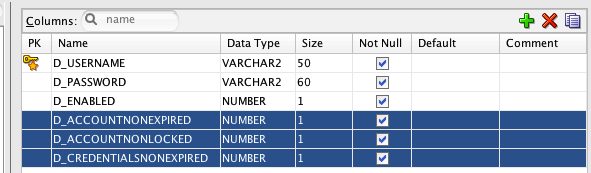
D_ACCOUNTNONEXPIRED,NUMBER(1) -- 表示帐号是否未过期
D_ACCOUNTNONLOCKED,NUMBER(1), -- 表示帐号是否未锁定
D_CREDENTIALSNONEXPIRED,NUMBER(1) --表示登录凭据是否未过期
要实现登录次数的限制,其实起作用的字段是D_ACCOUNTNONLOCKED,值为1时,表示正常,为0时表示被锁定,另外二个字段的作用以后的学习内容会详细解释。
新增一张表T_USER_ATTEMPTS,用来辅助记录每个用户登录错误时的尝试次数
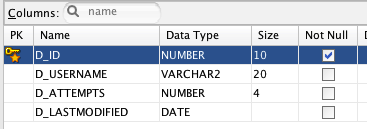
D_ID 是流水号
D_USERNAME 用户名,外建引用T_USERS中的D_USERNAME
D_ATTEMPTS 登录次数
D_LASTMODIFIED 最后登录错误的日期
二、创建Model/DAO/DAOImpl
要对新加的T_USER_ATTEMPTS读写数据,得有一些操作DB的类,这里我们采用Spring的JDBCTemplate来处理,包结构参考下图:

T_USER_ATTEMPTS表对应的Model如下
 package com.cnblogs.yjmyzz.model;

 import java.util.Date;

 public class UserAttempts {

     private int id;

     private String username;

     private int attempts;

     private Date lastModified;

     public int getId() {

         return id;

     }

     public void setId(int id) {

         this.id = id;

     }

     public String getUsername() {

         return username;

     }

     public void setUsername(String username) {

         this.username = username;

     }

     public int getAttempts() {

         return attempts;

     }

     public void setAttempts(int attempts) {

         this.attempts = attempts;

     }

     public Date getLastModified() {

         return lastModified;

     }

     public void setLastModified(Date lastModified) {

         this.lastModified = lastModified;

     }

 }
UserAttempts
对应的DAO接口
 package com.cnblogs.yjmyzz.dao;

 import com.cnblogs.yjmyzz.model.UserAttempts;

 public interface UserDetailsDao {

     void updateFailAttempts(String username);

     void resetFailAttempts(String username);

     UserAttempts getUserAttempts(String username);

 }
UserDetailsDao
以及DAO接口的实现
 package com.cnblogs.yjmyzz.dao.impl;

 import java.sql.ResultSet;

 import java.sql.SQLException;

 import java.util.Date;

 import javax.annotation.PostConstruct;

 import javax.sql.DataSource;

 import org.springframework.beans.factory.annotation.Autowired;

 import org.springframework.dao.EmptyResultDataAccessException;

 import org.springframework.jdbc.core.RowMapper;

 import org.springframework.jdbc.core.support.JdbcDaoSupport;

 import org.springframework.stereotype.Repository;

 import org.springframework.security.authentication.LockedException;

 import com.cnblogs.yjmyzz.dao.UserDetailsDao;

 import com.cnblogs.yjmyzz.model.UserAttempts;

 @Repository

 public class UserDetailsDaoImpl extends JdbcDaoSupport implements

         UserDetailsDao {

     private static final String SQL_USERS_UPDATE_LOCKED = "UPDATE t_users SET d_accountnonlocked = ? WHERE d_username = ?";

     private static final String SQL_USERS_COUNT = "SELECT COUNT(*) FROM t_users WHERE d_username = ?";

     private static final String SQL_USER_ATTEMPTS_GET = "SELECT d_id id,d_username username,d_attempts attempts,d_lastmodified lastmodified FROM t_user_attempts WHERE d_username = ?";

     private static final String SQL_USER_ATTEMPTS_INSERT = "INSERT INTO t_user_attempts (d_id,d_username, d_attempts, d_lastmodified) VALUES(t_user_attempts_seq.nextval,?,?,?)";

     private static final String SQL_USER_ATTEMPTS_UPDATE_ATTEMPTS = "UPDATE t_user_attempts SET d_attempts = d_attempts + 1, d_lastmodified = ? WHERE d_username = ?";

     private static final String SQL_USER_ATTEMPTS_RESET_ATTEMPTS = "UPDATE t_user_attempts SET d_attempts = 0, d_lastmodified = null WHERE d_username = ?";

     private static final int MAX_ATTEMPTS = 3;

     @Autowired

     private DataSource dataSource;

     @PostConstruct

     private void initialize() {

         setDataSource(dataSource);

     }

     @Override

     public void updateFailAttempts(String username) {

         UserAttempts user = getUserAttempts(username);

         if (user == null) {

             if (isUserExists(username)) {

                 // if no record, insert a new

                 getJdbcTemplate().update(SQL_USER_ATTEMPTS_INSERT,

                         new Object[] { username, 1, new Date() });

             }

         } else {

             if (isUserExists(username)) {

                 // update attempts count, +1

                 getJdbcTemplate().update(SQL_USER_ATTEMPTS_UPDATE_ATTEMPTS,

                         new Object[] { new Date(), username });

             }

             if (user.getAttempts() + 1 >= MAX_ATTEMPTS) {

                 // locked user

                 getJdbcTemplate().update(SQL_USERS_UPDATE_LOCKED,

                         new Object[] { false, username });

                 // throw exception

                 throw new LockedException("User Account is locked!");

             }

         }

     }

     @Override

     public void resetFailAttempts(String username) {

         getJdbcTemplate().update(SQL_USER_ATTEMPTS_RESET_ATTEMPTS,

                 new Object[] { username });

     }

     @Override

     public UserAttempts getUserAttempts(String username) {

         try {

             UserAttempts userAttempts = getJdbcTemplate().queryForObject(

                     SQL_USER_ATTEMPTS_GET, new Object[] { username },

                     new RowMapper<UserAttempts>() {

                         public UserAttempts mapRow(ResultSet rs, int rowNum)

                                 throws SQLException {

                             UserAttempts user = new UserAttempts();

                             user.setId(rs.getInt("id"));

                             user.setUsername(rs.getString("username"));

                             user.setAttempts(rs.getInt("attempts"));

                             user.setLastModified(rs.getDate("lastModified"));

                             return user;

                         }

                     });

             return userAttempts;

         } catch (EmptyResultDataAccessException e) {

             return null;

         }

     }

     private boolean isUserExists(String username) {

         boolean result = false;

         int count = getJdbcTemplate().queryForObject(SQL_USERS_COUNT,

                 new Object[] { username }, Integer.class);

         if (count > 0) {

             result = true;

         }

         return result;

     }

 }
UserDetailsDaoImpl
观察代码可以发现,对登录尝试次数的限制处理主要就在上面这个类中,登录尝试次数达到阈值3时,通过抛出异常LockedException来通知上层代码。
三、创建CustomUserDetailsService、LimitLoginAuthenticationProvider
 package com.cnblogs.yjmyzz.service;

 import java.sql.ResultSet;

 import java.sql.SQLException;

 import java.util.List;

 import org.springframework.jdbc.core.RowMapper;

 import org.springframework.security.core.GrantedAuthority;

 import org.springframework.security.core.authority.AuthorityUtils;

 import org.springframework.security.core.userdetails.User;

 import org.springframework.security.core.userdetails.UserDetails;

 import org.springframework.security.core.userdetails.jdbc.JdbcDaoImpl;

 import org.springframework.stereotype.Service;

 @Service("userDetailsService")

 public class CustomUserDetailsService extends JdbcDaoImpl {

     @Override

     public void setUsersByUsernameQuery(String usersByUsernameQueryString) {

         super.setUsersByUsernameQuery(usersByUsernameQueryString);

     }

     @Override

     public void setAuthoritiesByUsernameQuery(String queryString) {

         super.setAuthoritiesByUsernameQuery(queryString);

     }

     // override to pass get accountNonLocked

     @Override

     public List<UserDetails> loadUsersByUsername(String username) {

         return getJdbcTemplate().query(super.getUsersByUsernameQuery(),

                 new String[] { username }, new RowMapper<UserDetails>() {

                     public UserDetails mapRow(ResultSet rs, int rowNum)

                             throws SQLException {

                         String username = rs.getString("username");

                         String password = rs.getString("password");

                         boolean enabled = rs.getBoolean("enabled");

                         boolean accountNonExpired = rs

                                 .getBoolean("accountNonExpired");

                         boolean credentialsNonExpired = rs

                                 .getBoolean("credentialsNonExpired");

                         boolean accountNonLocked = rs

                                 .getBoolean("accountNonLocked");

                         return new User(username, password, enabled,

                                 accountNonExpired, credentialsNonExpired,

                                 accountNonLocked, AuthorityUtils.NO_AUTHORITIES);

                     }

                 });

     }

     // override to pass accountNonLocked

     @Override

     public UserDetails createUserDetails(String username,

             UserDetails userFromUserQuery,

             List<GrantedAuthority> combinedAuthorities) {

         String returnUsername = userFromUserQuery.getUsername();

         if (super.isUsernameBasedPrimaryKey()) {

             returnUsername = username;

         }

         return new User(returnUsername, userFromUserQuery.getPassword(),

                 userFromUserQuery.isEnabled(),

                 userFromUserQuery.isAccountNonExpired(),

                 userFromUserQuery.isCredentialsNonExpired(),

                 userFromUserQuery.isAccountNonLocked(), combinedAuthorities);

     }

 }
CustomUserDetailsService
为什么需要这个类?因为下面这个类需要它:
 package com.cnblogs.yjmyzz.provider;

 import java.util.Date;

 import org.springframework.security.authentication.BadCredentialsException;

 import org.springframework.security.authentication.LockedException;

 import org.springframework.security.authentication.dao.DaoAuthenticationProvider;

 import org.springframework.security.core.Authentication;

 import org.springframework.security.core.AuthenticationException;

 import org.springframework.stereotype.Component;

 import com.cnblogs.yjmyzz.dao.UserDetailsDao;

 import com.cnblogs.yjmyzz.model.UserAttempts;

 @Component("authenticationProvider")

 public class LimitLoginAuthenticationProvider extends DaoAuthenticationProvider {

     UserDetailsDao userDetailsDao;

     @Override

     public Authentication authenticate(Authentication authentication)

             throws AuthenticationException {

         try {

             Authentication auth = super.authenticate(authentication);

             // if reach here, means login success, else exception will be thrown

             // reset the user_attempts

             userDetailsDao.resetFailAttempts(authentication.getName());

             return auth;

         } catch (BadCredentialsException e) {

             userDetailsDao.updateFailAttempts(authentication.getName());

             throw e;

         } catch (LockedException e) {

             String error = "";

             UserAttempts userAttempts = userDetailsDao

                     .getUserAttempts(authentication.getName());

             if (userAttempts != null) {

                 Date lastAttempts = userAttempts.getLastModified();

                 error = "User account is locked! <br><br>Username : "

                         + authentication.getName() + "<br>Last Attempts : "

                         + lastAttempts;

             } else {

                 error = e.getMessage();

             }

             throw new LockedException(error);

         }

     }

     public UserDetailsDao getUserDetailsDao() {

         return userDetailsDao;

     }

     public void setUserDetailsDao(UserDetailsDao userDetailsDao) {

         this.userDetailsDao = userDetailsDao;

     }

 }
LimitLoginAuthenticationProvider
这个类继承自org.springframework.security.authentication.dao.DaoAuthenticationProvider,而DaoAuthenticationProvider里需要一个UserDetailsService的实例,即我们刚才创建的CustomUserDetailService

LimitLoginAuthenticationProvider这个类如何使用呢?该配置文件出场了
四、spring-security.xml
 <beans:beans xmlns="http://www.springframework.org/schema/security"

     xmlns:beans="http://www.springframework.org/schema/beans" xmlns:xsi="http://www.w3.org/2001/XMLSchema-instance"

     xsi:schemaLocation="http://www.springframework.org/schema/beans

     http://www.springframework.org/schema/beans/spring-beans-3.0.xsd

     http://www.springframework.org/schema/security

     http://www.springframework.org/schema/security/spring-security-3.2.xsd">

     <http auto-config="true" use-expressions="true">

         <intercept-url pattern="/admin**" access="hasRole('ADMIN')" />

         <!-- access denied page -->

         <access-denied-handler error-page="/403" />

         <form-login login-page="/login" default-target-url="/welcome"

             authentication-failure-url="/login?error" username-parameter="username"

             password-parameter="password" />

         <logout logout-success-url="/login?logout" />

         <csrf />

     </http>

     <beans:bean id="userDetailsDao"

         class="com.cnblogs.yjmyzz.dao.impl.UserDetailsDaoImpl">

         <beans:property name="dataSource" ref="dataSource" />

     </beans:bean>

     <beans:bean id="customUserDetailsService"

         class="com.cnblogs.yjmyzz.service.CustomUserDetailsService">

         <beans:property name="usersByUsernameQuery"

             value="SELECT d_username username,d_password password, d_enabled enabled,d_accountnonexpired accountnonexpired,d_accountnonlocked accountnonlocked,d_credentialsnonexpired credentialsnonexpired FROM t_users WHERE d_username=?" />

         <beans:property name="authoritiesByUsernameQuery"

             value="SELECT d_username username, d_role role FROM t_user_roles WHERE d_username=?" />

         <beans:property name="dataSource" ref="dataSource" />

     </beans:bean>

     <beans:bean id="authenticationProvider"

         class="com.cnblogs.yjmyzz.provider.LimitLoginAuthenticationProvider">

         <beans:property name="passwordEncoder" ref="encoder" />

         <beans:property name="userDetailsService" ref="customUserDetailsService" />

         <beans:property name="userDetailsDao" ref="userDetailsDao" />

     </beans:bean>

     <beans:bean id="encoder"

         class="org.springframework.security.crypto.bcrypt.BCryptPasswordEncoder">

         <beans:constructor-arg name="strength" value="9" />

     </beans:bean>

     <authentication-manager>

         <authentication-provider ref="authenticationProvider" />

     </authentication-manager>

 </beans:beans>
跟之前的变化有点大,47行是核心,为了实现47行的注入,需要33-38行,而为了完成authenticationProvider所需的一些property的注入,又需要其它bean的注入,所以看上去增加的内容就有点多了,但并不难理解。
五、运行效果
连续3次输错密码后,将看到下面的提示
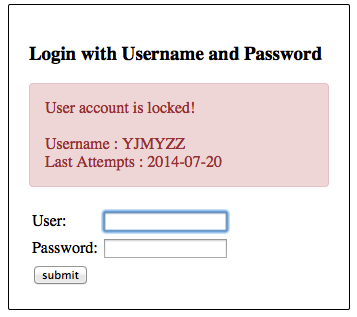
这时如果查下数据库,会看到

错误尝试次数,在db中已经达到阀值3

而且该用户的“是否未锁定”字段值为0,如果要手动解锁,把该值恢复为1,并将T_USER_ATTEMPTS中的尝试次数,改到3以下即可。
源代码下载:SpringSecurity-Limit-Login-Attempts-XML.zip
参考文章:
Spring Security : limit login attempts example
Spring Security笔记:登录尝试次数限制的更多相关文章
- Spring Security笔记:Remember Me(下次自动登录)
前一节学习了如何限制登录尝试次数,今天在这个基础上再增加一点新功能:Remember Me. 很多网站,比如博客园,在登录页面就有这个选项,勾选“下次自动登录”后,在一定时间段内,只要不清空浏览器Co ...
- Spring Security笔记:HTTP Basic 认证
在第一节 Spring Security笔记:Hello World 的基础上,只要把Spring-Security.xml里改一个位置 <http auto-config="true ...
- Spring Security 自定义登录认证(二)
一.前言 本篇文章将讲述Spring Security自定义登录认证校验用户名.密码,自定义密码加密方式,以及在前后端分离的情况下认证失败或成功处理返回json格式数据 温馨小提示:Spring Se ...
- Spring Security笔记:使用BCrypt算法加密存储登录密码
在前一节使用数据库进行用户认证(form login using database)里,我们学习了如何把“登录帐号.密码”存储在db中,但是密码都是明文存储的,显然不太讲究.这一节将学习如何使用spr ...
- Spring Security笔记:自定义登录页
以下内容参考了 http://www.mkyong.com/spring-security/spring-security-form-login-example/ 接上回,在前面的Hello Worl ...
- Spring Boot整合Spring Security自定义登录实战
本文主要介绍在Spring Boot中整合Spring Security,对于Spring Boot配置及使用不做过多介绍,还不了解的同学可以先学习下Spring Boot. 本demo所用Sprin ...
- Spring Security笔记:Hello World
本文演示了Spring Security的最最基本用法,二个页面(或理解成二个url),一个需要登录认证后才能访问(比如:../admin/),一个可匿名访问(比如:../welcome) 注:以下内 ...
- Spring Security笔记:自定义Login/Logout Filter、AuthenticationProvider、AuthenticationToken
在前面的学习中,配置文件中的<http>...</http>都是采用的auto-config="true"这种自动配置模式,根据Spring Securit ...
- Spring Security笔记:使用数据库进行用户认证(form login using database)
在前一节,学习了如何自定义登录页,但是用户名.密码仍然是配置在xml中的,这样显然太非主流,本节将学习如何把用户名/密码/角色存储在db中,通过db来实现用户认证 一.项目结构 与前面的示例相比,因为 ...
随机推荐
- jar 命令 打包装class文件的文件夹
由于将spring源代码导入到eclipse后,缺少jar包, 所以从maven仓库中下载spring发布的spring-core jar包. 为了方便理解目录结构,使用tree命令: tr ...
- Java的SPI机制与简单的示例
一.SPI机制 这里先说下SPI的一个概念,SPI英文为Service Provider Interface单从字面可以理解为Service提供者接口,正如从SPI的名字去理解SPI就是Service ...
- android 滑动滚动条调节音量
利用滚动条滑动控制音量: 定义: private SeekBar mseekBarvolume: 以下实现代码: //调节音量--begin------------------------- //音量 ...
- linux 接口地址全部清除才清理从此接口发出的下一跳路由
接口地址全部清除才清理从此接口发出的下一跳路由 如: eth7配置两个地址 eth7: 192.168.1.1 10.1.1.1 添加一条路由: route add -net 2.2.2.0/24 g ...
- raspberry pi2 智能小车源码及测试视频
作者:XIAOBO QQ:463431476 转载请注明作者Python 源代码 import RPi.GPIO as GPIO #human-computer-interaction import ...
- ViewPager+Fragment再探:和TAB滑动条一起三者结合
Fragment前篇: <Android Fragment初探:静态Fragment组成Activity> ViewPager前篇: <Android ViewPager初探:让页面 ...
- LNMP源码安装
1. mysql安装 # Preconfiguration setup shell > groupadd mysql shell > useradd -r -g mysql -s /bin ...
- c++11 新特性之lambda表达式
写过c#之后,觉得c#里的lambda表达式和delegate配合使用,这样的机制用起来非常爽.c++11也有了lambda表达式,形式上有细小的差异.形式如下: c#:(input paramete ...
- ARC的原理详解
1,ARC的本质 ARC本质是NSAutoreleasePool的直接应用, @autorelease{ return UIApplicationMain(argc, argv, nil, NSStr ...
- js生成[n,m]的随机数
一.预备知识 Math.ceil(); //向上取整. Math.floor(); //向下取整. Math.round(); //四舍五入. Math.random(); //0.0 ~ 1 ...