
selenium3+python自动化50-环境搭建(firefox)【转载】
前言
有不少小伙伴在安装selenium环境后启动firefox报错,因为现在selenium升级到3.0了,跟2.0的版本还有有一点区别的。
安装环境过程中主要会遇到三个坑:
1.'geckodriver' executable needs to be in PATH
2.Expected browser binary location, but unable to find binary in default location
3.Unsupported Marionette protocol version 2, required 3
环境准备:
--python3.6
--selenium3.0
--firefox50
一、安装python
1.安装python这个简单,下载版本后傻瓜式安装就行了。
2.安装好之后,看下这个目录D:\python\Scripts,有没pip.exe和easy_install.exe(一般都有,没有的话得重新安装一次了)
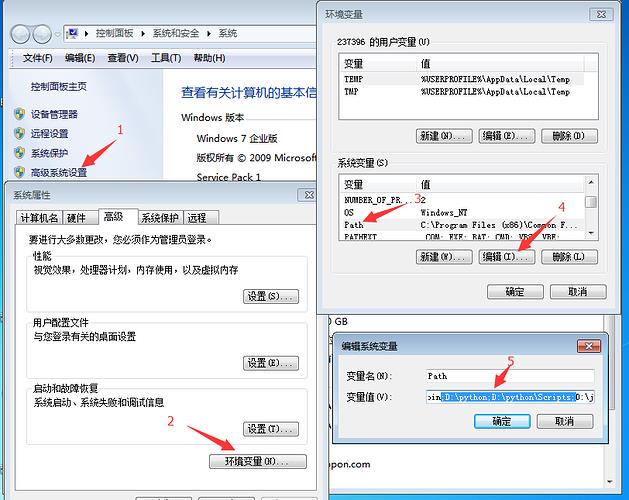
3.将D:\python和D:\python\Scripts,添加到环境变量path下
二、检查pip工具
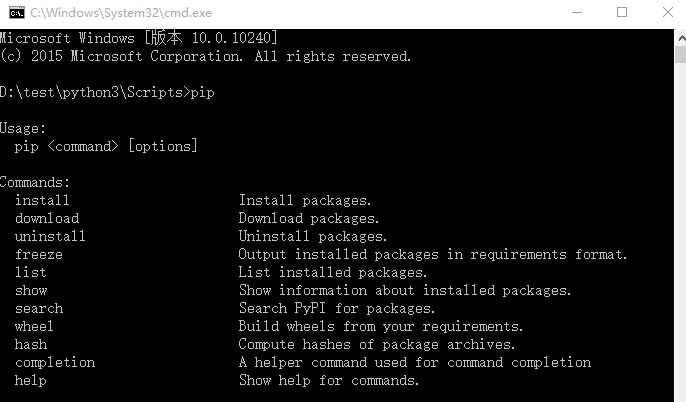
1.打开cmd,输入:pip,出现如下图界面,说明pip环境OK.
>>pip
2.要是出现异常提示:Did not provide a command,就看这篇解决:Selenium2+python自动化3-解决pip使用异常
三、安装selenium3.0
1.cmd输入:pip install selenium
>>pip install selenium
2.首次安装要看到100%完成,中途失败就重新多输入几次安装。

四、检查selenium环境
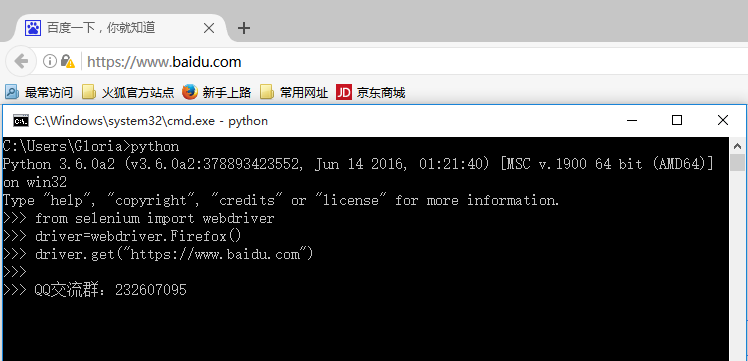
1.在cmd输入如下指令检查环境
>>python
>>from selenium import webdriver
>>driver=webdriver.Firefox()
>>driver.get("https://www.baidu.com")
2.能看到浏览器正常启动,说明环境OK,如果遇到异常就继续看下面解决方案。
五、遇到第一个坑:'geckodriver' executable needs to be in PATH
1.如果启动浏览器过程中报如下错误
Traceback (most recent call last):
File "<stdin>", line 1, in <module>
File "D:\test\python3\lib\site-packages\selenium\webdriver\firefox\webdriver.py", line 145, in __init__
self.service.start()
File "D:\test\python3\lib\site-packages\selenium\webdriver\common\service.py", line 81, in start
os.path.basename(self.path), self.start_error_message)
selenium.common.exceptions.WebDriverException: Message: 'geckodriver' executable needs to be in PATH.
2.这个是因为最新的selenium3.0启动firefox需要geckodriver.exe这个驱动文件。
3.下载之后,配置到环境变量path下(可以直接放python根目录)
六、遇到第二坑:Expected browser binary location, but unable to find binary in default location
1.如果启动浏览器过程中报如下错误
Traceback (most recent call last):
File "<stdin>", line 1, in <module>
File "D:\test\python3\lib\site-packages\selenium\webdriver\firefox\webdriver.py", line 155, in __init__
keep_alive=True)
File "D:\test\python3\lib\site-packages\selenium\webdriver\remote\webdriver.py", line 92, in __init__
self.start_session(desired_capabilities, browser_profile)
File "D:\test\python3\lib\site-packages\selenium\webdriver\remote\webdriver.py", line 179, in start_session
response = self.execute(Command.NEW_SESSION, capabilities)
File "D:\test\python3\lib\site-packages\selenium\webdriver\remote\webdriver.py", line 238, in execute
self.error_handler.check_response(response)
File "D:\test\python3\lib\site-packages\selenium\webdriver\remote\errorhandler.py", line 193, in check_response
raise exception_class(message, screen, stacktrace)
selenium.common.exceptions.WebDriverException: Message: Expected browser binary location, but unable to find binary in default location, no 'moz:firefoxOptions.binary' capability provided, and no binary flag set on the command line
2.这个是因为firefox.exe这个文件也需要配置到环境变量path下
3.这个路径就是安装完firefox后,找到firefox.exe这个文件的地址,加到path下

七、遇到第三坑:Unsupported Marionette protocol version 2, required 3
1.如果启动浏览器过程中出现如下错误
Traceback (most recent call last):
File "<stdin>", line 1, in <module>
File "D:\test\python3\lib\site-packages\selenium\webdriver\firefox\webdriver.py", line 155, in __init__
keep_alive=True)
File "D:\test\python3\lib\site-packages\selenium\webdriver\remote\webdriver.py", line 92, in __init__
self.start_session(desired_capabilities, browser_profile)
File "D:\test\python3\lib\site-packages\selenium\webdriver\remote\webdriver.py", line 179, in start_session
response = self.execute(Command.NEW_SESSION, capabilities)
File "D:\test\python3\lib\site-packages\selenium\webdriver\remote\webdriver.py", line 238, in execute
self.error_handler.check_response(response)
File "D:\test\python3\lib\site-packages\selenium\webdriver\remote\errorhandler.py", line 193, in check_response
raise exception_class(message, screen, stacktrace)
selenium.common.exceptions.WebDriverException: Message: Unsupported Marionette protocol version 2, required 3
2.这个错误原因是firefox版本过低了,最新的selenium3.0版本支持firefox47以上的版本,升级版本就可以了
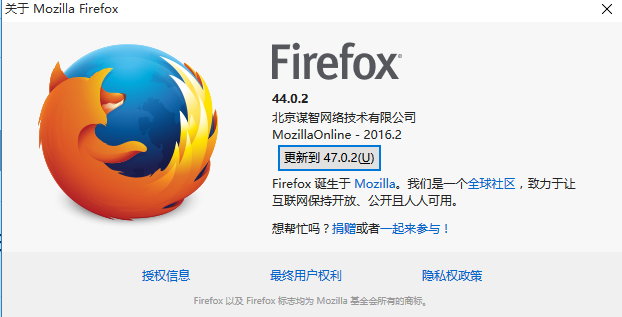
总结:整个环境的配置是python3.6+selenium3.0+firefox47以上版本,当然python用2.7版本也是可以的
selenium3+python自动化50-环境搭建(firefox)【转载】的更多相关文章
- selenium3+python自动化50-环境搭建(firefox)
前言 有不少小伙伴在安装selenium环境后启动firefox报错,因为现在selenium升级到3.0了,跟2.0的版本还有有一点区别的. 安装环境过程中主要会遇到三个坑: 1.'geckodri ...
- Selenium2+python自动化1-环境搭建【转载】
前言 目前selenium版本已经升级到3.0了,网上的大部分教程是基于2.0写的,所以在学习前先要弄清楚版本号,这点非常重要.本系列依然以selenium2为基础,目前selenium3坑比较多,暂 ...
- Selenium3+python自动化006-环境搭建
一.selenium简介 1.Selenium历史 (1)Selenium 1.0: Selenium IDE Selenium Grid Selenium RC(核心功能) Sele ...
- Appium+Python自动化 1 环境搭建(适用windows系统-Android移动端自动化)
一.安装并配置 java jdk ①下载 java jdk后 安装,安装完成后,配置环境变量 打开计算机->系统属性->高级系统设置->环境变量->新建(系统变量),如图所示: ...
- Android自动化测试之环境搭建
Android自动化测试之环境搭建 一.Android-sdk介绍 SDK(Software development kit)软件开发工具包.被软件开发工程师用于为特定的软件包.软件框架.硬件平台. ...
- Python+Selenium+webdriver环境搭建(windows)以及相关资源下载链接
今天记录一下测试小菜鸟alter在测试入门的一点关于python+Selenium+webdriver环境搭建的经历以及资源分享.欢迎交流学习,批评指正. 一.Python的下载与安装 1.pytho ...
- Python之Django环境搭建(MAC+pycharm+Django++postgreSQL)
Python之Django环境搭建(MAC+pycharm+Django++postgreSQL) 转载请注明地址:http://www.cnblogs.com/funnyzpc/p/7828614. ...
- Robot Framework自动化_环境搭建以及第一个用例
Robot Framework自动化_环境搭建以及第一个脚本 培训老师:肖能尤 2016/06/07 课程目的 一.Robot framework 环境搭建以及第一个脚本 课程内容 1 安装前准 ...
- 基于Python的Appium环境搭建合集
自动化一直是测试圈中的热聊,也是大家追求的技术方向.在测试中,往往回归测试也是测试人员的“痛点”.对于迭代慢.变更少的功能,就能用上自动化来替代人工回归,减轻工作量. 问题 在分享环境搭建之前,先抛出 ...
随机推荐
- lintcode-101-删除排序数组中的重复数字 II
101-删除排序数组中的重复数字 II 跟进"删除重复数字": 如果可以允许出现两次重复将如何处理? 样例 标签 数组 两根指针 脸书 思路 参照上一篇博客lintcode-100 ...
- lintcode-57-三数之和
57-三数之和 给出一个有n个整数的数组S,在S中找到三个整数a, b, c,找到所有使得a + b + c = 0的三元组. 注意事项 在三元组(a, b, c),要求a <= b <= ...
- 在vue-cli创建的项目里配置scss
第一步,gitbash进入到项目目录 npm install node-sass --save-dev npm install sass-loader --save-dev 第二步:打开webpack ...
- bcc编译
bcc编译,直接在docker里编,太方便:第一次深切体会到docker的强大: 1)下载bcc源码: 2) 把源码中的Dockerfile.ubuntu重命名为Dockerfile 3)sudo d ...
- 玩lua
https://my.oschina.net/wangxuanyihaha/blog/186401
- python 的sets list dictionary
http://blog.csdn.net/joseph_happy/article/details/6717412 http://blog.csdn.net/joseph_happy/article/ ...
- 【题解】ZJOI2017仙人掌
感觉这题很厉害啊,虽然想了一天多但还是失败了……(:д:) 这题首先注意到给定图中如果存在环其实对于答案是没有影响的.然后关键之处就在于两个 \(dp\) 数组,其中 \(f[u]\) 表示以 \(u ...
- 用JavaScript实现一个简单的树结构
数据源用数组混json结构,实现了基本的功能.效率一般,跟 dhtree 梅花雪树对比了下,都差不多. (ps感觉比dhtree快点,跟梅花雪树差不多,个人测试) 这个实现树的原理是根据json,不断 ...
- 如何优化JQuery each()函数的性能
如果对jQuery这东西只停留在用的层面,而不知其具体实现的话,真的很容易用出问题来.这也是为什么近期我一直不怎么推崇用jQuery,这框架的API设定就有误导人们走上歧途之嫌. 01 $.fn.be ...
- HDU2389:Rain on your Parade(二分图最大匹配+HK算法)
Rain on your Parade Time Limit: 6000/3000 MS (Java/Others) Memory Limit: 655350/165535 K (Java/Ot ...