
Qt Python Scriptable Application
Qt Python Scriptable Application
eryar@163.com
Abstract. Python and C++ are in many ways as different as two languages could be: while C++ is usually compiled to machine-code, Python is interpreted. Python's dynamic type system is often cited as the foundation of its flexibility, while in C++ static typing is the cornerstone of its efficiency. C++ has an intricate and difficult compile-time meta-language, while in Python, practically everything happens at runtime.
Key Words. Qt, Python, Shiboken2, PySide2
1 Introduction
Python和C++是两种不同的开发语言:C++通常编译成机器码,而Python是解释型的。Python的动态类型系统是它灵活性的基础,而C++的静态类型运行效率高。对于许多程序员来说,让Python和C++互为补充来进行程序开发是很完美的。Python程序的性能瓶颈可以用C++来重写;C++程序选择Python作为中间脚本语言,可以为程序提供方便地集成和扩展能力,即支持程序二次开发,方便为程序定制功能。
2 Shiboken2
Shiboken2是一个为C/C++库生成CPython绑定代码的生成器,用来创建PySide的模块,换句话说,Shiboken可以用来暴露Qt C++API给Python。
Shiboken使用ApiExtractor库来分析所有的Qt头文件。由于使用的clang,不依赖Qt,所以Shiboken也可用于将非Qt的C++项目。并且Shiboken有一个类型系统Typesytem,基于XML文件。

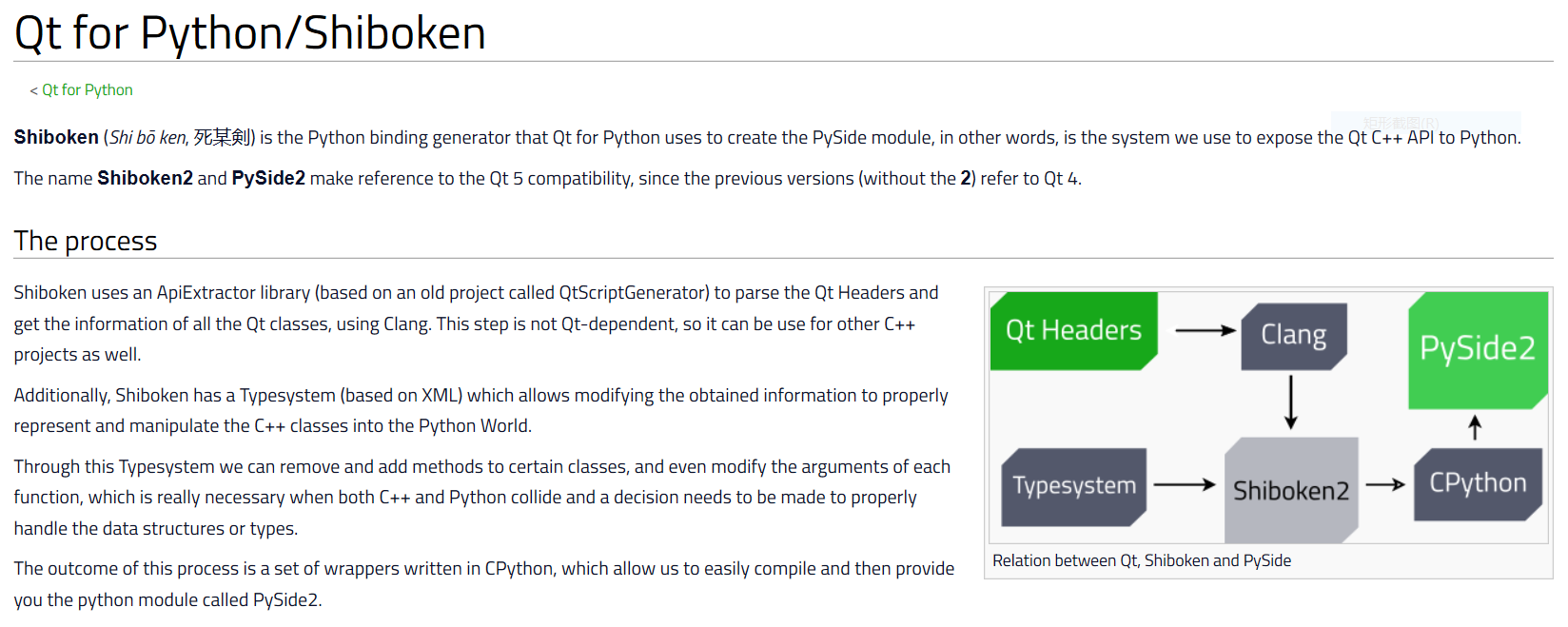
编译PySide的前提条件就是先要编译出Shiboken。当成功编译PySide后,就会生成Shiboken等类库。既然使用Shiboken可以将Qt的C++对象暴露给Python,那么如何将C++和Python结合起来,生成一个支持Python脚本的程序呢?
在PySide2的例子文件夹中提供了两个例子:
l SampleBinding:暴露非Qt的C++对象给Python;
l ScriptableApplication:支持脚本的程序示例;
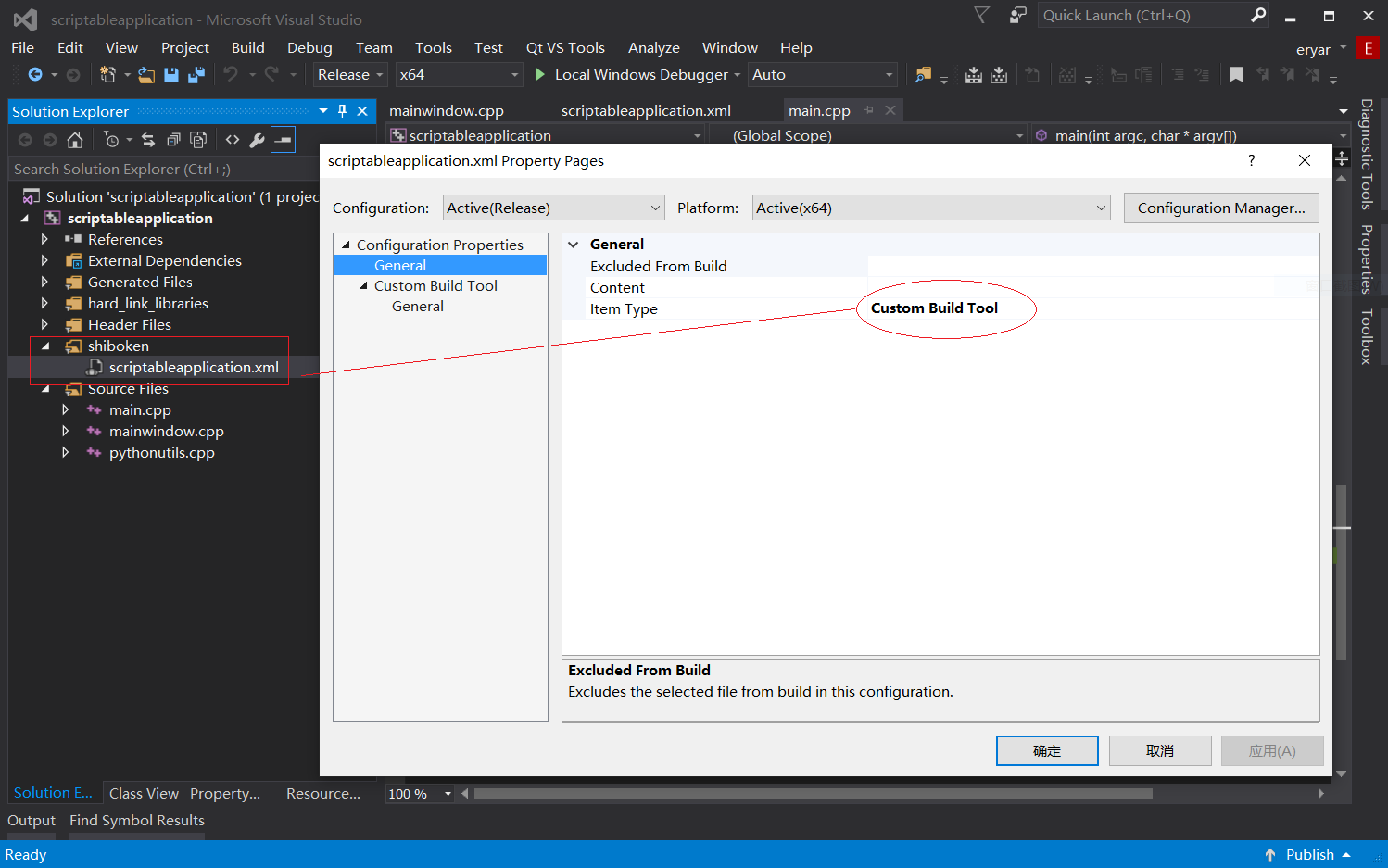
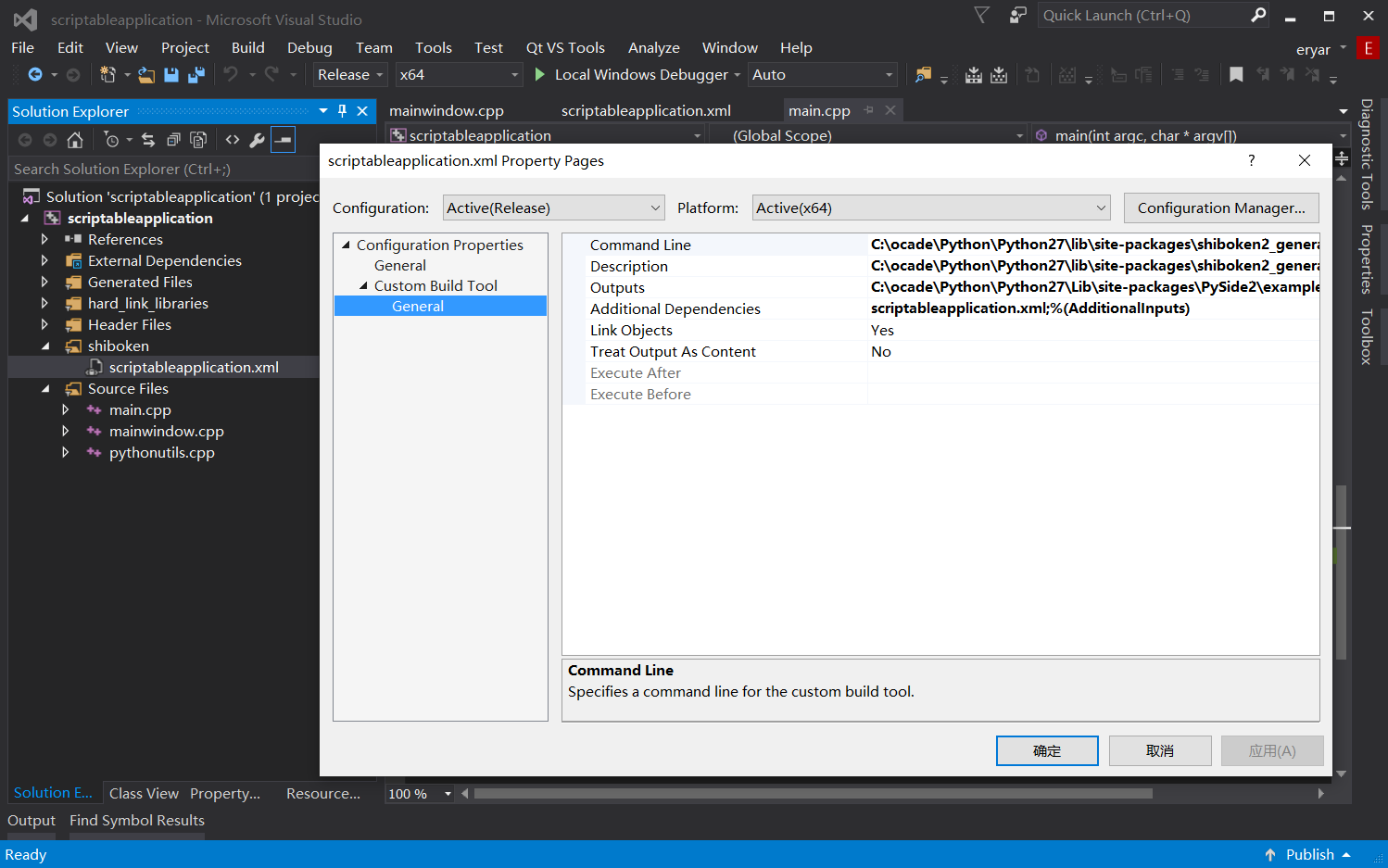
如何编译这两个例子,在其中的ReadMe.md中都有详细说明,主要是配置好PySide2,Shiboken2等环境。其中ScriptableApplication中提供了CMake和QMake两种编译方式,将他们生成VS的工程可以看出,在VS项目中增加了XML文件,并将其设置成Custom Build Tool:
并为其配置Shiboken的一些命令选项:
3 ScriptableApplication Example
编译成功程序运行截图如下所示:
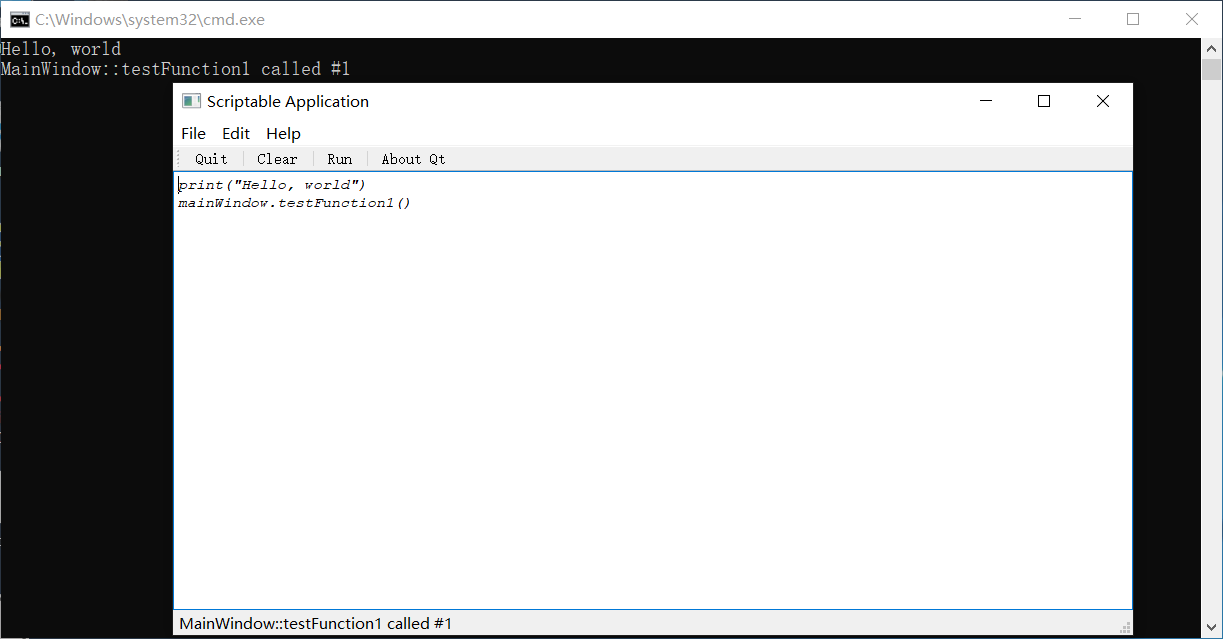
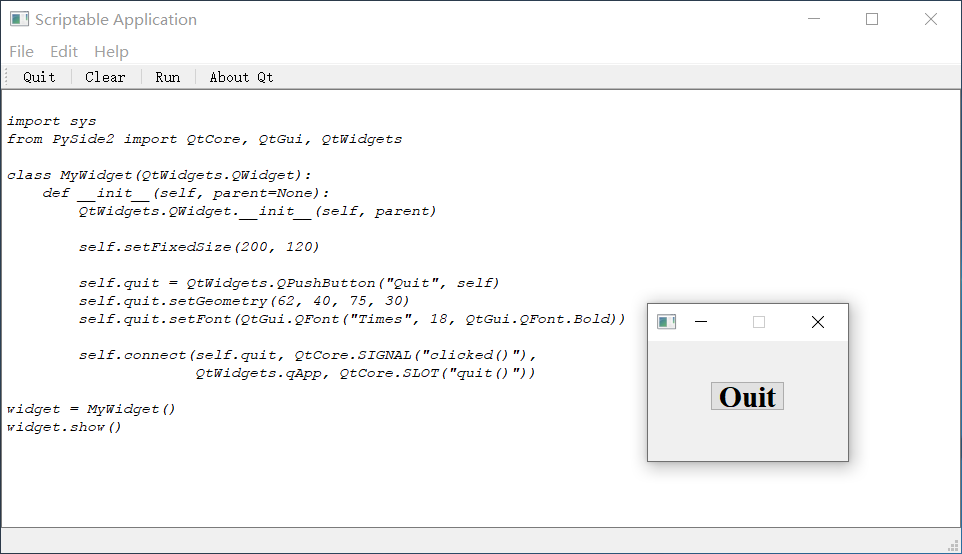
程序支持了Python脚本,当然也可以使用PySide来开发GUI,如下所示:
4 Conclusion
为C++程序提供Python脚本支持有很多开源库可以实现,如boost.python, pycxx等,而Qt 的PySide2使用Shiboken2来将Qt的C++类型暴露给Python,所以也可以直接使用Shiboken2来将C++类封装成Python类。
5 References
- Building Hybrid Systems With Boost Python, by Dave Abrahams and Ralf W. Grosse-Kunstleve
- https://wiki.qt.io/Qt_for_Python/Shiboken
- https://doc.qt.io/qtforpython/shiboken2/contents.html
- https://www.qt.io/blog/2018/05/31/write-python-bindings
- https://code.qt.io/cgit/pyside/pyside-setup.git/tree/examples/scriptableapplication
Qt Python Scriptable Application的更多相关文章
- Create a Qt Widget Based Application—Windows
This turtorial describes how to use Qt Creator to create a small Qt application, Text Finder. It is ...
- How to create PDF files in a Python/Django application using ReportLab
https://assist-software.net/blog/how-create-pdf-files-python-django-application-using-reportlab CONT ...
- How to export Excel files in a Python/Django application
https://assist-software.net/blog/how-export-excel-files-python-django-application CONTENTS Introduct ...
- 如何用Qt Python创建简单的桌面条形码应用
Qt for Python可以快速跨平台的GUI应用.这篇文章分享下如何结合Dynamsoft Barcode Reader SDK来创建一个简单的读码应用. 安装Qt for Python 官方站点 ...
- Qt+Python开发百度图片下载器
一.资源下载地址 https://www.aliyundrive.com/s/jBU2wBS8poH 本项目路径:项目->收费->百度图片下载器(可试用5分钟) 安装包直接下载地址:htt ...
- 【QT】qt python install pip
https://pip.pypa.io/en/stable/installing/ http://www.runoob.com/w3cnote/python-pip-install-usage.htm ...
- 史上最全的Python电子书教程资源下载(转)
网上搜集的,点击即可下载,希望提供给有需要的人^_^ O'Reilly.Python.And.XML.pdf 2.02 MB OReilly - Programming Python 2nd. ...
- Python框架、库以及软件资源汇总
转自:http://developer.51cto.com/art/201507/483510.htm 很多来自世界各地的程序员不求回报的写代码为别人造轮子.贡献代码.开发框架.开放源代码使得分散在世 ...
- Awesome Python
Awesome Python A curated list of awesome Python frameworks, libraries, software and resources. Insp ...
随机推荐
- 读取Core下的appsettings.json的值的时候中文乱码
这个百度一下一大堆,我就用的这个:然后重新生成一次就好了. 2.有的是更改VS的什么高级保存之类的,我记得之气设置过, 然后就是:这篇文章
- window10配置python虚拟环境的路径
当我们搭建python+django项目的时候,需要配置虚拟环境,从而使项目与项目之间的包相互隔离,互不影响. 1.配置虚拟环境前,首先需要安装两个包 pip install virtualenvwr ...
- eclipse android ndk开发遇到的问题.
1. error:parameter name omitted 用javah生成的.h文件中,方法是没有指定形参的,实现的时候需要我们在实现的方法定义中加上形参. 2. 'NewStringUTF' ...
- THUWC2020 自闭记
DAY 1 报道 领胸牌和-围巾-! 发现我和 \(ssf\) 小姐姐一个考场. 合影+开幕式 宾馆睡了一觉-睡上午觉真的舒服. 合影时在c位! 开幕式.比上次夏令营不知道好到哪里去了,讲话都挺有意思 ...
- Docker windows 容器启动失败 network not found
前几天由于重启了服务器,docker配置的网络出了些问题导致在docker容器中安装的mysql识别用户权限时发生错误.(从宿主机A以user身份 登入到容器B中安装的Mysql时,用户竟然不是use ...
- vuex 基本语法
VUEX 的核心概念 1 .State (常用):2.Getters :3.Mutations(常用):4.Actions :5.Modules: 1.State是唯一的数据源,单一的状态树 cons ...
- HDU Queuing(递推+矩阵快速幂)
Queuing Time Limit: 10000/5000 MS (Java/Others) Memory Limit: 32768/32768 K (Java/Others)Total Su ...
- Stopping service [Tomcat] Disconnected from the target VM, address:XXXXXX解决方案
原文出处:https://blog.csdn.net/u013294097/article/details/90677049 Stopping service [Tomcat] Disconnecte ...
- Nutz-使用Jspview跳转页面报404
案例 今天在前段页面提交登陆请求时,后台报404,找不到对应的页面,但是该jsp已经放在了正确的目录下,并且请求地址也没错,就是返回对应jsp的时候找不到该文件 解决方案 经排查,原来犯了个低级错误, ...
- OpenCV3入门1—环境搭建与实验
1.环境搭建 1.1 VS2017开发环境搭建 1).下载软件包 https://opencv.org/ 2).配置环境变量 配置win10系统环境变量,把下面路径添加到path. D:\WORK\5 ...