
张高兴的 Xamarin.Android 学习笔记:(三)活动生命周期
本文将直接解释我写的一个示例。示例目的在于展示 Android 活动在 Xamarin 中的用法。如果有朋友对基础知识不太了解建议先学 Android 。
新建一个 Xamarin.Android 项目 ActivityStates。在项目中新建文件夹 Activities 用来存放活动。项目结构如下
(GitHub : https://github.com/ZhangGaoxing/xamarin-android-demo/tree/master/ActivityStates)
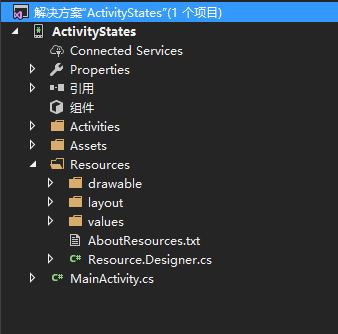
在 Activities 文件夹中新建两个活动 DialogActivity 和 NormalActivity(右击 Activities —— 添加 —— 新建项 —— 活动)
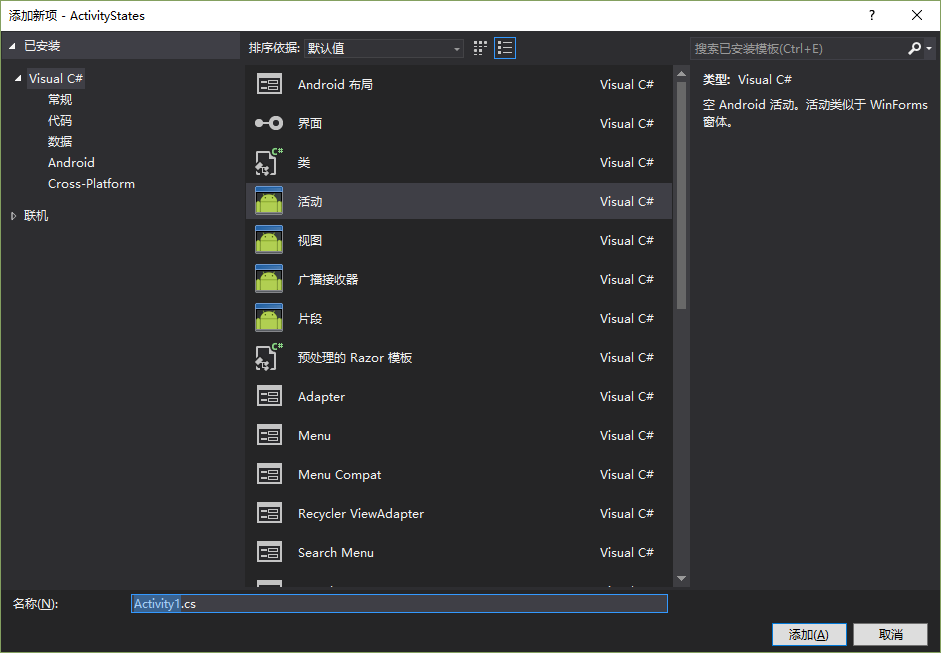
在 Resources 下的 layout 文件夹中新建两个与之相对应的布局 DialogLayout.axml 和 NormalLayout.axml(右击 layout —— 添加 —— 新建项 —— Android 布局)
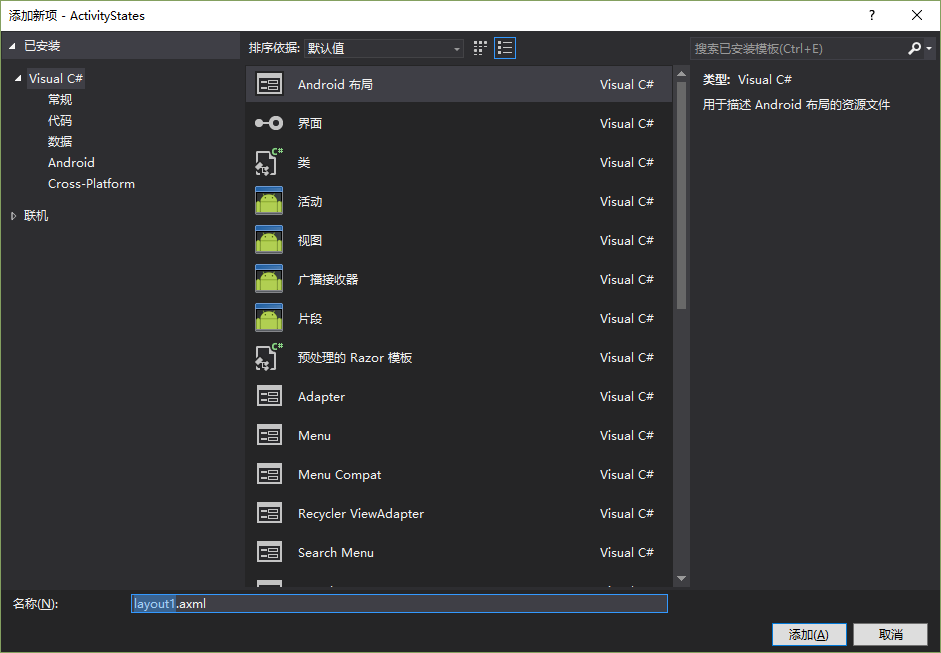
完成后项目结构如下图所示
说完活动、布局的新建,接下来开始编辑代码,新建的活动和布局的代码很简单
NormalActivity.cs
using Android.App;

using Android.Content;

using Android.OS;

using Android.Runtime;

using Android.Views;

using Android.Widget;

namespace ActivityStates.Activities

{

    [Activity(Label = "NormalActivity")]

    public class NormalActivity : Activity

    {

        protected override void OnCreate(Bundle savedInstanceState)

        {

            base.OnCreate(savedInstanceState);

            SetContentView(Resource.Layout.NormalLayout);

        }

    }

}
对应的 NormalLayout.axml
<LinearLayout xmlns:android="http://schemas.android.com/apk/res/android"

    android:orientation="vertical"

    android:layout_width="match_parent"

    android:layout_height="match_parent"

    android:minWidth="25px"

    android:minHeight="25px">

    <TextView

        android:text="This is a Normal Layout"

        android:layout_width="match_parent"

        android:layout_height="wrap_content"

        android:id="@+id/textView1" />

</LinearLayout>
下面要说说 DialogActivity.cs 。由于我们需要把当前的活动主题改为 Dialog 形式,按照一般的 Android 项目,我们应该编辑 AndroidManifest.xml 文件,但在 Xamarin 项目中采用 C# 中的特性(Attribute)来进行配置。详细说明可以按 F12 查看代码。

所以在配置活动主题时我们需要把活动特性修改为以下代码:[Activity(Label = "DialogActivity", Theme ="@android:style/Theme.Dialog")]
DialogActivity.cs
using Android.App;

using Android.Content;

using Android.OS;

using Android.Runtime;

using Android.Views;

using Android.Widget;

namespace ActivityStates.Activities

{

    [Activity(Label = "DialogActivity", Theme ="@android:style/Theme.Dialog")]

    public class DialogActivity : Activity

    {

        protected override void OnCreate(Bundle savedInstanceState)

        {

            base.OnCreate(savedInstanceState);

            SetContentView(Resource.Layout.DialogLayout);

        }

    }

}
DialogLayout.axml
<LinearLayout xmlns:android="http://schemas.android.com/apk/res/android"

    android:orientation="vertical"

    android:layout_width="match_parent"

    android:layout_height="match_parent"

    android:minWidth="25px"

    android:minHeight="25px">

    <TextView

        android:text="This is a Dialog Layout"

        android:layout_width="match_parent"

        android:layout_height="wrap_content"

        android:id="@+id/textView1" />

</LinearLayout>
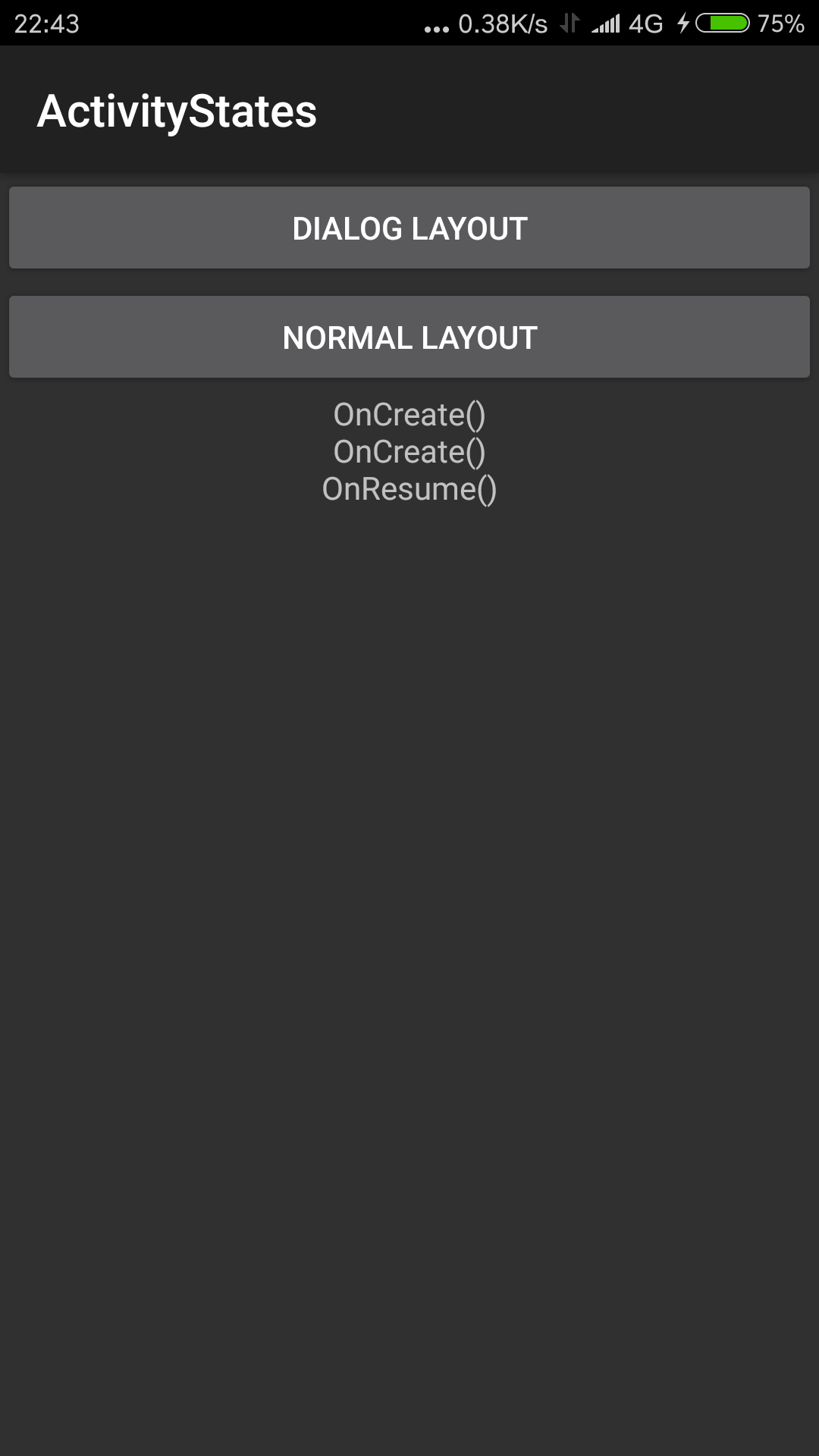
下面来说明一下主活动和主布局。在主布局中我们需要两个 Button 用来跳转到上面两个新建的活动,和一个 TextView 用来输出 Log。
Main.axml
<LinearLayout xmlns:android="http://schemas.android.com/apk/res/android"

    android:orientation="vertical"

    android:layout_width="match_parent"

    android:layout_height="match_parent">

    <Button

        android:text="Dialog Layout"

        android:layout_width="match_parent"

        android:layout_height="wrap_content"

        android:id="@+id/btnDialog" />

    <Button

        android:text="Normal Layout"

        android:layout_width="match_parent"

        android:layout_height="wrap_content"

        android:id="@+id/btnNormal" />

    <TextView

        android:gravity="center"

        android:layout_width="match_parent"

        android:layout_height="wrap_content"

        android:id="@+id/txtLog" />

</LinearLayout>
而在主活动中我们需要重写活动生命周期的7个方法,在 OnDestroy() 方法中,由于活动已经销毁,向 TextView 中输出完全没有意义,所以采用 Toast 通知的方法来输出。
MainActivity.cs
using Android.App;

using Android.Widget;

using Android.OS;

using Android.Content;

namespace ActivityStates

{

    [Activity(Label = "ActivityStates", MainLauncher = true, Icon = "@drawable/icon")]

    public class MainActivity : Activity

    {

        TextView txtLog;        // 用于显示信息

        protected override void OnCreate(Bundle bundle)

        {

            base.OnCreate(bundle);

            SetContentView (Resource.Layout.Main);

            // 获取控件

            Button btnDialog = FindViewById<Button>(Resource.Id.btnDialog);

            Button btnNormal = FindViewById<Button>(Resource.Id.btnNormal);

            txtLog = FindViewById<TextView>(Resource.Id.txtLog);

            // 输出信息

            txtLog.Text += "OnCreate()\n";

            btnDialog.Click += (sender, e) =>

            {

                Intent dialog = new Intent(this, typeof(Activities.DialogActivity));

                StartActivity(dialog);

            };

            btnNormal.Click += (sender, e) =>

            {

                Intent normal = new Intent(this, typeof(Activities.NormalActivity));

                StartActivity(normal);

            };

        }

        protected override void OnStart()

        {

            base.OnStart();

            txtLog.Text += "OnCreate()\n";

        }

        protected override void OnResume()

        {

            base.OnResume();

            txtLog.Text += "OnResume()\n";

        }

        protected override void OnPause()

        {

            base.OnPause();

            txtLog.Text += "OnPause()\n";

        }

        protected override void OnStop()

        {

            base.OnStop();

            txtLog.Text += "OnStop()\n";

        }

        protected override void OnRestart()

        {

            base.OnRestart();

            txtLog.Text += "OnRestart()\n";

        }

        protected override void OnDestroy()

        {

            base.OnDestroy();

            Toast.MakeText(this, "OnDestroy()", ToastLength.Short).Show();

        }

    }

}
运行图
张高兴的 Xamarin.Android 学习笔记:(三)活动生命周期的更多相关文章
- 张高兴的 Xamarin.Android 学习笔记:(一)环境配置
最近在自学 Xamarin 和 Android ,同时发现国内在做 Xamarin 的不多.我在自学中间遇到了很多问题,而且百度到的很多教程也有些过时,现在打算写点东西稍微总结下,顺便帮后人指指路了. ...
- 张高兴的 Xamarin.Android 学习笔记:(二)“Hello World”
完成环境配置后开始第一个简单项目.打开 Visual Studio 新建一个 Xamarin.Android 项目 "HelloAndroid".(GitHub:https://g ...
- android学习笔记28——Activity生命周期
Activity生命周期 Activity的活动状态由android已Activity栈的形式管理,当前活动的Activity位于栈顶.随着不同应用的运行,每个Activity都有可能从活动状态转入非 ...
- Android学习笔记:Activity生命周期详解
进行android的开发,必须深入了解Activity的生命周期.而对这个讲述最权威.最好的莫过于google的开发文档了. 本文的讲述主要是对 http://developer.android.co ...
- android学习笔记(5)Activity生命周期学习
每一个activity都有它的生命周期,开启它,关闭它,跳转到其他activity等等,都会自己主动调用下面某种方法.对这些个方法覆写后观察学习. protected void onCreate(Bu ...
- 张高兴的 Xamarin.Android 学习笔记:(四)常用控件
示例地址 GitHub : https://github.com/ZhangGaoxing/xamarin-android-demo/tree/master/ControlsDemo
- Android学习笔记----Activity的生命周期图示
转载,一目了然.
- MAVEN学习笔记之Maven生命周期和插件简介(3)
MAVEN学习笔记之Maven生命周期和插件简介(3) clean compile site三套生命周期相互独立. clean pre-clean 执行清理前的工作 clean 清理上一次构建生成的所 ...
- Maven学习笔记(六):生命周期与插件
何为生命周期: Maven的生命周期就是为了对全部的构建过程进行抽象和统一.Maven从大量项目和构建工具中学习和反思,然后总结了一套高度完好的.易扩展的生命周期.这个生命周期包括了项目的清 ...
随机推荐
- 201521123054《Java程序设计》第8周学习总结
1. 本周学习总结 2. 书面作业 List中指定元素的删除(题目4-1) 1.1 实验总结 每次删除时下标需要-1:原理如图 统计文字中的单词数量并按出现次数排序(题目5-3) 2.1 伪代码(简单 ...
- 201521123109《java程序设计》第五周学习总结
1. 本周学习总结 1.1 尝试使用思维导图总结有关多态与接口的知识点. 1.2 可选:使用常规方法总结其他上课内容. 2. 书面作业 作业参考文件下载 1.代码阅读:Child压缩包内源代码 1.1 ...
- 201521123054 《Java程序设计》 第2周学习总结
本周学习总结 能够利用jdk文档处理实验问题: 动态数组的学习: 书面作业 1.使用Eclipse关联jdk源代码,并查看String对象的源代码(截图)?分析String使用什么来存储字符串的?分析 ...
- delphi引用别的单元时问题
当需要添加别的工程总的unit文件时,将unit的pas文档放入工程目录下,在工程页面Uses添加 Unit2 in 'Unit2.pas' {DataModule2: TDataModule}, U ...
- Hibernate第一篇【介绍Hibernate,简述ORM,快速入门】
前言 前面已经学过了Struts2框架了,紧接着就是学习Hibernate框架了-本博文主要讲解介绍Hibernate框架,ORM的概念和Hibernate入门 什么是Hibernate框架? Hib ...
- 最近使用 .NET Core 遇到的一些坑
最近.NET Core升级到2.0后开始慢慢捣鼓的多了起来,但遇到了不少坑,所以特来记录下. 第一个坑 条件编译符 我们在编写一些方法的时候通常会为Debug模式增加一些输出日志等以便我们检查,也会 ...
- OC——多态
书接上文,上文提到继承一个很大用途的是为了更好的实现多态,现在我们就来看看OC的多态. 多态:顾名思义就是好多种状态,以前学C#时候印象最深刻的例子是好多个类共同实现同一个接口,然后把这些类的对象都装 ...
- PyTorch教程之Training a classifier
我们已经了解了如何定义神经网络,计算损失并对网络的权重进行更新. 接下来的问题就是: 一.What about data? 通常处理图像.文本.音频或视频数据时,可以使用标准的python包将数据加载 ...
- 执行sql时出现错误 extraneous input ';' expecting EOF near '<EOF>'
调用jdbc执行hive sql时出现错误 Error while compiling statement: FAILED: ParseException line 5:22 extraneous i ...
- 快速搭建应用服务日志收集系统(Filebeat + ElasticSearch + kibana)
快速搭建应用服务日志收集系统(Filebeat + ElasticSearch + kibana) 概要说明 需求场景,系统环境是CentOS,多个应用部署在多台服务器上,平时查看应用日志及排查问题十 ...