
vue下载文件模板(excel) 和 导出excel表格
1. get形式传参数
仅限于get方式,注意请求头参数...,需要后台放开
window.location = '/dms-underlying-asset/download?assetType=' + localStorage.getItem('assetType')
2. post形式传参数
前端项目中使用最多的
注意:请求类型:responseType: "blob"
(1)定义接口(post请求,responseType:数据返回类型为blob)
1 export function download(data) {

2   return request({

3     url: `api/exportExcel`,

4     method: 'post',

5     responseType: 'blob',

6     data

7   })

8 }
(2)调用接口
 1 const res = await download(this.form)

 2 // 等同于

 3 // axios.post('/api/exportExcal', this.form, {responseType: //"blob"}).then(res => {})

 4

 5 console.log(res, '这里会看到返回的blob文件流')   // 类似这种
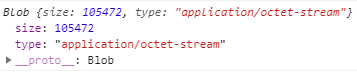
 6

 7 if (!res) return      //

 8 const excelTitle = "嘤嘤嘤.xlsx"

 9

10 this.readFileDownload(res, excelTitle)    // 封装读取文件并下载
(3)封装读取文件并下载
这里涉及到几个问题:
1. FileReader 读取bolb流文件,参考:https://developer.mozilla.org/zh-CN/docs/Web/API/FileReader
FileReader 对象允许Web应用程序异步读取存储在用户计算机上的文件(或原始数据缓冲区)的内容,使用 File 或 Blob 对象指定要读取的文件或数据。
2. content-type(res.type === 'application/octet-stream')我们在解析res.type的时候,参考:https://blog.csdn.net/u012894692/article/details/88846401
export function readFileDownload(data, msg) {

  var res = data

  if (res.type === 'application/json' || res.type === 'application/json;charset=UTF-8') {     // 失败的时候,注意ie兼容问题


    let fileReader = new FileReader()

    fileReader.onload = function(event) {

      let jsonData = JSON.parse(this.result) // this.result是根据event,读取文件后打印的     event.target.reslut

      console.log(jsonData, '...............')

      if (jsonData.data === null && jsonData.code === 1) {

        Message({

          message: jsonData.msg || 'Error',

          type: 'error',

          duration: 5 * 1000

        })

      }

    }

    fileReader.readAsText(res)


  }

  if (res.type === 'application/octet-stream' || res.type === 'application/vnd.ms-excel' || res.type === 'application/vnd.ms-excel;charset=UTF-8') {

    console.log('success...')         // 成功,注意ie兼容问题

    const blob = new Blob([res], { type: 'application/vnd.ms-excel;charset=utf-8' })

    if (window.navigator && window.navigator.msSaveOrOpenBlob) {

      window.navigator.msSaveOrOpenBlob(blob, msg)

    } else {

      console.log(blob)

      const url = window.URL.createObjectURL(blob)

      console.log(url)

      const aLink = document.createElement('a')

      aLink.style.display = 'none'

      aLink.href = url

      aLink.setAttribute('download', msg)

      document.body.appendChild(aLink)

      aLink.click()

      document.body.removeChild(aLink)

      window.URL.revokeObjectURL(url)

    }

  }

}
3,将表格的下载成excel表格(table表格绑定id)
这种方式怎么说呢,感觉不实用,仅限于前端页面的table表格,在没有后台接口的情况下,(有分页的话还比较难搞),不实用
// 导出表格

      var wb = XLSX.utils.table_to_book(document.querySelector('#mytable')) //mytable为表格的id名

      var wbout = XLSX.write(wb, {

        bookType: 'xlsx',

        bookSST: true,

        type: 'array'

      })

      try {

        FileSaver.saveAs(new Blob([wbout], { type: 'application/octet-stream' }), '统计表.xlsx')

      } catch (e) {

        if (typeof console !== 'undefined') console.log(e, wbout)

      }

      return wbout
vue下载文件模板(excel) 和 导出excel表格的更多相关文章
- C#变成数据导入Excel和导出Excel
excel 基础 •整个excel 表格叫工作表:workbook:工作表包含的叫页:sheet:行:row:单元格:cell. •excel 中的电话号码问题,看起来像数字的字符串以半角单引号开头就 ...
- [转]Excel.dll 导出Excel控制
Excel.dll 导出Excel控制 2010-06-12 11:26 2932人阅读 评论(2) 收藏 举报 excelmicrosoftstring产品服务器google 最近做了个导出Exce ...
- 纳税服务系统【用户模块之使用POI导入excel、导出excel】
前言 再次回到我们的用户模块上,我们发现还有两个功能没有完成: 对于将网页中的数据导入或导出到excel文件中,我们是完全没有学习过的.但是呢,在Java中操作excel是相对常用的,因此也有组件供我 ...
- [poi使用]使用excel模版导出excel
Apache POI是基于Office Open XML标准(OOXML)和Microsoft的OLE 2复合文档格式(OLE2)处理各种文件格式的开源项目.简而言之,您可以使用Java读写MS ...
- 前端vue下载文件时blob返回流中怎么获取文件名
我很久之前写了一篇前端vue利用blob对象下载文件,有些人私信我,如果后端返回流失败,给出的json对象该怎么获得?前端获取的流怎么能获取原文件名?其实在那篇文章之后,我就已经针对这两个问题进行了优 ...
- POI操作EXCEL之导出Excel(设置有效性,下拉列表引用)
本人使用的是poi-bin-3.10-FINAL-20140208.zip 版本的poi以下是程序关键代码: //需要引用的类 import java.io.File; import java.io. ...
- C#导出EXCEL(DataTable导出EXCEL)
using System; using System.Collections.Generic; using System.Text; using System.Data; using System.I ...
- javaweb下载文件模板
import java.io.FileInputStream; import java.io.IOException; import java.io.InputStream; import javax ...
- vue下载文件
import fileDownload from 'js-file-download' let params = { ", ", "filename":&quo ...
- 【Java excel】导出excel文件
TestExprot package excel; import java.io.File; import java.io.IOException; import java.text.DateForm ...
随机推荐
- Kafka源码阅读系列——Producer
Producer Kafka源码的exmaple模块有一个Producer类,继承了Thread类,构造方法会指定topic,是否异步,是否幂等,配置Kafka集群信息,初始化一个KafkaProdu ...
- SQL Network Interfaces, error: 50 - 发生了 Local Database Runtime 错误。无法创建自动实例
1. sqllocaldb delete MSSQLLocalDB 2. sqllocaldb create
- redis为什么是单核单线程
1)以前一直有个误区,以为:高性能服务器 一定是多线程来实现的 原因很简单因为误区二导致的:多线程 一定比 单线程 效率高,其实不然! 在说这个事前希望大家都能对 CPU . 内存 . 硬盘的速度都有 ...
- C#向其实进程子窗体发送指令
近日,想在自己的软件简单控制其它软件的最大化最小化,想到直接向进程发送指令,结果一直无效,经过Spy++发现,原来快捷方式在子窗体上,所以需要遍历子窗体在发送指令,以下为参考代码: 1 [DllImp ...
- mysql使用support-files下的mysql.server启动报错“Starting MySQL ERROR! Couldn't find MySQL server (/usr/local/mysql/bin/mysqld_safe)”
报错版本:mysql-5.7.35 1.报错完整提示信息: [root@localhost support-files]# ./mysql.server start ./mysql.server: l ...
- 生产环境出现CPU占用过高,分析思路和定位
top 定位cpu占比高的pidjps -l 定位具体是后台哪个应用程序ps -mp 进程id -o(自定义格式) THREAD,tid,time 定位当前进程所有线程占用cpu时间高的线程idjst ...
- WordPress标题分隔符”-“被转义为“–”怎么办?
按照百度搜索资源平台<百度搜索网页标题规范:让标题回归标题本身>百度官方文档参考,如果WordPress标题里出现不规范"– 2.停止wptexturize转义任何字符 add_ ...
- Matlab:读取、写入(.txt)(.xlsx)
写入txt a=[1,2,3;4,5,6]; save C:\Users\Administrator\Desktop\a.txt -ascii a 参考:https://blog.csdn.net/h ...
- 3DMAX2018安装
1.下载3DMAX2018安装包并解压 2.打开解压后的文件点击Setup 选择语言和安装位置点击下一步 安装完成后点击enter a serial number 输入序列号066-66666666, ...
- linux使用iperf3测试带宽
1. https://www.alibabacloud.com/help/zh/express-connect/latest/test-the-performance-of-an-express-co ...