
ShardingSphere-proxy-5.0.0分布式哈希取模分片实现(四)
一、说明
主要是对字符串的字段进行hash取模
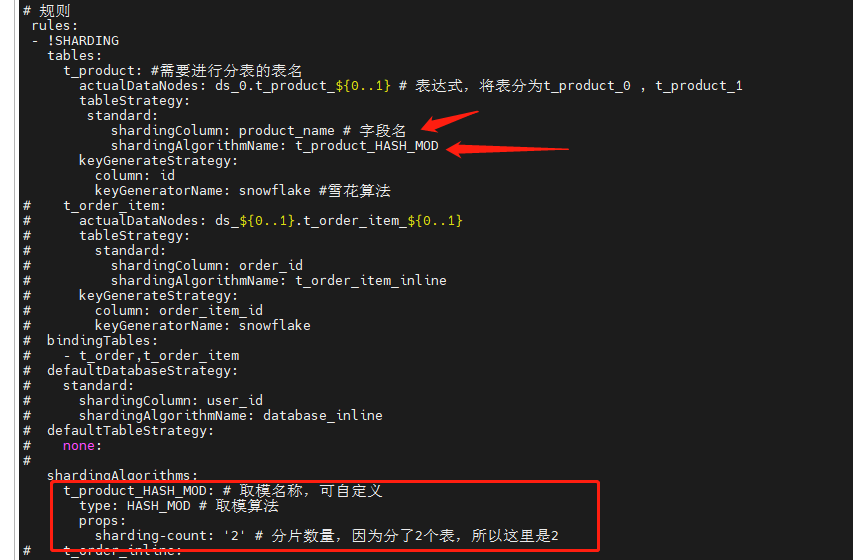
二、修改配置文件config-sharding.yaml,并重启服务
#

# Licensed to the Apache Software Foundation (ASF) under one or more

# contributor license agreements.  See the NOTICE file distributed with

# this work for additional information regarding copyright ownership.

# The ASF licenses this file to You under the Apache License, Version 2.0

# (the "License"); you may not use this file except in compliance with

# the License.  You may obtain a copy of the License at

#

#     http://www.apache.org/licenses/LICENSE-2.0

#

# Unless required by applicable law or agreed to in writing, software

# distributed under the License is distributed on an "AS IS" BASIS,

# WITHOUT WARRANTIES OR CONDITIONS OF ANY KIND, either express or implied.

# See the License for the specific language governing permissions and

# limitations under the License.

#

######################################################################################################

#

# Here you can configure the rules for the proxy.

# This example is configuration of sharding rule.

#

######################################################################################################

#

#schemaName: sharding_db

#

#dataSources:

#  ds_0:

#    url: jdbc:postgresql://127.0.0.1:5432/demo_ds_0

#    username: postgres

#    password: postgres

#    connectionTimeoutMilliseconds: 30000

#    idleTimeoutMilliseconds: 60000

#    maxLifetimeMilliseconds: 1800000

#    maxPoolSize: 50

#    minPoolSize: 1

#  ds_1:

#    url: jdbc:postgresql://127.0.0.1:5432/demo_ds_1

#    username: postgres

#    password: postgres

#    connectionTimeoutMilliseconds: 30000

#    idleTimeoutMilliseconds: 60000

#    maxLifetimeMilliseconds: 1800000

#    maxPoolSize: 50

#    minPoolSize: 1

#

#rules:

#- !SHARDING

#  tables:

#    t_order:

#      actualDataNodes: ds_${0..1}.t_order_${0..1}

#      tableStrategy:

#        standard:

#          shardingColumn: order_id

#          shardingAlgorithmName: t_order_inline

#      keyGenerateStrategy:

#          column: order_id

#          keyGeneratorName: snowflake

#    t_order_item:

#      actualDataNodes: ds_${0..1}.t_order_item_${0..1}

#      tableStrategy:

#        standard:

#          shardingColumn: order_id

#          shardingAlgorithmName: t_order_item_inline

#      keyGenerateStrategy:

#        column: order_item_id

#        keyGeneratorName: snowflake

#  bindingTables:

#    - t_order,t_order_item

#  defaultDatabaseStrategy:

#    standard:

#      shardingColumn: user_id

#      shardingAlgorithmName: database_inline

#  defaultTableStrategy:

#    none:

#

#  shardingAlgorithms:

#    database_inline:

#      type: INLINE

#      props:

#        algorithm-expression: ds_${user_id % 2}

#    t_order_inline:

#      type: INLINE

#      props:

#        algorithm-expression: t_order_${order_id % 2}

#    t_order_item_inline:

#      type: INLINE

#      props:

#        algorithm-expression: t_order_item_${order_id % 2}

#

#  keyGenerators:

#    snowflake:

#      type: SNOWFLAKE

#      props:

#        worker-id: 123

######################################################################################################

#

# If you want to connect to MySQL, you should manually copy MySQL driver to lib directory.

#

######################################################################################################

# 连接mysql所使用的数据库名

 schemaName: MyDb

 dataSources:

  ds_0:

    url: jdbc:mysql://127.0.0.1:3306/MyDb?serverTimezone=UTC&useSSL=false

    username: root # 数据库用户名

    password: mysql123  # 登录密码

    connectionTimeoutMilliseconds: 30000

    idleTimeoutMilliseconds: 60000

    maxLifetimeMilliseconds: 1800000

    maxPoolSize: 50

    minPoolSize: 1

#  ds_1:

#    url: jdbc:mysql://127.0.0.1:3306/demo_ds_1?serverTimezone=UTC&useSSL=false

#    username: root

#    password:

#    connectionTimeoutMilliseconds: 30000

#    idleTimeoutMilliseconds: 60000

#    maxLifetimeMilliseconds: 1800000

#    maxPoolSize: 50

#    minPoolSize: 1

#

# 规则

 rules:

 - !SHARDING

   tables:

     t_product: #需要进行分表的表名

       actualDataNodes: ds_0.t_product_${0..1} # 表达式,将表分为t_product_0 , t_product_1

       tableStrategy:

        standard:

           shardingColumn: product_name # 字段名

           shardingAlgorithmName: t_product_HASH_MOD

       keyGenerateStrategy:

         column: id

         keyGeneratorName: snowflake #雪花算法

#    t_order_item:

#      actualDataNodes: ds_${0..1}.t_order_item_${0..1}

#      tableStrategy:

#        standard:

#          shardingColumn: order_id

#          shardingAlgorithmName: t_order_item_inline

#      keyGenerateStrategy:

#        column: order_item_id

#        keyGeneratorName: snowflake

#  bindingTables:

#    - t_order,t_order_item

#  defaultDatabaseStrategy:

#    standard:

#      shardingColumn: user_id

#      shardingAlgorithmName: database_inline

#  defaultTableStrategy:

#    none:

#

   shardingAlgorithms:

     t_product_HASH_MOD: # 取模名称,可自定义

       type: HASH_MOD # 取模算法

       props:

         sharding-count: '2' # 分片数量,因为分了2个表,所以这里是2

#    t_order_inline:

#      type: INLINE

#      props:

#        algorithm-expression: t_order_${order_id % 2}

#    t_order_item_inline:

#      type: INLINE

#      props:

#        algorithm-expression: t_order_item_${order_id % 2}

#

   keyGenerators:

     snowflake: # 雪花算法名称,自定义名称

       type: SNOWFLAKE

       props:

         worker-id: 123
三、数据准备
-- 创建表

SET NAMES utf8mb4;

SET FOREIGN_KEY_CHECKS = 0;

-- ----------------------------

-- Table structure for t_product_0

-- ----------------------------

DROP TABLE IF EXISTS `t_product`;

CREATE TABLE `t_product_0`  (

  `id` varchar(225) CHARACTER SET utf8mb4 COLLATE utf8mb4_general_ci NOT NULL,

  `product_id` int(11) NOT NULL,

  `product_name` varchar(255) CHARACTER SET utf8mb4 COLLATE utf8mb4_general_ci NOT NULL,

  PRIMARY KEY (`id`, `product_id`) USING BTREE

) ENGINE = InnoDB CHARACTER SET = utf8mb4 COLLATE = utf8mb4_general_ci ROW_FORMAT = Dynamic;

SET FOREIGN_KEY_CHECKS = 1;

-- 插入表数据

INSERT INTO t_product(product_id,product_name) VALUES(3,'apple');

INSERT INTO t_product(product_id,product_name) VALUES(2,'iphone');
四、查看数据
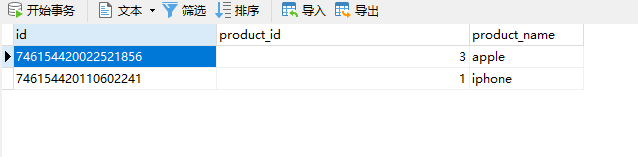
1、查看shardingsphere中间件t_product表数据
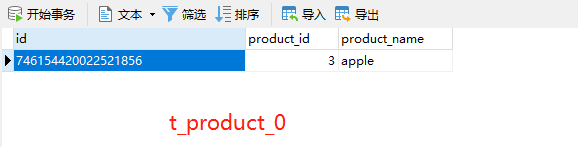
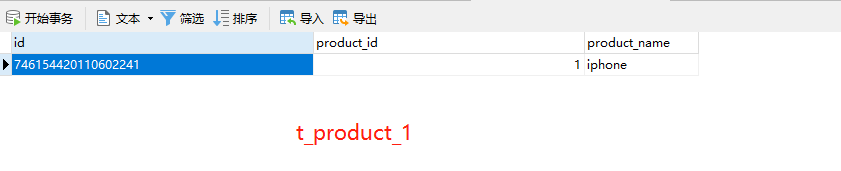
2、查看t_product_0、t_product_1表数据,同时对数据进行了分表存储(因为配置文件中有做分表配置)
ShardingSphere-proxy-5.0.0分布式哈希取模分片实现(四)的更多相关文章
- Memcached 之取模与哈希算法命中率实验
当5台memcache服务器中有一台宕机时的命中率实验. 一.php实现代码 1. config.php $server = array( "A" => array(&quo ...
- 重磅|Apache ShardingSphere 5.0.0 即将正式发布
Apache ShardingSphere 5.0.0 GA 版在经历 5.0.0-alpha 及 5.0.0-beta 接近两年时间的研发和打磨,终于将在 11 月份与大家正式见面! 11 月 10 ...
- Apache ShardingSphere 5.0.0 内核优化及升级指南
经过近两年时间的优化和打磨,Apache ShardingSphere 5.0.0 GA 版终于在本月正式发布,相比于 4.1.1 GA 版,5.0.0 GA 版在内核层面进行了大量的优化.首先,基于 ...
- ElasticJob 3.0.0:打造面向互联网生态和海量任务的分布式调度解决方案
ElasticJob 于 2020 年 5 月 28 日重启并成为 Apache ShardingSphere 子项目.新版本借鉴了 ShardingSphere 可拔插架构的设计理念,对内核进行了大 ...
- ShardingSphere-proxy-5.0.0分布式雪花ID生成(三)
一.目的 保证在分库分表中每条数据具有唯一性 二.修改配置文件config-sharding.yaml,并重启服务 # # Licensed to the Apache Software Founda ...
- Spark-1.0.0 standalone分布式安装教程
Spark目前支持多种分布式部署方式:一.Standalone Deploy Mode:二Amazon EC2.:三.Apache Mesos:四.Hadoop YARN.第一种方式是单独部署,不需要 ...
- Hadoop2.6.0完全分布式安装
本文地址:http://www.cnblogs.com/myresearch/p/hadoop-full-distributed-operation.html,转载请注明源地址. 我这边是使用了两台主 ...
- Hadoop上路-01_Hadoop2.3.0的分布式集群搭建
一.配置虚拟机软件 下载地址:https://www.virtualbox.org/wiki/downloads 1.虚拟机软件设定 1)进入全集设定 2)常规设定 2.Linux安装配置 1)名称类 ...
- 琐碎-hadoop2.2.0伪分布式和完全分布式安装(centos6.4)
环境是centos6.4-32,hadoop2.2.0 伪分布式文档:http://pan.baidu.com/s/1kTrAcWB 完全分布式文档:http://pan.baidu.com/s/1s ...
随机推荐
- LC-349
Given two integer arrays nums1 and nums2, return an array of their intersection. Each element in the ...
- Kubernetes探针原理详解
前言: 分布式系统和微服务体系结构的挑战之一是自动检测不正常的应用程序,并将请求(request)重新路由到其他可用系统,恢复损坏的组件.健康检查是应对该挑战的一种可靠方法.使用 Kubernetes ...
- 帝国CMS后台采集关键字的方法
小伙伴们知道帝国CMS后台的采集功能是不能采集关键字的,那么老墨今天给大家说一个变通方法,让后台能采集关键字!方法如下: 1.系统设置--管理数据表--管理字段--增加字段(字段名:keywords字 ...
- [翻译] Cassandra 分布式结构化存储系统
Cassandra 分布式结构化存储系统 摘要 Cassandra 是一个分布式存储系统,用于管理分布在许多商品服务器上的大量结构化数据,同时提供无单点故障(no single point of fa ...
- go源码阅读 - sync/mutex
Mutex是go标准库中的互斥锁,用于处理并发场景下共享资源的访问冲突问题. 1. Mutex定义: // A Mutex is a mutual exclusion lock. // The zer ...
- 2021.08.03 BZOJ 疯狂的馒头(并查集)
2021.08.03 BZOJ 疯狂的馒头(并查集) 疯狂的馒头 - 题目 - 黑暗爆炸OJ (darkbzoj.tk) 重点: 1.并查集的神奇运用 2.离线化 题意: 给一个长为n的序列,进行m次 ...
- XCTF练习题---MISC---就在其中
XCTF练习题---MISC---就在其中 flag:flag{haPPy_Use_0penSsI} 解题步骤: 1.观察题目,下载附件 2.拿到手以后发现是一个数据包格式,直接上Wireshark查 ...
- FreeRTOS --(9)任务管理之启动调度器
转载自 https://blog.csdn.net/zhoutaopower/article/details/107057528 在使用 FreeRTOS 的时候,一般的,先创建若干任务,但此刻任务并 ...
- junethack使用指南
本文面向有志于参加Nethack六月衍生大赛,且具有一定英文水平的玩家. 首先,在Junethack服务器页面挑一个在线服务器的网站,个人推荐 hardfought.org,因为访问速度较快. 然后, ...
- MySQL性能优化 - 别再只会说加索引了
MySQL性能优化 MySQL性能优化我们可以从以下四个维度考虑:硬件升级.系统配置.表结构设计.SQL语句和索引. 从成本上来说:硬件升级>系统配置>表结构设计>SQL语句及索引, ...