
OpenLayer——模拟运动轨迹
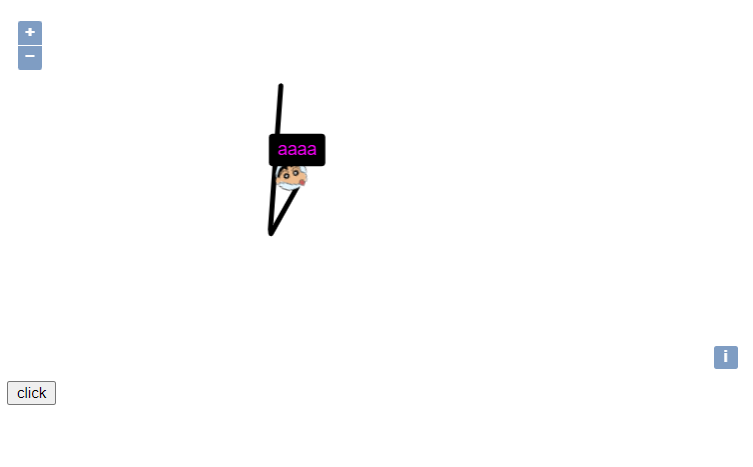
模拟在人地图上移动,动态绘制行动轨迹的功能,附带一个跟随的气泡弹窗。
<!DOCTYPE html>

<html lang="en">

<head>

    <meta charset="UTF-8">

    <title>Title</title>

    <link href="ol/ol.css" rel="stylesheet" type="text/css"/>

    <script type="text/javascript" src="ol/ol.js" charset="utf-8"></script>

    <script type="text/javascript" src="jquery.js" charset="utf-8"></script>

    <script type="text/javascript" src="layer/layer.js" charset="utf-8"></script>

</head>

<body>

<div id="map" style="width: 100%;height: 100%"></div>

<button id="btn" type="button">click</button>

<script>

    var map = new ol.Map({

        layers: [

            new ol.layer.Tile({

                source: new ol.source.OSM()

            })

        ],

        target: 'map',

        view: new ol.View({

            center: [12950000, 4860000],

            zoom: 7

        })

    });

    /**

     * 维护航迹点样式

     **/

    function getPointStyles(rotation) {

        return new ol.style.Style({

            image: new ol.style.Icon({

                rotation: rotation || 0,

                opacity: 1,

                size: [48, 48],

                src: "img/lbxx-32x32.png" //图片路径

            }),

            text: new ol.style.Text({

                text: 'aaaa',

                font: "normal 14px Helvetica",

                textAlign: "center",

                offsetY: -30,

                fill: new ol.style.Fill({color: '#F0F'}),

                backgroundFill: new ol.style.Fill({color: "#000"}),

                backgroundStroke: new ol.style.Stroke({color: "#000", width: 6}),

                padding: [2, 4, 2, 4]

            })

        });

    }

    /**

     *  维护航线样式

     **/

    function getLineStyle() {

        return new ol.style.Style({

            stroke: new ol.style.Stroke({

                color: '#000',

                width: 4

            })

        });

    }

    /**

     * 内部维护一个数组,包含航线的所有点

     */

    function LineArray(p) {

        //航线点

        let arr = [p];

        //增加一个点时候的事件(调整icon的旋转角,刷新地图等等)

        let onPush;

        return {

            push: function (point) {

                //增加一个轨迹点,并且触发事件

                var last = arr[arr.length - 1];

                if (point[0] === last[0] && point[1] === last[1]) {

                    console.log('节点未发生变化:' + last + ' -> ' + point);

                } else {

                    arr.push(point);

                    onPush(last, point);

                }

            },

            addPushListener: function (fun) {

                onPush = fun;

            },

            getArray: function () {

                return arr;

            }

        }

    }

    /**

     * 旋转角计算

     */

    function getRotation(aLon, aLat, bLon, bLat) {

        var kRadius = 6378137;

        var bx = (bLon * Math.PI / 180 - aLon * Math.PI / 180) * (kRadius * Math.cos(aLat * Math.PI / 180));

        var by = (bLat * Math.PI / 180 - aLat * Math.PI / 180) * kRadius;

        var angle = 0;

        angle = Math.atan2(bx, by) * 180.0 / Math.PI;

        return 3.14 / 180 * angle;

    }

    /**

     * 内部维护地图相关的操作

     */

    function AirlineBlock(p) {

        let line = new LineArray(p);

        //图层容器

        let layerVector = new ol.layer.Vector({

            source: new ol.source.Vector()

        });

        map.addLayer(layerVector);

        //航线

        let lineFeature = new ol.Feature({

            geometry: new ol.geom.LineString([p, p])

        });

        lineFeature.setStyle(getLineStyle());

        layerVector.getSource().addFeature(lineFeature);

        //飞机图标

        let pointFeature = new ol.Feature({

            geometry: new ol.geom.Point(p)

        });

        pointFeature.setStyle(getPointStyles());

        layerVector.getSource().addFeature(pointFeature);

        //添加1个点的事件侦听

        line.addPushListener(function (prePoint, point) {

            //点的位置变化和旋转角的调整

            var rotation = getRotation(prePoint[0], prePoint[1], point[0], point[1]);

            pointFeature.setGeometry(new ol.geom.Point(point));

            pointFeature.setStyle(getPointStyles(rotation));

            console.log(line.getArray());

            //航线的变化

            lineFeature.setGeometry(new ol.geom.LineString(line.getArray()));

        });

        return {

            push: line.push,

            destroy: function () {

                map.removeLayer(layerVector)

            }

        }

    }

    var airLineBlock = new AirlineBlock([12950000, 4860000]);

    var testArr = [

        [12950000, 4190000], [12950000, 4460000], [12850000, 4960000]

        , [12850000, 4170000], [12850000, 4280000], [12850000, 4290000]

        , [12850000, 4360000], [12850000, 4360000], [12850000, 4900000]];

    /**

     * 设置一个点击事件,每次从testArr中随机取数,作为下次的轨迹点

     */

    $('#btn').click(function () {

        var time = new Date().getTime();

        var i = time % testArr.length - 1;

        var point = new Array(2);

        point[0] = testArr[i][0] + time % 100000;

        point[1] = testArr[i][1] + time % 10000;

        airLineBlock.push(point);

    })

    console.log(ol.proj.fromLonLat([12950000, 4190000], 'EPSG:4326'))

</script>

</body>

</html>
OpenLayer——模拟运动轨迹的更多相关文章
- 59.Android开源项目及库 (转)
转载 : https://github.com/Tim9Liu9/TimLiu-Android?hmsr=toutiao.io&utm_medium=toutiao.io&utm_so ...
- Android开源项目及库搜集
TimLiu-Android 自己总结的Android开源项目及库. github排名 https://github.com/trending,github搜索:https://github.com/ ...
- 各种Android UI开源框架 开源库
各种Android UI开源框架 开源库 转 https://blog.csdn.net/zhangdi_gdk2016/article/details/84643668 自己总结的Android开源 ...
- Android 开源项目及库汇总(2)
Android 开源项目及库汇总(2) ListenToCode 2.7 2018.10.10 15:43 字数 8527 阅读 1001评论 0喜欢 29 地图 百度地图– Android百度地图 ...
- WPF太阳、地球、月球运动轨迹模拟
原文:WPF太阳.地球.月球运动轨迹模拟 版权声明:本文为博主原创文章,未经博主允许不得转载. https://blog.csdn.net/yangyisen0713/article/details/ ...
- 模拟位置 定位 钉钉打卡 运动轨迹 MD
Markdown版本笔记 我的GitHub首页 我的博客 我的微信 我的邮箱 MyAndroidBlogs baiqiantao baiqiantao bqt20094 baiqiantao@sina ...
- 使用Xcode + Python进行IOS运动轨迹模拟
前言 在某些app中,需要根据用户的实时位置来完成某些事件 例如跑步打卡软件(步道乐跑).考勤打卡软件(叮叮).某些基于实时位置的游戏(Pokemon Go.一起来捉妖) 一般解决办法是通过使用安卓模 ...
- [深入浅出Windows 10]模拟实现微信的彩蛋动画
9.7 模拟实现微信的彩蛋动画 大家在玩微信的时候有没有发现节日的时候发一些节日问候语句如“情人节快乐”,这时候会出现很多爱心形状从屏幕上面飘落下来,我们这小节就是要模拟实现这样的一种动画效果.可能微 ...
- 使用Socket通信实现Silverlight客户端实时数据的获取(模拟GPS数据,地图实时位置)
原文:使用Socket通信实现Silverlight客户端实时数据的获取(模拟GPS数据,地图实时位置) 在上一篇中说到了Silverlight下的Socket通信,在最后的时候说到本篇将会结合地图. ...
- N体运动的程序模拟
这依然是与<三体>有关的一篇文章.空间中三个星体在万有引力作用下的运动被称之为三体问题,参见我的上一篇文章:三体运动的程序模拟.而这一节,对三体问题进行了扩展,实现了空间中N个星体在万有引 ...
随机推荐
- Linux操作命令(五)1.find命令 2.xargs命令
1.find命令(一) 查找,沿着文件层次结构向下遍历,匹配符合条件的文件,并执行相应的操作 参数 描述 -print find 命令将匹配的文件输出到标准输出 -exec find 命令对匹配的文件 ...
- 正点原子sys.h文档详解
文档主体内容为位带的映射,目的是实现位带操作. 第一部分:位带映射的宏函数 1 #define BITBAND(addr, bitnum) ((addr & 0xF0000000)+0x200 ...
- 在orangepi 3 lts使用high speed timer
概述 在allwin H6的用户手册上可以发现全志H6芯片支持普通计时器和高速计时器. 普通计时器可以处理低频定时任务,其时钟源包括LOSC和OSC,前者频率为32768Hz,后者为24MHz. 高数 ...
- .net core 3.1 上传大文件报错413 Payload Too Large
IIS配置如下 https://www.cnblogs.com/hallejuayahaha/p/12884347.html 代码里面新增 services.Configure<FormOpti ...
- 2.2 在resources目录下,新建applicationContext.xml
<?xml version="1.0" encoding="UTF-8"?> <beans> <!-- 这个bean标签的作用是, ...
- vue 项目引入 jquery
一.引入 jquery 1. 方式一 默认会安装最新版本 jquery npm install jquery 2. 方式二 指定版本 npm install jquery@3.6.0 3. 方式三 在 ...
- go 下的查询数据库的框架 ORM框架:访问mysql数据库
运维的基友 习惯使用python了,学习go的时候是不是被gorm 恶心死了 例如python flask 框架下的orm那么好用简单 ,或者号称 世界上最好用的语言php的同学们也是非常的苦恼呢 很 ...
- goalng 将字符串转化成整数后取余
package main import ( "fmt" "github.com/google/uuid" "hash/fnv" ) func ...
- React函数式组件值之useRef()和useImperativeHandle()
一.useRef useRef共有两种用法,获取子组件的实例(只有类组件可用),在函数组件中的一个全局变量,不会因为重复 render 重复申明, 类似于类组件的 this.xxx. 1. useRe ...
- java学习:八大基本类型变量
1.类 在java中用class来定义一个类,类是java程序的基本单位 类描述的是具有共性的一类事物,所以我们又可以把类称作为模板技术 如何理解共性: 具有相同的属性-->java变量 具 ...