
Spring Security权限控制框架使用指南
在常用的后台管理系统中,通常都会有访问权限控制的需求,用于限制不同人员对于接口的访问能力,如果用户不具备指定的权限,则不能访问某些接口。
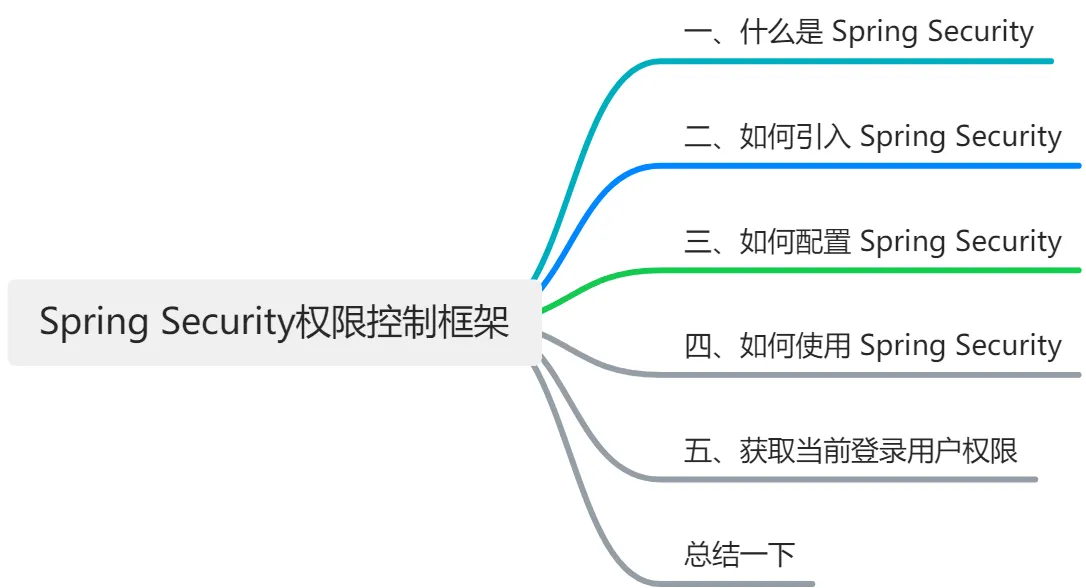
本文将用 waynboot-mall 项目举例,给大家介绍常见后管系统如何引入权限控制框架 Spring Security。大纲如下,
一、什么是 Spring Security
Spring Security 是一个基于 Spring 框架的开源项目,旨在为 Java 应用程序提供强大和灵活的安全性解决方案。Spring Security 提供了以下特性:
- 认证:支持多种认证机制,如表单登录、HTTP 基本认证、OAuth2、OpenID 等。
- 授权:支持基于角色或权限的访问控制,以及基于表达式的细粒度控制。
- 防护:提供了多种防护措施,如防止会话固定、点击劫持、跨站请求伪造等攻击。
- 集成:与 Spring 框架和其他第三方库和框架进行无缝集成,如 Spring MVC、Thymeleaf、Hibernate 等。
二、如何引入 Spring Security
在 waynboot-mall 项目中直接引入 spring-boot-starter-security 依赖,
<dependencies>

    <dependency>

        <groupId>org.springframework.boot</groupId>

        <artifactId>spring-boot-starter-security</artifactId>

        <version>3.1.0</version>

    </dependency>

</dependencies>
三、如何配置 Spring Security
在 Spring Security 3.0 中要配置 Spring Security 跟以往是有些不同的,比如不在继承 WebSecurityConfigurerAdapter。在 waynboot-mall 项目中,具体配置如下,
@Configuration

@EnableWebSecurity

@AllArgsConstructor

@EnableMethodSecurity(securedEnabled = true, jsr250Enabled = true)

public class SecurityConfig {

    private UserDetailsServiceImpl userDetailsService;

    private AuthenticationEntryPointImpl unauthorizedHandler;

    private JwtAuthenticationTokenFilter jwtAuthenticationTokenFilter;

    private LogoutSuccessHandlerImpl logoutSuccessHandler;

    @Bean

    public SecurityFilterChain filterChain(HttpSecurity httpSecurity) throws Exception {

        httpSecurity

                // cors启用

                .cors(httpSecurityCorsConfigurer -> {})

                .csrf(AbstractHttpConfigurer::disable)

                .sessionManagement(httpSecuritySessionManagementConfigurer -> {

                    httpSecuritySessionManagementConfigurer.sessionCreationPolicy(SessionCreationPolicy.STATELESS);

                })

                .exceptionHandling(httpSecurityExceptionHandlingConfigurer -> {

                    httpSecurityExceptionHandlingConfigurer.authenticationEntryPoint(unauthorizedHandler);

                })

                // 过滤请求

                .authorizeHttpRequests(authorizationManagerRequestMatcherRegistry -> {

                    authorizationManagerRequestMatcherRegistry

                            .requestMatchers("/favicon.ico", "/login", "/favicon.ico", "/actuator/**").anonymous()

                            .requestMatchers("/slider/**").anonymous()

                            .requestMatchers("/captcha/**").anonymous()

                            .requestMatchers("/upload/**").anonymous()

                            .requestMatchers("/common/download**").anonymous()

                            .requestMatchers("/doc.html").anonymous()

                            .requestMatchers("/swagger-ui/**").anonymous()

                            .requestMatchers("/swagger-resources/**").anonymous()

                            .requestMatchers("/webjars/**").anonymous()

                            .requestMatchers("/*/api-docs").anonymous()

                            .requestMatchers("/druid/**").anonymous()

                            .requestMatchers("/elastic/**").anonymous()

                            .requestMatchers("/message/**").anonymous()

                            .requestMatchers("/ws/**").anonymous()

                            // 除上面外的所有请求全部需要鉴权认证

                            .anyRequest().authenticated();

                })

                .headers(httpSecurityHeadersConfigurer -> {

                    httpSecurityHeadersConfigurer.frameOptions(HeadersConfigurer.FrameOptionsConfig::disable);

                });

                // 处理跨域请求中的Preflight请求(cors),设置corsConfigurationSource后无需使用

                // .requestMatchers(CorsUtils::isPreFlightRequest).permitAll()

                // 对于登录login 验证码captchaImage 允许匿名访问

        httpSecurity.logout(httpSecurityLogoutConfigurer -> {

            httpSecurityLogoutConfigurer.logoutUrl("/logout");

            httpSecurityLogoutConfigurer.logoutSuccessHandler(logoutSuccessHandler);

        });

        // 添加JWT filter

        httpSecurity.addFilterBefore(jwtAuthenticationTokenFilter, UsernamePasswordAuthenticationFilter.class);

        // 认证用户时用户信息加载配置,注入springAuthUserService

        httpSecurity.userDetailsService(userDetailsService);

        return httpSecurity.build();

    }

    @Bean

    public AuthenticationManager authenticationManager(AuthenticationConfiguration authenticationConfiguration) throws Exception {

        return authenticationConfiguration.getAuthenticationManager();

    }

    /**

     * 强散列哈希加密实现

     */

    @Bean

    public BCryptPasswordEncoder bCryptPasswordEncoder() {

        return new BCryptPasswordEncoder();

    }

}
这里详细介绍下 SecurityConfig 配置类,
- filterChain(HttpSecurity httpSecurity) 方法是访问控制的核心方法,这里面可以针对 url 设置是否需要权限认证、cors 配置、csrf 配置、用户信息加载配置、jwt 过滤器拦截配置等众多功能。
- authenticationManager(AuthenticationConfiguration authenticationConfiguration) 方法适用于启用认证接口,需要手动声明,否则启动报错。
- bCryptPasswordEncoder() 方法用户定义用户登录时的密码加密策略,需要手动声明,否则启动报错。
四、如何使用 Spring Security
要使用 Spring Security,只需要在需要控制访问权限的方法或类上添加相应的 @PreAuthorize 注解即可,如下,
@Slf4j

@RestController

@AllArgsConstructor

@RequestMapping("system/role")

public class RoleController extends BaseController {

    private IRoleService iRoleService;

    @PreAuthorize("@ss.hasPermi('system:role:list')")

    @GetMapping("/list")

    public R list(Role role) {

        Page<Role> page = getPage();

        return R.success().add("page", iRoleService.listPage(page, role));

    }

}
我们在 list 方法上加了 @PreAuthorize("@ss.hasPermi('system:role:list')") 注解表示当前登录用户拥有 system:role:list 权限才能访问 list 方法,否则返回权限错误。
五、获取当前登录用户权限
在 SecurityConfig 配置类中我们定义了 UserDetailsServiceImpl 作为我们的用户信息加载的实现类,从而通过读取数据库中用户的账号、密码与前端传入的账号、密码进行比对。代码如下,
@Slf4j

@Service

@AllArgsConstructor

public class UserDetailsServiceImpl implements UserDetailsService {

    private IUserService iUserService;

    private IDeptService iDeptService;

    private PermissionService permissionService;

    public static void main(String[] args) {

        BCryptPasswordEncoder bCryptPasswordEncoder = new BCryptPasswordEncoder();

        System.out.println(bCryptPasswordEncoder.encode("123456"));

    }

    @Override

    public UserDetails loadUserByUsername(String username) throws UsernameNotFoundException {

        // 1. 读取数据库中当前用户信息

        User user = iUserService.getOne(new QueryWrapper<User>().eq("user_name", username));

        // 2. 判断该用户是否存在

        if (user == null) {

            log.info("登录用户:{} 不存在.", username);

            throw new UsernameNotFoundException("登录用户:" + username + " 不存在");

        }

        // 3. 判断是否禁用

        if (Objects.equals(UserStatusEnum.DISABLE.getCode(), user.getUserStatus())) {

            log.info("登录用户:{} 已经被停用.", username);

            throw new DisabledException("登录用户:" + username + " 不存在");

        }

        user.setDept(iDeptService.getById(user.getDeptId()));

        // 4. 获取当前用户的角色信息

        Set<String> rolePermission = permissionService.getRolePermission(user);

        // 5. 根据角色获取权限信息

        Set<String> menuPermission = permissionService.getMenuPermission(rolePermission);

        return new LoginUserDetail(user, menuPermission);

    }

}
针对 UserDetailsServiceImpl 的代码逻辑进行一个讲解,大家可以配合代码理解。
- 读取数据库中当前用户信息
- 判断该用户是否存在
- 判断是否禁用
- 获取当前用户的角色信息
- 根据角色获取权限信息
总结一下
本文给大家讲解了后管系统如何引入权限控制框架 Spring Security 3.0 版本以及代码实战。相信能帮助大家对权限控制框架 Spring Security 有一个清晰的理解。后续大家可以按照本文的使用指南一步一步将 Spring Security 引入到的自己的项目中用于访问权限控制。
想要获取 waynboot-mall 项目源码的同学,可以关注我公众号【程序员wayn】,回复 waynboot-mall 即可获得。
如果觉得这篇文章写的不错的话,不妨点赞加关注,我会更新更多技术干货、项目教学、实战经验分享的文章。
Spring Security权限控制框架使用指南的更多相关文章
- 自定义Spring Security权限控制管理(实战篇)
上篇<话说Spring Security权限管理(源码)>介绍了Spring Security权限控制管理的源码及实现,然而某些情况下,它默认的实现并不能满足我们项目的实际需求,有时候需要 ...
- Spring Security权限控制
Spring Security官网 : https://projects.spring.io/spring-security/ Spring Security简介: Spring Security是一 ...
- spring security 权限安全认证框架-入门(一)
spring security 概述: Spring Security是一个功能强大且高度可定制的身份验证和访问控制框架.它是保护基于spring的应用程序的实际标准. Spring Security ...
- security权限控制
目录 前言 数据库和dimain 静态页面 配置文件 web.xml引入 service校验方法 用户名的获取 不同角色访问控制权限 jsp页面 后台 前言 spring自带角色权限控制框架 用户-角 ...
- Flex-Security权限控制框架
转自:http://code.google.com/p/flex-security/ flex UI组件权限控制框架 一.快速开始 1) 下载并添加flex_security.swf在你的flex l ...
- spring security 权限框架原理
spring security 权限框架原理
- WPF权限控制框架——【4】抛砖引玉
写第一篇"权限控制框架"系列博客是在2021-01-29,在这不到一个月的时间里,收集自己零碎的时间,竟然写出了一个"麻雀虽小,五脏俱全"的权限控制框架:对于一 ...
- 权限控制框架Spring Security 和Shiro 的总结
关于权限控制,一开始感觉比较难,后来先是接触了Spring Security 学起来也比较吃力,再是学习了Shiro,感觉简单很多. 总体来说这些框架,主要做了两个事情 Authentication: ...
- spring 的权限控制:security
下面我们将实现关于Spring Security3的一系列教程. 最终的目标是整合Spring Security + Spring3MVC 完成类似于SpringSide3中mini-web的功能. ...
- 权限控制框架Shiro简单介绍及配置实例
Shiro是什么 http://shiro.apache.org/ Apache Shiro是一个非常易用的Java安全框架,它能提供验证.授权.加密和Session控制.Shiro非常轻量级,而且A ...
随机推荐
- [转帖]/proc文件简介
https://www.jianshu.com/p/2610241770be 简介 /proc文件系统是一个伪文件系统,它只存在内存当中,而不占用外存空间.它以文件系统的方式为访问系统内核数据的操作提 ...
- 【转帖】通过pip命令安装好包之后,在pycharm中不显示此库,也不能调用
目录 1. 问题描述 2. 解决方法1 3. 解决方法2 1. 问题描述 在cmd输入pip list 命令可以看到我的库都已经安装好了,但是pycharm中却没有显示. 在PyCharm查找,并没有 ...
- [转帖]Linux如何查看网关地址
转至:https://baijiahao.baidu.com/s?id=1733537078943023051&wfr=spider&for=pc 服务器之间的通信是通过ip地址来 ...
- [转帖]总结:Servlet
一.背景 开发了很久的web服务,使用了很多web框架,都忘记web技术最原始的模样了,今天来回顾下. 二.Servlet是什么? Servlet是sun公司提供的一门用于开发动态web资源的技术.我 ...
- [转帖] shell管道咋堵住了
https://www.cnblogs.com/codelogs/p/16060378.html 背景# 起因是这样的,我们想开发一个小脚本,当cpu使用率过高时,使用jstack将java的线程栈保 ...
- [转帖]Linux内核网络中的软中断ksoftirqd
https://zhuanlan.zhihu.com/p/361976930 1. 前言 之前分享过Linux内核网络数据包的接收过程,当执行到网卡通过硬件中断(IRQ)通知CPU,告诉它有数据来了, ...
- 袋鼠云数栈产品中 AI+ 实现原理剖析
生产力工具 + AI 是不可逆转的趋势,慢慢的大模型能力通过 AI Agent 落地的工程化能力也开始趋于成熟.作为大数据产品的数栈也必然是需要借助 AI 能力提升产品竞争力. 去年 12 月,我们在 ...
- TypeScript接口的讲解-强制约束-可选属性-任意多个属性-只读属性
接口 接口:可以描述类的一部分抽象行为, 也可以描述数据的结构形状 接口一般首字母大写, 接口中 可以定义为 强制约束 可选属性 只读属性 任意属性 # 强制约束 // 定义接口 interface ...
- 使用Visual Studio调试 .NET源代码
前言 在我们日常开发过程中常常会使用到很多其他封装好的第三方类库(NuGet依赖项)或者是.NET框架中自带的库.如果可以设置断点并在NuGet依赖项或框架本身上使用调试器的所有功能,那么我们的源码调 ...
- gpedit.msc 打不开
win10系统推出已有不短的时间了,朋友们也纷纷升级了win10系统,但是暴露的问题也是越来越多,比如win10系统打开运行输入gpedit.msc命令时却提示找不到文件.那出现win10打不开gpe ...