
Neo4J 图库的集群部署与基础使用
Ned4J 图库的集群部署与基础使用
部署机器
| 名称 | 配置 | IP |
|---|---|---|
| server1 | 8 核 16G | 172.16.0.2 |
| server2 | 8 核 16G | 172.16.0.3 |
| server3 | 8 核 16G | 172.16.0.4 |
| server4 | 8 核 16G | 172.16.0.5 |
# 创建项目目录

mkdir -p /opt/neo4j/

# 环境变量

export USER_ID="$(id -u)"

export GROUP_ID="$(id -g)"

export NEO4J_DOCKER_IMAGE=neo4j:5-community

export NEO4J_EDITION=docker_compose

export EXTENDED_CONF=yes

export NEO4J_ACCEPT_LICENSE_AGREEMENT=yes

export NEO4J_AUTH=neo4j/your_password
neo4j.conf 配置文件
# Setting that specifies how much memory Neo4j is allowed to use for the page cache.

server.memory.pagecache.size=100M

# Setting that specifies the initial JVM heap size.

server.memory.heap.initial_size=100M

# The behavior of the initial discovery is determined by the parameters `dbms.cluster.discovery.resolver_type` and `dbms.cluster.discovery.endpoints`.

# The DNS strategy fetches the IP addresses of the cluster members using the DNS A records.

# ### dbms.cluster.discovery.resolver_type=DNS

# The value of `dbms.cluster.discovery.endpoints` should be set to a single domain name and the port of the discovery service.

# The domain name returns an A record for every server in the cluster when a DNS lookup is performed.

# Each A record returned by DNS should contain the IP address of the server in the cluster.

# The configured server uses all the IP addresses from the A records to join or form a cluster.

# The discovery port must be the same on all servers when using this configuration.

# ### dbms.cluster.discovery.endpoints=neo4j-network:5000

# Address (the public hostname/IP address of the machine)

# and port setting that specifies where this instance advertises for discovery protocol messages from other members of the cluster.

# ### server.discovery.advertised_address=$(hostname -i)

# Address (the public hostname/IP address of the machine)

# and port setting that specifies where this instance advertises for Raft messages within the cluster.

# ### server.cluster.raft.advertised_address=$(hostname)

 # Address (the public hostname/IP address of the machine)

 # and port setting that specifies where this instance advertises for requests for transactions in the transaction-shipping catchup protocol.

# ### server.cluster.advertised_address=$(hostname)

# Enable server-side routing

# ###dbms.routing.enabled=true

# Use server-side routing for neo4j:// protocol connections.

# ###dbms.routing.default_router=SERVER

# The advertised address for the intra-cluster routing connector.

# ###server.routing.advertised_address=$(hostname)

# HTTP Connector

#

dbms.connector.http.type=HTTP

dbms.connector.http.enabled=true

dbms.connectors.default_listen_address=0.0.0.0

#

#dbms.connector.http.address=0.0.0.0:#{default.http.port}

dbms.connector.http.address=0.0.0.0:7474

dbms.connector.http.listen_address=0.0.0.0:7474
Docker-Compose.yml 文件
version: '3.8'

# Custom top-level network

networks:

  neo4j-internal:

services:

  server1:

    # Docker image to be used

    image: ${NEO4J_DOCKER_IMAGE}

    # Hostname

    hostname: server1

    # Service-level network, which specifies the networks, from the list of the top-level networks (in this case only neo4j-internal), that the server will connect to.

    # Adds a network alias (used in neo4j.conf when configuring the discovery members)

    networks:

      neo4j-internal:

        aliases:

          - neo4j-network

    # The ports that will be accessible from outside the container - HTTP (7474) and Bolt (7687).

    ports:

      - "7474:7474"

      - "7687:7687"

    # Uncomment the volumes to be mounted to make them accessible from outside the container.

    volumes:

      - /opt/neo4j/neo4j.conf:/conf/neo4j.conf # This is the main configuration file.

      - /opt/neo4j/data/server1:/var/lib/neo4j/data

      - /opt/neo4j/logs/server1:/var/lib/neo4j/logs

      - /opt/neo4j/conf/server1:/var/lib/neo4j/conf

      - /opt/neo4j/import/server1:/var/lib/neo4j/import

      #- /opt/neo4j/metrics/server1:/var/lib/neo4j/metrics

      #- /opt/neo4j/licenses/server1:/var/lib/neo4j/licenses

      #- /opt/neo4j/ssl/server1:/var/lib/neo4j/ssl

    # Passes the following environment variables to the container

    environment:

      - NEO4J_ACCEPT_LICENSE_AGREEMENT

      - NEO4J_AUTH

      - EXTENDED_CONF

      - NEO4J_EDITION

      - NEO4J_initial_server_mode__constraint=PRIMARY

    # Simple check testing whether the port 7474 is opened.

    # If so, the instance running inside the container is considered as "healthy".

    # This status can be checked using the "docker ps" command.

    healthcheck:

      test: ["CMD-SHELL", "wget --no-verbose --tries=1 --spider localhost:7474 || exit 1"]

    # Set up the user

    user: ${USER_ID}:${GROUP_ID}

  server2:

    image: ${NEO4J_DOCKER_IMAGE}

    hostname: server2

    networks:

      neo4j-internal:

        aliases:

          - neo4j-network

    ports:

      - "7475:7474"

      - "7688:7687"

    volumes:

      - /opt/neo4j/neo4j.conf:/conf/neo4j.conf

      - /opt/neo4j/data/server2:/var/lib/neo4j/data

      - /opt/neo4j/logs/server2:/var/lib/neo4j/logs

      - /opt/neo4j/conf/server2:/var/lib/neo4j/conf

      - /opt/neo4j/import/server2:/var/lib/neo4j/import

      #- /opt/neo4j/metrics/server2:/var/lib/neo4j/metrics

      #- /opt/neo4j/licenses/server2:/var/lib/neo4j/licenses

      #- /opt/neo4j/ssl/server2:/var/lib/neo4j/ssl

    environment:

      - NEO4J_ACCEPT_LICENSE_AGREEMENT

      - NEO4J_AUTH

      - EXTENDED_CONF

      - NEO4J_EDITION

      - NEO4J_initial_server_mode__constraint=PRIMARY

    healthcheck:

      test: ["CMD-SHELL", "wget --no-verbose --tries=1 --spider localhost:7474 || exit 1"]

    user: ${USER_ID}:${GROUP_ID}

  server3:

    image: ${NEO4J_DOCKER_IMAGE}

    hostname: server3

    networks:

      neo4j-internal:

        aliases:

          - neo4j-network

    ports:

      - "7476:7474"

      - "7689:7687"

    volumes:

      - /opt/neo4j/neo4j.conf:/conf/neo4j.conf

      - /opt/neo4j/data/server3:/var/lib/neo4j/data

      - /opt/neo4j/logs/server3:/var/lib/neo4j/logs

      - /opt/neo4j/conf/server3:/var/lib/neo4j/conf

      - /opt/neo4j/import/server3:/var/lib/neo4j/import

      #- /opt/neo4j/metrics/server3:/var/lib/neo4j/metrics

      #- /opt/neo4j/licenses/server3:/var/lib/neo4j/licenses

      #- /opt/neo4j/ssl/server3:/var/lib/neo4j/ssl

    environment:

      - NEO4J_ACCEPT_LICENSE_AGREEMENT

      - NEO4J_AUTH

      - EXTENDED_CONF

      - NEO4J_EDITION

      - NEO4J_initial_server_mode__constraint=PRIMARY

    healthcheck:

      test: ["CMD-SHELL", "wget --no-verbose --tries=1 --spider localhost:7474 || exit 1"]

    user: ${USER_ID}:${GROUP_ID}

  server4:

    image: ${NEO4J_DOCKER_IMAGE}

    hostname: server4

    networks:

      neo4j-internal:

        aliases:

          - neo4j-network

    ports:

      - "7477:7474"

      - "7690:7687"

    volumes:

      - /opt/neo4j/neo4j.conf:/conf/neo4j.conf

      - /opt/neo4j/data/server4:/var/lib/neo4j/data

      - /opt/neo4j/logs/server4:/var/lib/neo4j/logs

      - /opt/neo4j/conf/server4:/var/lib/neo4j/conf

      - /opt/neo4j/import/server4:/var/lib/neo4j/import

      #- /opt/neo4j/metrics/server4:/var/lib/neo4j/metrics

      #- /opt/neo4j/licenses/server4:/var/lib/neo4j/licenses

      #- /opt/neo4j/ssl/server4:/var/lib/neo4j/ssl

    environment:

      - NEO4J_ACCEPT_LICENSE_AGREEMENT

      - NEO4J_AUTH

      - EXTENDED_CONF

      - NEO4J_EDITION

      - NEO4J_initial_server_mode__constraint=SECONDARY

    healthcheck:

      test: ["CMD-SHELL", "wget --no-verbose --tries=1 --spider localhost:7474 || exit 1"]

    user: ${USER_ID}:${GROUP_ID}
version: '2'

services:

  neo4j:

    image: docker.io/bitnami/neo4j:5

    ports:

      - '7474:7474'

      - '7473:7473'

      - '7687:7687'

    volumes:

      - 'neo4j_data:/bitnami'

    environment:

      - NEO4J_AUTH=neo4j/bitnami1

volumes:

  neo4j_data:

    driver: local
Neo4J 的基础使用
基于 7474 端口的访问
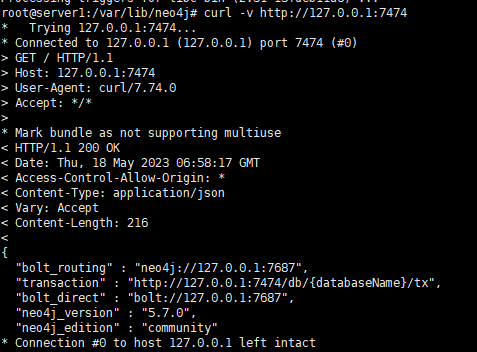
通过远程配置的IP访问与配置,特别需要注意的就是对应的Auth这块,从而基于对应的外部IP才可以访问 比如 http://192.168.1.217:7474/
参考
Neo4J 图库的集群部署与基础使用的更多相关文章
- HBase集群部署与基础命令
HBase 集群部署 安装 hbase 之前需要先搭建好 hadoop 集群和 zookeeper 集群.hadoop 集群搭建可以参考:https://www.cnblogs.com/javammc ...
- Storm1.0.3集群部署
Storm集群部署 所有集群部署的基本流程都差不多:下载安装包并上传.解压安装包并配置环境变量.修改配置文件.分发安装包.启动集群.查看集群是否部署成功. 1.所有的集群上都要配置hosts vi ...
- Kafka集群部署 (守护进程启动)
1.Kafka集群部署 1.1集群部署的基本流程 下载安装包.解压安装包.修改配置文件.分发安装包.启动集群 1.2集群部署的基础环境准备 安装前的准备工作(zk集群已经部署完毕) 关闭防火墙 c ...
- Storm集群部署及单词技术
1. 集群部署的基本流程 集群部署的流程:下载安装包.解压安装包.修改配置文件.分发安装包.启动集群 注意: 所有的集群上都需要配置hosts vi /etc/hosts 192.168.239.1 ...
- 2.Storm集群部署及单词统计案例
1.集群部署的基本流程 2.集群部署的基础环境准备 3.Storm集群部署 4.Storm集群的进程及日志熟悉 5.Storm集群的常用操作命令 6.Storm源码下载及目录熟悉 7.Storm 单词 ...
- openstack(pike 版)集群部署(一)----基础环境部署
一.环境 1.系统: a.CentOS Linux release 7.4.1708 (Core) b.更新yum源和安装常用软件 # yum -y install epel-release ba ...
- k8s1.9.0安装--基础集群部署
二.基础集群部署 - kubernetes-simple 1. 部署ETCD(主节点) 1.1 简介 kubernetes需要存储很多东西,像它本身的节点信息,组件信息,还有通过kubernetes运 ...
- Dubbo入门到精通学习笔记(二十):MyCat在MySQL主从复制的基础上实现读写分离、MyCat 集群部署(HAProxy + MyCat)、MyCat 高可用负载均衡集群Keepalived
文章目录 MyCat在MySQL主从复制的基础上实现读写分离 一.环境 二.依赖课程 三.MyCat 介绍 ( MyCat 官网:http://mycat.org.cn/ ) 四.MyCat 的安装 ...
- 2.Ceph 基础篇 - 集群部署及故障排查
文章转载自:https://mp.weixin.qq.com/s?__biz=MzI1MDgwNzQ1MQ==&mid=2247485243&idx=1&sn=e425c31a ...
- 理解 OpenStack + Ceph (1):Ceph + OpenStack 集群部署和配置
本系列文章会深入研究 Ceph 以及 Ceph 和 OpenStack 的集成: (1)安装和部署 (2)Ceph RBD 接口和工具 (3)Ceph 物理和逻辑结构 (4)Ceph 的基础数据结构 ...
随机推荐
- 用BingGPT写一首勉励自己的诗
觉得写的还挺有意思,所以记录一下,祝自己在今后的生活中努力学习,学有所成 勤学不辍志,博览群书知. 海纳百川理,山高自有路. 勿以时日长,惟以功夫深.
- 存储系统模拟—R实现
存储系统 存储问题是人们最熟悉又最需要研究的问题之一.例如企业储存的原材料.在制品等,存储太少,不足以满足生产的需要,将使生产过程中断; 存储太多,超过了生产的需要,将造成资金及资源的积压浪费.商店储 ...
- QtDesigner第一个程序
用QTDesigner设计界面简单多了,而且更加直观.先看下效果图,是不是比我们用代码写的布局要美观多了 制作.ui界面 (1).打开Pycharm的界面设计工具QTDsigner Pycharm-& ...
- ChatGPT 与 Midjourney 强强联手,让先秦阿房宫重现辉煌!
Midjourney 是一款非常特殊的 AI 绘画聊天机器人,它并不是软件,也不用安装,而是直接搭载在 Discord 平台之上,所有的功能都是通过调用 Discord 的聊天机器人程序实现的.要想使 ...
- Redis读书笔记(三)
单机数据库的实现 Redis数据库 Redis数据库的实现 struct redisServer { //... //保存服务器中的所有数据库, 数组 redisDB *db; //服务器的数据库数量 ...
- Vue路由实现的底层原理
在Vue中利用数据劫持defineProperty在原型prototype上初始化了一些getter,分别是router代表当前Router的实例 . router代表当前Router的实例.rout ...
- TEC-6计算机组成原理实验(简图)
TEC-6计算机组成原理实验
- 【故障公告】被放出的 Bing 爬虫,又被爬宕机的园子
这些巨头爬虫们现在怎么了?记忆中2022年之前的十几年,园子没有遇到过被巨头爬虫们爬宕机的情况,巨头们都懂得爱护,都懂得控制节奏,都懂得在爬网时控制并发连接数以免给目标网站造成过大压力. 从去年开始, ...
- 小程序TS报错 "无法重新声明块范围变量。此处也声明了xx "
初学者简单的方法,目前还没有遇到问题 想法很简单,当export导出,骗eslint认为是一个模块. 如果有新的问题欢迎留言,我也在学习 1 import utilsApi from '../util ...
- ArcGIS Pro创建、发布、调用GP服务全过程示例(等高线分析)
在之前的文章介绍过使用ArcMap发布GP分析服务,由于ArcGIS后续不在更新ArcMap,改用ArcGIS Pro,本文对ArcGIS Pro发布GP分析服务进行说明. 本文以等高线分析为例,使用 ...