
Spring Cloud Config:外部集中化配置管理
Spring Cloud Config:外部集中化配置管理
- SpringCloud学习教程
- SpringCloud
Spring Cloud Config 可以为微服务架构中的应用提供集中化的外部配置支持,它分为服务端和客户端两个部分,本文将对其用法进行详细介绍。
#Spring Cloud Config 简介
Spring Cloud Config 分为服务端和客户端两个部分。服务端被称为分布式配置中心,它是个独立的应用,可以从配置仓库获取配置信息并提供给客户端使用。客户端可以通过配置中心来获取配置信息,在启动时加载配置。Spring Cloud Config 的配置中心默认采用Git来存储配置信息,所以天然就支持配置信息的版本管理,并且可以使用Git客户端来方便地管理和访问配置信息。
#在Git仓库中准备配置信息
由于Spring Cloud Config 需要一个存储配置信息的Git仓库,这里我们先在Git仓库中添加好配置文件再演示其功能,Git仓库地址为:https://gitee.com/macrozheng/springcloud-configopen in new window。
#配置仓库目录结构
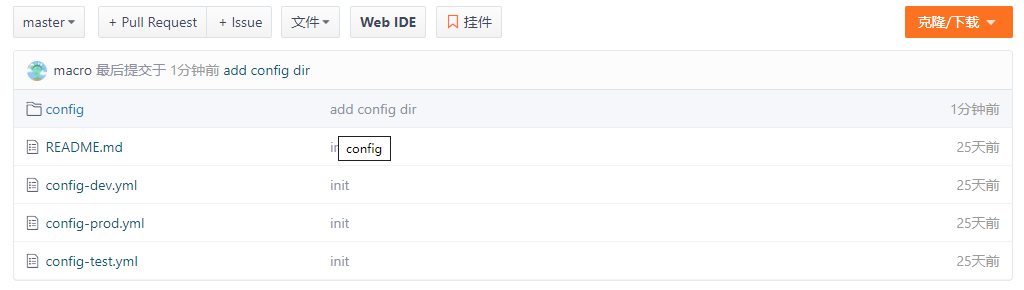
#master分支下的配置信息
- config-dev.yml:
config:

  info: "config info for dev(master)"
- config-test.yml:
config:

  info: "config info for test(master)"
- config-prod.yml:
config:

  info: "config info for prod(master)"
#dev分支下的配置信息
- config-dev.yml:
config:

  info: "config info for dev(dev)"
- config-test.yml:
config:

  info: "config info for test(dev)"
- config-prod.yml:
config:

  info: "config info for prod(dev)"
#创建config-server模块
这里我们创建一个config-server模块来演示Spring Cloud Config 作为配置中心的功能。
#在pom.xml中添加相关依赖
<dependency>

    <groupId>org.springframework.cloud</groupId>

    <artifactId>spring-cloud-config-server</artifactId>

</dependency>

<dependency>

    <groupId>org.springframework.cloud</groupId>

    <artifactId>spring-cloud-starter-netflix-eureka-client</artifactId>

</dependency>
#在application.yml中进行配置
server:

  port: 8901

spring:

  application:

    name: config-server

  cloud:

    config:

      server:

        git: #配置存储配置信息的Git仓库

          uri: https://gitee.com/macrozheng/springcloud-config.git

          username: macro

          password: 123456

          clone-on-start: true #开启启动时直接从git获取配置

eureka:

  client:

    service-url:

      defaultZone: http://localhost:8001/eureka/
#在启动类上添加@EnableConfigServer注解来启用配置中心功能
@EnableConfigServer

@EnableDiscoveryClient

@SpringBootApplication

public class ConfigServerApplication {

    public static void main(String[] args) {

        SpringApplication.run(ConfigServerApplication.class, args);

    }

}
#通过config-server获取配置信息
这里我们通过config-server来演示下如何获取配置信息。
#获取配置文件信息的访问格式
# 获取配置信息

/{label}/{application}-{profile}

# 获取配置文件信息

/{label}/{application}-{profile}.yml
#占位符相关解释
- application:代表应用名称,默认为配置文件中的spring.application.name,如果配置了spring.cloud.config.name,则为该名称;
- label:代表分支名称,对应配置文件中的spring.cloud.config.label;
- profile:代表环境名称,对应配置文件中的spring.cloud.config.profile。
#获取配置信息演示
启动eureka-server、config-server服务;
访问http://localhost:8901/master/config-devopen in new window来获取master分支上dev环境的配置信息;
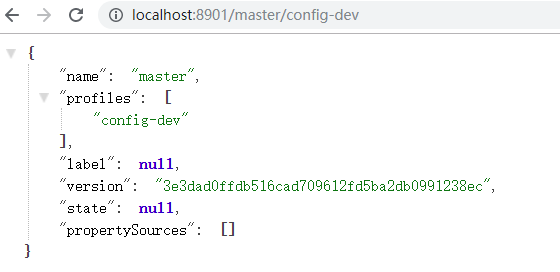
- 访问http://localhost:8901/master/config-dev.ymlopen in new window来获取master分支上dev环境的配置文件信息,对比上面信息,可以看出配置信息和配置文件信息并不是同一个概念;

- 访问http://localhost:8901/master/config-test.ymlopen in new window来获取master分支上test环境的配置文件信息:

- 访问http://localhost:8901/dev/config-dev.ymlopen in new window来获取dev分支上dev环境的配置文件信息:

#创建config-client模块
我们创建一个config-client模块来从config-server获取配置。
#在pom.xml中添加相关依赖
<dependency>

    <groupId>org.springframework.cloud</groupId>

    <artifactId>spring-cloud-starter-config</artifactId>

</dependency>

<dependency>

    <groupId>org.springframework.cloud</groupId>

    <artifactId>spring-cloud-starter-netflix-eureka-client</artifactId>

</dependency>

<dependency>

    <groupId>org.springframework.boot</groupId>

    <artifactId>spring-boot-starter-web</artifactId>

</dependency>
#在bootstrap.yml中进行配置
server:

  port: 9001

spring:

  application:

    name: config-client

  cloud:

    config: #Config客户端配置

      profile: dev #启用配置后缀名称

      label: dev #分支名称

      uri: http://localhost:8901 #配置中心地址

      name: config #配置文件名称

eureka:

  client:

    service-url:

      defaultZone: http://localhost:8001/eureka/
#添加ConfigClientController类用于获取配置
/**

 * Created by macro on 2019/9/11.

 */

@RestController

public class ConfigClientController {

    @Value("${config.info}")

    private String configInfo;

    @GetMapping("/configInfo")

    public String getConfigInfo() {

        return configInfo;

    }

}
#演示从配置中心获取配置
启动config-client服务;
访问http://localhost:9001/configInfoopen in new window,可以获取到dev分支下dev环境的配置;
config info for dev(dev)
1
#获取子目录下的配置
我们不仅可以把每个项目的配置放在不同的Git仓库存储,也可以在一个Git仓库中存储多个项目的配置,此时就会用到在子目录中搜索配置信息的配置。
- 首先我们需要在config-server中添加相关配置,用于搜索子目录中的配置,这里我们用到了application占位符,表示对于不同的应用,我们从对应应用名称的子目录中搜索配置,比如config子目录中的配置对应config应用;
spring:

  cloud:

    config:

      server:

        git:

          search-paths: '{application}'
- 访问http://localhost:9001/configInfoopen in new window进行测试,可以发现获取的是config子目录下的配置信息。
config info for config dir dev(dev)
1
#刷新配置
当Git仓库中的配置信息更改后,我们可以通过SpringBoot Actuator的refresh端点来刷新客户端配置信息,以下更改都需要在config-client中进行。
- 在pom.xml中添加Actuator的依赖:
<dependency>

   <groupId>org.springframework.boot</groupId>

   <artifactId>spring-boot-starter-actuator</artifactId>

</dependency>
- 在bootstrap.yml中开启refresh端点:
management:

  endpoints:

    web:

      exposure:

        include: 'refresh'
- 在ConfigClientController类添加@RefreshScope注解用于刷新配置:
/**

 * Created by macro on 2019/9/11.

 */

@RestController

@RefreshScope

public class ConfigClientController {

    @Value("${config.info}")

    private String configInfo;

    @GetMapping("/configInfo")

    public String getConfigInfo() {

        return configInfo;

    }

}
- 重新启动config-client后,调用refresh端点进行配置刷新:
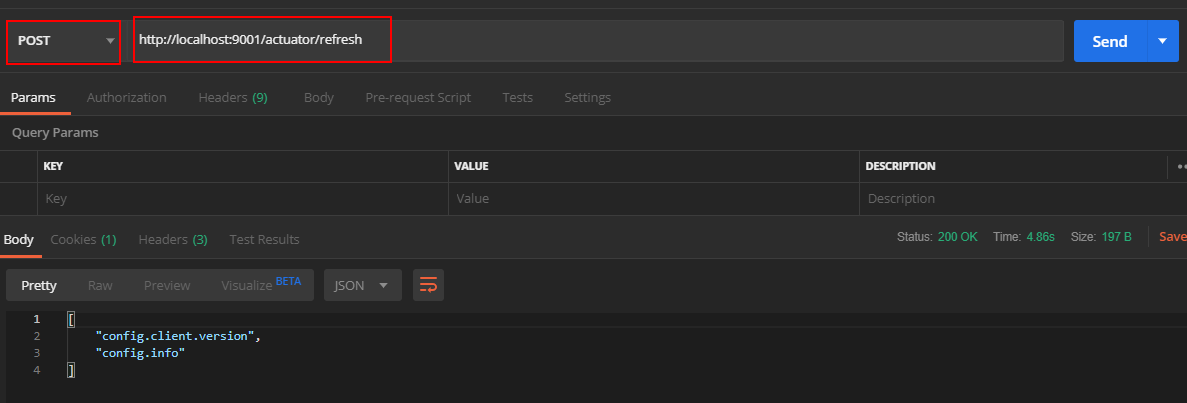
- 访问http://localhost:9001/configInfoopen in new window进行测试,可以发现配置信息已经刷新。
update config info for config dir dev(dev)
#配置中心添加安全认证
我们可以通过整合SpringSecurity来为配置中心添加安全认证。
#创建config-security-server模块
- 在pom.xml中添加相关依赖:
<dependency>

    <groupId>org.springframework.cloud</groupId>

    <artifactId>spring-cloud-config-server</artifactId>

</dependency>

<dependency>

    <groupId>org.springframework.boot</groupId>

    <artifactId>spring-boot-starter-security</artifactId>

</dependency>
- 在application.yml中进行配置:
server:

  port: 8905

spring:

  application:

    name: config-security-server

  cloud:

    config:

      server:

        git:

          uri: https://gitee.com/macrozheng/springcloud-config.git

          username: macro

          password: 123456

          clone-on-start: true #开启启动时直接从git获取配置

  security: #配置用户名和密码

    user:

      name: macro

      password: 123456
- 启动config-security-server服务。
#修改config-client的配置
- 添加bootstrap-security.yml配置文件,主要是配置了配置中心的用户名和密码:
server:

  port: 9002

spring:

  application:

    name: config-client

  cloud:

    config:

      profile: dev #启用配置后缀名称

      label: dev #分支名称

      uri: http://localhost:8905 #配置中心地址

      name: config #配置文件名称

      username: macro

      password: 123456
使用bootstrap-security.yml启动config-client服务;
访问http://localhost:9002/configInfoopen in new window进行测试,发现可以获取到配置信息。
config info for dev(dev)
1
#config-sever集群搭建
在微服务架构中,所有服务都从配置中心获取配置,配置中心一旦宕机,会发生很严重的问题,下面我们搭建一个双节点的配置中心集群来解决该问题。
启动两个config-server分别运行在8902和8903端口上;
添加config-client的配置文件bootstrap-cluster.yml,主要是添加了从注册中心获取配置中心地址的配置并去除了配置中心uri的配置:
spring:

  cloud:

    config:

      profile: dev #启用环境名称

      label: dev #分支名称

      name: config #配置文件名称

      discovery:

        enabled: true

        service-id: config-server

eureka:

  client:

    service-url:

      defaultZone: http://localhost:8001/eureka/
- 以bootstrap-cluster.yml启动config-client服务,注册中心显示信息如下:

- 访问http://localhost:9003/configInfoopen in new window,发现config-client可以获取到配置信息。
config info for config dir dev(dev)
1
#使用到的模块
springcloud-learning

├── eureka-server -- eureka注册中心

├── config-server -- 配置中心服务

├── config-security-server -- 带安全认证的配置中心服务

└── config-client -- 获取配置的客户端服务
Spring Cloud Config:外部集中化配置管理的更多相关文章
- Spring Cloud Config 分布式配置管理 5.3
Spring Cloud Config简介 在传统的单体式应用系统中,我们通常会将配置文件和代码放在一起,但随着系统越来越大,需要实现的功能越来越多时,我们又不得不将系统升级为分布式系统,同时也会将系 ...
- SpringCloud的配置管理:Spring Cloud Config
演示如何使用ConfigServer提供统一的参数配置服务 ###################################################################一.概 ...
- spring cloud config —— git配置管理
目录 talk is cheep, show your the code Server端 pom.xml server的application.yml 配置文件 测试Server client端 po ...
- 【八】Spring Cloud Config
一.分布式系统面临的--配置问题 微服务意味着要将单体应用中的业务拆分成一个个子服务,每个服务的力度相对较小,因此系统中会出现大量的服务.由于每个服务都需要必要的配置信息才能运行,所以一套集中式的.动 ...
- spring cloud学习(六)Spring Cloud Config
Spring Cloud Config 参考个人项目 参考个人项目 : (希望大家能给个star~) https://github.com/FunriLy/springcloud-study/tree ...
- Spring Cloud config之一:分布式配置中心入门介绍
Spring Cloud Config为服务端和客户端提供了分布式系统的外部化配置支持.配置服务器为各应用的所有环境提供了一个中心化的外部配置.它实现了对服务端和客户端对Spring Environm ...
- 【SpringCloud构建微服务系列】使用Spring Cloud Config统一管理服务配置
一.为什么要统一管理微服务配置 对于传统的单体应用而言,常使用配置文件来管理所有配置,比如SpringBoot的application.yml文件,但是在微服务架构中全部手动修改的话很麻烦而且不易维护 ...
- Spring Cloud Config 配置中心实践过程中,你需要了解这些细节!
本文导读: Spring Cloud Config 基本概念 Spring Cloud Config 客户端加载流程 Spring Cloud Config 基于消息总线配置 Spring Cloud ...
- Spring Cloud Config(一):聊聊分布式配置中心 Spring Cloud Config
目录 Spring Cloud Config(一):聊聊分布式配置中心 Spring Cloud Config Spring Cloud Config(二):基于Git搭建配置中心 Spring Cl ...
- Spring Cloud Config、Apollo、Nacos配置中心选型及对比
Spring Cloud Config.Apollo.Nacos配置中心选型及对比 1.Nacos 1.1 Nacos主要提供以下四大功能 2.Spring Cloud Config 3.Apollo ...
随机推荐
- 6、zookeeper应用场景-分布式唯一ID
分布式唯一id案例 原理:使用zookeeper有序节点,节点后会加上有序的id,用这个id来当唯一ID 在过去的单库单表型系统中,通常第可以使用数据库字段自带的auto_ increment属性来自 ...
- Spring多线程事务处理
一.背景 本文主要介绍了spring多线程事务的解决方案,心急的可以跳过上面的理论介绍分析部分直接看最终解决方案. 在我们日常的业务活动中,经常会出现大规模的修改插入操作,比如在3.0的活动赛事创建, ...
- C#移除List中特定元素
在List里面移除其中一个元素之后,原有的索引以及索引对应的值会发生改变,如果按照原有的索引值删除,就会误删除其它元素. 1.实现思路 原始List为A,将需要删除的元素放到一个List B里面,遍历 ...
- aardio 嵌入 其他应用程序
aardio 嵌入 其他应用程序 需求 这个chrome壳不能进行拖拽和缩放,所以再套一个壳,可以再分屏的时候用 import win.ui; /*DSG{{*/ winform = win.form ...
- C#串口开发之SerialPort类封装
目录 SerialPort类 参数封装 控件操作封装 SerialPortClient类实现 SerialPortClient类使用 测试Demo 参考文章 SerialPort类 微软在.NET中对 ...
- windows10 中为文件添加让自己可以使用查看、修改、运行的权限
在Win10中添加权限的方法 前一段时间重装了系统,然后,突然间就因为权限原因没法查看一些文件了.所以就想办法添加权限.尝试很多次后终于成功了,这篇文章记录一下如何为自己添加权限. 选中需要添加权限的 ...
- 音频信号质量的度量标准--MOS得分的由来
早期语音质量的评价方式是凭主观的,人们在打通电话之后通过人耳来感知语音质量的好坏.1996年国际ITU组织在ITU-T P.800和P.830建议书开始制订相关的评测标准:MOS(Mean Opini ...
- C++ 萃取机 Iterator Traits
Iterator Traits 萃取出 Iterator 的性质:迭代器种类.迭代器所指数据类型.迭代器距离类型.迭代器所指数据引用.迭代器所指数据指针.根据不同的迭代器种类可以采取不同的算法策略.但 ...
- Java取当前时间的一分钟后,并格式化输出
1.Java1.8 以前 Calendar instance = Calendar.getInstance();//获取当前日期时间 instance.add(Calendar.MINUTE,1);/ ...
- RTMP、X264与交叉编译
RTMP.X264与交叉编译 与HTTP(超文本传输协议)同样是一个基于TCP的Real Time Messaging Protocol(实时消息传输协议).由Adobe Systems公司为Fl ...