
k8s-生产环境部署django项目k8s-dashboard管理系统
1. k8s-生产环境部署django项目k8s-dashboard管理系统
部署架构
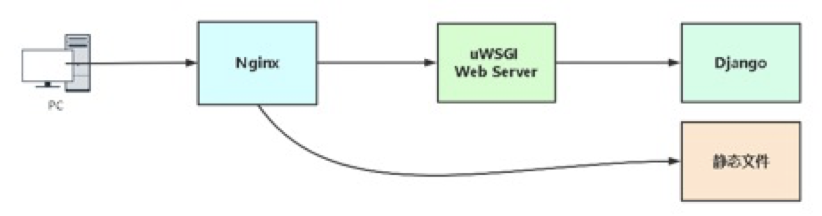
nginx 前端web服务,接收到动态请求通过uwsgi模块将请求转发给uwsgi服务器,uwsgi服务器通过django处理完后返回给Nginx,Nginx返回用户浏览器展示。
既然uwsgi是一个可以独立部署的服务器,为什么还用Nginx代理?
- Nginx作为入口可配置安全策略,并且可以为uwsgi提供负载均衡。
- Nginx处理静态资源能力强
2. 将本地开发的项目打包
2.1 导入依赖模块列表
pip freeze > ~/requirements.txt
是用pip工具导出安装的pip list的显示的包
2.2 修改数据库为mysql
# devops_orm/settings.py

DATABASES = {

	'default': {

        'ENGINE': 'django.db.backends.mysql',

        'NAME': 'k8s',

        'USER': 'k8s',

        'PASSWORD': '12345678',

        'HOST': '192.168.0.78',

        'PORT': '3306',

	}

}
关闭debug模式和白名单
# SECURITY WARNING: don't run with debug turned on in production!

DEBUG = False     # 关闭调试模式

# 开启用户访问IP

ALLOWED_HOSTS = ['*']     # 白名单,只允许列表中的ip访问,*代表所有
3. 服务器环境准备
3.1 安装python3
安装依赖包
yum -y install zlib-devel bzip2-devel openssl-devel ncurses-devel sqlite-devel readline-devel tk-devel gdbm-devel db4-devel libpcap-devel xz-devel libffi-devel
第一种方式用yum安装
Linux安装:
yum install python36 -y
一条命令完成安装。
3.2 安装依赖模块列表
- 压缩本地代码和导出的模块依赖列表

压缩为zip包,方便后面上传

上传压缩到服务器
[root@k8s-master ~]# rz

rz waiting to receive.

Starting zmodem transfer.  Press Ctrl+C to cancel.

Transferring k8s.zip...

  100%    1267 KB    1267 KB/sec    00:00:01       0 Errors

[root@k8s-master ~]# ll

total 1272

drwxr-xr-x 2 root root    4096 Jul  4 21:07 k8s-tools

-rw-r--r-- 1 root root 1297880 Jul  4 21:04 k8s.zip
这里通过rz命令上传的,可以使用sftp等
解压压缩包
[root@k8s-master ~]# yum install unzip -y

[root@k8s-master ~]# unzip k8s.zip

[root@k8s-master ~]# ll

total 1284

drwxr-xr-x 3 root root    4096 Jul  5 14:28 devops

drwxr-xr-x 2 root root    4096 Jul  4 21:07 k8s-tools

-rw-r--r-- 1 root root 1297880 Jul  4 21:04 k8s.zip

drwxr-xr-x 2 root root    4096 Jul  4 21:37 __MACOSX

-rw-r--r-- 1 root root      58 Jul  4 21:46 requirements.txt

[root@k8s-master ~]# mkdir -p /opt/k8s

[root@k8s-master ~]# mv devops/* /opt/k8s/
安装依赖包
[root@k8s-master ~]# pip3 install -r requirements.txt -i http://mirrors.aliyun.com/pypi/simple --trusted-host mirrors.aliyun.com
[root@k8s-master ~]# cat requirements.txt

Django

kubernetes

PyMySQL

channels

channels-redis

PyYAML
3.3 安装数据库
mysql安装
[root@k8s-master ~]# docker run -d --name db -p 3306:3306 -v mysqldata:/var/lib/mysql -e MYSQL_ROOT_PASSWORD=123456 mysql:5.7 --character-set-server=utf8

[root@k8s-master ~]# docker exec  -it db bash

root@f992b2375c5d:/# mysql -uroot -p$MYSQL_ROOT_PASSWORD

mysql: [Warning] Using a password on the command line interface can be insecure.

Welcome to the MySQL monitor.  Commands end with ; or \g.

Your MySQL connection id is 2

Server version: 5.7.34 MySQL Community Server (GPL)

Copyright (c) 2000, 2021, Oracle and/or its affiliates.

Oracle is a registered trademark of Oracle Corporation and/or its

affiliates. Other names may be trademarks of their respective

owners.

Type 'help;' or '\h' for help. Type '\c' to clear the current input statement.

mysql> create database k8s;

Query OK, 1 row affected (0.00 sec)
安装redis:
[root@k8s-master ~]# docker run --name redis -d -p 6379:6379 redis:3
3.4 启动开发环境
启动程序,验证依赖模块
[root@k8s-master devops]# python3 manage.py runserver 0.0.0.0:8000

Watching for file changes with StatReloader

Performing system checks...

System check identified no issues (0 silenced).

You have 18 unapplied migration(s). Your project may not work properly until you apply the migrations for app(s): admin, auth, contenttypes, sessions.

Run 'python manage.py migrate' to apply them.

July 05, 2021 - 11:36:44

Django version 3.2.5, using settings 'devops.settings'

Starting ASGI/Channels version 3.0.3 development server at http://0.0.0.0:8000/
测试没有问题,同步数据库
[root@k8s-master devops]# python3 manage.py migrate

Operations to perform:

  Apply all migrations: admin, auth, contenttypes, sessions

Running migrations:

  Applying contenttypes.0001_initial... OK

  Applying auth.0001_initial... OK

  Applying admin.0001_initial... OK

  Applying admin.0002_logentry_remove_auto_add... OK

  Applying admin.0003_logentry_add_action_flag_choices... OK

  Applying contenttypes.0002_remove_content_type_name... OK

  Applying auth.0002_alter_permission_name_max_length... OK

  Applying auth.0003_alter_user_email_max_length... OK

  Applying auth.0004_alter_user_username_opts... OK

  Applying auth.0005_alter_user_last_login_null... OK

  Applying auth.0006_require_contenttypes_0002... OK

  Applying auth.0007_alter_validators_add_error_messages... OK

  Applying auth.0008_alter_user_username_max_length... OK

  Applying auth.0009_alter_user_last_name_max_length... OK

  Applying auth.0010_alter_group_name_max_length... OK

  Applying auth.0011_update_proxy_permissions... OK

  Applying auth.0012_alter_user_first_name_max_length... OK

  Applying sessions.0001_initial... OK
3.4 安装与配置uwsgi
Centos7 服务器安装依赖包
[root@k8s-master devops]# yum -y install gcc gcc-c++ gd cmake patch automakemake autoconf libjpeg libjpeg-devel libpng libpng-devel freetype freetype-devellibxml2 libxml2-devel zlib zlib-devel glibc glibc-devel glib2 glib2-devel bzip2bzip2-devel ncurses ncurses-devel curl curl-devel e2fsprogs e2fsprogs-develkrb5 krb5-devel libidn libtools-libs libidn-devel openssl openssl-developenldap openldap-devel nss_ldap openldap-clients openldap-servers pcre-devel libmcrypt-devel readline-devellibcap-devel ntpdate vim tree wget python3-devel.x86_64
uWSGI是一个Web服务器,也是Python的一个模块,直接pip安装即可:
[root@k8s-master devops]# pip3 install uwsgi -i http://mirrors.aliyun.com/pypi/simple --trusted-host mirrors.aliyun.com
创建uwsgi配置文件,路径任意,
[root@k8s-master ~]# mkdir -p /opt/uwsgi

[root@k8s-master ~]# cd /opt/uwsgi

[root@k8s-master uwsgi]# vim uwsgi.ini

[root@k8s-master uwsgi]# cat uwsgi.ini

[uwsgi]

# 项目目录

chdir = /opt/k8s

# 指定sock的文件路径

socket = /opt/k8s/uwsgi.sock

# 指定监听端口

http = 0.0.0.0:8080

# 静态资源

static-map = /static=/opt/k8s/static

# wsgi文件(django入口)

wsgi-file=devops/wsgi.py

# 进程个数

processes = 1

# 指定项目的应用

# module = devops.wsgi

# 进程pid

pidfile = /opt/k8s/uwsgi.pid

# 日志路径

daemonize = /opt/k8s/uwsgi.log
启动
[root@k8s-master uwsgi]# uwsgi --ini uwsgi.ini

[uWSGI] getting INI configuration from uwsgi.ini

[uwsgi-static] added mapping for /static => /opt/k8s/static
验证服务启动
[root@k8s-master uwsgi]# ss -antp |grep 8080

LISTEN     0      100          *:8080                     *:*                   users:(("uwsgi",pid=4871,fd=3),("uwsgi",pid=4870,fd=3))
3.5 安装nginx
安装nginx
[root@k8s-master uwsgi]# yum localinstall http://nginx.org/packages/centos/7/noarch/RPMS/nginx-release-centos-7-0.el7.ngx.noarch.rpm

[root@k8s-master uwsgi]# yum -y install nginx

[root@k8s-master uwsgi]# service nginx start

Redirecting to /bin/systemctl start nginx.service

[root@k8s-master uwsgi]# systemctl enable nginx.service

Created symlink from /etc/systemd/system/multi-user.target.wants/nginx.service to /usr/lib/systemd/system/nginx.service.
配置nginx
[root@k8s-master uwsgi]# cd /etc/nginx/

[root@k8s-master nginx]# ll

total 76

drwxr-xr-x 2 root root 4096 Jun  2 08:24 conf.d

drwxr-xr-x 2 root root 4096 Jun  2 08:24 default.d

-rw-r--r-- 1 root root 1077 Jun  2 08:24 fastcgi.conf

-rw-r--r-- 1 root root 1077 Jun  2 08:24 fastcgi.conf.default

-rw-r--r-- 1 root root 1007 Jun  2 08:24 fastcgi_params

-rw-r--r-- 1 root root 1007 Jun  2 08:24 fastcgi_params.default

-rw-r--r-- 1 root root 2837 Jun  2 08:24 koi-utf

-rw-r--r-- 1 root root 2223 Jun  2 08:24 koi-win

-rw-r--r-- 1 root root 5231 Jun  2 08:24 mime.types

-rw-r--r-- 1 root root 5231 Jun  2 08:24 mime.types.default

-rw-r--r-- 1 root root 2336 Jun  2 08:23 nginx.conf

-rw-r--r-- 1 root root 2656 Jun  2 08:24 nginx.conf.default

-rw-r--r-- 1 root root  636 Jun  2 08:24 scgi_params

-rw-r--r-- 1 root root  636 Jun  2 08:24 scgi_params.default

-rw-r--r-- 1 root root  664 Jun  2 08:24 uwsgi_params

-rw-r--r-- 1 root root  664 Jun  2 08:24 uwsgi_params.default

-rw-r--r-- 1 root root 3610 Jun  2 08:24 win-utf

[root@k8s-master nginx]# cd conf.d/

[root@k8s-master conf.d]# vim k8s-dashboard.conf

[root@k8s-master conf.d]# cat k8s-dashboard.conf

server {

        listen       80;

        server_name  k8s-dashboard.scajy.cn;

        location / {

           include     uwsgi_params;  # 导入模块用于与uwsgi通信

           uwsgi_pass unix:/opt/k8s/uwsgi.sock;

        }

        # 静态文件目录

        location /static {

           alias /opt/k8s/static;

        }

}
重启nginx
[root@k8s-master conf.d]# nginx -t

nginx: the configuration file /etc/nginx/nginx.conf syntax is ok

nginx: configuration file /etc/nginx/nginx.conf test is successful

[root@k8s-master conf.d]# nginx -s reload
域名解析
这个根据自己域名进行配置域名解析
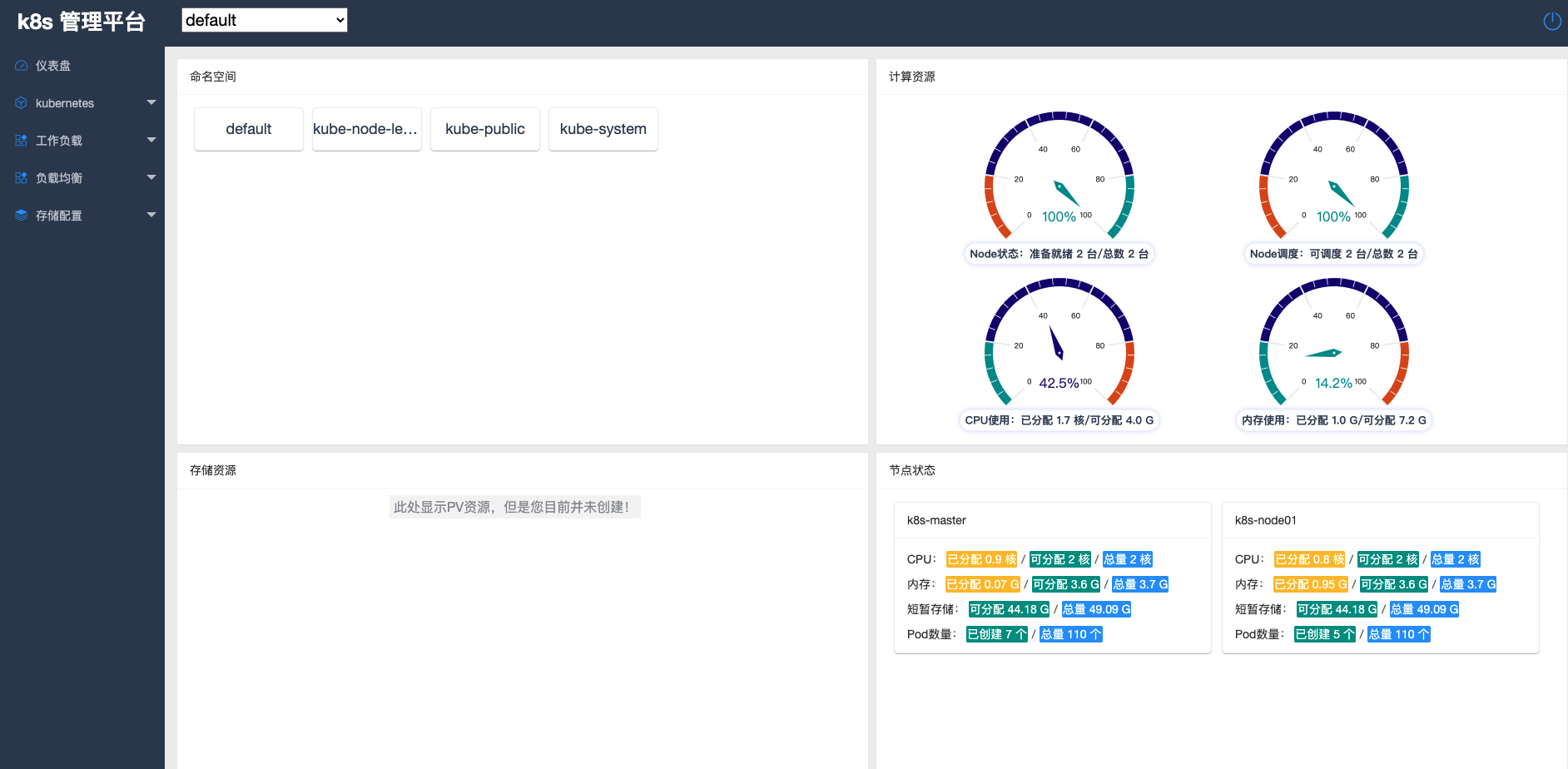
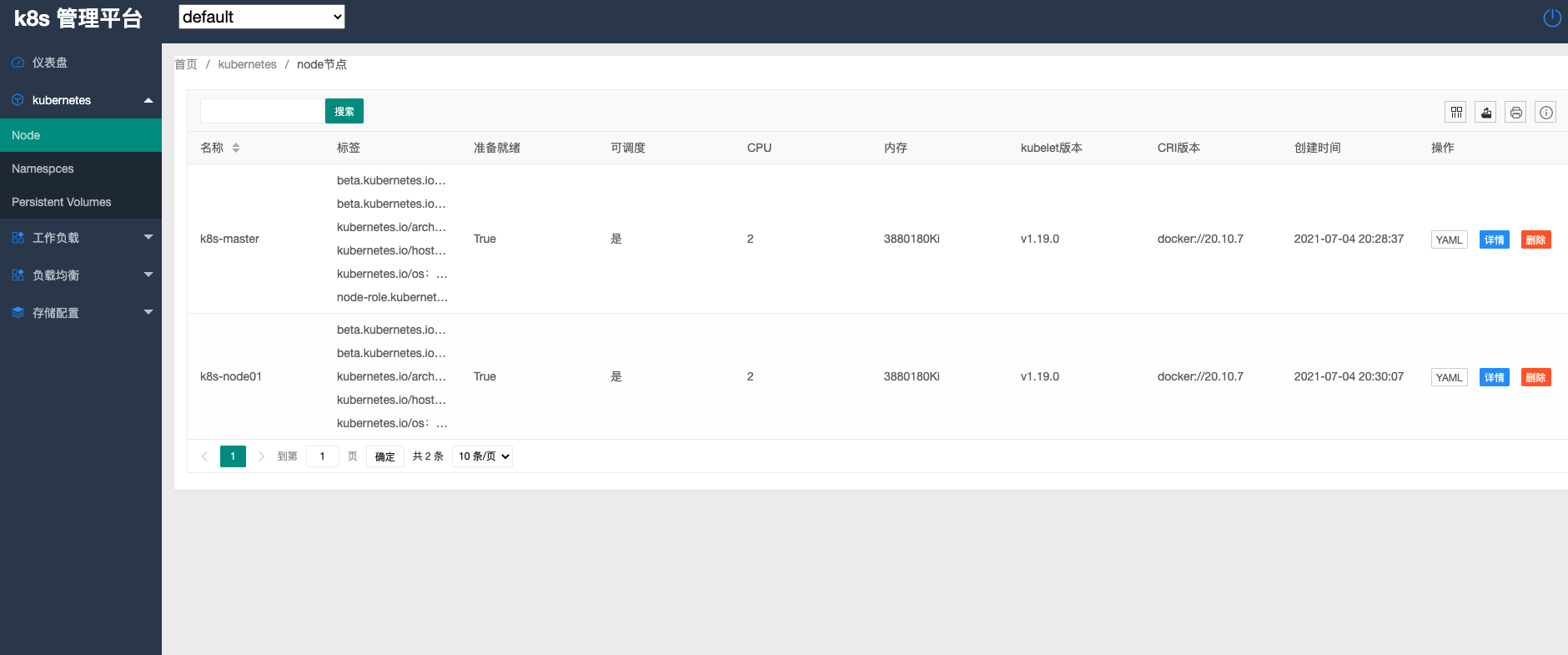
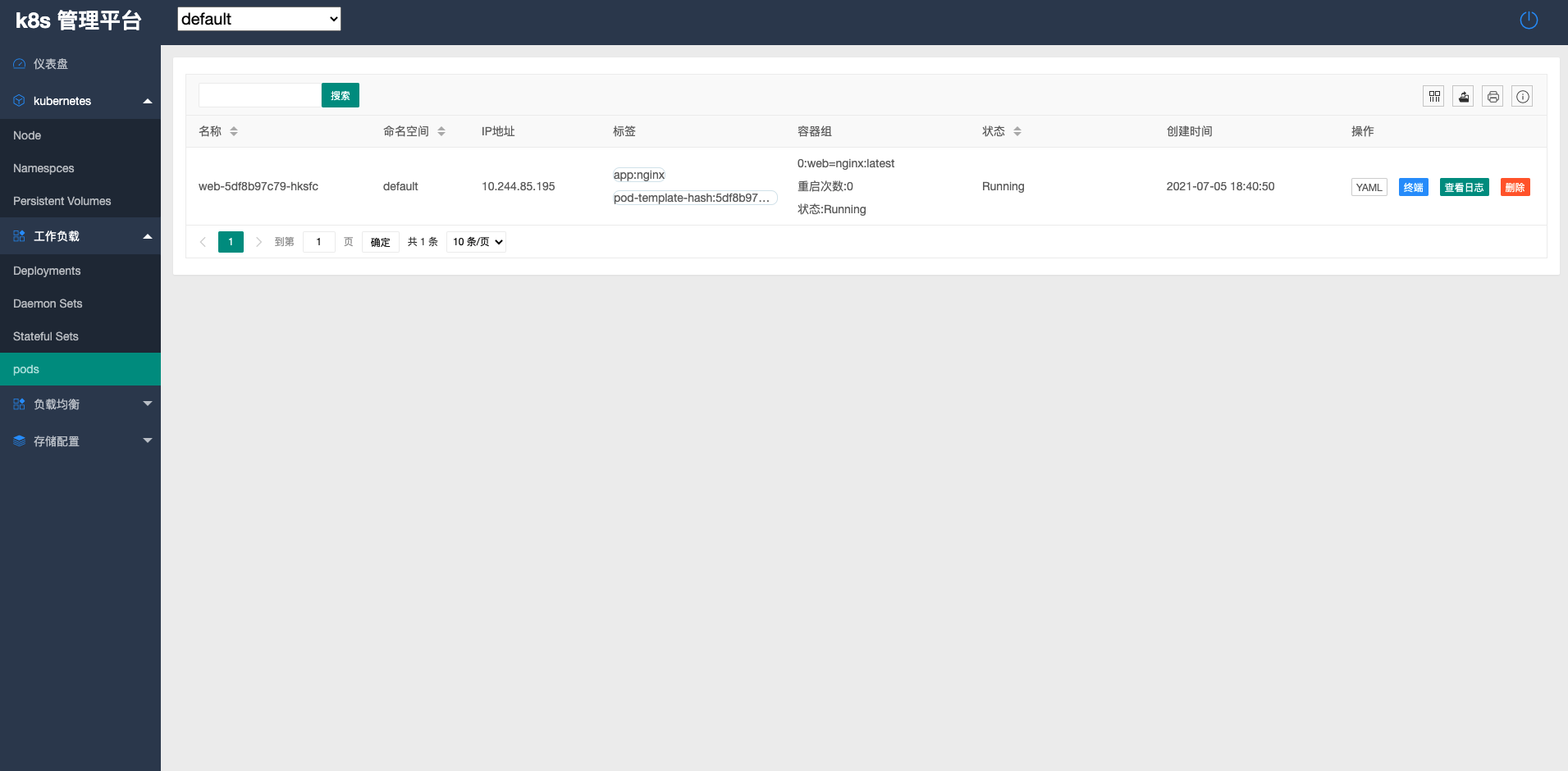
4. 浏览器访问
k8s-生产环境部署django项目k8s-dashboard管理系统的更多相关文章
- 生产环境部署Django项目
生产环境部署Django项目 1. 部署架构 IP地址 安装服务 172.16.1.251 nginx uwsgi(sock方式) docker mysql5.7 redis5 Nginx 前端We ...
- k8s生产环境部署
建议配置: 服务器 900G*2 SSD 安装操作系统 CPU 16核心*2 40G网卡*2 RAM 64G*8 操作系统建议:Centos7.4/Centos 7.6 不建议使用CentOS8 分布 ...
- Django + Uwsgi + Nginx 的生产环境部署
使用runserver可以使我们的django项目很便捷的在本地运行起来,但这只能在局域网内访问,如果在生产环境部署django,就要多考虑一些问题了.比如静态文件处理,安全,效率等等,本篇文章总结归 ...
- ubuntu Django + Uwsgi + Nginx 的生产环境部署
一.概述 使用runserver可以使我们的django项目很便捷的在本地运行起来,但这只能在局域网内访问,如果在生产环境部署django,就要多考虑一些问题了.比如静态文件处理,安全,效率等等,本篇 ...
- 学习项目部署Django+uwsgi+Nginx生产环境部署
绪论 项目生产环境部署,是很重的一个知识点.第一,Django自带的服务器很简陋,由于测试和开发环境尚可,无法用于生产环境,保障安全性和可靠性.以及性能.此外,学习部署方式,还有利于了解生产部署后的项 ...
- 第四百零二节,Django+Xadmin打造上线标准的在线教育平台—生产环境部署,uwsgi安装和启动,nginx的安装与启动,uwsgi与nginx的配置文件+虚拟主机配置
第四百零二节,Django+Xadmin打造上线标准的在线教育平台—生产环境部署,uwsgi安装和启动,nginx的安装与启动,uwsgi与nginx的配置文件+虚拟主机配置 软件版本 uwsgi- ...
- 10: Django + Uwsgi + Nginx 的生产环境部署
1.1 一些重要概念 1.Web协议介绍 Web协议出现顺序: CGI -> FCGI -> WSGI -> uwsgi 1. CGI: 最早的协议 2. FCGI: 比CGI快 ...
- Django + Uwsgi + Nginx 的生产环境部署实战
目录 Django + Uwsgi + Nginx 的生产环境部署实战 安装Uwsgi 一.使用命令来启动django项目 二.使用配置文件来启动我们的Django项目 安装Nginx 配置Nginx ...
- 11: Django + gunicorn + Nginx 的生产环境部署
1.1 gunicorn介绍 1.Gunicorn 1. Gunicorn是使用Python实现的WSGI服务器, 直接提供了http服务, 并且在woker上提供了多种选择, gevent, e ...
随机推荐
- [bug] 安装MySQL8.0.15 失败,提示This application requires Visual Studio 2015 x64 Redistributable
参考 https://blog.csdn.net/weixin_44092289/article/details/88045666
- 阿里云上安装 OpenStack 是什么体验
阿里云上跑火车(安装 OpenStack Train 版本),猜猜最终花了多少钱? 前言 前面给大家提供了用虚拟机安装 OpenStack 的镜像,虽然已经很简便了,但还是略显笨重.一来镜像文件比较大 ...
- sed常用
行首添加字符串 # cat a [root@localhost b]# vim a 文件a将每行的第1列添加HEAD [root@localhost b]# sed 's/^/HEAD &/g ...
- linux patch中的p0和p1的区别
命令patch的主要作用是生成diff文件和应用diff文件.举个例子来讲,当发现某个程序出现bug需要打补丁时,patch便是一个好工具. diff文件头: [root@localhost kern ...
- linux进阶之yum管理
一.部署私有repo源 1.官网下载需要的仓库: rsync -avrt --delete rsync://mirrors.ustc.edu.cn/centos/7/cloud/x86_64/open ...
- MarkDown笔记二
表格 列1|列2|列3 --|--|-- 内容1|内容2|内容3 下例冒号在左为左对齐(默认),在右为右对齐,在俩侧为居中对齐 | 左对齐 | 右对齐 | 居中对齐 | | :-----| ----: ...
- jackson学习+CVE-2019-12086漏洞分析
jackson和fastjson差不多,都是用来更方便的处理json 国人用fastjson,老外用jackson/gson比较多 环境搭建: pom.xml: <dependency> ...
- Navigation 实现不同fragment之间的view的共享(含动画过渡)
以imageView的共享举例 两个fragment都要有各自的imageview视图,id可以不同,但transitonName一定要相同, 都要指定相同的src 例如: fragment A &l ...
- 重新整理 .net core 实践篇—————配置文件之环境配置[九]
前言 在当今在互联网微服务比较适用的情况下,docker 可以说一个利器.每次我们打包docker的时候都是适用docker 的配置文件,那么配置文件里面会设置环境变量,这个时候需要我们的应用能够识别 ...
- RISC-V与DSA计算机架构
RISC-V与DSA计算机架构 相信所有和计算机体系结构打过交道的朋友们都看过David Patterson与John Hennessy的煌煌巨作,<计算机体系架构:量化研究方法>.两位在 ...