
spring 5.x 系列第3篇 —— spring AOP (xml配置方式)
文章目录
源码Gitub地址:https://github.com/heibaiying/spring-samples-for-all
一、说明
1.1 项目结构说明
切面配置位于resources下的aop.xml文件,其中CustomAdvice是自定义切面类,OrderService是待切入的方法。
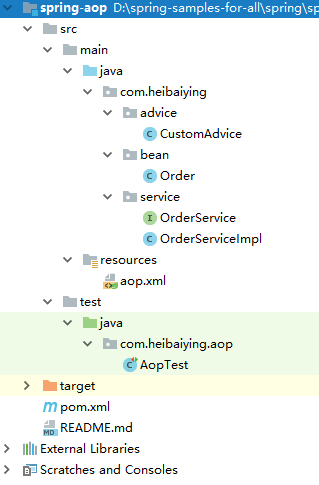
1.2 依赖说明
除了spring的基本依赖外,需要导入aop依赖包
 <!--aop 相关依赖-->
<dependency>
    <groupId>org.springframework</groupId>
    <artifactId>spring-aop</artifactId>
    <version>${spring-base-version}</version>
</dependency>
二、spring aop
2.1 创建待切入接口及其实现类
public interface OrderService {

    Order queryOrder(Long id);

    Order createOrder(Long id, String productName);
}
public class OrderServiceImpl implements OrderService {

    public Order queryOrder(Long id) {
        return new Order(id, "product", new Date());
    }

    public Order createOrder(Long id, String productName) {
        // 模拟抛出异常
        // int j = 1 / 0;
        return new Order(id, "new Product", new Date());
    }
}
2.2 创建自定义切面类
/**
 * @author : heibaiying
 * @description : 自定义切面
 */
public class CustomAdvice {

    //前置通知
    public void before(JoinPoint joinPoint) {
        //获取节点名称
        String name = joinPoint.getSignature().getName();
        Object[] args = joinPoint.getArgs();
        System.out.println(name + "方法调用前:获取调用参数" + Arrays.toString(args));
    }

    //后置通知(抛出异常后不会被执行)
    public void afterReturning(JoinPoint joinPoint, Object result) {
        System.out.println("后置返回通知结果" + result);
    }

    //环绕通知
    public Object around(ProceedingJoinPoint joinPoint) throws Throwable {
        System.out.println("环绕通知-前");
        //调用目标方法
        Object proceed = joinPoint.proceed();
        System.out.println("环绕通知-后");
        return proceed;
    }

    //异常通知
    public void afterException(JoinPoint joinPoint, Exception exception) {
        System.err.println("后置异常通知:" + exception);
    }

    ;

    // 后置通知 总会执行 但是不能访问到返回值
    public void after(JoinPoint joinPoint) {
        System.out.println("后置通知");
    }
}
2.3 配置切面
<?xml version="1.0" encoding="UTF-8"?>
<beans xmlns="http://www.springframework.org/schema/beans"
       xmlns:xsi="http://www.w3.org/2001/XMLSchema-instance"
       xmlns:aop="http://www.springframework.org/schema/aop"
       xsi:schemaLocation="http://www.springframework.org/schema/beans
        http://www.springframework.org/schema/beans/spring-beans.xsd
        http://www.springframework.org/schema/aop
        http://www.springframework.org/schema/aop/spring-aop.xsd">

    <!--开启后允许使用Spring AOP的@AspectJ注解 如果是纯xml配置 可以不用开启这个声明-->
    <aop:aspectj-autoproxy/>

    <!-- 1.配置目标对象 -->
    <bean name="orderService" class="com.heibaiying.service.OrderServiceImpl"/>
    <!-- 2.声明切面 -->
    <bean name="myAdvice" class="com.heibaiying.advice.CustomAdvice"/>
    <!-- 3.配置将通知织入目标对象 -->
    <aop:config>
        <!--命名切入点 关于切入点更多表达式写法可以参见README.md-->
        <aop:pointcut expression="execution(* com.heibaiying.service.OrderService.*(..))" id="cutPoint"/>
        <aop:aspect ref="myAdvice">
            <!-- 前置通知 -->
            <aop:before method="before" pointcut-ref="cutPoint"/>
            <!-- 后置通知 如果需要拿到返回值 则要指明返回值对应的参数名称-->
            <aop:after-returning method="afterReturning" pointcut-ref="cutPoint" returning="result"/>
            <!-- 环绕通知 -->
            <aop:around method="around" pointcut-ref="cutPoint"/>
            <!-- 后置异常 如果需要拿到异常 则要指明异常对应的参数名称 -->
            <aop:after-throwing method="afterException" pointcut-ref="cutPoint" throwing="exception"/>
            <!-- 最终通知 -->
            <aop:after method="after" pointcut-ref="cutPoint"/>
        </aop:aspect>
    </aop:config>

</beans>
2.4 测试切面
@RunWith(SpringRunner.class)
@ContextConfiguration("classpath:aop.xml")
public class AopTest {

    @Autowired
    private OrderService orderService;

    @Test
    public void save() {
        orderService.createOrder(1283929319L, "手机");
        orderService.queryOrder(4891894129L);
    }
}
附: 关于切面表达式的说明
切面表达式遵循以下格式:
execution(modifiers-pattern? ret-type-pattern declaring-type-pattern?name-pattern(param-pattern)
            throws-pattern?)
- 除了返回类型模式,名字模式和参数模式以外,所有的部分都是可选的;
*,它代表了匹配任意的返回类型;()匹配了一个不接受任何参数的方法, 而(..)匹配了一个接受任意数量参数的方法(零或者更多)。 模式(*)匹配了一个接受一个任何类型的参数的方法。 模式(*,String)匹配了一个接受两个参数的方法,第一个可以是任意类型,第二个则必须是String类型。
下面给出一些常见切入点表达式的例子。
任意公共方法的执行:
execution(public * *(..))任何一个以“set”开始的方法的执行:
execution(* set*(..))AccountService接口的任意方法的执行:execution(* com.xyz.service.AccountService.*(..))定义在service包里的任意方法的执行:
execution(* com.xyz.service.*.*(..))定义在service包或者子包里的任意方法的执行:
execution(* com.xyz.service..*.*(..))在service包里的任意连接点(在Spring AOP中只是方法执行) :
within(com.xyz.service.*)在service包或者子包里的任意连接点(在Spring AOP中只是方法执行) :
within(com.xyz.service..*)实现了
AccountService接口的代理对象的任意连接点(在Spring AOP中只是方法执行) :this(com.xyz.service.AccountService)
更多表达式可以参考官方文档:Declaring a Pointcut
附:源码Gitub地址:https://github.com/heibaiying/spring-samples-for-all
spring 5.x 系列第3篇 —— spring AOP (xml配置方式)的更多相关文章
- spring 5.x 系列第1篇 —— springmvc基础 (xml配置方式)
文章目录 一.搭建hello spring工程 1.1 项目搭建 1.2 相关配置讲解 二.配置自定义拦截器 三.全局异常处理 四.参数绑定 4.1 参数绑定 4.2 关于日期格式转换的三种方法 五. ...
- spring 5.x 系列第17篇 —— 整合websocket (xml配置方式)
源码Gitub地址:https://github.com/heibaiying/spring-samples-for-all 一.说明 1.1 项目结构说明 项目模拟一个简单的群聊功能,为区分不同的聊 ...
- spring 5.x 系列第15篇 —— 整合dubbo (xml配置方式)
文章目录 一. 项目结构说明 二.项目依赖 三.公共模块(dubbo-common) 四. 服务提供者(dubbo-provider) 4.1 productService是服务的提供者( 商品数据用 ...
- spring 5.x 系列第13篇 —— 整合RabbitMQ (xml配置方式)
源码Gitub地址:https://github.com/heibaiying/spring-samples-for-all 一.说明 1.1 项目结构说明 本用例关于rabbitmq的整合提供简单消 ...
- spring 5.x 系列第11篇 —— 整合memcached (xml配置方式)
文章目录 一.说明 1.1 XMemcached客户端说明 1.2 项目结构说明 1.3 依赖说明 二.spring 整合 memcached 2.1 单机配置 2.2 集群配置 2.3 存储基本类型 ...
- spring 5.x 系列第9篇 —— 整合mongodb (xml配置方式)
源码Gitub地址:https://github.com/heibaiying/spring-samples-for-all 一.说明 1.1 项目结构说明 配置文件位于resources下,项目以单 ...
- spring 5.x 系列第2篇 —— springmvc基础 (代码配置方式)
文章目录 一.搭建hello spring工程 1.1 项目搭建 1.2 相关注解说明 二.配置自定义拦截器 三.全局异常处理 四.参数绑定 4.1 参数绑定 4.2 关于日期格式转换的三种方法 五. ...
- spring 5.x 系列第18篇 —— 整合websocket (代码配置方式)
源码Gitub地址:https://github.com/heibaiying/spring-samples-for-all 一.说明 1.1 项目结构说明 项目模拟一个简单的群聊功能,为区分不同的聊 ...
- spring 5.x 系列第16篇 —— 整合dubbo (代码配置方式)
文章目录 一. 项目结构说明 二.项目依赖 三.公共模块(dubbo-ano-common) 四. 服务提供者(dubbo-ano-provider) 4.1 提供方配置 4.2 使用注解@Servi ...
- spring 5.x 系列第14篇 —— 整合RabbitMQ (代码配置方式)
源码Gitub地址:https://github.com/heibaiying/spring-samples-for-all 一.说明 1.1 项目结构说明 本用例关于rabbitmq的整合提供简单消 ...
随机推荐
- Visual C# 2010 实现资源管理器
演练:使用设计器创建带有 ListView 和 TreeView 控件的资源管理器样式的界面 Visual Studio 2010 其他版本 此主题尚未评级 - 评价此主题 Vis ...
- ef core code first from exist db
目标 为现有数据库生成新的连接,允许只选择部分表 可以处理一些很怪的需求,比如EF升级EF Core(这个可能有其他解),EF.EF Core同时连接一个数据库 我遇到的问题是: 原项目是.net f ...
- WPF 绑定父类属性
原文:WPF 绑定父类属性 1.绑定父控件的属性. <ContextMenu x:Key="ContextMenuColoum"> <MenuItem Heade ...
- Binding控件某个属性
<Grid Margin="60"> <Grid.RowDefinitions> <RowDefinition Height="*" ...
- WPF Path.Data 后台代码赋值
Path path = new Path(); string sData = "M 250,40 L200,20 L200,60 Z"; var converter = TypeD ...
- GAC的一种非官方实现方式
1.GAC简介 全局程序集缓存(Global Assembly Cache, GAC)计算机范围内的代码缓存,它存储专门安装的程序集,这些程序集由计算机上的许多应用程序共享.在全局程序集缓存中部署的应 ...
- SDP开发平台试用版上线!提供源码!!!!
SDP开发平台提供试用版!! SDP软件快速开发平台是一套面向对象的应用软件快速开发平台. 1.SDP 设计端--页面设计 通过简单的拖拉控件,或者快速生成控件,可以在几分钟快速制作一个页面:如图 通 ...
- swift 如何控制view的显示与隐藏
swift 如何控制view的显示与隐藏 UIView有一个属性 hidden let line: UILabel = UILabel() 默认是显示的 需要显示它的时候:line.hidden = ...
- MySQL中临时表的基本创建与使用教程(CREATETEMPORARY TABLE)
当工作在非常大的表上时,你可能偶尔需要运行很多查询获得一个大量数据的小的子集,不是对整个表运行这些查询,而是让MySQL每次找出所需的少数记录,将记录选择到一个临时表可能更快些,然后在这些表运行查询. ...
- 转载 《我用 TypeScript 语言的七个月》
快速使用Romanysoft LAB的技术实现 HTML 开发Mac OS App,并销售到苹果应用商店中. <HTML开发Mac OS App 视频教程> 土豆网同步更新:http: ...