
一个简单的利用 WebClient 异步下载的示例(二)
继上一篇 一个简单的利用 WebClient 异步下载的示例(一) 后,我想把核心的处理提取出来,成 SkyWebClient,如下:
1. SkyWebClient
该构造函数中 downloadConfigs 参数是必须的,不能为 NULL,而 ProgressBar progressBar 可为空,只不过不能显示进度条而已。
    public class DownloadEntry

    {

        public string Url { get; set; }

        public string Path { get; set; }

        /// <summary>

        /// 当前处理的数据

        /// </summary>

        public object Data { get; set; }

        public DownloadEntry(string url, string savedPath)

            :this(url,savedPath, null)

        {

        }

        public DownloadEntry(string url, string savedPath, object data)

        {

            Url = url;

            Path = savedPath;

            Data = data;

        }

    }

    /// <summary>

    /// 当单个下载前的事件处理

    /// </summary>

    /// <param name="current">当前处理的数据,有可能为 NULL,请注意判断</param>

    public delegate void WhenSingleDownloadingEventHandler(DownloadEntry current);

    /// <summary>

    /// 当全部下载完毕后的事件处理

    /// </summary>

    public delegate void WhenAllDownloadedEventHandler();

    /// <summary>

    /// 当下载错误时

    /// </summary>

    /// <param name="ex"></param>

    public delegate void WhenDownloadingErrorEventHandler(Exception ex);

    public class SkyWebClient : INotifyPropertyChanged

    {

        #region 字段、属性

        public event PropertyChangedEventHandler PropertyChanged;

        private void OnPropertyChanged(string prop)

        {

            if (PropertyChanged != null)

            {

                PropertyChanged(this, new PropertyChangedEventArgs(prop));

            }

        }

        /// <summary>

        /// 当单个下载前的事件处理

        /// </summary>

        public event WhenSingleDownloadingEventHandler WhenSingleDownloading;

        private void OnWhenSingleDownloading(DownloadEntry next)

        {

            if (WhenSingleDownloading != null)

            {

                WhenSingleDownloading(next);

            }

        }

        /// <summary>

        /// 当全部下载完毕后的事件处理

        /// </summary>

        public event WhenAllDownloadedEventHandler WhenAllDownloaded;

        private void OnWhenAllDownloaded()

        {

            if (WhenAllDownloaded != null)

            {

                WhenAllDownloaded();

            }

        }

        /// <summary>

        /// 当全部下载完毕后的事件处理

        /// </summary>

        public event WhenDownloadingErrorEventHandler WhenDownloadingError;

        private void OnWhenDownloadingError(Exception ex)

        {

            if (WhenDownloadingError != null)

            {

                WhenDownloadingError(ex);

            }

        }

        ProgressBar progressBar;

        WebClient webc;

        Queue<DownloadEntry> ToDownload = new Queue<DownloadEntry>();

        bool _canChange = true;

        public bool CanChange

        {

            get

            {

                return _canChange;

            }

            set

            {

                _canChange = value;

                OnPropertyChanged("CanChange");

            }

        }

        #endregion

        public SkyWebClient(IEnumerable<DownloadEntry> downloadConfigs)

            :this(downloadConfigs, null)

        {

        }

        public SkyWebClient(IEnumerable<DownloadEntry> downloadConfigs, ProgressBar progressBar)

        {

            if (downloadConfigs == null)

            {

                throw new ArgumentNullException("downloadConfigs");

            }

            foreach (DownloadEntry item in downloadConfigs)

            {

                ToDownload.Enqueue(item);

            }

            this.webc = new WebClient();

            this.progressBar = progressBar;

            webc.DownloadFileCompleted += Webc_DownloadFileCompleted; //注册下载完成事件

            webc.DownloadProgressChanged += Webc_DownloadProgressChanged; //注册下载进度改变事件

        }

        public void Start()

        {

            if (ToDownload.Count == )

            {

                Downloaded();

                return;

            }

            if (CanChange)

            {

                CanChange = false;

                if (this.progressBar != null)

                {

                    this.progressBar.Maximum = ToDownload.Count * ;

                }

                StartCore();

            }

            else

            {

                ToDownload.Clear();

                webc.CancelAsync();

                CanChange = true;

                //this.progressBar.Value = 0;

                //btnRunByWebClient.Text = "用 WebClient 开始下载";

            }

        }

        private void StartCore()

        {

            DownloadEntry next = ToDownload.Dequeue();

            webc.DownloadFileAsync(new Uri(next.Url), next.Path);

            OnWhenSingleDownloading(next);

        }

        private void DownloadNext()

        {

            if (ToDownload.Any())

            {

                StartCore();

                if (this.progressBar != null)

                {

                    this.progressBar.Value = this.progressBar.Maximum - ((ToDownload.Count + ) * );

                }

            }

            else

            {

                if (this.progressBar != null)

                {

                    this.progressBar.Value = ;

                }

                Downloaded();

            }

        }

        private void Downloaded()

        {

            CanChange = true;

            OnWhenAllDownloaded();

        }

        private void Webc_DownloadFileCompleted(object sender, AsyncCompletedEventArgs e)

        {

            if (e.Error != null && !e.Cancelled)

            {

                OnWhenDownloadingError(e.Error);

                CanChange = true;

                //this.progressBar.Value = 0;

            }

            else

            {

                DownloadNext();

            }

        }

        private void Webc_DownloadProgressChanged(object sender, DownloadProgressChangedEventArgs e)

        {

            if (this.progressBar != null)

            {

                this.progressBar.Value = this.progressBar.Maximum - ((ToDownload.Count + ) * ) + e.ProgressPercentage;

            }

        }

    }
2. Form1.cs
在点击事件中,调用 SkyWebClient。
    public partial class Form1 : Form

    {

        public Form1()

        {

            InitializeComponent();

        }

        private List<int> GetDownloadIds()

        {

            List<int> ids = new List<int>();

            for (int i = ; i <= ; i++)

            {

                ids.Add(i);

            }

            return ids;

        }

        private void WhenAllDownloading()

        {

            this.listBoxLog.Items.Insert(, string.Format("当前时间:{0},准备开始下载...", DateTime.Now.ToString("yyyy-MM-dd HH:mm:ss")));

            //禁用按钮

            EnableOrDisableButtons(false);

        }

        private void EnableOrDisableButtons(bool enabled)

        {

            this.btnRunByHttpClient.Enabled = enabled;

            this.btnRunByWebClient.Enabled = enabled;

        }

        private void WhenSingleDownloaded(int id, bool singleDownloadSuccess)

        {

            this.listBoxLog.Items.Insert(, string.Format("当前时间:{0},编号 {1} 下载 {2}!", DateTime.Now.ToString("yyyy-MM-dd HH:mm:ss"), id, singleDownloadSuccess));

        }

        private void WhenAllDownloaded()

        {

            this.listBoxLog.Items.Insert(, string.Format("当前时间:{0},下载完毕!", DateTime.Now.ToString("yyyy-MM-dd HH:mm:ss")));

            //启用按钮

            EnableOrDisableButtons(true);

        }

        private async void btnRunByHttpClient_Click(object sender, EventArgs e)

        {

            SkyHttpClient skyHttpClient = new SkyHttpClient();

            try

            {

                WhenAllDownloading();

                foreach (var id in GetDownloadIds())

                {

                    bool singleDownloadSuccess = await TaskDemo101.RunByHttpClient(skyHttpClient, id);

                    WhenSingleDownloaded(id, singleDownloadSuccess);

                }

                WhenAllDownloaded();

            }

            catch (Exception ex)

            {

                MessageBox.Show(ex.Message, "Download Error!");

            }

        }

        private void btnRunByWebClient_Click(object sender, EventArgs e)

        {

            WhenAllDownloading();

            var ids = GetDownloadIds();

            List<DownloadEntry> downloadConfigs = new List<DownloadEntry>();

            Random rd = new Random();

            foreach (var id in ids)

            {

                downloadConfigs.Add(new DownloadEntry(TaskDemo101.GetRandomUrl(rd), TaskDemo101.GetSavedFileFullName(), id));

            }

            SkyWebClient skyWebClient = new SkyWebClient(downloadConfigs, this.progressBar1);

            skyWebClient.WhenAllDownloaded += SkyWebClient_WhenAllDownloaded;

            skyWebClient.WhenSingleDownloading += SkyWebClient_WhenSingleDownloading;

            skyWebClient.WhenDownloadingError += SkyWebClient_WhenDownloadingError;

            skyWebClient.Start();

        }

        private void SkyWebClient_WhenDownloadingError(Exception ex)

        {

            MessageBox.Show("下载时出现错误: " + ex.Message);

        }

        private void SkyWebClient_WhenSingleDownloading(DownloadEntry current)

        {

            WhenSingleDownloaded((int)current.Data, true);

        }

        private void SkyWebClient_WhenAllDownloaded()

        {

            btnRunByWebClient.Text = "用 WebClient 开始下载";

            WhenAllDownloaded();

        }

    }
3. 运行截图
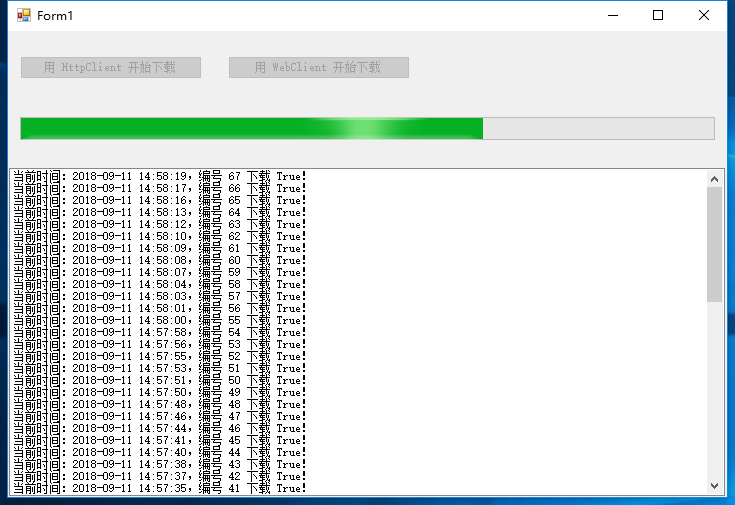
如图:
4. 总结
由于本下载采用依次来异步下载,虽然可以保证下载的文件的完整,但单位时间内效率不高,可能进度缓慢。且如果其中一个占用了较多的时间(比如:2分钟),那么整体的下载进度就会变慢。接下来,我会逐步优化它,敬请关注!
谢谢浏览!
一个简单的利用 WebClient 异步下载的示例(二)的更多相关文章
- 一个简单的利用 WebClient 异步下载的示例(三)
继续上一篇 一个简单的利用 WebClient 异步下载的示例(二) 后,继续优化它. 1. 直接贴代码了: DownloadEntry: public class DownloadEntry { p ...
- 一个简单的利用 WebClient 异步下载的示例(一)
继上一篇文章 一个简单的利用 HttpClient 异步下载的示例 ,我们知道不管是 HttpClient,还算 WebClient,都不建议每次调用都 new HttpClient,或 new We ...
- 一个简单的利用 WebClient 异步下载的示例(五)(完结篇)
接着上一篇,我们继续来优化.我们的 SkyParallelWebClient 可否支持切换“同步下载模式”和“异步下载模式”呢,好处是大量的代码不用改,只需要调用 skyParallelWebClie ...
- 一个简单的利用 WebClient 异步下载的示例(四)
接上一篇,我们继续优化它. 1. DownloadEntry 类 public class DownloadEntry { public string Url { get; set; } public ...
- 一个简单的利用 HttpClient 异步下载的示例
可能你还会喜欢 一个简单的利用 WebClient 异步下载的示例 ,且代码更加新. 1. 定义自己的 HttpClient 类. using System; using System.Collec ...
- [.NET] 一步步打造一个简单的 MVC 电商网站 - BooksStore(二)
一步步打造一个简单的 MVC 电商网站 - BooksStore(二) 本系列的 GitHub地址:https://github.com/liqingwen2015/Wen.BooksStore 前: ...
- 一个简单的AXIS远程调用Web Service示例
我们通常都将编写好的Web Service发布在Tomcat或者其他应用服务器上,然后通过浏览器调用该Web Service,返回规范的XML文件.但是如果我们不通过浏览器调用,而是通过客户端程序调用 ...
- [c#]WebClient异步下载文件并显示进度
摘要 在项目开发中经常会用到下载文件,这里使用winform实现了一个带进度条的例子. 一个例子 using System; using System.Collections.Generic; usi ...
- WebClient异步下载文件
namespace ConsoleAppSyncDownload{ class Program { static void Main(string[] args) { ...
随机推荐
- nodejs通过钉钉群机器人推送消息
nodejs 通过钉钉群机器人推送消息 Intro 最近在用 nodejs 写爬虫,之前的 nodejs 爬虫代码用 js 写的,感觉可维护性太差,也没有智能提示,于是把js改用ts(typescri ...
- 使用Java操作Elasticsearch(Elasticsearch的java api使用)
1.Elasticsearch是基于Lucene开发的一个分布式全文检索框架,向Elasticsearch中存储和从Elasticsearch中查询,格式是json. 索引index,相当于数据库中的 ...
- 只想听歌曲的高潮部分?让我用python来教你做个音乐高潮提取器!
有些时候,我们为了设定手机铃声或者发抖音视频时,会耗费大量时间在音乐剪辑上.尤其是想发布大量抖音视频的时候,我们得收集大量的短音乐,这是一个相当耗费时间的工作.那么,这个音乐高潮的提取能不能自动化呢? ...
- java核心技术第二篇之数据库SQL语法
#查询products表记录SELECT * FROM products WHERE price > 2000;-- 单行注释/* 多行注释*/#创建数据库CREATE DATABASE hei ...
- fatal error: iconv.h: No such file or directory
CodeLite CodeLite编译(使用Cygwin Toolchain)出现如下错误: fatal error: iconv.h: No such file or directory 解决办法 ...
- ucoreOS_lab 1~8 实验报告导航
所有的实验已经全部完成,实验的源代码及报告都在 Github 上,欢迎大家批评指正,如果觉得对你有帮助的话,欢迎为此项目 star & watch & fork 三连,让更多的朋友们看 ...
- 6-SQL子查询
(1) 什么是关联子查询,什么是非关联子查询 (嵌套查询) 子查询从数据表中查询了数据结果,如果这个数据结果只执行一次,然后这个数据结果作为主查询的条件进行执行,那么这样的子查询叫做非关联子查询. 如 ...
- FileSizeLimitExceededException
org.apache.tomcat.util.http.fileupload.FileUploadBase$FileSizeLimitExceededException 很明显,这异常的意思是文件大小 ...
- Ingo Molnar 的实时补丁
一.简介 Ingo Molnar 的实时补丁是完全开源的,它采用的实时实现技术完全类似于Timesys Linux,而且中断线程化的代码是基于TimeSys Linux的中断线程化代码的.这些实时实现 ...
- [PHP] 存储改造中的逻辑和清理遗留的问题
现象:用户读信时,根据路径的哈希结果,访问四台服务器中一台请求文件,这四台缓存机器已经下线,访问不到再去后端存储访问浪费了时间 前因:每一封信都是一个文件,存储在公司内部的分布式文件系统s3上.因为读 ...