
(十)c#Winform自定义控件-横向列表
官网
前提
入行已经7,8年了,一直想做一套漂亮点的自定义控件,于是就有了本系列文章。
GitHub:https://github.com/kwwwvagaa/NetWinformControl
码云:https://gitee.com/kwwwvagaa/net_winform_custom_control.git
如果觉得写的还行,请点个 star 支持一下吧
欢迎前来交流探讨: 企鹅群568015492 idkey=6e08741ef16fe53bf0314c1c9e336c4f626047943a8b76bac062361bab6b4f8d">
目录
https://www.cnblogs.com/bfyx/p/11364884.html
准备工作
梳理一下需求,我们需要一个横向的节点列表控件,可以进行左右翻页
根据上面所写的需求,我们需要分为2步操作,1:创建项控件,2:创建列表控件
开始
首先我们创建项控件,添加一个用户控件,命名UCHorizontalListItem
代码量并不多,我们看下完整代码
 // 版权所有  黄正辉  交流群:568015492   QQ:623128629

 // 文件名称:UCHorizontalListItem.cs

 // 创建日期:2019-08-15 16:01:13

 // 功能描述:HorizontalList

 // 项目地址:https://gitee.com/kwwwvagaa/net_winform_custom_control

 using System;

 using System.Collections.Generic;

 using System.ComponentModel;

 using System.Drawing;

 using System.Data;

 using System.Linq;

 using System.Text;

 using System.Windows.Forms;

 namespace HZH_Controls.Controls

 {

     [ToolboxItem(false)]

     public partial class UCHorizontalListItem : UserControl

     {

         public event EventHandler SelectedItem;

         private KeyValuePair<string, string> _DataSource = new KeyValuePair<string, string>();

         public KeyValuePair<string, string> DataSource

         {

             get { return _DataSource; }

             set

             {

                 _DataSource = value;

                 int intWidth = ControlHelper.GetStringWidth(value.Value, lblTitle.CreateGraphics(), lblTitle.Font);

                 if (intWidth < )

                     intWidth = ;

                 this.Width = intWidth + ;

                 lblTitle.Text = value.Value;

                 SetSelect(false);

             }

         }

         public UCHorizontalListItem()

         {

             InitializeComponent();

             this.Dock = DockStyle.Right;

             this.MouseDown += Item_MouseDown;

             this.lblTitle.MouseDown += Item_MouseDown;

             this.ucSplitLine_H1.MouseDown += Item_MouseDown;

         }

         void Item_MouseDown(object sender, MouseEventArgs e)

         {

             if (SelectedItem != null)

                 SelectedItem(this, e);

         }

         public void SetSelect(bool bln)

         {

             if (bln)

             {

                 lblTitle.ForeColor = Color.FromArgb(, , );

                 ucSplitLine_H1.Visible = true;

                 this.lblTitle.Padding = new Padding(, , , );

             }

             else

             {

                 lblTitle.ForeColor = Color.FromArgb(, , );

                 ucSplitLine_H1.Visible = false;

                 this.lblTitle.Padding = new Padding(, , , );

             }

         }

     }

 }
 namespace HZH_Controls.Controls

 {

     partial class UCHorizontalListItem

     {

         /// <summary>

         /// 必需的设计器变量。

         /// </summary>

         private System.ComponentModel.IContainer components = null;

         /// <summary>

         /// 清理所有正在使用的资源。

         /// </summary>

         /// <param name="disposing">如果应释放托管资源,为 true;否则为 false。</param>

         protected override void Dispose(bool disposing)

         {

             if (disposing && (components != null))

             {

                 components.Dispose();

             }

             base.Dispose(disposing);

         }

         #region 组件设计器生成的代码

         /// <summary>

         /// 设计器支持所需的方法 - 不要

         /// 使用代码编辑器修改此方法的内容。

         /// </summary>

         private void InitializeComponent()

         {

             this.lblTitle = new System.Windows.Forms.Label();

             this.ucSplitLine_H1 = new HZH_Controls.Controls.UCSplitLine_H();

             this.SuspendLayout();

             //

             // lblTitle

             //

             this.lblTitle.Dock = System.Windows.Forms.DockStyle.Fill;

             this.lblTitle.Font = new System.Drawing.Font("微软雅黑", 10F);

             this.lblTitle.ForeColor = System.Drawing.Color.FromArgb(((int)(((byte)()))), ((int)(((byte)()))), ((int)(((byte)()))));

             this.lblTitle.Location = new System.Drawing.Point(, );

             this.lblTitle.Name = "lblTitle";

             this.lblTitle.Padding = new System.Windows.Forms.Padding(, , , );

             this.lblTitle.Size = new System.Drawing.Size(, );

             this.lblTitle.TabIndex = ;

             this.lblTitle.Text = "分类名称\r\n分类名称";

             this.lblTitle.TextAlign = System.Drawing.ContentAlignment.MiddleCenter;

             //

             // ucSplitLine_H1

             //

             this.ucSplitLine_H1.BackColor = System.Drawing.Color.FromArgb(((int)(((byte)()))), ((int)(((byte)()))), ((int)(((byte)()))));

             this.ucSplitLine_H1.Dock = System.Windows.Forms.DockStyle.Bottom;

             this.ucSplitLine_H1.Location = new System.Drawing.Point(, );

             this.ucSplitLine_H1.Name = "ucSplitLine_H1";

             this.ucSplitLine_H1.Size = new System.Drawing.Size(, );

             this.ucSplitLine_H1.TabIndex = ;

             this.ucSplitLine_H1.TabStop = false;

             //

             // UCHorizontalListItem

             //

             this.AutoScaleMode = System.Windows.Forms.AutoScaleMode.None;

             this.Controls.Add(this.lblTitle);

             this.Controls.Add(this.ucSplitLine_H1);

             this.Name = "UCHorizontalListItem";

             this.Padding = new System.Windows.Forms.Padding(, , , );

             this.Size = new System.Drawing.Size(, );

             this.ResumeLayout(false);

         }

         #endregion

         private UCSplitLine_H ucSplitLine_H1;

         private System.Windows.Forms.Label lblTitle;

     }

 }
设计效果如图

接着我们来创建列表控件,添加一个用户控件,命名UCHorizontalList
我们看下需要提供哪些属性
public UCHorizontalListItem SelectedItem { get; set; }

        public event EventHandler SelectedItemEvent;

        private int m_startItemIndex = ;

        private bool isAutoSelectFirst = true;

        public bool IsAutoSelectFirst

        {

            get { return isAutoSelectFirst; }

            set { isAutoSelectFirst = value; }

        }

        private List<KeyValuePair<string, string>> dataSource = null;

        public List<KeyValuePair<string, string>> DataSource

        {

            get { return dataSource; }

            set

            {

                dataSource = value;

                ReloadSource();

            }

        }
我们有时需要刷新列表
  public void ReloadSource()

         {

             try

             {

                 ControlHelper.FreezeControl(this, true);

                 this.panList.SuspendLayout();

                 this.panList.Controls.Clear();

                 this.panList.Width = this.panMain.Width;

                 if (DataSource != null)

                 {

                     foreach (var item in DataSource)

                     {

                         UCHorizontalListItem uc = new UCHorizontalListItem();

                         uc.DataSource = item;

                         uc.SelectedItem += uc_SelectItem;

                         this.panList.Controls.Add(uc);

                     }

                 }

                 this.panList.ResumeLayout(true);

                 if (this.panList.Controls.Count > )

                     this.panList.Width = panMain.Width + this.panList.Controls[].Location.X * -;

                 this.panList.Location = new Point(, );

                 m_startItemIndex = ;

                 if (this.panList.Width > panMain.Width)

                     panRight.Visible = true;

                 else

                     panRight.Visible = false;

                 panLeft.Visible = false;

                 panList.SendToBack();

                 panRight.SendToBack();

                 if (isAutoSelectFirst && DataSource != null && DataSource.Count > )

                 {

                     SelectItem((UCHorizontalListItem)this.panList.Controls[]);

                 }

             }

             finally

             {

                 ControlHelper.FreezeControl(this, false);

             }

         }
还需要处理选中处理
  private void SelectItem(UCHorizontalListItem item)

         {

             if (SelectedItem != null && !SelectedItem.IsDisposed)

                 SelectedItem.SetSelect(false);

             SelectedItem = item;

             SelectedItem.SetSelect(true);

             if (SelectedItemEvent != null)

                 SelectedItemEvent(item, null);

         }
然后就是翻页功能的处理了
  private void panLeft_MouseDown(object sender, MouseEventArgs e)

         {

             if (this.panList.Location.X >= )

             {

                 this.panList.Location = new Point(, );

                 return;

             }

             for (int i = m_startItemIndex; i >= ; i--)

             {

                 if (this.panList.Controls[i].Location.X < this.panList.Controls[m_startItemIndex].Location.X - panMain.Width)

                 {

                     m_startItemIndex = i + ;

                     break; ;

                 }

                 if (i == )

                 {

                     m_startItemIndex = ;

                 }

             }

             ResetListLocation();

             panRight.Visible = true;

             if (this.panList.Location.X >= )

             {

                 panLeft.Visible = false;

             }

             else

             {

                 panLeft.Visible = true;

             }

             panList.SendToBack();

             panRight.SendToBack();

         }

         private void panRight_MouseDown(object sender, MouseEventArgs e)

         {

             if (this.panList.Location.X + this.panList.Width <= this.panMain.Width)

                 return;

             if (this.panList.Controls.Count <= )

                 return;

             for (int i = m_startItemIndex; i < this.panList.Controls.Count; i++)

             {

                 if (this.panList.Location.X + this.panList.Controls[i].Location.X + this.panList.Controls[i].Width > panMain.Width)

                 {

                     m_startItemIndex = i;

                     break;

                 }

             }

             ResetListLocation();

             panLeft.Visible = true;

             if (panList.Width + panList.Location.X <= panMain.Width)

                 panRight.Visible = false;

             else

                 panRight.Visible = true;

             panList.SendToBack();

             panRight.SendToBack();

         }

         private void ResetListLocation()

         {

             if (this.panList.Controls.Count > )

             {

                 this.panList.Location = new Point(this.panList.Controls[m_startItemIndex].Location.X * -, );

             }

         }
最后向外暴露一个设置选中的功能
 public void SetSelect(string strKey)

         {

             foreach (UCHorizontalListItem item in this.panList.Controls)

             {

                 if (item.DataSource.Key == strKey)

                 {

                     SelectItem(item);

                     return;

                 }

             }

         }
以上就是主要东西了,再看下完整代码
 // 版权所有  黄正辉  交流群:568015492   QQ:623128629

 // 文件名称:UCHorizontalList.cs

 // 创建日期:2019-08-15 16:01:06

 // 功能描述:HorizontalList

 // 项目地址:https://gitee.com/kwwwvagaa/net_winform_custom_control

 using System;

 using System.Collections.Generic;

 using System.ComponentModel;

 using System.Drawing;

 using System.Data;

 using System.Linq;

 using System.Text;

 using System.Windows.Forms;

 namespace HZH_Controls.Controls

 {

     public partial class UCHorizontalList : UserControl

     {

         public UCHorizontalListItem SelectedItem { get; set; }

         public event EventHandler SelectedItemEvent;

         private int m_startItemIndex = ;

         private bool isAutoSelectFirst = true;

         public bool IsAutoSelectFirst

         {

             get { return isAutoSelectFirst; }

             set { isAutoSelectFirst = value; }

         }

         private List<KeyValuePair<string, string>> dataSource = null;

         public List<KeyValuePair<string, string>> DataSource

         {

             get { return dataSource; }

             set

             {

                 dataSource = value;

                 ReloadSource();

             }

         }

         public UCHorizontalList()

         {

             InitializeComponent();

         }

         public void ReloadSource()

         {

             try

             {

                 ControlHelper.FreezeControl(this, true);

                 this.panList.SuspendLayout();

                 this.panList.Controls.Clear();

                 this.panList.Width = this.panMain.Width;

                 if (DataSource != null)

                 {

                     foreach (var item in DataSource)

                     {

                         UCHorizontalListItem uc = new UCHorizontalListItem();

                         uc.DataSource = item;

                         uc.SelectedItem += uc_SelectItem;

                         this.panList.Controls.Add(uc);

                     }

                 }

                 this.panList.ResumeLayout(true);

                 if (this.panList.Controls.Count > )

                     this.panList.Width = panMain.Width + this.panList.Controls[].Location.X * -;

                 this.panList.Location = new Point(, );

                 m_startItemIndex = ;

                 if (this.panList.Width > panMain.Width)

                     panRight.Visible = true;

                 else

                     panRight.Visible = false;

                 panLeft.Visible = false;

                 panList.SendToBack();

                 panRight.SendToBack();

                 if (isAutoSelectFirst && DataSource != null && DataSource.Count > )

                 {

                     SelectItem((UCHorizontalListItem)this.panList.Controls[]);

                 }

             }

             finally

             {

                 ControlHelper.FreezeControl(this, false);

             }

         }

         void uc_SelectItem(object sender, EventArgs e)

         {

             SelectItem(sender as UCHorizontalListItem);

         }

         private void SelectItem(UCHorizontalListItem item)

         {

             if (SelectedItem != null && !SelectedItem.IsDisposed)

                 SelectedItem.SetSelect(false);

             SelectedItem = item;

             SelectedItem.SetSelect(true);

             if (SelectedItemEvent != null)

                 SelectedItemEvent(item, null);

         }

         private void panLeft_MouseDown(object sender, MouseEventArgs e)

         {

             if (this.panList.Location.X >= )

             {

                 this.panList.Location = new Point(, );

                 return;

             }

             for (int i = m_startItemIndex; i >= ; i--)

             {

                 if (this.panList.Controls[i].Location.X < this.panList.Controls[m_startItemIndex].Location.X - panMain.Width)

                 {

                     m_startItemIndex = i + ;

                     break; ;

                 }

                 if (i == )

                 {

                     m_startItemIndex = ;

                 }

             }

             ResetListLocation();

             panRight.Visible = true;

             if (this.panList.Location.X >= )

             {

                 panLeft.Visible = false;

             }

             else

             {

                 panLeft.Visible = true;

             }

             panList.SendToBack();

             panRight.SendToBack();

         }

         private void panRight_MouseDown(object sender, MouseEventArgs e)

         {

             if (this.panList.Location.X + this.panList.Width <= this.panMain.Width)

                 return;

             if (this.panList.Controls.Count <= )

                 return;

             for (int i = m_startItemIndex; i < this.panList.Controls.Count; i++)

             {

                 if (this.panList.Location.X + this.panList.Controls[i].Location.X + this.panList.Controls[i].Width > panMain.Width)

                 {

                     m_startItemIndex = i;

                     break;

                 }

             }

             ResetListLocation();

             panLeft.Visible = true;

             if (panList.Width + panList.Location.X <= panMain.Width)

                 panRight.Visible = false;

             else

                 panRight.Visible = true;

             panList.SendToBack();

             panRight.SendToBack();

         }

         private void ResetListLocation()

         {

             if (this.panList.Controls.Count > )

             {

                 this.panList.Location = new Point(this.panList.Controls[m_startItemIndex].Location.X * -, );

             }

         }

         public void SetSelect(string strKey)

         {

             foreach (UCHorizontalListItem item in this.panList.Controls)

             {

                 if (item.DataSource.Key == strKey)

                 {

                     SelectItem(item);

                     return;

                 }

             }

         }

     }

 }
 namespace HZH_Controls.Controls

 {

     partial class UCHorizontalList

     {

         /// <summary>

         /// 必需的设计器变量。

         /// </summary>

         private System.ComponentModel.IContainer components = null;

         /// <summary>

         /// 清理所有正在使用的资源。

         /// </summary>

         /// <param name="disposing">如果应释放托管资源,为 true;否则为 false。</param>

         protected override void Dispose(bool disposing)

         {

             if (disposing && (components != null))

             {

                 components.Dispose();

             }

             base.Dispose(disposing);

         }

         #region 组件设计器生成的代码

         /// <summary>

         /// 设计器支持所需的方法 - 不要

         /// 使用代码编辑器修改此方法的内容。

         /// </summary>

         private void InitializeComponent()

         {

             this.panMain = new System.Windows.Forms.Panel();

             this.panList = new System.Windows.Forms.Panel();

             this.panRight = new System.Windows.Forms.Panel();

             this.panLeft = new System.Windows.Forms.Panel();

             this.panMain.SuspendLayout();

             this.SuspendLayout();

             //

             // panMain

             //

             this.panMain.Controls.Add(this.panList);

             this.panMain.Dock = System.Windows.Forms.DockStyle.Fill;

             this.panMain.Location = new System.Drawing.Point(, );

             this.panMain.Name = "panMain";

             this.panMain.Size = new System.Drawing.Size(, );

             this.panMain.TabIndex = ;

             //

             // panList

             //

             this.panList.Anchor = System.Windows.Forms.AnchorStyles.Left;

             this.panList.BackColor = System.Drawing.Color.Transparent;

             this.panList.Location = new System.Drawing.Point(, );

             this.panList.Name = "panList";

             this.panList.Size = new System.Drawing.Size(, );

             this.panList.TabIndex = ;

             //

             // panRight

             //

             this.panRight.BackgroundImage = global::HZH_Controls.Properties.Resources.chevron_right;

             this.panRight.BackgroundImageLayout = System.Windows.Forms.ImageLayout.Center;

             this.panRight.Dock = System.Windows.Forms.DockStyle.Right;

             this.panRight.Location = new System.Drawing.Point(, );

             this.panRight.Name = "panRight";

             this.panRight.Size = new System.Drawing.Size(, );

             this.panRight.TabIndex = ;

             this.panRight.Visible = false;

             this.panRight.MouseDown += new System.Windows.Forms.MouseEventHandler(this.panRight_MouseDown);

             //

             // panLeft

             //

             this.panLeft.BackgroundImage = global::HZH_Controls.Properties.Resources.chevron_left;

             this.panLeft.BackgroundImageLayout = System.Windows.Forms.ImageLayout.Center;

             this.panLeft.Dock = System.Windows.Forms.DockStyle.Left;

             this.panLeft.Location = new System.Drawing.Point(, );

             this.panLeft.Name = "panLeft";

             this.panLeft.Size = new System.Drawing.Size(, );

             this.panLeft.TabIndex = ;

             this.panLeft.Visible = false;

             this.panLeft.MouseDown += new System.Windows.Forms.MouseEventHandler(this.panLeft_MouseDown);

             //

             // UCHorizontalList

             //

             this.AutoScaleMode = System.Windows.Forms.AutoScaleMode.None;

             this.Controls.Add(this.panMain);

             this.Controls.Add(this.panRight);

             this.Controls.Add(this.panLeft);

             this.Name = "UCHorizontalList";

             this.Size = new System.Drawing.Size(, );

             this.panMain.ResumeLayout(false);

             this.ResumeLayout(false);

         }

         #endregion

         private System.Windows.Forms.Panel panLeft;

         private System.Windows.Forms.Panel panRight;

         private System.Windows.Forms.Panel panMain;

         private System.Windows.Forms.Panel panList;

     }

 }
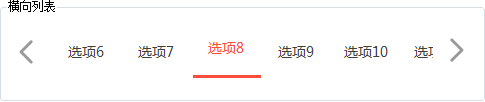
用处及效果
用处:一般用着需要横向切换选项的地方,比如省份切换等
效果:
调用示例
  List<KeyValuePair<string, string>> lstHL = new List<KeyValuePair<string, string>>();

             for (int i = ; i < ; i++)

             {

                 lstHL.Add(new KeyValuePair<string, string>(i.ToString(), "选项" + i));

             }

             this.ucHorizontalList1.DataSource = lstHL;
最后的话
如果你喜欢的话,请到 https://gitee.com/kwwwvagaa/net_winform_custom_control 点个星 星吧
(十)c#Winform自定义控件-横向列表的更多相关文章
- c#Winform自定义控件-目录
前提 入行已经7,8年了,一直想做一套漂亮点的自定义控件,于是就有了本系列文章. 开源地址:https://gitee.com/kwwwvagaa/net_winform_custom_control ...
- winform 自定义控件(高手)
高手推荐:https://www.cnblogs.com/bfyx/p/11364884.html c#Winform自定义控件-目录 前提 入行已经7,8年了,一直想做一套漂亮点的自定义控件 ...
- (三十二)c#Winform自定义控件-表格
前提 入行已经7,8年了,一直想做一套漂亮点的自定义控件,于是就有了本系列文章. 开源地址:https://gitee.com/kwwwvagaa/net_winform_custom_control ...
- (七十九)c#Winform自定义控件-导航菜单
前提 入行已经7,8年了,一直想做一套漂亮点的自定义控件,于是就有了本系列文章. GitHub:https://github.com/kwwwvagaa/NetWinformControl 码云:ht ...
- (八十二)c#Winform自定义控件-穿梭框
前提 入行已经7,8年了,一直想做一套漂亮点的自定义控件,于是就有了本系列文章. GitHub:https://github.com/kwwwvagaa/NetWinformControl 码云:ht ...
- (三十)c#Winform自定义控件-文本框(三)
前提 入行已经7,8年了,一直想做一套漂亮点的自定义控件,于是就有了本系列文章. 开源地址:https://gitee.com/kwwwvagaa/net_winform_custom_control ...
- (二十五)c#Winform自定义控件-有确定取消的窗体(一)
前提 入行已经7,8年了,一直想做一套漂亮点的自定义控件,于是就有了本系列文章. 开源地址:https://gitee.com/kwwwvagaa/net_winform_custom_control ...
- (二十六)c#Winform自定义控件-有确定取消的窗体(二)
前提 入行已经7,8年了,一直想做一套漂亮点的自定义控件,于是就有了本系列文章. 开源地址:https://gitee.com/kwwwvagaa/net_winform_custom_control ...
- (四十九)c#Winform自定义控件-下拉框(表格)
前提 入行已经7,8年了,一直想做一套漂亮点的自定义控件,于是就有了本系列文章. GitHub:https://github.com/kwwwvagaa/NetWinformControl 码云:ht ...
随机推荐
- 解决webpack打包速度慢的解决办法
技巧1 webpack在打包的时候第一次总是会做很长的准备工作,包括加载插件之类的.在刚接触webpack的时候总是webpack一下-测一下-改一下-再webpack一下,这种方式最后让很多人崩溃了 ...
- ~~Python解释器安装教程及环境变量配置~~
进击のpython Python解释器安装教程以及环境变量配置 对于一个程序员来说,能够自己配置python解释器是最基础的技能 那么问题来了,现在市面上有两种Python版本 Python 2.x ...
- NOIP2018普及T4暨洛谷P5018 对称二叉树题解
题目链接:https://www.luogu.org/problemnew/show/P5018 花絮:这道题真的比历年的t4都简单的多呀,而且本蒟蒻做得出t4做不出t3呜呜呜... 这道题可以是一只 ...
- 机器学习-利用pickle加载cifar文件
首先这里有百度云的数据集供大家下载:(官网太慢了) 链接:https://pan.baidu.com/s/1G0MxZIGSK_DyZTcuNbxraQ 提取码:ui51 复制这段内容后打开百度网盘手 ...
- [leetcode] 392. Is Subsequence (Medium)
原题 判断子序列 /** * @param {string} s * @param {string} t * @return {boolean} */ var isSubsequence = func ...
- 从后端到前端之Vue(三)小结以及一颗真实的大树
上一篇写了一下tab,下面整理一下用过的知识点,本想按照官网的文档,整理一下可以更清晰,结果也许是我的方法不对吧,总之更模糊了. 按照官网文档的顺序整理到了表单输入绑定之前,因为之前大致也就只涉及到这 ...
- [NLP-ASR] 语音识别项目整理(一) 语音预处理
简介 之前参与过114对话系统的项目,中间搁置很久,现在把之前做过的内容整理一下,一是为自己回顾,二是也希望分享自己看的内容,中间也遇到一些问题,如果您可以提一些建议将不胜感激. 114查询主要分 ...
- fuel 9.0完全离线配置+升级fule 9.1+bootstrap制作
2017-08-23 fuel 完全离线配置 完全离线适用于部署在内网,无Internet的环境当中,且需要升级fuel版本的情况.理论上,我的办法适用所有版本. 以下所有操作全部在fuel节点上. ...
- 我是这样一步步理解--主题模型(Topic Model)、LDA
1. LDA模型是什么 LDA可以分为以下5个步骤: 一个函数:gamma函数. 四个分布:二项分布.多项分布.beta分布.Dirichlet分布. 一个概念和一个理念:共轭先验和贝叶斯框架. 两个 ...
- 如何实现Excel多人共享与协作
1.写在前面的话 本人从事信息化工作多年,对Excel等电子表格的多人共享与协作接触较早,帮助客户实施的方案也较多,因此有些体会和认识.正好看到网上这方面的讨论较多,但都不完整,我就进一步做了专题调研 ...