
TensorFlow Lite for Android示例
一、TensorFlow Lite
TensorFlow Lite 是用于移动设备和嵌入式设备的轻量级解决方案。TensorFlow Lite 支持 Android、iOS 甚至树莓派等多种平台。
二、tflite格式
TensorFlow 生成的模型是无法直接给移动端使用的,需要离线转换成.tflite文件格式。
tflite 存储格式是 flatbuffers。
FlatBuffers 是由Google开源的一个免费软件库,用于实现序列化格式。它类似于Protocol Buffers、Thrift、Apache Avro。
因此,如果要给移动端使用的话,必须把 TensorFlow 训练好的 protobuf 模型文件转换成 FlatBuffers 格式。官方提供了 toco 来实现模型格式的转换。
三、API
TensorFlow Lite 提供了 C ++ 和 Java 两种类型的 API。无论哪种 API 都需要加载模型和运行模型。
而 TensorFlow Lite 的 Java API 使用了 Interpreter 类(解释器)来完成加载模型和运行模型的任务。后面的例子会看到如何使用 Interpreter。
四、TensorFlow Lite实现手写数字识别
下面的 demo 中已经包含了 mnist.tflite 模型文件。(如果没有的话,需要自己训练保存成pb文件,再转换成tflite 格式)
    // The tensorflow lite file

    private lateinit var tflite: Interpreter

    // Input byte buffer

    private lateinit var inputBuffer: ByteBuffer

    // Output array [batch_size, 10]

    private lateinit var mnistOutput: Array<FloatArray>

    init {

        try {

            tflite = Interpreter(loadModelFile(activity))

            inputBuffer = ByteBuffer.allocateDirect(

                    BYTE_SIZE_OF_FLOAT * DIM_BATCH_SIZE * DIM_IMG_SIZE_X * DIM_IMG_SIZE_Y * DIM_PIXEL_SIZE)

            inputBuffer.order(ByteOrder.nativeOrder())

            mnistOutput = Array(DIM_BATCH_SIZE) { FloatArray(NUMBER_LENGTH) }

            Log.d(TAG, "Created a Tensorflow Lite MNIST Classifier.")

        } catch (e: IOException) {

            Log.e(TAG, "IOException loading the tflite file failed.")

        }

    }
从 asserts 文件中加载 mnist.tflite 模型:
    /**

     * Load the model file from the assets folder

     */

    @Throws(IOException::class)

    private fun loadModelFile(activity: Activity): MappedByteBuffer {

        val fileDescriptor = activity.assets.openFd(MODEL_PATH)

        val inputStream = FileInputStream(fileDescriptor.fileDescriptor)

        val fileChannel = inputStream.channel

        val startOffset = fileDescriptor.startOffset

        val declaredLength = fileDescriptor.declaredLength

        return fileChannel.map(FileChannel.MapMode.READ_ONLY, startOffset, declaredLength)

    }
真正识别手写数字是在 classify() 方法:
val digit = mnistClassifier.classify(Bitmap.createScaledBitmap(paintView.bitmap, PIXEL_WIDTH, PIXEL_WIDTH, false))
classify() 方法包含了预处理用于初始化 inputBuffer、运行 mnist 模型、识别出数字。
    /**

     * Classifies the number with the mnist model.

     *

     * @param bitmap

     * @return the identified number

     */

    fun classify(bitmap: Bitmap): Int {

        if (tflite == null) {

            Log.e(TAG, "Image classifier has not been initialized; Skipped.")

        }

        preProcess(bitmap)

        runModel()

        return postProcess()

    }

    /**

     * Converts it into the Byte Buffer to feed into the model

     *

     * @param bitmap

     */

    private fun preProcess(bitmap: Bitmap?) {

        if (bitmap == null || inputBuffer == null) {

            return

        }

        // Reset the image data

        inputBuffer.rewind()

        val width = bitmap.width

        val height = bitmap.height

        // The bitmap shape should be 28 x 28

        val pixels = IntArray(width * height)

        bitmap.getPixels(pixels, 0, width, 0, 0, width, height)

        for (i in pixels.indices) {

            // Set 0 for white and 255 for black pixels

            val pixel = pixels[i]

            // The color of the input is black so the blue channel will be 0xFF.

            val channel = pixel and 0xff

            inputBuffer.putFloat((0xff - channel).toFloat())

        }

    }

    /**

     * Run the TFLite model

     */

    private fun runModel() = tflite.run(inputBuffer, mnistOutput)

    /**

     * Go through the output and find the number that was identified.

     *

     * @return the number that was identified (returns -1 if one wasn't found)

     */

    private fun postProcess(): Int {

        for (i in 0 until mnistOutput[0].size) {

            val value = mnistOutput[0][i]

            if (value == 1f) {

                return i

            }

        }

        return -1

    }
对于 Android 有一个地方需要注意,必须在 app 模块的 build.gradle 中添加如下的语句,否则无法加载模型。
android {

    ......

    aaptOptions {

        noCompress "tflite"

    }

}
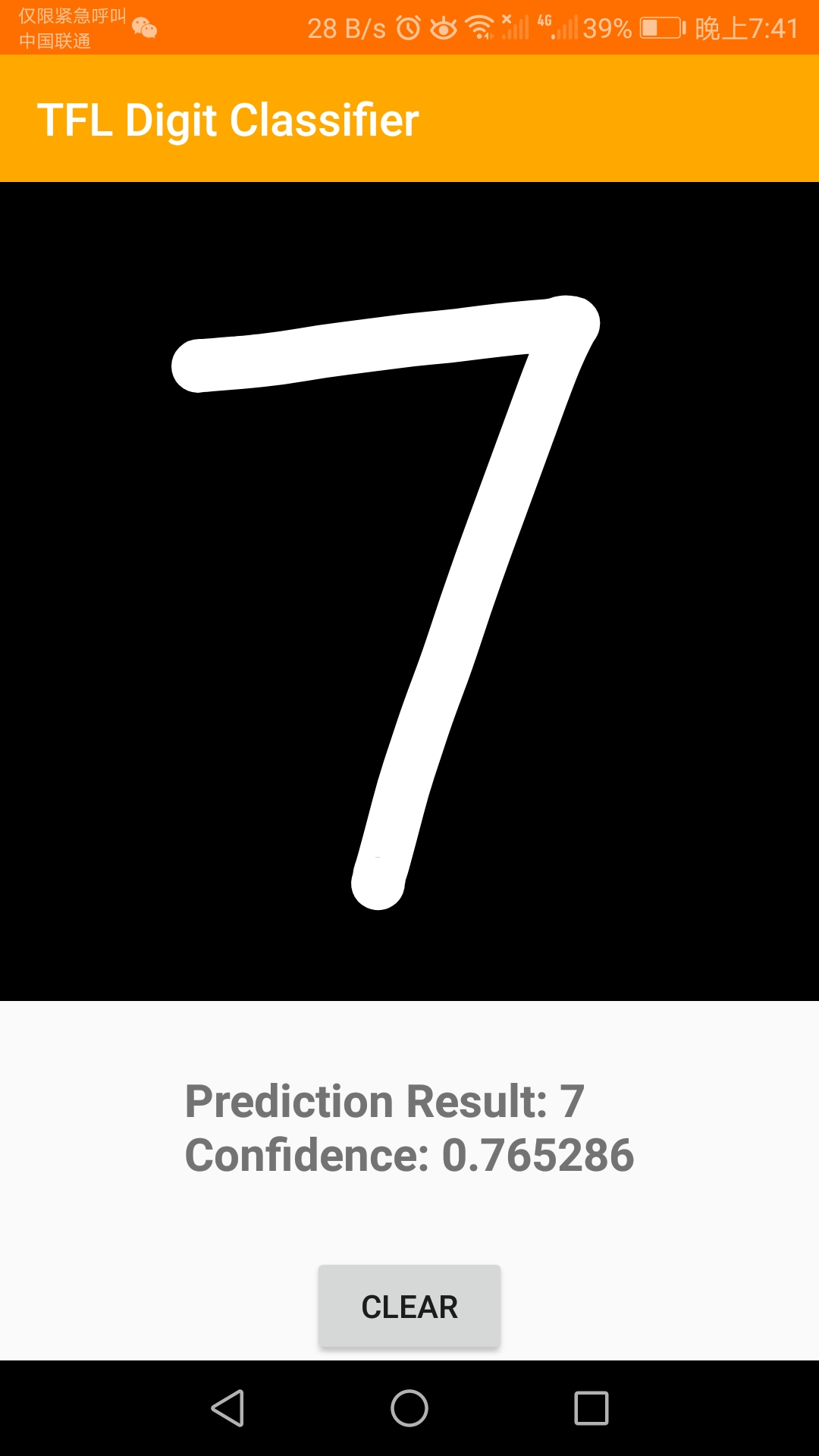
效果:
五、总结
本文 demo 的 github 地址:https://github.com/fengzhizi715/TFLite-MnistDemo
当然,也可以跑一下官方的例子:https://github.com/tensorflow/tensorflow/tree/master/tensorflow/lite/examples/android/app
虽然准确度都不咋地。。。
更多有趣的TensorFlow Lite示例:https://www.tensorflow.org/lite/examples/
TensorFlow Lite for Android示例的更多相关文章
- TensorFlow Lite demo——就是为嵌入式设备而存在的,底层调用NDK神经网络API,注意其使用的tf model需要转换下,同时提供java和C++ API,无法使用tflite的见后
Introduction to TensorFlow Lite TensorFlow Lite is TensorFlow’s lightweight solution for mobile and ...
- android NDK 神经网络API——是给tensorflow lite调用的底层API,应用开发者使用tensorflow lite即可
eural Networks API In this document show more Understanding the Neural Networks API Runtime Neural N ...
- object detection模型转换成TensorFlow Lite,在Android应用
环境 tensorflow = 1.12.0 bazel = 0.18.1 ubuntu = 16.04 python = 3.6.2 安装 bazel (0.18.1) 如果tensorflow是1 ...
- 移动端目标识别(3)——使用TensorFlow Lite将tensorflow模型部署到移动端(ssd)之Running on mobile with TensorFlow Lite (写的很乱,回头更新一个简洁的版本)
承接移动端目标识别(2) 使用TensorFlow Lite在移动设备上运行 在本节中,我们将向您展示如何使用TensorFlow Lite获得更小的模型,并允许您利用针对移动设备优化 ...
- 移动端目标识别(1)——使用TensorFlow Lite将tensorflow模型部署到移动端(ssd)之TensorFlow Lite简介
平时工作就是做深度学习,但是深度学习没有落地就是比较虚,目前在移动端或嵌入式端应用的比较实际,也了解到目前主要有 caffe2,腾讯ncnn,tensorflow,因为工作用tensorflow比较多 ...
- 在 Flutter 中使用 TensorFlow Lite 插件实现文字分类
如果您希望能有一种简单.高效且灵活的方式把 TensorFlow 模型集成到 Flutter 应用里,那请您一定不要错过我们今天介绍的这个全新插件 tflite_flutter.这个插件的开发者是 G ...
- Tensorflow Lite从入门到精通
TensorFlow Lite 是 TensorFlow 在移动和 IoT 等边缘设备端的解决方案,提供了 Java.Python 和 C++ API 库,可以运行在 Android.iOS 和 Ra ...
- 谷歌发布 TensorFlow Lite [官方网站,文档]
机器学习社区:http://tensorflow123.com/ 简介 TensorFlow Lite TensorFlow Lite 是 TensorFlow 针对移动和嵌入式设备的轻量级解决方案. ...
- 移动端目标识别(2)——使用TENSORFLOW LITE将TENSORFLOW模型部署到移动端(SSD)之TF Lite Developer Guide
TF Lite开发人员指南 目录: 1 选择一个模型 使用一个预训练模型 使用自己的数据集重新训练inception-V3,MovileNet 训练自己的模型 2 转换模型格式 转换tf.GraphD ...
随机推荐
- 推荐一款移动端小视频App声咖视频
推荐一款移动端小视频App声咖视频 1 介绍 声咖app,这款软件是一款声音交友社交软件,在上面你可以轻松互动,找到你的知心朋友,并且可以自由添加好友,与其他人互动,让交友更加轻松!, 2 特色功能介 ...
- java8 HashMap源码 详细研读
HashMap原理 目的: 单纯分析和学习hashmap的实现,不多说与Hashtable.ConcurrentHashMap等的区别. 基于 jdk1.8 在面试中有些水平的公司比较喜欢问HashM ...
- openldap 指定普通用户登录ldap后可查看某分组下的用户信息
#ldap普通用户登录限制查看信息#在/openldap/slapd.conf文件最下面添加一下代码,可控制某个用户拥有查看用户信息的权限,而其他普通用户登录后无法查看用户信息,若有多个普通用户需要用 ...
- Oracle 自定义函数实现列转行效果
在 Oracle 领域,我相信一说到列转行大部分人都会立马想到 WM_CONCAT 函数,我觉得主要是因为该函数比较实用.但事实上 WM_CONCAT 并非官方公开函数,使用会存在一定的风险:函数返回 ...
- 前端与算法 leetcode 387. 字符串中的第一个唯一字符
目录 # 前端与算法 leetcode 387. 字符串中的第一个唯一字符 题目描述 概要 提示 解析 解法一:双循环 解法二:Set法单循环 算法 传入测试用例的运行结果 执行结果 GitHub仓库 ...
- tensorflow 梯度裁剪
gvs = optimizer.compute_gradients(loss) # 计算出梯度和变量值 capped_gvs = [(tf.clip_by_value(grad, -5e+10, 5e ...
- Semaphore可以控制并发访问的线程个数
public class SemaphoreTest { //信号量,只允许 3个线程同时访问 ); public static void main(String[] args) { Executor ...
- [转帖]Linux监测某一时刻对外的IP连接情况
Linux监测某一时刻对外的IP连接情况 https://blog.csdn.net/twt326/article/details/81454171 公司机器有病毒 需要分析一下. 之前有需要,在CS ...
- scala中nothing和null的区别
1:nothing是所有类型的子类,他没有具体的实例对象,常见的应用:抛出异常.程序exit.无线循环等. 2:nothing是所有类型的子类,也是null的子类,nothing没有对象,但是可以用来 ...
- 删除链表中的倒数第N个节点
题目 给定一个链表,删除链表的倒数第 n 个节点,并且返回链表的头结点. 示例: 给定一个链表: ->->->->, 和 n = . 当删除了倒数第二个节点后,链表变为 -&g ...