
Unity 编辑器扩展
自定义检视面板的使用:
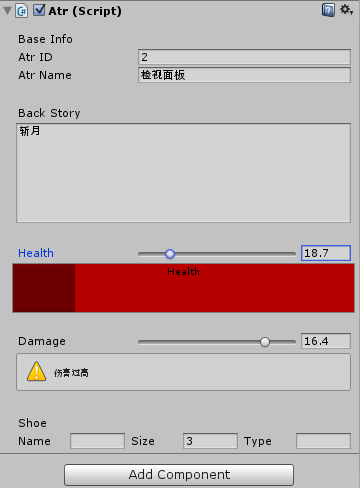
先是定义一个脚本文件,我们来修饰它的检视面板:
[HelpURL("http://www.baidu.com")]

public class Atr : MonoBehaviour

{

    public int id;

    public string Name;

    [Multiline()]

    public string BackStory;

    public float health;

    public float damage;

    public float weaponDamagel, weaponDamage2;

    public string shoeName;

    public int shoeSize;

    public string shoeType;

    [Space()]

    [Range(-,)]

    public int time;

    void Start ()

    {

        health = ;

    }

}
然后在根目录的Editor文件夹下定义一个用来修饰上面脚本检视面板的类文件:
using UnityEngine;

using System.Collections;

using UnityEditor;

[CustomEditor(typeof(Atr))]

//需要继承自editor,并且引入UnityEditor程序集

public class LearnInspector : Editor

{

    private Atr atr;

    private bool showWeapons;

    void OnEnable()

    {

        //获取当前自定义的Inspector对象

        atr = (Atr) target;

    }

    //执行该函数来自定义检视面板

    public override void OnInspectorGUI()

    {

        //不写默认是垂直布局

        EditorGUILayout.BeginVertical();

        //空格

        EditorGUILayout.Space();

        EditorGUILayout.Space();

        EditorGUILayout.LabelField("Base Info");

        atr.id = EditorGUILayout.IntField("Atr ID", atr.id);

        atr.Name = EditorGUILayout.TextField("Atr Name", atr.Name);

        EditorGUILayout.Space();

        EditorGUILayout.Space();

        EditorGUILayout.Space();

        EditorGUILayout.LabelField("Back Story");

        atr.BackStory = EditorGUILayout.TextArea(atr.BackStory, GUILayout.MinHeight());

        EditorGUILayout.Space();

        EditorGUILayout.Space();

        EditorGUILayout.Space();

        atr.health = EditorGUILayout.Slider("Health", atr.health, , );

        if (atr.health < )

        {

            GUI.color = Color.red;

        }

        else if (atr.health>)

        {

            GUI.color = Color.green;

        }

        else

        {

            GUI.color = Color.grey;

        }

        Rect progressRect = GUILayoutUtility.GetRect(, );

        EditorGUI.ProgressBar(progressRect,atr.health/100.0f,"Health");

        GUI.color = Color.white;

        EditorGUILayout.Space();

        EditorGUILayout.Space();

        EditorGUILayout.Space();

        atr.damage = EditorGUILayout.Slider("Damage", atr.damage, , );

        if(atr.damage<)

        {

            EditorGUILayout.HelpBox("伤害过低",MessageType.Error);

        }

        else if (atr.damage > )

        {

            EditorGUILayout.HelpBox("伤害过高",MessageType.Warning);

        }

        else

        {

            EditorGUILayout.HelpBox("伤害适中",MessageType.Info);

        }

        EditorGUILayout.Space();

        EditorGUILayout.Space();

        EditorGUILayout.Space();

        EditorGUILayout.LabelField("Shoe");

        EditorGUILayout.BeginHorizontal();

        EditorGUILayout.LabelField("Name", GUILayout.MaxWidth());

        atr.shoeName = EditorGUILayout.TextField(atr.shoeName);

        EditorGUILayout.LabelField("Size", GUILayout.MaxWidth());

        atr.shoeSize = EditorGUILayout.IntField(atr.shoeSize); EditorGUILayout.LabelField("Type", GUILayout.MaxWidth());

        atr.shoeType = EditorGUILayout.TextField(atr.shoeType);

        EditorGUILayout.EndHorizontal();

        EditorGUILayout.EndVertical();

    }

}

//绘制字段用到的方法

//EditorGUILayout.LabelField()标签字段

//EditorGUILayout.IntField() 整数字段

//EditorGUILayout.FloatField() 浮点数字段

//EditorGUILayout.TextField() 文本字段

//EditorGUILayout.Vector2Field() 二维向量字段

//EditorGUILayout.Vector3Field() 三维向量字段

//EditorGUILayout.Vector4Field() 四维向量字段
可以看出该修饰类和效果图对应的关系。我们可以方便的定义检视面板来协助游戏的开发调试,让它直观的显示出帮助消息。
更多的信息可以查看帮助文档:http://www.ceeger.com/Script/Editor/Editor.html
自定义窗口:
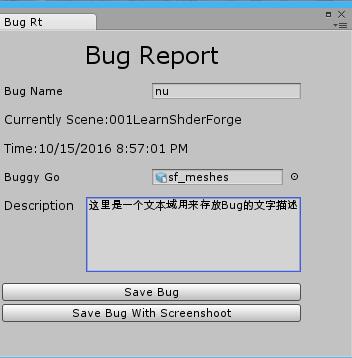
 using System;

 using UnityEngine;

 using System.Collections;

 using System.IO;

 using UnityEditor;

 using UnityEditor.SceneManagement;

 public class MyFirstWindow : EditorWindow

 {

     public Texture TxTexture;

     string bugReporterName = "";

     string description = "";

     GameObject buggyGameObject;

     MyFirstWindow()

     {

         this.titleContent=new GUIContent("Bug Rt");

     }

     [MenuItem("Tool/Bug Reporter")]

     static void showWindow()

     {

         EditorWindow.GetWindow(typeof (MyFirstWindow));

     }

     //绘制窗口界面

     void OnGUI()

     {

         GUILayout.BeginVertical();

         GUILayout.Space();

         GUI.skin.label.fontSize = ;

         GUI.skin.label.alignment = TextAnchor.MiddleCenter;

         GUILayout.Label("Bug Report");

         GUILayout.Space();

         bugReporterName = EditorGUILayout.TextField("Bug Name", bugReporterName);

         GUILayout.Space();

         GUI.skin.label.fontSize = ;

         GUI.skin.label.alignment = TextAnchor.UpperLeft;

         GUILayout.Label("Currently Scene:"+EditorSceneManager.GetActiveScene().name);

         GUILayout.Space();

         GUILayout.Label("Time:"+System.DateTime.Now);

         GUILayout.Space();

         buggyGameObject =

             (GameObject) EditorGUILayout.ObjectField("Buggy Go", buggyGameObject, typeof (GameObject), true);

         GUILayout.Space();

         GUILayout.BeginHorizontal();

         GUILayout.Label("Description", GUILayout.MaxWidth());

         description = EditorGUILayout.TextArea(description, GUILayout.MaxHeight());

         GUILayout.EndHorizontal();

         EditorGUILayout.Space();

         if (GUILayout.Button("Save Bug"))

         {

             SaveBug();

         }

         if (GUILayout.Button("Save Bug With Screenshoot"))

         {

             SaveBugWithScreeshot();

         }

         EditorGUILayout.EndVertical();//布局开始和结束相对应,缺少时可能出现窗口中的元素无法自适应的情况

     }

     private void SaveBugWithScreeshot()

     {

         Writer();

         Application.CaptureScreenshot("Assets/BugReports/" + bugReporterName + "/" + bugReporterName + ".png");

     }

     private void SaveBug()

     {

         Writer();

     }

     //IO类,用来写入保存信息

     void Writer()

     {

         Directory.CreateDirectory("Assets/BugReports/" + bugReporterName);

         StreamWriter sw = new StreamWriter("Assets/BugReports/" + bugReporterName + "/" + bugReporterName + ".txt");

         sw.WriteLine(bugReporterName);

         sw.WriteLine(DateTime.Now.ToString());

         sw.WriteLine(EditorSceneManager.GetActiveScene().name);

         sw.WriteLine(description);

         sw.Close();

     }

 }
自定义菜单项:
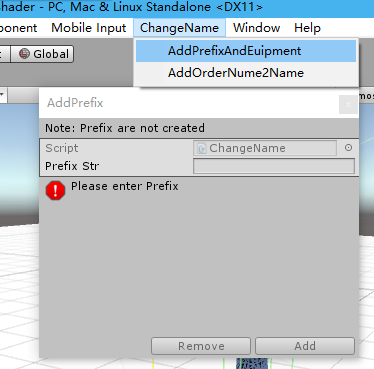
 using UnityEditor;

 using UnityEngine;

 using System.Collections;

 /// <summary>

 /// 工具类改名

 /// </summary>

 public class ChangeName : ScriptableWizard

 {

     public string PrefixStr = null;

     /// <summary>

     /// 当没有任何GameObject被选中的时候,将菜单disable(注意,这个函数名可以随意取)

     /// </summary>

     /// <returns></returns>

     [MenuItem("ChangeName/AddPrefixAndEuipment", true)]

     static bool CreateWindowDisabled()

     {

         return Selection.activeTransform;

     }

     /// <summary>

     /// 创建编辑窗口(注意,这个函数名可以随意取)

     /// </summary>

     [MenuItem("ChangeName/AddPrefixAndEuipment")]

     static void CreateWindow()

     {

         //第一个参数窗口标题

         // 定制窗口标题和按钮,其中第二个参数是Create按钮,第三个则属于other按钮

         // 如果不想使用other按钮,则可调用DisplayWizard的两参数版本

         DisplayWizard<ChangeName>(

             "AddPrefix",

             "Add", "Remove");

     }

     /// <summary>

     /// 窗口创建或窗口内容更改时调用

     /// </summary>

     void OnWizardUpdate()

     {

         helpString = "Note: Prefix are not created";

         if (string.IsNullOrEmpty(PrefixStr))

         {

             errorString = "Please enter Prefix";

             isValid = false;

         }

         else

         {

             errorString = "";

             isValid = true;

         }

     }

     /// <summary>

     /// 点击Add按钮(即Create按钮)调用

     /// </summary>

     void OnWizardCreate()

     {

         Transform[] transforms = Selection.GetTransforms(SelectionMode.TopLevel | SelectionMode.OnlyUserModifiable);

         foreach (Transform transform in transforms)

         {

             transform.name = PrefixStr + transform.name;         }

         Debug.Log("AddPrefixAndEuipment " + PrefixStr+"successed!");

     }

     /// <summary>

     /// 点击Remove(即other按钮)调用

     /// </summary>

     void OnWizardOtherButton()

     {

         Transform[] transforms = Selection.GetTransforms(SelectionMode.TopLevel | SelectionMode.OnlyUserModifiable);

         foreach (Transform transform in transforms)

         {

             if (transform.name.Contains(PrefixStr))

             {

                 transform.name=transform.name.Replace(PrefixStr, "");

             }

         }

         Debug.Log("ReMove prefix " + PrefixStr + "successed!");

     }


     [MenuItem("ChangeName/AddOrderNume2Name ")]// 为选择的对象名称添加序列号,让重名的物体相区别

     static void AddOrder2Name()

     {

         int n = ;

         Transform[] transforms = Selection.GetTransforms(SelectionMode.TopLevel | SelectionMode.OnlyUserModifiable);

         foreach (Transform transform in transforms)

         {

             transform.name = transform.name + n.ToString();

             n++;

         }

     }

     [MenuItem("GameObject/Add Child %g")]

     static void MenuAddChild()

     {

         Transform[] transforms = Selection.GetTransforms(SelectionMode.TopLevel | SelectionMode.OnlyUserModifiable);

         foreach (Transform transform in transforms)

         {

             GameObject newChild = new GameObject("_Child");

             newChild.transform.parent = transform;

         }

     }

     [MenuItem("ChangeName/ReNameUILabelX")]

     static void ReNameUILableX()

     {

         UIButton [] UIButtions = GameObject.Find("CenterMenu").transform.GetChild().GetComponentsInChildren<UIButton>();

         foreach (UIButton uiButtion in UIButtions)

         {

             if (uiButtion.gameObject.activeSelf)

             {

                 uiButtion.GetComponentInChildren<EptBtnOnClick>().EptName="X_"+ uiButtion.GetComponentInChildren<UILabel>().text;

             }

         }

     }

 }
ScriptableWizard:
继承自EditorWindow,主要用来做向导。有2个按钮,一个是Create,另一个是Other。当我们使用它的时候,他始终显示在最上层,不会被unity其他窗口遮挡。
SelectionMode:
can be used to tweak the selection returned by Selection.GetTransforms.
Note: This is an editor class. To use it you have to place your script in Assets/Editor inside your project folder. Editor classes are in the UnityEditor namespace so for C# scripts you need to add "using UnityEditor;" at the beginning of the script.
The default transform selection mode is: SelectionMode.TopLevel | SelectionMode.ExcludePrefab | SelectionMode.Editable.
| Unfiltered |
Return the whole selection. |
| TopLevel |
Only return the topmost selected transform. A selected child of another selected transform will be filtered out. |
| Deep |
Return the selection and all child transforms of the selection. |
| ExcludePrefab |
Excludes any prefabs from the selection. |
| Editable |
Excludes any objects which shall not be modified. |
| Assets |
Only return objects that are assets in the Asset directory. |
| DeepAssets |
If the selection contains folders, also include all assets and subfolders within that folder in the file hierarchy. |
补充(190426):
一键导出包,非常方便迁移测试程序或者自己的代码库
 using System;

 #if UNITY_EDITOR

 using UnityEditor;

 using System.IO;

 #endif

 using UnityEngine;

 namespace WSFramework{

     public class ExportPakge{

 #if UNITY_EDITOR

          [MenuItem("WSTool/ExportPac %e")]

         private static void ExportPackageAndCopyName(){

             var path="Assets/WSFramework";

             var fileName="WS_"+DateTime.Now.ToString("yyyyMMdd_hh")+".unitypackage";

             //--剪切板API,导出后直接粘贴出当前包的名字

             GUIUtility.systemCopyBuffer=fileName;

             //--导出package api

             AssetDatabase.ExportPackage(path,fileName, ExportPackageOptions.Recurse);

             //--打开asset目录

             Application.OpenURL("file://"+Application.dataPath);

         }

     }

 #endif

 }
assetstore一个很优秀的编辑器扩展插件,只需要在类中添加 attribute标签就能方便的实现很多功能,有兴趣的可以下载学习下
Unity 编辑器扩展的更多相关文章
- Unity编辑器扩展 Chapter7--使用ScriptableObject持久化存储数据
Unity编辑器扩展 Chapter7--使用ScriptableObject持久化存储数据 unity unity Editor ScirptableObject Unity编辑器扩展 Chapt ...
- Unity编辑器扩展chapter1
Unity编辑器扩展chapter1 unity通过提供EditorScript API 的方式为我们提供了方便强大的编辑器扩展途径.学好这一部分可以使我们学会编写一些工具来提高效率,甚至可以自制一些 ...
- unity 编辑器扩展简单入门
unity 编辑器扩展简单入门 通过使用编辑器扩展,我们可以对一些机械的操作实现自动化,而不用使用额外的环境,将工具与开发环境融为一体:并且,编辑器扩展也提供GUI库,来实现可视化操作:编辑器扩展甚至 ...
- Unity编辑器扩展Texture显示选择框
学习NGUI插件的时候,突然间有一个问题为什么它这些属性可以通过弹出窗口来选中呢? 而我自己写的组件只能使用手动拖放的方式=.=. Unity开发了组件Inspector视图扩展API,如果我们要写插 ...
- Unity 编辑器扩展 场景视图内控制对象
http://blog.csdn.net/akof1314/article/details/38129031 假设有一个敌人生成器类,其中有个属性range用来表示敌人生成的范围区域大小,那么可以用O ...
- Unity编辑器扩展
在开发中有可能需要自己开发编辑器工具,在Unity中界面扩展常见两种情况,拿某插件为例: 1,自建窗口扩展 2,脚本Inspector显示扩展 不管使用那种样式,都需要经常用到两个类EditorGUI ...
- Unity 编辑器扩展 Chapter2—Gizmos
二. 使用Gizoms绘制网格及矩阵转换使用 1. 创建Leve类,作为场景控制类: using UnityEngine; //使用namespace方便脚本管理 namespace RunAndJu ...
- unity编辑器扩展学习
扩展编辑器实际上就是在unity菜单栏中添加一些按钮,可以一键执行一些重复性的工作. 一.添加按钮 1.简单使用MenuItem特性 using UnityEngine; using UnityEdi ...
- Unity 编辑器扩展自定义窗体
这次看见Unity还可以自定义弹出窗体,让我很好奇.于是就去网上找文章看了看. 如果想自定义窗体需要把类放入Editor文件夹下面. 代码如下: using UnityEngine; using Un ...
随机推荐
- Sublime Text 3 for Mac 3176 序号版
—– BEGIN LICENSE —–sgbteamSingle User LicenseEA7E-11532598891CBB9 F1513E4F 1A3405C1 A865D53F115F202E ...
- 【洛谷P1982】小朋友的数字
小朋友的数字 题目链接 题目翻译: 每个小朋友有一个数字,构成一个数字序列a1,a2…an 我们定义“特征值”fi为a1~ai中的最大连续子段和 再定义“分数”si为1~i-1中最大的(sj+fj), ...
- STM32 Cortex-M3 NMI异常
最近在调试STM32 Cortex-M3 HardFault异常,以外发现程序居然进入了NMI异常.对于这种异常,从来没有出现过,如下图所示. 此时的R0等寄存器的值如下图所示, 堆栈指针是0x200 ...
- Java参数传递对象引用传递失效
产线问题排查,方法传递对象引用但返回后对象一直为空 原因: null作为参数传递的时候,就不是引用传参了 Java参数引用传递之例外:null 众所周知的是,java中除基本类型外,参数都是引用传递. ...
- 架构风格:万金油CS与分层
计算机科学家David Wheele曾说过这么一句话: All problems in computer science can be solved by another level of indir ...
- Jumpserver堡垒机搭建(脚本自动化)
#!/bin/bash # coding: utf- # Copyright (c) set -e #返回值为非0时,退出脚本 echo "0. 系统的一些配置" setenfor ...
- GPUImage源码解读之GPUImageContext
GPUImageContext类,提供OpenGL ES基本上下文,GPUImage相关处理线程,GLProgram缓存.帧缓存.由于是上下文对象,因此该模块提供的更多是存取.设置相关的方法. 属性列 ...
- 微信小程序中的app文件介绍
[app] 一.app.json 1.对当前小程序的全局配置 2.页面路径.界面表现.网络超时时间.底部 tab 等 { "pages":[ "pages/index/i ...
- chromium之MessagePump.h
上代码,注释已经写得很详细了. 粗看一下,这是个纯虚类,用于跨平台的通用接口. MessagePump,Pump的意思是泵,,MessagePump也就是消息泵,输送消息 namespace base ...
- Zabbix——使用邮件报警
前提条件: 1. Zabbix版本4.0 zabbix-server 命令配置: yum install mailx -y #下载邮件功能 vi /etc/mail.rc set bsdcompat ...