
较老版本 AFNetworking 使用心得

较老版本的 AFNetworking 下载链接 http://pan.baidu.com/s/14Cxga
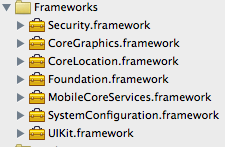
将压缩包中的文件夹拖入xcode工程项目中并引入如下的框架
简单的 JOSN 解析例子
static NSString *serverAddress = @"http://m.weather.com.cn/data/101110101.html";
// 1.创建JSON操作对象
AFJSONRequestOperation *operation =
[AFJSONRequestOperation
JSONRequestOperationWithRequest:[NSURLRequest requestWithURL:[NSURL URLWithString:serverAddress]]
success:^(NSURLRequest *request, NSHTTPURLResponse *response, id JSON) {
NSLog(@"success -- %@", JSON);
} failure:^(NSURLRequest *request, NSHTTPURLResponse *response, NSError *error, id JSON) {
NSLog(@"failure -- %@", JSON);
}];
// 2.执行对象的操作异步加载
[operation start];
简单的 XML 解析例子
static NSString *serverAddress = @"http://flash.weather.com.cn/wmaps/xml/beijing.xml";
// 1.创建XML操作对象
AFXMLRequestOperation *operation =
[AFXMLRequestOperation
XMLParserRequestOperationWithRequest:[NSURLRequest requestWithURL:[NSURL URLWithString:serverAddress]]
success:^(NSURLRequest *request, NSHTTPURLResponse *response, NSXMLParser *XMLParser) {
NSLog(@"[$10000000$] success -- %@", XMLParser);
}
failure:^(NSURLRequest *request, NSHTTPURLResponse *response, NSError *error, NSXMLParser *XMLParser) {
NSLog(@"failure -- %@", XMLParser);
}];
// 2.执行对象的操作异步加载
[operation start];
HTTP POST请求例子
-----------------------------------------------------------------------------------------------------
//内联函数
NS_INLINE AFHTTPClient * createAFHTTPClient(NSString *baseURLString)
{
//创建一个AFHTTPClient的链接,仅需传入服务器URL的String即可
return [AFHTTPClient clientWithBaseURL:[NSURL URLWithString:baseURLString]];
}
NS_INLINE NSData * createJSONDataFromDict(NSDictionary *params)
{
//根据字典创建出JSON专用格式的NSData
return [NSJSONSerialization dataWithJSONObject:params
options:NSJSONWritingPrettyPrinted
error:nil];
}
-----------------------------------------------------------------------------------------------------
//服务器地址
static NSString *serverAddress = @"http://art.wooboo.com.cn/support/service.shtml";
//初始化一个本地的httpClient
AFHTTPClient *httpClient = createAFHTTPClient(serverAddress);
//完善httpClient并形成一个POST请求报文
NSURLRequest *request = [httpClient multipartFormRequestWithMethod:@"POST"
path:serverAddress
parameters:nil
constructingBodyWithBlock:^(id<AFMultipartFormData> formData) {
NSArray *paramsType = @[@{@"action": @"loadImg", @"artId": @"0"}];
//转换字典数据为JSON专用格式并再次转换为字符串
NSString *params = [[NSString alloc] initWithData:
createJSONDataFromDict(paramsType[0])
encoding:NSUTF8StringEncoding];
//进一步完善请求的内容 (Content-Disposition: form-data; name=#{name}")
[formData appendPartWithFormData:[params dataUsingEncoding:NSUTF8StringEncoding]
name:@"p"];
}];
//将请求报文发送到服务器进行链接
AFHTTPRequestOperation *operation = [[AFHTTPRequestOperation alloc] initWithRequest:request];
[operation
setCompletionBlockWithSuccess:^(AFHTTPRequestOperation *operation, id responseObject) {
NSLog(@"%@", jsonObjectFromData(responseObject));
} failure:^(AFHTTPRequestOperation *operation, NSError *error) {
NSLog(@"error.");
}];
[operation start];
加载网络图片
-----------------------------------------------------------------------------------------------------
//内联函数
NS_INLINE NSURL * netURL(NSString *netPath)
{
//网络文件的URL
return [NSURL URLWithString:netPath];
}
NS_INLINE UIImage * imageFromBuddleByName(NSString *imageName)
{
//通过名字获取buddle中图片资源
return [UIImage imageNamed:imageName];
}
-----------------------------------------------------------------------------------------------------
- (void)setImageWithURL:(NSURL *)url
placeholderImage:(UIImage *)placeholderImage;
Creates and enqueues an image request operation, which asynchronously downloads the image from the specified URL. Any previous image request for the receiver will be cancelled. If the image is cached locally, the image is set immediately, otherwise the specified placeholder image will be set immediately, and then the remote image will be set once the request is finished.
-----------------------------------------------------------------------------------------------------
static NSString *picServerAddress =
@"http://wallpapers.wallbase.cc/high-resolution/wallpaper-2677423.jpg";
UIImageView *imageView = [[UIImageView alloc] initWithFrame:CGRectMake(0.0f, 0.0f, 100.0f, 100.0f)];
[imageView setImageWithURL:netURL(picServerAddress)
placeholderImage:imageFromBuddleByName(@"1.png")];
-----------------------------------------------------------------------------------------------------
较老版本 AFNetworking 使用心得的更多相关文章
- 较老版本的AFNetworking使用心得
较老版本的 AFNetworking 下载链接 ( http://pan.baidu.com/s/14Cxga ) 将压缩包中的文件夹拖入xcode工程项目中并引入如下的框架 简单的 JOSN 解析例 ...
- 如何给不支持新特性的浏览器打补丁(让老版本IE兼容新特性)
一个非常棒的 JavaScript 框架叫做 Modernizr(http://www.modernizr. com),用于向缺少 HTML5/CSS3特性支持的浏览器打补丁.由 Alexander ...
- 快速入门系列--WebAPI--04在老版本MVC4下的调整
WebAPI是建立在MVC和WCF的基础上的,原来微软老是喜欢封装的很多,这次终于愿意将http编程模型的相关细节暴露给我们了.在之前的介绍中,基本上都基于.NET 4.5之后版本,其System.N ...
- 微软Hololens学院教程-Hologram 220-空间声音(Spatial sound )【本文是老版本,与最新的微软教程有出入】
这是老版本的教程,为了不耽误大家的时间,请直接看原文,本文仅供参考哦! 原文链接https://developer.microsoft.com/EN-US/WINDOWS/HOLOGRAPHIC/ho ...
- 微软Hololens学院教程-Hologram 230-空间场景建模(Spatial mapping )【微软教程已经更新,本文是老版本】
这是老版本的教程,为了不耽误大家的时间,请直接看原文,本文仅供参考哦!原文链接:https://developer.microsoft.com/EN-US/WINDOWS/HOLOGRAPHIC/ho ...
- 微软Hololens学院教程- Holograms 100: Getting Started with Unity【微软教程已经更新,本文是老版本】
这是老版本的教程,为了不耽误大家的时间,请直接看原文,本文仅供参考哦!原文链接:https://developer.microsoft.com/EN-US/WINDOWS/HOLOGRAPHIC/ho ...
- 微软Hololens学院教程-Hologram 212-Voice(语音)【微软教程已经更新,本文是老版本】
这是老版本的教程,为了不耽误大家的时间,请直接看原文,本文仅供参考哦!原文链接:https://developer.microsoft.com/EN-US/WINDOWS/HOLOGRAPHIC/ho ...
- 微软Hololens学院教程-Hologram 211-Gestures(手势)【微软教程已经更新,本文是老版本】
这是老版本的教程,为了不耽误大家的时间,请直接看原文,本文仅供参考哦!原文链接:https://developer.microsoft.com/EN-US/WINDOWS/HOLOGRAPHIC/ho ...
- 微软Hololens学院教程-Hologram 210 Gaze(凝视)【微软教程已经更新,本文是老版本】
这是老版本的教程,为了不耽误大家的时间,请直接看原文,本文仅供参考哦!原文链接:https://developer.microsoft.com/EN-US/WINDOWS/HOLOGRAPHIC/ho ...
随机推荐
- HDR 视频编码
前转换以及后转换:-f xxx.cfg (以及注意工作目录以及路径名/和//) HEVC视频编码:-c xxx.cfg -c xx.cfg(视频的配置文件)
- Navicat Premium 常用功能讲解
https://www.linuxidc.com/Linux/2016-04/130159.htm Navicat Premium 常用功能讲解 1.快捷键 1.1. F8 快速回到当前对象列表 1. ...
- chunk writer 中需要对抛错的交易进行回滚,同时又要在其他表中记录是哪一笔交易记录失败
首先根据我有限的知识判断,回滚之后进行写表,该写表动作只能使用listener来进行. 考虑使用的listener有:ItemWriteListener StepExecutionListen ...
- HDU 4348 To the moon(主席树区间修改)
题意 给你一个区间,支持如下操作: 在一段区间内加上一个值,并生成一个历史版本 查询某个版本下一段区间内的和 回到一个历史版本上并舍弃之后的版本 做法 这就是主席树区间修改裸题啦QwQ 上一篇博客我讲 ...
- centos7配置svn钩子hooks脚本自动同步代码到项目目录
由于项目需要,svn提交后的代码希望再测试服务器上测试,每次提交后还要手动去svn update一次 十分麻烦,配置好svn钩子以后就省去了这些麻烦. 进入svn版本库目录找到hooks目录找到文件p ...
- thinkphp中table方法
table方法也属于模型类的连贯操作方法之一,主要用于指定操作的数据表. 用法 一般情况下,操作模型的时候系统能够自动识别当前对应的数据表,所以,使用table方法的情况通常是为了:切换操作的数据表: ...
- 错误跳转js
<script type="text/javascript"> var t = 5; //倒计时的秒数 function showTime(){ document.ge ...
- 「WC 2019」数树
「WC 2019」数树 一道涨姿势的EGF好题,官方题解我并没有完全看懂,尝试用指数型生成函数和组合意义的角度推了一波.考场上只得了 44 分也暴露了我在数数的一些基本套路上的不足,后面的 \(\ex ...
- NOI.AC NOIP模拟赛 第四场 补记
NOI.AC NOIP模拟赛 第四场 补记 子图 题目大意: 一张\(n(n\le5\times10^5)\)个点,\(m(m\le5\times10^5)\)条边的无向图.删去第\(i\)条边需要\ ...
- Intel Code Challenge Elimination Round (Div.1 + Div.2, combined) A. Broken Clock 水题
A. Broken Clock 题目连接: http://codeforces.com/contest/722/problem/A Description You are given a broken ...