
如何整合Office Web Apps至自己开发的系统(二)
WOPI项目的创建
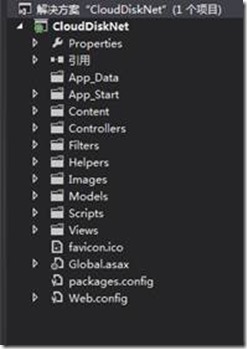
首先用vs2012创建一个mvc4的程序。如图:
从上一篇我们可以知道,WOPI通讯主要通过两个服务:
一个是CheckFileInfo服务,
一个是GetFile服务。
所以下面我们主要介绍这两个服务的创建。
1. 首先创建CheckFileInfo服务:
我们先确定这个服务的路由地址
设置为:http://<ServerName>/files/<filename>?access_token=<token>
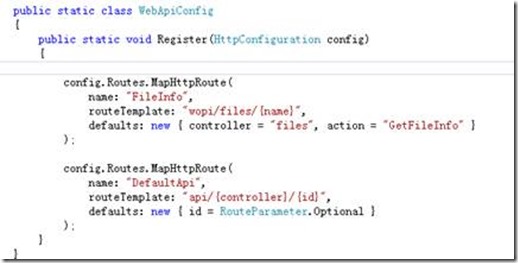
修改App_Start文件夹下面的WebApiConfig.cs文件。
插入下列代码:
config.Routes.MapHttpRoute(
name: "FileInfo",
routeTemplate: "wopi/files/{name}",
defaults: new { controller = "files", action = "GetFileInfo" }
);
如图所示
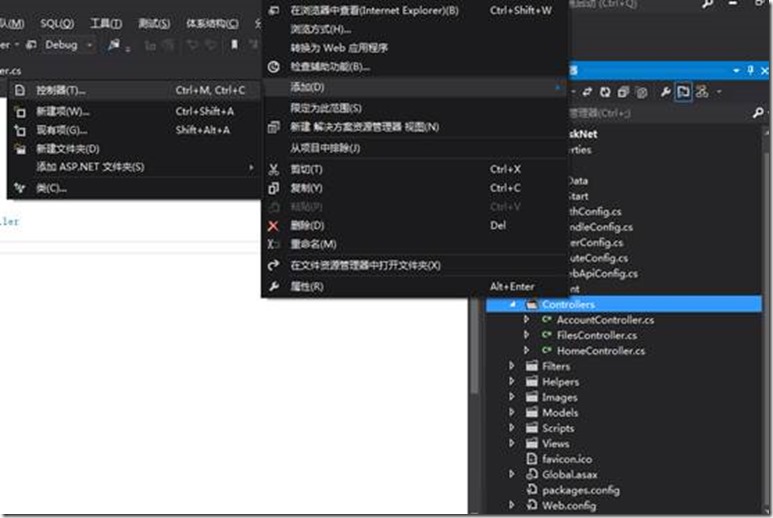
创建一个名称为files的Controller,
设置为空API控制器:
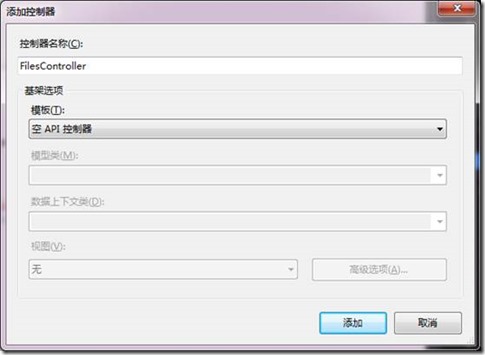
之所以我们不用平常的MVC控制器,而选API控制器,是因为我们做的是服务,来返回信息,所以要换成ApiController。
这个服务要返回的是json,属性包括为
BaseFileName
OwerId
Size
SHA256
Version
所以我们要创建一个model,包含上述属性
如下图:

在上述的路由器规则中,action用的是GetFileInfo方法,所以要在FileController规则中写一个GetFileInfo方法,这个方法返回CheckFileInfo类型。
public CheckFileInfo GetFileInfo(string name, string access_token)

{

string _access_token = access_token;

var file = HostingEnvironment.MapPath("~/App_Data/" + name);//从硬盘中获取name文件

FileInfo info = new FileInfo(file);

var json = new CheckFileInfo

{

BaseFileName = info.Name ,//"test.docx",

OwnerId = "admin",

Size = info.Length,

SHA256 = "+17lwXXN0TMwtVJVs4Ll+gDHEIO06l+hXK6zWTUiYms=",

Version = "GIYDCMRNGEYC2MJREAZDCORQGA5DKNZOGIZTQMBQGAVTAMB2GAYA===="

};

return json;

}
如下图

我们访问一下这个地址:
http://192.9.206.52:1407/wopi/files/test.docx?access_token=06l+hXK6zWTUi
这个192.9.206.52是我的本机地址。
得到下列结果:
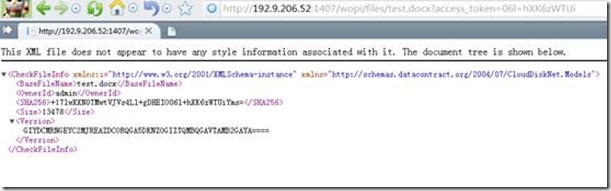
证明这个服务制作成功。
2.然后再来制作GetFile服务。
因为GetFileInfo的URI地址
http://<ServerName>/files/<filename>?access_token=<token>
所以GetFile地址应该比其多一个/Contents,所以为
http://<ServerName>/files/<filename>/Contents?access_token=<token>
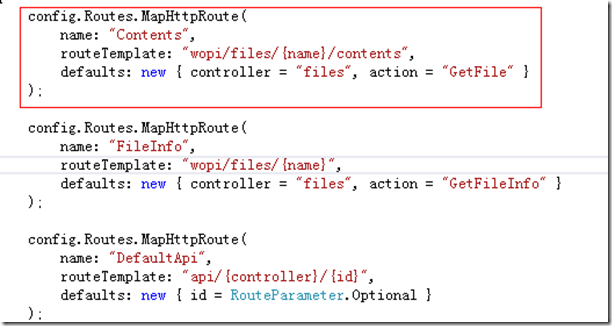
设置它的路由地址
config.Routes.MapHttpRoute(
name: "Contents",
routeTemplate: "wopi/files/{name}/contents",
defaults: new { controller = "files", action = "GetFile" }
);
如下图:
GetFile这个服务返回的应该是数据流,所以返回的类型应该是HttpResponseMessage类型。
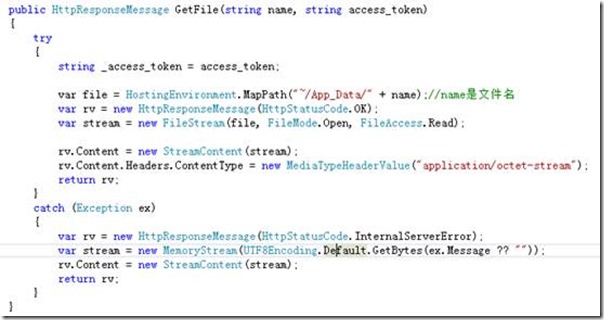
从硬盘中获取一个doc文件,转换为Stream类型,代码如下:
public HttpResponseMessage GetFile(string name, string access_token)

{

try

{

string _access_token = access_token;

var file = HostingEnvironment.MapPath("~/App_Data/" + name);//name是文件名

var rv = new HttpResponseMessage(HttpStatusCode.OK);

var stream = new FileStream(file, FileMode.Open, FileAccess.Read);

rv.Content = new StreamContent(stream);

rv.Content.Headers.ContentType = new MediaTypeHeaderValue("application/octet-stream");

return rv;

}

catch (Exception ex)

{

var rv = new HttpResponseMessage(HttpStatusCode.InternalServerError);

var stream = new MemoryStream(UTF8Encoding.Default.GetBytes(ex.Message ?? ""));

rv.Content = new StreamContent(stream);

return rv;

}

}
如下图:
至此,两个服务制作完毕。
可以访问下列地址查看效果,
其中
192.9.206.50为OWA的机器地址,
192.9.206.52为本机的地址。
这个URL地址带了两个参数
分别为WOPISrc,值为http://192.9.206.52:1407/wopi/files/test.docx
Access_token,值为06l+hXK6zWTUi
这两个参数的意思,我已经在以前的博文中《如何整合Office Web Apps至自己开发的系统(一)》说过了。
在这个例子中,access_token我是随便取的,并且在代码中也没有对这个令牌进行验证。
确保两台机器的相应端口能互相访问。
访问得到的结果如下:
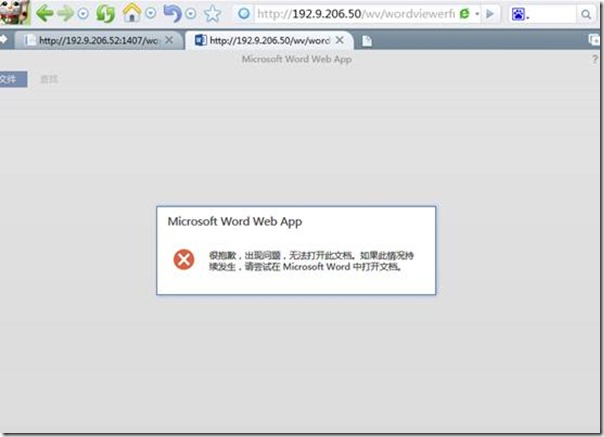
怎么会访问出错呢?
翻了很久资料,发现有老外也遇到过类似这种问题:
I write this message because on actually working on this WOPI protocol. I try to build a WOPI host. I think i'm almost finish the "view" action. But i got some problems with the CheckFileInfo (JSON) or GetFile (/content). For me everything is well fonctionning, but the WAC doesn't work just after it call my JSON. I really dont know why.. I observed all the interactions between SharePoint and WAC, to show what is different with mine host. But i think i need some help now. Does anyone can try to give me some hint ? I checked everythings (Correlation-ID, JSON, access-token) ...
别人的回答是让他考虑一下是不是SHA散列算法的问题:
You might also double-check that your SHA hashes are being calculated correctly - this can cause some problems.
并给了一个网站地址:www.tylerbutler.com/.../base64-encoded-sha256-hashes
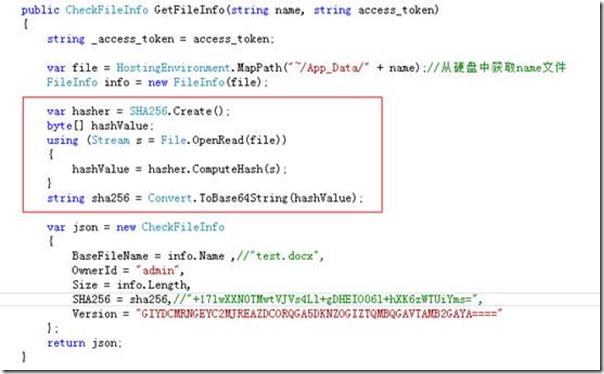
那就按照提示把散列算法加上去,
代码如下:
var file = HostingEnvironment.MapPath("~/App_Data/" + name);//从硬盘中获取name文件

            FileInfo info = new FileInfo(file);

            var hasher = SHA256.Create();

            byte[] hashValue;

            using (Stream s = File.OpenRead(file))

            {

                hashValue = hasher.ComputeHash(s);

            }

            string sha256 = Convert.ToBase64String(hashValue);
如下图:
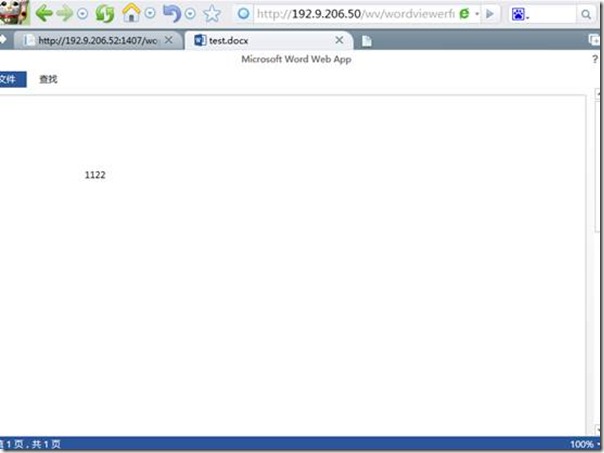
再次运行,OK,大功告成
其实按照上述步骤,就可以在自己的系统中调用Office Web Apps的查看功能了,实在要看demo的同学可以去下列链接下载
http://download.csdn.net/detail/poisson1984/6003183
最近csdn上的积分吃紧,顺便刷点积分,
下面有一个外国的例子,会更全面:http://pan.baidu.com/s/1f4suc
因为所在公司发展方向的原因,没有太多时间继续深入研究OWA,敬请见谅(2016-05-05)
如何整合Office Web Apps至自己开发的系统(二)的更多相关文章
- 如何整合Office Web Apps至自己开发的系统(一)
在前面我的一篇博客中 Office Web Apps安装部署(一),有一张介绍Office Web Apps与其他系统的关系图, 从上述图中,可知实际上Office Web Apps也是可以接入自 ...
- 整合Office Web Apps至自己的开发系统
原文出处:http://www.cnblogs.com/poissonnotes/p/3267190.html 还可参考:https://www.cnblogs.com/majiang/p/36729 ...
- Office Web Apps Server 2013与PDF(二)
在上一篇文章(Office Web Apps Server 2013与PDF(一))中,曾经介绍了Office Web Apps Server 2013在更新后,可以直接对PDF文档进行在线的查看.不 ...
- java web整合office web apps
1.下载安装vmware虚拟机 2.下载windows server 2012或者window server 2012 R2的iso镜像 http://www.xp85.com/html/Window ...
- Asp.net与office web apps的整合
其实网上有关office web app的整合已经有相关的文章了,典型的是如何整合Office Web Apps至自己开发的系统(一) 和如何整合Office Web Apps至自己开发的系统(二), ...
- office web apps 整合Java web项目
之前两篇文章将服务器安装好了,项目主要的就是这么讲其整合到我们的项目中,网上大部分都是asp.net的,很少有介绍Java如何整合的,经过百度,终于将其整合到了我的项目中. 首先建个servlet拦截 ...
- office web apps 整合到自己项目中(wopi实现在线预览编辑)
借助office web apps实现在线预览和在线编辑 我所有的代码都是用go语言编写,你可以直接编译后使用,不用再有其他的操作. 最近项目实在太忙,这几天才有时间,这次是重头戏,要好好琢磨一下怎么 ...
- Exchange 2013与 Office Web Apps 整合
好久没写什么新文章了,这里有关Office Web Apps 的部署我就省略了,只是在创建web场我一般 会创建2个url, 如: New-OfficeWebAppsFarm -InternalUrl ...
- 一、office web apps 部署
原文出处:http://www.cnblogs.com/yanweidie/p/4516164.html 原文出处:https://www.cnblogs.com/poissonnotes/p/323 ...
随机推荐
- Python3入门(四)——Python函数
一.概述 python和其他高级语言一样,支持函数 注意和scala不一样,结果必须使用return,否则默认return None!这和scala最后一个值作为返回是不一样的! 二.函数调用 和其他 ...
- 用pyinstaller把python代码打包成exe可执行文件
优点: 1. pyinstaller 是跨平台的可以用在linux和windows系统上 2. 操作非常简单,几个命令就搞定了,这个比py2exe容易用多了 缺点: 1. 打包后的体积过大,因为要带p ...
- Qt 的线程与事件循环
Qt 的线程与事件循环
- 微信小程序云开发之云函数创建
云函数 云函数是一段运行在云端的代码,无需管理服务器,在开发工具内编写.一键上传部署即可运行后端代码. 小程序内提供了专门用于云函数调用的 API.开发者可以在云函数内使用 wx-server-sdk ...
- 前端页面loading效果(CSS实现)
当首页内容或图片比较多时,加载时间会比较长,此时可能出现页面白屏的情况,用户体验较差.所以,在页面完全加载出来之前,可以考虑加入loading效果,当页面完全加载完后,是loading消失即可. 1. ...
- effective c++ 笔记 (41-44)
//---------------------------15/04/25---------------------------- //#41 了解隐式接口和编译期多态 { // 1:面向对象编 ...
- 在Windows商店应用中使用浅色主题
在开发商店应用时会遇到这样的情况,设计师给我们的设计是浅色背景/深色文本,而商店应用默认是深色背景/浅色文本.那我们需要在每个页面去显式声明背景色和前景色吗,这显然是不理想的.这时就需要设置应用的主题 ...
- python3 subprocess模块
当我们在执行python程序的时候想要执行系统shell可以使用subprocess,这时可以新起一个进程来执行系统的shell命令,python3常用的有subprocess.run()和subpr ...
- docker教程——docker镜像打包上传
在开始使用URLOS进行docker应用开发之前,我们先来了解一下docker镜像的打包方法.首先,安装URLOS,安装完成之后,docker也随之安装到了主机里.执行以下命令安装URLOS: cur ...
- CentOS7安装OpenStack(Rocky版)-01.控制节点的系统环境准备
分享一下Rocky版本的OpenStack安装管理经验: OpenStack每半年左右更新一版,目前是版本是201808月发布的版本-R版(Rocky),目前版本安装方法优化较好,不过依然是比较复杂 ...