
iOS多线程与网络开发之NSOperation
郝萌主倾心贡献,尊重作者的劳动成果,请勿转载。
假设文章对您有所帮助,欢迎给作者捐赠,支持郝萌主,捐赠数额任意,重在心意^_^
我要捐赠: 点击捐赠
Cocos2d-X源代码下载:点我传送
游戏官方下载:
 http://dwz.cn/RwTjl
游戏视频预览: http://dwz.cn/RzHHd
游戏开发博客:http://dwz.cn/RzJzI
游戏源代码传送:http://dwz.cn/Nret1
NSOperation和NSOperationQueue实现多线程的详细步骤
先将须要运行的操作封装到一个NSOperation对象中
然后将NSOperation对象加入到NSOperationQueue中
系统会自己主动将NSOperationQueue中的NSOperation取出来
将取出的NSOperation封装的操作放到一条新线程中运行
使用NSOperation子类的方式有3种
NSInvocationOperation
NSBlockOperation
自己定义子类继承NSOperation,实现内部对应的方法
- (id)initWithTarget:(id)target selector:(SEL)sel object:(id)arg;
调用start方法開始运行操作
- (void)start;
一旦运行操作,就会调用target的sel方法
注意
默认情况下,调用了start方法后并不会开一条新线程去运行操作。而是在当前线程同步运行操作
仅仅有将NSOperation放到一个NSOperationQueue中,才会异步运行操作
+ (id)blockOperationWithBlock:(void (^)(void))block;
通过addExecutionBlock:方法加入很多其它的操作
- (void)addExecutionBlock:(void (^)(void))block;
注意:仅仅要NSBlockOperation封装的操作数 > 1。就会异步运行操作
NSOperation能够调用start方法来运行任务。但默认是同步运行的
假设将NSOperation加入到NSOperationQueue(操作队列)中。系统会自己主动异步运行NSOperation中的操作
加入操作到NSOperationQueue中
- (void)addOperation:(NSOperation *)op;
- (void)addOperationWithBlock:(void (^)(void))block;
同一时候运行的任务数
比方。同一时候开3个线程运行3个任务,并发数就是3
最大并发数的相关方法
- (NSInteger)maxConcurrentOperationCount;
- (void)setMaxConcurrentOperationCount:(NSInteger)cnt;
- (void)cancelAllOperations;
提示:也能够调用NSOperation的- (void)cancel方法取消单个操作
暂停和恢复队列
- (void)setSuspended:(BOOL)b; // YES代表暂停队列,NO代表恢复队列
- (BOOL)isSuspended;
- (NSOperationQueuePriority)queuePriority;
- (void)setQueuePriority:(NSOperationQueuePriority)p;
优先级的取值
NSOperationQueuePriorityVeryLow = -8L,
NSOperationQueuePriorityLow = -4L,
NSOperationQueuePriorityNormal = 0,
NSOperationQueuePriorityHigh = 4,
NSOperationQueuePriorityVeryHigh = 8
比方一定要让操作A运行完后,才干运行操作B,能够这么写
[operationB addDependency:operationA]; // 操作B依赖于操作A
能够在不同queue的NSOperation之间创建依赖关系
- (void (^)(void))completionBlock;
- (void)setCompletionBlock:(void (^)(void))block;
重写- (void)main方法,在里面实现想运行的任务
重写- (void)main方法的注意点
自己创建自己主动释放池(由于假设是异步操作,无法訪问主线程的自己主动释放池)
常常通过- (BOOL)isCancelled方法检測操作是否被取消,对取消做出响应

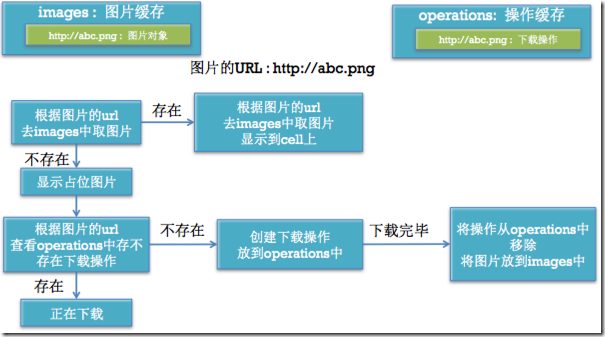
//

//  HVWDownloadImageOperation.h

//  ConcurrentDownloadImageDemo

//

//  Created by YuriyHao on 15/7/24.

//  Copyright (c) 2015年 YuriyHao. All rights reserved.

//

#import <Foundation/Foundation.h>

@class HVWDownloadImageOperation;

@protocol HVWDownloadImageOperationDelegate <NSObject>

@optional

- (void) downloadImageOperation:(HVWDownloadImageOperation *) operation didFinishedDownloadWithImage:(UIImage *) image;

@end

@interface HVWDownloadImageOperation : NSOperation

@property(nonatomic, strong) NSString *url;

@property(nonatomic, strong) NSIndexPath *indexPath;

@property(nonatomic, weak) id<HVWDownloadImageOperationDelegate> delegate;

@end
//

//  HVWDownloadImageOperation.m

//  ConcurrentDownloadImageDemo

//

//  Created by YuriyHao on 15/7/24.

//  Copyright (c) 2015年 YuriyHao. All rights reserved.

//

#import <UIKit/UIKit.h>

#import "HVWDownloadImageOperation.h"

@implementation HVWDownloadImageOperation

- (void)main {

    NSLog(@"====下载图片======%@", [NSThread currentThread]);

    NSURL *url = [NSURL URLWithString:self.url];

    NSData *data;

    for (int i=0; i<1; i++) {

        data = [NSData dataWithContentsOfURL:url];

    }

    UIImage *image = [UIImage imageWithData:data];

    if ([self.delegate respondsToSelector:@selector(downloadImageOperation:didFinishedDownloadWithImage:)]) {

        [self.delegate downloadImageOperation:self didFinishedDownloadWithImage:image];

    }

}

@end
//

//  HVWApp.h

//  ConcurrentDownloadImageDemo

//

//  Created by YuriyHao on 15/7/24.

//  Copyright (c) 2015年 YuriyHao. All rights reserved.

//

#import <Foundation/Foundation.h>

@interface HVWApp : NSObject

@property(nonatomic, strong) NSString *name;

@property(nonatomic, strong) NSString *icon;

@property(nonatomic, strong) NSString *download;

- (instancetype) initWithDictionary:(NSDictionary *) dict;

+ (instancetype) appWithDictionary:(NSDictionary *) dict;

@end
//

//  ViewController.m

//  ConcurrentDownloadImageDemo

//

//  Created by YuriyHao on 15/7/24.

//  Copyright (c) 2015年 YuriyHao. All rights reserved.

//

#import "ViewController.h"

#import "HVWApp.h"

#import "HVWDownloadImageOperation.h"

@interface ViewController () <UITableViewDataSource, UITableViewDelegate, HVWDownloadImageOperationDelegate>

@property(nonatomic, strong) NSArray *apps;

@property(nonatomic, strong) NSOperationQueue *queue;

@property(nonatomic, strong) NSMutableDictionary *operations;

@property(nonatomic, strong) NSMutableDictionary *images;

@end

@implementation ViewController

- (NSArray *)apps {

    if (nil == _apps) {

        NSArray *dictArray = [NSArray arrayWithContentsOfFile:[[NSBundle mainBundle] pathForResource:@"apps.plist" ofType:nil]];

        NSMutableArray *appArray = [NSMutableArray array];

        for (NSDictionary *dict in dictArray) {

            HVWApp *app = [HVWApp appWithDictionary:dict];

            [appArray addObject:app];

        }

        _apps = appArray;

    }

    return _apps;

}

- (NSOperationQueue *)queue {

    if (_queue == nil ) {

        _queue = [[NSOperationQueue alloc] init];

        _queue.maxConcurrentOperationCount = 3;

    }

    return _queue;

}

- (NSMutableDictionary *)operations {

    if (nil == _operations) {

        _operations = [NSMutableDictionary dictionary];

    }

    return _operations;

}

- (NSMutableDictionary *)images {

    if (nil == _images) {

        _images = [NSMutableDictionary dictionary];

    }

    return _images;

}

- (void)viewDidLoad {

    [super viewDidLoad];

    // Do any additional setup after loading the view, typically from a nib.

}

- (void)didReceiveMemoryWarning {

    [super didReceiveMemoryWarning];

    // Dispose of any resources that can be recreated.

}

#pragma mark - tableViewDatasource

- (NSInteger)numberOfSectionsInTableView:(UITableView *)tableView {

    return 1;

}

- (NSInteger)tableView:(UITableView *)tableView numberOfRowsInSection:(NSInteger)section {

    return self.apps.count;

}

- (UITableViewCell *)tableView:(UITableView *)tableView cellForRowAtIndexPath:(NSIndexPath *)indexPath {

    static NSString *ID = @"AppCell";

    UITableViewCell *cell = [tableView dequeueReusableCellWithIdentifier:ID];

    if (nil == cell) {

        cell = [[UITableViewCell alloc] initWithStyle:UITableViewCellStyleValue1 reuseIdentifier:ID];

    }

    HVWApp *app = self.apps[indexPath.row];

    cell.textLabel.text = app.name;

    cell.detailTextLabel.text = app.download;

    // 占位图片

    cell.imageView.image = [UIImage imageNamed:@"a9ec8a13632762d0092abc3ca2ec08fa513dc619"];

    // 假设没有图片,准备开启线程下载图片

    UIImage *image = self.images[app.icon];

    if (image) {

        // 假设图片存在,不须要反复下载,直接设置图片

        cell.imageView.image = image;

    } else {

        // 假设图片不存在。看看是不是正在下载

        HVWDownloadImageOperation *operation = self.operations[app.icon];

        if (operation) {

            // 假设图片正在下载,不必要开启线的线程再进行下载

        } else {

            // 没有在下载,创建一个新的任务进行下载

            operation = [[HVWDownloadImageOperation alloc] init];

            // 设置代理

            operation.delegate = self;

            // 传送url

            operation.url = app.icon;

            // 记录indexPath

            operation.indexPath = indexPath;

            [self.queue addOperation:operation];

            // 记录正在下载的任务

            [self.operations setObject:operation forKey:operation.url];

        }

    }

    return cell;

}

#pragma mark - HVWDownloadImageOperationDelegate

- (void)downloadImageOperation:(HVWDownloadImageOperation *)operation didFinishedDownloadWithImage:(UIImage *)image {

    UITableViewCell *cell = [self.tableView cellForRowAtIndexPath:operation.indexPath];

    cell.imageView.image = image;

    [self.tableView reloadRowsAtIndexPaths:@[operation.indexPath] withRowAnimation:UITableViewRowAnimationNone];

    // 存储图片到内存

    if (image) {

        [self.images setObject:image forKey:operation.url];

    }

    NSLog(@"已经下载的图片数==========>%d", self.images.count);

}

@end
郝萌主倾心贡献,尊重作者的劳动成果。请勿转载。
假设文章对您有所帮助。欢迎给作者捐赠。支持郝萌主,捐赠数额任意,重在心意^_^
我要捐赠: 点击捐赠
Cocos2d-X源代码下载:点我传送
游戏官方下载:http://dwz.cn/RwTjl
游戏视频预览:http://dwz.cn/RzHHd
游戏开发博客:http://dwz.cn/RzJzI
游戏源代码传送:http://dwz.cn/Nret1
iOS多线程与网络开发之NSOperation的更多相关文章
- iOS多线程与网络开发之NSURLCache
郝萌主倾心贡献,尊重作者的劳动成果.请勿转载. // 2 // ViewController.m 3 // NSURLCacheDemo 4 // 5 // Created by haomengzhu ...
- iOS多线程开发之NSOperation - 快上车,没时间解释了!
一.什么是NSOperation? NSOperation是苹果提供的一套多线程解决方案.实际上NSOperation是基于GCD更高一层的封装,但是比GCD更加的面向对象.代码可读性更高.可控性更强 ...
- iOS多线程开发之NSOperation
一.什么是NSOperation? NSOperation是苹果提供的一套多线程解决方案.实际上NSOperation是基于GCD更高一层的封装,但是比GCD更加的面向对象.代码可读性更高.可控性更强 ...
- iOS多线程与网络开发之多线程概述
郝萌主倾心贡献,尊重作者的劳动成果,请勿转载. 假设文章对您有所帮助,欢迎给作者捐赠.支持郝萌主,捐赠数额任意,重在心意^_^ 我要捐赠: 点击捐赠 Cocos2d-X源代码下载:点我传送 游戏官方下 ...
- iOS开发之NSOperation & NSOperationQueue
1.简介 (1) NSOperationQueue(操作队列)是由GCD提供的队列模型的Cocoa抽象,是一套Objective-C的API,为了使并发(多线程)编程变得更加简单,但效率比GCD略低. ...
- iOS网络开发之AFNetworking
概述 AFNetworking是一个非常受欢迎的轻量级的iOS.Mac OS X网络通信类库.它建立在NSURLConnection.NSOperation以及其技术的基础上,有着精心设计的模块结构和 ...
- iOS多线程编程Part 2/3 - NSOperation
多线程编程Part 1介绍了NSThread以及NSRunLoop,这篇Blog介绍另一种并发编程技术:NSOPeration. NSOperation & NSOperationQueue ...
- iOS多线程与网络开发之发送接收server信息
郝萌主倾心贡献,尊重作者的劳动成果,请勿转载. (1).使用同步方法发送get请求(不经常使用) 2 /** 发送get消息 */ 3 - (void) testGet { 4 NSString *r ...
- iOS多线程与网络开发之多线程NSThread
郝萌主倾心贡献,尊重作者的劳动成果,请勿转载. 假设文章对您有所帮助,欢迎给作者捐赠,支持郝萌主,捐赠数额任意,重在心意^_^ 我要捐赠: 点击捐赠 Cocos2d-X源代码下载:点我传送 游戏官方下 ...
随机推荐
- jsp指令和重定向
1 声明指令 格式:<%!声明变量或函数 %> 作用:会生成一个成员变量或成员方法,也可以使用访问修饰符修饰,public,private,protected 2 注释指令 格式:< ...
- Spring Cloud构建微服务架构(三)断路器
在分布式架构中,断路器模式的作用也是类似的,当某个服务单元发生故障(类似用电器发生短路)之后,通过断路器的故障监控(类似熔断保险丝),向调用方返回一个错误响应,而不是长时间的等待.这样就不会使得线程因 ...
- JavaScript——DOM或以树形展示的Web页面
Web网页的一般能够通过document以及document所相关的各种元素组成.当然我们也能够通过层次结构的树形结构在展现Web页面.假设要对一个网页进行改动的话,我们能够通过document对象. ...
- [svc]logstash和filebeat之间ssl加密
cfssl生成证书 wget https://pkg.cfssl.org/R1.2/cfssl_linux-amd64 -O /usr/local/bin/cfssl wget https://pkg ...
- 关于Java Collections的几个常见问题
列举几个关于Java Collections的常见问题并给出答案. 1. 什么时候用LinkedList,什么时候用ArrayList? ArrayList是使用数组实现的list,本质上就是数组.A ...
- 递增和递减进度条CCProgressTimer
关于scheduleUpdate看这篇即可 http://www.benmutou.com/blog/archives/56 接下来是示例代码: CCSize size = CCDirector::s ...
- maven(5)------eclipse下maven常用命令打包
eclipse集成maven常用命令clean,install,一步完成项目清理和打包.在集成工具下使用maven 命令与命令窗口不同,需要将mvn省掉(比如:mvn clean,在工具中直接用cle ...
- 每天一个linux命令(1):tail 命令
tail 命令从指定点开始将文件写到标准输出.使用tail命令的-f选项可以方便的查阅正在改变的日志文件,tail -f filename会把filename里最尾部的内容显示在屏幕上,并且不但刷新, ...
- Can you share some Scala List class examples?
Scala List FAQ: Can you share some Scala List class examples? The Scala List class may be the most c ...
- Ribbon重试机制与Hystrix熔断机制的配置问题1
Ribbon超时与Hystrix超时问题,为了确保Ribbon重试的时候不被熔断,我们就需要让Hystrix的超时时间大于Ribbon的超时时间,否则Hystrix命令超时后,该命令直接熔断,重试机制 ...