
【原创】Linux基础之SSH秘钥登录

官方:https://www.ssh.com/ssh/
The SSH protocol uses encryption to secure the connection between a client and a server. All user authentication, commands, output, and file transfers are encrypted to protect against attacks in the network.
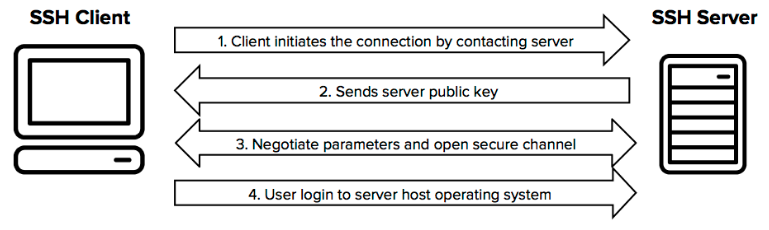
密钥类型包括rsa和dsa,详见 https://security.stackexchange.com/questions/5096/rsa-vs-dsa-for-ssh-authentication-keys
The security of the RSA algorithm is based on the fact that factorization of large integers is known to be "difficult", whereas DSA security is based on the discrete logarithm problem.
rsa基于大数分解,dsa基于离散对数;
RSA keys can go up to 4096 bits, where DSA has to be exactly 1024 bits (although OpenSSL allows for more.)
rsa key最高支持4096长度bit,dsa key只支持1024长度bit;
1 生成秘钥,rsa或者dsa
1.1 命令生成(linux或mac)
$ ssh-keygen -t rsa -b 4096
Generating public/private rsa key pair.
Enter file in which to save the key (/home/testuser/.ssh/id_rsa):
Enter passphrase (empty for no passphrase):
Enter same passphrase again:
Your identification has been saved in /home/testuser/.ssh/id_rsa.
Your public key has been saved in /home/testuser/.ssh/id_rsa.pub.
The key fingerprint is:
SHA256:mRMuErgh17o9EPe1gzdd/tFuj6L0rVsk7qTw1rrGFCc testuser@testserver
The key's randomart image is:
+---[RSA 4096]----+
| |
| o |
|. = + o . |
| o * o + *Eo. . |
| + . + S .+o o .|
| + . o +.. + o |
| . o .o..o o o|
| . ++=oo o.|
| o*+=+o .|
+----[SHA256]-----+
创建过程会输入密码;
创建完成后默认会在home目录的.ssh目录下创建两个秘钥文件,公钥(pub后缀)和私钥
$ ls .ssh
id_rsa id_rsa.pub
登录时私钥自己保存,公钥放到服务器上
1.2 securecrt或xshell界面生成(windows)
securecrt创建秘钥的地方在
Tools--Create Public Keys
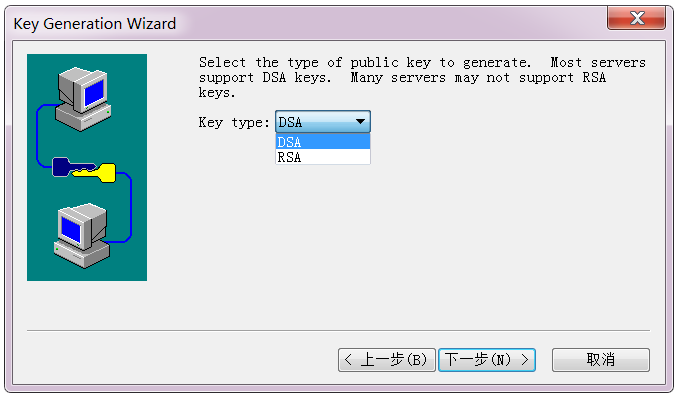
2 上传公钥
将公钥上传到要登录的服务器的用户home目录下,同时将公钥加入authorized_keys
cat .ssh/id_rsa.pub >> .ssh/authorized_keys
chmod 600 .ssh/authorized_keys
3 本机私钥登录
3.1 ssh命令登录(linux或mac)
$ ssh -i /path/id_rsa user@remote_ip
另外还可以修改配置文件,配置key,这样就可以免掉-i
#vi /etc/ssh/ssh_config
IdentityFile ~/.ssh/id_rsa
3.2 securecrt或xshell登录(windows)
选择私钥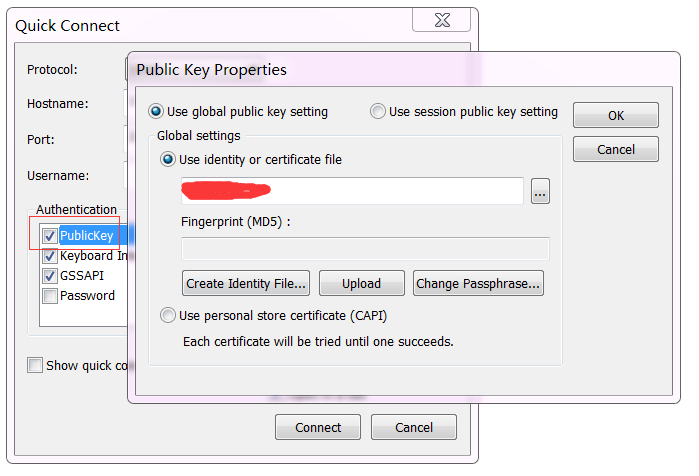
4 hadoop集群配置免密登录
4.1 root用户ssh免密登录
1 准备key
# ssh-keygen -t rsa -b 4096
# ls .ssh
authorized_keys id_rsa id_rsa.pub known_hosts
# cat .ssh/id_rsa.pub >> .ssh/authorized_keys
# chmod 600 .ssh/authorized_keys
2 拷贝
1)没有密码,但是可以登录到服务器,逐台登录服务器后nc接收文件
# nc -l $receive_port |tar -zxvf -
本机执行
# tar -zcvf - .ssh |nc $receive_ip $receive_port
2)有服务器的登录账号和密码,逐台拷贝
# scp .ssh/id_rsa.pub root@$server_ip:/root/.ssh
# scp .ssh/authorized_keys root@$server_ip:/root/.ssh
3 逐台ssh登录验证
# ssh $server_ip
4 逐台拷贝known_hosts
# scp .ssh/known_hosts $server_ip:/root/.ssh/
4.2 其他用户免密登陆,以hadoop为例
# ansible all-servers -m shell -a 'useradd hadoop'
# su - hadoop
$ ssh-keygen -t rsa -b 4096
$ cat .ssh/id_rsa.pub >> .ssh/authorized_keys
$ chmod 600 .ssh/authorized_keys
$ exit
# ansible other-servers -m copy -a 'src=/home/hadoop/.ssh dest=/home/hadoop/'
# ansible other-servers -m shell -a 'chown -R hadoop.hadoop /home/hadoop/.ssh && cd /home/hadoop/.ssh && chmod 600 id_rsa authorized_keys'
# su - hadoop
$ ssh $server
$ scp .ssh/known_host $server:/home/hadoop/.ssh
【原创】Linux基础之SSH秘钥登录的更多相关文章
- 服务器使用ssh秘钥登录并禁止密码登录
问题: 最近在登录服务器的时候,每次都会有提示999+ falied login等字眼,意思就是自己的服务器密码正在被人暴力破解.想象以下,别人有了你的服务器的root登录密码,那么就可以对你的服务器 ...
- linux普通用户免秘钥登录(xshell工具环境)
一.xshell生成密钥 1)工具->新建用户密钥生成向导 2)选择密钥类型.密钥长度(默认即可) 3)生成密钥(生成公钥和私钥) 4)为密钥加密,增加密码(可选),建议加上 5)将公钥保存为文 ...
- Linux SCRT本地免秘钥登录远程机器
一.生成本地公钥和私钥 1.1.创建公钥 步骤:工具->创建公钥 然后下一步: 秘钥类型选择RSA: 然后下一步: 密钥位长度:默认是1024,我这边是2048 然后下一步: 密钥格式: 然后点 ...
- Xshell配置SSH秘钥登录
秘钥生成 生成公钥 工具 -> 新建用户秘钥生成向导 -> 下一步 -> 点击下一步,输入密码: 点击下一步 点击保存为文件,完成. 生成私钥 工具 -> 用户秘钥管理者 选中 ...
- 通过SSH秘钥登录线上MySQL数据库(基于Navicat)
前言 生产环境的数据库往往需要经过严格的安全限制,所以禁用密码登录,使用秘钥的方式是一种相对安全的登录方式. 原理: 角色: 主机A:其他主机,有访问线上数据库的权限 主机B:线上数据库的主机 主机C ...
- 腾讯云服务器,使用xshell ssh秘钥登录的时候报错:所选的用户密钥未在远程主机上注册
1.背景 新买了台腾讯云服务器,在腾讯云控制台新建了SSH私钥,然后下载到本地. 在本地使用xshell工具,导入下载好的私钥进行登录,报错:所选的用户密钥未在远程主机上注册 2.解决方案 在确定选择 ...
- SSH设置秘钥登录
设置 SSH 通过密钥登录 我们一般使用 PuTTY 等 SSH 客户端来远程管理 Linux 服务器.但是,一般的密码方式登录,容易有密码被暴力破解的问题.所以,一般我们会将 SSH 的端口设置为默 ...
- 在windows上使用ssh秘钥连接git服务器
git部署在centos7上 安装好git后,新建一个用户test(注意要加入git用户组)配置ssh秘钥登录,我的另一篇博客有写配置步骤 重点的地方是在windows系统上使用秘钥登录git服务器 ...
- Linux SSH 免秘钥登录
SSH 免秘钥登录 ssh:是一种安全加密协议 ssh username@hostname ssh gongziyuan.com:以当前用户登录该机器(如果不是当前用户,需要这么干:ssh ...
随机推荐
- 最简单易懂的Spring Security 身份认证流程讲解
最简单易懂的Spring Security 身份认证流程讲解 导言 相信大伙对Spring Security这个框架又爱又恨,爱它的强大,恨它的繁琐,其实这是一个误区,Spring Security确 ...
- 在Asp.Net Core中使用DI的方式使用Hangfire构建后台执行脚本
最近项目中需要用到后台Job,原有在Windows中我们会使用命令行程序结合计划任务或者直接生成Windows Service,现在.Net Core跨平台了,虽然Linux下也有计划任务,但跟原有方 ...
- EChars学习之路1
引入echarts.min.js或者使用CDN https://cdn.bootcss.com/echarts/4.2.1-rc1/echarts.min.js 为ECharts准备一个具备大小(宽高 ...
- Java canlendar task
DayPilot for Java - Calendar, Scheduler and Gantt Chart Componentshttps://java.daypilot.org/ AJAX Sc ...
- HDU 3901 Wildcard
题目:Wildcard 链接:http://acm.hdu.edu.cn/showproblem.php?pid=3901 题意:给一个原串(只含小写字母)和一个模式串(含小写字母.?.* ,*号可替 ...
- Datatable get请求传参应用
以关注页面为例: html: <div class="row"> <div class="col-md-12 col-sm-12 col-xs-12&q ...
- vs2017开发IOS(vs2017 xamarin 连接mac)
这两天突然记起巨软的Visual Studio 2017 好像有说可以用C#开发IOS和Android应用,所以就自己去尝试了下生成过程. 相对与IOS来说,Android的生成过程还是比较容易的没有 ...
- codeforces451C
Predict Outcome of the Game CodeForces - 451C There are n games in a football tournament. Three team ...
- 怼天怼地怼空气的Linus喜欢怎样的工作方式?
Linus Torvalds的“暴脾气”是出了名的,看到令自己不爽的事情就会怼过去,比如: 他曾经说Intel提交的漏洞修复程序是彻底的垃圾! 当别人说Git没用C++开发的时候, 他反击说“C++是 ...
- 读取Excel2003、Excel2007或更高级的兼容性问题 workbook 下载中文名称文件
xls 使用HSSFWorkbook xlsx使用XSSFWorkbook 但是我使用XSSFWorkbook时没找到nuget包,引用不了,只能重新找办法,幸好workbook解决了我这个问题 // ...