
创建一个dynamics 365 CRM online plugin (五) - Images in Plugin
Snapshots of the primary entity's attributes from database before(pre) and after (post) the core platform operation.
怎么理解这句话呢
简单的我们可以理解PreOperation与PostOperation的 entity中数据的镜像.
使用Pre-Entity镜像的一些案例:
1. 如果你需要对original data在modification之前做使用.
2. 如果你需要form的original data没有被modified修改之前做读取.
PS: local name 为field的label name/entity name. Schema name 为数据库中field的名字
这次我们将修改leader 中的filedbusiness telephone number(logical name 为telephone1)
我们将plugin中try模块里面的代码用以下代码覆盖掉
我们可以看到,我们获取了modifiedBusinessPhone 为update之后的值.
我们又使用了preImage这个value 从PreEntityImages镜像中获取original value 为originalBusinessPhone
// Plug-in business logic goes here.

                    //Pre and post entity images

                    // Snapshots of the primary entity's attributes from database before (pre) and after (post) the core platfomr operation.

                    // This is modified business phone number

                    var modifiedBusinessPhone = entity.Attributes["telephone1"].ToString();

                    // Retrieve preEntity Images

                    var preImage = (Entity)context.PreEntityImages["PreImage"];

                    // Normally we don't retrieve post entity images with following reason

                    // 1. After the postOperation, we are on the current situation modifed data

                    // 2. When retrieve the postEntityImages, due to it is not created, the entity will be null.

                    // Entity postImage = (Entity)context.PostEntityImages["PostImage"];

                    // Retrieve original business phone number

                    var originalBusinessPhone = preImage.Attributes["telephone1"].ToString();

                    // Display the information in the error log

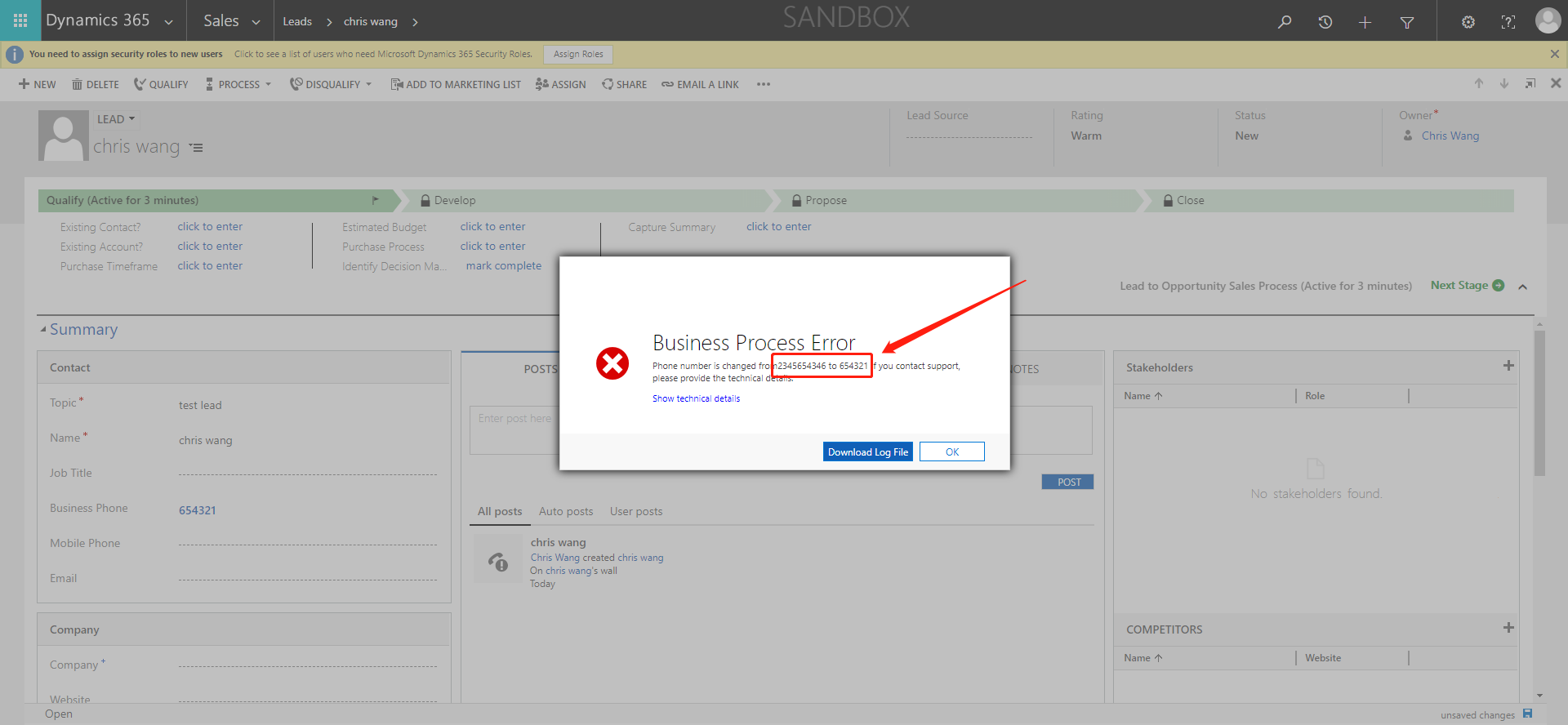
                    throw new InvalidPluginExecutionException("Phone number is changed from" + originalBusinessPhone + " to " + modifiedBusinessPhone);
我们build代码之后打开我们的plugin registration tool.
点开我们的MyCRM Assembly, 点开class PreEntityImageDemo(我创建的新的class名称).
在update我们的MyCRM assembly之后,我们点击建立新的Step
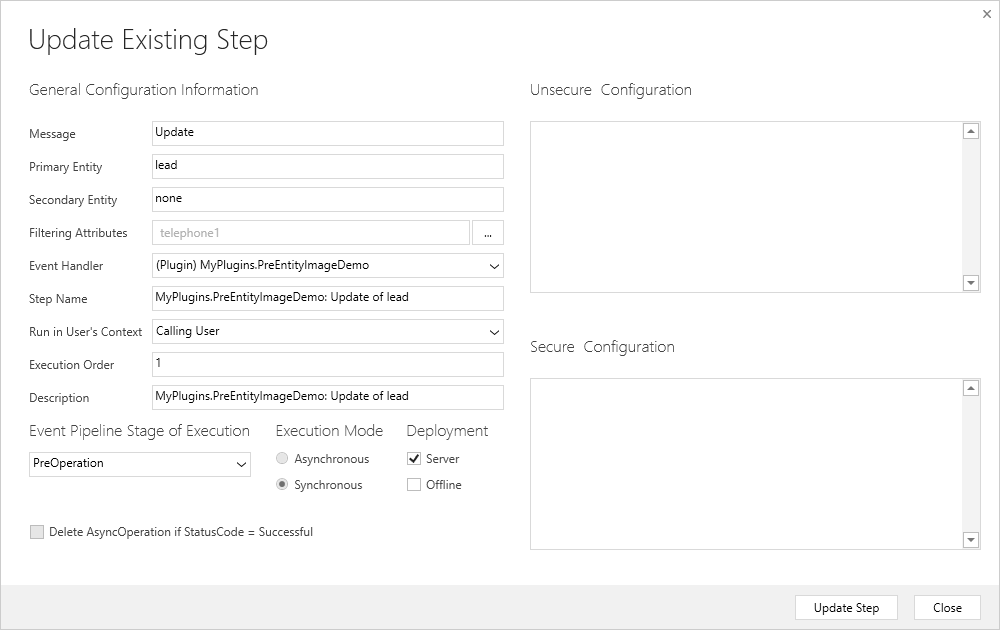
创建Step之后, 我们需要右键Step建立image
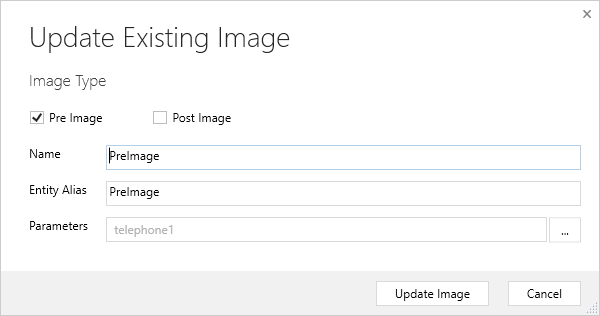
PS:因为我们不需要全局的fields都做触发,所以在register step的时候切记Filtering Attributes只勾选telephone1, 创建image镜像的时候只在Parameters中指勾选telephone1.
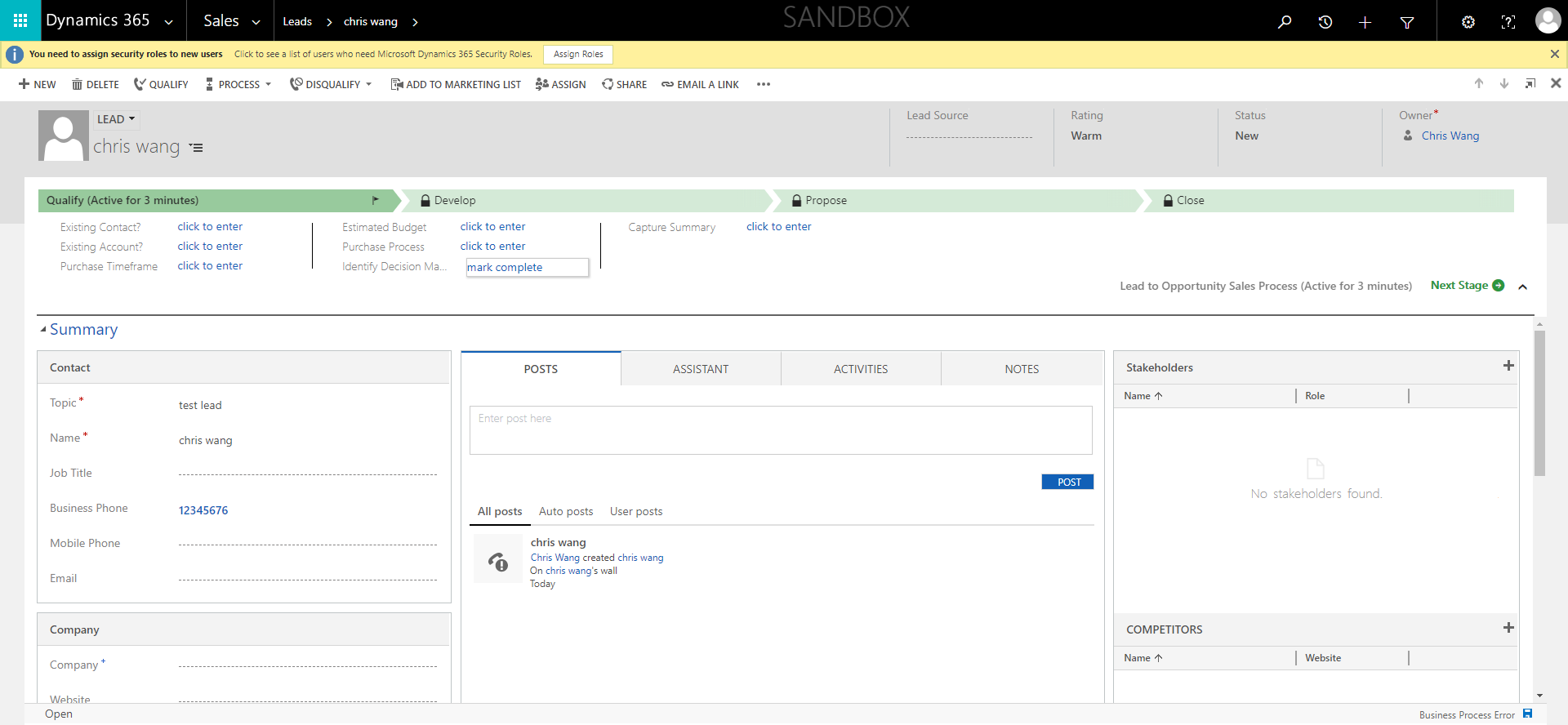
我们打开我们的CRM的lead
点击保存之后,可以发现我们的business Phone 有在error log中改动
创建一个dynamics 365 CRM online plugin (五) - Images in Plugin的更多相关文章
- 创建一个dynamics 365 CRM online plugin (九) - Context.Depth
让我们来看看官方文档是怎么讲的 https://docs.microsoft.com/en-us/previous-versions/dynamicscrm-2016/developers-guide ...
- 创建一个dynamics 365 CRM online plugin (七) - plugin当中的Impersonation角色
我们之前创建的plugin都是使用default的 run in User's Context. 理解就是使用正在登陆的security context用户信息 那有个问题,如果当前用户的securi ...
- 创建一个dynamics 365 CRM online plugin (四) - PreValidation
开始之前,我们要确认一下 Plugin 的 pipeline. PreValidation -> PreOperation -> Server Side System Main Event ...
- 创建一个dynamics 365 CRM online plugin (三) - PostOperation
上两节我们创建了一个 PreOperation的plugin 今天我们创建一个PostOpeartion的plugin和之前的plugin连接起来 当创建contact之后,我们要添加一个task给新 ...
- 创建一个dynamics 365 CRM online plugin (一) - Hello World Plugin
源代码连接:https://github.com/TheMiao/Dynamics365CRM/blob/master/MyCRM/MyCRM/HelloWorld.cs 首先,我们需要创建一个.NE ...
- 创建一个dynamics 365 CRM online plugin (十) - Isolation mode or trust mode
Isolation Mode 也被称作为Plugin Trust CRM里面有两种plugin trust / isolation mode 1. Full Trust 只在OP系统中可使用,没有限制 ...
- 创建一个dynamics 365 CRM online plugin (八) - 使用Shared Variables 在plugins 之前传递data
CRM 可以实现plugin之前的值传递. 我们可以使用SharedVariables 把值在plugin之间传递 实现plugins之间的传递非常简单,我们只需要用key value pair来配对 ...
- 创建一个dynamics 365 CRM online plugin (六) - Delete plugin from CRM
我们之前都学习到怎么添加,debug还有update plugin. 今天带大家过一下怎么从CRM instance当中删除plugin. 首先让我们打开Settings -> Customiz ...
- 创建一个dynamics 365 CRM online plugin (二) - fields检查
Golden Rules 1. Platform only passes Entity attributes to Plugin that has change of data. 2. If the ...
随机推荐
- JavaScript 实时 全角转半角
//JavaScript全角字符转半角(参数str为input框输入的内容)var $fullChar2halfChar = function(str) { var result = ''; for ...
- Problem B: STL——集合运算
Description 集合的运算就是用给定的集合去指定新的集合.设A和B是集合,则它们的并差交补集分别定义如下: A∪B={x|x∈A∨x∈B} A∩B={x|x∈A∧x∈B} A-B={x|x∈A ...
- tensorFlow小结
1,才云科技的书 <实战G深度学习框架>是一本好书,我的练习基本上都在其示例上运行,网上查看的示例都类似. 2,windows下安装了anaconda,采用spyder来运行python ...
- ForkJoinPool 源码
ForkJoinPool----FJP先看task.fork方法,含义是将当前任务,放到当前线程的工作队列中.但是第一次执行这个方法是在主线程中,主线程是不可能被FJP管理的.那么就进入ForkJoi ...
- jmeter测试计划元素执行顺序
jmeter测试计划元素执行顺序 测试计划的元素是有序的,通过以下方式执行: 1–配置节点 2–前置处理器 3–定时器 4–取样器 5–后置处理器(只在有结果可用情况下执行) 6–断言(只在有结果可用 ...
- 移动端设备中1px适配
方式1:伪类+transform实现,主要用transform中的scale缩放,缩放默认中心点是以x,y轴的50%处,因此需要用transform-origin调整中心点 html代码: <d ...
- linux在tomcat中指定jdk
setclasspath.sh和catalina.sh中写入 export JAVA_HOME=/qbtapp/jdk-8u111-linux-i586/jdk1.8.0_111export JRE_ ...
- Centos6.5 安装 RabbitMQ 3.7.11
RabbitMQ是一个开源的AMQP实现,服务器端用Erlang语言编写,支持多种客户端,如:Python.Ruby..NET.Java.JMS.C.PHP.ActionScript.XMPP.STO ...
- 日积月累——java虚拟机内存区域的划分
看了博主“一杯凉茶”一篇对java内存详解的文章后,虚心学习,并记录下来 ,以便日后再来温故. 一,运行时数据区 1.程序计数器 当前线程所执行的字节码行号指示器,字节码解释器工作依赖计数器控制完成, ...
- vue created中初始化属性
created:在模板渲染成html前调用,即通常初始化某些属性值,然后再渲染成视图. mounted:在模板渲染成html后调用,通常是初始化页面完成后,再对html的dom节点进行一些需要的操作