
C#如何在DataGridViewCell中自定义脚本编辑器
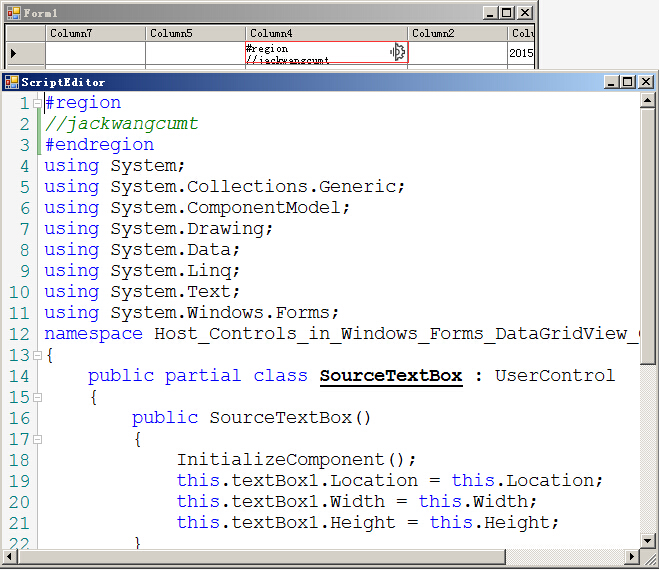
上一篇博文探讨了如何自定义DataGridViewColumn实现一个TreeViewColumn来在DataGridView控件中显示TreeView控件,其实我们还可以继续发挥想象,自定义其他的列类型,下面介绍一个脚本编辑器列类型,我这里取名ScriptTextEditorColumn,当用户单击DataGridView的ScriptTextEditorColumn时,单元格右边会出现一个按钮,单击按钮会弹出一个脚本编辑器窗体,用户可以在窗体中进行代码维护,然后回写到单元格中。
用人会问,这个控件有啥实际作用,其实结合动态编译的技术,在datagridview中进行取值公式的模板设定,也就是在对应的单元格中设置C#脚本,然后动态执行后呈现结果到一个datagridview单元格中,这样就实现了动态配置datagridview后台计算逻辑的目的,当然实现这样的功能还需要大量的工作,但是主要的思路就是这样。
1 ScriptTextEditorColumn
 using System;

 using System.Collections.Generic;

 using System.Linq;

 using System.Text;

 using System.Windows.Forms;

 namespace Host_Controls_in_Windows_Forms_DataGridView_Cells

 {

    public class ScriptTextEditorColumn : DataGridViewColumn

     {

        public ScriptTextEditorColumn()

            : base(new ScriptTextEditorCell())

         {

         }

         public override DataGridViewCell CellTemplate

         {

             get

             {

                 return base.CellTemplate;

             }

             set

             {

                 // Ensure that the cell used for the template is a ScriptTextEditorCell.

                 if (value != null &&

                     !value.GetType().IsAssignableFrom(typeof(ScriptTextEditorCell)))

                 {

                     throw new InvalidCastException("Must be a ScriptTextEditorCell");

                 }

                 base.CellTemplate = value;

             }

         }

     }

     //----------------------------------------------------------------------

     public class  ScriptTextEditorCell : DataGridViewTextBoxCell

     {

         public ScriptTextEditorCell()

             : base()

         {

         }

         public override void InitializeEditingControl(int rowIndex, object

             initialFormattedValue, DataGridViewCellStyle dataGridViewCellStyle)

         {

             // Set the value of the editing control to the current cell value.

             base.InitializeEditingControl(rowIndex, initialFormattedValue,

                 dataGridViewCellStyle);

             ScriptTextEditingControl ctl =

                 DataGridView.EditingControl as ScriptTextEditingControl;

             // Use the default row value when Value property is null.

             if (this.Value == null)

             {

                 ctl.textBox1.Text = (String)this.DefaultNewRowValue;

             }

             else

             {

                 ctl.textBox1.Text = (String)this.Value;

             }

         }

         public override Type EditType

         {

             get

             {

                 // Return the type of the editing control that CalendarCell uses.

                 return typeof(ScriptTextEditingControl);

             }

         }

         public override Type ValueType

         {

             get

             {

                 // Return the type of the value that CalendarCell contains.

                 return typeof(String);

             }

         }

         public override object DefaultNewRowValue

         {

             get

             {

                 // Use the current date and time as the default value.

                 string code = @"

 #region

 //jackwangcumt

 #endregion

 using System;

 using System.Collections.Generic;

 using System.ComponentModel;

 using System.Drawing;

 using System.Data;

 using System.Linq;

 using System.Text;

 using System.Windows.Forms;

 namespace Host_Controls_in_Windows_Forms_DataGridView_Cells

 {

     public partial class SourceTextBox : UserControl

     {

         public SourceTextBox()

         {

             InitializeComponent();

             this.textBox1.Location = this.Location;

             this.textBox1.Width = this.Width;

             this.textBox1.Height = this.Height;

         }

         protected void OnValueChanged(string text)

         {

             this.textBox1.Text = text;

         }

         private void btnSource_Click(object sender, EventArgs e)

         {

             ScriptEditor frm = new ScriptEditor(this.textBox1.Text);

             frm.ShowDialog();

             this.textBox1.Text = frm.fastColoredTextBox1.Text;

         }

     }

 }

                 ";

                 return code;

             }

         }

     }

     //-----------------------------------------------------------------

     class ScriptTextEditingControl : SourceTextBox, IDataGridViewEditingControl

     {

         DataGridView dataGridView;

         private bool valueChanged = false;

         int rowIndex;

         public ScriptTextEditingControl()

         {

             //文本变更更新到cell

             this.textBox1.TextChanged += new EventHandler(textBox1_TextChanged);

         }

         void textBox1_TextChanged(object sender, EventArgs e)

         {

             // Notify the DataGridView that the contents of the cell

             // have changed.

             valueChanged = true;

             this.EditingControlDataGridView.NotifyCurrentCellDirty(true);

             //调用SourceTextBox的OnValueChanged(string Text)

             base.OnValueChanged(this.textBox1.Text);

         }

         // Implements the IDataGridViewEditingControl.EditingControlFormattedValue

         // property.

         public object EditingControlFormattedValue

         {

             get

             {

                 return this.textBox1.Text;

             }

             set

             {

                 if (value is String)

                 {

                     try

                     {

                         // This will throw an exception of the string is

                         // null, empty, or not in the format of a date.

                        this.textBox1.Text=((String)value);

                     }

                     catch

                     {

                         // In the case of an exception, just use the

                         // default value so we're not left with a null

                         // value.

                         this.textBox1.Text = "jackwangcumt>>error";

                     }

                 }

             }

         }

         // Implements the

         // IDataGridViewEditingControl.GetEditingControlFormattedValue method.

         public object GetEditingControlFormattedValue(

             DataGridViewDataErrorContexts context)

         {

             return EditingControlFormattedValue;

         }

         // Implements the

         // IDataGridViewEditingControl.ApplyCellStyleToEditingControl method.

         public void ApplyCellStyleToEditingControl(

             DataGridViewCellStyle dataGridViewCellStyle)

         {

             this.Font = dataGridViewCellStyle.Font;

             //this.CalendarForeColor = dataGridViewCellStyle.ForeColor;

             //this.CalendarMonthBackground = dataGridViewCellStyle.BackColor;

         }

         // Implements the IDataGridViewEditingControl.EditingControlRowIndex

         // property.

         public int EditingControlRowIndex

         {

             get

             {

                 return rowIndex;

             }

             set

             {

                 rowIndex = value;

             }

         }

         // Implements the IDataGridViewEditingControl.EditingControlWantsInputKey

         // method.

         public bool EditingControlWantsInputKey(

             Keys key, bool dataGridViewWantsInputKey)

         {

             // Let the DateTimePicker handle the keys listed.

             switch (key & Keys.KeyCode)

             {

                 case Keys.Left:

                 case Keys.Up:

                 case Keys.Down:

                 case Keys.Right:

                 case Keys.Home:

                 case Keys.End:

                 case Keys.PageDown:

                 case Keys.PageUp:

                     return true;

                 default:

                     return !dataGridViewWantsInputKey;

             }

         }

         // Implements the IDataGridViewEditingControl.PrepareEditingControlForEdit

         // method.

         public void PrepareEditingControlForEdit(bool selectAll)

         {

             // No preparation needs to be done.

         }

         // Implements the IDataGridViewEditingControl

         // .RepositionEditingControlOnValueChange property.

         public bool RepositionEditingControlOnValueChange

         {

             get

             {

                 return false;

             }

         }

         // Implements the IDataGridViewEditingControl

         // .EditingControlDataGridView property.

         public DataGridView EditingControlDataGridView

         {

             get

             {

                 return dataGridView;

             }

             set

             {

                 dataGridView = value;

             }

         }

         // Implements the IDataGridViewEditingControl

         // .EditingControlValueChanged property.

         public bool EditingControlValueChanged

         {

             get

             {

                 return valueChanged;

             }

             set

             {

                 valueChanged = value;

             }

         }

         // Implements the IDataGridViewEditingControl

         // .EditingPanelCursor property.

         public Cursor EditingPanelCursor

         {

             get

             {

                 return base.Cursor;

             }

         }

         protected override void OnTextChanged(EventArgs e)

         {

             // Notify the DataGridView that the contents of the cell

             // have changed.

             valueChanged = true;

             this.EditingControlDataGridView.NotifyCurrentCellDirty(true);

             base.OnTextChanged(e);

         }

     }

 }
2 SourceTextBox
 using System;

 using System.Collections.Generic;

 using System.ComponentModel;

 using System.Drawing;

 using System.Data;

 using System.Linq;

 using System.Text;

 using System.Windows.Forms;

 namespace Host_Controls_in_Windows_Forms_DataGridView_Cells

 {

     public partial class SourceTextBox : UserControl

     {

         public SourceTextBox()

         {

             InitializeComponent();

             this.textBox1.Location = this.Location;

             this.textBox1.Width = this.Width;

             this.textBox1.Height = this.Height;

         }

         protected void OnValueChanged(string text)

         {

             this.textBox1.Text = text;

         }

         private void btnSource_Click(object sender, EventArgs e)

         {

             ScriptEditor frm = new ScriptEditor(this.textBox1.Text);

             frm.ShowDialog();

             this.textBox1.Text = frm.fastColoredTextBox1.Text;

         }

     }

 }
 namespace Host_Controls_in_Windows_Forms_DataGridView_Cells

 {

     partial class SourceTextBox

     {

         /// <summary>

         /// 必需的设计器变量。

         /// </summary>

         private System.ComponentModel.IContainer components = null;

         /// <summary>

         /// 清理所有正在使用的资源。

         /// </summary>

         /// <param name="disposing">如果应释放托管资源,为 true;否则为 false。</param>

         protected override void Dispose(bool disposing)

         {

             if (disposing && (components != null))

             {

                 components.Dispose();

             }

             base.Dispose(disposing);

         }

         #region 组件设计器生成的代码

         /// <summary>

         /// 设计器支持所需的方法 - 不要

         /// 使用代码编辑器修改此方法的内容。

         /// </summary>

         private void InitializeComponent()

         {

             this.textBox1 = new System.Windows.Forms.TextBox();

             this.btnSource = new System.Windows.Forms.Button();

             this.SuspendLayout();

             //

             // textBox1

             //

             this.textBox1.BorderStyle = System.Windows.Forms.BorderStyle.None;

             this.textBox1.Location = new System.Drawing.Point(, );

             this.textBox1.Margin = new System.Windows.Forms.Padding();

             this.textBox1.Multiline = true;

             this.textBox1.Name = "textBox1";

             this.textBox1.Size = new System.Drawing.Size(, );

             this.textBox1.TabIndex = ;

             //

             // btnSource

             //

             this.btnSource.Anchor = ((System.Windows.Forms.AnchorStyles)(((System.Windows.Forms.AnchorStyles.Top | System.Windows.Forms.AnchorStyles.Bottom)

                         | System.Windows.Forms.AnchorStyles.Right)));

             this.btnSource.BackColor = System.Drawing.Color.Transparent;

             this.btnSource.BackgroundImage = global::Host_Controls_in_Windows_Forms_DataGridView_Cells.Resource.setting;

             this.btnSource.BackgroundImageLayout = System.Windows.Forms.ImageLayout.Zoom;

             this.btnSource.FlatAppearance.BorderColor = System.Drawing.Color.White;

             this.btnSource.FlatAppearance.BorderSize = ;

             this.btnSource.FlatStyle = System.Windows.Forms.FlatStyle.Flat;

             this.btnSource.Font = new System.Drawing.Font("新宋体", 9F, System.Drawing.FontStyle.Bold, System.Drawing.GraphicsUnit.Point, ((byte)()));

             this.btnSource.Location = new System.Drawing.Point(, -);

             this.btnSource.Margin = new System.Windows.Forms.Padding();

             this.btnSource.Name = "btnSource";

             this.btnSource.Size = new System.Drawing.Size(, );

             this.btnSource.TabIndex = ;

             this.btnSource.UseVisualStyleBackColor = false;

             this.btnSource.Click += new System.EventHandler(this.btnSource_Click);

             //

             // SourceTextBox

             //

             this.AutoScaleDimensions = new System.Drawing.SizeF(6F, 12F);

             this.AutoScaleMode = System.Windows.Forms.AutoScaleMode.Font;

             this.Controls.Add(this.btnSource);

             this.Controls.Add(this.textBox1);

             this.Margin = new System.Windows.Forms.Padding();

             this.Name = "SourceTextBox";

             this.Size = new System.Drawing.Size(, );

             this.ResumeLayout(false);

             this.PerformLayout();

         }

         #endregion

         public System.Windows.Forms.Button btnSource;

         public System.Windows.Forms.TextBox textBox1;

     }

 }
3 效果
C#如何在DataGridViewCell中自定义脚本编辑器的更多相关文章
- 6.1 如何在spring中自定义xml标签
dubbo自定义了很多xml标签,例如<dubbo:application>,那么这些自定义标签是怎么与spring结合起来的呢?我们先看一个简单的例子. 一 编写模型类 package ...
- 如何在 Azure 中自定义 Windows 虚拟机
若要以快速一致的方式配置虚拟机 (VM),通常需要某种形式的自动化. 自定义 Windows VM 的一种常用方法是使用适用于 Windows 的自定义脚本扩展. 本教程介绍如何执行下列操作: 使用自 ...
- 如何在pyqt中自定义无边框窗口
前言 之前写过很多关于无边框窗口并给窗口添加特效的博客,按照时间线罗列如下: 如何在pyqt中实现窗口磨砂效果 如何在pyqt中实现win10亚克力效果 如何在pyqt中通过调用SetWindowCo ...
- 如何在CODESOFT中自定义删除文档备料
CODESOFT 2015是先进的标签设计与集成软件.在使用CODESOFT制作条码标签时,为方便省时,我们可以事先创建自己的文档模板,保存它们以供将来使用.接下来,小编就讲讲CODESOFT 201 ...
- [VBA]用一个简单例子说明如何在Excel中自定义函数
Excel中的函数无疑是强大的,但是再强大的战士也有他脆弱的脚后跟[1].这两天在使用Excel的时候遇到了一个需求,要在某一个单元格里面自动计算今天是星期几(如显示 Today is Tuesday ...
- ASP.NET MVC如何在Action中返回脚本并执行
我们都知道在aspx页面的cs文件中只要用Respos.Write("<script></scritp>")就可以在前台执行脚本 但是在MVC中就不一样了, ...
- 如何在C#中自定义自己的异常
在C#中所有的异常类型都继承自System.Exception,也就是说,System.Exception是所有异常类的基类. 总起来说,其派生类分为两种:1. SystemException类: 所 ...
- 在 Symfony Command中自定义脚本把Excel数据导入到数据库中
// 注:只是在此做下记录,有兴趣的可以参考,不做实际教程文档 <?php/** * Created by IntelliJ IDEA. * User: davis * Date: 2019-0 ...
- 如何在windows7中使用“专用字符编辑器”中的字
工具/原料 win7电脑 系统自带的“专用字符编辑器” 系统自带的“字符映射表” 百度经验:jingyan.baidu.com 方法/步骤 1 点击开始→所有程序→附件→系统工具→专用字符编辑器: 步 ...
随机推荐
- 通过Class获取标签,兼容的几种思路
在js中通过document.getElementsByClassName()在低版本IE浏览器中不兼容.然后我写了几种方案,大家可以参考参考. html代码 <!DOCTYPE html> ...
- KendoUI系列:ComboBox
1.基本使用 1>.创建Input <input id="color" placeholder="Select Color..." /> &l ...
- Docker之Linux Cgroups
Linux Cgroups介绍 上面是构建Linux容器的namespace技术,它帮进程隔离出自己单独的空间,但Docker又是怎么限制每个空间的大小,保证他们不会互相争抢呢?那么就要用到Linux ...
- Linux - 常用Shell命令
珠玉在前,不再赘言. 对Linux新手非常有用的20个命令 对中级Linux用户非常有用的20个命令 对Linux专家非常有用的20个命令
- 【转】图文详解YUV420数据格式
YUV格式有两大类:planar和packed. 对于planar的YUV格式,先连续存储所有像素点的Y,紧接着存储所有像素点的U,随后是所有像素点的V.对于packed的YUV格式,每个像素点的Y, ...
- Elasticsearch——分页查询From&Size VS scroll
Elasticsearch中数据都存储在分片中,当执行搜索时每个分片独立搜索后,数据再经过整合返回.那么,如果要实现分页查询该怎么办呢? 更多内容参考Elasticsearch资料汇总 按照一般的查询 ...
- javascrpt插入html中中文字符乱码问题记录
问题就是我使用js做这么个事情: var description = [ '你好', '你好', '你好', '你好' ]; var link = ''; var logLink = ''; ; i ...
- 语义化HTML:i、b、em和strong标签
一.前言 在HTML4.1中i和b作为表象标签分别表示斜体和粗体样式,而强调样式与内容分离的XHTML中则出现样式效果相同的em和strong表义标签,此时我们会建议避免使用i和b标签,应该改用em和 ...
- 实现iOS图片等资源文件的热更新化(零): 序
必要的序 以后在写系列文章,准备把基本的规划和动机等,单独作为一个小的序言部分给独立出来.序言部分,可以较为完整地交待系列文章的写作动机,所展示的编码技术可能的应用场景等.个人,我还是比较看重文章或者 ...
- 基于MVC4+EasyUI的Web开发框架经验总结(13)--DataGrid控件实现自动适应宽带高度
在默认情况下,EasyUI的DataGrid好像都没有具备自动宽度的适应功能,一般是指定像素宽度的,但是使用的人员计算机的屏幕分辨率可能不一样,因此导致有些地方显示太大或者太小,总是不能达到好的预期效 ...