
状态开关按钮(ToggleButton)和开关(Switch)
ToggleButton支持的XML属性及相关方法
1.android:checked----->setChecked(boolean)
----->设置该按钮是否被选中
2.android:textOff----->设置当该按钮的状态关闭时显示的文本
3.android:textON----->设置当该按钮的状态打开时显示的文本
Switch支持的XML属性及相关方法
1.android:checked----->setChecked(boolean)
----->设置该按钮是否被选中
2.android:textOff----->设置当该按钮的状态关闭时显示的文本
3.android:textON----->设置当该按钮的状态打开时显示的文本
4.android:switchMinWidth----->setSwitchMinWidth(int)
----->设置该开关的最小宽度
5.android:switchPadding----->setSwitchMinWidth(int)
----->设置该开关与标题文本之间的空白
6.android:switchTextAppearance----->setSwitchTextAppearance(Context,int)
----->设置开关图标上的文本样式
7.android:textStyle----->setSwitchTypeface(TYpeface)
----->设置开关的文本风格
8.android:thumb----->setThumbResource(int)
----->指定使用自定义Drawable绘制该开关的开关按钮
9.android:track----->setTrackResource(int)
----->指定使用自定义Drawable绘制该开关的轨道
10.android:typeface----->setSwitchTypeface(TYpeface)
-----设置该开关的文本的字体风格
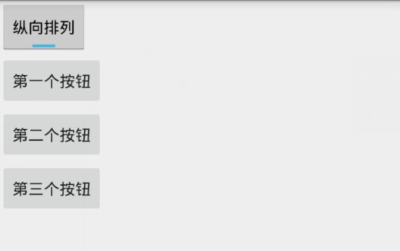
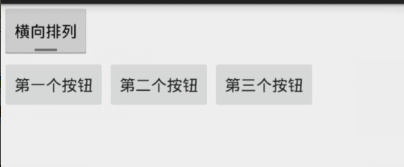
Demo2\togglebutton_demo\src\main\res\layout\activity_main.xml
 <LinearLayout xmlns:android="http://schemas.android.com/apk/res/android"

     xmlns:tools="http://schemas.android.com/tools"

     android:layout_width="match_parent"

     android:layout_height="match_parent"

     android:orientation="vertical"

     tools:context=".MainActivity">

     <!--定义一个ToggleButton按钮-->

     <ToggleButton

         android:id="@+id/toggle"

         android:layout_width="wrap_content"

         android:layout_height="wrap_content"

         android:checked="true"

         android:textOff="横向排列"

         android:textOn="纵向排列" />

     <!--定义一个可以动态改变方向的线性布局-->

     <LinearLayout

         android:id="@+id/test"

         android:layout_width="match_parent"

         android:layout_height="match_parent"

         android:orientation="vertical">

         <Button

             android:layout_width="wrap_content"

             android:layout_height="wrap_content"

             android:text="第一个按钮"/>

         <Button

             android:layout_width="wrap_content"

             android:layout_height="wrap_content"

             android:text="第二个按钮"/>

         <Button

             android:layout_width="wrap_content"

             android:layout_height="wrap_content"

             android:text="第三个按钮"/>

     </LinearLayout>

 </LinearLayout>
Demo2\togglebutton_demo\src\main\java\com\ly\togglebutton_demo\MainActivity.java
 import android.app.Activity;

 import android.os.Bundle;

 import android.widget.CompoundButton;

 import android.widget.LinearLayout;

 import android.widget.ToggleButton;

 public class MainActivity extends Activity {

     private ToggleButton toggle ;

     private LinearLayout linear ;

     @Override

     protected void onCreate(Bundle savedInstanceState) {

         super.onCreate(savedInstanceState);

         setContentView(R.layout.activity_main);

         toggle = (ToggleButton) findViewById(R.id.toggle);

         linear = (LinearLayout) findViewById(R.id.test);

         toggle.setOnCheckedChangeListener(new CompoundButton.OnCheckedChangeListener() {

             @Override

             public void onCheckedChanged(CompoundButton buttonView, boolean isChecked) {

                 if (isChecked){

                     //如果选中了,就设置垂直布局

                     linear.setOrientation(LinearLayout.VERTICAL);

                 }else {

                     //否则就水平

                     linear.setOrientation(LinearLayout.HORIZONTAL);

                 }

             }

         });

     }

 }
状态开关按钮(ToggleButton)和开关(Switch)的更多相关文章
- Android学习笔记-开关按钮ToggleButton和开关Switch
本节给大家介绍的Android基本UI控件是:开关按钮ToggleButton和开关Switch,这两个其实都是开关组件,只是后者需要在Android 4.0以后才能使用 所以AndroidManif ...
- Android——滚动视图(ScrollView)图片视图(ImageView)、状态开关按钮(ToggleButton)、时钟
xml <?xml version="1.0" encoding="utf-8"?> <!--滚动视图--> <ScrollVie ...
- Android——图片视图(ImageView)、状态开关按钮(ToggleButton)、时钟、图片透明度、滚动和时间选择器
activity_ui1.xml dth="wrap_content" android:layout_height="wrap_content" android ...
- 状态开关按钮(ToggleButton)与开关(Switch)的功能与用法
状态开关按钮(ToggleButton)与开关(Switch)也是由Button派生出来的,因此它们的本质也是按钮,Button支持的各种属性.方法也适用于ToggleButton和Switch.从功 ...
- 状态开关按钮(ToggleButton)及按钮(Swich)的使用
状态开关按钮(ToggleButton)和开关(Switch)也是由Button派生出来的,因此它们本质上都是按钮,Button支持的各种属性.方法也适用于ToggleButton和Switch.从功 ...
- Android ToggleButton(开关函数)与switch (开关按钮)
1.ToggleButton (1)介绍 (2)组件形状 (3)xml文件设置 <?xml version="1.0" encoding="utf-8"? ...
- Android 多状态按钮ToggleButton
1.什么是ToggleButtonToggleButton有两种状态:选中和未选中状态并且需要为不同的状态设置不同的显示文本2.ToggleButton属性android:checked=" ...
- vue.js开发之开关(switch)组件
最近开发组件的时候,自定义开发了开关(switch)组件,现将代码整理如下,方便日后复用. toggle-switch.vue <template> <label role=&quo ...
- 可滑动的ToggleButton(开关)
2013-12-28 17:25:01 网上看到一篇关于可滑动的ToogleButton的文章,有代码,觉得挺好,但是不符合我的要求,因此在他的代码基础上改了一些.(作者看到了勿喷啊,实在找不到原文了 ...
随机推荐
- Ueditor1.4.3.3+springMvc+maven 实现图片上传
前记:由于项目中需要有一个新增数据并且要能支持表格图片上传的功能.使用了ueditor控件.为实现这个功能,从一开始什么都看不懂,到一直连着弄了5天,总算是有了眉目.在此记录一下以便能帮到可以和我一样 ...
- SpringMVC+Freemarker+JSTL支持
前提: 网页编程中,我的思路是,通用的模块不仅仅只有后台代码,前端页面也可以独立为模块. 这个和asp.net中的UserController很像 比如有个人员基本信息的展示界面,需要在多个界面中嵌入 ...
- PHP函数的实现原理及性能分析
前言 在任何语言中,函数都是最基本的组成单元.对于php的函数,它具有哪些特点?函数调用是怎么实现的?php函数的性能如何,有什么使用建议?本文将从原理出发进行分析结合实际的性能测试尝试对这些问题进行 ...
- rem字体响应式布局
引用js,自动算字体大小,响应式布局 <script> var iScale = 1; iScale = iScale / window.devicePixelRatio; documen ...
- mysql 事件调度
适用于mysql 5.1 及以后版本 1.查看是否开启 show variables like '%scheduler%' 2.查看进程 show processlist 3.事件调度器默认是关闭的, ...
- (一)常用的CSS命名规则
头:header 内容:content/container 尾:footer 导航:nav 侧栏:sidebar 栏目:column 页面外围控制整体布局宽度:wrapper 左右中:left rig ...
- NPOI导出Excel(含有超过65335的处理情况)
NPOI导出Excel的网上有很多,正好自己遇到就学习并总结了一下: 首先说明几点: 1.Excel2003及一下:后缀xls,单个sheet最大行数为65335 Excel2007 单个sheet ...
- 扩大a标签的响应区域
<a href="" style="display:inline-block; width: 100%;">xx</a>
- 使用Wireshark 查看查找未被过滤端口
打开Wireshark ,过滤输入“ip.src == [IP] && ip.ttl < 255”,因为防火墙伪造的数据包的TTL都是255,真实的数据包应该是56,所以这句话直 ...
- mysql 5.7开启并行复制
开启多线程复制,默认关键的参数有两个: mysql> show variables like 'slave_parallel_%'; +------------------------+---- ...