
状态开关按钮(ToggleButton)与开关(Switch)的功能与用法
状态开关按钮(ToggleButton)与开关(Switch)也是由Button派生出来的,因此它们的本质也是按钮,Button支持的各种属性、方法也适用于ToggleButton和Switch。从功能上来看,ToggleButton、Switch与CheckBox复选框非常相似,它们都可以提供两个状态。不过ToggleButton、Switch与CheckBox的区别主要体现在功能上,ToggleButton、Switch通常用于切换程序中的某种状态。
表2.14显示了ToggleButton所支持的XML属性及相关方法的说明。
表2.14 ToggleButton支持的XML属性及相关方法说明
| XML属性 | 相关方法 | 说明 |
| android:checked | setChecked(boolean) | 设置该按钮是否被选中 |
| android:textOff | 设置当该按钮的状态关闭时显示的文本 | |
| android:textOn | 设置当该按钮的状态打开时显示的文本 |
表2.15显示了Switch所支持的XML属性及相关方法的说明。
表2.15 Switch支持的XML属性及相关方法说明
| XML属性 | 相关方法 | 说明 |
| android:checked | setChecked(boolean) | 设置该开关是否被选中 |
| android:switchMinWidth | setSwitchMinWidth(int) | 设置该开关的最小宽度 |
| android:switchPadding | setSwitchPadding(int) | 设置开关与标题文本之间的空白 |
| android:switchTextAppearance | setSwitchTextAppearance(Context,int) | 设置该开关图标上的文本样式 |
| android:textOff | setTextOff(CharSequence) | 设置该开关的状态关闭时显示的文本 |
| android:textOn | setTextOn(CharSequence) | 设置该开关的文本的风格 |
| android:textStyle | setSwitchTypeface(Typeface) | 设置该开关的文本的风格 |
| android:thumb | setThumbResource(int) | 指定使用自定义Drawable绘制该开关的开关按钮 |
| android:track | setTrackResource(int) | 指定使用自定义Drawable绘制该开关的开关轨道 |
| android:typeface | setSwitchTypeface(Typeface) | 设置该开关的文本的字体风格 |
实例:动态控制布局
该实例的思路是在页面中增加一个ToggleButton,随着该按钮状态改变,界面布局中的LinearLayout布局的方向在水平布局、垂直布局之间切换。下面是该程序所使用的界面布局。
<LinearLayout xmlns:android="http://schemas.android.com/apk/res/android"

    android:orientation="vertical"

    android:layout_width="fill_parent"

    android:layout_height="fill_parent"

     >

<!-- 定义一个ToggleButton按钮 -->

<ToggleButton android:id="@+id/toggle"

    android:layout_width="wrap_content"

    android:layout_height="wrap_content"

    android:textOff="横向排列"

    android:textOn="纵向排列"

    android:checked="true" />

<Switch android:id="@+id/switcher"

    android:layout_width="wrap_content"

    android:layout_height="wrap_content"

    android:textOff="横向排列"

    android:textOn="纵向排列"

    android:thumb="@drawable/check"

    android:checked="true" />

<!-- 下面省略了三个按钮的定义 -->

<LinearLayout android:orientation="vertical"

    android:id="@+id/test"

    android:layout_width="fill_parent"

    android:layout_height="fill_parent" >

    <Button android:layout_width="wrap_content"

        android:layout_height="wrap_content"

        android:text="测试按钮一" />

    <Button android:layout_width="wrap_content"

        android:layout_height="wrap_content"

        android:text="测试按钮二" />

     <Button android:layout_width="wrap_content"

        android:layout_height="wrap_content"

        android:text="测试按钮三" />

</LinearLayout>

</LinearLayout>
上面LinearLayout中定义了三个按钮,该LinearLayout默认采用垂直方向的线性布局。接下来我们为ToggleButton按钮、Switch按钮绑定监听器,当它的选中状态发生改变时,程序通过代码来改变LinearLayout的布局方向。
package org.crazyit.helloworld;

import android.os.Bundle;

import android.app.Activity;

import android.view.Menu;

import android.widget.*;

import android.widget.CompoundButton.OnCheckedChangeListener;

public class ToggleButtonTest extends Activity {

    ToggleButton toggle;

    Switch switcher;

    @Override

    protected void onCreate(Bundle savedInstanceState) {

        super.onCreate(savedInstanceState);

        setContentView(R.layout.toggle_button_test);

        toggle=(ToggleButton)findViewById(R.id.toggle);

        switcher=(Switch)findViewById(R.id.switcher);

        final LinearLayout test=(LinearLayout)findViewById(R.id.test);

        OnCheckedChangeListener listener=new OnCheckedChangeListener(){

            @Override

            public void onCheckedChanged(CompoundButton arg0, boolean isChecked) {

                // TODO Auto-generated method stub

                if(isChecked)

                {

                    //设置LinearLayout垂直布局

                    test.setOrientation(1);

                }

                else

                {

                    test.setOrientation(0);

                }

            }

        };

        toggle.setOnCheckedChangeListener(listener);

        switcher.setOnCheckedChangeListener(listener);

    }

    @Override

    public boolean onCreateOptionsMenu(Menu menu) {

        // Inflate the menu; this adds items to the action bar if it is present.

        getMenuInflater().inflate(R.menu.toggle_button_test, menu);

        return true;

    }

}
运行该Activity,随着用户改变ToggleButton按钮的状态,下面界面布局的方向也在不断发生变化。图2.26显示了ToggleButton的界面。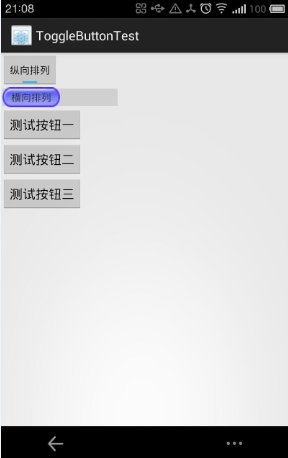
图2.26 ToggleButton与Switch的功能
状态开关按钮(ToggleButton)与开关(Switch)的功能与用法的更多相关文章
- 状态开关按钮(ToggleButton)和开关(Switch)
ToggleButton支持的XML属性及相关方法1.android:checked----->setChecked(boolean) ----->设置该按钮是否被选中2.android: ...
- Android学习笔记-开关按钮ToggleButton和开关Switch
本节给大家介绍的Android基本UI控件是:开关按钮ToggleButton和开关Switch,这两个其实都是开关组件,只是后者需要在Android 4.0以后才能使用 所以AndroidManif ...
- Android——滚动视图(ScrollView)图片视图(ImageView)、状态开关按钮(ToggleButton)、时钟
xml <?xml version="1.0" encoding="utf-8"?> <!--滚动视图--> <ScrollVie ...
- Android——图片视图(ImageView)、状态开关按钮(ToggleButton)、时钟、图片透明度、滚动和时间选择器
activity_ui1.xml dth="wrap_content" android:layout_height="wrap_content" android ...
- 状态开关按钮(ToggleButton)及按钮(Swich)的使用
状态开关按钮(ToggleButton)和开关(Switch)也是由Button派生出来的,因此它们本质上都是按钮,Button支持的各种属性.方法也适用于ToggleButton和Switch.从功 ...
- Android ToggleButton(开关函数)与switch (开关按钮)
1.ToggleButton (1)介绍 (2)组件形状 (3)xml文件设置 <?xml version="1.0" encoding="utf-8"? ...
- Android 多状态按钮ToggleButton
1.什么是ToggleButtonToggleButton有两种状态:选中和未选中状态并且需要为不同的状态设置不同的显示文本2.ToggleButton属性android:checked=" ...
- vue.js开发之开关(switch)组件
最近开发组件的时候,自定义开发了开关(switch)组件,现将代码整理如下,方便日后复用. toggle-switch.vue <template> <label role=&quo ...
- 单选按钮(RadioButton)与复选框(CheckBox)的功能与用法
单选按钮(RadioButton)和复选框(CheckBox).状态开关按钮(ToggleButton)与开关(Switch)是用户界面中最普通的UI组件,他们都继承了Button类,因此都可直接使用 ...
随机推荐
- (Question)CSS中position的绝对定位问题
RT,绝对定位相对于定位的元素存在是哪里? https://yunpan.cn/crjSMTiak2srZ 访问密码 1570
- js 获取n天前的时间
<script type="text/javascript"> var strdate = new Date(); var begindate = strdate.ge ...
- hdu1915
对于图的东西总是一筹莫展,没办法,还是翻出以前的基础题来看看,然后慢慢分析吧.路漫漫其修远兮,吾将上下而求索…… void bfs(int x,int y){ for(int k=0;k<8;k ...
- Android4.2以后,多屏幕的支持 学习(一)
前几天总结了Android的多用户支持,过几天准备再总结Android的多屏支持.Android支持3种类型屏幕:主屏幕(Primary Display).外屏幕(External Display)和 ...
- NVIDA 提到的 深度框架库
BidMachBlocksCaffeChainerCNTKcuda-convnetcuda-convnet2Deeplearning4jkaldiKerasLasagneMarvinMatConvNe ...
- (中等) POJ 3280 Cheapest Palindrome,DP。
Description Keeping track of all the cows can be a tricky task so Farmer John has installed a system ...
- MyBatis 3 中使用存储过程
转:http://zachary-guo.iteye.com/blog/1756689 Mybats 是 iBatis 被 Google 收购后重新命名的一个工程,当然也做了大量的升级.iBatis ...
- Extjs的架构设计思考,单页面应用 or 多页面?
写在前面:不要认为 EXTJS 高版本就是一个界面改良,在项目中,仍然用 N 张页面,在 N 张页面部署 EXTJS .这种方式不用多讲,效率问题大家都看得出来, EXTJS 是一个集成开发工具,注定 ...
- 硬件和软件兼容i2c协议的24Cxx系列EEPROM存储器(转)
源:硬件和软件兼容i2c协议的24Cxx系列EEPROM存储器 硬件上由于24c01的A0A1A2管脚不允许悬空,故暂时的想法是兼容24c02 ---24c16 使用一个dip8封装的芯片插座,A0 ...
- STM8时钟系统详解
就我个人看来,研究一块单片机,分为新手和老手两种模式,新人迫切的想先用,你得告诉他们怎么样最快的写出一个能跑起来的程序,告诉他们每一个外设的使用方式,老手不同,用的单片机多了外设对于他们而言没太多好奇 ...