
状态开关按钮(ToggleButton)和开关(Switch)
ToggleButton支持的XML属性及相关方法
1.android:checked----->setChecked(boolean)
----->设置该按钮是否被选中
2.android:textOff----->设置当该按钮的状态关闭时显示的文本
3.android:textON----->设置当该按钮的状态打开时显示的文本
Switch支持的XML属性及相关方法
1.android:checked----->setChecked(boolean)
----->设置该按钮是否被选中
2.android:textOff----->设置当该按钮的状态关闭时显示的文本
3.android:textON----->设置当该按钮的状态打开时显示的文本
4.android:switchMinWidth----->setSwitchMinWidth(int)
----->设置该开关的最小宽度
5.android:switchPadding----->setSwitchMinWidth(int)
----->设置该开关与标题文本之间的空白
6.android:switchTextAppearance----->setSwitchTextAppearance(Context,int)
----->设置开关图标上的文本样式
7.android:textStyle----->setSwitchTypeface(TYpeface)
----->设置开关的文本风格
8.android:thumb----->setThumbResource(int)
----->指定使用自定义Drawable绘制该开关的开关按钮
9.android:track----->setTrackResource(int)
----->指定使用自定义Drawable绘制该开关的轨道
10.android:typeface----->setSwitchTypeface(TYpeface)
-----设置该开关的文本的字体风格
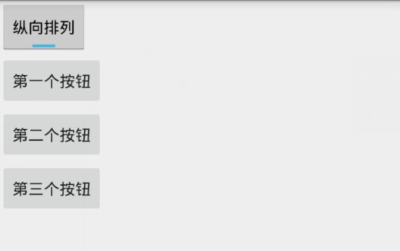
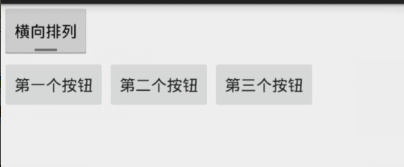
Demo2\togglebutton_demo\src\main\res\layout\activity_main.xml
 <LinearLayout xmlns:android="http://schemas.android.com/apk/res/android"

     xmlns:tools="http://schemas.android.com/tools"

     android:layout_width="match_parent"

     android:layout_height="match_parent"

     android:orientation="vertical"

     tools:context=".MainActivity">

     <!--定义一个ToggleButton按钮-->

     <ToggleButton

         android:id="@+id/toggle"

         android:layout_width="wrap_content"

         android:layout_height="wrap_content"

         android:checked="true"

         android:textOff="横向排列"

         android:textOn="纵向排列" />

     <!--定义一个可以动态改变方向的线性布局-->

     <LinearLayout

         android:id="@+id/test"

         android:layout_width="match_parent"

         android:layout_height="match_parent"

         android:orientation="vertical">

         <Button

             android:layout_width="wrap_content"

             android:layout_height="wrap_content"

             android:text="第一个按钮"/>

         <Button

             android:layout_width="wrap_content"

             android:layout_height="wrap_content"

             android:text="第二个按钮"/>

         <Button

             android:layout_width="wrap_content"

             android:layout_height="wrap_content"

             android:text="第三个按钮"/>

     </LinearLayout>

 </LinearLayout>
Demo2\togglebutton_demo\src\main\java\com\ly\togglebutton_demo\MainActivity.java
 import android.app.Activity;

 import android.os.Bundle;

 import android.widget.CompoundButton;

 import android.widget.LinearLayout;

 import android.widget.ToggleButton;

 public class MainActivity extends Activity {

     private ToggleButton toggle ;

     private LinearLayout linear ;

     @Override

     protected void onCreate(Bundle savedInstanceState) {

         super.onCreate(savedInstanceState);

         setContentView(R.layout.activity_main);

         toggle = (ToggleButton) findViewById(R.id.toggle);

         linear = (LinearLayout) findViewById(R.id.test);

         toggle.setOnCheckedChangeListener(new CompoundButton.OnCheckedChangeListener() {

             @Override

             public void onCheckedChanged(CompoundButton buttonView, boolean isChecked) {

                 if (isChecked){

                     //如果选中了,就设置垂直布局

                     linear.setOrientation(LinearLayout.VERTICAL);

                 }else {

                     //否则就水平

                     linear.setOrientation(LinearLayout.HORIZONTAL);

                 }

             }

         });

     }

 }
状态开关按钮(ToggleButton)和开关(Switch)的更多相关文章
- Android学习笔记-开关按钮ToggleButton和开关Switch
本节给大家介绍的Android基本UI控件是:开关按钮ToggleButton和开关Switch,这两个其实都是开关组件,只是后者需要在Android 4.0以后才能使用 所以AndroidManif ...
- Android——滚动视图(ScrollView)图片视图(ImageView)、状态开关按钮(ToggleButton)、时钟
xml <?xml version="1.0" encoding="utf-8"?> <!--滚动视图--> <ScrollVie ...
- Android——图片视图(ImageView)、状态开关按钮(ToggleButton)、时钟、图片透明度、滚动和时间选择器
activity_ui1.xml dth="wrap_content" android:layout_height="wrap_content" android ...
- 状态开关按钮(ToggleButton)与开关(Switch)的功能与用法
状态开关按钮(ToggleButton)与开关(Switch)也是由Button派生出来的,因此它们的本质也是按钮,Button支持的各种属性.方法也适用于ToggleButton和Switch.从功 ...
- 状态开关按钮(ToggleButton)及按钮(Swich)的使用
状态开关按钮(ToggleButton)和开关(Switch)也是由Button派生出来的,因此它们本质上都是按钮,Button支持的各种属性.方法也适用于ToggleButton和Switch.从功 ...
- Android ToggleButton(开关函数)与switch (开关按钮)
1.ToggleButton (1)介绍 (2)组件形状 (3)xml文件设置 <?xml version="1.0" encoding="utf-8"? ...
- Android 多状态按钮ToggleButton
1.什么是ToggleButtonToggleButton有两种状态:选中和未选中状态并且需要为不同的状态设置不同的显示文本2.ToggleButton属性android:checked=" ...
- vue.js开发之开关(switch)组件
最近开发组件的时候,自定义开发了开关(switch)组件,现将代码整理如下,方便日后复用. toggle-switch.vue <template> <label role=&quo ...
- 可滑动的ToggleButton(开关)
2013-12-28 17:25:01 网上看到一篇关于可滑动的ToogleButton的文章,有代码,觉得挺好,但是不符合我的要求,因此在他的代码基础上改了一些.(作者看到了勿喷啊,实在找不到原文了 ...
随机推荐
- ELK:kibana使用的lucene查询语法【转载】
kibana在ELK阵营中用来查询展示数据 elasticsearch构建在Lucene之上,过滤器语法和Lucene相同 全文搜索 在搜索栏输入login,会返回所有字段值中包含login的文档 使 ...
- iOS系统导航/自绘制导航路线
系统自带导航 /** 系统自带导航 当前位置导航到目的地 1.根据目的地进行地理编码 2.把当前位置和目的地封装成MKMapItem对象 3.使用 MKMapItem openMapsWithItem ...
- jQuery Mobile 可折叠
可折叠的内容块 可折叠(Collapsibles)允许您隐藏或显示内容 - 对于存储部分信息很有用. 如需创建可折叠的内容块,请向某个容器分配 data-role="collapsible& ...
- 获取WIFI的SSID和本机IP
1.获取WIFI的SSID 引入库 #import <SystemConfiguration/CaptiveNetwork.h> ..... ..... // WIFI的名字 + (NSS ...
- Eclipse中调试Android技巧
Android eclipse中程序调试 一:断点调试 用eclipse开发android程序的时,跟VS一样是可以断点单步调试的. 步骤如下. 1 设置断点:在编码窗体的左边框上用鼠标双击,或者右键 ...
- 为何PHP插入mysql的中文是乱码?【坑】
依然没有找到最终的解决方法,PHP插入的中文在phpmyadmin中看是乱码,但是用PHP获取之后显示正常: 可以在phpmyadmin中直接插入中文,在PHPmyadmin中显示正常,用PHP获取中 ...
- linux 怎么完全卸载mysql数据库
在linux下开发,mysql数据库是经常用到的,对于初学者来说,在linux怎么安装卸载mysql数据库,也许可能比较痛苦,这里简单介绍下,怎么卸载msql数据库. a)查看系统中是否以rpm包安装 ...
- 使用AsyncTask实现文件下载并且在状态中显示下载进度
2013年10月24日 上班的第二天 昨天我是用afinal完成的则个功能,但是公司里并不希望使用第三方的代码,所以要求我在不使用第三方开源项目的情况下实现. 最先我是使用Thread开启一个子线程, ...
- 【转】js判断手机访问网页
原理:原理有两个,第一:通过游览器(browser)判断是否是手机:第二:通过访问终端判断是否是手机(userAgent):但是通常考虑到兼容性,需要这两种原理同时使用:具体的实现如下: JS实现: ...
- 安装完ODAC,出现ORA-12560:TNS:协议适配器错误 12541 无监听程序的解决
进入系统环境变量设置,查看Path路径,发现D:\oracle\product\11.2.0\client_1等路径放到了oracle11g数据库路径前面,将新加入的路径置后即可解决ORA-12560 ...