
Handling events in an MVVM WPF application
Posted: June 30, 2013 | Filed under: MVVM, WPF, XAML |1 Comment
In a WPF application that uses the MVVM (Model-View-ViewModel) design pattern, the view model is the component that is responsible for handling the application’s presentation logic and state. This means that the view’s code-behind file should contain no code to handle events that are raised from any user interface (UI) element such as a Button or a ComboBox nor should it contain any domain specific logic.
Ideally, the code-behind of a view – typically a Window or a UserControl – contains only a constructor that calls the InitializeComponent method and perhaps some additional code to control or interact with the view layer that is difficult or inefficient to express in XAML, e.g. complex animations.
In other words, an MVVM application should not have any code like this where a button’s click event is handled in the code-behind of the view:
<Button Content="Click here!" Click="btn_Click"/>
protected void btn_Click(object sender, RoutedEventArgs e)
{
/* This is not MVVM! */
}
Commands
Instead, in addition to providing properties to expose data to be displayed or edited in the view, the view model defines actions that can be performed by the user and typically expose these as commands. A command is an object that implements theSystem.Windows.Input.ICommand interface and encapsulates the code for the action to be performed. It can be data bound to a UI control in the view to be invoked as a result of a mouse click, key press or any other input event. As well as the command being invoked as the user interacts with the UI, a UI control can be automatically enabled or disabled based on the command.
The Execute method of the ICommand interface encapsulates the operation itself while the CanExecute method indicates whether the command can be invoked at a particular time or not. The interface also defines a CanExecuteChanged event that is raised on the UI thread to cause every invoking control to requery to check if the command can execute.
WPF provides two implementations of the ICommand interface; the System.Windows.Input.RoutedCommand andSystem.Windows.Input.RoutedUICommand where the latter is a subclass of the former that simply adds a Text property that describes the command. However, neither of these implementations are especially suited to be used in a view model as they search the visual tree from the focused element and up for an element that has a matchingSystem.Windows.Input.CommandBinding object in its CommandBindings collection and then executes the Execute delegate for this particular CommandBinding. Since the command logic should reside in the view model, you don’t want to setup aCommandBinding in the view in order to connect the command to a visual element. Instead, you can create your own command by creating a class that implements the ICommand. The below implementation is a common one that invokes delegates for the Execute and CanExecute methods. If you are using Prism, the framework for building composite WPF and Silverlight applications from the Microsoft Patterns and Practices Team, there is a similar Microsoft.Practices.Prism.Commands.DelegateCommand class available.
public class DelegateCommand<T> : System.Windows.Input.ICommand
{
private readonly Predicate<T> _canExecute;
private readonly Action<T> _execute;
public DelegateCommand(Action<T> execute)
: this(execute, null)
{
}
public DelegateCommand(Action<T> execute, Predicate<T> canExecute)
{
_execute = execute;
_canExecute = canExecute;
}
public bool CanExecute(object parameter)
{
if (_canExecute == null)
return true;
return _canExecute((parameter == null) ? default(T) : (T)Convert.ChangeType(parameter, typeof(T)));
}
public void Execute(object parameter)
{
_execute((parameter == null) ? default(T) : (T)Convert.ChangeType(parameter, typeof(T)));
}
public event EventHandler CanExecuteChanged;
public void RaiseCanExecuteChanged()
{
if (CanExecuteChanged != null)
CanExecuteChanged(this, EventArgs.Empty);
}
}
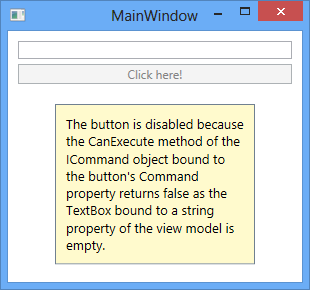
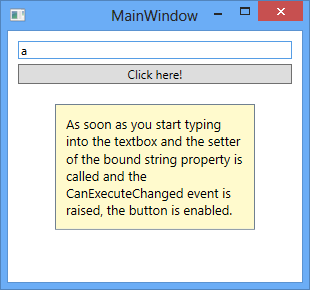
The view model will then expose properties of this type for the view to bind to. Below is a sample implementation of a view model that exposes a ButtonClickCommand that will disable any UI control that is bound to it if the private string field _input, which is in turn exposed through a string property called Input, is empty. If you only pass a single delegate to the constructor of the DelegateCommand<T> class, it will assume that the command should always by available and the CanExecute method will always return true. Also note that when the value of the string property changes, a RaiseCanExecuteChanged method is called to raise the CanExecuteChanged event in order to update the status of any control in the view that is bound to the command.
public class ViewModel
{
private readonly DelegateCommand<string> _clickCommand;
public ViewModel()
{
_clickCommand = new DelegateCommand<string>(
(s) => { /* perform some action */ }, //Execute
(s) => { return !string.IsNullOrEmpty(_input); } //CanExecute
);
}
public DelegateCommand<string> ButtonClickCommand
{
get { return _clickCommand; }
}
private string _input;
public string Input
{
get { return _input; }
set
{
_input = value;
_clickCommand.RaiseCanExecuteChanged();
}
}
}
public partial class MainWindow : Window
{
public MainWindow()
{
InitializeComponent();
this.DataContext = new ViewModel();
}
}
<StackPanel Margin="10">
<TextBox Text="{Binding Input, UpdateSourceTrigger=PropertyChanged}"/>
<Button Content="Click here!" Command="{Binding ButtonClickCommand}"
Margin="0 5 0 0"/>
</StackPanel>
With this approach you have now moved the presentation logic from the view to the view model. Instead of hooking up the button’s click handler, its Command property is now bound to the command defined in the view model and when the user clicks on the button the command’s Execute method will be invoked.
EventTriggers
There is an alternative way of associating a control in the view with a command object exposed by the view model. Only some controls can actually bind to a command through the Command property, notably those derived fromSystem.Windows.Controls.Primitives.ButtonBase or System.Windows.Controls.MenuItem. If you want to attach a command to some other control or when you want to invoke a command on an event other than the click event for a button, you can use Expression Blend interaction triggers and the System.Windows.Interactivity.InvokeCommandAction class. Below is an example on how you would execute a command object called MouseEnterCommand in the view model when the user moves the mouse pointer over a Rectangle element in the view. You specify the event for which the command will be executed in the EventName property of the EventTrigger. Remember to add a reference to System.Windows.Interactivity.dll for this to compile.
Also note that using the InvokeCommandAction doesn’t automatically enable or disable the control based on the command’s CanExecute method, unlike controls that have a Command property and can be bound directly to a command.
<Window x:Class="Mm.HandlingEventsMVVM.MainWindow"
xmlns="http://schemas.microsoft.com/winfx/2006/xaml/presentation"
xmlns:x="http://schemas.microsoft.com/winfx/2006/xaml"
xmlns:i="clr-namespace:System.Windows.Interactivity;assembly=System.Windows.Interactivity"
Title="MainWindow" Height="350" Width="525">
<StackPanel>
<Rectangle Fill="Yellow" Stroke="Black" Width="100" Height="100">
<i:Interaction.Triggers>
<i:EventTrigger EventName="MouseEnter" >
<i:InvokeCommandAction Command="{Binding MouseEnterCommand}" />
</i:EventTrigger>
</i:Interaction.Triggers>
</Rectangle>
</StackPanel>
</Window>
CommandParameters
If you wish to pass a parameter to a command from the view you do so by using the CommandParameter property. The type argument of the generic DelegateCommand<T> class specifies the type of the command parameter that gets passed to the Execute and CanExecute methods. The CommandParameter property exists in both the ButtonBase and MenuItem derived controls as well as in the InvokeCommandAction class:
<Button Content="Click here!" Command="{Binding ButtonClickCommand}"
CommandParameter="some string to be passed..."
Margin="0 5 0 0"/>
<i:InvokeCommandAction Command="{Binding MouseEnterCommand}"
CommandParameter="some string to be passed..."/>
CallMethodAction
Besides the InvokeCommandAction class, there is also another class named CallMethodAction that can be used to invoke a method in the view model from the view without using commands. It has a MethodName property for specifying the name of the method to call and a TargetObject property that needs to be bound to an instance of the class containing the method, i.e. the view model:
<Window x:Class="Mm.HandlingEventsMVVM.MainWindow"
xmlns="http://schemas.microsoft.com/winfx/2006/xaml/presentation"
xmlns:x="http://schemas.microsoft.com/winfx/2006/xaml"
xmlns:i="clr-namespace:System.Windows.Interactivity;assembly=System.Windows.Interactivity"
xmlns:ei="http://schemas.microsoft.com/expression/2010/interactions"
Title="MainWindow" Height="350" Width="525">
<StackPanel>
<Rectangle Fill="Yellow" Stroke="Black" Width="100" Height="100">
<i:Interaction.Triggers>
<i:EventTrigger EventName="MouseEnter" >
<!-- Execute a method called 'SomeMethod' defined in the view model -->
<ei:CallMethodAction TargetObject="{Binding}" MethodName="SomeMethod"/>
</i:EventTrigger>
</i:Interaction.Triggers>
</Rectangle>
</StackPanel>
</Window>
public void SomeMethod()
{
/* do something ... */
}
Note that the CallMethodAction class is defined in another assembly and namespace and you will need to add a reference to Microsoft.Expressions.Interactions.dll to be able to use it. Also note that it doesn’t support parameters.
Handling events in an MVVM WPF application的更多相关文章
- 每天翻译一点点: WPF Application Framework (WAF)
ps:http://waf.codeplex.com/wikipage?title=Model-View-ViewModel%20Pattern&referringTitle=Document ...
- 【转】How to view word document in WPF application
How to view word document in WPF application (CSVSTOViewWordInWPF) Introduction The Sample demonstra ...
- Merging a WPF application into a single EXE(WPF应用程序合并成单个Exe文件)
I always dislike handing off little applications to people. Not because I can’t, but because of the ...
- C# WPF Application 下的文件操作
好气哦,电脑好烂,每天花大把的时间在等电脑反应上. 没有钱买新电脑,连组台式机的钱都没有.好气哦. 啊啊啊啊文件操作是什么鬼???C++下我都懵了,C#下好多东西要学!!!我不会!我不会!我不会!!! ...
- (4)事件处理——(1)事件处理(Handling Events)
JavaScript has several built-in ways of reacting to user interaction and other events. To make a pag ...
- WPF Application 类介绍以及怎样修改启动方式
因为想要修改wpf的启动方式,所以研究了下Application类,现把一些有用的属性与大家分享下: 属性: Current 获取当前 AppDomain的 Appl ...
- WPF——Application
Application类处于WPF应用程序的最顶端,main函数就在这个类中. Application类的作用: 截图连接 https://docs.microsoft.com/zh-cn/dotne ...
- WPF Application
Application类作为启动的入口,在VS中,通常自动代码为我们继承了Application类,这样做的有点,我还没有理解到,但是我们先学到这个知识点. 为了能够更好的控制整个启动过程,包括得到A ...
- Eloquent JavaScript #12# Handling Events
索引 Notes onclick removeEventListener Event objects stopPropagation event.target Default actions Key ...
随机推荐
- java 设置允许ajax XMLHttpRequest 请求跨域访问
怎样才能算跨域?协议,域名,端口都必须相同,才算在同一个域. 方案1: 使用XMLHttpRequest... 异步请求不能跨域访问,除非要访问的网页响应头信息设置为允许跨域访问. 将网页设置为允许 ...
- iPad开发(Universal Applications)
一.iPad 1.判断是否在iPad上 BOOL iPad = ([[UIDevice currentDevice] userInterfaceIdiom] == UIUserInterfaceIdi ...
- EasyUi–8.datebox赋值的问题
这个问题要从EasyUI的datebox组件说起,小菜用这个组件的时候,发现用$("#id").val()这种形式,居然拿不到文本框的值! 经过度娘的帮助,发现可以用$( ...
- GMap.Net开发之在WinForm和WPF中使用GMap.Net地图插件
GMap.NET是什么? 来看看它的官方说明:GMap.NET is great and Powerful, Free, cross platform, open source .NET contro ...
- 判断一个类到底是从哪个jar包中调用的工具类
项目中使用的jar包较多时,会出现jar冲突的情况,有时候很难判断当前使用的这个类是从哪个jar包中调用的.因为一般我们只能看到jar包的名称,不清楚其中的类的目录结构. 这个类的作用就是说明当前调用 ...
- PHPCMS V9 点击量排行调用方法
首先调用的标签代码如下: {pc:content action=”sitehits” siteid=”4″ num=”10″ order=”views DESC” cache=”3600″} {loo ...
- [Spring Batch] 图解Spring Batch原理
找到一副以前学习的图,稻清楚的描述了Spring Batch运行原理:
- AIX RAC ORA-27504 ORA-27300 ORA-27301 ORA-27302 ORA-27303
操作系统:AIX6.1 数据库:Oracle10.2.0.5 RAC 2个节点.其中一个节点正常,另外一个节点的instance的状态是offline的,手工去启动的时候报错: ORA: IPC e ...
- VS2012 配置 OpenCV3.0
VS2012 配置 opencv3.0,相比之前的版本,3.0的配置简单了好多. 通过配置属性文件,可以做到一次配置,重复使用! 根据文章的操作在 win7 64bit VS2012 下成功配置 op ...
- win7 快捷键
F F1 显示辅助 F2 重命名选定项目 F3 搜索文件或文件夹 F4 在 Windows 资源管理器中显示地址栏列表 F5 刷新活动窗口 F6 在窗口中或桌面上循环切换屏幕元素 F10 激活活动程序 ...