
PHP微信支付开发实例
这篇文章主要为大家详细介绍了PHP微信支付开发过程,具有一定的参考价值,感兴趣的小伙伴们可以参考一下
PHP微信支付开发过程,分享给大家,供大家参考,具体内容如下
1.开发环境
Thinkphp 3.2.3
微信:服务号,已认证
开发域名:http://test.paywechat.com (自定义的域名,外网不可访问)
2.需要相关文件和权限
微信支付需申请开通
微信公众平台开发者文档:http://mp.weixin.qq.com/wiki/home/index.html
微信支付开发者文档:https://pay.weixin.qq.com/wiki/doc/api/index.html
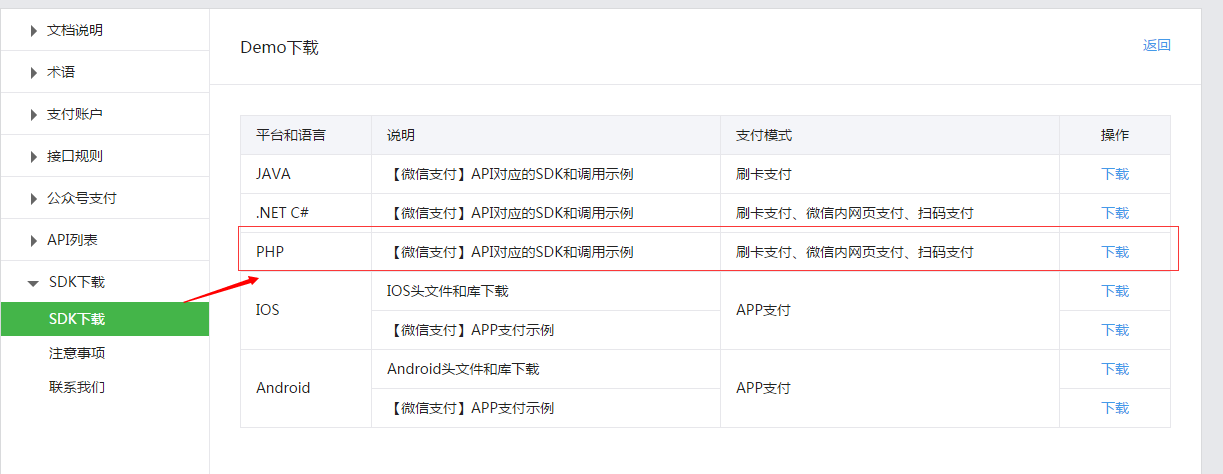
微信支付SDK下载地址:https://pay.weixin.qq.com/wiki/doc/api/jsapi.php?chapter=11_1
3.开发
下载好微信支付PHP版本的SDK,文件目录为下图:
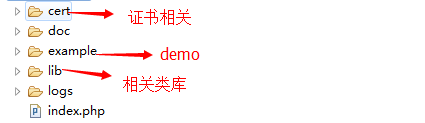
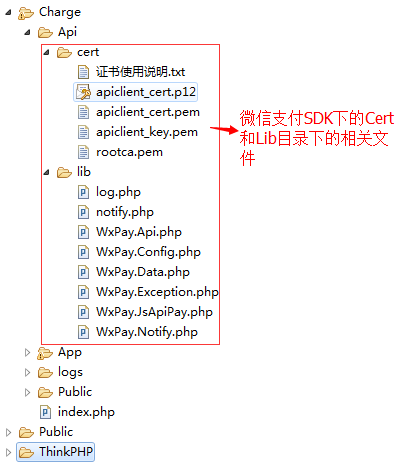
把微信支付SDK的Cert和Lib目录放入Thinkphp,目录为
现在介绍微信支付授权目录问题,首先是微信支付开发配置里面的支付授权目录填写,
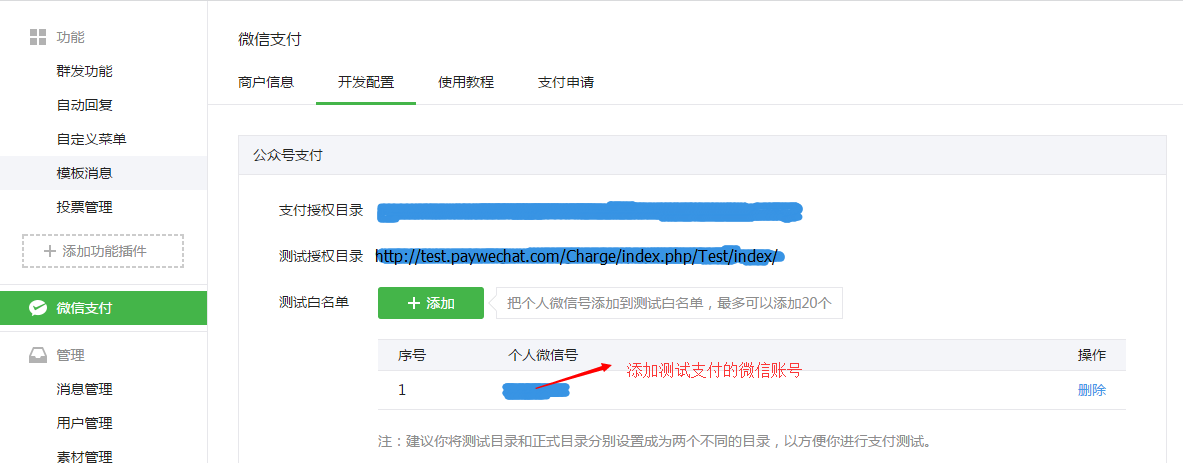
然后填写JS接口安全域。
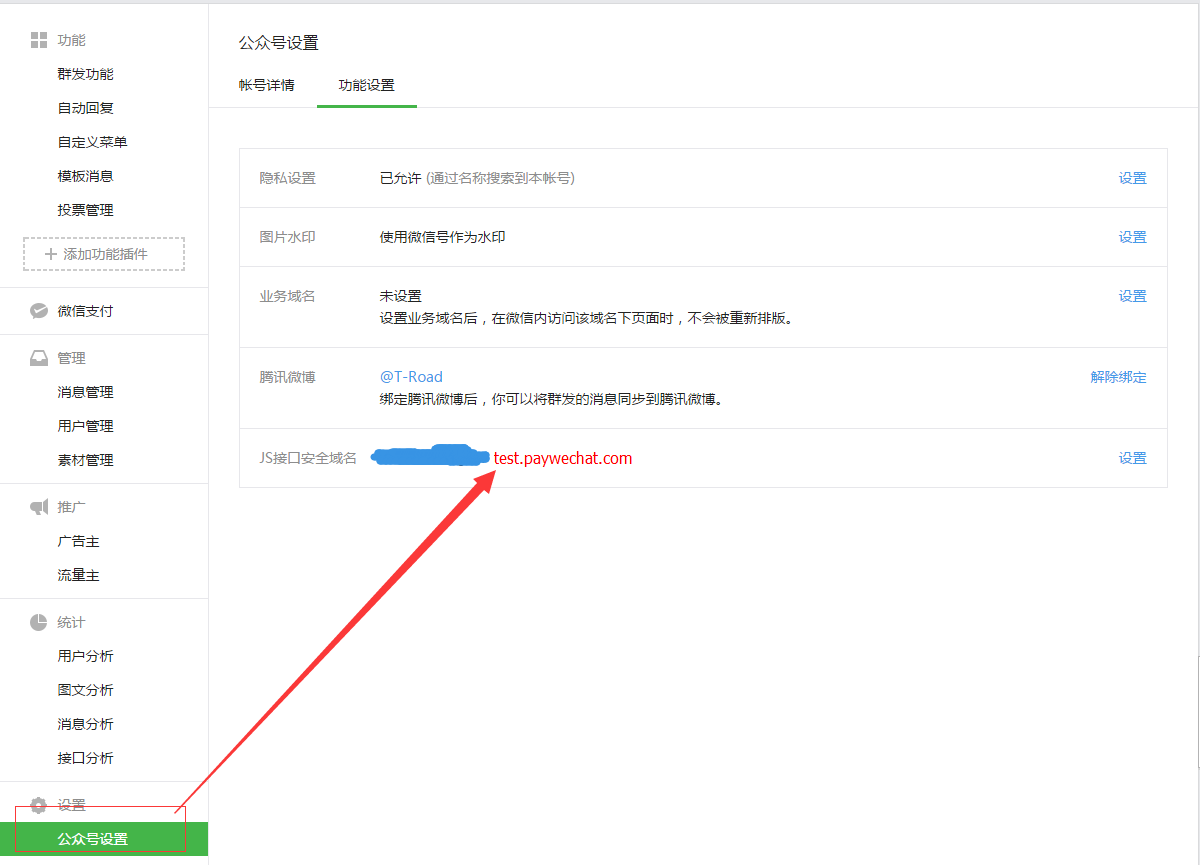
最后设置网页授权

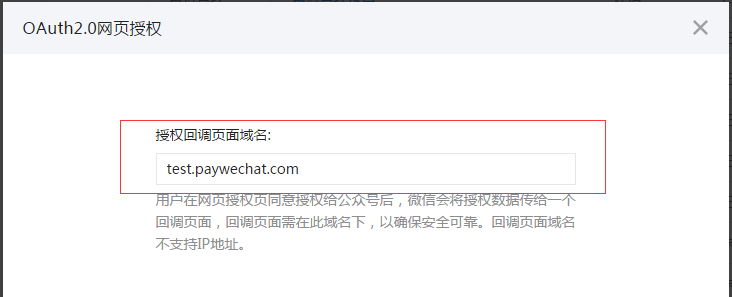
这些设置完,基本完成一半,注意设置的目录和我thinkphp里面的目录。
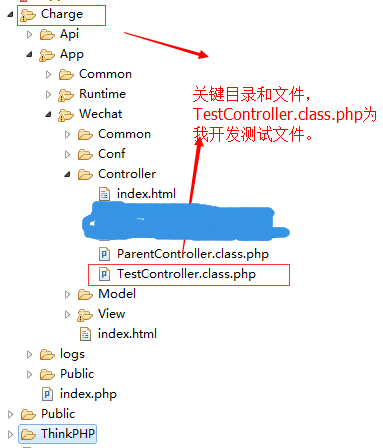
4.微信支付配置
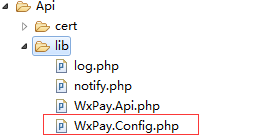
把相关配置填写正确。
|
1
2
3
4
5
6
7
8
9
10
11
12
13
14
15
16
17
18
19
20
21
22
23
24
25
26
27
28
29
30
31
32
33
34
35
36
37
38
39
40
41
42
43
44
45
46
47
48
49
50
51
52
53
54
55
56
57
58
|
/*** 配置账号信息*/class WxPayConfig{ //=======【基本信息设置】===================================== // /** * TODO: 修改这里配置为您自己申请的商户信息 * 微信公众号信息配置 * * APPID:绑定支付的APPID(必须配置,开户邮件中可查看) * * MCHID:商户号(必须配置,开户邮件中可查看) * * KEY:商户支付密钥,参考开户邮件设置(必须配置,登录商户平台自行设置) * * APPSECRET:公众帐号secert(仅JSAPI支付的时候需要配置, 登录公众平台,进入开发者中心可设置), * 获取地址:https://mp.weixin.qq.com/advanced/advanced?action=dev&t=advanced/dev&token=2005451881&lang=zh_CN * @var string */ const APPID = ''; const MCHID = ''; const KEY = ''; const APPSECRET = ''; //=======【证书路径设置】===================================== /** * TODO:设置商户证书路径 * 证书路径,注意应该填写绝对路径(仅退款、撤销订单时需要,可登录商户平台下载, * API证书下载地址:https://pay.weixin.qq.com/index.php/account/api_cert,下载之前需要安装商户操作证书) * @var path */ const SSLCERT_PATH = '../cert/apiclient_cert.pem'; const SSLKEY_PATH = '../cert/apiclient_key.pem'; //=======【curl代理设置】=================================== /** * TODO:这里设置代理机器,只有需要代理的时候才设置,不需要代理,请设置为0.0.0.0和0 * 本例程通过curl使用HTTP POST方法,此处可修改代理服务器, * 默认CURL_PROXY_HOST=0.0.0.0和CURL_PROXY_PORT=0,此时不开启代理(如有需要才设置) * @var unknown_type */ const CURL_PROXY_HOST = "0.0.0.0";//"10.152.18.220"; const CURL_PROXY_PORT = 0;//8080; //=======【上报信息配置】=================================== /** * TODO:接口调用上报等级,默认紧错误上报(注意:上报超时间为【1s】,上报无论成败【永不抛出异常】, * 不会影响接口调用流程),开启上报之后,方便微信监控请求调用的质量,建议至少 * 开启错误上报。 * 上报等级,0.关闭上报; 1.仅错误出错上报; 2.全量上报 * @var int */ const REPORT_LEVENL = 1;} |
现在开始贴出代码:
|
1
2
3
4
5
6
7
8
9
10
11
12
13
14
15
16
17
18
19
20
21
22
23
24
25
26
27
28
29
30
31
32
33
34
35
36
37
38
39
40
41
42
43
44
45
46
47
48
49
50
51
52
53
54
55
56
57
58
59
60
61
62
63
64
65
66
67
68
69
70
71
72
73
74
75
76
77
78
79
80
81
82
83
84
85
86
87
88
89
90
91
92
93
94
95
96
97
98
99
100
101
102
103
104
105
106
107
108
109
110
111
112
113
114
115
116
117
118
119
120
121
122
123
124
125
126
127
128
129
130
131
132
133
134
135
136
137
138
139
140
141
142
143
144
145
146
147
148
149
150
151
152
153
154
155
156
157
158
159
160
161
162
163
164
165
166
167
168
169
170
171
172
173
174
175
176
177
178
179
180
181
182
183
184
185
186
187
188
189
190
191
192
193
194
195
196
197
198
199
200
201
202
203
204
205
206
207
208
209
210
211
212
213
214
215
216
217
218
219
220
221
222
223
224
225
226
227
228
229
230
|
namespace Wechat\Controller;use Think\Controller;/** * 父类控制器,需要继承 * @file ParentController.class.php * @author Gary <lizhiyong2204@sina.com> * @date 2015年8月4日 * @todu */class ParentController extends Controller { protected $options = array ( 'token' => '', // 填写你设定的key 'encodingaeskey' => '', // 填写加密用的EncodingAESKey 'appid' => '', // 填写高级调用功能的app id 'appsecret' => '', // 填写高级调用功能的密钥 'debug' => false, 'logcallback' => '' ); public $errCode = 40001; public $errMsg = "no access"; /** * 获取access_token * @return mixed|boolean|unknown */ public function getToken(){ $cache_token = S('exp_wechat_pay_token'); if(!empty($cache_token)){ return $cache_token; } $url = sprintf($url,$this->options['appid'],$this->options['appsecret']); $result = $this->http_get($url); $result = json_decode($result,true); if(empty($result)){ return false; } S('exp_wechat_pay_token',$result['access_token'],array('type'=>'file','expire'=>3600)); return $result['access_token']; } /** * 发送客服消息 * @param array $data 消息结构{"touser":"OPENID","msgtype":"news","news":{...}} */ public function sendCustomMessage($data){ $token = $this->getToken(); if (empty($token)) return false; $url = sprintf($url,$token); $result = $this->http_post($url,self::json_encode($data)); if ($result) { $json = json_decode($result,true); if (!$json || !empty($json['errcode'])) { $this->errCode = $json['errcode']; $this->errMsg = $json['errmsg']; return false; } return $json; } return false; } /** * 发送模板消息 * @param unknown $data * @return boolean|unknown */ public function sendTemplateMessage($data){ $token = $this->getToken(); if (empty($token)) return false; $url = sprintf($url,$token); $result = $this->http_post($url,self::json_encode($data)); if ($result) { $json = json_decode($result,true); if (!$json || !empty($json['errcode'])) { $this->errCode = $json['errcode']; $this->errMsg = $json['errmsg']; return false; } return $json; } return false; } public function getFileCache($name){ return S($name); } /** * 微信api不支持中文转义的json结构 * @param array $arr */ static function json_encode($arr) { $parts = array (); $is_list = false; //Find out if the given array is a numerical array $keys = array_keys ( $arr ); $max_length = count ( $arr ) - 1; if (($keys [0] === 0) && ($keys [$max_length] === $max_length )) { //See if the first key is 0 and last key is length - 1 $is_list = true; for($i = 0; $i < count ( $keys ); $i ++) { //See if each key correspondes to its position if ($i != $keys [$i]) { //A key fails at position check. $is_list = false; //It is an associative array. break; } } } foreach ( $arr as $key => $value ) { if (is_array ( $value )) { //Custom handling for arrays if ($is_list) $parts [] = self::json_encode ( $value ); /* :RECURSION: */ else $parts [] = '"' . $key . '":' . self::json_encode ( $value ); /* :RECURSION: */ } else { $str = ''; if (! $is_list) $str = '"' . $key . '":'; //Custom handling for multiple data types if (!is_string ( $value ) && is_numeric ( $value ) && $value<2000000000) $str .= $value; //Numbers elseif ($value === false) $str .= 'false'; //The booleans elseif ($value === true) $str .= 'true'; else $str .= '"' . addslashes ( $value ) . '"'; //All other things // :TODO: Is there any more datatype we should be in the lookout for? (Object?) $parts [] = $str; } } $json = implode ( ',', $parts ); if ($is_list) return '[' . $json . ']'; //Return numerical JSON return '{' . $json . '}'; //Return associative JSON } /** +---------------------------------------------------------- * 生成随机字符串 +---------------------------------------------------------- * @param int $length 要生成的随机字符串长度 * @param string $type 随机码类型:0,数字+大小写字母;1,数字;2,小写字母;3,大写字母;4,特殊字符;-1,数字+大小写字母+特殊字符 +---------------------------------------------------------- * @return string +---------------------------------------------------------- */ static public function randCode($length = 5, $type = 2){ $arr = array(1 => "0123456789", 2 => "abcdefghijklmnopqrstuvwxyz", 3 => "ABCDEFGHIJKLMNOPQRSTUVWXYZ", 4 => "~@#$%^&*(){}[]|"); if ($type == 0) { array_pop($arr); $string = implode("", $arr); } elseif ($type == "-1") { $string = implode("", $arr); } else { $string = $arr[$type]; } $count = strlen($string) - 1; $code = ''; for ($i = 0; $i < $length; $i++) { $code .= $string[rand(0, $count)]; } return $code; } /** * GET 请求 * @param string $url */ private function http_get($url){ $oCurl = curl_init(); curl_setopt($oCurl, CURLOPT_SSL_VERIFYPEER, FALSE); curl_setopt($oCurl, CURLOPT_SSL_VERIFYHOST, FALSE); curl_setopt($oCurl, CURLOPT_SSLVERSION, 1); //CURL_SSLVERSION_TLSv1 } curl_setopt($oCurl, CURLOPT_URL, $url); curl_setopt($oCurl, CURLOPT_RETURNTRANSFER, 1 ); $sContent = curl_exec($oCurl); $aStatus = curl_getinfo($oCurl); curl_close($oCurl); if(intval($aStatus["http_code"])==200){ return $sContent; }else{ return false; } } /** * POST 请求 * @param string $url * @param array $param * @param boolean $post_file 是否文件上传 * @return string content */ private function http_post($url,$param,$post_file=false){ $oCurl = curl_init(); curl_setopt($oCurl, CURLOPT_SSL_VERIFYPEER, FALSE); curl_setopt($oCurl, CURLOPT_SSL_VERIFYHOST, false); curl_setopt($oCurl, CURLOPT_SSLVERSION, 1); //CURL_SSLVERSION_TLSv1 } if (is_string($param) || $post_file) { $strPOST = $param; } else { $aPOST = array(); foreach($param as $key=>$val){ $aPOST[] = $key."=".urlencode($val); } $strPOST = join("&", $aPOST); } curl_setopt($oCurl, CURLOPT_URL, $url); curl_setopt($oCurl, CURLOPT_RETURNTRANSFER, 1 ); curl_setopt($oCurl, CURLOPT_POST,true); curl_setopt($oCurl, CURLOPT_POSTFIELDS,$strPOST); $sContent = curl_exec($oCurl); $aStatus = curl_getinfo($oCurl); curl_close($oCurl); if(intval($aStatus["http_code"])==200){ return $sContent; }else{ return false; } }} |
|
1
2
3
4
5
6
7
8
9
10
11
12
13
14
15
16
17
18
19
20
21
22
23
24
25
26
27
28
29
30
31
32
33
34
35
36
37
38
39
40
41
42
43
44
45
46
47
48
49
50
51
52
53
54
55
56
57
58
59
60
61
62
63
64
65
66
67
68
69
70
71
72
73
74
75
76
77
78
79
80
81
82
83
84
85
86
87
88
89
90
91
92
93
94
95
96
97
98
99
100
101
102
103
|
namespace Wechat\Controller;use Wechat\Controller\ParentController;/** * 微信支付测试控制器 * @file TestController.class.php * @author Gary <lizhiyong2204@sina.com> * @date 2015年8月4日 * @todu */class TestController extends ParentController { private $_order_body = 'xxx'; private $_order_goods_tag = 'xxx'; public function __construct(){ parent::__construct(); require_once ROOT_PATH."Api/lib/WxPay.Api.php"; require_once ROOT_PATH."Api/lib/WxPay.JsApiPay.php"; } public function index(){ //①、获取用户openid $tools = new \JsApiPay(); $openId = $tools->GetOpenid(); //②、统一下单 $input = new \WxPayUnifiedOrder(); //商品描述 $input->SetBody($this->_order_body); //附加数据,可以添加自己需要的数据,微信回异步回调时会附加这个数据 $input->SetAttach('xxx'); //商户订单号 $out_trade_no = \WxPayConfig::MCHID.date("YmdHis"); $input->SetOut_trade_no($out_trade_no); //总金额,订单总金额,只能为整数,单位为分 $input->SetTotal_fee(1); //交易起始时间 $input->SetTime_start(date("YmdHis")); //交易结束时间 $input->SetTime_expire(date("YmdHis", time() + 600)); //商品标记 $input->SetGoods_tag($this->_order_goods_tag); //通知地址,接收微信支付异步通知回调地址 SITE_URL=http://test.paywechat.com/Charge $notify_url = SITE_URL.'/index.php/Test/notify.html'; $input->SetNotify_url($notify_url); //交易类型 $input->SetTrade_type("JSAPI"); $input->SetOpenid($openId); $order = \WxPayApi::unifiedOrder($input); $jsApiParameters = $tools->GetJsApiParameters($order); //获取共享收货地址js函数参数 $editAddress = $tools->GetEditAddressParameters(); $this->assign('openId',$openId); $this->assign('jsApiParameters',$jsApiParameters); $this->assign('editAddress',$editAddress); $this->display(); } /** * 异步通知回调方法 */ public function notify(){ require_once ROOT_PATH."Api/lib/notify.php"; $notify = new \PayNotifyCallBack(); $notify->Handle(false); //这里的IsSuccess是我自定义的一个方法,后面我会贴出这个文件的代码,供参考。 $is_success = $notify->IsSuccess(); $bdata = $is_success['data']; //支付成功 if($is_success['code'] == 1){ $news = array( 'touser' => $bdata['openid'], 'msgtype' => 'news', 'news' => array ( 'articles'=> array ( array( 'title' => '订单支付成功', 'description' => "支付金额:{$bdata['total_fee']}\n". "微信订单号:{$bdata['transaction_id']}\n" 'picurl' => '', 'url' => '' ) ) ) ); //发送微信支付通知 $this->sendCustomMessage($news); }else{//支付失败 } } /** * 支付成功页面 * 不可靠的回调 */ public function ajax_PaySuccess(){ //订单号 $out_trade_no = I('post.out_trade_no'); //支付金额 $total_fee = I('post.total_fee'); /*相关逻辑处理*/ } |
贴上模板HTML
|
1
2
3
4
5
6
7
8
9
10
11
12
13
14
15
16
17
18
19
20
21
22
23
24
25
26
27
28
29
30
31
32
33
34
35
36
37
38
39
40
41
42
43
44
45
46
47
48
49
50
51
52
53
54
55
56
57
58
59
60
61
62
63
64
65
66
67
68
69
70
71
72
73
74
75
76
77
78
79
80
81
|
<html><head> <meta http-equiv="content-type" content="text/html;charset=utf-8"/> <meta name="viewport" content="width=device-width, initial-scale=1"/> <title>微信支付样例-支付</title> <script type="text/javascript"> //调用微信JS api 支付 function jsApiCall() { WeixinJSBridge.invoke( 'getBrandWCPayRequest', {$jsApiParameters}, function(res){ WeixinJSBridge.log(res.err_msg); //取消支付 if(res.err_msg == 'get_brand_wcpay_request:cancel'){ //处理取消支付的事件逻辑 }else if(res.err_msg == "get_brand_wcpay_request:ok"){ /*使用以上方式判断前端返回,微信团队郑重提示: res.err_msg将在用户支付成功后返回 ok,但并不保证它绝对可靠。 这里可以使用Ajax提交到后台,处理一些日志,如Test控制器里面的ajax_PaySuccess方法。 */ } alert(res.err_code+res.err_desc+res.err_msg); } ); } function callpay() { if (typeof WeixinJSBridge == "undefined"){ if( document.addEventListener ){ document.addEventListener('WeixinJSBridgeReady', jsApiCall, false); }else if (document.attachEvent){ document.attachEvent('WeixinJSBridgeReady', jsApiCall); document.attachEvent('onWeixinJSBridgeReady', jsApiCall); } }else{ jsApiCall(); } } //获取共享地址 function editAddress() { WeixinJSBridge.invoke( 'editAddress', {$editAddress}, function(res){ var value1 = res.proviceFirstStageName; var value2 = res.addressCitySecondStageName; var value3 = res.addressCountiesThirdStageName; var value4 = res.addressDetailInfo; var tel = res.telNumber; alert(value1 + value2 + value3 + value4 + ":" + tel); } ); } window.onload = function(){ if (typeof WeixinJSBridge == "undefined"){ if( document.addEventListener ){ document.addEventListener('WeixinJSBridgeReady', editAddress, false); }else if (document.attachEvent){ document.attachEvent('WeixinJSBridgeReady', editAddress); document.attachEvent('onWeixinJSBridgeReady', editAddress); } }else{ editAddress(); } }; </script></head><body> <br/> <font color="#9ACD32"><b>该笔订单支付金额为<span style="color:#f00;font-size:50px">1分</span>钱</b></font><br/><br/> <div align="center"> <button style="width:210px; height:50px; border-radius: 15px;background-color:#FE6714; border:0px #FE6714 solid; cursor: pointer; color:white; font-size:16px;" type="button" onclick="callpay()" >立即支付</button> </div></body></html> |
notify.php文件代码,这里有在官方文件里新添加的一个自定义方法。
|
1
2
3
4
5
6
7
8
9
10
11
12
13
14
15
16
17
18
19
20
21
22
23
24
25
26
27
28
29
30
31
32
33
34
35
36
37
38
39
40
41
42
43
44
45
46
47
48
49
50
51
52
53
54
55
56
57
58
59
60
61
62
63
|
require_once ROOT_PATH."Api/lib/WxPay.Api.php";require_once ROOT_PATH.'Api/lib/WxPay.Notify.php';require_once ROOT_PATH.'Api/lib/log.php';//初始化日志$logHandler= new \CLogFileHandler(ROOT_PATH."/logs/".date('Y-m-d').'.log');$log = \Log::Init($logHandler, 15);class PayNotifyCallBack extends WxPayNotify{ protected $para = array('code'=>0,'data'=>''); //查询订单 public function Queryorder($transaction_id) { $input = new \WxPayOrderQuery(); $input->SetTransaction_id($transaction_id); $result = \WxPayApi::orderQuery($input); \Log::DEBUG("query:" . json_encode($result)); if(array_key_exists("return_code", $result) && array_key_exists("result_code", $result) && $result["return_code"] == "SUCCESS" && $result["result_code"] == "SUCCESS") { return true; } $this->para['code'] = 0; $this->para['data'] = ''; return false; } //重写回调处理函数 public function NotifyProcess($data, &$msg) { \Log::DEBUG("call back:" . json_encode($data)); $notfiyOutput = array(); if(!array_key_exists("transaction_id", $data)){ $msg = "输入参数不正确"; $this->para['code'] = 0; $this->para['data'] = ''; return false; } //查询订单,判断订单真实性 if(!$this->Queryorder($data["transaction_id"])){ $msg = "订单查询失败"; $this->para['code'] = 0; $this->para['data'] = ''; return false; } $this->para['code'] = 1; $this->para['data'] = $data; return true; } /** * 自定义方法 检测微信端是否回调成功方法 * @return multitype:number string */ public function IsSuccess(){ return $this->para; }} |
到这里基本上完成,可以在微信端打开http://test.paywechat.com/Charge/index.php/Test/index/
我的环境,HTTP服务器没有重写url,微信支付继续探索中,有些地方可能写的有问题或不足,望大家谅解,互相学习。
以上就是PHP微信支付开发的全部内容,希望对大家的学习有所帮助,也希望大家多多支持脚本之家。
您可能感兴趣的文章:
相关文章
- 2013-10-10简单实用的.net DataTable导出Execl
- 2013-05-05wamp下修改mysql访问密码的解决方法
- 2014-10-10smarty中英文多编码字符截取乱码问题解决方法
- 2016-05-05CodeIgniter连贯操作的底层原理分析
- 2015-06-06phpcms手机内容页面添加上一篇和下一篇
- 2016-06-06Yii2 rbac权限控制之rule教程详解
- 2014-03-03使用Discuz关键词服务器实现PHP中文分词
- 2014-06-06ThinkPHP3.1新特性之字段合法性检测详解
- 2014-06-06ThinkPHP CURD方法之where方法详解
- 2014-11-11php去除数组中重复数据
把微信支付SDK的Cert和Lib目录放入Thinkphp,目录为
现在介绍微信支付授权目录问题,首先是微信支付开发配置里面的支付授权目录填写,
然后填写JS接口安全域。
最后设置网页授权
这些设置完,基本完成一半,注意设置的目录和我thinkphp里面的目录。
4.微信支付配置
把相关配置填写正确。
|
1
2
3
4
5
6
7
8
9
10
11
12
13
14
15
16
17
18
19
20
21
22
23
24
25
26
27
28
29
30
31
32
33
34
35
36
37
38
39
40
41
42
43
44
45
46
47
48
49
50
51
52
53
54
55
56
57
58
|
/*** 配置账号信息*/class WxPayConfig{ //=======【基本信息设置】===================================== // /** * TODO: 修改这里配置为您自己申请的商户信息 * 微信公众号信息配置 * * APPID:绑定支付的APPID(必须配置,开户邮件中可查看) * * MCHID:商户号(必须配置,开户邮件中可查看) * * KEY:商户支付密钥,参考开户邮件设置(必须配置,登录商户平台自行设置) * * APPSECRET:公众帐号secert(仅JSAPI支付的时候需要配置, 登录公众平台,进入开发者中心可设置), * 获取地址:https://mp.weixin.qq.com/advanced/advanced?action=dev&t=advanced/dev&token=2005451881&lang=zh_CN * @var string */ const APPID = ''; const MCHID = ''; const KEY = ''; const APPSECRET = ''; //=======【证书路径设置】===================================== /** * TODO:设置商户证书路径 * 证书路径,注意应该填写绝对路径(仅退款、撤销订单时需要,可登录商户平台下载, * API证书下载地址:https://pay.weixin.qq.com/index.php/account/api_cert,下载之前需要安装商户操作证书) * @var path */ const SSLCERT_PATH = '../cert/apiclient_cert.pem'; const SSLKEY_PATH = '../cert/apiclient_key.pem'; //=======【curl代理设置】=================================== /** * TODO:这里设置代理机器,只有需要代理的时候才设置,不需要代理,请设置为0.0.0.0和0 * 本例程通过curl使用HTTP POST方法,此处可修改代理服务器, * 默认CURL_PROXY_HOST=0.0.0.0和CURL_PROXY_PORT=0,此时不开启代理(如有需要才设置) * @var unknown_type */ const CURL_PROXY_HOST = "0.0.0.0";//"10.152.18.220"; const CURL_PROXY_PORT = 0;//8080; //=======【上报信息配置】=================================== /** * TODO:接口调用上报等级,默认紧错误上报(注意:上报超时间为【1s】,上报无论成败【永不抛出异常】, * 不会影响接口调用流程),开启上报之后,方便微信监控请求调用的质量,建议至少 * 开启错误上报。 * 上报等级,0.关闭上报; 1.仅错误出错上报; 2.全量上报 * @var int */ const REPORT_LEVENL = 1;} |
现在开始贴出代码:
|
1
2
3
4
5
6
7
8
9
10
11
12
13
14
15
16
17
18
19
20
21
22
23
24
25
26
27
28
29
30
31
32
33
34
35
36
37
38
39
40
41
42
43
44
45
46
47
48
49
50
51
52
53
54
55
56
57
58
59
60
61
62
63
64
65
66
67
68
69
70
71
72
73
74
75
76
77
78
79
80
81
82
83
84
85
86
87
88
89
90
91
92
93
94
95
96
97
98
99
100
101
102
103
104
105
106
107
108
109
110
111
112
113
114
115
116
117
118
119
120
121
122
123
124
125
126
127
128
129
130
131
132
133
134
135
136
137
138
139
140
141
142
143
144
145
146
147
148
149
150
151
152
153
154
155
156
157
158
159
160
161
162
163
164
165
166
167
168
169
170
171
172
173
174
175
176
177
178
179
180
181
182
183
184
185
186
187
188
189
190
191
192
193
194
195
196
197
198
199
200
201
202
203
204
205
206
207
208
209
210
211
212
213
214
215
216
217
218
219
220
221
222
223
224
225
226
227
228
229
230
|
namespace Wechat\Controller;use Think\Controller;/** * 父类控制器,需要继承 * @file ParentController.class.php * @author Gary <lizhiyong2204@sina.com> * @date 2015年8月4日 * @todu */class ParentController extends Controller { protected $options = array ( 'token' => '', // 填写你设定的key 'encodingaeskey' => '', // 填写加密用的EncodingAESKey 'appid' => '', // 填写高级调用功能的app id 'appsecret' => '', // 填写高级调用功能的密钥 'debug' => false, 'logcallback' => '' ); public $errCode = 40001; public $errMsg = "no access"; /** * 获取access_token * @return mixed|boolean|unknown */ public function getToken(){ $cache_token = S('exp_wechat_pay_token'); if(!empty($cache_token)){ return $cache_token; } $url = sprintf($url,$this->options['appid'],$this->options['appsecret']); $result = $this->http_get($url); $result = json_decode($result,true); if(empty($result)){ return false; } S('exp_wechat_pay_token',$result['access_token'],array('type'=>'file','expire'=>3600)); return $result['access_token']; } /** * 发送客服消息 * @param array $data 消息结构{"touser":"OPENID","msgtype":"news","news":{...}} */ public function sendCustomMessage($data){ $token = $this->getToken(); if (empty($token)) return false; $url = sprintf($url,$token); $result = $this->http_post($url,self::json_encode($data)); if ($result) { $json = json_decode($result,true); if (!$json || !empty($json['errcode'])) { $this->errCode = $json['errcode']; $this->errMsg = $json['errmsg']; return false; } return $json; } return false; } /** * 发送模板消息 * @param unknown $data * @return boolean|unknown */ public function sendTemplateMessage($data){ $token = $this->getToken(); if (empty($token)) return false; $url = sprintf($url,$token); $result = $this->http_post($url,self::json_encode($data)); if ($result) { $json = json_decode($result,true); if (!$json || !empty($json['errcode'])) { $this->errCode = $json['errcode']; $this->errMsg = $json['errmsg']; return false; } return $json; } return false; } public function getFileCache($name){ return S($name); } /** * 微信api不支持中文转义的json结构 * @param array $arr */ static function json_encode($arr) { $parts = array (); $is_list = false; //Find out if the given array is a numerical array $keys = array_keys ( $arr ); $max_length = count ( $arr ) - 1; if (($keys [0] === 0) && ($keys [$max_length] === $max_length )) { //See if the first key is 0 and last key is length - 1 $is_list = true; for($i = 0; $i < count ( $keys ); $i ++) { //See if each key correspondes to its position if ($i != $keys [$i]) { //A key fails at position check. $is_list = false; //It is an associative array. break; } } } foreach ( $arr as $key => $value ) { if (is_array ( $value )) { //Custom handling for arrays if ($is_list) $parts [] = self::json_encode ( $value ); /* :RECURSION: */ else $parts [] = '"' . $key . '":' . self::json_encode ( $value ); /* :RECURSION: */ } else { $str = ''; if (! $is_list) $str = '"' . $key . '":'; //Custom handling for multiple data types if (!is_string ( $value ) && is_numeric ( $value ) && $value<2000000000) $str .= $value; //Numbers elseif ($value === false) $str .= 'false'; //The booleans elseif ($value === true) $str .= 'true'; else $str .= '"' . addslashes ( $value ) . '"'; //All other things // :TODO: Is there any more datatype we should be in the lookout for? (Object?) $parts [] = $str; } } $json = implode ( ',', $parts ); if ($is_list) return '[' . $json . ']'; //Return numerical JSON return '{' . $json . '}'; //Return associative JSON } /** +---------------------------------------------------------- * 生成随机字符串 +---------------------------------------------------------- * @param int $length 要生成的随机字符串长度 * @param string $type 随机码类型:0,数字+大小写字母;1,数字;2,小写字母;3,大写字母;4,特殊字符;-1,数字+大小写字母+特殊字符 +---------------------------------------------------------- * @return string +---------------------------------------------------------- */ static public function randCode($length = 5, $type = 2){ $arr = array(1 => "0123456789", 2 => "abcdefghijklmnopqrstuvwxyz", 3 => "ABCDEFGHIJKLMNOPQRSTUVWXYZ", 4 => "~@#$%^&*(){}[]|"); if ($type == 0) { array_pop($arr); $string = implode("", $arr); } elseif ($type == "-1") { $string = implode("", $arr); } else { $string = $arr[$type]; } $count = strlen($string) - 1; $code = ''; for ($i = 0; $i < $length; $i++) { $code .= $string[rand(0, $count)]; } return $code; } /** * GET 请求 * @param string $url */ private function http_get($url){ $oCurl = curl_init(); curl_setopt($oCurl, CURLOPT_SSL_VERIFYPEER, FALSE); curl_setopt($oCurl, CURLOPT_SSL_VERIFYHOST, FALSE); curl_setopt($oCurl, CURLOPT_SSLVERSION, 1); //CURL_SSLVERSION_TLSv1 } curl_setopt($oCurl, CURLOPT_URL, $url); curl_setopt($oCurl, CURLOPT_RETURNTRANSFER, 1 ); $sContent = curl_exec($oCurl); $aStatus = curl_getinfo($oCurl); curl_close($oCurl); if(intval($aStatus["http_code"])==200){ return $sContent; }else{ return false; } } /** * POST 请求 * @param string $url * @param array $param * @param boolean $post_file 是否文件上传 * @return string content */ private function http_post($url,$param,$post_file=false){ $oCurl = curl_init(); curl_setopt($oCurl, CURLOPT_SSL_VERIFYPEER, FALSE); curl_setopt($oCurl, CURLOPT_SSL_VERIFYHOST, false); curl_setopt($oCurl, CURLOPT_SSLVERSION, 1); //CURL_SSLVERSION_TLSv1 } if (is_string($param) || $post_file) { $strPOST = $param; } else { $aPOST = array(); foreach($param as $key=>$val){ $aPOST[] = $key."=".urlencode($val); } $strPOST = join("&", $aPOST); } curl_setopt($oCurl, CURLOPT_URL, $url); curl_setopt($oCurl, CURLOPT_RETURNTRANSFER, 1 ); curl_setopt($oCurl, CURLOPT_POST,true); curl_setopt($oCurl, CURLOPT_POSTFIELDS,$strPOST); $sContent = curl_exec($oCurl); $aStatus = curl_getinfo($oCurl); curl_close($oCurl); if(intval($aStatus["http_code"])==200){ return $sContent; }else{ return false; } }} |
|
1
2
3
4
5
6
7
8
9
10
11
12
13
14
15
16
17
18
19
20
21
22
23
24
25
26
27
28
29
30
31
32
33
34
35
36
37
38
39
40
41
42
43
44
45
46
47
48
49
50
51
52
53
54
55
56
57
58
59
60
61
62
63
64
65
66
67
68
69
70
71
72
73
74
75
76
77
78
79
80
81
82
83
84
85
86
87
88
89
90
91
92
93
94
95
96
97
98
99
100
101
102
103
|
namespace Wechat\Controller;use Wechat\Controller\ParentController;/** * 微信支付测试控制器 * @file TestController.class.php * @author Gary <lizhiyong2204@sina.com> * @date 2015年8月4日 * @todu */class TestController extends ParentController { private $_order_body = 'xxx'; private $_order_goods_tag = 'xxx'; public function __construct(){ parent::__construct(); require_once ROOT_PATH."Api/lib/WxPay.Api.php"; require_once ROOT_PATH."Api/lib/WxPay.JsApiPay.php"; } public function index(){ //①、获取用户openid $tools = new \JsApiPay(); $openId = $tools->GetOpenid(); //②、统一下单 $input = new \WxPayUnifiedOrder(); //商品描述 $input->SetBody($this->_order_body); //附加数据,可以添加自己需要的数据,微信回异步回调时会附加这个数据 $input->SetAttach('xxx'); //商户订单号 $out_trade_no = \WxPayConfig::MCHID.date("YmdHis"); $input->SetOut_trade_no($out_trade_no); //总金额,订单总金额,只能为整数,单位为分 $input->SetTotal_fee(1); //交易起始时间 $input->SetTime_start(date("YmdHis")); //交易结束时间 $input->SetTime_expire(date("YmdHis", time() + 600)); //商品标记 $input->SetGoods_tag($this->_order_goods_tag); //通知地址,接收微信支付异步通知回调地址 SITE_URL=http://test.paywechat.com/Charge $notify_url = SITE_URL.'/index.php/Test/notify.html'; $input->SetNotify_url($notify_url); //交易类型 $input->SetTrade_type("JSAPI"); $input->SetOpenid($openId); $order = \WxPayApi::unifiedOrder($input); $jsApiParameters = $tools->GetJsApiParameters($order); //获取共享收货地址js函数参数 $editAddress = $tools->GetEditAddressParameters(); $this->assign('openId',$openId); $this->assign('jsApiParameters',$jsApiParameters); $this->assign('editAddress',$editAddress); $this->display(); } /** * 异步通知回调方法 */ public function notify(){ require_once ROOT_PATH."Api/lib/notify.php"; $notify = new \PayNotifyCallBack(); $notify->Handle(false); //这里的IsSuccess是我自定义的一个方法,后面我会贴出这个文件的代码,供参考。 $is_success = $notify->IsSuccess(); $bdata = $is_success['data']; //支付成功 if($is_success['code'] == 1){ $news = array( 'touser' => $bdata['openid'], 'msgtype' => 'news', 'news' => array ( 'articles'=> array ( array( 'title' => '订单支付成功', 'description' => "支付金额:{$bdata['total_fee']}\n". "微信订单号:{$bdata['transaction_id']}\n" 'picurl' => '', 'url' => '' ) ) ) ); //发送微信支付通知 $this->sendCustomMessage($news); }else{//支付失败 } } /** * 支付成功页面 * 不可靠的回调 */ public function ajax_PaySuccess(){ //订单号 $out_trade_no = I('post.out_trade_no'); //支付金额 $total_fee = I('post.total_fee'); /*相关逻辑处理*/ } |
贴上模板HTML
|
1
2
3
4
5
6
7
8
9
10
11
12
13
14
15
16
17
18
19
20
21
22
23
24
25
26
27
28
29
30
31
32
33
34
35
36
37
38
39
40
41
42
43
44
45
46
47
48
49
50
51
52
53
54
55
56
57
58
59
60
61
62
63
64
65
66
67
68
69
70
71
72
73
74
75
76
77
78
79
80
81
|
<html><head> <meta http-equiv="content-type" content="text/html;charset=utf-8"/> <meta name="viewport" content="width=device-width, initial-scale=1"/> <title>微信支付样例-支付</title> <script type="text/javascript"> //调用微信JS api 支付 function jsApiCall() { WeixinJSBridge.invoke( 'getBrandWCPayRequest', {$jsApiParameters}, function(res){ WeixinJSBridge.log(res.err_msg); //取消支付 if(res.err_msg == 'get_brand_wcpay_request:cancel'){ //处理取消支付的事件逻辑 }else if(res.err_msg == "get_brand_wcpay_request:ok"){ /*使用以上方式判断前端返回,微信团队郑重提示: res.err_msg将在用户支付成功后返回 ok,但并不保证它绝对可靠。 这里可以使用Ajax提交到后台,处理一些日志,如Test控制器里面的ajax_PaySuccess方法。 */ } alert(res.err_code+res.err_desc+res.err_msg); } ); } function callpay() { if (typeof WeixinJSBridge == "undefined"){ if( document.addEventListener ){ document.addEventListener('WeixinJSBridgeReady', jsApiCall, false); }else if (document.attachEvent){ document.attachEvent('WeixinJSBridgeReady', jsApiCall); document.attachEvent('onWeixinJSBridgeReady', jsApiCall); } }else{ jsApiCall(); } } //获取共享地址 function editAddress() { WeixinJSBridge.invoke( 'editAddress', {$editAddress}, function(res){ var value1 = res.proviceFirstStageName; var value2 = res.addressCitySecondStageName; var value3 = res.addressCountiesThirdStageName; var value4 = res.addressDetailInfo; var tel = res.telNumber; alert(value1 + value2 + value3 + value4 + ":" + tel); } ); } window.onload = function(){ if (typeof WeixinJSBridge == "undefined"){ if( document.addEventListener ){ document.addEventListener('WeixinJSBridgeReady', editAddress, false); }else if (document.attachEvent){ document.attachEvent('WeixinJSBridgeReady', editAddress); document.attachEvent('onWeixinJSBridgeReady', editAddress); } }else{ editAddress(); } }; </script></head><body> <br/> <font color="#9ACD32"><b>该笔订单支付金额为<span style="color:#f00;font-size:50px">1分</span>钱</b></font><br/><br/> <div align="center"> <button style="width:210px; height:50px; border-radius: 15px;background-color:#FE6714; border:0px #FE6714 solid; cursor: pointer; color:white; font-size:16px;" type="button" onclick="callpay()" >立即支付</button> </div></body></html> |
notify.php文件代码,这里有在官方文件里新添加的一个自定义方法。
|
1
2
3
4
5
6
7
8
9
10
11
12
13
14
15
16
17
18
19
20
21
22
23
24
25
26
27
28
29
30
31
32
33
34
35
36
37
38
39
40
41
42
43
44
45
46
47
48
49
50
51
52
53
54
55
56
57
58
59
60
61
62
63
|
require_once ROOT_PATH."Api/lib/WxPay.Api.php";require_once ROOT_PATH.'Api/lib/WxPay.Notify.php';require_once ROOT_PATH.'Api/lib/log.php';//初始化日志$logHandler= new \CLogFileHandler(ROOT_PATH."/logs/".date('Y-m-d').'.log');$log = \Log::Init($logHandler, 15);class PayNotifyCallBack extends WxPayNotify{ protected $para = array('code'=>0,'data'=>''); //查询订单 public function Queryorder($transaction_id) { $input = new \WxPayOrderQuery(); $input->SetTransaction_id($transaction_id); $result = \WxPayApi::orderQuery($input); \Log::DEBUG("query:" . json_encode($result)); if(array_key_exists("return_code", $result) && array_key_exists("result_code", $result) && $result["return_code"] == "SUCCESS" && $result["result_code"] == "SUCCESS") { return true; } $this->para['code'] = 0; $this->para['data'] = ''; return false; } //重写回调处理函数 public function NotifyProcess($data, &$msg) { \Log::DEBUG("call back:" . json_encode($data)); $notfiyOutput = array(); if(!array_key_exists("transaction_id", $data)){ $msg = "输入参数不正确"; $this->para['code'] = 0; $this->para['data'] = ''; return false; } //查询订单,判断订单真实性 if(!$this->Queryorder($data["transaction_id"])){ $msg = "订单查询失败"; $this->para['code'] = 0; $this->para['data'] = ''; return false; } $this->para['code'] = 1; $this->para['data'] = $data; return true; } /** * 自定义方法 检测微信端是否回调成功方法 * @return multitype:number string */ public function IsSuccess(){ return $this->para; }} |
到这里基本上完成,可以在微信端打开http://test.paywechat.com/Charge/index.php/Test/index/
我的环境,HTTP服务器没有重写url,微信支付继续探索中,有些地方可能写的有问题或不足,望大家谅解,互相学习。
以上就是PHP微信支付开发的全部内容,希望对大家的学习有所帮助,也希望大家多多支持脚本之家。
您可能感兴趣的文章:
相关文章
- 2013-10-10简单实用的.net DataTable导出Execl
- 2013-05-05wamp下修改mysql访问密码的解决方法
- 2014-10-10smarty中英文多编码字符截取乱码问题解决方法
- 2016-05-05CodeIgniter连贯操作的底层原理分析
- 2015-06-06phpcms手机内容页面添加上一篇和下一篇
- 2016-06-06Yii2 rbac权限控制之rule教程详解
- 2014-03-03使用Discuz关键词服务器实现PHP中文分词
- 2014-06-06ThinkPHP3.1新特性之字段合法性检测详解
- 2014-06-06ThinkPHP CURD方法之where方法详解
- 2014-11-11php去除数组中重复数据
PHP微信支付开发实例的更多相关文章
- Thinkphp5整合微信扫码支付开发实例
ThinkPHP框架是比较多人用的,曾经做过的一个Thinkphp5整合微信扫码支付开发实例,分享出来大家一起学习 打开首页生成订单,并显示支付二维码 public function index() ...
- 微信支付开发h5调用
这两天做微信支付开发.碰到大坑.纠结死我了.好不容做完. 后台java:直接上代码:注意区分前后端的变量大小写... @RequestMapping(value = "/index" ...
- 微信支付开发(11) Native支付
关键字:微信公众平台 微信支付 Native原生支付作者:方倍工作室原文:http://www.cnblogs.com/txw1958/p/wxpay-native.html 由于微信支付接口更新,本 ...
- Android开发 --微信支付开发(转载!)(开发工具:Eclipse)
Android_APP 微信支付接口开发 日期:2015-10-06 12:47:33 作者: 来源: 人气:3549 1.首先说一下我们在开发微信支付接口的时候遇到最多和最疑惑的问题,那就是明明 a ...
- 微信支付开发+{ping++}微信支付托管
------------------------微信支付接口------------------------------- 微信支付开发并没有想象中的那么难,主要是微信提供了sdk. 微信公众号必须是 ...
- PHP微信支付开发之扫描支付(模式二)后如何回调
其实在写这篇文章的时候感觉自己已经落伍了,不过笔者在百度上搜索"微信支付开发之扫描支付(模式二)后如何回调"寻找答案时,发现依旧有很多朋友没有解决这个问题,所以就把自己的解决思路分 ...
- PHP微信支付开发
此链接https://pay.weixin.qq.com/wiki/doc/api/H5.php?chapter=15_2,是微信官方的示例,无效,报错. 1.申请微信支付的开通条件?什么样的账号可以 ...
- 微信支付开发出现redirect_uri参数错误的解决方法
我们在进行微信支付开发的时候会遇到出现“redirect_uri参数错误”这种情况,怎么办呢?下面就是我总结出现这种“redirect_uri参数错误”的七种可能情况,以及解决方式. 1.可能原因①: ...
- 微信支付开发 c# SDK JSAPI支付开发的流程和微信大坑
微信支付开发流程 1. 开通微信支付功能 省略 2. 下载微信的C#版的微信SDK 下载连接:https://pay.weixin.qq.com/wiki/doc/api/jsapi.php?chap ...
随机推荐
- 自然语言6_treebank句子解析
#英文句子结构分析 import nltkfrom nltk.corpus import treebankt = treebank.parsed_sents('wsj_0001.mrg')[1]t.d ...
- JVM 关闭钩子
1.功能 在jvm中添加关闭钩子(Runtime.getRuntime().addShutdownHook(shutdownHook);)后,当jvm关闭时会执行系统中已经设置的所有通过该方法添加的钩 ...
- 仿照jquery封装一个自己的js库(一)
所谓造轮子的好处就是复习知识点,加深对原版jquery的理解. 本文系笔者学习jquery的笔记,记述一个名为"dQuery"的初级版和缩水版jquery库的实现.主要涉及知识点包 ...
- yum安装指定(特定)版本(旧版本)软件包的方法
在命令行里输入: yum list SDL 注意这里类库的名字是区别大小写的. 参考 http://www.dabu.info/yum-install-specific-version-old-pac ...
- Swift学习一
// 定义一个类 class AClass { } // 数据转换 var a = Int(4.555) // 可选值 var num: Int? = Int("23k") // ...
- LeetCode —— Merge k Sorted Lists
/* ** 算法的思路: ** 1.将k个链表的首元素进行建堆 ** 2.从堆中取出最小的元素,放到链表中 ** 3.如果取出元素的有后续的元素,则放入堆中,若没有则转步骤2,直到堆为空 */ #in ...
- sufeinet
http://www.sufeinet.com http://tool.sufeinet.com/
- CSS核心的几个概念
盒模型.position.float.他们是css的基础,之间看似独立却又相辅相成. 元素类型 块级元素.内联元素 他们之间有以下区别: 1.块级元素独占一行,除非显示的修改display属性.而内联 ...
- XStream使用总结
最近做webService报文转换的公共接口使用到了XSream工具库,写个小总结备忘... XStream是一个可以将javaBean与XML双向转换的java类库,本文内容基于xstream-1. ...
- 【转】快速理解Kafka分布式消息队列框架
from:http://blog.csdn.net/colorant/article/details/12081909 快速理解Kafka分布式消息队列框架 标签: kafkamessage que ...