
【Android】7.2 LinearLayout(线性布局)
分类:C#、Android、VS2015;
创建日期:2016-02-10
一、简介
LinearLayout将容器内的组件一个挨着一个地横向或纵向依次堆叠起来(不重叠)。该布局和WPF的StackPanel控件的功能非常相似,也是通过orientation属性设置排列的方向是纵向(vertical)还是纵向(horizontal)。
常用属性有:
android:layout_gravity:子元素在容器中的对齐方式。即:往哪一端偏沉(gravity:重力)。
android:orientation:控制子元素的排列方式(横向排列、纵向排列)
android:layout_weight:表示其子元素占用空间的分配权重,值越小权重越大。
例如:
<LinearLayout
android:orientation="horizontal"
android:layout_width="fill_parent"
android:layout_height="fill_parent"
android:layout_weight="1"
注意:子元素的宽和高必须至少有一个设置为“fill_parent”线性布局才会起作用。
二、示例—Demo01LinearLayout
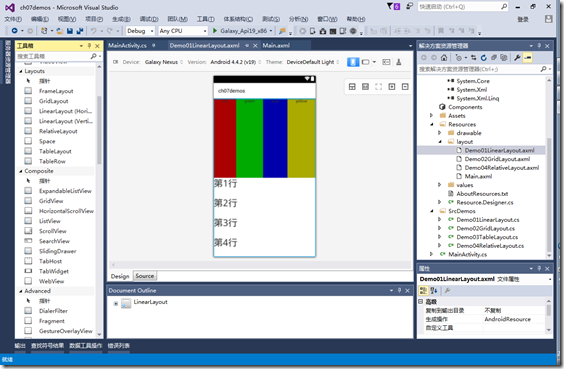
1、设计界面
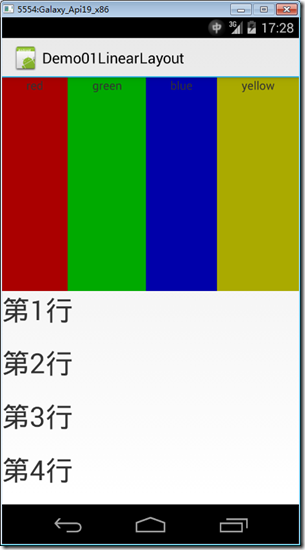
2、运行效果
3、添加Demo01LinearLayout.axml文件
在layout文件夹下添加该文件。
<?xml version="1.0" encoding="utf-8"?>

<LinearLayout xmlns:android="http://schemas.android.com/apk/res/android"

    android:orientation="vertical"

    android:layout_width="match_parent"

    android:layout_height="match_parent">

  <LinearLayout

      android:orientation="horizontal"

      android:layout_width="fill_parent"

      android:layout_height="fill_parent"

      android:layout_weight="1">

    <TextView

        android:text="red"

        android:gravity="center_horizontal"

        android:background="#aa0000"

        android:layout_width="wrap_content"

        android:layout_height="fill_parent"

        android:layout_weight="1" />

    <TextView

        android:text="green"

        android:gravity="center_horizontal"

        android:background="#00aa00"

        android:layout_width="wrap_content"

        android:layout_height="fill_parent"

        android:layout_weight="1" />

    <TextView

        android:text="blue"

        android:gravity="center_horizontal"

        android:background="#0000aa"

        android:layout_width="wrap_content"

        android:layout_height="fill_parent"

        android:layout_weight="1" />

    <TextView

        android:text="yellow"

        android:gravity="center_horizontal"

        android:background="#aaaa00"

        android:layout_width="wrap_content"

        android:layout_height="fill_parent"

        android:layout_weight="1" />

  </LinearLayout>

  <LinearLayout

      android:orientation="vertical"

      android:layout_width="fill_parent"

      android:layout_height="fill_parent"

      android:layout_weight="1">

    <TextView

        android:text="第1行"

        android:textSize="15pt"

        android:layout_width="fill_parent"

        android:layout_height="wrap_content"

        android:layout_weight="1" />

    <TextView

        android:text="第2行"

        android:textSize="15pt"

        android:layout_width="fill_parent"

        android:layout_height="wrap_content"

        android:layout_weight="1" />

    <TextView

        android:text="第3行"

        android:textSize="15pt"

        android:layout_width="fill_parent"

        android:layout_height="wrap_content"

        android:layout_weight="1" />

    <TextView

        android:text="第4行"

        android:textSize="15pt"

        android:layout_width="fill_parent"

        android:layout_height="wrap_content"

        android:layout_weight="1" />

  </LinearLayout>

</LinearLayout>
4、添加Demo01LinearLayout.cs文件
在SrcDemos文件夹下添加该文件。
using Android.App;

using Android.OS;

namespace ch07demos.SrcDemos

{

    [Activity(Label = "Demo01LinearLayout")]

    public class Demo01LinearLayout : Activity

    {

        protected override void OnCreate(Bundle savedInstanceState)

        {

            base.OnCreate(savedInstanceState);

            SetContentView(Resource.Layout.Demo01LinearLayout);

        }

    }

}
运行观察效果。
【Android】7.2 LinearLayout(线性布局)的更多相关文章
- android 59 LinearLayout 线性布局
##常见的布局* LinearLayout 线性布局线性布局往左右拉是拉不动的,> 线性布局的朝向 vertical|horizontal> 线性布局的权重 weight 和 0dip一起 ...
- Android布局管理详解(1)—— LinearLayout 线性布局
Android的布局方式共有6种,分别是LinearLayout(线性布局).TableLayout(表格布局).FrameLayout(帧布局).RelativeLayout(相对布局).GridL ...
- Android精通:View与ViewGroup,LinearLayout线性布局,RelativeLayout相对布局,ListView列表组件
UI的描述 对于Android应用程序中,所有用户界面元素都是由View和ViewGroup对象构建的.View是绘制在屏幕上能与用户进行交互的一个对象.而对于ViewGroup来说,则是一个用于存放 ...
- Android零基础入门第25节:最简单最常用的LinearLayout线性布局
原文:Android零基础入门第25节:最简单最常用的LinearLayout线性布局 良好的布局设计对于UI界面至关重要,在前面也简单介绍过,目前Android中的布局主要有6种,创建的布局文件默认 ...
- 2.2.1 LinearLayout(线性布局)
本节引言 本节开始讲Android中的布局,Android中有六大布局,分别是: LinearLayout(线性布局), RelativeLayout(相对布局), TableLayout(表格布局) ...
- Android学习笔记(11):线性布局LinearLayout
线性布局LinearLayout是指在横向或是竖向一个接一个地排列.当排列的组件超出屏幕后,超出的组件将不会再显示出来. LinearLayout支持的XML属性和相应方法如表所看到的: Attrib ...
- Android LinearLayout线性布局
LinearLayout是线性布局控件:要么横向排布,要么竖向排布 决定性属性:必须有的! android:orientation:vertical (垂直方向) .horizontal(水平方向) ...
- Android LinearLayout线性布局详解
为了更好地管理Android应用的用户界面里的各组件,Android提供了布局管理器.通过使用布局管理器,Android应用图形用户界面具有良好的平台无关性.推荐使用布局管理器来管理组件的分布.大小, ...
- android的布局-----LinearLayout(线性布局)
学习导图(图片在网上下载) 知识点详解(演示效果方便组件没有设置id) (1)gravity和Layout_gravity android:gravity 属性是对该view中内容的限定.比如一个bu ...
- Android基础_2 Activity线性布局和表格布局
在activity的布局中,线性布局和表格布局是最简单的,这次分别从线性布局,表格布局以及线性布局和表格混合布局做了实验,实验中只需要编写 相应的xml的代码,java代码不需要更改,因为我们这里只是 ...
随机推荐
- JSP的范围-作用域(web基础学习笔记五)
JSP的范围(作用域) 在JSP页面中的对象,包括用户创建的对象如JavaBean,都有一个范围属性,这个范围也被叫做“作用域”.范围定义了在什么时间内,在哪一个JSP页面中可以访问这些对象.例如,s ...
- EventBus源码分析
一. EventBus简介 1.1.EventBus EventBus 是一个 Android 事件发布/订阅框架,通过解耦发布者和订阅者简化Android 事件传递,这里的事件可 ...
- java如何将毫秒数转为相应的年月日格式
public static void main(String[] args) { Date date = new Date(); Long time = date.getTime(); System. ...
- Persona——Web人物角色介绍
一.什么是人物角色? 人物角色,即persona([pə:’səunə]),这里讨论的主要是web persona,是指针对网站目标群体真实特征的勾勒,是真实用户的综合原型.我们对产品使用者的目标.行 ...
- java中写sql语句的小小细节
来源于:http://www.cnblogs.com/reine98/p/6180472.html 看如下一条sql语句 1 2 3 4 5 6 String sql="SELECT * F ...
- Android学习系列(12)--App列表之拖拽GridView
根据前面文章中ListView拖拽的实现原理,我们也是很容易实现推拽GridView的,下面我就以相同步骤实现基本的GridView拖拽效果. 因为GridView不用做分组处理,代码处理起来 ...
- JFinal连接数据库配置说明
本文采用的是加载配置文件的形式和数据库进行交互 ps:数据库采用的是postgresql 1.加载配置文件 public void configConstant(Constants me) { Pro ...
- 关于ftpshell脚本中mget中去除多余交互式提示的方法
默认情况下ftp里面的交互式提示是开启的,平常如果下载多个文件时,这种提示很让人烦,如果是在shell脚本里面要从ftp服务器上一次mget多个文件,写个交互式很麻烦,最好是把这个交互式提示关掉. 进 ...
- python学习笔记——multiprocessing 多进程中的重构方法__init__
重构: import multiprocessing import time class ClockProcesses(multiprocessing.Process): def __init__(s ...
- RHCE7 管理II-2 通过grep使用正则表达式
grep -i:忽略大小写 -n:表示行数 找出含有root的行 # grep root /etc/passwd root:x:::root:/root:/bin/bash ::operator:/r ...